文章目录
前言
本文主要介绍Notification的使用方式,以及如何通过自定义布局满足不同的需求。
一、基础使用方法
通过下面的工具类可以直接使用,包含了通知本体的点击事件
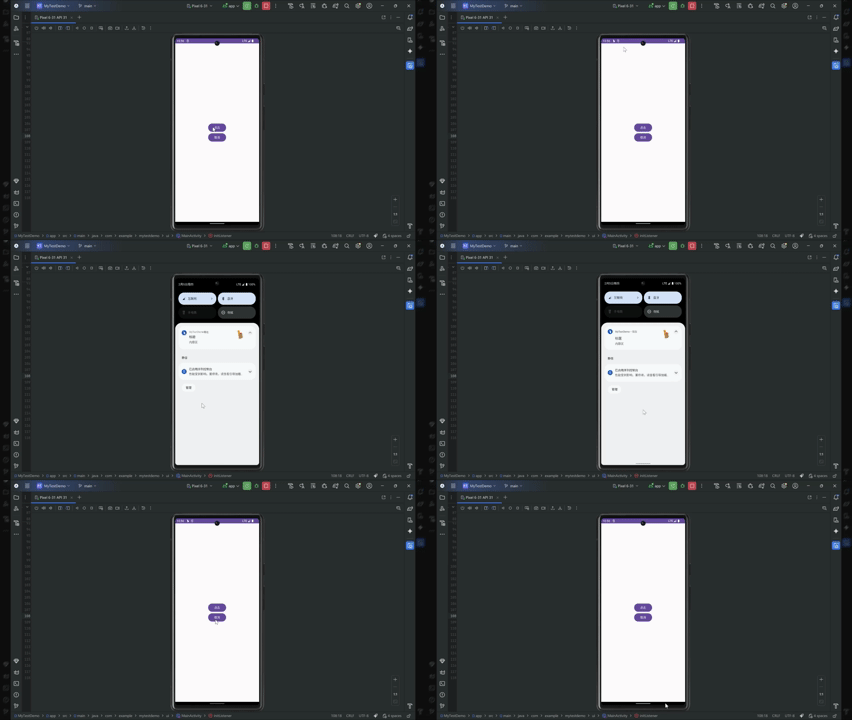
kotlin
object NotificationUtils {
    private const val NOTIFICATION_SHOW = 1 //通知展示与消失的识别码

    // ===========PendingIntent请求码===============
    const val NOTIFICATION_ACTIVITY = 100 //跳转activity请求码
    const val NOTIFICATION_SERVICE = 101 //跳转service请求码
    const val NOTIFICATION_BOARDCAST = 102 //跳转Boardcast请求码
    private const val NOTIFICATION_CHANNEL_ID = "notification_channel_default" //通知渠道的id

    private var notificationManager: NotificationManager? = null
    private var intentMode = NOTIFICATION_ACTIVITY //选择跳转的目标类型
    private var notificationTitle = "" //通知的标题
    private var notificationText = "" //通知的内容
    private var smallIcon = 0 //小图标的资源id
    private var largeIcon = 0 //下拉后图标的资源id


    /**
     *  @describe: 通知的展示
     *  @params:
     *     context 上下文
     *     intent 跳转目标的上下文
     *     intentMode 跳转目标的类型
     *     notificationTitle 通知的标题
     *     notificationText 通知的内容
     *     smallIcon 通知的小图标资源id
     *     largeIcon 下拉后展示的图标资源id
     *  @return:
     */
    fun show(
        context: Context,
        intent: Intent,
        intentMode: Int,
        notificationTitle: String,
        notificationText: String,
        smallIcon: Int,
        largeIcon: Int,
        chanelName: String? = "消息通知渠道"
    ) {
        this.intentMode = intentMode
        this.notificationTitle = notificationTitle
        this.notificationText = notificationText
        this.smallIcon = smallIcon
        this.largeIcon = largeIcon

        //获取到管理类
        notificationManager =
            context.getSystemService(Context.NOTIFICATION_SERVICE) as NotificationManager
        //8.0开始必须设置通知渠道
        if (Build.VERSION.SDK_INT >= Build.VERSION_CODES.O) {
            //参数:渠道唯一标识,用户可见的频道名称(长按通知会显示名称),决定了响铃/震动/横幅等行为的重要级别
            val channel = NotificationChannel(
                NOTIFICATION_CHANNEL_ID, chanelName,
                NotificationManager.IMPORTANCE_DEFAULT
            ).apply {
                description = "通用的通知渠道" //显示在系统设置里的渠道副标题
                enableVibration(false) //是否允许震动
                enableLights(false) //是否允许闪光灯开启
                setSound(null, null) //可设置自定义提示音
            }
            Log.i("TAG", "show: ")
            notificationManager?.createNotificationChannel(channel)
        }

        //发送
        notificationManager?.notify(NOTIFICATION_SHOW, getNotification(context, intent))
    }


    /**
     *  @describe: 获取通知必须的Notification
     *  @params:
     *  @return:
     */
    private fun getNotification(context: Context, intent: Intent): Notification {
        val bitmap = if (largeIcon != 0) BitmapFactory.decodeResource(context.resources, largeIcon)
        else BitmapFactory.decodeResource(context.resources, R.drawable.touming9)


        val notification = NotificationCompat.Builder(context, NOTIFICATION_CHANNEL_ID)
            .setSmallIcon(if (smallIcon != 0) smallIcon else R.mipmap.ic_launcher) //设置状态栏小图标显示,只会展示符合当前设备主题的单色显示
            .setLargeIcon(bitmap) //设置状态栏下拉时的图标
            .setContentTitle(notificationTitle) //状态栏下拉时展示的标题
            .setContentText(notificationText) //状态栏下拉时展示的内容
            .setWhen(System.currentTimeMillis()) //设置下拉后展示当前的时间
            .setOngoing(true) //设置不能通过滑动删除通知
            .setContentIntent(getPendingIntent(context, intent)) //设置通知整体点击事件
            .build()

        return notification
    }

    /**
     *  @describe: 设置通知的点击事件跳转的目标,可以设置的意图有activity、service、Boardcast三种
     *  @params:
     *  @return:
     */
    private fun getPendingIntent(context: Context, intent: Intent): PendingIntent {

        val flags = if (Build.VERSION.SDK_INT >= Build.VERSION_CODES.M) {
            PendingIntent.FLAG_UPDATE_CURRENT or PendingIntent.FLAG_IMMUTABLE //FLAG_IMMUTABLE表示内容不会改动,防止外部篡改
        } else {
            PendingIntent.FLAG_UPDATE_CURRENT  //FLAG_UPDATE_CURRENT为更新Intent中内容
        }

        val pendingIntent = when (intentMode) { //根据不同目标进行对应类型的跳转
            NOTIFICATION_ACTIVITY -> {
                PendingIntent.getActivity(
                    context,
                    NOTIFICATION_ACTIVITY,
                    intent,
                    flags
                )
            }

            NOTIFICATION_SERVICE -> {
                PendingIntent.getService(
                    context,
                    NOTIFICATION_SERVICE,
                    intent,
                    flags
                )
            }

            NOTIFICATION_BOARDCAST -> {
                PendingIntent.getBroadcast(
                    context,
                    NOTIFICATION_BOARDCAST,
                    intent,
                    flags
                )
            }

            else -> {}
        }

        return pendingIntent as PendingIntent
    }

    /**
     *  @describe: 通知的隐藏
     *  @params:
     *  @return:
     */
    fun hide() {
        notificationManager?.cancel(NOTIFICATION_SHOW)
    }
}


使用:
//当前案例为跳转目标activity
  NotificationUtils.show(
                this@MainActivity,
                Intent(this@MainActivity, MainActivity::class.java),
                NotificationUtils.NOTIFICATION_ACTIVITY,
                "标题",
                "内容区",
                R.drawable.touming9,
                R.drawable.touming9
            )
api33以上需要动态申请权限
kotlin
清单文件中添加权限:
<uses-permission android:name="android.permission.POST_NOTIFICATIONS" />


进行权限申请后发送:
 private val requestNotificationPermissionLauncher =
        registerForActivityResult(
            ActivityResultContracts.RequestPermission()
        ) { granted ->
            if (granted) {
                Log.i("Permission", "通知权限已授予")
                // 可以安全显示通知
                NotificationUtils.show(
                    this@MainActivity,
                    Intent(this@MainActivity, MainActivity::class.java),
                    NotificationUtils.NOTIFICATION_ACTIVITY,
                    "标题",
                    "内容区",
                    R.drawable.touming9,
                    R.drawable.touming9
                )
            } else {
                Log.w("Permission", "通知权限被拒绝")
                // 可提示用户:去设置页开启
            }
        }

    override fun initListener() {
        textBtn.setOnClickListener {
            if (Build.VERSION.SDK_INT >= 33 &&
                ContextCompat.checkSelfPermission(
                    this,
                    Manifest.permission.POST_NOTIFICATIONS
                ) != PackageManager.PERMISSION_GRANTED
            ) {
                requestNotificationPermissionLauncher.launch(
                    Manifest.permission.POST_NOTIFICATIONS
                )
            } else
                //进行通知发送
                NotificationUtils.show(
                    this@MainActivity,
                    Intent(this@MainActivity, MainActivity::class.java),
                    NotificationUtils.NOTIFICATION_ACTIVITY,
                    "标题",
                    "内容区",
                    R.drawable.touming9,
                    R.drawable.touming9
                )
        }
    }
二、自定义布局
由于自定义布局随机因素太多,因此没有工具类制作的意义,所以这里放上案例以供参考。
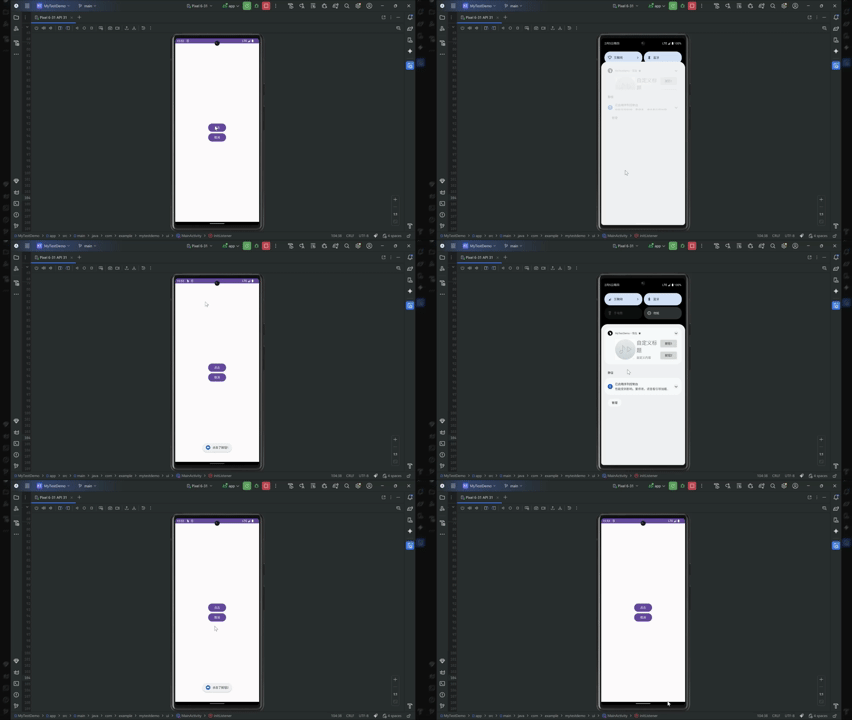
kotlin
帮助类:
object NotificationHelper {

    //通知渠道的id
    private const val CHANNEL_ID = "notification_channel"

    //用户可见的通知渠道名称(长按状态栏通知内容可显示)
    private const val CHANNEL_NAME = "音乐播放中"

    //==================id==========================

    //用于标识当前通知的唯一id,如果同一个id多次发送则会更新此通知
    private const val NOTIFICATION_ID = 100

    //通知主体的点击事件返回码
    private const val PENDINGINTENT_ID = 200
    //通知自定义布局中按钮1识别码
    private const val PENDINGINTENT_CUSTOM_BTN1 = 210
    //通知自定义布局中按钮2识别码
    private const val PENDINGINTENT_CUSTOM_BTN2 = 220


    var notificationManager: NotificationManager? = null

    /**
     *  @describe: 设置通知的显示
     *  @params:
     *  @return:
     */
    fun show(context: Context) {

        //获取通知管理类
        notificationManager =
            context.getSystemService(Context.NOTIFICATION_SERVICE) as NotificationManager
        //设置8.0以上所需的通知渠道
        setNotificationChannel()
        val notification = getNotification(context)
        Log.i("NotificationHelper", "show: 通知已发送")
        //发送
        notificationManager?.notify(NOTIFICATION_ID,notification)


    }


    private fun getNotification(context: Context): Notification {
        val remoteViews = getCreateCustomView(context) //设置折叠态的布局
        val bigRemoteViews = getCreateBigCustomView(context) //设置展开时自定义布局相关
        //api31及以上强制对折叠态高度有所要求
        val targetRemoteViews = if(Build.VERSION.SDK_INT >= Build.VERSION_CODES.S){
              remoteViews
        }else{
             bigRemoteViews
        }

        val pendingIntent = getPendingIntent(
            context,
            Intent(context, MainActivity::class.java),
            PENDINGINTENT_ID
        ) //获取通知主体点击意图

        val notification = NotificationCompat.Builder(context,CHANNEL_ID)
            .setSmallIcon(R.drawable.touming9) //设置通知小图标
            .setCustomContentView(targetRemoteViews) //高版本的折叠布局 限高64dp
            .setCustomBigContentView(bigRemoteViews) //高版本的展开布局 限高256dp
            .setCustomHeadsUpContentView(bigRemoteViews) //横幅通知的布局(紧急程度至少为IMPORTANCE_HIGH,且有打断性行为则会展示)
            .setStyle(
                androidx.media.app.NotificationCompat.MediaStyle()
                    .setShowActionsInCompactView(0, 1)
            )
            .setOngoing(true) //设置滑动不删除
            .setColor(ContextCompat.getColor(context, R.color.black)) //添加通知颜色,来适配小图标颜色
            .setContentIntent(pendingIntent) //设置主体点击事件
            .build() //构建
        Log.i("NotificationHelper", "getNotification: 通知创建成功notification=$notification")
        return notification
    }


    /**
     *  @describe: 折叠态的自定义布局,31及以上高度最高只显示64dp,通常只放置一个TextView
     *  来显示内容,不放置imageView,因为最前面必带一个用setSmallIcon设置的小图标,布局的高度
     *  最好也设置不超过48dp以保证良好的显示
     *  @params:
     *  @return:
     */
    private fun getCreateCustomView(context: Context): RemoteViews {
        //设置折叠态布局
        val remoteViews = RemoteViews(context.packageName,R.layout.notification_custom_small)
        //设置折叠态布局中的控件
        remoteViews.setTextViewText(R.id.nitification_small_text,"播放中:歌曲名")
        return remoteViews
    }


    /**
     *  @describe: 创建展开时通知的自定义布局,以及设置内容显示等(不支持ConstraintLayout布局)
     *  @params:
     *  @return:
     */
    private fun getCreateBigCustomView(context: Context): RemoteViews {
        //设置自定义布局
        val remoteViews = RemoteViews(context.packageName, R.layout.notification_custom)
        //设置自定义布局中控件的显示
        remoteViews.setTextViewText(R.id.notification_custom_title, "自定义标题")
        remoteViews.setTextViewText(R.id.notification_custom_text, "自定义内容")

        //设置自定义布局中的点击事件
        //按钮1
        val pendingIntent1 = getPendingIntent(context,Intent(context, MainActivity::class.java).apply {
            putExtra("custom","btn1")
        },PENDINGINTENT_CUSTOM_BTN1)

        remoteViews.setOnClickPendingIntent(R.id.notification_custom_btn1,pendingIntent1)
        //按钮2
        val pendingIntent2 = getPendingIntent(context,Intent(context, MainActivity::class.java).apply {
            putExtra("custom","btn2")
        },PENDINGINTENT_CUSTOM_BTN2)
        remoteViews.setOnClickPendingIntent(R.id.notification_custom_btn2,pendingIntent2)

        return remoteViews
    }


    /**
     *  @describe: 通知主体的点击事件
     *  @params:
     *  @return:
     */
    private fun getPendingIntent(
        context: Context,
        intent: Intent,
        requestCode: Int
    ): PendingIntent {
        val flags = if (Build.VERSION.SDK_INT >= Build.VERSION_CODES.M) {
            //可以更新数据    当前PendingIntent不可变,外部无法进行修改(不适用可回复通知与气泡通知)
            PendingIntent.FLAG_UPDATE_CURRENT or PendingIntent.FLAG_IMMUTABLE
        } else {
            PendingIntent.FLAG_UPDATE_CURRENT
        }
        val pendingIntent = PendingIntent.getActivity(context, requestCode, intent, flags)
        Log.i("NotificationHelper", "getPendingIntent: 自定义内容创建pendingIntent=$pendingIntent")
        return pendingIntent
    }


    /**
     *  @describe: 8.0以上必须设置通知渠道
     *  @params:
     *  @return:
     */
    private fun setNotificationChannel() {
        if (Build.VERSION.SDK_INT >= Build.VERSION_CODES.O) {
            //渠道唯一标识符,长按通知时会显示的渠道名称,决定了响铃/震动/横幅等提示的重要等级
            val channel = NotificationChannel(
                CHANNEL_ID,
                CHANNEL_NAME,
                NotificationManager.IMPORTANCE_DEFAULT
            ).apply {

                description = "音乐播放通知,显示播放状态并支持快捷操作" //添加渠道说明
                enableVibration(false) //是否允许震动
                enableLights(false) //是否允许闪光灯开启
                setSound(null, null) //可设置自定义提示音
            }
            Log.i("NotificationHelper", "setNotificationChannel:渠道创建成功channel=$channel ")
            //创建通知渠道
            notificationManager?.createNotificationChannel(channel)
        }
    }


    fun hide() {
        notificationManager?.cancel(NOTIFICATION_ID)
    }

}
为了防止通知里按钮重复跳转当前页面,造成多个相同页面重复进栈,可以将该页面的启动模式设置为 android:launchMode="singleInstance"
kotlin
使用时:
class MainActivity : BaseActivity() {
    private lateinit var sendBtn: Button
    private lateinit var cancelBtn: Button


    override fun setViewId(): Int = R.layout.activity_main

    override fun initView() {
        sendBtn = findViewById(R.id.send_btn)
        cancelBtn = findViewById(R.id.cancel_btn)
    }


    //当页面启动方式为singleInstance时,会调用onNewIntent将新intent传入,所以原来的getIntent获取的是以前初次启动时的旧数据
    override fun onNewIntent(intent: Intent?) {
        super.onNewIntent(intent)
        setIntent(intent) //更新当前的intent为新intent
        handleIntent(intent)
    }

    private fun handleIntent(intent: Intent?) {
        val key = intent?.getStringExtra("custom")
        Log.i("MainActivity", "onStart: key=$key")
        when (key) {
            "btn1" -> {
                Toast.makeText(this, "点击了按钮1", Toast.LENGTH_SHORT).show()
            }
            "btn2" -> {
                Toast.makeText(this, "点击了按钮2", Toast.LENGTH_SHORT).show()
            }
        }

    }


    private val requestNotificationPermissionLauncher =
        registerForActivityResult(
            ActivityResultContracts.RequestPermission()
        ) { granted ->
            if (granted) {
                Log.i("Permission", "通知权限已授予")
                // 可以安全显示通知
                NotificationUtils.show(
                    this@MainActivity,
                    Intent(this@MainActivity, MainActivity::class.java),
                    NotificationUtils.NOTIFICATION_ACTIVITY,
                    "标题",
                    "内容区",
                    R.drawable.touming9,
                    R.drawable.touming9
                )
            } else {
                Log.w("Permission", "通知权限被拒绝")
                // 可提示用户:去设置页开启
            }
        }

    override fun initListener() {
        sendBtn.setOnClickListener {
            if (Build.VERSION.SDK_INT >= 33 &&
                ContextCompat.checkSelfPermission(
                    this,
                    Manifest.permission.POST_NOTIFICATIONS
                ) != PackageManager.PERMISSION_GRANTED
            ) {
                requestNotificationPermissionLauncher.launch(
                    Manifest.permission.POST_NOTIFICATIONS
                )
            } else
            //进行通知发送
                NotificationHelper.show(this)
        }

        cancelBtn.setOnClickListener {
            NotificationHelper.hide()
        }
    }
}