一、前言说明
- SpringBoot+MyBatis Plus+PostgreSQL整合常用数据类型的使用基本上和MySQL使用差不多
- 但是PGSQL中Json类型和数组类型并不能直接像MySQL那样,例如MySQL中JSON可以使用String类型存储和查询
- 但是在PGSQL中,如果使用String接收数组类型,当插入数据的时候就会报错
python
column "xxx" is of type json but expression is of type character varying- 这一篇文章,核心主要展示在整合使用时的常用数据类型使用以及json和数组的接口与插入等,并且可以根据解决方案拓展自定义类型 5. 文章不做多余的废话,大家可以直接看后续代码,然后重点的地方会着重说明
- 注意:默认大家已经掌握SpringBoot、MyBatis Plus、PostgreSQL的基础使用
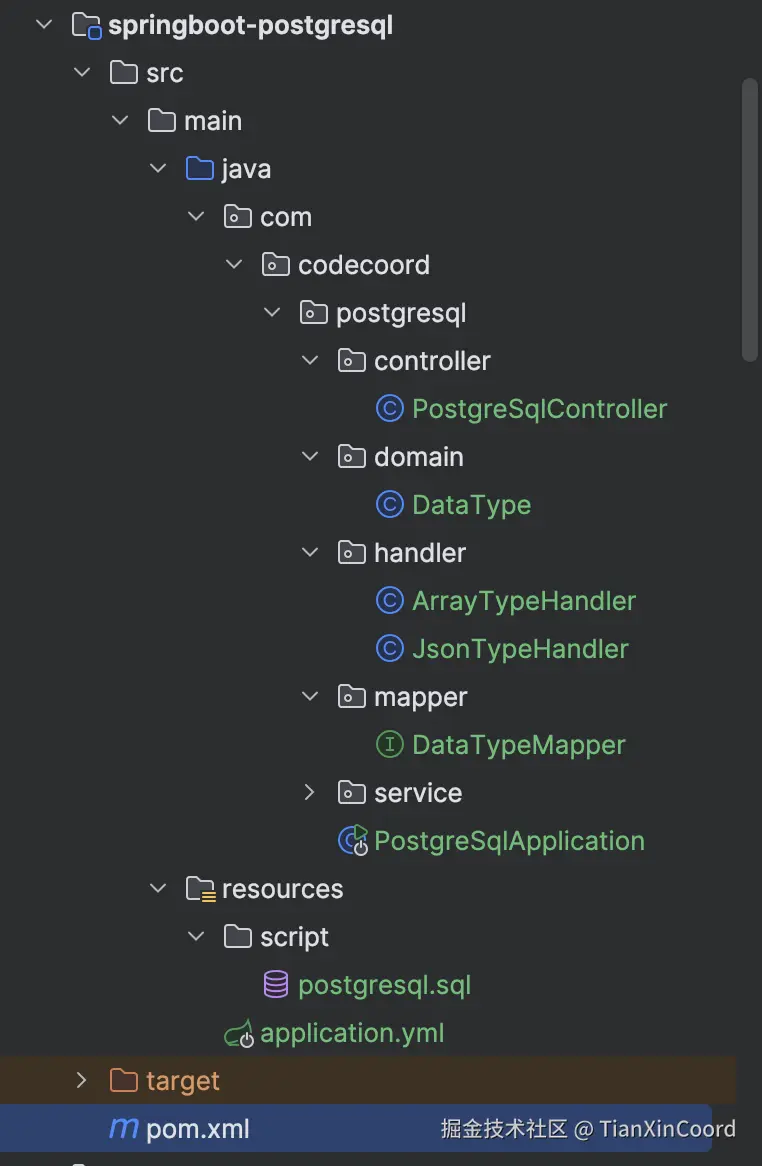
- 项目整体结构如下,实现方式有多种,以下是其中一种基于 TypeHandler 的实现
二、项目搭建
这里只列出重要的类,其余的类从源码获取
2.1 pom.xml
xml
<?xml version="1.0" encoding="UTF-8"?>
<project xmlns="http://maven.apache.org/POM/4.0.0" xmlns:xsi="http://www.w3.org/2001/XMLSchema-instance"
         xsi:schemaLocation="http://maven.apache.org/POM/4.0.0 https://maven.apache.org/xsd/maven-4.0.0.xsd">
    <modelVersion>4.0.0</modelVersion>
    <parent>
        <groupId>org.springframework.boot</groupId>
        <artifactId>spring-boot-starter-parent</artifactId>
        <version>3.4.5</version>
        <relativePath/> <!-- lookup parent from repository -->
    </parent>
    <groupId>com.codecoord</groupId>
    <artifactId>springboot-postgresql</artifactId>
    <version>1.0</version>

    <properties>
        <java.version>21</java.version>
        <maven.compiler.source>${java.version}</maven.compiler.source>
        <maven.compiler.target>${java.version}</maven.compiler.target>
        <maven.compiler.compilerVersion>${java.version}</maven.compiler.compilerVersion>
        <project.build.sourceEncoding>UTF-8</project.build.sourceEncoding>
        <project.reporting.outputEncoding>UTF-8</project.reporting.outputEncoding>
    </properties>

    <dependencies>
        <dependency>
            <groupId>org.springframework.boot</groupId>
            <artifactId>spring-boot-starter-web</artifactId>
        </dependency>
        <dependency>
            <groupId>com.alibaba</groupId>
            <artifactId>fastjson</artifactId>
            <version>2.0.57</version>
        </dependency>
        <dependency>
            <groupId>org.projectlombok</groupId>
            <artifactId>lombok</artifactId>
        </dependency>
        <dependency>
            <groupId>com.baomidou</groupId>
            <artifactId>mybatis-plus-spring-boot3-starter</artifactId>
            <version>3.5.14</version>
        </dependency>
        <dependency>
            <groupId>com.alibaba</groupId>
            <artifactId>druid-spring-boot-starter</artifactId>
            <version>1.2.27</version>
        </dependency>
        <dependency>
            <groupId>org.postgresql</groupId>
            <artifactId>postgresql</artifactId>
            <version>42.7.8</version>
        </dependency>
    </dependencies>

    <repositories>
        <repository>
            <id>aliyun</id>
            <name>aliyun</name>
            <url>https://maven.aliyun.com/repository/public</url>
            <releases>
                <enabled>true</enabled>
            </releases>
            <snapshots>
                <enabled>true</enabled>
            </snapshots>
        </repository>
    </repositories>

    <build>
        <plugins>
            <plugin>
                <groupId>org.springframework.boot</groupId>
                <artifactId>spring-boot-maven-plugin</artifactId>
            </plugin>
        </plugins>
    </build>
</project>
2.2 数据库脚本
sql
drop table if exists data_type;

create table data_type
(
    id                   bigserial primary key,
    -- 数值类型
    tiny_int_col         smallint,
    small_int_col        smallint,
    integer_col          integer,
    big_int_col          bigint,
    decimal_col          decimal(10, 2),
    numeric_col          numeric(15, 4),
    real_col             real,
    double_precision_col double precision,

    -- 字符串类型
    char_col             char(10),
    varchar_col          varchar(255),
    text_col             text,

    -- 日期时间类型
    date_col             date,
    time_col             time,
    timestamp_col        timestamp,
    timestamp_tz_col     timestamptz,

    -- 布尔类型
    boolean_col          boolean,

    -- JSON类型
    json_col             json,
    jsonb_col            jsonb,

    -- 数组类型
    array_col            int[],
    decimal_array_col    decimal(10, 2)[]
);
2.3 实体类
- 指定类型处理器,如果不指定就需要在配置文件中配置处理器扫描路径
java
package com.codecoord.postgresql.domain;

import com.alibaba.fastjson2.JSONObject;
import com.baomidou.mybatisplus.annotation.IdType;
import com.baomidou.mybatisplus.annotation.TableField;
import com.baomidou.mybatisplus.annotation.TableId;
import com.baomidou.mybatisplus.annotation.TableName;
import com.codecoord.postgresql.handler.ArrayTypeHandler;
import com.codecoord.postgresql.handler.JsonTypeHandler;
import lombok.Data;

import java.io.Serial;
import java.io.Serializable;
import java.math.BigDecimal;
import java.time.LocalDate;
import java.time.LocalDateTime;
import java.time.LocalTime;
import java.time.OffsetDateTime;
import java.util.List;

/**
 * 异步任务
 *
 * @author TianXinCoord
 * @since 2025/12/29
 */
@Data
@TableName("public.data_type")
public class DataType implements Serializable {
    @Serial
    private static final long serialVersionUID = 1L;

    // 自增
    @TableId(type = IdType.AUTO)
    private Long id;

    // 数值类型
    private Short tinyIntCol;
    private Short smallIntCol;
    private Integer integerCol;
    private Long bigIntCol;
    private java.math.BigDecimal decimalCol;
    private java.math.BigDecimal numericCol;
    private Float realCol;
    private Double doublePrecisionCol;

    // 字符串类型
    private String charCol;
    private String varcharCol;
    private String textCol;

    // 日期时间类型
    private LocalDate dateCol;
    private LocalTime timeCol;
    private LocalDateTime timestampCol;
    private OffsetDateTime timestampTzCol;

    // 布尔类型
    private Boolean booleanCol;

    // 不指定处理器,则需要配置mp的扫描配置包:mybatis-plus.type-handlers-package
    // JSON类型,需要指定对应的json处理器
    // @TableField(typeHandler = JsonTypeHandler.class)
    private JSONObject jsonCol;
    // @TableField(typeHandler = JsonTypeHandler.class)
    private JSONObject jsonbCol;

    // 数组类型
    // @TableField(typeHandler = ArrayTypeHandler.class)
    // private Integer[] arrayCol;
    private List<Integer> arrayCol;
    private BigDecimal[] decimalArrayCol;
}
2.4 配置文件
- 这里最重要的就是指定 TypeHandler 所在的包路径
- type-handlers-package: com.codecoord.postgresql.handler
yml
server:
  port: 80
spring:
  datasource:
    url: jdbc:postgresql://ip:5432/databasename
    driver-class-name: org.postgresql.Driver
    username: username
    password: password
    type: com.alibaba.druid.pool.DruidDataSource
    druid:
      initial-size: 1
      min-idle: 1
      max-active: 10
      max-wait: 60000
      time-between-eviction-runs-millis: 60000
      min-evictable-idle-time-millis: 300000
      validation-query: SELECT 1
      test-while-idle: true
      test-on-borrow: false
      test-on-return: false
mybatis-plus:
  configuration:
    log-impl: org.apache.ibatis.logging.stdout.StdOutImpl
    map-underscore-to-camel-case: true
  global-config:
    db-config:
      logic-delete-value: 1
      logic-not-delete-value: 0
      id-type: auto
    banner: false
  # 指定类型处理包
  type-handlers-package: com.codecoord.postgresql.handler
2.5 类型处理器
- 解决Java和数据库数据类型之间的匹配,实际上就是通过 TypeHandler 来告诉MyBatis/MP这个数据应该怎么处理
- 基本上所有的类型匹配都可以采用这种方式解决
2.5.1 JSON类型处理器
- 此处使用fastjson的JSONObject类型来作为JSON载体和MyBatis/MP类型处理器之间的载体
- 也可以自定义一个类型,比如下面的处理器知识JSONObject和1版本和2版本、Map数据类型,如果有自己的新类型,按照下面的代码示例加入即可
java
package com.codecoord.postgresql.handler;

import com.alibaba.fastjson.JSONObject;
import com.alibaba.fastjson2.JSON;
import org.apache.ibatis.type.BaseTypeHandler;
import org.apache.ibatis.type.JdbcType;
import org.apache.ibatis.type.MappedJdbcTypes;
import org.apache.ibatis.type.MappedTypes;

import java.sql.*;
import java.util.Map;

/**
 * JSON处理器
 *
 * @author TianXinCoord
 * @since 2025/12/29
 */
@MappedJdbcTypes(JdbcType.OTHER)
@MappedTypes({JSONObject.class, com.alibaba.fastjson2.JSONObject.class, Map.class})
@SuppressWarnings("unused")
public class JsonTypeHandler extends BaseTypeHandler<Object> {

    @Override
    public void setNonNullParameter(PreparedStatement ps, int i, Object parameter, JdbcType jdbcType) throws SQLException {
        ps.setObject(i, JSON.toJSONString(parameter), Types.OTHER);
    }

    @Override
    public Object getNullableResult(ResultSet rs, String columnName) throws SQLException {
        return JSON.parse(rs.getString(columnName));
    }

    @Override
    public Object getNullableResult(ResultSet rs, int columnIndex) throws SQLException {
        return JSON.parse(rs.getString(columnIndex));
    }

    @Override
    public Object getNullableResult(CallableStatement cs, int columnIndex) throws SQLException {
        return JSON.parse(cs.getString(columnIndex));
    }
}
2.5.2 Array类型处理器
java
package com.codecoord.postgresql.handler;

import com.baomidou.mybatisplus.core.toolkit.ArrayUtils;
import org.apache.ibatis.type.BaseTypeHandler;
import org.apache.ibatis.type.JdbcType;
import org.apache.ibatis.type.MappedJdbcTypes;
import org.apache.ibatis.type.MappedTypes;
import org.springframework.util.StringUtils;

import java.math.BigDecimal;
import java.sql.*;
import java.util.*;

/**
 * 数组类型处理器
 *
 * @author TianXinCoord
 * @since 2025/12/29
 */
@MappedJdbcTypes(JdbcType.ARRAY)
@SuppressWarnings("unused")
@MappedTypes({List.class, int[].class, long[].class, short[].class, Integer[].class, Short[].class, Long[].class, BigDecimal[].class})
public class ArrayTypeHandler extends BaseTypeHandler<Object> {
    private boolean isListType;
    private static final Map<Class<?>, String> TYPES = Map.of(
            Short.class, "smallint",
            Integer.class, "integer",
            Long.class, "bigint",
            short.class, "smallint",
            int.class, "integer",
            long.class, "bigint",
            String.class, "text",
            BigDecimal.class, "numeric"
    );

    @Override
    public void setNonNullParameter(PreparedStatement ps, int i, Object parameter, JdbcType jdbcType) throws SQLException {
        Object[] array;
        if (parameter instanceof List) {
            array = ((List<?>) parameter).toArray();
        } else if (parameter.getClass().isArray()) {
            array = (Object[]) parameter;
        } else {
            throw new IllegalArgumentException("PG array type only supports Array or List");
        }

        Array pgArray = ps.getConnection().createArrayOf(resolvePgType(ps, parameter), array);
        ps.setArray(i, pgArray);
    }

    private String resolvePgType(PreparedStatement ps, Object parameter) {
        isListType = false;
        Class<?> componentType;
        if (parameter instanceof List<?> list) {
            componentType = list.isEmpty() ? String.class : list.getFirst().getClass();
            isListType = true;
        } else {
            componentType = parameter.getClass().getComponentType();
        }

        String pgType = TYPES.get(componentType);
        if (StringUtils.hasLength(pgType)) {
            return pgType;
        }
        throw new IllegalArgumentException("Unsupported PG array element type " + componentType);
    }

    @Override
    public Object getNullableResult(ResultSet rs, String columnName) throws SQLException {
        return toJavaArray(rs.getArray(columnName));
    }

    @Override
    public Object getNullableResult(ResultSet rs, int columnIndex) throws SQLException {
        return toJavaArray(rs.getArray(columnIndex));
    }

    @Override
    public Object getNullableResult(CallableStatement cs, int columnIndex) throws SQLException {
        return toJavaArray(cs.getArray(columnIndex));
    }

    private Object toJavaArray(Array array) throws SQLException {
        if (Objects.isNull(array)) {
            return null;
        }
        Object[] objects = (Object[]) array.getArray();
        if (!isListType || ArrayUtils.isEmpty(objects)) {
            return array.getArray();
        }
        // List数组需要单独处理
        return new ArrayList<>(Arrays.asList(objects));
    }
}
2.6 接口代码
java
package com.codecoord.postgresql.controller;

import com.alibaba.fastjson.JSONObject;
import com.alibaba.fastjson2.JSON;
import com.codecoord.postgresql.domain.DataType;
import com.codecoord.postgresql.service.DataTypeService;
import jakarta.annotation.Resource;
import org.springframework.web.bind.annotation.RequestMapping;
import org.springframework.web.bind.annotation.RequestParam;
import org.springframework.web.bind.annotation.RestController;

import java.math.BigDecimal;
import java.time.LocalDate;
import java.time.LocalDateTime;
import java.time.LocalTime;
import java.time.OffsetDateTime;
import java.util.List;
import java.util.Objects;

/**
 * PostgreSqlController
 *
 * @author TianXinCoord
 * @since 2025/12/29
 */
@RestController
@RequestMapping("/sql")
public class PostgreSqlController {
    @Resource
    private DataTypeService dataTypeService;

    @RequestMapping("/autoincrement")
    public DataType autoincrement(@RequestParam(value = "id", required = false) Long id) {
        DataType dataType = new DataType();
        // 做自定义赋值,默认是自增
        if (Objects.nonNull(id)) {
            dataType.setId(id);
        }
        // 注意:如果指定了插入Id,但是自增序列是从1开始的,则有可能导致数据库主键冲突
        // 当自增时,则实体类必须要有一个字段有值,否则将会导致构建的SQL value为空,导致问题
        dataType.setVarcharCol("测试自增字段");
        dataTypeService.save(dataType);
        return dataTypeService.getById(dataType.getId());
    }

    @RequestMapping("/numeric")
    public DataType numeric() {
        DataType dataType = new DataType();
        dataType.setSmallIntCol((short) 123);
        dataType.setIntegerCol(456);
        dataType.setBigIntCol(789L);
        dataType.setDecimalCol(new BigDecimal("123.45"));
        dataType.setNumericCol(new BigDecimal("678.90"));
        dataType.setRealCol(12.34f);
        dataType.setDoublePrecisionCol(56.78);
        dataTypeService.save(dataType);
        return dataTypeService.getById(dataType.getId());
    }

    @RequestMapping("/string")
    public DataType string() {
        DataType dataType = new DataType();
        dataType.setVarcharCol("测试字符串");
        dataType.setCharCol("A");
        dataType.setTextCol("长文本内容");
        dataTypeService.save(dataType);
        return dataTypeService.getById(dataType.getId());
    }

    @RequestMapping("/date")
    public DataType date() {
        DataType dataType = new DataType();
        dataType.setDateCol(LocalDate.parse("2025-12-29"));
        dataType.setTimeCol(LocalTime.parse("15:30:45"));
        dataType.setTimestampCol(LocalDateTime.parse("2025-12-29T15:30:45"));
        dataType.setTimestampTzCol(OffsetDateTime.now());
        dataTypeService.save(dataType);
        return dataTypeService.getById(dataType.getId());
    }

    @RequestMapping("/boolean")
    public DataType booleanType() {
        DataType dataType = new DataType();
        dataType.setBooleanCol(true);
        dataTypeService.save(dataType);
        return dataTypeService.getById(dataType.getId());
    }

    @RequestMapping("/json")
    public DataType json() {
        DataType dataType = new DataType();
        // column "json_col" is of type json but expression is of type character varying
        // 直接默认赋值是不支持JSON格式的
        // 1. 需要自定义类型处理FastjsonTypeHandler
        dataType.setJsonCol(JSON.parseObject("{"name":"test","value":"[]","array":[1,2,3],"nested":{"key":"value"}}"));
        dataType.setJsonbCol(JSON.parseObject("{"title":"sample jsonb","content":"PostgreSQL JSONB data","tags":["json","postgresql","database"],"metadata":{"created":"2025-12-29","version":1.0,"active":true}}"));
        dataTypeService.save(dataType);
        return dataTypeService.getById(dataType.getId());
    }

    @RequestMapping("/array")
    public DataType array() {
        DataType dataType = new DataType();
        // dataType.setArrayCol(new Integer[]{1, 2, 3});
        dataType.setArrayCol(List.of(1, 2, 3, 5));
        dataType.setDecimalArrayCol(new BigDecimal[]{new BigDecimal("123.45"), new BigDecimal("678.90")});
        dataTypeService.save(dataType);
        return dataTypeService.getById(dataType.getId());
    }
}
三、接口测试
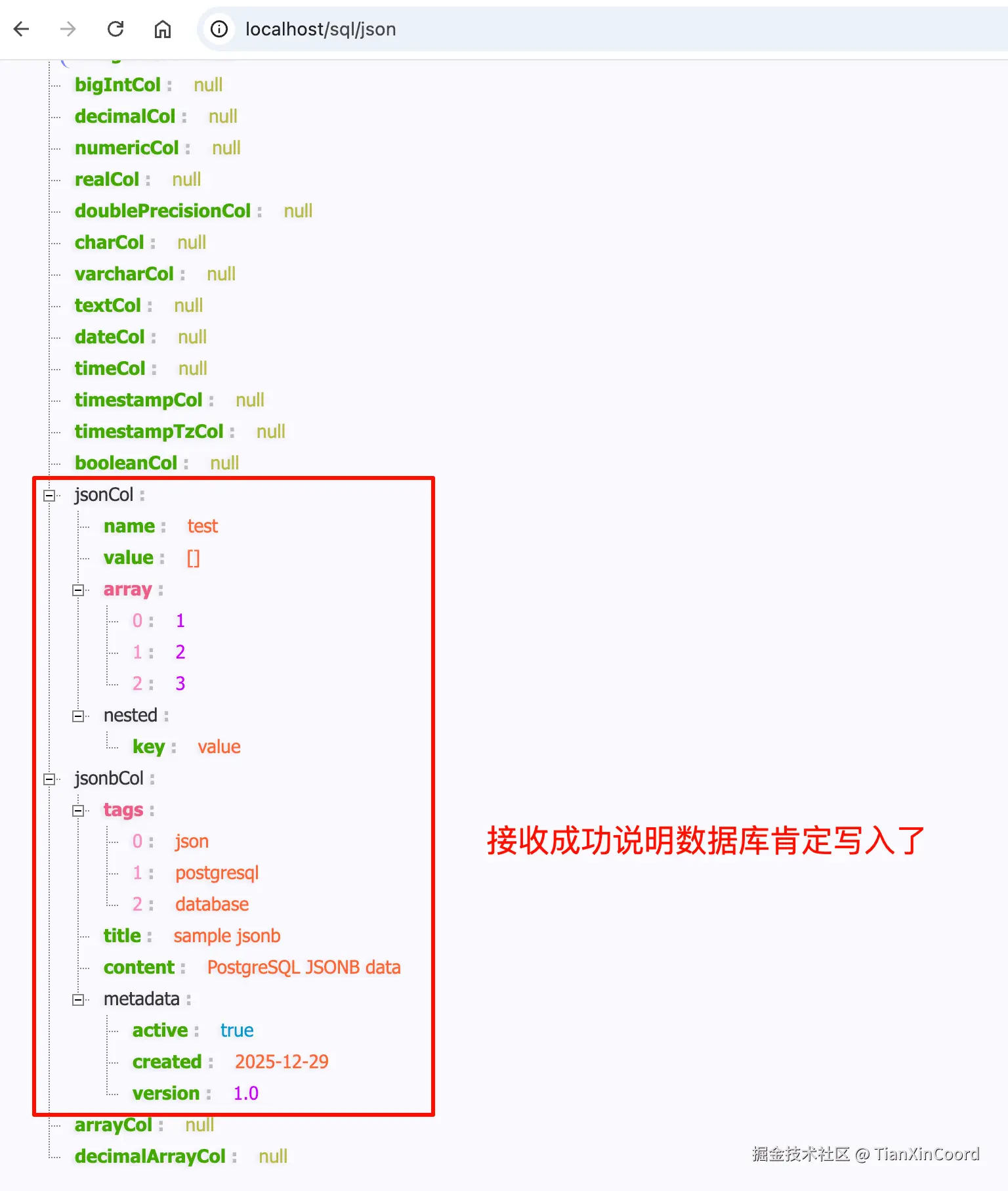
3.1 测试json类型
- 请求接口插入数据
- 数据库数据

- json数据处理成功
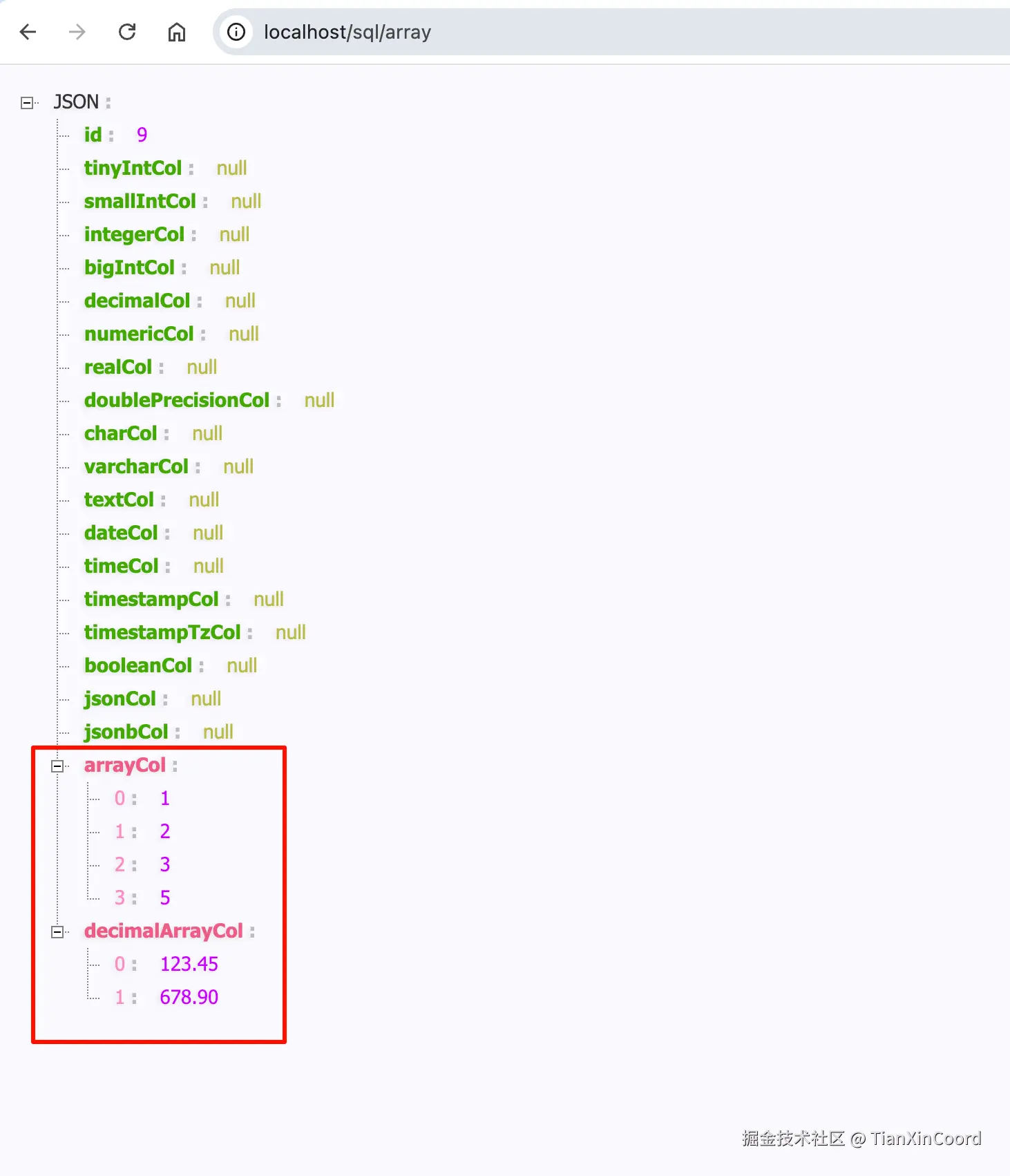
3.2 测试数组类型
- 插入数据成功
- 数据库查询

- 数组类型接收成功