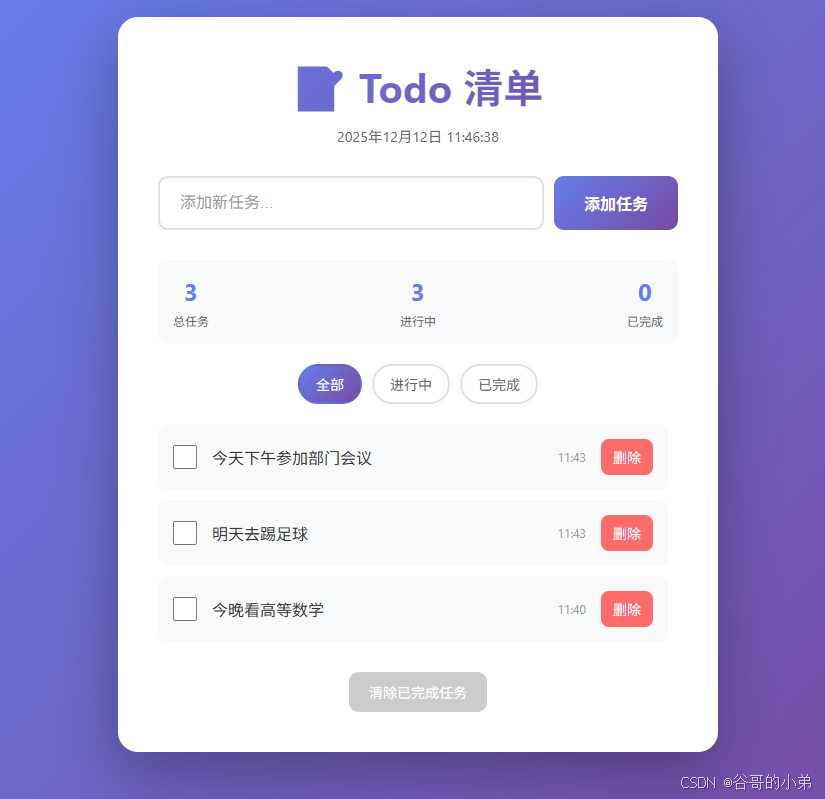
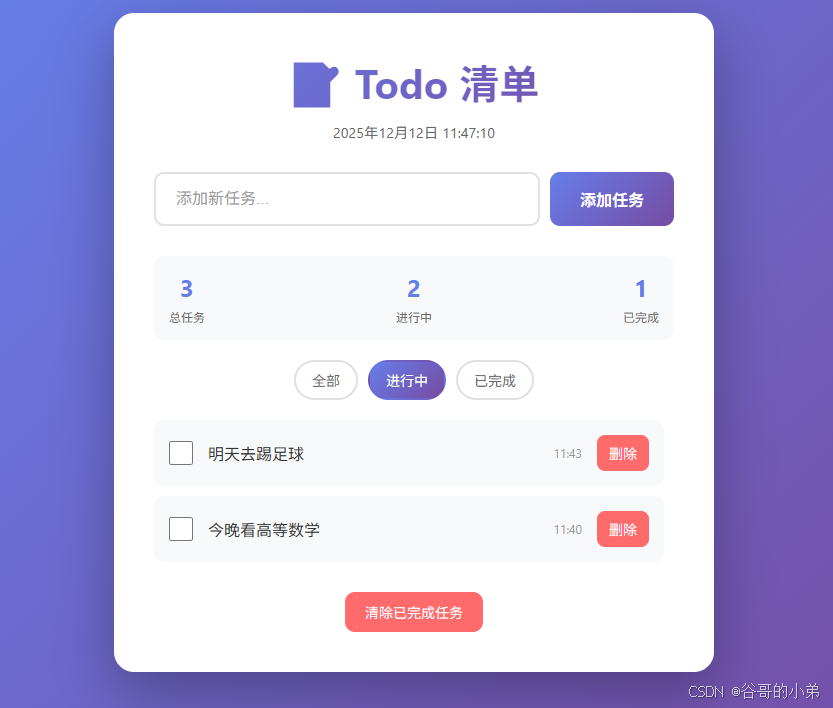
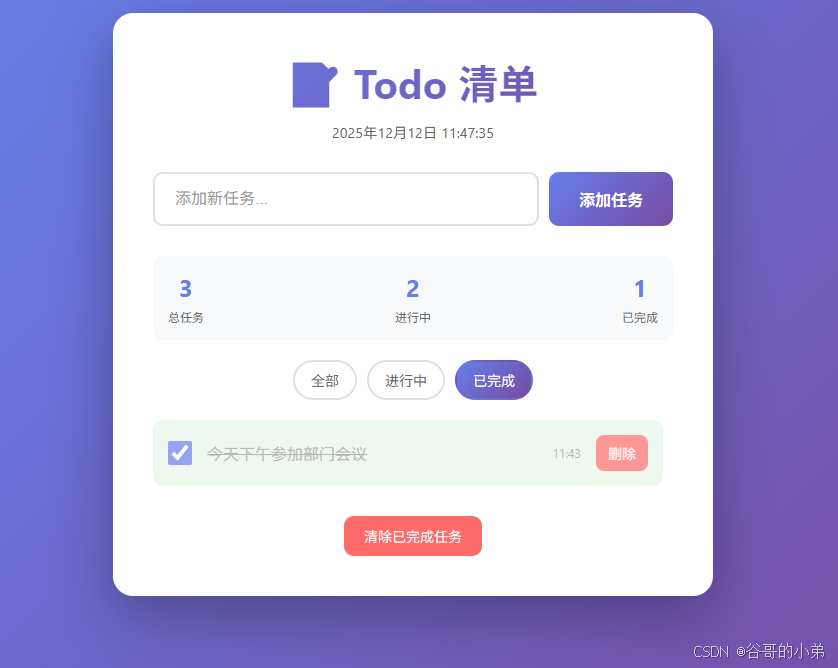
<!DOCTYPE html>
<html lang="zh-CN">
<head>
<meta charset="UTF-8">
<meta name="viewport" content="width=device-width, initial-scale=1.0">
<title>Todo 任务清单</title>
<style>
* {
margin: 0;
padding: 0;
box-sizing: border-box;
}
body {
font-family: -apple-system, BlinkMacSystemFont, 'Segoe UI', Roboto, 'Helvetica Neue', Arial, sans-serif;
background: linear-gradient(135deg, #667eea 0%, #764ba2 100%);
min-height: 100vh;
padding: 20px;
display: flex;
justify-content: center;
align-items: flex-start;
}
.container {
background: white;
border-radius: 20px;
box-shadow: 0 20px 60px rgba(0, 0, 0, 0.3);
width: 100%;
max-width: 600px;
padding: 40px;
animation: slideIn 0.5s ease-out;
}
@keyframes slideIn {
from {
opacity: 0;
transform: translateY(-30px);
}
to {
opacity: 1;
transform: translateY(0);
}
}
h1 {
color: #333;
text-align: center;
margin-bottom: 10px;
font-size: 2.5em;
background: linear-gradient(135deg, #667eea 0%, #764ba2 100%);
-webkit-background-clip: text;
-webkit-text-fill-color: transparent;
background-clip: text;
}
.date-time {
text-align: center;
color: #666;
margin-bottom: 30px;
font-size: 0.9em;
}
.input-container {
display: flex;
gap: 10px;
margin-bottom: 30px;
}
#todoInput {
flex: 1;
padding: 15px 20px;
border: 2px solid #e0e0e0;
border-radius: 10px;
font-size: 16px;
transition: all 0.3s ease;
outline: none;
}
#todoInput:focus {
border-color: #667eea;
box-shadow: 0 0 0 3px rgba(102, 126, 234, 0.1);
}
#todoInput::placeholder {
color: #999;
}
#addBtn {
padding: 15px 30px;
background: linear-gradient(135deg, #667eea 0%, #764ba2 100%);
color: white;
border: none;
border-radius: 10px;
font-size: 16px;
font-weight: 600;
cursor: pointer;
transition: all 0.3s ease;
white-space: nowrap;
}
#addBtn:hover {
transform: translateY(-2px);
box-shadow: 0 10px 20px rgba(102, 126, 234, 0.3);
}
#addBtn:active {
transform: translateY(0);
}
.stats {
display: flex;
justify-content: space-between;
margin-bottom: 20px;
padding: 15px;
background: #f8f9fa;
border-radius: 10px;
}
.stat-item {
text-align: center;
}
.stat-number {
font-size: 24px;
font-weight: bold;
color: #667eea;
}
.stat-label {
font-size: 12px;
color: #666;
margin-top: 5px;
}
.filter-buttons {
display: flex;
gap: 10px;
margin-bottom: 20px;
justify-content: center;
}
.filter-btn {
padding: 8px 16px;
border: 2px solid #e0e0e0;
background: white;
border-radius: 20px;
cursor: pointer;
transition: all 0.3s ease;
font-size: 14px;
color: #666;
}
.filter-btn.active {
background: linear-gradient(135deg, #667eea 0%, #764ba2 100%);
color: white;
border-color: transparent;
}
.filter-btn:hover:not(.active) {
border-color: #667eea;
color: #667eea;
}
#todoList {
list-style: none;
max-height: 400px;
overflow-y: auto;
padding-right: 10px;
}
#todoList::-webkit-scrollbar {
width: 6px;
}
#todoList::-webkit-scrollbar-track {
background: #f1f1f1;
border-radius: 10px;
}
#todoList::-webkit-scrollbar-thumb {
background: #ccc;
border-radius: 10px;
}
#todoList::-webkit-scrollbar-thumb:hover {
background: #999;
}
.todo-item {
display: flex;
align-items: center;
padding: 15px;
margin-bottom: 10px;
background: #f8f9fa;
border-radius: 10px;
transition: all 0.3s ease;
animation: fadeIn 0.3s ease-out;
}
@keyframes fadeIn {
from {
opacity: 0;
transform: translateX(-20px);
}
to {
opacity: 1;
transform: translateX(0);
}
}
.todo-item:hover {
background: #e9ecef;
transform: translateX(5px);
}
.todo-item.completed {
opacity: 0.7;
background: #e8f5e9;
}
.todo-checkbox {
width: 24px;
height: 24px;
margin-right: 15px;
cursor: pointer;
accent-color: #667eea;
}
.todo-text {
flex: 1;
font-size: 16px;
color: #333;
transition: all 0.3s ease;
}
.todo-item.completed .todo-text {
text-decoration: line-through;
color: #999;
}
.todo-time {
font-size: 12px;
color: #999;
margin-right: 15px;
}
.delete-btn {
padding: 8px 12px;
background: #ff6b6b;
color: white;
border: none;
border-radius: 8px;
cursor: pointer;
transition: all 0.3s ease;
font-size: 14px;
}
.delete-btn:hover {
background: #ff5252;
transform: scale(1.05);
}
.empty-state {
text-align: center;
padding: 40px;
color: #999;
}
.empty-state svg {
width: 100px;
height: 100px;
margin-bottom: 20px;
opacity: 0.5;
}
.clear-completed {
margin-top: 20px;
text-align: center;
}
.clear-btn {
padding: 10px 20px;
background: #ff6b6b;
color: white;
border: none;
border-radius: 10px;
cursor: pointer;
transition: all 0.3s ease;
font-size: 14px;
}
.clear-btn:hover {
background: #ff5252;
transform: translateY(-2px);
}
.clear-btn:disabled {
background: #ccc;
cursor: not-allowed;
transform: none;
}
@media (max-width: 600px) {
.container {
padding: 20px;
}
h1 {
font-size: 2em;
}
.input-container {
flex-direction: column;
}
#addBtn {
width: 100%;
}
.filter-buttons {
flex-wrap: wrap;
}
.todo-time {
display: none;
}
}
</style>
</head>
<body>
<div class="container">
<h1>📝 Todo 清单</h1>
<div class="date-time" id="dateTime"></div>
<div class="input-container">
<input type="text" id="todoInput" placeholder="添加新任务..." autocomplete="off">
<button id="addBtn">添加任务</button>
</div>
<div class="stats">
<div class="stat-item">
<div class="stat-number" id="totalCount">0</div>
<div class="stat-label">总任务</div>
</div>
<div class="stat-item">
<div class="stat-number" id="activeCount">0</div>
<div class="stat-label">进行中</div>
</div>
<div class="stat-item">
<div class="stat-number" id="completedCount">0</div>
<div class="stat-label">已完成</div>
</div>
</div>
<div class="filter-buttons">
<button class="filter-btn active" data-filter="all">全部</button>
<button class="filter-btn" data-filter="active">进行中</button>
<button class="filter-btn" data-filter="completed">已完成</button>
</div>
<ul id="todoList"></ul>
<div class="clear-completed">
<button class="clear-btn" id="clearCompletedBtn">清除已完成任务</button>
</div>
</div>
<script>
class TodoApp {
constructor() {
this.todos = this.loadTodos();
this.currentFilter = 'all';
this.init();
}
init() {
this.updateDateTime();
setInterval(() => this.updateDateTime(), 1000);
this.bindEvents();
this.render();
this.updateStats();
}
updateDateTime() {
const now = new Date();
const options = {
year: 'numeric',
month: 'long',
day: 'numeric',
hour: '2-digit',
minute: '2-digit',
second: '2-digit',
hour12: false
};
document.getElementById('dateTime').textContent = now.toLocaleString('zh-CN', options);
}
bindEvents() {
document.getElementById('addBtn').addEventListener('click', () => this.addTodo());
document.getElementById('todoInput').addEventListener('keypress', (e) => {
if (e.key === 'Enter') this.addTodo();
});
document.getElementById('clearCompletedBtn').addEventListener('click', () => this.clearCompleted());
document.querySelectorAll('.filter-btn').forEach(btn => {
btn.addEventListener('click', (e) => {
document.querySelectorAll('.filter-btn').forEach(b => b.classList.remove('active'));
e.target.classList.add('active');
this.currentFilter = e.target.dataset.filter;
this.render();
});
});
}
addTodo() {
const input = document.getElementById('todoInput');
const text = input.value.trim();
if (!text) {
this.showMessage('请输入任务内容');
return;
}
const todo = {
id: Date.now(),
text: text,
completed: false,
createdAt: new Date().toLocaleString('zh-CN', {
hour: '2-digit',
minute: '2-digit'
})
};
this.todos.unshift(todo);
this.saveTodos();
this.render();
this.updateStats();
input.value = '';
input.focus();
}
toggleTodo(id) {
const todo = this.todos.find(t => t.id === id);
if (todo) {
todo.completed = !todo.completed;
this.saveTodos();
this.render();
this.updateStats();
}
}
deleteTodo(id) {
this.todos = this.todos.filter(t => t.id !== id);
this.saveTodos();
this.render();
this.updateStats();
}
clearCompleted() {
const completedCount = this.todos.filter(t => t.completed).length;
if (completedCount === 0) {
this.showMessage('没有已完成的任务');
return;
}
if (confirm(`确定要清除 ${completedCount} 个已完成的任务吗?`)) {
this.todos = this.todos.filter(t => !t.completed);
this.saveTodos();
this.render();
this.updateStats();
}
}
getFilteredTodos() {
switch(this.currentFilter) {
case 'active':
return this.todos.filter(t => !t.completed);
case 'completed':
return this.todos.filter(t => t.completed);
default:
return this.todos;
}
}
render() {
const todoList = document.getElementById('todoList');
const filteredTodos = this.getFilteredTodos();
if (filteredTodos.length === 0) {
todoList.innerHTML = `
<div class="empty-state">
<svg viewBox="0 0 24 24" fill="none" stroke="currentColor" stroke-width="2">
<path d="M9 11l3 3L22 4"></path>
<path d="M21 12v7a2 2 0 01-2 2H5a2 2 0 01-2-2V5a2 2 0 012-2h11"></path>
</svg>
<p>暂无任务</p>
</div>
`;
return;
}
todoList.innerHTML = filteredTodos.map(todo => `
<li class="todo-item ${todo.completed ? 'completed' : ''}">
<input type="checkbox"
class="todo-checkbox"
${todo.completed ? 'checked' : ''}
onchange="app.toggleTodo(${todo.id})">
<span class="todo-text">${this.escapeHtml(todo.text)}</span>
<span class="todo-time">${todo.createdAt}</span>
<button class="delete-btn" onclick="app.deleteTodo(${todo.id})">删除</button>
</li>
`).join('');
}
updateStats() {
const total = this.todos.length;
const completed = this.todos.filter(t => t.completed).length;
const active = total - completed;
document.getElementById('totalCount').textContent = total;
document.getElementById('activeCount').textContent = active;
document.getElementById('completedCount').textContent = completed;
const clearBtn = document.getElementById('clearCompletedBtn');
clearBtn.disabled = completed === 0;
}
showMessage(message) {
const input = document.getElementById('todoInput');
input.placeholder = message;
input.style.borderColor = '#ff6b6b';
setTimeout(() => {
input.placeholder = '添加新任务...';
input.style.borderColor = '#e0e0e0';
}, 2000);
}
escapeHtml(text) {
const div = document.createElement('div');
div.textContent = text;
return div.innerHTML;
}
saveTodos() {
localStorage.setItem('todos', JSON.stringify(this.todos));
}
loadTodos() {
const saved = localStorage.getItem('todos');
return saved ? JSON.parse(saved) : [];
}
}
const app = new TodoApp();
</script>
</body>
</html>