当路由切换的时候,react router 会销毁之前路由的组件,然后渲染新的路由对应的组件。
在一些场景下,这样是有问题的。
比如移动端很多长列表,用户划了很久之后,点击某个列表项跳到详情页,之后又跳回来,但是这时候列表页的组件销毁重新创建,又回到了最上面。
比如移动端填写了某个表单,有的表单需要跳到别的页面获取数据,然后跳回来,跳回来发现组件销毁重新创建,之前填的都没了。
类似这种场景,就需要路由切换的时候不销毁组件,也就是 keepalive。
我们先复现下这个场景:
js
npx create-vite选择 react + typescript 创建项目。
安装 react-router:
js
npm i --save react-router-dom在 App.tsx 写下路由:
js
import { useState } from 'react';
import {  Link, useLocation, RouterProvider, createBrowserRouter, Outlet } from 'react-router-dom';

const Layout = () => {
    const { pathname } = useLocation();

    return (
        <div>
            <div>当前路由: {pathname}</div>
            <Outlet/>
        </div>
    )
}

const Aaa = () => {
    const [count, setCount] = useState(0);

    return <div>
      <p>{count}</p>
      <p>
        <button onClick={() => setCount(count => count + 1)}>加一</button>
      </p>
      <Link to='/bbb'>去 Bbb 页面</Link><br/>
      <Link to='/ccc'>去 Ccc 页面</Link>
    </div>
};

const Bbb = () => {
    const [count, setCount] = useState(0);

    return <div>
      <p>{count}</p>
      <p><button onClick={() => setCount(count => count + 1)}>加一</button></p>
      <Link to='/'>去首页</Link>
    </div>
};

const Ccc = () => {
    return <div>
      <p>ccc</p>
      <Link to='/'>去首页</Link>
    </div>
};

const routes = [
  {
    path: "/",
    element: <Layout></Layout>,
    children: [
      {
        path: "/",
        element: <Aaa></Aaa>,
      },
      {
        path: "/bbb",
        element: <Bbb></Bbb>
      },
      {
        path: "/ccc",
        element: <Ccc></Ccc>
      }
    ]
  }
];

export const router = createBrowserRouter(routes);

const App = () => {
    return <RouterProvider router={router}/>
}

export default App;
这里有 /、/bbb、/ccc 这三个路由。
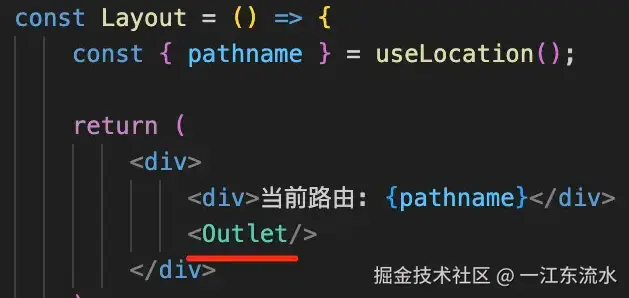
一级路由渲染 Layout 组件,里面通过 Outlet 指定渲染二级路由的地方。
二级路由 / 渲染 Aaa 组件,/bbb 渲染 Bbb 组件,/ccc 渲染 Ccc 组件。
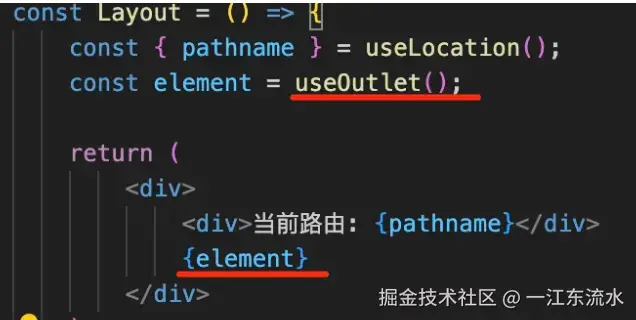
这里的 Outlet 组件,也可以换成 useOutlet,效果一样:
默认路由切换,对应的组件就会销毁。
我们有时候不希望切换路由时销毁页面组件,也就是希望能实现 keepalive。
怎么做呢?
其实很容易想到,我们把所有需要 keepalive 的组件保存到一个全局对象。
然后渲染的时候把它们都渲染出来,路由切换只是改变显示隐藏。
按照这个思路来写一下:
新建 KeepAliveLayout.tsx:
js
import React, { createContext, useContext } from 'react';
import { useOutlet, useLocation, matchPath } from 'react-router-dom'
import type { FC, PropsWithChildren, ReactNode } from 'react';

interface KeepAliveLayoutProps extends PropsWithChildren{
    keepPaths: Array<string | RegExp>;
    keepElements?: Record<string, ReactNode>;
    dropByPath?: (path: string) => void;
}

type KeepAliveContextType = Omit<Required<KeepAliveLayoutProps>, 'children'>;

const keepElements: KeepAliveContextType['keepElements'] = {};

export const KeepAliveContext = createContext<KeepAliveContextType>({
    keepPaths: [],
    keepElements,
    dropByPath(path: string) {
        keepElements[path] = null;
    }
});

const isKeepPath = (keepPaths: Array<string | RegExp>, path: string) => {
    let isKeep = false;
    for(let i = 0; i< keepPaths.length; i++) {
        let item = keepPaths[i];
        if (item === path) {
            isKeep = true;
        }
        if (item instanceof RegExp && item.test(path)) {
            isKeep = true;
        }
        if (typeof item === 'string' && item.toLowerCase() === path) {
            isKeep = true;
        }
    }
    return isKeep;
}

export function useKeepOutlet() {
    const location = useLocation();
    const element = useOutlet();

    const { keepElements, keepPaths } = useContext(KeepAliveContext);
    const isKeep = isKeepPath(keepPaths, location.pathname);

    if (isKeep) {
        keepElements![location.pathname] = element;
    }

    return <>
        {
            Object.entries(keepElements).map(([pathname, element]) => (
                <div
                    key={pathname}
                    style={{ height: '100%', width: '100%', position: 'relative', overflow: 'hidden auto' }}
                    className="keep-alive-page"
                    hidden={!matchPath(location.pathname, pathname)}
                >
                    {element}
                </div>
            ))
        }
        {!isKeep && element}
    </>
}

const KeepAliveLayout: FC<KeepAliveLayoutProps> = (props) => {
    const { keepPaths, ...other } = props;

    const { keepElements, dropByPath } = useContext(KeepAliveContext);

    return (
        <KeepAliveContext.Provider value={{ keepPaths, keepElements, dropByPath }} {...other} />
    )
}

export default KeepAliveLayout;
ts 相关知识点
PropsWithChildren
在 React 中,PropsWithChildren 是 TypeScript 提供的一个工具类型,用于为组件的 props 类型添加 children 属性的类型定义。
当你定义组件的 props 类型时,如果组件需要接收 children(子元素),可以使用 PropsWithChildren 来自动包含 children 的类型,无需手动声明。
它的本质是一个泛型类型,定义如下(简化版):
js
type PropsWithChildren<P = {}> = P & { children?: React.ReactNode };
js
import { type PropsWithChildren } from 'react';

// 自定义 props 类型
type CardProps = {
  title: string;
  className?: string;
};

// 使用 PropsWithChildren 包含 children
const Card = ({ title, className, children }: PropsWithChildren<CardProps>) => {
  return (
    <div className={className}>
      <h2>{title}</h2>
      <div>{children}</div>
    </div>
  );
};

// 使用组件
const App = () => {
  return (
    <Card title="卡片标题" className="card">
      <p>这是卡片内容</p>
    </Card>
  );
};
Record、 Require、 Omit
- Record 是创建一个 key value 的对象类型:
js
keepElements?: Record<string, ReactNode>;-
Requried 是去掉可选 -?
-
Omit 是删掉其中的部分属性:
js
type KeepAliveContextType = Omit<Required<KeepAliveLayoutProps>, 'children'>;如果要知道某个属性的类型呢? 如下代码:
js
const keepElements: KeepAliveContextType['keepElements'] = {};KeepAliveContextType['keepElements'] 就返回了 keepElements 属性的类型。
是不是感觉ts跟编程一样。
继续往下看:
js
const KeepAliveLayout: FC<KeepAliveLayoutProps> = (props) => {
    const { keepPaths, ...other } = props;

    const { keepElements, dropByPath } = useContext(KeepAliveContext);

    return (
        <KeepAliveContext.Provider value={{ keepPaths, keepElements, dropByPath }} {...other} />
    )
}

export default KeepAliveLayout;
首先从父组件中传入props,其中包括定义的 keepPaths, 然后从useContext 取出其他值,然后通过KeepAliveContext.Provider 的value 进行设置,这样子组件就能获取到这些值。
然后暴露一个 useKeepOutlet 的 hook:
js
export function useKeepOutlet() {
    const location = useLocation();
    const element = useOutlet();

    const { keepElements, keepPaths } = useContext(KeepAliveContext);
    const isKeep = isKeepPath(keepPaths, location.pathname);

    if (isKeep) {
        keepElements![location.pathname] = element;
    }

    return <>
        {
            Object.entries(keepElements).map(([pathname, element]) => (
                <div
                    key={pathname}
                    style={{ height: '100%', width: '100%', position: 'relative', overflow: 'hidden auto' }}
                    className="keep-alive-page"
                    hidden={!matchPath(location.pathname, pathname)}
                >
                    {element}
                </div>
            ))
        }
        {!isKeep && element}
    </>
}
用 useLocation 拿到当前路由,用 useOutlet 拿到对应的组件。
判断下当前路由是否在需要 keepalive 的路由内,是的话就保存到 keepElements。
然后渲染所有的 keepElements,如果不匹配 matchPath 就隐藏。
并且如果当前路由不在 keepPaths 内,就直接渲染对应的组件: {!isKeep && element} 。
其实原理比较容易看懂:在 context 中保存所有需要 keepalive 的组件,全部渲染出来,通过路由是否匹配来切换对应组件的显示隐藏。
在 App.tsx 里引入测试下:
在外面包一层 KeepAliveLayout 组件:
js
const App = () => {
    return (
    <KeepAliveLayout keepPaths={['/bbb', '/']}>
      <RouterProvider router={router}/>
    </KeepAliveLayout>
    )
}
<RouterProvider router={router}/>会作为children传递到KeepAliveLayout组件中。
然后把 useOutlet 换成 useKeepOutlet:
js
const Layout = () => {
    const { pathname } = useLocation();

    const element = useKeepOutlet()

    return (
        <div>
            <div>当前路由: {pathname}</div>
            { element }
            {/* <Outlet/> */}
        </div>
    )
}
总结
路由切换会销毁对应的组件,但很多场景我们希望路由切换组件不销毁,也就是 keepalive。
react router 并没有实现这个功能,需要我们自己做。
我们在 context 中保存所有需要 keepalive 的组件,然后渲染的时候全部渲染出来,通过路由是否匹配来切换显示隐藏。
这样实现了 keepalive。
这个功能是依赖 React Router 的 useLocation、useOutlet、matchPath 等 api 实现的,和路由功能密不可分。