先生们/女士们先看结果
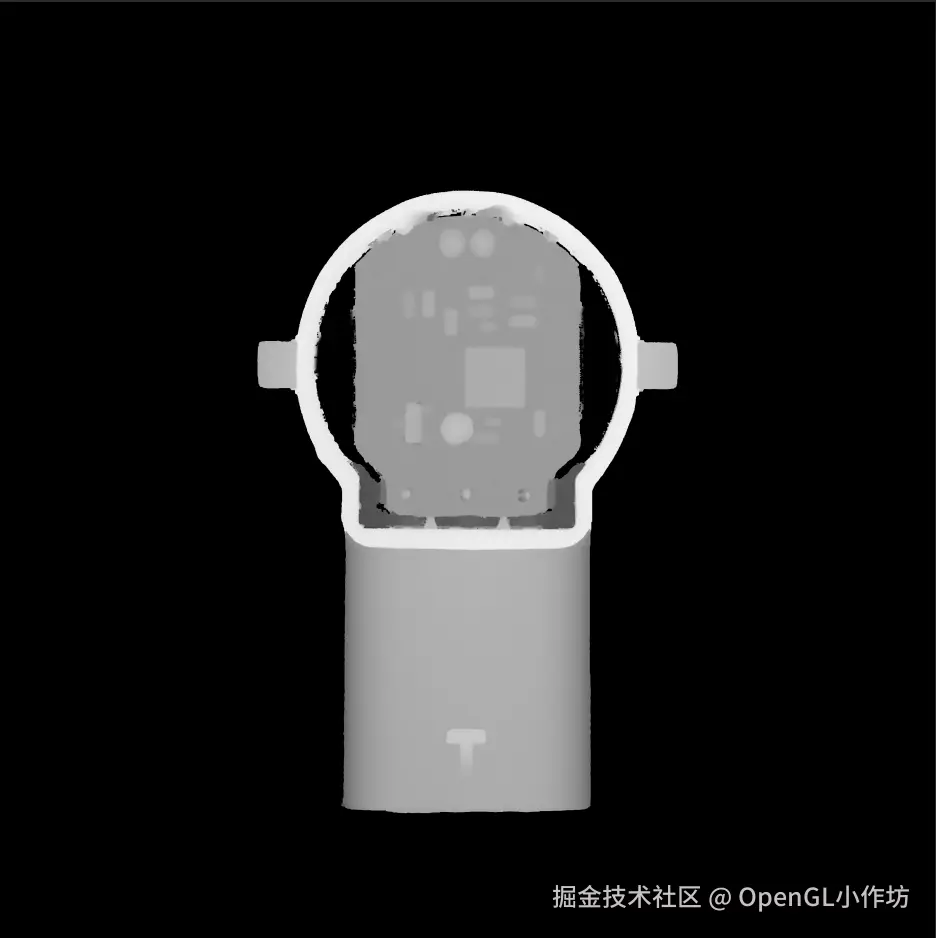
1.高程图片.tif记录了模型的高度信息。

2.通过转换将.tif高程图片构建成.obj模型
一.读取高程图像(.tif)信息
这里我们使用到一个库GDAL,C#里面用来获取.tif像素信息的一个库,感兴趣的小伙伴可以深入了解一下,这里我们只说怎么读取.tif的图片信息。
c#
Gdal.AllRegister(); //初始化GDAL

//获取高程图像.tif的图像信息dem
using Dataset ds = Gdal.Open(".tif图片路径", Access.GA_ReadOnly);
width = ds.RasterXSize;
height = ds.RasterYSize;
Band band = ds.GetRasterBand(1);
band.GetNoDataValue(out double noData, out int hasNoData);

float[] buffer = new float[width * height];
band.ReadRaster(0, 0, width, height, buffer, width, height, 0, 0);

float[,] dem = new float[height, width];
isNoData = new bool[height, width];

for (int y = 0; y < height; y++)
{
    for (int x = 0; x < width; x++)
    {
        float v = buffer[y * width + x];
        bool nd = (hasNoData == 1 && Math.Abs(v - (float)noData) < 0.001f) || v == 0f;
        dem[y, x] = nd ? 0 : v;
        isNoData[y, x] = nd;
    }
}
二.根据高程图像(.tif)构建模型网格Mesh.
上一步骤中,我们获取到了高程图像(.tif)的图像信息。下面我们就利用这些高度信息来构建模型。
之前,对3D模型有过了解的同学肯定知道,要想构建一个3D模型,无非就是集齐模型的顶点,法线,面,纹理坐标(Uv),然后高程图像的高度信息,就可以作为我们要构建模型的顶点信息。
C#
internal class ObjMesh //自定义的模型类
{
    public List<Vector3> Vertices { get; } = new();
    public List<(int, int, int)> Faces { get; } = new();
}
C#
   int rows = dem.GetLength(0);
   int cols = dem.GetLength(1);

   // 计算中心点偏移量
   float centerX = (cols - 1) * 0.5f * xyScale;
   float centerZ = -(rows - 1) * 0.5f * xyScale;  // 注意:Z轴为负方向

   ObjMesh mesh = new ObjMesh();
   int[,] topIndexMap = new int[rows, cols];
   int[,] bottomIndexMap = new int[rows, cols];

   // ---------- 顶部顶点 ----------
   for (int y = 0; y < rows; y += step)
   {
       for (int x = 0; x < cols; x += step)
       {
           if (outerNoData[y, x])
           {
               topIndexMap[y, x] = 0;
               continue;
           }

           topIndexMap[y, x] = mesh.Vertices.Count + 1;
           // 将坐标原点移动到中心点
           float xPos = x * xyScale - centerX;
           float zPos = -y * xyScale - centerZ;  // 注意:Z轴为负方向
           mesh.Vertices.Add(new Vector3(
               xPos,
               dem[y, x] * zScale,
               zPos
           ));
       }
   }

   // ---------- 顶部三角面 ----------
   for (int y = 0; y < rows - step; y += step)
   {
       for (int x = 0; x < cols - step; x += step)
       {
           int v00 = topIndexMap[y, x];
           int v10 = topIndexMap[y, x + step];
           int v01 = topIndexMap[y + step, x];
           int v11 = topIndexMap[y + step, x + step];

           if (v00 == 0 || v10 == 0 || v01 == 0 || v11 == 0)
               continue;

           mesh.Faces.Add((v00, v01, v10));
           mesh.Faces.Add((v10, v01, v11));
       }
   }

   // ---------- 创建底部顶点映射 ----------
   for (int y = 0; y < rows; y += step)
   {
       for (int x = 0; x < cols; x += step)
       {
           // 只有顶部有效的点才有底部顶点
           if (topIndexMap[y, x] != 0)
           {
               Vector3 topV = mesh.Vertices[topIndexMap[y, x] - 1];
               bottomIndexMap[y, x] = mesh.Vertices.Count + 1;
               mesh.Vertices.Add(new Vector3(
                   topV.X,
                   bottomY,
                   topV.Z
               ));
           }
       }
   }

   // ---------- 创建侧边墙 ----------
   // 垂直边(X方向)
   for (int y = 0; y < rows; y += step)
   {
       for (int x = 0; x < cols - step; x += step)
       {
           int idx00 = topIndexMap[y, x];
           int idx10 = topIndexMap[y, x + step];

           // 如果两个顶点都存在,且至少有一个是边缘点
           if (idx00 != 0 && idx10 != 0)
           {
               bool isEdge = IsEdgePoint(topIndexMap, x, y, rows, cols, step) ||
                            IsEdgePoint(topIndexMap, x + step, y, rows, cols, step);

               if (isEdge)
               {
                   int b00 = bottomIndexMap[y, x];
                   int b10 = bottomIndexMap[y, x + step];
                   mesh.Faces.Add((idx00, b00, b10));
                   mesh.Faces.Add((idx00, b10, idx10));
               }
           }
           // 如果一个存在一个不存在,创建三角形连接
           else if (idx00 != 0 && idx10 == 0)
           {
               int b00 = bottomIndexMap[y, x];
               Vector3 topV = mesh.Vertices[idx00 - 1];
               int b10 = mesh.Vertices.Count + 1;
               // 计算新的底部顶点坐标(使用中心偏移)
               float xPos = (x + step) * xyScale - centerX;
               float zPos = -y * xyScale - centerZ;
               mesh.Vertices.Add(new Vector3(
                   xPos,
                   bottomY,
                   zPos
               ));
               mesh.Faces.Add((idx00, b00, b10));
               // 更新映射
               bottomIndexMap[y, x + step] = b10;
           }
           else if (idx00 == 0 && idx10 != 0)
           {
               int b10 = bottomIndexMap[y, x + step];
               Vector3 topV = mesh.Vertices[idx10 - 1];
               int b00 = mesh.Vertices.Count + 1;
               // 计算新的底部顶点坐标(使用中心偏移)
               float xPos = x * xyScale - centerX;
               float zPos = -y * xyScale - centerZ;
               mesh.Vertices.Add(new Vector3(
                   xPos,
                   bottomY,
                   zPos
               ));
               mesh.Faces.Add((idx10, b10, b00));
               // 更新映射
               bottomIndexMap[y, x] = b00;
           }
       }
   }

   // 垂直边(Y方向)
   for (int y = 0; y < rows - step; y += step)
   {
       for (int x = 0; x < cols; x += step)
       {
           int idx00 = topIndexMap[y, x];
           int idx01 = topIndexMap[y + step, x];

           if (idx00 != 0 && idx01 != 0)
           {
               bool isEdge = IsEdgePoint(topIndexMap, x, y, rows, cols, step) ||
                            IsEdgePoint(topIndexMap, x, y + step, rows, cols, step);

               if (isEdge)
               {
                   int b00 = bottomIndexMap[y, x];
                   int b01 = bottomIndexMap[y + step, x];
                   mesh.Faces.Add((idx00, b00, b01));
                   mesh.Faces.Add((idx00, b01, idx01));
               }
           }
           else if (idx00 != 0 && idx01 == 0)
           {
               int b00 = bottomIndexMap[y, x];
               Vector3 topV = mesh.Vertices[idx00 - 1];
               int b01 = mesh.Vertices.Count + 1;
               // 计算新的底部顶点坐标(使用中心偏移)
               float xPos = x * xyScale - centerX;
               float zPos = -(y + step) * xyScale - centerZ;
               mesh.Vertices.Add(new Vector3(
                   xPos,
                   bottomY,
                   zPos
               ));
               mesh.Faces.Add((idx00, b00, b01));
               bottomIndexMap[y + step, x] = b01;
           }
           else if (idx00 == 0 && idx01 != 0)
           {
               int b01 = bottomIndexMap[y + step, x];
               Vector3 topV = mesh.Vertices[idx01 - 1];
               int b00 = mesh.Vertices.Count + 1;
               // 计算新的底部顶点坐标(使用中心偏移)
               float xPos = x * xyScale - centerX;
               float zPos = -y * xyScale - centerZ;
               mesh.Vertices.Add(new Vector3(
                   xPos,
                   bottomY,
                   zPos
               ));
               mesh.Faces.Add((idx01, b01, b00));
               bottomIndexMap[y, x] = b00;
           }
       }
   }

   // ---------- 创建底面(只覆盖有顶部顶点的地方) ----------
   // 只在顶部面存在的区域创建底面三角形
   for (int y = 0; y < rows - step; y += step)
   {
       for (int x = 0; x < cols - step; x += step)
       {
           int t00 = topIndexMap[y, x];
           int t10 = topIndexMap[y, x + step];
           int t01 = topIndexMap[y + step, x];
           int t11 = topIndexMap[y + step, x + step];

           // 如果这个网格的顶部存在(四个角都有顶部顶点),则创建对应的底面
           if (t00 != 0 && t10 != 0 && t01 != 0 && t11 != 0)
           {
               int b00 = bottomIndexMap[y, x];
               int b10 = bottomIndexMap[y, x + step];
               int b01 = bottomIndexMap[y + step, x];
               int b11 = bottomIndexMap[y + step, x + step];

               // 底面三角面(注意法线方向向下,顶点顺序要逆时针)
               mesh.Faces.Add((b00, b10, b01));
               mesh.Faces.Add((b10, b11, b01));
           }
       }
   }

   // ---------- 处理孤立的底面区域 ----------
   // 对于那些顶部只有一个顶点的地方,创建单个三角形的底面
   for (int y = 0; y < rows; y += step)
   {
       for (int x = 0; x < cols; x += step)
       {
           // 如果当前点有顶部顶点,但周围四个网格中没有一个完整的顶部面
           if (topIndexMap[y, x] != 0)
           {
               bool hasAdjacentTopFace = false;

               // 检查左上网格
               if (y - step >= 0 && x - step >= 0)
               {
                   if (topIndexMap[y - step, x - step] != 0 &&
                       topIndexMap[y - step, x] != 0 &&
                       topIndexMap[y, x - step] != 0)
                   {
                       hasAdjacentTopFace = true;
                   }
               }

               // 检查右上网格
               if (y - step >= 0 && x + step < cols)
               {
                   if (topIndexMap[y - step, x] != 0 &&
                       topIndexMap[y - step, x + step] != 0 &&
                       topIndexMap[y, x + step] != 0)
                   {
                       hasAdjacentTopFace = true;
                   }
               }

               // 检查左下网格
               if (y + step < rows && x - step >= 0)
               {
                   if (topIndexMap[y, x - step] != 0 &&
                       topIndexMap[y + step, x - step] != 0 &&
                       topIndexMap[y + step, x] != 0)
                   {
                       hasAdjacentTopFace = true;
                   }
               }

               // 检查右下网格
               if (y + step < rows && x + step < cols)
               {
                   if (topIndexMap[y, x + step] != 0 &&
                       topIndexMap[y + step, x] != 0 &&
                       topIndexMap[y + step, x + step] != 0)
                   {
                       hasAdjacentTopFace = true;
                   }
               }

               // 如果没有相邻的顶部面,为这个孤立的点创建一个小的三角底面
               if (!hasAdjacentTopFace)
               {
                   int b00 = bottomIndexMap[y, x];
                   // 创建两个相邻的虚拟底部点(使用中心偏移)
                   Vector3 bottomCenter = mesh.Vertices[b00 - 1];
                   int b01 = mesh.Vertices.Count + 1;
                   mesh.Vertices.Add(new Vector3(
                       bottomCenter.X - 0.5f * xyScale,
                       bottomY,
                       bottomCenter.Z
                   ));
                   int b10 = mesh.Vertices.Count + 1;
                   mesh.Vertices.Add(new Vector3(
                       bottomCenter.X,
                       bottomY,
                       bottomCenter.Z + 0.5f * xyScale
                   ));

                   mesh.Faces.Add((b00, b10, b01));
               }
           }
       }
   }
三.将模型写入.obj文件
上一步中,我们已经获得了模型的所有顶点信息,面信息。下面只要将mesh写入.obj即可。
C#
private static void WriteObj(string path, ObjMesh mesh)
{
    using StreamWriter sw = new StreamWriter(path);
    sw.WriteLine("# DEM Terrain with Walls + Bottom");
    foreach (var v in mesh.Vertices)
        sw.WriteLine($"v {v.X:F6} {v.Y:F6} {v.Z:F6}");
    foreach (var f in mesh.Faces)
        sw.WriteLine($"f {f.Item1} {f.Item2} {f.Item3}");

}