文章目录
- 一、简介和安装
- [二、JSON Schema](#二、JSON Schema)
-
- [2.1 JSON Schema入门案例](#2.1 JSON Schema入门案例)
- [2.2 JSON Schema校验方式-2种](#2.2 JSON Schema校验方式-2种)
-
- [2.2.1 在线工具校验](#2.2.1 在线工具校验)
- [2.2.2 python代码校验](#2.2.2 python代码校验)
- [2.2.3 python代码校验的错误终端提示](#2.2.3 python代码校验的错误终端提示)
- [三、JSON Schema语法](#三、JSON Schema语法)
-
- [3.1 type关键字](#3.1 type关键字)
-
- [3.1.1 type语法](#3.1.1 type语法)
- [3.1.2 type示例](#3.1.2 type示例)
- [3.2 properties关键字](#3.2 properties关键字)
-
- [3.2.1 properties语法](#3.2.1 properties语法)
- [3.2.2 properties示例1](#3.2.2 properties示例1)
- [3.2.3 properties示例2](#3.2.3 properties示例2)
- [3.3 required关键字](#3.3 required关键字)
-
- [3.3.1 required语法](#3.3.1 required语法)
- [3.3.2 required示例](#3.3.2 required示例)
- [3.4 const关键字](#3.4 const关键字)
-
- [3.4.1 const语法](#3.4.1 const语法)
- [3.4.1 const示例](#3.4.1 const示例)
- [3.5 pattern关键字](#3.5 pattern关键字)
-
- [3.5.1 pattern语法](#3.5.1 pattern语法)
- [3.5.2 pattern示例](#3.5.2 pattern示例)
- [四、JSON Schema综合案例](#四、JSON Schema综合案例)
一、简介和安装
-
**概念:**校验接⼝返回响应结果的全部字段(更进一步的断言,断言只能校验字段的值。)
-
校验内容:
- 字段值
- 字段名 或 字段类型
-
校验流程:
-
定义 校验规则(json语法)
-
比对 响应数据(实际结果) 是否 符合 校验规则
-
-
安装jsonschema:
yacaspip install jsonschema -i https://pypi.douban.com/simple/
二、JSON Schema
Json Schema: 用来定义json数据约束的一个标准
2.1 JSON Schema入门案例
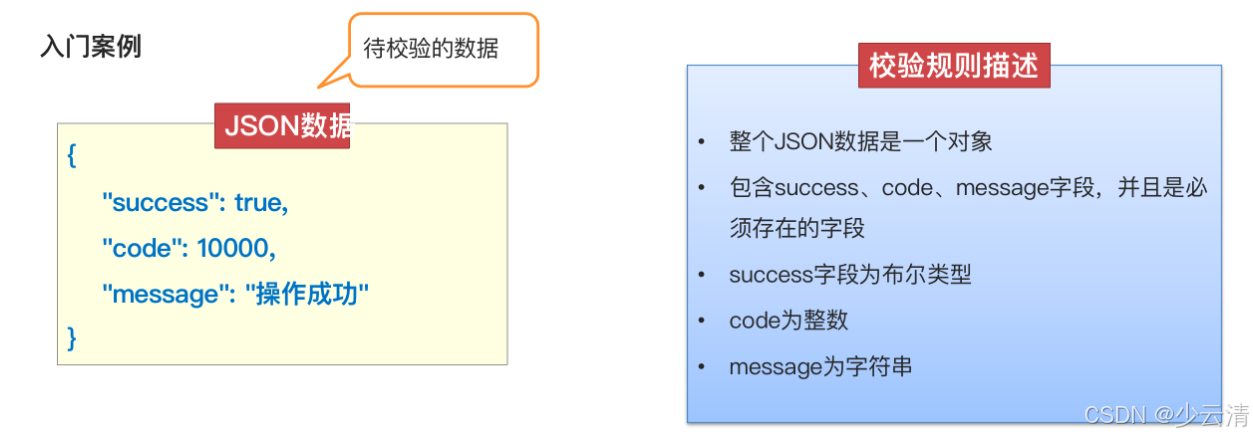
json
//  JSON Schema,把汉字写的"校验规则描述"转为JSON Schema语法,如下:

{
 	"type": "object",
 	"properties": {
     	"success": {"type": "boolean"},
     	"code": {"type": "integer"},
     	"message": {"type": "string"}
 	},
 	"required": ["success", "code", "message"]
}

====================================================================
// json数据:待校验数据
{
    "success": true,
    "code": 100,
    "message": "操作成功"
}
2.2 JSON Schema校验方式-2种
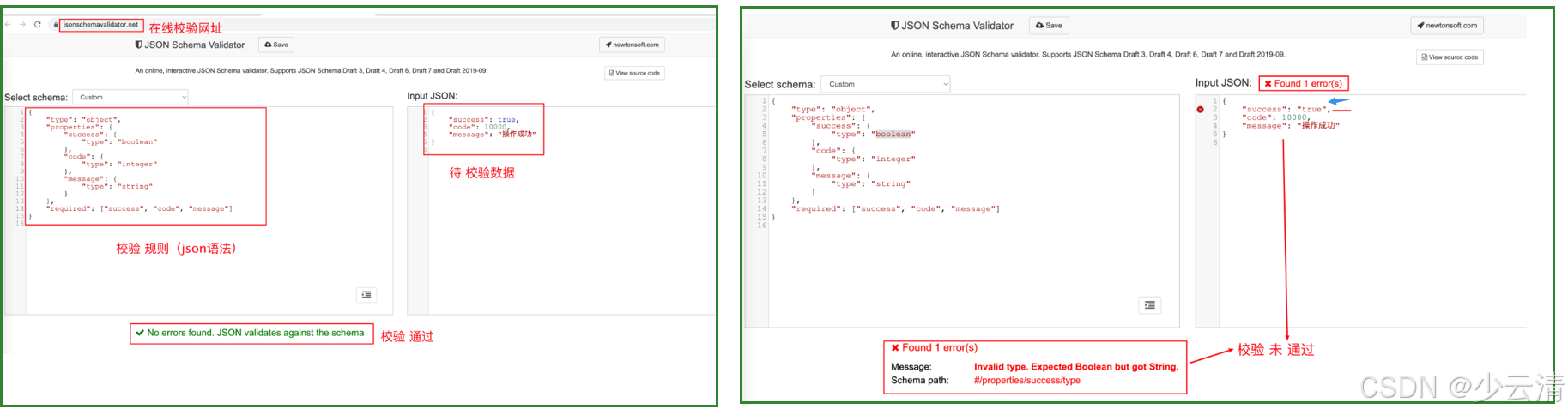
2.2.1 在线工具校验
http://json-schema-validator.herokuapp.com
https://www.jsonschemavalidator.net 【推荐】
2.2.2 python代码校验
python
实现步骤:

1、导包 import jsonschema

2、定义 jsonschema格式 数据校验规则

3、调⽤ jsonschema.validate(instance="json数据", schema="jsonshema规则")

// instance:实例
查验校验结果:
-
校验通过:返回 None
-
校验失败
- schema 规则错误,返回 SchemaError
- json 数据错误,返回 ValidationError
案例:
python
"""
入门案例
"""
# 1. 导包
import jsonschema

# 2. 创建 校验规则
schema = {
    "type": "object",
    "properties": {
        "success": {
            "type": "boolean"
        },
        "code": {
            "type": "integer"
        },
        "message": {
            "type": "string"
        }
    },
    "required": ["success", "code", "message"]
}

# 3. 准备 待校验数据(用 python语法,表示的 json数据)
json_data = {
    "success": True,   # 布尔类型的python为True
    "code": 100.3,
    "message": "操作成功"
}

# 4. 调用方法 进行校验
res = jsonschema.validate(instance=json_data, schema=schema)

# 5. 查看校验结果
print("校验结果:", res)
通过结果:
bash
校验结果: None2.2.3 python代码校验的错误终端提示
1、SchemaError:校验规则中,有语法错误
2、ValidationError:json数据与校验规则不符,导致校验失败。
三、JSON Schema语法
| JSON Schema 关键字 | 描述 |
|---|---|
| type | 表示待校验元素的类型 |
| properties | 定义待校验的JSON对象中, 各个key-value对中value的限制条件 |
| required | 定义待校验的JSON对象中, 必须存在的key |
| const | JSON元素必须等于指定的内容 |
| pattern | 使用正则表达式约束字符串类型数据 |
3.1 type关键字
type: 用于限定待校验JSON元素所属的数据类型。
| type取值 | 对应的python数据类型 | 描述 |
|---|---|---|
| object | object | 对象 |
| array | list 列表 | 数组 |
| integer | int | 整数 |
| number | float或int | 数字 |
| null | None | 空 |
| boolean (True、False) | bool | 布尔 |
| string | str | 字符串 |
3.1.1 type语法
yacas
{
	"type": "数据类型"
}
3.1.2 type示例
python
# 导包
import jsonschema

# 校验规则 (json语法)
schema = {
    "type": "object"
}

# 数据
# json_data = 100
# json_data = 100.2
# json_data = "hello"
# json_data = [1, 2, 3, 4]
# json_data = None
# json_data = True
json_data = {"a": 1, "b": 2}

# 调用方法
res = jsonschema.validate(instance=json_data, schema=schema)

# 查看结果
print("校验结果:", res)
3.2 properties关键字
**说明:**是 type关键字的辅助。用于 type 的值为 object 的场景。
**作用:**指定 对象中 每个字段的校验规则。 可以嵌套使用。
3.2.1 properties语法
yacas
语法:
{
    "type": "object",
    "properties": {
        "字段名1":{规则},
        "字段名2":{规则},
    	......
	}
}
3.2.2 properties示例1
需求:
1、已知JSON数据
2、要求定义每个一级字段的数据类型
python
# 导包
import jsonschema
# 校验规则,根据测试数据写校验规则
schema = {
    "type": "object",
    "properties": {
        "success": {"type": "boolean"},
        "code": {"type": "integer"},
        "message": {"type": "string"},
        "money": {"type": "number"},
        "address": {"type": "null"},
        "data": {"type": "object"},
        "luckyNumber": {"type": "array"}
    }
}
# 测试数据
json_data = {
    "success": True,
    "code": 10000,
    "message": "操作成功",
    "money": 6.66,
    "address": None,
    "data": {
        "name": "tom"
    },
    "luckyNumber": [6, 8, 9]
}
# 调用方法校验
res = jsonschema.validate(instance=json_data, schema=schema)
# 查看校验结果
print("校验结果:", res)
3.2.3 properties示例2
需求:
1、已知JSON数据
2、要求定义JSON对象中包含的所有字段及数据类型
python
# 导包
import jsonschema

# 校验规则
schema = {
    "type": "object",
    "properties": {
        "success": {"type": "boolean"},
        "code": {"type": "integer"},
        "message": {"type": "string"},
        "money": {"type": "number"},
        "address": {"type": "null"},
        "data": {
            "type": "object",
            "properties": {
                "name": {"type": "string"},
                "age": {"type": "integer"},
                "height": {"type": "number"}
            }
        },
        "luckyNumber": {"type": "array"}
    }
}
# 测试数据
json_data = {
    "success": True,
    "code": 10000,
    "message": "操作成功",
    "money": 6.66,
    "address": None,
    "data": {
        "name": "tom",
        "age": 18,
        "height": 1.81
    },
    "luckyNumber": [6, 8, 9]
}

# 调用方法校验
res = jsonschema.validate(instance=json_data, schema=schema)
# 查看校验结果
print("校验结果:", res)
3.3 required关键字
**作用:**定义待校验的Json对象中,必须存在的key。
说明:
- 用于限制JSON对象中必须包含哪些key ;
- 该关键字的值是一个数组, 而数组中的元素必须是字符串,而且必须是唯一的
3.3.1 required语法
yacas
语法:
{
	"required": ["字段名1", "字段名2", ...]
}
3.3.2 required示例
需求:
1、已知JSON数据
2、要求JSON对象中必须包含success、 code、message等字段
python
# 导包
import jsonschema

# 待测数据
json_data = {
    "success": True,
    "code": 10000,
    "message": "操作成功",
    "money": 6.66,
    "address": None,
    "data": {
        "name": "tom",
        "age": "18",
        "height": 1.81
    },
    "luckyNumber": [6, 8, 9]
}

# 校验规则
schema = {
    "type": "object",
    "properties": {
        "success": {"type": "boolean"},
        "code": {"type": "integer"},
        "message": {"type": "string"},
        "money": {"type": "number"},
        "address": {"type": "null"},
        "data": {
            "type": "object",
            "required": ["name", "age", "height"]
        },
        "luckyNumber": {"type": "array"},
    },
    "required": ["success", "code", "message", "money", "address", "data", "luckyNumber"]
}

# 调用方法
res = jsonschema.validate(instance=json_data, schema=schema)

# 查看结果
print("校验结果:", res)
3.4 const关键字
**作用:**用于校验JSON元素必须等于指定的内容 。等价于 断言中 == 用法
说明:
- 如果待校验的JSON元素的值和该关键字指定的值相同, 则通过校验。否则, 无法通过校验
- 该关键字的值可以是任何值, 包括null
3.4.1 const语法
yacas
语法:
{
    "字段名":{"const": 具体值}
}
3.4.1 const示例
python
# 导包
import jsonschema

# 待测试数据
data = {
    "success": True,
    "name": "李四",
    "height": 1.93,
    "addr": None
}

# 校验规则
schema = {
    "type": "object",
    "properties": {
        "success": {"const": True},
        "name": {"const": "李四"},
        "height": {"const": 1.93},
        "addr": {"const": None}
    }
}

# 调用方法
res = jsonschema.validate(instance=data, schema=schema)

# 查看结果
print(res)
3.5 pattern关键字
**作用:**指定正则表达式,对字符串进行模糊匹配
正则表达式,用不常用的符号,排列组合,从大量 字符串 数据中,按指定条件 筛选 数据。
yacas
基础正则举例:
1 包含字符串:hello
2 以字符串开头 ^: ^hello 	如:hello,world
3 以字符串结尾 $: hello$ 	如:中国,hello
4 匹配[]内任意1个字符[]: [0-9]匹配任意⼀个数字  [a-z]匹任意一个小写字母  [cjfew9823]匹配任意一个
5 匹配指定次数{}: [0-9]{11}匹配11位数字。说明:0-9之间的任意数字要出现11次。

匹配手机号:^[0-9]{11}$    说明:以数字开头,0-9之间的任意数字要出现11次,以数字结尾
说明:
- 正则表达式: 字符串的匹配模式
- 包含指定字符串: pattern = "指定字符串"
3.5.1 pattern语法
yacas
{
    "字段名":{"pattern": "正则表达式"}
}
3.5.2 pattern示例
需求:
1、已知JSON数据
2、校验message字段的值必须包含'操作成功'
3、校验手机号必须是11为数字
python
# 导包
import jsonschema

# 测试数据
data = {
    "message": "操作成功!",
    "mobile": "11800000002"
}

# 校验规则
schema = {
    "type": "object",
    "properties": {
        "message": {"pattern": "^操作成功"},
        "mobile": {"pattern": "^[0-9]{11}$"}
    }
}

# 调用方法
res = jsonschema.validate(instance=data, schema=schema)

# 查看结果
print(res)
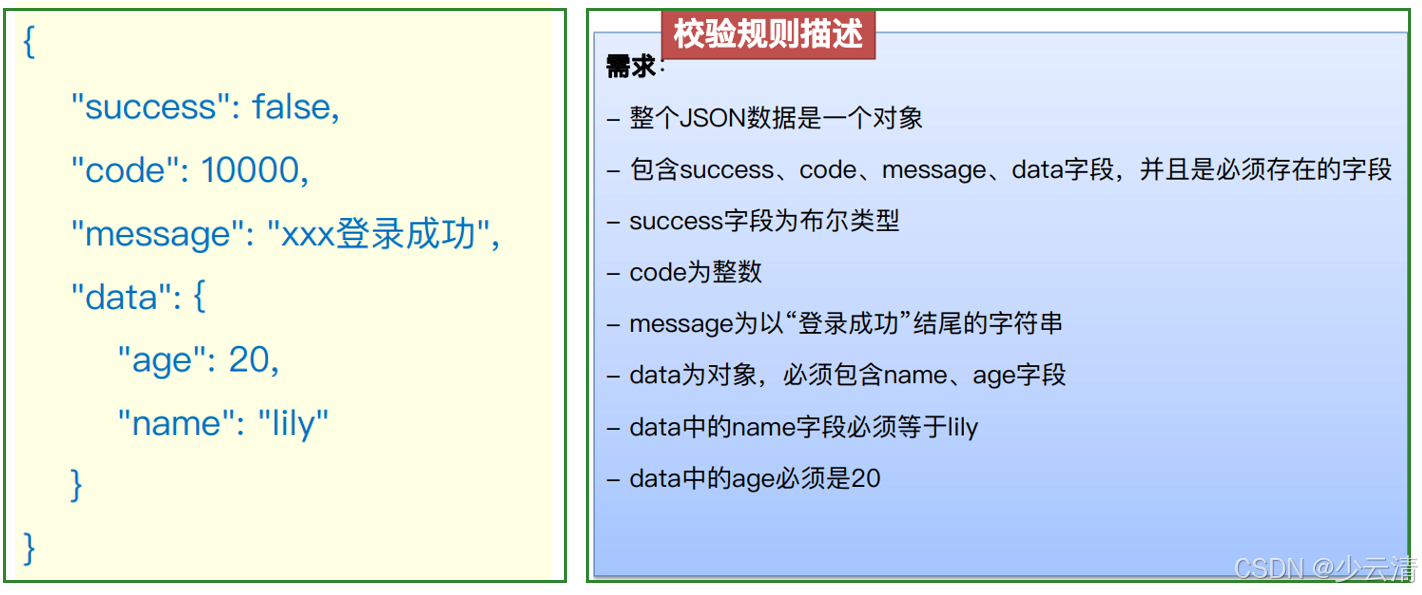
四、JSON Schema综合案例
python
"""
综合案例
"""
import jsonschema

data = {
    "success": False,
    "code": 10000,
    "message": "xxx登录成功",
    "data": {
        "age": 20,
        "name": "lily"
    }
}
schema = {
    "type": "object",
    "properties": {
        "success": {"type": "boolean"},
        "code": {"type": "integer"},
        "message": {"pattern": "登录成功$"},
        "data": {
            "type": "object",
            "properties": {
                "name": {"const": "lily"},
                "age": {"const": 20}
            },
            "required": ["name", "age"]
        }
    },
    "required": ["success", "code", "message", "data"]
}

# 调用方法
res = jsonschema.validate(instance=data, schema=schema)

# 查看结果
print(res)