java
import java.io.FileInputStream;
import java.io.FileOutputStream;
import java.util.Date;
import java.util.HashMap;
import java.util.Map;

import org.apache.poi.ss.usermodel.Cell;
import org.apache.poi.ss.usermodel.Row;
import org.apache.poi.ss.usermodel.Sheet;
import org.apache.poi.ss.usermodel.Workbook;
import org.apache.poi.xssf.usermodel.XSSFWorkbook;

/**
 * 根据Excel模板,指定单元格坐标填充数据
 * @author HK 2025年12月30日
 *
 */
public class ExcelFiller {

    /**
     * 根据模板文件生成新 Excel 文件,并填充指定单元格的值
     *
     * @param templatePath 模板文件路径
     * @param cellData      单元格坐标 -> 值的映射(如 "A1": "Hello", "B2": 123)
     * @param outputFilePath 输出文件路径
     * @return 是否成功
     */
    public static boolean fillExcel(String templatePath, Map<String, Object> cellData, String outputFilePath) {
        try (FileInputStream fis = new FileInputStream(templatePath);
             Workbook workbook = new XSSFWorkbook(fis)) {

            // 获取第一个 Sheet(可扩展为指定 sheet)
            Sheet sheet = workbook.getSheetAt(0);

            // 遍历需要填充的数据
            for (Map.Entry<String, Object> entry : cellData.entrySet()) {
                String cellAddress = entry.getKey();
                Object value = entry.getValue();

                // 解析单元格坐标,如 "A1" -> row 0, column 0
                int rowIdx = Integer.parseInt(cellAddress.replaceAll("[^0-9]", ""));
                int colIdx = cellAddress.charAt(0) - 'A';

                Row row = sheet.getRow(rowIdx);
                if (row == null) {
                    row = sheet.createRow(rowIdx);
                }

                Cell cell = row.getCell(colIdx);
                if (cell == null) {
                    cell = row.createCell(colIdx);
                }

                // 根据值类型设置单元格内容
                if (value instanceof String) {
                    cell.setCellValue((String) value);
                } else if (value instanceof Integer) {
                    cell.setCellValue((Integer) value);
                } else if (value instanceof Double) {
                    cell.setCellValue((Double) value);
                } else if (value instanceof Boolean) {
                    cell.setCellValue((Boolean) value);
                } else if (value instanceof Date) {
                    cell.setCellValue((Date) value);
                } else {
                    cell.setCellValue(value.toString());
                }
            }

            // 保存到新文件
            try (FileOutputStream fos = new FileOutputStream(outputFilePath)) {
                workbook.write(fos);
            }

            return true;

        } catch (Exception e) {
            e.printStackTrace();
            return false;
        }
    }

    // 示例:测试方法
    public static void main(String[] args) {
        String templatePath = "D:\\template.xlsx";
        String outputFilePath = "D:\\output-file.xlsx";

        // 数据集合:单元格坐标 -> 值
        Map<String, Object> cellData = new HashMap<String, Object>();
        cellData.put("A1", "Hello");
        cellData.put("B2", "123");

        boolean result = fillExcel(templatePath, cellData, outputFilePath);
        if (result) {
            System.out.println("Excel 填充成功,已保存到: " + outputFilePath);
        } else {
            System.out.println("Excel 填充失败!");
        }
    }
}
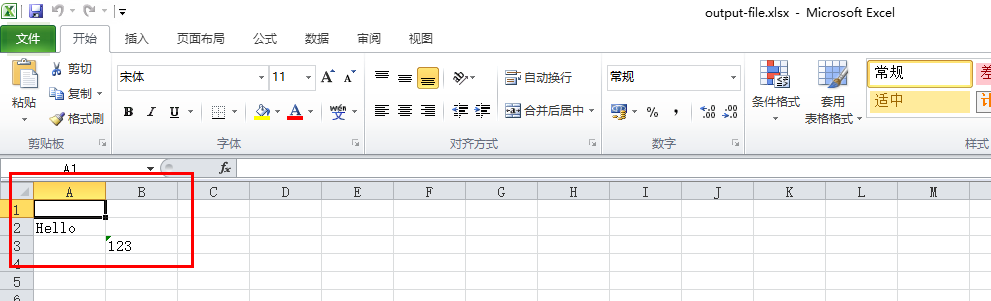
测试Demo,创建一个空Excel,执行上述代码