WaferMap.html
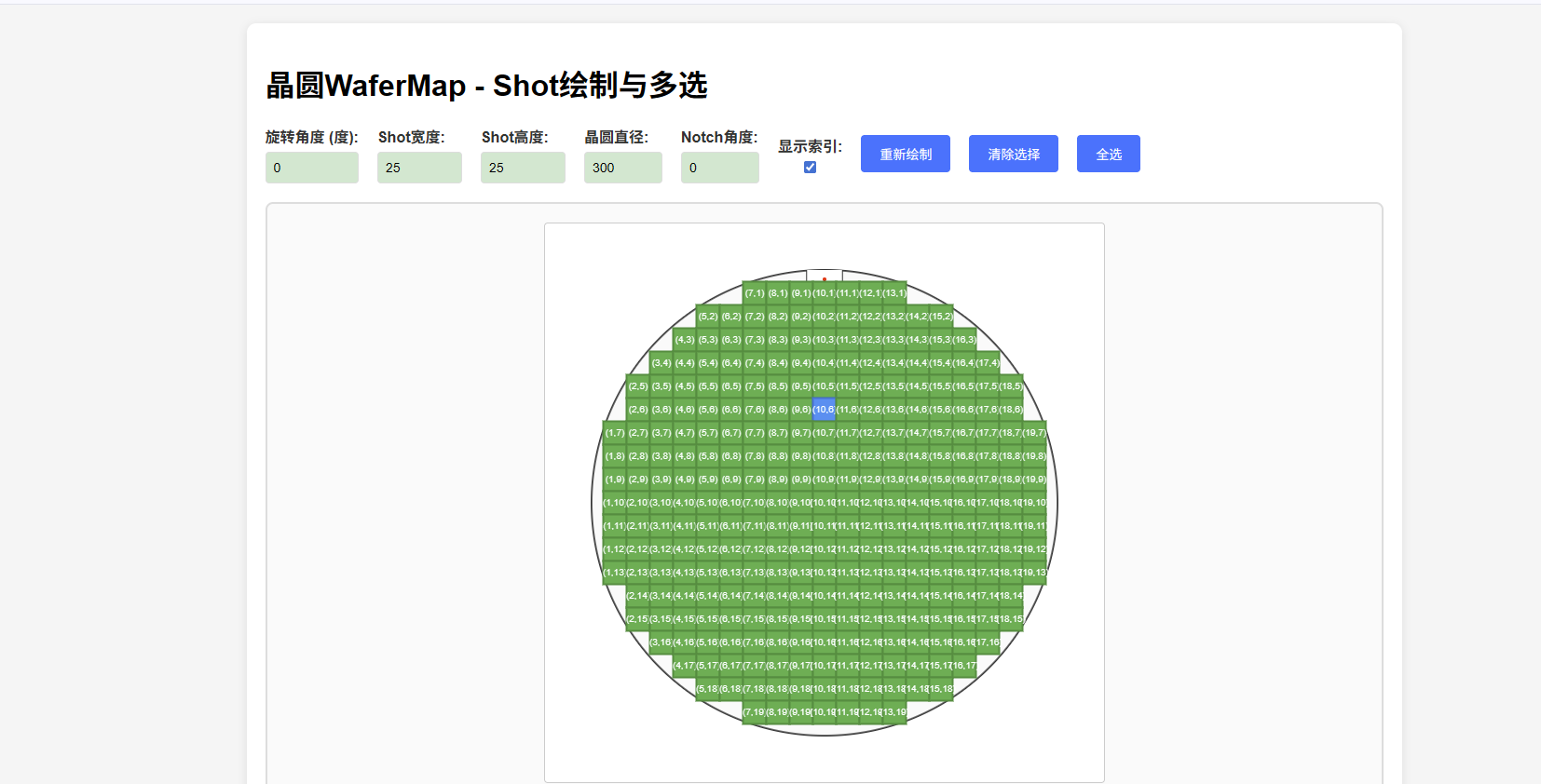
<!DOCTYPE html>
<html lang="zh-CN">
<head>
<meta charset="UTF-8">
<meta name="viewport" content="width=device-width, initial-scale=1.0">
<title>晶圆WaferMap - Shot绘制与多选</title>
<style>
body {
font-family: Arial, sans-serif;
margin: 20px;
background-color: #f5f5f5;
}
.container {
max-width: 1200px;
margin: 0 auto;
background: white;
border-radius: 10px;
padding: 20px;
box-shadow: 0 2px 10px rgba(0,0,0,0.1);
}
.controls {
display: flex;
gap: 20px;
margin-bottom: 20px;
flex-wrap: wrap;
align-items: center;
}
.control-group {
display: flex;
flex-direction: column;
gap: 5px;
}
label {
font-weight: bold;
color: #333;
}
input, select {
padding: 8px;
border: 1px solid #ddd;
border-radius: 4px;
font-size: 14px;
}
input[type="checkbox"] {
width: auto;
margin: 0;
padding: 0;
}
button {
padding: 10px 20px;
background-color: #007bff;
color: white;
border: none;
border-radius: 4px;
cursor: pointer;
font-size: 14px;
}
button:hover {
background-color: #0056b3;
}
.canvas-container {
display: flex;
justify-content: center;
margin: 20px 0;
border: 2px solid #ddd;
border-radius: 8px;
background: #fafafa;
padding: 20px;
}
canvas {
border: 1px solid #ccc;
border-radius: 4px;
background: white;
}
.info-panel {
margin-top: 20px;
padding: 15px;
background: #f8f9fa;
border-radius: 5px;
border: 1px solid #e9ecef;
}
.selected-shots {
margin-top: 10px;
padding: 10px;
background: #e3f2fd;
border-radius: 5px;
border: 1px solid #bbdefb;
}
.shot-info {
font-size: 12px;
color: #666;
margin-top: 5px;
}
</style>
</head>
<body>
<div class="container">
<h1>晶圆WaferMap - Shot绘制与多选</h1>
<div class="controls">
<div class="control-group">
<label for="rotation">旋转角度 (度):</label>
<input type="number" id="rotation" value="0" min="0" max="360" step="1">
</div>
<div class="control-group">
<label for="shotWidth">Shot宽度:</label>
<input type="number" id="shotWidth" value="25" min="1" max="50" step="0.1">
</div>
<div class="control-group">
<label for="shotHeight">Shot高度:</label>
<input type="number" id="shotHeight" value="25" min="1" max="50" step="0.1">
</div>
<div class="control-group">
<label for="waferSize">晶圆直径:</label>
<input type="number" id="waferSize" value="300" min="50" max="300" step="1">
</div>
<div class="control-group">
<label for="notchAngle">Notch角度:</label>
<input type="number" id="notchAngle" value="0" min="0" max="360" step="1">
</div>
<div class="control-group">
<label for="showIndices">显示索引:</label>
<input type="checkbox" id="showIndices" checked>
</div>
<button onclick="redrawWafer()">重新绘制</button>
<button onclick="clearSelection()">清除选择</button>
<button onclick="selectAll()">全选</button>
</div>
<div class="canvas-container">
<canvas id="waferCanvas" width="600" height="600"></canvas>
</div>
<div class="info-panel">
<h3>操作说明:</h3>
<p>• 点击Shot进行单选</p>
<p>• 按住Ctrl/Cmd键点击进行多选</p>
<p>• 拖拽鼠标进行框选(按住Ctrl/Cmd键可在框选时保持之前的选择)</p>
<p>• 调整Notch角度来设定晶圆方向</p>
<p>• 可以选择是否显示Shot的XY索引</p>
<p>• 蓝色为选中状态,绿色为正常状态</p>
<div class="selected-shots">
<strong>已选择的Shot:</strong>
<div id="selectedShotsList">无</div>
</div>
<div class="shot-info">
<div>总Shot数: <span id="totalShots">0</span></div>
<div>已选择: <span id="selectedCount">0</span></div>
</div>
</div>
</div>
<script>
class WaferMap {
constructor(canvasId) {
this.canvas = document.getElementById(canvasId);
this.ctx = this.canvas.getContext('2d');
this.shots = [];
this.selectedShots = new Set();
this.dragStartX = 0;
this.dragStartY = 0;
this.isDragging = false;
this.isMultiSelect = false;
this.setupEventListeners();
this.generateDefaultShots();
this.draw();
}
setupEventListeners() {
this.canvas.addEventListener('mousedown', (e) => this.handleMouseDown(e));
this.canvas.addEventListener('mousemove', (e) => this.handleMouseMove(e));
this.canvas.addEventListener('mouseup', (e) => this.handleMouseUp(e));
this.canvas.addEventListener('click', (e) => this.handleClick(e));
document.addEventListener('keydown', (e) => {
if (e.ctrlKey || e.metaKey) {
this.isMultiSelect = true;
}
});
document.addEventListener('keyup', (e) => {
if (!e.ctrlKey && !e.metaKey) {
this.isMultiSelect = false;
}
});
}
generateDefaultShots() {
// 生成默认的Shot网格
const shotWidth = parseFloat(document.getElementById('shotWidth').value);
const shotHeight = parseFloat(document.getElementById('shotHeight').value);
const waferSize = parseFloat(document.getElementById('waferSize').value);
this.shots = [];
const centerX = this.canvas.width / 2;
const centerY = this.canvas.height / 2;
const radius = Math.min(centerX, centerY) - 50;
// 计算网格数量
const gridWidth = Math.ceil(radius * 2 / shotWidth);
const gridHeight = Math.ceil(radius * 2 / shotHeight);
let shotId = 1;
for (let row = 0; row < gridHeight; row++) {
for (let col = 0; col < gridWidth; col++) {
const x = (col - gridWidth / 2) * shotWidth;
const y = (row - gridHeight / 2) * shotHeight;
// 只添加在晶圆范围内的Shot
if (Math.sqrt(x * x + y * y) <= radius - Math.max(shotWidth, shotHeight) / 2) {
this.shots.push({
id: shotId++,
x: x,
y: y,
row: row,
col: col,
xIndex: col,
yIndex: row,
status: 'normal'
});
}
}
}
this.updateShotCount();
}
drawNotch(centerX, centerY, radius, notchAngle) {
// 绘制Notch(缺口)
this.ctx.save();
this.ctx.translate(centerX, centerY);
this.ctx.rotate(notchAngle * Math.PI / 180);
// Notch的尺寸
const notchWidth = radius * 0.15; // Notch宽度为半径的15%
const notchDepth = radius * 0.08; // Notch深度为半径的8%
// 绘制Notch缺口
this.ctx.beginPath();
this.ctx.moveTo(-notchWidth/2, -radius);
this.ctx.lineTo(-notchWidth/2, -radius + notchDepth);
this.ctx.lineTo(notchWidth/2, -radius + notchDepth);
this.ctx.lineTo(notchWidth/2, -radius);
this.ctx.strokeStyle = '#333';
this.ctx.lineWidth = 2;
this.ctx.stroke();
this.ctx.fillStyle = 'white';
this.ctx.fill();
// 绘制Notch标识
this.ctx.beginPath();
this.ctx.arc(0, -radius + notchDepth/2, 2, 0, 2 * Math.PI);
this.ctx.fillStyle = '#ff0000';
this.ctx.fill();
this.ctx.restore();
}
rotatePoint(x, y, angle) {
const rad = angle * Math.PI / 180;
const cos = Math.cos(rad);
const sin = Math.sin(rad);
return {
x: x * cos - y * sin,
y: x * sin + y * cos
};
}
draw() {
this.ctx.clearRect(0, 0, this.canvas.width, this.canvas.height);
const centerX = this.canvas.width / 2;
const centerY = this.canvas.height / 2;
const radius = Math.min(centerX, centerY) - 50;
const rotation = parseFloat(document.getElementById('rotation').value);
const shotWidth = parseFloat(document.getElementById('shotWidth').value);
const shotHeight = parseFloat(document.getElementById('shotHeight').value);
const notchAngle = parseFloat(document.getElementById('notchAngle').value);
const showIndices = document.getElementById('showIndices').checked;
// 绘制晶圆轮廓
this.ctx.beginPath();
this.ctx.arc(centerX, centerY, radius, 0, 2 * Math.PI);
this.ctx.strokeStyle = '#333';
this.ctx.lineWidth = 2;
this.ctx.stroke();
this.ctx.fillStyle = 'rgba(240, 240, 240, 0.3)';
this.ctx.fill();
// 绘制Notch(缺口)
this.drawNotch(centerX, centerY, radius, notchAngle);
// 绘制晶圆中心点
this.ctx.beginPath();
this.ctx.arc(centerX, centerY, 3, 0, 2 * Math.PI);
this.ctx.fillStyle = '#ff0000';
this.ctx.fill();
// 绘制所有Shot
this.shots.forEach(shot => {
const rotatedPos = this.rotatePoint(shot.x, shot.y, rotation);
const screenX = centerX + rotatedPos.x;
const screenY = centerY + rotatedPos.y;
// 保存旋转后的屏幕坐标用于点击检测
shot.screenX = screenX;
shot.screenY = screenY;
this.ctx.save();
this.ctx.translate(screenX, screenY);
this.ctx.rotate(rotation * Math.PI / 180);
// 根据选择状态设置颜色
if (this.selectedShots.has(shot.id)) {
this.ctx.fillStyle = '#2196F3';
this.ctx.strokeStyle = '#1976D2';
} else {
this.ctx.fillStyle = '#4CAF50';
this.ctx.strokeStyle = '#388E3C';
}
// 绘制Shot矩形
this.ctx.fillRect(-shotWidth/2, -shotHeight/2, shotWidth, shotHeight);
this.ctx.strokeRect(-shotWidth/2, -shotHeight/2, shotWidth, shotHeight);
// 绘制Shot信息
this.ctx.fillStyle = 'white';
this.ctx.font = '10px Arial';
this.ctx.textAlign = 'center';
this.ctx.textBaseline = 'middle';
if (showIndices) {
// 只显示XY索引
this.ctx.fillText(`(${shot.xIndex},${shot.yIndex})`, 0, 0);
}
this.ctx.restore();
});
// 绘制选择框
if (this.isDragging) {
this.ctx.strokeStyle = '#2196F3';
this.ctx.lineWidth = 1;
this.ctx.setLineDash([5, 5]);
this.ctx.strokeRect(
this.dragStartX,
this.dragStartY,
this.currentX - this.dragStartX,
this.currentY - this.dragStartY
);
this.ctx.setLineDash([]);
}
this.updateSelectedShotsList();
}
getMousePos(e) {
const rect = this.canvas.getBoundingClientRect();
return {
x: e.clientX - rect.left,
y: e.clientY - rect.top
};
}
handleMouseDown(e) {
const pos = this.getMousePos(e);
this.dragStartX = pos.x;
this.dragStartY = pos.y;
this.isDragging = false; // 先设为false,在mousemove中再设为true
this.hasDragged = false;
}
handleMouseMove(e) {
if (this.isDragging || (this.dragStartX && this.dragStartY)) {
const pos = this.getMousePos(e);
const dx = pos.x - this.dragStartX;
const dy = pos.y - this.dragStartY;
// 只有移动距离大于5像素才开始拖拽
if (Math.abs(dx) > 5 || Math.abs(dy) > 5) {
this.isDragging = true;
this.hasDragged = true;
}
if (this.isDragging) {
this.currentX = pos.x;
this.currentY = pos.y;
this.draw();
}
}
}
handleMouseUp(e) {
if (this.isDragging && this.hasDragged) {
const pos = this.getMousePos(e);
this.selectShotsInRect(
this.dragStartX,
this.dragStartY,
pos.x,
pos.y
);
this.draw();
}
this.isDragging = false;
this.hasDragged = false;
this.dragStartX = null;
this.dragStartY = null;
}
handleClick(e) {
// 如果刚刚进行了拖拽,则不处理点击
if (this.hasDragged) return;
const pos = this.getMousePos(e);
const shotWidth = parseFloat(document.getElementById('shotWidth').value);
const shotHeight = parseFloat(document.getElementById('shotHeight').value);
// 查找点击的Shot
const clickedShot = this.shots.find(shot => {
const dx = pos.x - shot.screenX;
const dy = pos.y - shot.screenY;
return Math.abs(dx) <= shotWidth/2 && Math.abs(dy) <= shotHeight/2;
});
if (clickedShot) {
if (e.ctrlKey || e.metaKey) {
// 多选模式:切换选择状态
if (this.selectedShots.has(clickedShot.id)) {
this.selectedShots.delete(clickedShot.id);
} else {
this.selectedShots.add(clickedShot.id);
}
} else {
// 单选模式:只选择当前Shot
this.selectedShots.clear();
this.selectedShots.add(clickedShot.id);
}
this.draw();
}
}
selectShotsInRect(x1, y1, x2, y2) {
const minX = Math.min(x1, x2);
const maxX = Math.max(x1, x2);
const minY = Math.min(y1, y2);
const maxY = Math.max(y1, y2);
// 如果没有按住Ctrl/Cmd键,先清除之前的选择
if (!(event && (event.ctrlKey || event.metaKey))) {
this.selectedShots.clear();
}
this.shots.forEach(shot => {
if (shot.screenX >= minX && shot.screenX <= maxX &&
shot.screenY >= minY && shot.screenY <= maxY) {
this.selectedShots.add(shot.id);
}
});
}
updateSelectedShotsList() {
const selectedList = document.getElementById('selectedShotsList');
const selectedCount = document.getElementById('selectedCount');
if (this.selectedShots.size === 0) {
selectedList.textContent = '无';
} else {
const selectedIds = Array.from(this.selectedShots).sort((a, b) => a - b);
const selectedShotsInfo = selectedIds.map(id => {
const shot = this.shots.find(s => s.id === id);
return `ID${id}(${shot.xIndex},${shot.yIndex})`;
});
selectedList.innerHTML = selectedShotsInfo.join(', ');
}
selectedCount.textContent = this.selectedShots.size;
}
updateShotCount() {
document.getElementById('totalShots').textContent = this.shots.length;
}
clearSelection() {
this.selectedShots.clear();
this.draw();
}
selectAll() {
this.selectedShots.clear();
this.shots.forEach(shot => this.selectedShots.add(shot.id));
this.draw();
}
redraw() {
this.generateDefaultShots();
this.selectedShots.clear();
this.draw();
}
}
// 初始化WaferMap
let waferMap;
window.onload = function() {
waferMap = new WaferMap('waferCanvas');
};
function redrawWafer() {
waferMap.redraw();
}
function clearSelection() {
waferMap.clearSelection();
}
function selectAll() {
waferMap.selectAll();
}
</script>
</body>
</html>