一、共享参数的用法
1、SharedPreferences是Android的一个轻量级存储工具,采用的存储结构是Key-Value的键值对方式
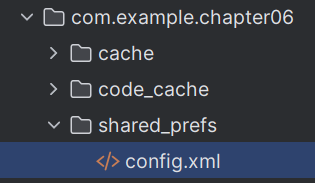
2、共享参数的存储介质是符合XML规范的配置文件。保存路径是:/data/data/应用包名/shared_prefs/文件名.xml
3、共享参数的使用场景
(1)简单且孤立的数据。若是复杂且相互间有关的数据,则要保存在数据库中
(2)文本形式的数据。若是二进制数据,则要保存在文件中
(3)需要持久化存储的数据。在App退出后再次启动时,之前保存的数据仍然有效
4、实际开发中,共享参数经常存储的数据有App的个性化配置信息、用户使用App的行为信息、临时需要保存的片段信息等
5、例子:把注册信息写入共享参数

activity_share_write.xml
XML
<?xml version="1.0" encoding="utf-8"?>
<LinearLayout xmlns:android="http://schemas.android.com/apk/res/android"
    xmlns:app="http://schemas.android.com/apk/res-auto"
    xmlns:tools="http://schemas.android.com/tools"
    android:layout_width="match_parent"
    android:layout_height="match_parent"
    android:orientation="vertical"
    tools:context=".ShareWriteActivity">

    <GridLayout
        android:layout_width="match_parent"
        android:layout_height="wrap_content"
        android:columnCount="2"
        android:rowCount="4">

        <TextView
            android:layout_width="60dp"
            android:layout_height="wrap_content"
            android:text="姓名:"
            android:textSize="17sp"/>

        <EditText
            android:id="@+id/et_name"
            android:layout_width="0dp"
            android:layout_height="wrap_content"
            android:layout_columnWeight="1"
            android:inputType="text"
            android:hint="请输入姓名"/>

        <TextView
            android:layout_width="60dp"
            android:layout_height="wrap_content"
            android:text="年龄:"
            android:textSize="17sp"/>

        <EditText
            android:id="@+id/et_age"
            android:layout_width="0dp"
            android:layout_height="wrap_content"
            android:layout_columnWeight="1"
            android:inputType="number"
            android:maxLength="3"
            android:hint="请输入年龄"/>

        <TextView
            android:layout_width="60dp"
            android:layout_height="wrap_content"
            android:text="身高:"
            android:textSize="17sp"/>

        <EditText
            android:id="@+id/et_height"
            android:layout_width="0dp"
            android:layout_height="wrap_content"
            android:layout_columnWeight="1"
            android:inputType="numberDecimal"
            android:maxLength="6"
            android:hint="请输入身高"/>

        <TextView
            android:layout_width="60dp"
            android:layout_height="wrap_content"
            android:text="体重:"
            android:textSize="17sp"/>

        <EditText
            android:id="@+id/et_weight"
            android:layout_width="0dp"
            android:layout_height="wrap_content"
            android:layout_columnWeight="1"
            android:inputType="numberDecimal"
            android:maxLength="6"
            android:hint="请输入体重"/>

    </GridLayout>

    <CheckBox
        android:id="@+id/ck_married"
        android:layout_width="match_parent"
        android:layout_height="wrap_content"
        android:text="已婚"
        android:textSize="17sp"/>

    <Button
        android:id="@+id/btn_save"
        android:layout_width="match_parent"
        android:layout_height="wrap_content"
        android:text="保存到共享参数"
        android:textSize="17sp"/>

</LinearLayout>
ShareWriteActivity.java
java
package com.example.chapter06;

import androidx.appcompat.app.AppCompatActivity;

import android.content.Context;
import android.content.SharedPreferences;
import android.os.Bundle;
import android.view.View;
import android.widget.Button;
import android.widget.CheckBox;
import android.widget.EditText;

import java.util.Map;

public class ShareWriteActivity extends AppCompatActivity {

    private EditText et_name;
    private EditText et_age;
    private EditText et_height;
    private EditText et_weight;
    private CheckBox ck_married;
    private SharedPreferences config;

    @Override
    protected void onCreate(Bundle savedInstanceState) {
        super.onCreate(savedInstanceState);
        setContentView(R.layout.activity_share_write);

        et_name = findViewById(R.id.et_name);
        et_age = findViewById(R.id.et_age);
        et_height = findViewById(R.id.et_height);
        et_weight = findViewById(R.id.et_weight);
        ck_married = findViewById(R.id.ck_married);

        config = getSharedPreferences("config", Context.MODE_PRIVATE);

        Button btn_save = findViewById(R.id.btn_save);
        btn_save.setOnClickListener(new View.OnClickListener() {
            @Override
            public void onClick(View view) {
                String name = et_name.getText().toString();
                String age = et_age.getText().toString();
                String height = et_height.getText().toString();
                String weight = et_weight.getText().toString();

                // 获得编辑器
                SharedPreferences.Editor edit = config.edit();
                edit.putString("name", name);
                edit.putInt("age", Integer.parseInt(age));
                edit.putFloat("height", Float.parseFloat(height));
                edit.putFloat("weight", Float.parseFloat(weight));
                edit.putBoolean("married", ck_married.isChecked());
                // 提交
                edit.commit();
            }
        });

        // 读取文件,有的话就设置进去
        reload();
    }

    private void reload() {
        Map<String, ?> all = config.getAll();
        if (all.get("name") != null) {
            et_name.setText(String.valueOf(all.get("name")));
        }
        if (all.get("age") != null) {
            et_age.setText(String.valueOf(all.get("age")));
        }
        if (all.get("height") != null) {
            et_height.setText(String.valueOf(all.get("height")));
        }
        if (all.get("weight") != null) {
            et_weight.setText(String.valueOf(all.get("weight")));
        }
        if (all.get("married") != null) {
            ck_married.setChecked((boolean)all.get("married"));
        }
    }
}
生成的文件config.xml
XML
<?xml version='1.0' encoding='utf-8' standalone='yes' ?>
<map>
    <string name="name">qwer</string>
    <float name="weight" value="120.0" />
    <boolean name="married" value="true" />
    <int name="age" value="23" />
    <float name="height" value="170.5" />
</map>
reload()方法说明:读取文件,将保存的数据设置进页面