一、技术选型与架构设计
-
核心库选择
- SSH/SFTP :采用第三方库
QSsh,支持加密传输与安全文件操作 - FTP :使用Qt5+的
QNetworkAccessManager或第三方QFtp移植方案 - 命令执行:通过SSH通道调用远程Shell
- SSH/SFTP :采用第三方库
-
模块划分
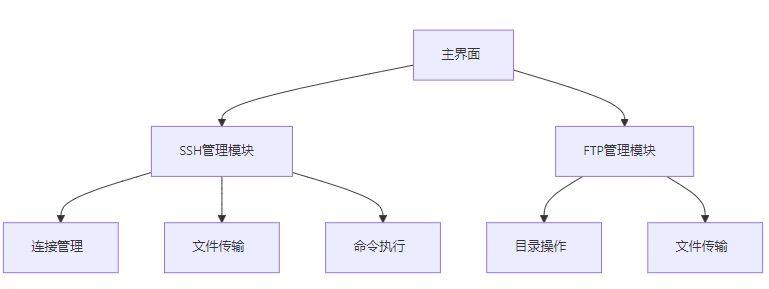
二、SSH功能实现(含代码示例)
1. 环境配置
cpp
// .pro文件配置
INCLUDEPATH += /path/to/QSsh/include
LIBS += -L/path/to/QSsh/lib -lqshttplib
2. 核心代码实现
cpp
// ssh_client.h
#include <QSsh/SshConnection>
#include <QSsh/SftpClient>

class SshClient : public QObject {
    Q_OBJECT
public:
    explicit SshClient(QObject *parent = nullptr);

    bool connectToHost(const QString &host, quint16 port, const QString &user, const QString &password);
    bool uploadFile(const QString &localPath, const QString &remotePath);
    bool downloadFile(const QString &remotePath, const QString &localPath);
    QByteArray executeCommand(const QString &command);

private:
    QSsh::SshConnection *m_connection;
    QSsh::SftpClient *m_sftp;
};

// ssh_client.cpp
SshClient::SshClient(QObject *parent) : QObject(parent) {
    m_connection = new QSsh::SshConnection();
}

bool SshClient::connectToHost(...) {
    m_connection->setParameters(/*...*/);
    if (!m_connection->connectToHost()) return false;

    m_sftp = m_connection->startSftpSession();
    return m_sftp->isOpen();
}

bool SshClient::uploadFile(...) {
    return m_sftp->put(localPath.toUtf8(), remotePath.toUtf8());
}

QByteArray SshClient::executeCommand(...) {
    QSsh::RemoteProcess *proc = m_connection->startRemoteProcess(command);
    proc->waitForFinished();
    return proc->readAllStandardOutput();
}
三、FTP功能实现方案
1. 基于QNetworkAccessManager(简化版)
cpp
// ftp_client.h
#include <QNetworkAccessManager>
#include <QNetworkReply>

class FtpClient : public QObject {
    Q_OBJECT
public:
    explicit FtpClient(QObject *parent = nullptr);

    void uploadFile(const QUrl &url, QFile *file);
    void downloadFile(const QUrl &url, QFile *file);

signals:
    void transferProgress(qint64 bytesSent, qint64 bytesTotal);
};

// ftp_client.cpp
void FtpClient::uploadFile(...) {
    QNetworkRequest request(url);
    QNetworkReply *reply = manager.put(QNetworkRequest(url), file);
    connect(reply, &QNetworkReply::uploadProgress, this, &FtpClient::transferProgress);
}
2. 完整FTP操作扩展(需第三方库)
cpp
// 使用libcurl实现完整FTP操作
#include <curl/curl.h>

size_t write_data(void *ptr, size_t size, size_t nmemb, FILE *stream) {
    return fwrite(ptr, size, nmemb, stream);
}

void ftp_download(const QString &url, const QString &localPath) {
    CURL *curl = curl_easy_init();
    FILE *fp = fopen(localPath.toUtf8(), "wb");
    curl_easy_setopt(curl, CURLOPT_URL, url.toUtf8());
    curl_easy_setopt(curl, CURLOPT_WRITEFUNCTION, write_data);
    curl_easy_setopt(curl, CURLOPT_WRITEDATA, fp);
    curl_easy_perform(curl);
    curl_easy_cleanup(curl);
    fclose(fp);
}
四、GUI界面设计(Qt Designer示例)
-
主界面布局
xml<!-- mainwindow.ui --> <widget class="QMainWindow"> <property name="geometry"> <rect> <x>0</x> <y>0</y> <width>800</width> <height>600</height> </rect> </property> <layout class="QHBoxLayout"> <item> <widget class="QTabWidget"> <property name="currentIndex">0</property> <widget class="QWidget"> <layout class="QFormLayout"> <item> <widget class="QLineEdit" name="hostEdit"/> </item> <item> <widget class="QPushButton" name="connectBtn">连接</widget> </item> <!-- SSH文件传输区域 --> <item> <widget class="QTreeWidget" name="fileTree"/> </item> </layout> </widget> <widget class="QWidget"> <layout class="QFormLayout"> <item> <widget class="QLineEdit" name="ftpHostEdit"/> </item> <item> <widget class="QPushButton" name="ftpConnectBtn">连接</widget> </item> <!-- FTP传输进度条 --> <item> <widget class="QProgressBar" name="progressBar"/> </item> </layout> </widget> </widget> </item> </layout> </widget>
五、关键问题解决方案
-
线程安全处理
cpp// 使用QtConcurrent处理耗时操作 QFuture<bool> future = QtConcurrent::run([this](){ return sshClient.uploadFile(localFile, remoteFile); }); // 进度更新 connect(&watcher, &QFutureWatcher<bool>::progressValueChanged, this, [&](int progress){ ui->progressBar->setValue(progress); }); -
错误处理机制
cppconnect(sshClient, &SshClient::errorOccurred, this, [&](QString errMsg){ QMessageBox::critical(this, "错误", errMsg); }); // 网络错误处理 connect(reply, &QNetworkReply::errorOccurred, this, [&](QNetworkReply::NetworkError code){ qDebug() << "FTP Error:" << code; });
六、性能优化策略
-
传输加速
- 启用SSH压缩:
sshClient->setCompressionEnabled(true) - 分块传输:设置
QNetworkRequest::setTransferTimeout(30000)
- 启用SSH压缩:
-
内存管理
cpp// 使用智能指针管理资源 QSharedPointer<QSsh::SshConnection> sshPtr(new QSsh::SshConnection()); // 文件流优化 QFile *file = new QFile(localPath); if(file->open(QIODevice::ReadOnly)) { QSharedPointer<QIODevice> filePtr(file); sshClient->uploadFile(filePtr, remotePath); }
qt实现ssh ftp 实现远程文件上传下载和cmd命令 www.youwenfan.com/contentcso/60478.html
七、扩展功能建议
-
密钥认证支持
cpp// 添加私钥认证 QSshKey privateKey("path/to/private_key"); sshClient->setIdentity(privateKey); -
批量操作功能
cpp// 批量上传文件 QStringList fileList = {"file1.txt", "file2.log"}; for(auto &file : fileList) { sshClient->uploadFile(file, "/remote/path/" + file); } -
实时日志显示
cpp// 命令执行输出实时显示 connect(sshClient, &SshClient::outputReceived, this, [&](QString output){ ui->outputText->append(output); });
完整项目结构示例
markdown
/SSH-FTP-Client
├── src/
│   ├── main.cpp
│   ├── ssh_client.cpp
│   ├── ftp_client.cpp
│   └── ui_mainwindow.h
├── libs/
│   └── QSsh/  # 第三方库源码
├── resources/
│   └── icons/ # 界面图标
└── CMakeLists.txt
总结
通过QSsh实现安全的SSH/SFTP操作,结合QNetworkAccessManager处理FTP协议,配合Qt的GUI框架可构建功能完备的远程文件管理工具。实际开发中需注意线程隔离、错误处理和性能优化,建议参考@ref等资料进行深度定制。