文章目录
一、积分抽奖系统
在现代 Web 应用中,积分抽奖活动已成为提升用户参与度和留存率的重要手段。本文将详细介绍一个基于 HTML、CSS 和 JavaScript 实现的九宫格积分抽奖系统,该系统具有流畅的动画效果和良好的用户体验。
二、效果演示
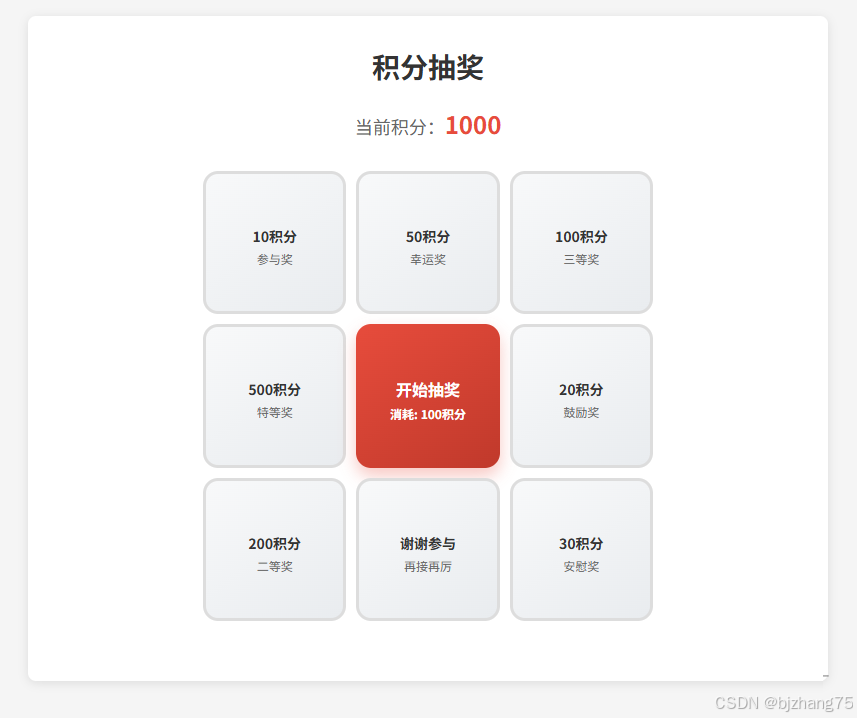
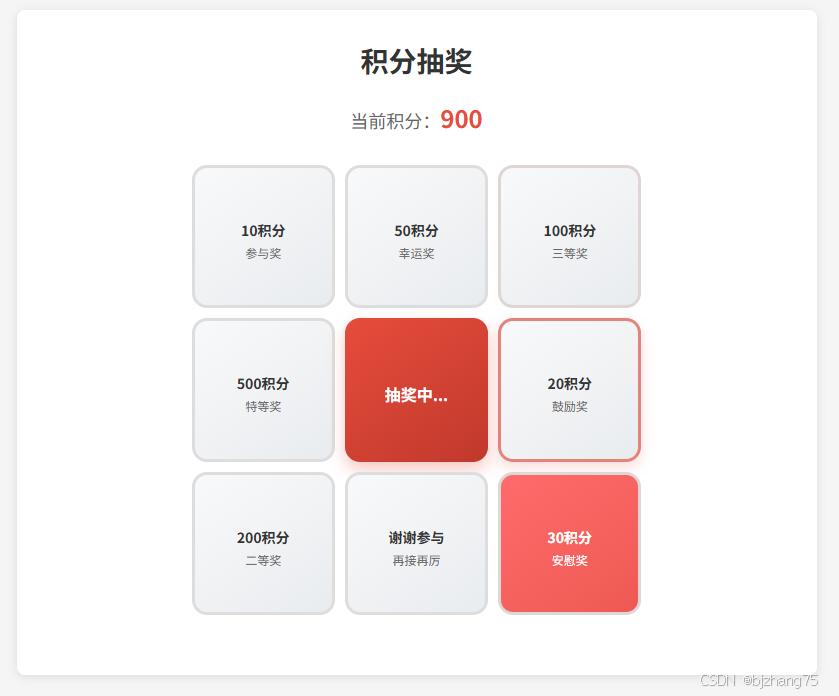
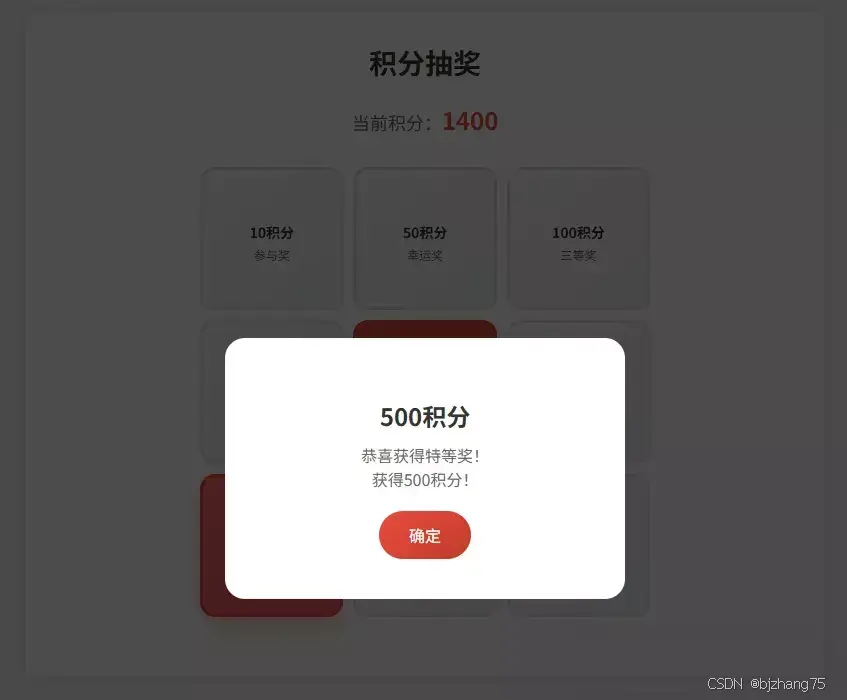
该抽奖系统采用经典的九宫格布局设计,中心为抽奖按钮,周围八个格子展示不同的奖品选项。用户点击"开始抽奖"按钮后,系统会消耗 100 积分并启动抽奖动画,最终高亮显示中奖结果并通过弹窗展示奖励详情。
三、系统分析
1、页面结构
页面采用居中布局,主体容器 container 包含标题、积分信息和抽奖区域三个主要部分。
1.1 主体容器
html
<div class="container">
  <h1 class="title">积分抽奖</h1>
  <div class="points-info">
    当前积分:<span class="points" id="currentPoints">1000</span>
  </div>

  <div class="lottery-grid">
    <!-- 九宫格抽奖区域 -->
  </div>
</div>
1.2 九宫格布局
抽奖区域采用 CSS Grid 布局实现 3×3 的网格结构,中心位置放置抽奖按钮。
html
<div class="lottery-grid">
  <!-- 第一行 -->
  <div class="lottery-item" data-index="0">
    <div class="item-icon"></div>
    <div class="item-name">10积分</div>
    <div class="item-points">参与奖</div>
  </div>
  <div class="lottery-item" data-index="1">
    <div class="item-icon"></div>
    <div class="item-name">50积分</div>
    <div class="item-points">幸运奖</div>
  </div>
  <div class="lottery-item" data-index="2">
    <div class="item-icon"></div>
    <div class="item-name">100积分</div>
    <div class="item-points">三等奖</div>
  </div>

  <!-- 第二行 -->
  <div class="lottery-item" data-index="7">
    <div class="item-icon"></div>
    <div class="item-name">500积分</div>
    <div class="item-points">特等奖</div>
  </div>
  <div class="draw-button" id="drawButton" onclick="startDraw()">
    <div style="font-size: 24px; margin-bottom: 8px;"></div>
    <div>开始抽奖</div>
    <div style="font-size: 12px; margin-top: 4px;">消耗: 100积分</div>
  </div>
  <div class="lottery-item" data-index="3">
    <div class="item-icon"></div>
    <div class="item-name">20积分</div>
    <div class="item-points">鼓励奖</div>
  </div>

  <!-- 第三行 -->
  <div class="lottery-item" data-index="6">
    <div class="item-icon"></div>
    <div class="item-name">200积分</div>
    <div class="item-points">二等奖</div>
  </div>
  <div class="lottery-item" data-index="5">
    <div class="item-icon"></div>
    <div class="item-name">谢谢参与</div>
    <div class="item-points">再接再厉</div>
  </div>
  <div class="lottery-item" data-index="4">
    <div class="item-icon"></div>
    <div class="item-name">30积分</div>
    <div class="item-points">安慰奖</div>
  </div>
</div>
1.3结果弹窗
中奖结果显示通过模态框 result-modal 实现。
html
<div class="result-modal" id="resultModal" onclick="handleModalClick(event)">
  <div class="result-content">
    <div class="result-icon" id="resultIcon"></div>
    <div class="result-title" id="resultTitle"></div>
    <div class="result-desc" id="resultDesc"></div>
    <button class="close-btn" onclick="closeResult()">确定</button>
  </div>
</div>
2、核心功能实现
2.1 全局变量定义
系统通过下面几个关键变量管理抽奖状态:
- currentPoints:用户当前积分
- drawCost:每次抽奖消耗积分
- isDrawing:抽奖进行状态标志
- prizes:奖品配置数组
javascript
let currentPoints = 1000;
let drawCost = 100;
let isDrawing = false;
let prizes = [
  { name: '10积分', points: 10, probability: 25, desc: '恭喜获得参与奖!' },
  // ...其他奖品配置
];
2.2 抽奖流程控制
startDraw 函数负责控制整个抽奖流程。首先通过 isDrawing 标志位防止重复触发,然后检查用户积分是否充足,接着扣除抽奖成本、更新界面显示,清理上一次抽奖的高亮状态,最后启动核心的九宫格动画逻辑 startLotteryAnimation。
javascript
function startDraw() {
  if (isDrawing) return;
  if (currentPoints < drawCost) {
    showResult('积分不足', `当前积分:${currentPoints},需要${drawCost}积分才能抽奖!`);
    return;
  }
  isDrawing = true;
  currentPoints -= drawCost;
  updatePointsDisplay();
  updateDrawButtonState(true);
  // 清除之前选中状态并启动动画
  document.querySelectorAll('.lottery-item').forEach(item => {
    item.classList.remove('active');
  });
  startLotteryAnimation();
}
2.3 抽奖动画实现
startLotteryAnimation 函数实现九宫格循环高亮的动画效果。它首先确定总共有8个奖项格子,并设定基础转动圈数为3圈,然后通过 getRandomPrizeIndex 获取中奖位置,计算出总的动画步数。
在动画过程中,使用递归 setTimeout 实现循环播放,每一步都会移除上一格的高亮状态并给当前格添加高亮效果,同时根据当前步数动态调整动画速度(前20步加速,最后20步减速),最终在指定步数停止并调用 showDrawResult 展示抽奖结果。
javascript
function startLotteryAnimation() {
  const totalItems = 8;
  const baseRounds = 3;
  const finalIndex = getRandomPrizeIndex();
  const totalSteps = baseRounds * totalItems + finalIndex;

  let currentStep = 0;
  let currentIndex = 0;
  let previousIndex = -1;
  let speed = 50; // 初始速度

  const animate = () => {
    // 移除前一个元素的 active 类
    if (previousIndex !== -1) {
      const previousItem = document.querySelector(`[data-index="${previousIndex}"]`);
      if (previousItem) {
        previousItem.classList.remove('active');
      }
    }

    // 高亮当前格子
    const currentItem = document.querySelector(`[data-index="${currentIndex}"]`);
    if (currentItem) {
      currentItem.classList.add('active');
    }

    previousIndex = currentIndex;
    currentStep++;

    // 速度逐渐变慢
    if (currentStep > totalSteps - 20) {
      speed += 10;
    } else if (currentStep < 20) {
      speed = Math.max(30, speed - 5);
    }

    // 更新索引
    currentIndex = (currentIndex + 1) % totalItems;

    if (currentStep < totalSteps) {
      setTimeout(animate, speed);
    } else {
      // 动画结束,显示结果
      setTimeout(() => {
        showDrawResult(finalIndex);
      }, 500);
    }
  };

  animate();
}
2.4 概率算法实现
getRandomPrizeIndex 函数基于概率权重算法确定中奖结果。它首先生成一个 0-100 之间的随机数,然后遍历 prizes 数组累加每个奖项的概率值,当随机数小于等于累计概率时,就返回当前奖项的索引,从而实现按照预设概率分布进行抽奖。如果遍历完所有奖项都没有匹配,则默认返回索引0。
javascript
function getRandomPrizeIndex() {
  const random = Math.random() * 100;
  let cumulative = 0;
  for (let i = 0; i < prizes.length; i++) {
    cumulative += prizes[i].probability;
    if (random <= cumulative) {
      return i;
    }
  }
  return 0;
}
四、扩展建议
- 增加抽奖次数限制:可以设置每日抽奖次数上限,提高稀缺性
- 丰富奖品种类:添加实物奖品、优惠券等非积分奖励类型
- 历史记录功能:记录用户抽奖历史,增强参与感
- 社交分享机制:允许用户分享中奖结果,扩大传播效果
- 主题皮肤切换:提供多种视觉主题随时选择切换
- 音效支持:添加背景音乐和音效增强沉浸感
五、完整代码
html
<!DOCTYPE html>
<html lang="zh-CN">
<head>
  <meta charset="UTF-8">
  <meta name="viewport" content="width=device-width, initial-scale=1.0">
  <title>积分抽奖</title>
  <style>
      * {
          margin: 0;
          padding: 0;
          box-sizing: border-box;
      }

      body {
          background-color: #f5f5f5;
          display: flex;
          justify-content: center;
          padding: 20px;
      }

      .container {
          background: #FFFFFF;
          border-radius: 8px;
          padding: 30px;
          box-shadow: 0 2px 10px rgba(0, 0, 0, 0.1);
          text-align: center;
          width: 800px;
      }

      .title {
          font-size: 28px;
          color: #333;
          margin-bottom: 20px;
          font-weight: bold;
      }

      .points-info {
          font-size: 18px;
          color: #666;
          margin-bottom: 30px;
      }

      .points {
          color: #e74c3c;
          font-weight: bold;
          font-size: 24px;
      }

      .lottery-grid {
          display: grid;
          grid-template-columns: repeat(3, 1fr);
          grid-template-rows: repeat(3, 1fr);
          gap: 10px;
          max-width: 450px;
          margin: 0 auto 30px;
          aspect-ratio: 1/1;
      }

      .lottery-item {
          border: 3px solid #ddd;
          border-radius: 15px;
          display: flex;
          flex-direction: column;
          justify-content: center;
          align-items: center;
          background: linear-gradient(145deg, #f8f9fa, #e9ecef);
          transition: all 0.3s ease;
          cursor: pointer;
          position: relative;
          overflow: hidden;
          font-size: 14px;
      }
      .lottery-item.active {
          border-color: #e74c3c;
          background: linear-gradient(145deg, #ff6b6b, #ee5a52);
          color: white;
          box-shadow: 0 10px 20px rgba(231, 76, 60, 0.3);
          z-index: 2;
      }

      .item-icon {
          font-size: 30px;
          margin-bottom: 8px;
      }

      .item-name {
          font-size: 14px;
          font-weight: bold;
          color: #333;
      }

      .item-points {
          font-size: 12px;
          color: #666;
          margin-top: 4px;
      }

      .lottery-item.active .item-name,
      .lottery-item.active .item-points {
          color: white;
      }

      .draw-button {
          grid-column: 2;
          grid-row: 2;
          border: none;
          border-radius: 15px;
          background: linear-gradient(145deg, #e74c3c, #c0392b);
          color: white;
          font-size: 16px;
          font-weight: bold;
          cursor: pointer;
          transition: all 0.3s ease;
          box-shadow: 0 8px 16px rgba(231, 76, 60, 0.3);
          position: relative;
          overflow: hidden;
          display: flex;
          flex-direction: column;
          justify-content: center;
          align-items: center;
      }
      .draw-button:disabled {
          background: linear-gradient(145deg, #95a5a6, #7f8c8d);
          cursor: not-allowed;
          box-shadow: none;
      }

      .result-modal {
          position: fixed;
          top: 0;
          left: 0;
          width: 100%;
          height: 100%;
          background: rgba(0, 0, 0, 0.7);
          display: none;
          justify-content: center;
          align-items: center;
          z-index: 1000;
      }

      .result-content {
          background: white;
          padding: 40px;
          border-radius: 20px;
          text-align: center;
          max-width: 400px;
          width: 90%;
      }

      .result-icon {
          font-size: 60px;
          margin-bottom: 20px;
      }

      .result-title {
          font-size: 24px;
          color: #333;
          margin-bottom: 10px;
          font-weight: bold;
      }

      .result-desc {
          font-size: 16px;
          color: #666;
          margin-bottom: 20px;
      }

      .close-btn {
          background: linear-gradient(145deg, #e74c3c, #c0392b);
          color: white;
          border: none;
          padding: 12px 30px;
          border-radius: 25px;
          font-size: 16px;
          cursor: pointer;
          transition: all 0.3s ease;
      }
  </style>
</head>
<body>
<div class="container">
  <h1 class="title">积分抽奖</h1>
  <div class="points-info">
    当前积分:<span class="points" id="currentPoints">1000</span>
  </div>

  <div class="lottery-grid">
    <!-- 第一行 -->
    <div class="lottery-item" data-index="0">
      <div class="item-icon"></div>
      <div class="item-name">10积分</div>
      <div class="item-points">参与奖</div>
    </div>
    <div class="lottery-item" data-index="1">
      <div class="item-icon"></div>
      <div class="item-name">50积分</div>
      <div class="item-points">幸运奖</div>
    </div>
    <div class="lottery-item" data-index="2">
      <div class="item-icon"></div>
      <div class="item-name">100积分</div>
      <div class="item-points">三等奖</div>
    </div>

    <!-- 第二行 -->
    <div class="lottery-item" data-index="7">
      <div class="item-icon"></div>
      <div class="item-name">500积分</div>
      <div class="item-points">特等奖</div>
    </div>
    <div class="draw-button" id="drawButton" onclick="startDraw()">
      <div style="font-size: 24px; margin-bottom: 8px;"></div>
      <div>开始抽奖</div>
      <div style="font-size: 12px; margin-top: 4px;">消耗: 100积分</div>
    </div>
    <div class="lottery-item" data-index="3">
      <div class="item-icon"></div>
      <div class="item-name">20积分</div>
      <div class="item-points">鼓励奖</div>
    </div>

    <!-- 第三行 -->
    <div class="lottery-item" data-index="6">
      <div class="item-icon"></div>
      <div class="item-name">200积分</div>
      <div class="item-points">二等奖</div>
    </div>
    <div class="lottery-item" data-index="5">
      <div class="item-icon"></div>
      <div class="item-name">谢谢参与</div>
      <div class="item-points">再接再厉</div>
    </div>
    <div class="lottery-item" data-index="4">
      <div class="item-icon"></div>
      <div class="item-name">30积分</div>
      <div class="item-points">安慰奖</div>
    </div>
  </div>
</div>

<!-- 结果弹窗 -->
<div class="result-modal" id="resultModal" onclick="handleModalClick(event)">
  <div class="result-content">
    <div class="result-icon" id="resultIcon"></div>
    <div class="result-title" id="resultTitle"></div>
    <div class="result-desc" id="resultDesc"></div>
    <button class="close-btn" onclick="closeResult()">确定</button>
  </div>
</div>

<script>
  // 抽奖系统变量
  let currentPoints = 1000;
  let drawCost = 100;
  let isDrawing = false;
  let prizes = [
    { name: '10积分', points: 10, probability: 25, desc: '恭喜获得参与奖!' },
    { name: '50积分', points: 50, probability: 20, desc: '恭喜获得幸运奖!' },
    { name: '100积分', points: 100, probability: 15, desc: '恭喜获得三等奖!' },
    { name: '20积分', points: 20, probability: 20, desc: '恭喜获得鼓励奖!' },
    { name: '30积分', points: 30, probability: 10, desc: '恭喜获得安慰奖!' },
    { name: '谢谢参与', points: 0, probability: 5, desc: '很遗憾,再接再厉哦!' },
    { name: '200积分', points: 200, probability: 3, desc: '恭喜获得二等奖!' },
    { name: '500积分', points: 500, probability: 2, desc: '恭喜获得特等奖!' }
  ];

  // 更新积分显示
  function updatePointsDisplay() {
    document.getElementById('currentPoints').textContent = currentPoints;
  }

  // 更新抽奖按钮状态
  function updateDrawButtonState(isDrawingState) {
    const drawButton = document.getElementById('drawButton');
    if (isDrawingState) {
      drawButton.innerHTML = `
        <div style="font-size: 24px; margin-bottom: 8px;"></div>
        <div>抽奖中...</div>
      `;
    } else {
      drawButton.innerHTML = `
        <div style="font-size: 24px; margin-bottom: 8px;"></div>
        <div>开始抽奖</div>
        <div style="font-size: 12px; margin-top: 4px;">消耗: 100积分</div>
      `;
    }
    drawButton.disabled = isDrawingState;
  }

  // 开始抽奖
  function startDraw() {
    if (isDrawing) return;
    if (currentPoints < drawCost) {
      showResult('积分不足', `当前积分:${currentPoints},需要${drawCost}积分才能抽奖!`);
      return;
    }
    isDrawing = true;
    currentPoints -= drawCost;
    updatePointsDisplay();
    updateDrawButtonState(true);
    // 清除之前的选中状态
    document.querySelectorAll('.lottery-item').forEach(item => {
      item.classList.remove('active');
    });
    // 开始转盘动画
    startLotteryAnimation();
  }

  // 开始抽奖动画
  function startLotteryAnimation() {
    const totalItems = 8;
    const baseRounds = 3; // 基础转3圈
    const finalIndex = getRandomPrizeIndex();
    const totalSteps = baseRounds * totalItems + finalIndex;

    let currentStep = 0;
    let currentIndex = 0;
    let previousIndex = -1;
    let speed = 50; // 初始速度

    const animate = () => {
      // 移除前一个元素的 active 类
      if (previousIndex !== -1) {
        const previousItem = document.querySelector(`[data-index="${previousIndex}"]`);
        if (previousItem) {
          previousItem.classList.remove('active');
        }
      }

      // 高亮当前格子
      const currentItem = document.querySelector(`[data-index="${currentIndex}"]`);
      if (currentItem) {
        currentItem.classList.add('active');
      }

      previousIndex = currentIndex;
      currentStep++;

      // 速度逐渐变慢
      if (currentStep > totalSteps - 20) {
        speed += 10;
      } else if (currentStep < 20) {
        speed = Math.max(30, speed - 5);
      }

      // 更新索引
      currentIndex = (currentIndex + 1) % totalItems;

      if (currentStep <= totalSteps) {
        setTimeout(animate, speed);
      } else {
        // 动画结束,显示结果
        setTimeout(() => {
          showDrawResult(finalIndex);
        }, 500);
      }
    };

    animate();
  }

  // 获取随机奖项索引
  function getRandomPrizeIndex() {
    const random = Math.random() * 100;
    let cumulative = 0;
    for (let i = 0; i < prizes.length; i++) {
      cumulative += prizes[i].probability;
      if (random <= cumulative) {
        return i;
      }
    }
    return 0;
  }

  // 显示抽奖结果
  function showDrawResult(prizeIndex) {
    const prize = prizes[prizeIndex];

    // 添加中奖积分
    if (prize.points > 0) {
      currentPoints += prize.points;
      updatePointsDisplay();
    }

    // 恢复按钮状态
    updateDrawButtonState(false);
    isDrawing = false;

    // 显示结果弹窗
    showResult(
      prize.name,
      prize.desc + (prize.points > 0 ? `<br>获得${prize.points}积分!` : '')
    );
  }

  // 显示结果弹窗
  function showResult(title, desc) {
    document.getElementById('resultTitle').textContent = title;
    document.getElementById('resultDesc').innerHTML = desc;
    document.getElementById('resultModal').style.display = 'flex';
  }

  // 关闭结果弹窗
  function closeResult() {
    document.getElementById('resultModal').style.display = 'none';
  }

  // 处理模态框点击事件
  function handleModalClick(event) {
    if (event.target === document.getElementById('resultModal')) {
      closeResult();
    }
  }
</script>
</body>
</html>