文章目录
-
- [Linux Web终端连接](#Linux Web终端连接)
-
- [使用Python Flask + Paramiko](#使用Python Flask + Paramiko)
-
- [1. 在CentOS8/TencentOS3.x上安装所需软件](#1. 在CentOS8/TencentOS3.x上安装所需软件)
- [2. 创建Web应用](#2. 创建Web应用)
- [3. 安装Python依赖并运行](#3. 安装Python依赖并运行)
- [4. 访问Web界面](#4. 访问Web界面)
Linux Web终端连接
使用Python Flask + Paramiko
1. 在CentOS8/TencentOS3.x上安装所需软件
bash
# 更新系统
sudo dnf update -y

# 安装Python和必要组件
sudo dnf install python3 python3-pip openssh-server -y

# 启动SSH服务
sudo systemctl enable --now sshd

# 确保防火墙允许HTTP/SSH
sudo firewall-cmd --permanent --add-service=http
sudo firewall-cmd --permanent --add-service=ssh
sudo firewall-cmd --reload
2. 创建Web应用
创建文件 web_shell.py:
python
#!/usr/bin/env python3

from flask import Flask, request, jsonify, render_template_string
import paramiko
import logging
import json

app = Flask(__name__)
logging.basicConfig(level=logging.WARNING)

class SSHSession:
    def __init__(self, hostname, username, password):
        self.ssh = paramiko.SSHClient()
        self.ssh.set_missing_host_key_policy(paramiko.AutoAddPolicy())
        self.ssh.connect(hostname, username=username, password=password, timeout=10)

    def execute(self, command):
        stdin, stdout, stderr = self.ssh.exec_command(command)
        output = stdout.read().decode('utf-8', errors='ignore')
        error = stderr.read().decode('utf-8', errors='ignore')
        return output + (error if error else "")

    def close(self):
        self.ssh.close()

sessions = {}

HTML = '''
<!DOCTYPE html>
<html>
<head>
    <title>Linux Web终端</title>
    <meta charset="utf-8">
    <style>
        body { font-family: Arial; margin: 20px; background: #f0f0f0; }
        .container { max-width: 800px; margin: auto; background: white; padding: 20px; border-radius: 5px; box-shadow: 0 0 10px rgba(0,0,0,0.1); }
        h2 { color: #333; border-bottom: 1px solid #ddd; padding-bottom: 10px; }
        .form-group { margin: 15px 0; }
        label { display: block; margin-bottom: 5px; font-weight: bold; }
        input[type="text"], input[type="password"], textarea {
            width: 100%; padding: 8px; border: 1px solid #ddd; border-radius: 3px; box-sizing: border-box;
        }
        button {
            background: #4CAF50; color: white; border: none; padding: 10px 15px;
            border-radius: 3px; cursor: pointer; margin-right: 10px;
        }
        button:hover { background: #45a049; }
        .danger { background: #f44336; }
        .danger:hover { background: #d32f2f; }
        .output {
            background: #000; color: #0f0; padding: 10px; border-radius: 3px;
            font-family: monospace; white-space: pre-wrap; margin-top: 10px;
            max-height: 400px; overflow-y: auto;
        }
        .terminal { display: none; }
        .session-info { background: #e7f7e7; padding: 10px; border-radius: 3px; margin-bottom: 15px; }
    </style>
</head>
<body>
    <div class="container">
        <h2>Linux Web终端连接</h2>

        <div id="login-form">
            <div class="form-group">
                <label>目标服务器IP:</label>
                <input type="text" id="host" value="192.168.100.140">
            </div>
            <div class="form-group">
                <label>用户名:</label>
                <input type="text" id="username" value="root">
            </div>
            <div class="form-group">
                <label>密码:</label>
                <input type="password" id="password">
            </div>
            <button onclick="connectSSH()">连接到服务器</button>
            <p style="color: #666; font-size: 12px; margin-top: 20px;">
                <strong>注意:</strong> 仅用于测试环境
            </p>
        </div>

        <div id="terminal" class="terminal">
            <div class="session-info">
                已连接到: <span id="connected-host"></span> |
                用户: <span id="connected-user"></span>
                <button onclick="logout()" style="float:right;">断开连接</button>
            </div>

            <div class="form-group">
                <label>输入命令:</label>
                <textarea id="command" rows="2" placeholder="输入Linux命令..."></textarea>
            </div>

            <button onclick="executeCommand()">执行命令</button>
            <button onclick="sendCommand('pwd')">pwd</button>
            <button onclick="sendCommand('ls -la')">ls -la</button>
            <button onclick="sendCommand('whoami')">whoami</button>
            <button onclick="sendCommand('df -h')">df -h</button>
            <button onclick="clearOutput()" class="danger">清屏</button>

            <h3>输出:</h3>
            <div id="output" class="output"></div>
        </div>
    </div>

    <script>
        let sessionId = null;

        function connectSSH() {
            const host = document.getElementById('host').value;
            const username = document.getElementById('username').value;
            const password = document.getElementById('password').value;

            if (!host || !username || !password) {
                alert('请填写所有字段');
                return;
            }

            fetch('/connect', {
                method: 'POST',
                headers: {'Content-Type': 'application/json'},
                body: JSON.stringify({
                    host: host,
                    username: username,
                    password: password
                })
            })
            .then(response => response.json())
            .then(data => {
                if (data.success) {
                    sessionId = data.session_id;
                    document.getElementById('login-form').style.display = 'none';
                    document.getElementById('terminal').style.display = 'block';
                    document.getElementById('connected-host').textContent = host;
                    document.getElementById('connected-user').textContent = username;
                    document.getElementById('output').textContent = '连接成功!\\n输入命令开始...';
                } else {
                    alert('连接失败: ' + data.error);
                }
            })
            .catch(error => {
                console.error('Error:', error);
                alert('连接出错: ' + error);
            });
        }

        function executeCommand() {
            if (!sessionId) {
                alert('请先连接到服务器');
                return;
            }

            const command = document.getElementById('command').value.trim();
            if (!command) {
                alert('请输入命令');
                return;
            }

            sendCommand(command);
        }

        function sendCommand(cmd) {
            if (!sessionId) return;

            document.getElementById('command').value = cmd;

            fetch('/execute', {
                method: 'POST',
                headers: {'Content-Type': 'application/json'},
                body: JSON.stringify({
                    session_id: sessionId,
                    command: cmd
                })
            })
            .then(response => response.json())
            .then(data => {
                const outputDiv = document.getElementById('output');
                outputDiv.textContent += '\\n$ ' + cmd + '\\n' + data.output + '\\n';
                outputDiv.scrollTop = outputDiv.scrollHeight;
                document.getElementById('command').value = '';
            })
            .catch(error => {
                console.error('Error:', error);
                document.getElementById('output').textContent += '\\n错误: ' + error;
            });
        }

        function clearOutput() {
            document.getElementById('output').textContent = '';
        }

        function logout() {
            if (sessionId) {
                fetch('/logout', {
                    method: 'POST',
                    headers: {'Content-Type': 'application/json'},
                    body: JSON.stringify({session_id: sessionId})
                });
            }
            sessionId = null;
            document.getElementById('terminal').style.display = 'none';
            document.getElementById('login-form').style.display = 'block';
            document.getElementById('password').value = '';
        }

        // 按Enter键执行命令
        document.getElementById('command').addEventListener('keypress', function(e) {
            if (e.key === 'Enter' && !e.shiftKey) {
                e.preventDefault();
                executeCommand();
            }
        });

        // 按Ctrl+L清屏
        document.addEventListener('keydown', function(e) {
            if (e.ctrlKey && e.key === 'l') {
                e.preventDefault();
                clearOutput();
            }
        });
    </script>
</body>
</html>
'''

@app.route('/')
def index():
    return HTML

@app.route('/connect', methods=['POST'])
def connect():
    try:
        data = request.json
        print(f"连接请求: {data['host']} 用户: {data['username']}")

        session = SSHSession(data['host'], data['username'], data['password'])
        session_id = str(id(session))
        sessions[session_id] = session

        return jsonify({'success': True, 'session_id': session_id})
    except Exception as e:
        print(f"连接错误: {str(e)}")
        return jsonify({'success': False, 'error': str(e)})

@app.route('/execute', methods=['POST'])
def execute():
    try:
        data = request.json
        session_id = data['session_id']

        if session_id not in sessions:
            return jsonify({'output': '会话已过期,请重新连接'})

        command = data['command']

        # 简单的危险命令过滤
        dangerous = ['rm -rf', 'mkfs', 'dd', ':(){:|:&};:', 'shutdown', 'halt', 'reboot']
        for d in dangerous:
            if d in command:
                return jsonify({'output': f'阻止危险命令: {d}'})

        output = sessions[session_id].execute(command)
        return jsonify({'output': output})
    except Exception as e:
        return jsonify({'output': f'执行错误: {str(e)}'})

@app.route('/logout', methods=['POST'])
def logout():
    data = request.json
    session_id = data.get('session_id')

    if session_id in sessions:
        sessions[session_id].close()
        del sessions[session_id]

    return jsonify({'success': True})

if __name__ == '__main__':
    print("=" * 60)
    print("Web终端服务启动中...")
    print("访问地址: http://192.168.100.140:5000")
    print("=" * 60)
    app.run(host='0.0.0.0', port=5000, debug=True, use_reloader=False)
3. 安装Python依赖并运行
bash
# 安装Python依赖
pip3 install flask paramiko

# 执行 pip3 install flask paramiko 报错后,解决方法:(没有报错不需要执行)
	# 1. 升级 pip 到最新版(解决绝大多数 Rust 扩展编译问题)
	python3 -m pip install --upgrade pip

	# 2. 安装系统级编译工具(CentOS/RHEL/Fedora)
	sudo yum install gcc libffi-devel python3-devel openssl-devel -y

	# 3. 重新安装 paramiko(会自动安装 bcrypt)
	pip3 install --user flask paramiko


# 运行Web应用(在后台运行)
nohup python3 web_shell.py > web_shell.log 2>&1 &

# 查看运行日志
tail -f web_shell.log

# 停止应用
pkill -f web_shell.py
4. 访问Web界面
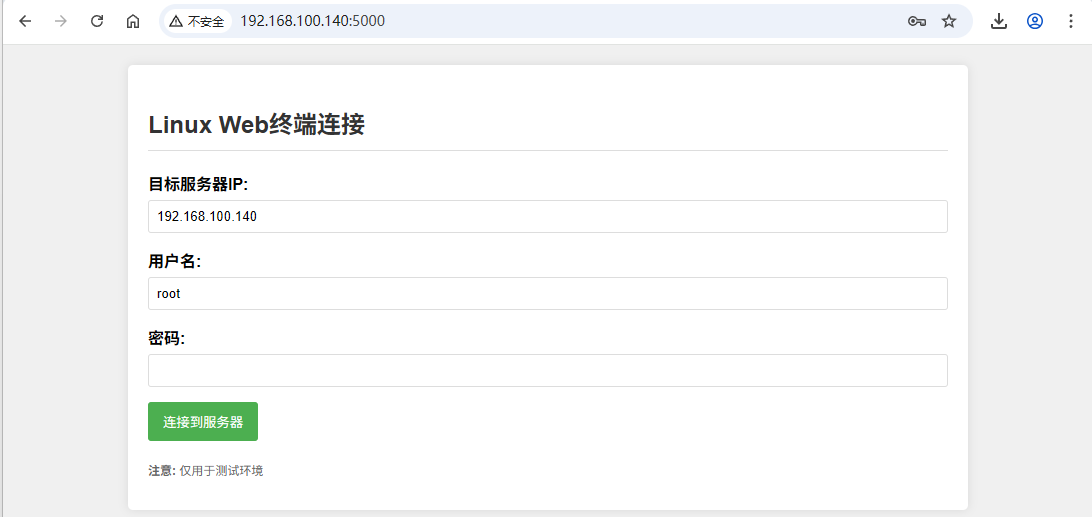
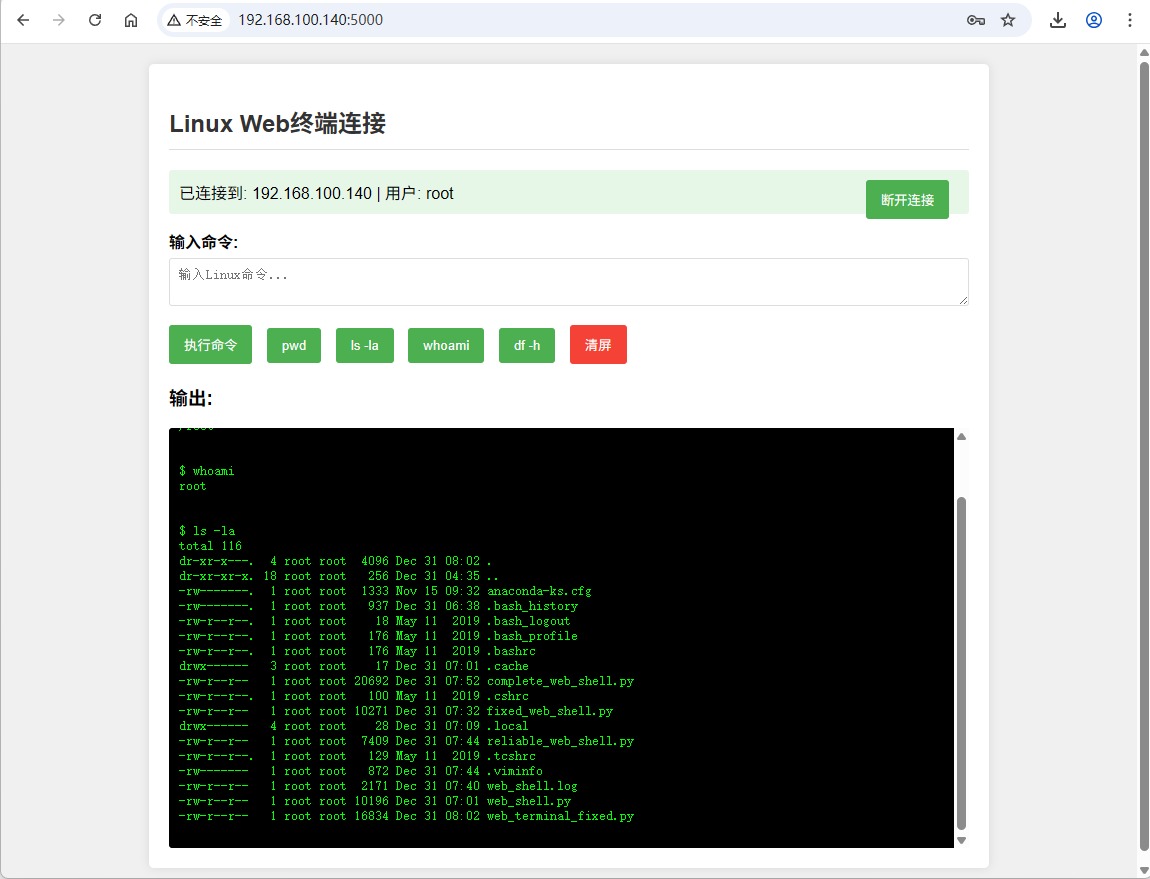
在浏览器中访问:http://192.168.100.140:5000