前端优化:requestAnimationFrame vs setInterval 性能对比与实战
两种倒计时比较
在前端开发中,倒计时功能是常见的需求,特别是在电商、活动页面、订单处理等场景中。传统的实现方式通常使用 setInterval,但随着现代浏览器的发展,requestAnimationFrame 提供了更优的性能和用户体验。本文将通过一个30分钟倒计时的实际案例,深入对比两种实现方式的差异。
setInterval 的传统实现
- 工作原理:基于固定时间间隔执行回调函数
- 优点:实现简单,兼容性好
- 缺点:标签页切换时可能暂停,时间精度受系统负载影响
requestAnimationFrame 的现代方案
- 工作原理:与浏览器刷新率同步,在下一帧渲染前执行回调
- 优点:性能优化,标签页切换时自动暂停,切回时自动同步
- 缺点:实现相对复杂,需要手动处理时间计算
实际演示对比
下面的代码演示了两种实现方式的30分钟倒计时:
html
<!DOCTYPE html>
<html lang="en">
  <head>
    <meta charset="UTF-8" />
    <meta name="viewport" content="width=device-width, initial-scale=1.0" />
    <title>30分钟倒计时对比</title>
    <style>
      .countdown-container {
        margin: 20px;
        padding: 20px;
        border: 1px solid #ccc;
        border-radius: 8px;
      }
      .countdown-title {
        font-size: 18px;
        font-weight: bold;
        margin-bottom: 10px;
      }
      .countdown-display {
        font-size: 24px;
        font-family: monospace;
        color: #333;
      }
      .smart-countdown {
        background-color: #f0f8ff;
      }
      .normal-countdown {
        background-color: #fff0f0;
      }
      .comparison-info {
        margin: 20px;
        padding: 15px;
        background-color: #f9f9f9;
        border-left: 4px solid #007acc;
      }
    </style>
  </head>
  <body>
    <h1>倒计时对比测试</h1>

    <div class="comparison-info">
      <p><strong>测试说明:</strong>打开此页面后,切换到其他标签页等待一段时间,然后切换回来观察两种倒计时的差异。</p>
    </div>

    <!-- 智能倒计时(使用requestAnimationFrame) -->
    <div class="countdown-container smart-countdown">
      <div class="countdown-title">智能倒计时(处理标签页切换)</div>
      <div id="countdown" class="countdown-display"></div>
      <p><small>使用requestAnimationFrame,切换标签页时会自动同步时间</small></p>
    </div>

    <!-- 普通倒计时(使用setInterval) -->
    <div class="countdown-container normal-countdown">
      <div class="countdown-title">普通倒计时(传统实现)</div>
      <div id="normal-countdown" class="countdown-display"></div>
      <p><small>使用setInterval,切换标签页时可能会暂停或延迟</small></p>
    </div>

    <script>
      // 封装成闭包,避免全局变量污染
      (function () {
        // 1. 抽离常量,便于维护
        const COUNTDOWN_TOTAL = 30 * 60; // 总倒计时(秒)

        // ========== 智能倒计时实现 ==========
        // 2. 状态管理:集中管理倒计时相关状态,避免散列
        const state = {
          countdownTimer: null, // 倒计时动画帧ID
          countdownStartTime: 0, // 倒计时开始时间戳
          remainingTime: COUNTDOWN_TOTAL, // 剩余时间(秒)
          isOrderExpired: false, // 是否已过期
          countdownDom: null // 倒计时显示DOM元素
        };

        /**
         * 初始化DOM元素(避免重复获取)
         */
        function initDom() {
          state.countdownDom = document.getElementById('countdown');
          // 容错:DOM不存在时终止逻辑
          if (!state.countdownDom) {
            console.error('倒计时DOM元素不存在');
            return false;
          }
          return true;
        }

        /**
         * 开始30分钟倒计时
         */
        function startCountdown() {
          if (!initDom()) return;

          // 清除现有倒计时(防止重复启动)
          clearCountdownTimer();

          // 重置状态
          state.remainingTime = COUNTDOWN_TOTAL;
          state.isOrderExpired = false;
          state.countdownStartTime = Date.now(); // 记录开始时间
          updateExpireTimeDisplay(); // 初始化显示

          // 倒计时核心逻辑:基于时间戳计算,避免rAF帧率误差
          const animateCountdown = () => {
            // 已过期则终止
            if (state.isOrderExpired) return;

            const currentTime = Date.now();
            // 计算真实流逝时间(秒),避免rAF后台暂停导致的时间偏差
            const elapsedTime = Math.floor((currentTime - state.countdownStartTime) / 1000);
            state.remainingTime = Math.max(0, COUNTDOWN_TOTAL - elapsedTime);

            updateExpireTimeDisplay();

            // 检查是否超时
            if (state.remainingTime <= 0) {
              handleOrderTimeout();
            } else {
              // 继续下一帧(rAF后台自动暂停,不消耗性能)
              state.countdownTimer = requestAnimationFrame(animateCountdown);
            }
          };

          // 启动倒计时
          state.countdownTimer = requestAnimationFrame(animateCountdown);
        }

        /**
         * 更新倒计时显示
         */
        function updateExpireTimeDisplay() {
          const minutes = Math.floor(state.remainingTime / 60);
          const seconds = state.remainingTime % 60;
          // 格式化时间(补零)
          const expireTime = `${minutes.toString().padStart(2, '0')}分${seconds.toString().padStart(2, '0')}秒`;
          state.countdownDom.textContent = expireTime;
        }

        /**
         * 处理订单超时
         */
        function handleOrderTimeout() {
          state.isOrderExpired = true;
          clearCountdownTimer();
          state.countdownDom.textContent = '订单已过期'; // 友好提示
        }

        /**
         * 清除倒计时定时器/动画帧
         */
        function clearCountdownTimer() {
          if (state.countdownTimer) {
            cancelAnimationFrame(state.countdownTimer);
            state.countdownTimer = null;
          }
        }

        /**
         * 处理页面可见性变化:切回时同步真实时间
         */
        function handleVisibilityChange() {
          // 页面切回前台,且倒计时未过期时同步时间
          if (!document.hidden && !state.isOrderExpired && state.countdownStartTime) {
            const currentTime = Date.now();
            console.log('智能倒计时 - 页面切回,同步时间:', new Date(currentTime));
            const elapsedTime = Math.floor((currentTime - state.countdownStartTime) / 1000);
            state.remainingTime = Math.max(0, COUNTDOWN_TOTAL - elapsedTime);
            updateExpireTimeDisplay();
          }
        }

        /**
         * 页面卸载/关闭时清理所有监听和定时器(核心优化)
         */
        function handlePageUnload() {
          // 1. 清除倒计时动画帧
          clearCountdownTimer();
          // 2. 移除visibilitychange事件监听
          document.removeEventListener('visibilitychange', handleVisibilityChange);
          // 3. 移除unload监听(避免循环引用)
          window.removeEventListener('unload', handlePageUnload);
          console.log('倒计时资源已清理');
        }

        // ========== 普通倒计时实现 ==========
        const normalState = {
          intervalTimer: null,
          remainingTime: COUNTDOWN_TOTAL,
          isExpired: false,
          countdownDom: null
        };

        /**
         * 初始化普通倒计时DOM
         */
        function initNormalDom() {
          normalState.countdownDom = document.getElementById('normal-countdown');
          if (!normalState.countdownDom) {
            console.error('普通倒计时DOM元素不存在');
            return false;
          }
          return true;
        }

        /**
         * 开始普通倒计时
         */
        function startNormalCountdown() {
          if (!initNormalDom()) return;

          // 清除现有定时器
          clearNormalTimer();

          // 重置状态
          normalState.remainingTime = COUNTDOWN_TOTAL;
          normalState.isExpired = false;
          updateNormalDisplay();

          // 使用setInterval实现
          normalState.intervalTimer = setInterval(() => {
            if (normalState.isExpired) return;

            normalState.remainingTime--;

            if (normalState.remainingTime <= 0) {
              handleNormalTimeout();
            } else {
              updateNormalDisplay();
            }
          }, 1000);
        }

        /**
         * 更新普通倒计时显示
         */
        function updateNormalDisplay() {
          const minutes = Math.floor(normalState.remainingTime / 60);
          const seconds = normalState.remainingTime % 60;
          const expireTime = `${minutes.toString().padStart(2, '0')}分${seconds.toString().padStart(2, '0')}秒`;
          normalState.countdownDom.textContent = expireTime;
        }

        /**
         * 处理普通倒计时超时
         */
        function handleNormalTimeout() {
          normalState.isExpired = true;
          clearNormalTimer();
          normalState.countdownDom.textContent = '订单已过期';
        }

        /**
         * 清除普通倒计时定时器
         */
        function clearNormalTimer() {
          if (normalState.intervalTimer) {
            clearInterval(normalState.intervalTimer);
            normalState.intervalTimer = null;
          }
        }

        /**
         * 处理普通倒计时的页面可见性变化
         */
        function handleNormalVisibilityChange() {
          if (!document.hidden && !normalState.isExpired) {
            console.log('普通倒计时 - 页面切回,但无法同步时间');
            // 普通倒计时无法自动同步时间,会显示不准确的时间
          }
        }

        /**
         * 清理普通倒计时资源
         */
        function handleNormalUnload() {
          clearNormalTimer();
        }

        // ========== 事件监听初始化 ==========
        // 监听页面可见性变化(两个倒计时都监听)
        document.addEventListener('visibilitychange', handleVisibilityChange);
        document.addEventListener('visibilitychange', handleNormalVisibilityChange);

        // 监听页面卸载/关闭:清理所有资源
        window.addEventListener('unload', handlePageUnload);
        window.addEventListener('unload', handleNormalUnload);

        // 启动两个倒计时
        startCountdown();
        startNormalCountdown();
      })();
    </script>
  </body>
</html>
实际的结果图对比
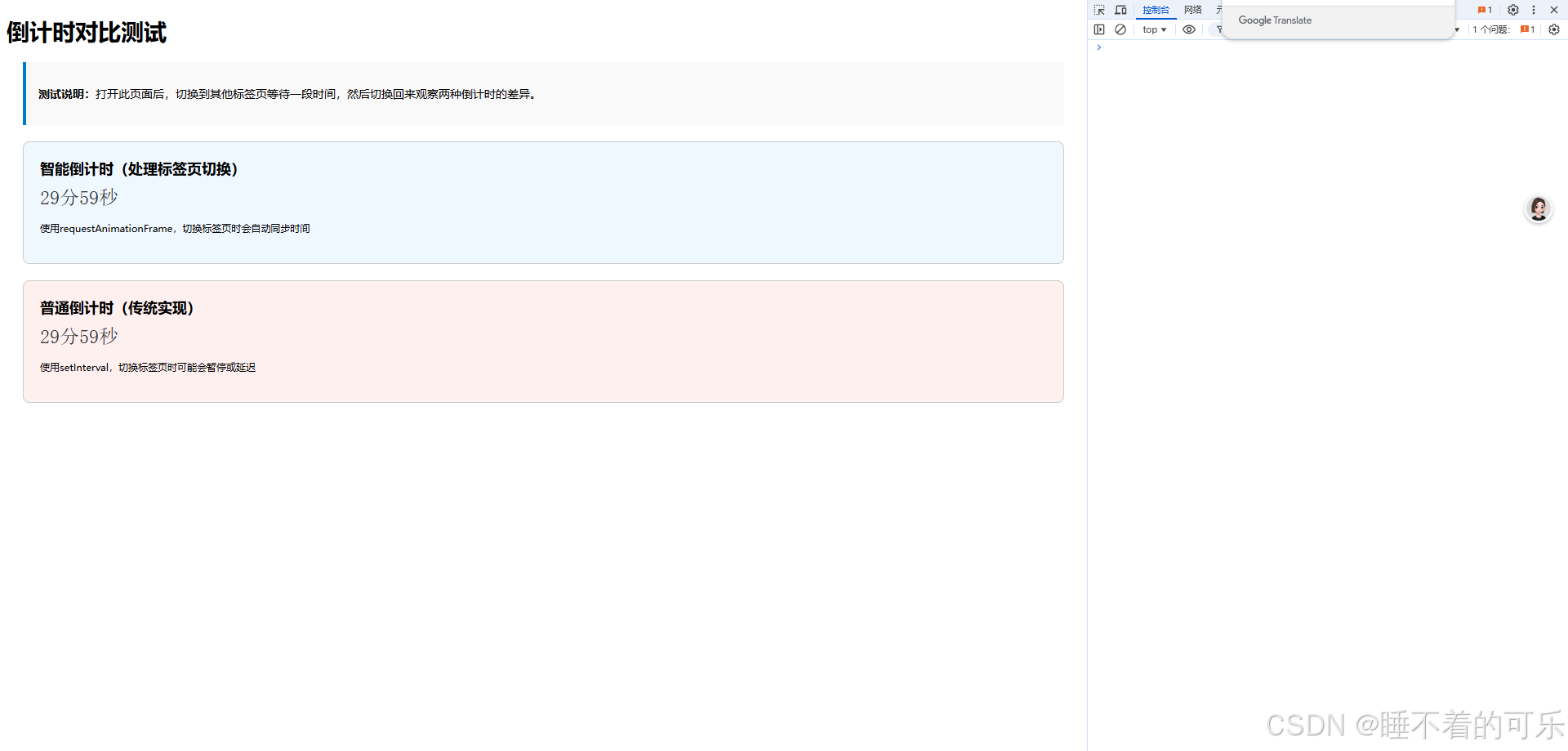
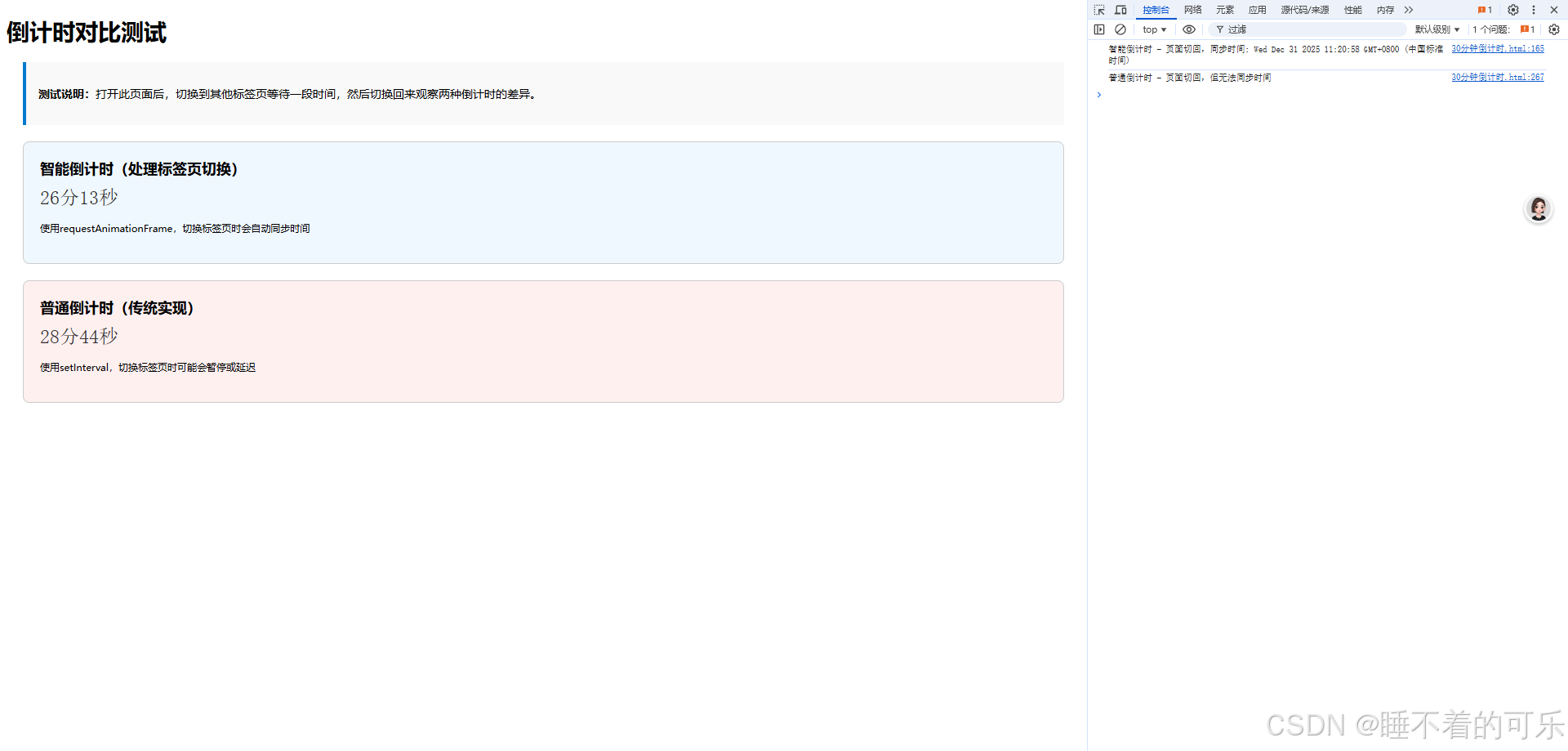
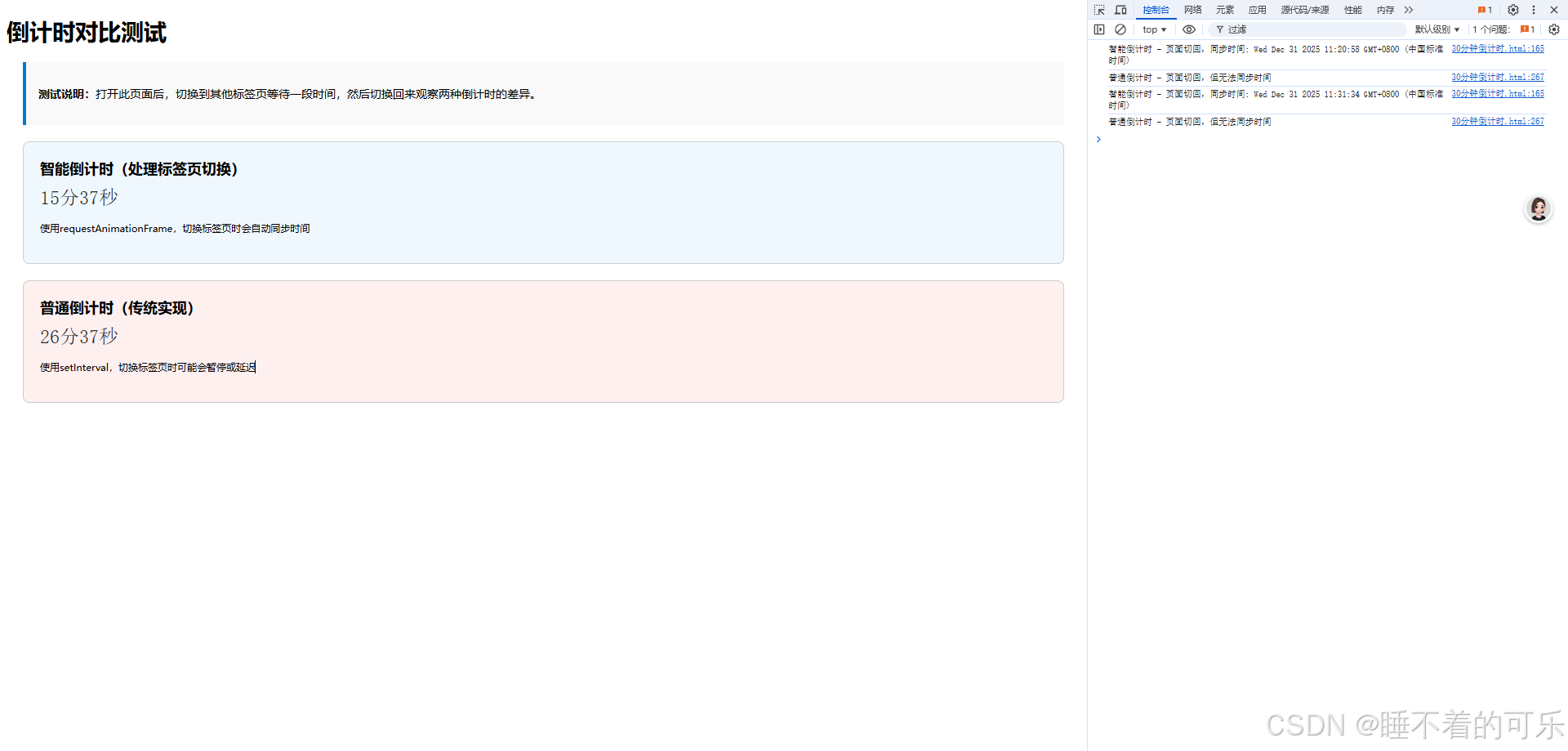
性能对比分析
1. 时间精度对比
- requestAnimationFrame: 基于时间戳计算,精度高,不受帧率影响
- setInterval: 固定间隔执行,可能因系统负载产生累积误差
2. 资源消耗对比
- requestAnimationFrame: 后台自动暂停,节省CPU和电池资源
- setInterval: 后台继续执行,消耗系统资源
3. 用户体验对比
- requestAnimationFrame: 切换标签页后自动同步,时间准确
- setInterval: 切换标签页后可能出现时间偏差
最佳实践建议
适用场景
- requestAnimationFrame: 高精度倒计时、动画效果、性能敏感场景
- setInterval: 简单倒计时、兼容性要求高、短时间任务
代码优化技巧
- 状态管理: 使用对象集中管理倒计时状态
- 错误处理: 添加DOM元素存在性检查
- 资源清理: 页面卸载时清理所有定时器
- 性能监控: 添加性能统计功能
结论
通过实际测试和性能分析,requestAnimationFrame 在倒计时场景中具有明显优势,特别是在需要高精度和良好用户体验的场景中。虽然实现相对复杂,但其带来的性能优化和用户体验提升是值得的。
对于简单的倒计时需求,setInterval 仍然是可行的选择,但在现代前端开发中,推荐优先考虑 requestAnimationFrame 方案。
扩展阅读: