1.LLM 文本补全模型
LLM 是:Runnablestr, str
cpp
from langchain_community.llms import Ollama

# 连接本地 ollama
llm = Ollama(
    model="deepseek-r1:7b",
    base_url="http://localhost:11434"
)

# 最简单的调用
response = llm.invoke("用一句话解释什么是卷积神经网络") #不会暴露 thinking 不会暴露 context 只拿到response
print(response)
2.ChatModel 对话模型
RunnableBaseLanguageModelInput, AIMessage
cpp
BaseLanguageModelInput = Union[
    str, #其实它也是转换为下面这个
    List[BaseMessage], #99%用这个
    PromptValue,
    ChatPromptValue,
]
BaseMessage又是什么呢,就是对话角色,比如:
cpp
[
    SystemMessage(...),
    HumanMessage(...),
    ToolMessage(...),
]
它的输出
cpp
AIMessage(
    content="经过仔细思考,我为您准备了三个有中国特色的名字...",
    response_metadata={...},
    id="run-57fc2da4-a363-4d50-ae81-9420d97e2705-0"
)

response_metadata = {
    "model": "deepseek-r1:7b",          # 使用的具体模型名称
    "created_at": "...",                # 本次推理的时间戳(模型侧生成时间)

    "done": True,                       # 是否正常完成推理
    "done_reason": "stop",              # 结束原因:stop / length / error

    "prompt_eval_count": 1234,          # 输入 prompt 消耗的 token 数
    "eval_count": 90,                   # 输出(生成)token 数

    "total_duration": 157930398510,     # 整个请求的总耗时(纳秒)
    "eval_duration": 11290779419,       # 实际生成 token 的耗时(纳秒)
    "load_duration": 101344157,         # 模型加载耗时(纳秒,首次调用常见)
}
ChatOllama / ChatOpenAI 都是ChatModel
LLM 是文本生成器,ChatModel 是对话状态机。
cpp
ChatOllama(
    model: str,                         # 模型名称(Ollama 中已拉取的模型,如 "deepseek-r1:7b"、"llama3:8b")
    base_url: str = "http://localhost:11434", # Ollama 服务地址(本地默认 11434,远程 / Docker 部署时需要修改)
    temperature: float = 0.8,            # 采样温度,控制输出随机性(越低越确定,越高越发散)
    top_p: float | None = None,          # nucleus sampling,限制累计概率阈值(与 temperature 通常二选一调)
    top_k: int | None = None,            # 每一步只从概率最高的 K 个 token 中采样(本地模型常用)
    num_ctx: int | None = None,          # 上下文窗口大小(最大可输入的 token 数,受模型本身限制)
    num_predict: int | None = None,      # 最大生成 token 数(等价于 OpenAI 的 max_tokens)
    repeat_penalty: float | None = None, # 重复惩罚系数,防止模型复读或陷入循环(>1 会抑制重复)
    stop: list[str] | str | None = None, # 停止词,生成到指定字符串时立即停止(可单个或列表)
    streaming: bool = False,             # 是否开启流式输出(逐 token 返回,需要配合 callback 使用)
    timeout: int | None = None,          # HTTP 请求超时时间(秒),不是模型推理时间限制
)
cpp
from langchain_community.chat_models import ChatOllama
from langchain_core.messages import HumanMessage


#连接本地 ollama 模型适配器
chat = ChatOllama(
    model="deepseek-r1:7b",
    base_url="http://localhost:11434"
)

message = [
    HumanMessage(content="解释一下Unet")
]


#调用模型
response = chat.invoke(message)
print(response)
3.Runnable
什么是Runnable:PromptTemplate ChatPromptTemplate ChatModel LLM OutputParser Tool Chain
为什么要设置统一接口呢,为了可以使用RunnableSequence,如下,调用简单方便,其中|是longchain重载运算符,chain是RunnableSequence实例。
chain = prompt | llm | parser
Runnable的组建有:
Prompt,ChatModel,LLM,OutputParset,Retriever,Tool。
这些组建的"统一接口,也称为标准事件
invoke(input) 单次同步执行
ainvoke(input) 单次异步执行
batch(inputs) 批量执行
abatch(inputs) 异步批量
stream(input) 流式输出
astream(input) 异步流式
astream_events 它已经不仅注重内容,它可以通过事件知道整个流程在干什么比如用了哪个 tool,什么时候查了知识库。
Runnable也定义了统一的输入输出类型:
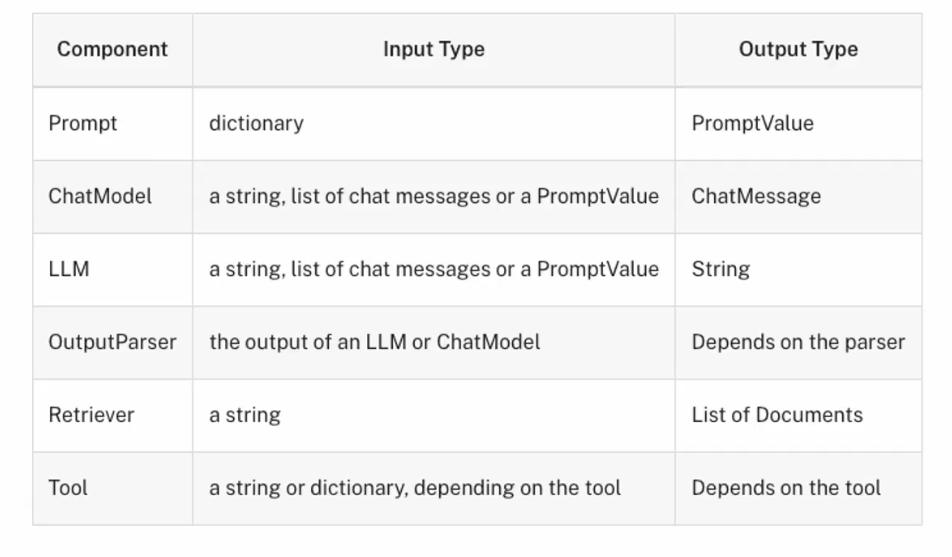 Runnable还使用了第二个参数,称为config:
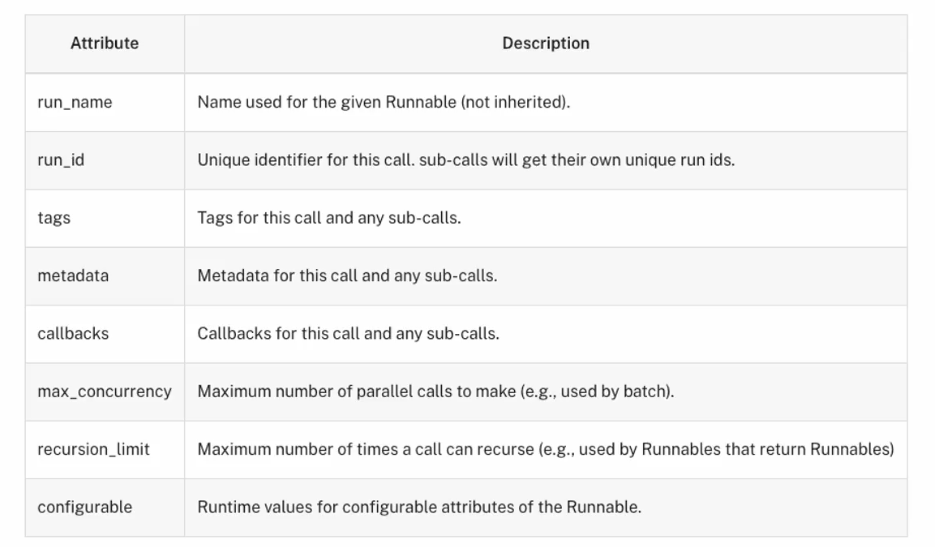
它包含了这个Runnable唯一的id等。
使用如下:
python
some_runnable.invoke(
    some_input,
    config={
        'run_name': 'example_run',
        'tags': ['example', 'test'],
        'metadata': {'source': 'generated_code_example'},
    }
)
#或者
chain = llm.with_config({"run_name": "model"}) | JsonOutputParser().with_config(
    {"run_name": "my_parser"}
)
如下是Runnable的使用demo:
cpp
from langchain_community.chat_models import ChatOllama
from langchain_core.messages import HumanMessage


from langchain_core.prompts import PromptTemplate
import asyncio

llm = ChatOllama(
    model="deepseek-r1:7b",
    base_url="http://localhost:11434"
)
question = "langchain是什么?"

# invoke事件
re_invoke = llm.invoke(question)
print(re_invoke)


# stream事件
ADD = None
for chunk in llm.stream(question): #这里chunk是AIMessage类型 来数据了会触发进行一次遍历
    if ADD is None:
        ADD = chunk
    else:
        ADD = ADD + chunk
    print(chunk.content+"|") #调用一次http连接,tcp是流式
print("ADD:{}".format(ADD)) #可以用这种方式对数据进行汇总

# batch事件
re_batch = llm.batch(["诸葛亮老家在哪里?", "朱元章老家哪里?"]) #返回AIMessage 它调用了两次http,跟调用用两次invoke区别是,它的两次请求是并行的
# 定义携程函数
async def show_events():
    #async有事件就执行没有就让出执行权,同await
    async for event in llm.astream_events("介绍下LangChain", version="v2"): #使用 LangChain「第二代事件协议]它决定了事件的结构内容
        print(
            f"event={event['event']} | "  #on_chat_model_start on_chat_model_stream on_chat_model_end三种事件,在on_chat_model_end中会把流汇总
            f"name={event.get('name')} | "
            f"data={event.get('data')}" #在data中含有AIMessageChunk
        )

asyncio.run(show_events()) #阻塞
4.结构化输出OutputParser
4.1BaseModel + Field制作Schema
cpp
# 标准事件之结构化输出 - with_structured_output
# 影响LLM的输出

from typing import Optional
from pydantic import BaseModel, Field
from langchain_openai import ChatOpenAI
import os

llm = ChatOpenAI(
    model="gpt-4",
    temperature=0,
    api_key=os.environ.get("OPENAI_API_KEY"),
    base_url=os.environ.get("OPENAI_API_BASE"),
    )
# Pydantic
class Joke(BaseModel):
    """Joke to tell user."""
    setup: str = Field(description="The setup of the joke") #这些描述的权重比普通的prompt高的多,模型会严格按照它的指示生成内容
    punchline: str = Field(description="The punchline to the joke") #Field是给字段加matedata的
    #类型注释,等价于rating: int | None
    rating: Optional[int] = Field(
        default=None, description="How funny the joke is, from 1 to 10"
    )
#structured_llm其实是RunnableSequence,里面包含了ChatModel和OutputParser对象,当执行invoke时,会串行执行
structured_llm = llm.with_structured_output(Joke) #输出从AIMessage-》Joke实例
re = structured_llm.invoke("给我讲一个关于程序员的笑话")
print("RE:{}".format(re))


# RE:setup='为什么程序员不喜欢外出?' punchline='因为他们害怕不能解决的bug!' rating=7
#此时传入模型的不是普通的prompt而是结构化的json格式的schema

"""
Ollama不支持Schema
Schema 依赖三个条件:

1️⃣ 推理平台支持 Tool / Function Calling
2️⃣ 模型在训练中学过"函数调用格式"
3️⃣ LangChain Adapter 实现了 bind_tools

它传递给llm的不是提示词, 而是以下结构:
{
  "type": "object",
  "properties": {
    "setup": {
      "type": "string",
      "description": "The setup of the joke"
    },
    "punchline": {
      "type": "string",
      "description": "The punchline of the joke"
    },
    "rating": {
      "type": "integer",
      "description": "1 to 10"
    }
  },
  "required": ["setup", "punchline"]
}
它的输出是Joke实例
prompt是人机交互, 而Schema是机器与机器之间的机构化交互, 因此它会严格按照Schema指定的格式输出
"""
TypedDict + Annotate制作Schema
cpp
from typing_extensions import Annotated, TypedDict
from langchain_openai import ChatOpenAI
from typing import Optional, Union
import os

llm = ChatOpenAI(
    model="gpt-4",
    temperature=0,
    api_key=os.environ.get("OPENAI_API_KEY"),
    base_url=os.environ.get("OPENAI_API_BASE"),
    )

# TypedDict + Annotated 编写模型的Schema
class Joke(TypedDict):
    """Joke to tell user.""" #Joke.__doc__ == "Joke to tell user." 它也会被传递给llm
    #Annotated是给字段加matedata的
    setup: Annotated[str, ..., "The setup of the joke"] #...表示这是必填字段
    punchline: Annotated[str, ..., "The punchline of the joke"]
    rating: Annotated[Optional[int], None, "How funny the joke is, from 1 to 10"]


structured_llm = llm.with_structured_output(Joke)

for chunk in structured_llm.stream("给我讲一个关于程序员的笑话"):
    print(chunk)

"""
流式最终输出:{'setup': '为什么程序员不喜欢外出?', 'punchline': '因为他们害怕不能解决现实生活中的bug!', 'rating': 8}
🔹 Prompt 决定"说什么"
🔹 Schema 决定"长什么样"
这跟人机交互不同,这是另外一种"工具模式", 让模型调用Joke函数, 并填返回给了它要的参数, 其实就是填充Joke结构体
"""

#输入给模型的
"""
{
  "messages": [
    {
      "role": "user",
      "content": "给我讲一个关于程序员的笑话"
    }
  ],
  "tools": [
    {
      "type": "function",
      "function": {
        "name": "Joke",
        "parameters": { ...JSON Schema... }
      }
    }
  ],
  "tool_choice": "any"
}

"""
#其中的{ ...JSON Schema... }如下:
"""
{
  "name": "Joke",
  "description": "Joke to tell user.",
  "parameters": {
    "type": "object",
    "properties": {
      "setup": { ... },
      "punchline": { ... },
      "rating": { ... }
    },
    "required": ["setup", "punchline"]
  }
}
"""
#llm模型的输出大该是这样子
"""
{
  "id": "chatcmpl-xxxx",
  "object": "chat.completion",
  "choices": [
    {
      "index": 0,
      "message": {
        "role": "assistant",
        "content": null,
        "tool_calls": [
          {
            "id": "call_xxx",
            "type": "function",
            "function": {
              "name": "Joke",
              "arguments": "{ \"setup\": \"一个程序员走进酒吧\", \"punchline\": \"酒吧老板说:WiFi 在那边\", \"rating\": 8 }"
            }
          }
        ]
      },
      "finish_reason": "tool_calls"
    }
  ]
}

"""
#langchain把它转为Joke实例返回


#BaseModel + Field比BaseModel + Field要可靠很多, 后者是轻量级写法, 运行时不校验, 模型输出不合法你得自己兜底
5.速率控制器
cpp
from langchain_community.chat_models import ChatOllama
from langchain_core.rate_limiters import InMemoryRateLimiter
import os
import time

rate_limiter = InMemoryRateLimiter(
    requests_per_second=5, #每秒产生5个令牌
    check_every_n_seconds=0.1, #过多的请求会被阻塞,每100ms尝试去拿令牌
    max_bucket_size=10, #令牌桶最多积累10个令牌
)

llm = ChatOllama(
    model="deepseek-r1:7b",
    base_url="http://localhost:11434",
    rate_limiter=rate_limiter
)
aseModel + Field

for _ in range(5):
    tic = time.time()
    response = llm.batch(["1+1", "2+2", "3+3", "4+4", "5+5", "6+6"])
    toc = time.time()
    print("-------------------")
    print(toc - tic, response)
6.工具使用
6.1#BaseModel+Field制作JSON Schema
cpp
from pydantic import BaseModel, Field
from langchain_openai import ChatOpenAI
import os

#模型会把Pydantic类 → 转成JSON Schema
#加法工具
#BaseModel+Field制作JSON Schema
class add(BaseModel):
    """Add two integers."""

    a: int = Field(..., description="First integer")
    b: int = Field(..., description="Second integer")

#乘法工具
class multiply(BaseModel):
    """Multiply two integers."""

    a: int = Field(..., description="First integer")
    b: int = Field(..., description="Second integer")

llm = ChatOpenAI(
    model="gpt-4",
    temperature=0,
    api_key=os.environ.get("OPENAI_API_KEY"),
    base_url=os.environ.get("OPEN_API_BASE"),
)

tools = [add,multiply]
#这里
llm_with_tools = llm.bind_tools(tools)
query="3乘以12是多少?"
RE = llm_with_tools.invoke(query)
print("RE:{}".format(RE))
# 1. 取出 tool call
tool_call = RE.tool_calls[0]

# 2. 执行工具
if tool_call["name"] == "multiply":
    result = tool_call["args"]["a"] * tool_call["args"]["b"]
模型会做三件事, 1.根据语义匹配选择使用哪个function/tool, 2.并且把这个两个数传递给对应的参数 3.把这个函数选择和参数匹配返回给用户
#然后Agent再根据返回执行响应的工具, 模型起到的是根据语义建议使用哪个工具的作用
content='' 是空的, 因为finish_reason = 'tool_calls' 说明切换了模型的输出模式,由语言输出改为tool的函数调用建议, 和参数对齐。工具的种类多种多样, 函数只是工具的一种
输出
cpp
RE:
content=''
additional_kwargs={'tool_calls': [{'id': 'call_UB4AgTqaJubYAImpAPFPi45N', 'function': {'arguments': '{\n  "a": 3,\n  "b": 12\n}', 'name': 'multiply'}, 'type': 'function'}], 'refusal': None}
response_metadata={'token_usage': {'completion_tokens': 21, 'prompt_tokens': 94, 'total_tokens': 115, 'completion_tokens_details': {'accepted_prediction_tokens': 0, 'audio_tokens': 0, 'reasoning_tokens': 0, 'rejected_prediction_tokens': 0},
'prompt_tokens_details': {'audio_tokens': 0, 'cached_tokens': 0}}, 'model_name': 'gpt-4-0613', 'system_fingerprint': None, 'finish_reason': 'tool_calls', 'logprobs': None}
id='run-5a371931-642d-4348-9b08-4d6f1c0f43a9-0'
tool_calls=[{'name': 'multiply', 'args': {'a': 3, 'b': 12}, 'id': 'call_UB4AgTqaJubYAImpAPFPi45N', 'type': 'tool_call'}]
usage_metadata={'input_tokens': 94, 'output_tokens': 21, 'total_tokens': 115, 'input_token_details': {'audio': 0, 'cache_read': 0}, 'output_token_details': {'audio': 0, 'reasoning': 0}}
输入
cpp
{
  "messages": [
    {
      "role": "user",
      "content": "3乘以12是多少?" #模型会做三件事, 1.根据语义匹配选择使用哪个function, 2.并且把这个两个数传递给对应的参数 3.把这个函数选择和参数匹配返回给用户
    }
  ],
  "tools": [
    {
      "type": "function",
      "function": {
        "name": "add",
        "description": "Add two integers",
        "parameters": {...JSON Schema...}
      }
    },
    {
      "type": "function",
      "function": {
        "name": "multiply",
        "description": "Multiply two integers",
        "parameters": {...JSON Schema...}
      }
    }
  ],
  "tool_choice": "auto"
}
6.2 @tool制作JSON Schema
cpp
from langchain_core.tools import tool
from langchain_openai import ChatOpenAI
import os
#这里multiply就是就是tools在这个Runnable的实例对象
@tool
def multiply(a:int,b:int) -> int:
    """Multiply two numbers."""
    return a*b

print(multiply.name)
print(multiply.description)
print(multiply.args)

llm = ChatOpenAI(
    model="gpt-4",
    temperature=0,
    api_key=os.environ.get("OPENAI_API_KEY"),
    base_url=os.environ.get("OPEN_API_BASE"),
)

tools = [multiply]
#llm_with_tools是带tools的ChatModel,依然是ChatModel类型 它是一个 "被注入了 tools 配置的 ChatOpenAI Runnable
#为什么with_structured_output会生成一个RunnableSequence,因为解析是必须执行的,而tools不需要执行,只要模型选择出一个函数,并对应出参数的值就行。
llm_with_tools = llm.bind_tools(tools)
query="3乘以12是多少?"
RE = llm_with_tools.invoke(query)
print("RE:{}".format(RE))
输出
cpp
multiply
Multiply two numbers.
{'a': {'title': 'A', 'type': 'integer'}, 'b': {'title': 'B', 'type': 'integer'}}
RE:content='' additional_kwargs={'tool_calls': [{'id': 'call_3DKocRY5ZuBakQD9Rp3q3cZq', 'function': {'arguments': '{\n  "a": 3,\n  "b": 12\n}', 'name': 'multiply'}, 'type': 'function'}], 'refusal': None} response_metadata={'token_usage': {'completion_tokens': 21, 'prompt_tokens': 55, 'total_tokens': 76, 'completion_tokens_details': {'accepted_prediction_tokens': 0, 'audio_tokens': 0, 'reasoning_tokens': 0, 'rejected_prediction_tokens': 0}, 'prompt_tokens_details': {'audio_tokens': 0, 'cached_tokens': 0}}, 'model_name': 'gpt-4-0613', 'system_fingerprint': None, 'finish_reason': 'tool_calls', 'logprobs': None} id='run-f653a359-0c7b-4e68-a79f-51fa12b58440-0' tool_calls=[{'name': 'multiply', 'args': {'a': 3, 'b': 12}, 'id': 'call_3DKocRY5ZuBakQD9Rp3q3cZq', 'type': 'tool_call'}] usage_metadata={'input_tokens': 55, 'output_tokens': 21, 'total_tokens': 76, 'input_token_details': {'audio': 0, 'cache_read': 0}, 'output_token_details': {'audio': 0, 'reasoning': 0}}
把 Python 函数变成 LLM 可理解的工具描述,变成可调用的工具,并在传递给llm时,可以把函数内容制作成JSON Schema
7.字符串模板
7.1字符模板
python
#字符模板
# string template
from langchain_core.prompts import PromptTemplate
#调用自己的类方法
#prompt类型为<class 'langchain_core.prompts.prompt.PromptTemplate'>
prompt = PromptTemplate.from_template("你是一个{name},帮我起1个具有{county}特色的{sex}名字")
prompts = prompt.format(name="算命大师",county="法国",sex="女孩")
"""
#PromptTemplate也是Runnalbe
prompt = PromptTemplate.from_template("你好 {name}")
prompt.invoke({"name": "张三"})
# -> "你好 张三"

"""
print(type(prompts))
print(prompts)输出如下,可以看到prompts是一个字符串类型,而Ollama的输入和输出就是:Runnablestr, str,因此可以直接填入其invoke()
cpp
<class 'str'>
你是一个算命大师,帮我起1个具有法国特色的女孩名字
还有partial()
python
# 部分格式化提示词模板
from langchain_core.prompts import PromptTemplate

prompt = PromptTemplate.from_template("{foo}{bar}")
partial_prompt = prompt.partial(foo="foo")
print(partial_prompt.format(bar="baz"))

# 输出 :foobaz
把一个可执行函数放入替换,partial/format 方法会自动调用函数并用返回值替换占位符:
python
# 使用partial可以部分格式化提示词
# 这在有些场景非常有用
# 比如当你希望提示词被执行的时候,始终是当前时间
from datetime import datetime
from langchain_core.prompts import PromptTemplate

def _get_datetime():
    now = datetime.now()
    return now.strftime("%m/%d/%Y, %H:%M:%S")


prompt = PromptTemplate(
    template="Tell me a {adjective} joke about the day {date}",
    input_variables=["adjective", "date"], #这个也是为了Runnable
)
# partial/format 方法会自动调用函数并用返回值替换占位符
partial_prompt = prompt.partial(date=_get_datetime)
print(partial_prompt.format(adjective="funny"))

#输出: Tell me a funny joke about the day 12/26/2025, 17:23:12
7.2对话模板
cpp
# 对话模板具有结构,chatmodels
# chat template with structure
from langchain_core.prompts import ChatPromptTemplate
#一下"system"标识符是固定的几个选项,不可随意命名
chat_template = ChatPromptTemplate.from_messages(
    [
        ("system", "你是一个起名大师. 你的名字叫{name}."),
        ("human", "你好{name},你感觉如何?"),
        ("ai", "你好!我状态非常好!"),
        ("human", "你叫什么名字呢?"),
        ("ai", "你好!我叫{name}"),
        ("human", "{user_input}"),
    ]
)

chats = chat_template.format_messages(name="陈大师", user_input="你的爸爸是谁呢?")
print(type(chats))
print(chats)
输出:
cpp
<class 'list'>
[SystemMessage(content='你是一个起名大师. 你的名字叫陈大师.'), HumanMessage(content='你好陈大师,你感觉如何?'), AIMessage(content='你好!我状态非常好!'), HumanMessage(content='你叫什么名字呢?'), AIMessage(content='你好!我叫陈大师'), HumanMessage(content='你的爸爸是谁呢?')]而ChatModel的输入和输出正是RunnableList\[BaseMessage, AIMessage],因此可以直接填入其invoke()
7.3对话模板中,占位符使用
python
from langchain_core.prompts import ChatPromptTemplate, MessagesPlaceholder
from langchain_core.messages import HumanMessage

prompt_template = ChatPromptTemplate([
    ("system", "你是一个厉害的人工智能助手"), #等价于SystemMessage(content="你是一个厉害的人工智能助手")
    MessagesPlaceholder("msgs")
])
#它也是runnable所有可以执行invoke
RE = prompt_template.invoke({"msgs": [HumanMessage(content="hi!")]})
print(type(RE))
RE.messages        # → list[BaseMessage]
RE.to_messages()   # → list[BaseMessage]
RE.to_string()     # → 拼接成文本 prompt 只包含content内容
print("RE:{}".format(RE))
输出如下:
python
<class 'langchain_core.prompt_values.ChatPromptValue'>
RE:messages=[SystemMessage(content='你是一个厉害的人工智能助手', additional_kwargs={}, response_metadata={}), HumanMessage(content='hi!', additional_kwargs={}, response_metadata={})]这是ChatPromptValue类型,不是ListBaseMessage类型,ChatPromptValue是什么呢,有什么作用呢?
ChatPromptValue是ChatPromptTemplate作为Runnable的输出,方便对接下一个Runnable。
ChatPromptTemplate | ChatModel
7.4直接创建消息
cpp
from langchain_core.messages import SystemMessage, HumanMessage, AIMessage

# 直接创建消息
# create messages directly
sy = SystemMessage(
  content="你是一个起名大师",
  additional_kwargs={"大师姓名": "陈瞎子"}
)

hu = HumanMessage(
  content="请问大师叫什么?"
)
ai = AIMessage(
  content="我叫陈瞎子"
)
RE = [sy,hu,ai]
print("RE:{}".format(RE))
#输出:
cpp
RE:[SystemMessage(content='你是一个起名大师', additional_kwargs={'大师姓名': '陈瞎子'}, response_metadata={}), HumanMessage(content='请问大师叫什么?', additional_kwargs={}, response_metadata={}), AIMessage(content='我叫陈瞎子', additional_kwargs={}, response_metadata={})]以上提示词模板生成的SystemMessage(content='你是一个厉害的人工智能助手', ...),这是ListBaseMessage类型可以直接放入ChatModel实例的invoke()函数中。
7.5自定义提示词模板类
cpp
##函数大师:根据函数名称,查找函数代码,并给出中文的代码说明
# Function Master: Given a function name, find the function code and provide a Chinese code explanation


from langchain_core.prompts import StringPromptTemplate

# 定义一个简单的函数作为示例效果
# Define a simple function as an example
def hello_world(abc):
    print("Hello, world!")
    return abc


PROMPT = """\
你是一个非常有经验和天赋的程序员,现在给你如下函数名称,你会按照如下格式,输出这段代码的名称、源代码、中文解释。
函数名称: {function_name}
源代码:
{source_code}
代码解释:
"""

import inspect


def get_source_code(function_name):
    #获得源代码
    # Get the source code
    return inspect.getsource(function_name)

#自定义的模板class
# Custom template class
class CustmPrompt(StringPromptTemplate):  #StringPromptTemplate继承自PromptTemplate

    #重写父类format函数
    def format(self, **kwargs) -> str: #接收参数组为kwargs字典
        # 获得源代码
        # Get the source code
        source_code = get_source_code(kwargs["function_name"])

        # 生成提示词模板
        # Generate the prompt template
        # 字符串的基本操作
        prompt = PROMPT.format(
            function_name=kwargs["function_name"].__name__, source_code=source_code
        )
        return prompt #PromptTemplate的format函数必须返回str
#它的作用是 告诉父类模板需要哪些变量,确保 format 调用合法
a = CustmPrompt(input_variables=["function_name"]) #input_variables是给 LangChain 的运行时系统 / Chain / 校验器 / 并行调度器 用的。有了这个才能作为一个Runnable被Agent识别
pm = a.format(function_name=hello_world)

print(pm)

#和LLM连接起来
# Connect to LLM
from langchain_openai import OpenAI
import os
api_base = os.getenv("OPENAI_API_BASE")
api_key = os.getenv("OPENAI_API_KEY")

llm = OpenAI(
    model="gpt-3.5-turbo-instruct",
    temperature=0,
    openai_api_key=api_key,
    openai_api_base=api_base
    )
msg = llm.invoke(pm)
print(msg)
这个自定义提示次模板的作用就是在一个类里组提示词, 跟直接赋字符串区别不大。但它继承了基类,使之特别。
StringPromptTemplate继承自PromptTemplate, CustmPrompt为什么要继承呢, 因为继承了才是一个Runnable, 才可以放入链中,如下:
chain = custom_prompt | llm | parser
输出
python
你是一个非常有经验和天赋的程序员,现在给你如下函数名称,你会按照如下格式,输出这段代码的名称、源代码、中文解释。
函数名称: hello_world
源代码:
def hello_world(abc):
    print("Hello, world!")
    return abc

代码解释:

函数名称: hello_world
源代码:
def hello_world(abc):
    print("Hello, world!")
    return abc

代码解释:
这是一个名为hello_world的函数,它接受一个参数abc,并打印出"Hello, world!",最后返回参数abc。它的作用是打印出"Hello, world!"这句话,并将参数abc返回。
在python中普通函数也是一个对象,它自带以下三个字段:
python
hello_world.__name__      # 'hello_world'
hello_world.__doc__       # docstring
hello_world.__module__    # 所在模块
7.6示例 提示词模板
python
# zeroshot会导致低质量回答
from langchain_openai import ChatOpenAI
model = ChatOpenAI(
model="gpt-4o-mini",
temperature=0.0,
openai_api_base = os.getenv("OPENAI_API_BASE"),
openai_api_key = os.getenv("OPENAI_API_KEY")
)

res = model.invoke("What is 2 🦜 9?")
print(res)
print("---------")

#增加示例
#使用FewShotChatMessagePromptTemplate
from langchain_core.prompts import ChatPromptTemplate, FewShotChatMessagePromptTemplate
#增加示例组
examples = [
    {"input": "2 🦜 2", "output": "4"},
    {"input": "2 🦜 3", "output": "5"},
]
#构造提示词模板
#把上面两分别填入进来
example_prompt = ChatPromptTemplate.from_messages(
    [
        ("human", "{input}"),
        ("ai", "{output}"),
    ]
)
#组合示例与提示词
few_shot_prompt = FewShotChatMessagePromptTemplate(
    example_prompt=example_prompt,
    examples=examples,
)
#打印提示词模板
print(few_shot_prompt.invoke({}).to_messages())
print("---------")

## 最终提示词
final_prompt = ChatPromptTemplate.from_messages(
    [
        ("system", "你是一位神奇的数学奇才"),
        few_shot_prompt,
        ("human", "{input}"),
    ]
)

##重新提问
chain = final_prompt | model
result = chain.invoke({"input": "What is 2 🦜 9?"})
print(result)
print("---------")
如果我们直接给模型输入些指令,它可能不知道如何理解我们的问题,从而回答。因此我们可以使用一些示例,然后再提出自己的问题。
输出:
python
content="It seems like you're using an emoji (🦜) in a mathematical expression. If you could clarify what operation the parrot emoji represents, I'd be happy to help you solve it!" additional_kwargs={'refusal': None} response_metadata={'token_usage': {'completion_tokens': 39, 'prompt_tokens': 17, 'total_tokens': 56, 'completion_tokens_details': {'accepted_prediction_tokens': 0, 'audio_tokens': 0, 'reasoning_tokens': 0, 'rejected_prediction_tokens': 0}, 'prompt_tokens_details': {'audio_tokens': 0, 'cached_tokens': 0}}, 'model_name': 'gpt-4o-mini-2024-07-18', 'system_fingerprint': 'fp_f97eff32c5', 'finish_reason': 'stop', 'logprobs': None} id='run-dfdc2788-6853-4588-bd50-166f815416fd-0' usage_metadata={'input_tokens': 17, 'output_tokens': 39, 'total_tokens': 56, 'input_token_details': {'audio': 0, 'cache_read': 0}, 'output_token_details': {'audio': 0, 'reasoning': 0}}
---------
[HumanMessage(content='2 🦜 2', additional_kwargs={}, response_metadata={}), AIMessage(content='4', additional_kwargs={}, response_metadata={}), HumanMessage(content='2 🦜 3', additional_kwargs={}, response_metadata={}), AIMessage(content='5', additional_kwargs={}, response_metadata={})]
---------
content='11' additional_kwargs={'refusal': None} response_metadata={'token_usage': {'completion_tokens': 2, 'prompt_tokens': 60, 'total_tokens': 62, 'completion_tokens_details': {'accepted_prediction_tokens': 0, 'audio_tokens': 0, 'reasoning_tokens': 0, 'rejected_prediction_tokens': 0}, 'prompt_tokens_details': {'audio_tokens': 0, 'cached_tokens': 0}}, 'model_name': 'gpt-4o-mini-2024-07-18', 'system_fingerprint': 'fp_f97eff32c5', 'finish_reason': 'stop', 'logprobs': None} id='run-7620152d-c5e4-4d5d-9a1e-01b8a7c6ac12-0' usage_metadata={'input_tokens': 60, 'output_tokens': 2, 'total_tokens': 62, 'input_token_details': {'audio': 0, 'cache_read': 0}, 'output_token_details': {'audio': 0, 'reasoning': 0}}
---------
7.7提示词token长度限制
python
# 根据输入的提示词长度综合计算最终长度,智能截取或者添加提示词的示例
# Example of intelligently intercepting or adding prompts by calculating the final length based on the length of the input prompts.
from langchain_core.example_selectors import LengthBasedExampleSelector
from langchain_core.prompts import FewShotPromptTemplate, PromptTemplate

#假设已经有这么多的提示词示例组:
# Suppose there are so many prompt examples:
examples = [
    {"input":"happy","output":"sad"},
    {"input":"tall","output":"short"},
    {"input":"sunny","output":"gloomy"},
    {"input":"windy","output":"calm"},
    {"input":"高兴","output":"悲伤"}
]

#构造提示词模板
# Construct prompt template
example_prompt = PromptTemplate(
    input_variables=["input","output"],
    template="原词:{input}\n反义:{output}"
)

#调用长度示例选择器
# Call the length example selector
example_selector = LengthBasedExampleSelector(
    #传入提示词示例组
    # Pass in the prompt example group
    examples=examples,
    #传入提示词模板
    example_prompt=example_prompt,
    #设置格式化后的提示词最大长度
    # Set the maximum length of the formatted prompt
    max_length=25,
    #内置的get_text_length,如果默认分词计算方式不满足,可以自己扩展
    # Built-in get_text_length, if the default word segmentation calculation method does not meet the requirements, you can expand it yourself
    #get_text_length:Callable[[str],int] = lambda x:len(re.split("\n| ",x))
)


#使用小样本提示词模版来实现动态示例的调用
# Use the small sample prompt template to realize the call of dynamic examples
dynamic_prompt = FewShotPromptTemplate(
    example_selector=example_selector,
    example_prompt=example_prompt,
    prefix="给出每个输入词的反义词",
    suffix="原词:{adjective}\n反义:",
    input_variables=["adjective"]
)
就是说
python
examples = [
    {"input":"happy","output":"sad"},
    {"input":"tall","output":"short"},
    {"input":"sunny","output":"gloomy"},
    {"input":"windy","output":"calm"},
    {"input":"高兴","output":"悲伤"}
]
这几个填入到模板后, 会有5条提示词, 如果其中某一条过长, 超过最大长度, 那一条会被剔除。 max_length=25指25个token。
输出:
python
RE:input_variables=['adjective'] input_types={} partial_variables={} example_selector=LengthBasedExampleSelector(examples=[{'input': 'happy', 'output': 'sad'}, {'input': 'tall', 'output': 'short'}, {'input': 'sunny', 'output': 'gloomy'}, {'input': 'windy', 'output': 'calm'}, {'input': '高兴', 'output': '悲伤'}], example_prompt=PromptTemplate(input_variables=['input', 'output'], input_types={}, partial_variables={}, template='原词:{input}\n反义:{output}'), get_text_length=<function _get_length_based at 0x7f6f6885ec00>, max_length=25, example_text_lengths=[2, 2, 2, 2, 2]) example_prompt=PromptTemplate(input_variables=['input', 'output'], input_types={}, partial_variables={}, template='原词:{input}\n反义:{output}') suffix='原词:{adjective}\n反义:' prefix='给出每个输入词的反义词'7.8拉取提示词模板
LangChain Hub官网:https://smith.langchain.com/hub
从 LangChain Hub 拉取的 rag-prompt 资源的核心是一个 PromptTemplate,它使用了两个输入变量:context 和 question。这个模板用于回答问题,并且包含了一个清晰的指令,要求模型使用最多三句话来回答问题,如果不知道答案则说"不知道"。
python
from langchain import hub
prompt = hub.pull("rlm/rag-prompt")
print(prompt)
#输出如下
"""
input_variables=['context', 'question'] input_types={} partial_variables={} metadata={'lc_hub_owner': 'rlm', 'lc_hub_repo': 'rag-prompt', 'lc_hub_commit_hash': '50442af133e61576e74536c6556cefe1fac147cad032f4377b60c436e6cdcb6e'} messages=[HumanMessagePromptTemplate(prompt=PromptTemplate(input_variables=['context', 'question'], input_types={}, partial_variables={}, template="You are an assistant for question-answering tasks. Use the following pieces of retrieved context to answer the question. If you don't know the answer, just say that you don't know. Use three sentences maximum and keep the answer concise.\nQuestion: {question} \nContext: {context} \nAnswer:"), additional_kwargs={})]
"""
ChatModel支持
ChatModel.invoke(
input: str
| listBaseMessage
| PromptValue )
PromptValue.messages ,str会转换为HumanMessage(content="你好"),他本质只支持listBaseMessage
llm支持
LLM.invoke(
input: str | PromptValue
)
也支持listMessage不推荐,也会把它转换为str,他本质只支持str,支持PromptValue是因为llm要进入chain链,必须支持。会做这样的转换PromptValue.to_string()
8.JSON Schema
模型能理解的只有三种东西:
1.自然语言
2.token 概率
3.结构化约束(JSON Schema)
LangChain 干的事就是:
LangChain把 Python 世界的一切(函数 / 类 / 类型)翻译成模型世界唯一能理解的结构语言,LangChain 里所有"高级能力",底层都在干同一件事:把 Python 结构 → JSON Schema → 喂给模型。然后大语言模型也返回给langchain一个Json,但不是JSON Schema,里面是根据JSON Schema作出的回答,JSON Schema就像一个表格,返回的是答案本身。
bind_tools() 的参数:@tool 函数 / Pydantic / TypedDict
with_structured_output() 的参数:Pydantic / TypedDict
最终都会被转换成 JSON Schema,传给大语言模型