作为持久层框架的佼佼者,MyBatis的日志模块为SQL调试、性能优化提供了强大支持。本文将带你深入理解其设计精髓与实战技巧。
一、整体架构:日志模块的战略位置
在深入探讨之前,让我们先从宏观视角理解MyBatis的分层架构。
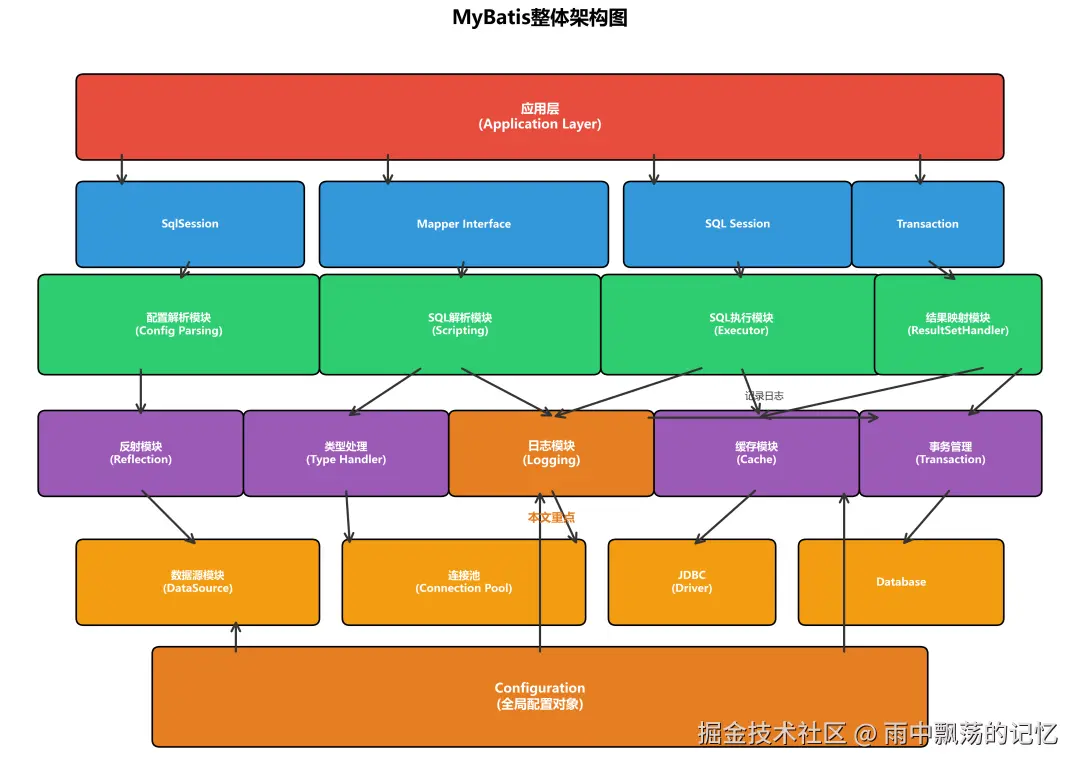
从架构图可以看出,日志模块位于基础支撑层,它就像一个忠实的记录员,默默记录着系统运行的每一个关键时刻。
日志模块的六大核心职责
markdown
1. 记录SQL执行日志 - 完整捕获执行的SQL语句
2. 记录参数日志 - 追踪SQL参数的传递过程
3. 记录结果日志 - 可选的查询结果记录
4. 记录性能日志 - 精准统计SQL执行耗时
5. 记录异常日志 - 详尽的错误信息捕获
6. 集成日志框架 - 无缝适配主流日志组件
为什么日志如此重要?
在实际开发中,日志扮演着三个关键角色:
sql
1、开发调试阶段
  1、查看实际执行的SQL语句
  2、检查参数绑定是否正确
  3、快速排查SQL语法错误
2、性能优化阶段
  1、识别执行缓慢的SQL查询
  2、分析SQL执行频率分布
  3、指导索引优化方向
3、生产运维阶段
  1、问题快速定位与追踪
  2、数据操作行为审计
  3、业务数据深度分析
MyBatis日志的五大特点
| 特性 | 说明 |
|---|---|
| 自动集成 | 智能检测并使用项目中的日志框架 |
| 多框架支持 | 支持SLF4J、Log4j、Log4j2、JDK Logging等 |
| 分级记录 | 支持DEBUG、INFO、WARN、ERROR等级别 |
| 性能考虑 | 使用延迟加载,避免不必要的字符串拼接 |
| JDBC日志 | 专门记录JDBC操作的详细日志 |
二、接口架构:统一而灵活的设计
MyBatis采用接口+适配器的经典设计模式,实现了与日志框架的解耦。
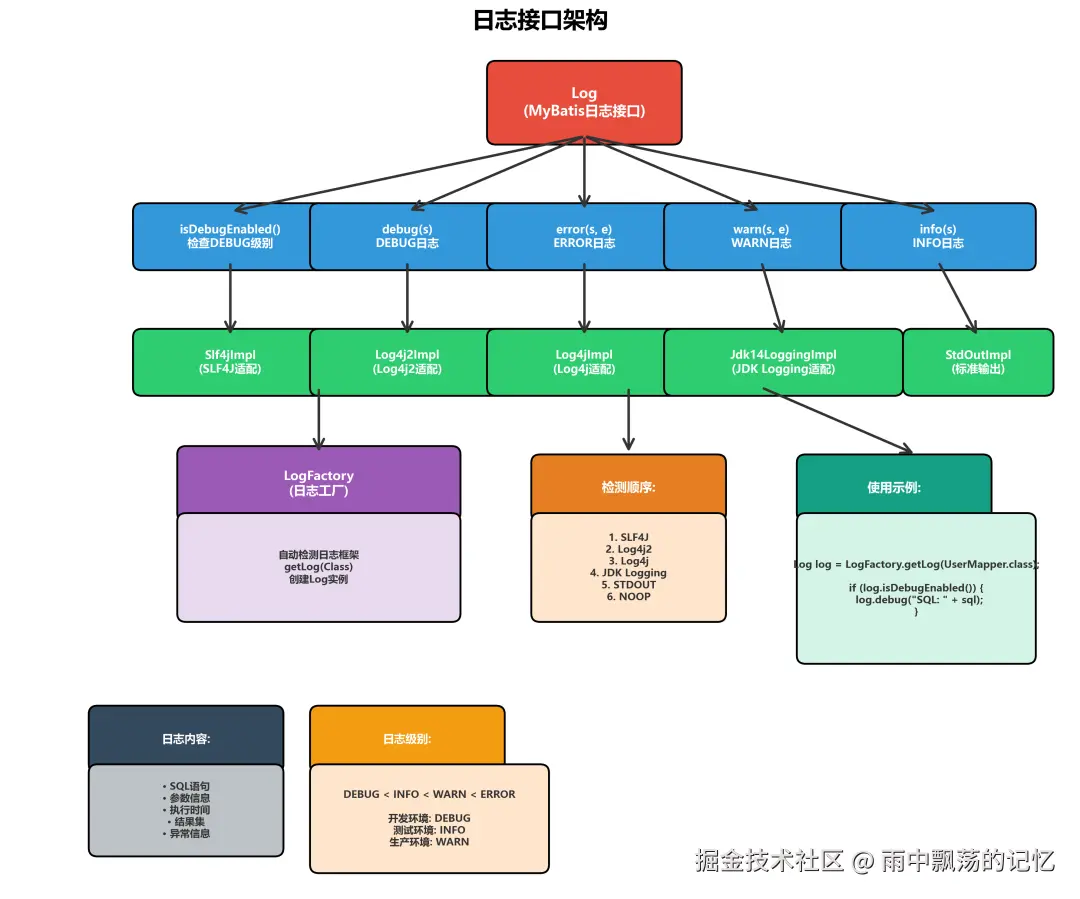
核心接口:Log
MyBatis定义了简洁而强大的日志接口:
arduino
public interface Log {
    // 是否启用DEBUG级别
    boolean isDebugEnabled();

    // 是否启用ERROR级别
    boolean isErrorEnabled();

    // DEBUG级别日志
    void debug(String s);

    // ERROR级别日志
    void error(String s);

    // ERROR级别日志(带异常)
    void error(String s, Throwable e);

    // WARN级别日志(带异常)
    void warn(String s, Throwable e);
}日志框架适配器家族MyBatis通过适配器模式支持多种主流日志框架:
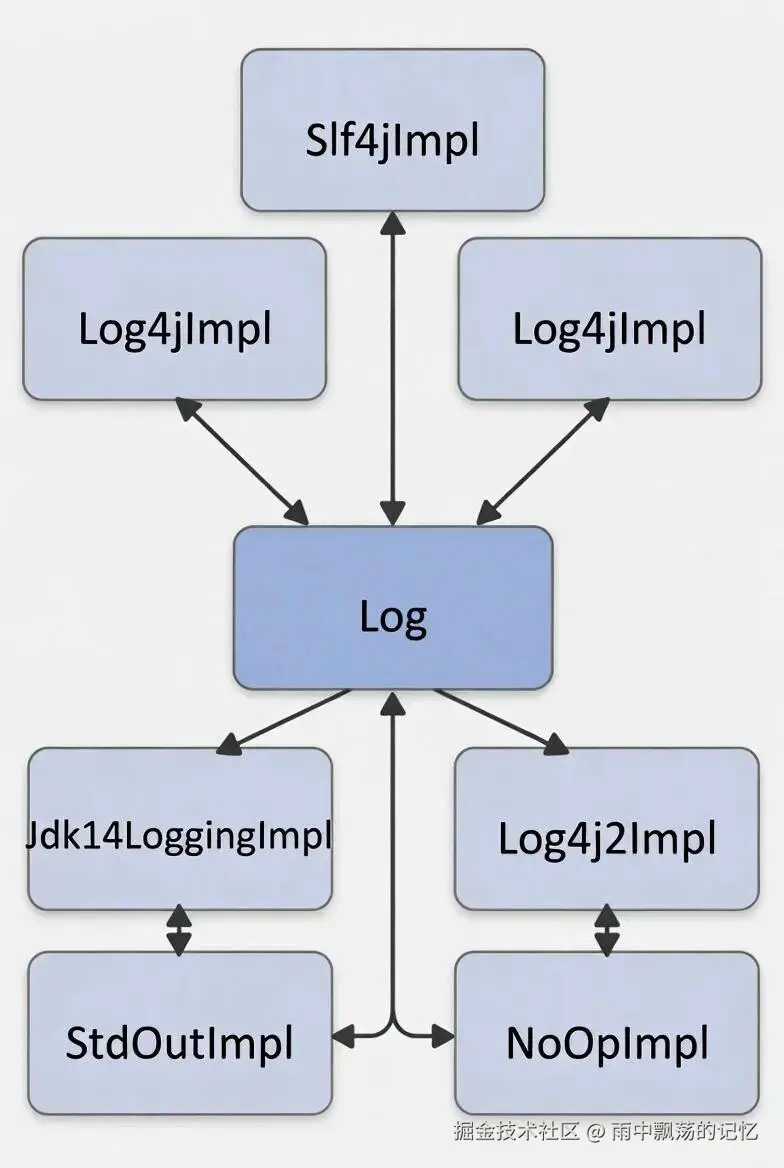
Slf4jImpl实现示例
typescript
public class Slf4jImpl implements Log {
    private final Logger log;

    public Slf4jImpl(String clazz) {
        // 通过SLF4J工厂创建Logger
        log = LoggerFactory.getLogger(clazz);
    }

    @Override
    public boolean isDebugEnabled() {
        return log.isDebugEnabled();
    }

    @Override
    public void debug(String s) {
        log.debug(s);
    }

    @Override
    public void error(String s, Throwable e) {
        log.error(s, e);
    }

    @Override
    public void warn(String s, Throwable e) {
        log.warn(s, e);
    }
}
LogFactory工厂类:智能选择最佳日志框架
LogFactory负责按照优先级自动检测并创建合适的Log实现:
php
public final class LogFactory {
    private static Constructor<? extends Log> logConstructor;

    static {
        // 按优先级依次尝试加载日志框架
        // 1. 优先尝试SLF4J
        tryImplementation(Slf4jImpl.class, "SLF4J");
        // 2. 然后尝试Log4j2
        tryImplementation(Log4j2Impl.class, "Log4j 2");
        // 3. 继续尝试Log4j
        tryImplementation(Log4jImpl.class, "Log4j");
        // 4. 尝试JDK内置日志
        tryImplementation(Jdk14LoggingImpl.class, "JDK logging");
        // 5. 降级到标准输出
        tryImplementation(StdOutImpl.class, "stdout");
        // 6. 最后使用空实现
        tryImplementation(NoOpImpl.class, "noop");
    }

    // 获取Log实例
    public static Log getLog(Class<?> clazz) {
        return getLog(clazz.getName());
    }

    public static Log getLog(String logger) {
        try {
            return logConstructor.newInstance(logger);
        } catch (Throwable t) {
            throw new RuntimeException(
                "Error creating logger for " + logger, t);
        }
    }

    // 支持自定义日志实现
    public static synchronized void useCustomLogging(
        Class<? extends Log> clazz) {
        setImplementation(clazz);
    }
}
三、日志配置:灵活多样的配置方式
MyBatis提供了多种配置方式,满足不同场景需求。
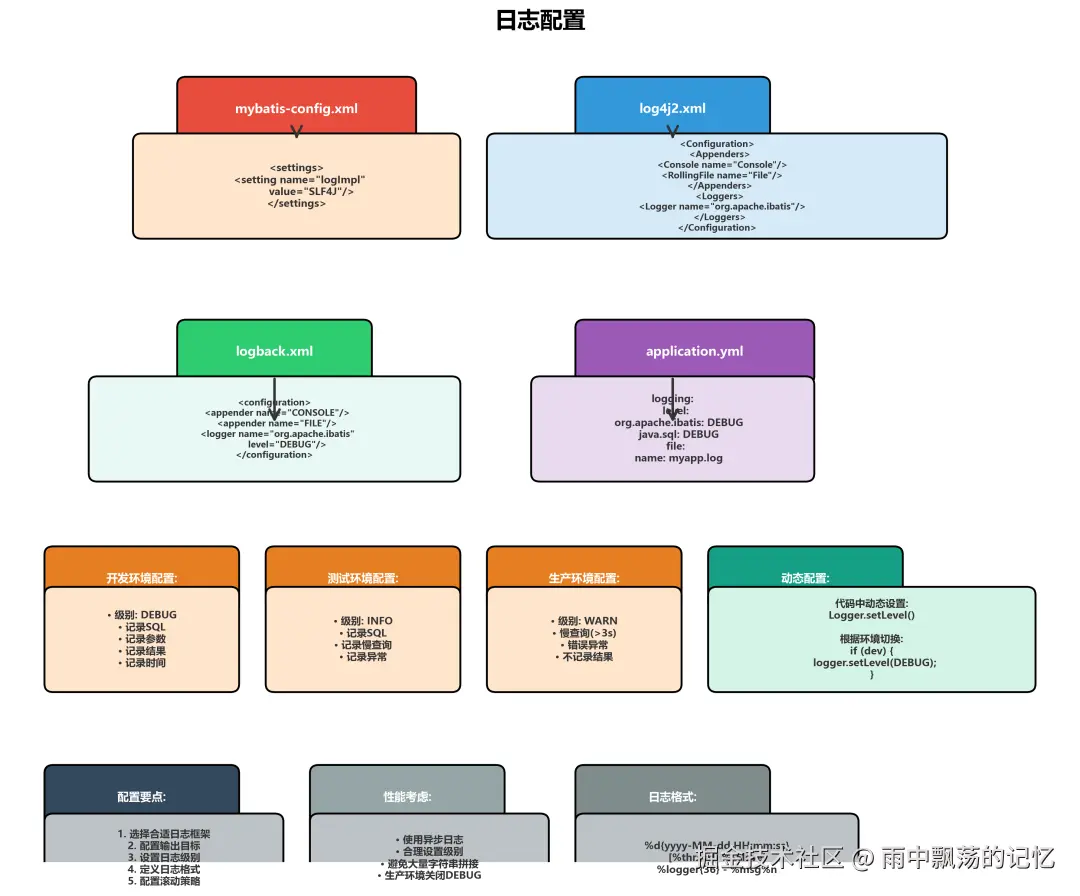
方式1:mybatis-config.xml配置
xml
<configuration>
    <settings>
        <!-- 可选:显式指定日志实现 -->
        <!-- <setting name="logImpl" value="SLF4J"/> -->
        <!-- <setting name="logImpl" value="LOG4J2"/> -->
        <!-- <setting name="logImpl" value="STDOUT_LOGGING"/> -->
    </settings>
</configuration>
方式2:Log4j2详细配置
log4j2.xml:
xml
<?xml version="1.0" encoding="UTF-8"?>
<Configuration status="WARN">
    <Appenders>
        <!-- 控制台输出 -->
        <Console name="Console" target="SYSTEM_OUT">
            <PatternLayout
                pattern="%d{HH:mm:ss.SSS} [%t] %-5level %logger{36} - %msg%n"/>
        </Console>

        <!-- 文件输出(滚动策略) -->
        <RollingFile name="RollingFile"
                     fileName="logs/mybatis.log"
                     filePattern="logs/mybatis-%d{yyyy-MM-dd}-%i.log.gz">
            <PatternLayout
                pattern="%d{yyyy-MM-dd HH:mm:ss.SSS} [%t] %-5level %logger{36} - %msg%n"/>
            <Policies>
                <!-- 每天滚动 -->
                <TimeBasedTriggeringPolicy interval="1"/>
                <!-- 单文件最大100MB -->
                <SizeBasedTriggeringPolicy size="100 MB"/>
            </Policies>
            <!-- 最多保留30天 -->
            <DefaultRolloverStrategy max="30"/>
        </RollingFile>
    </Appenders>

    <Loggers>
        <!-- MyBatis核心日志 -->
        <Logger name="org.apache.ibatis" level="DEBUG" additivity="false">
            <AppenderRef ref="Console"/>
            <AppenderRef ref="RollingFile"/>
        </Logger>

        <!-- SQL语句日志 -->
        <Logger name="org.apache.ibatis.jdbc.SQL"
                level="DEBUG" additivity="false">
            <AppenderRef ref="Console"/>
        </Logger>

        <!-- Root Logger -->
        <Root level="INFO">
            <AppenderRef ref="Console"/>
            <AppenderRef ref="RollingFile"/>
        </Root>
    </Loggers>
</Configuration>
方式3:Logback配置
logback.xml:
xml
<?xml version="1.0" encoding="UTF-8"?>
<configuration>
    <!-- 控制台输出 -->
    <appender name="CONSOLE"
              class="ch.qos.logback.core.ConsoleAppender">
        <encoder>
            <pattern>%d{HH:mm:ss.SSS} [%thread] %-5level %logger{36} - %msg%n</pattern>
        </encoder>
    </appender>

    <!-- 文件输出 -->
    <appender name="FILE"
              class="ch.qos.logback.core.rolling.RollingFileAppender">
        <file>logs/mybatis.log</file>
        <rollingPolicy
            class="ch.qos.logback.core.rolling.TimeBasedRollingPolicy">
            <fileNamePattern>logs/mybatis-%d{yyyy-MM-dd}.log</fileNamePattern>
            <maxHistory>30</maxHistory>
        </rollingPolicy>
        <encoder>
            <pattern>%d{yyyy-MM-dd HH:mm:ss.SSS} [%thread] %-5level %logger{36} - %msg%n</pattern>
        </encoder>
    </appender>

    <!-- MyBatis日志配置 -->
    <logger name="org.apache.ibatis" level="DEBUG"/>
    <logger name="java.sql.Connection" level="DEBUG"/>
    <logger name="java.sql.Statement" level="DEBUG"/>
    <logger name="java.sql.PreparedStatement" level="DEBUG"/>

    <!-- Root配置 -->
    <root level="INFO">
        <appender-ref ref="CONSOLE"/>
        <appender-ref ref="FILE"/>
    </root>
</configuration>
方式4:Spring Boot配置
application.yml:
yaml
# 日志配置
logging:
  level:
    # MyBatis SQL日志
    org.apache.ibatis: DEBUG
    java.sql.Connection: DEBUG
    java.sql.Statement: DEBUG
    java.sql.PreparedStatement: DEBUG
    java.sql.ResultSet: WARN
  # 日志文件配置
  file:
    path: logs
    name: myapp.log
    max-size: 100MB
    max-history: 30
  # 日志格式
  pattern:
    console: "%d{HH:mm:ss.SSS} [%thread] %-5level %logger{36} - %msg%n"
    file: "%d{yyyy-MM-dd HH:mm:ss.SSS} [%thread] %-5level %logger{36} - %msg%n"
四、JDBC日志:细粒度的操作追踪
MyBatis提供了专门的JDBC日志记录机制,可以追踪每一个JDBC操作的细节。
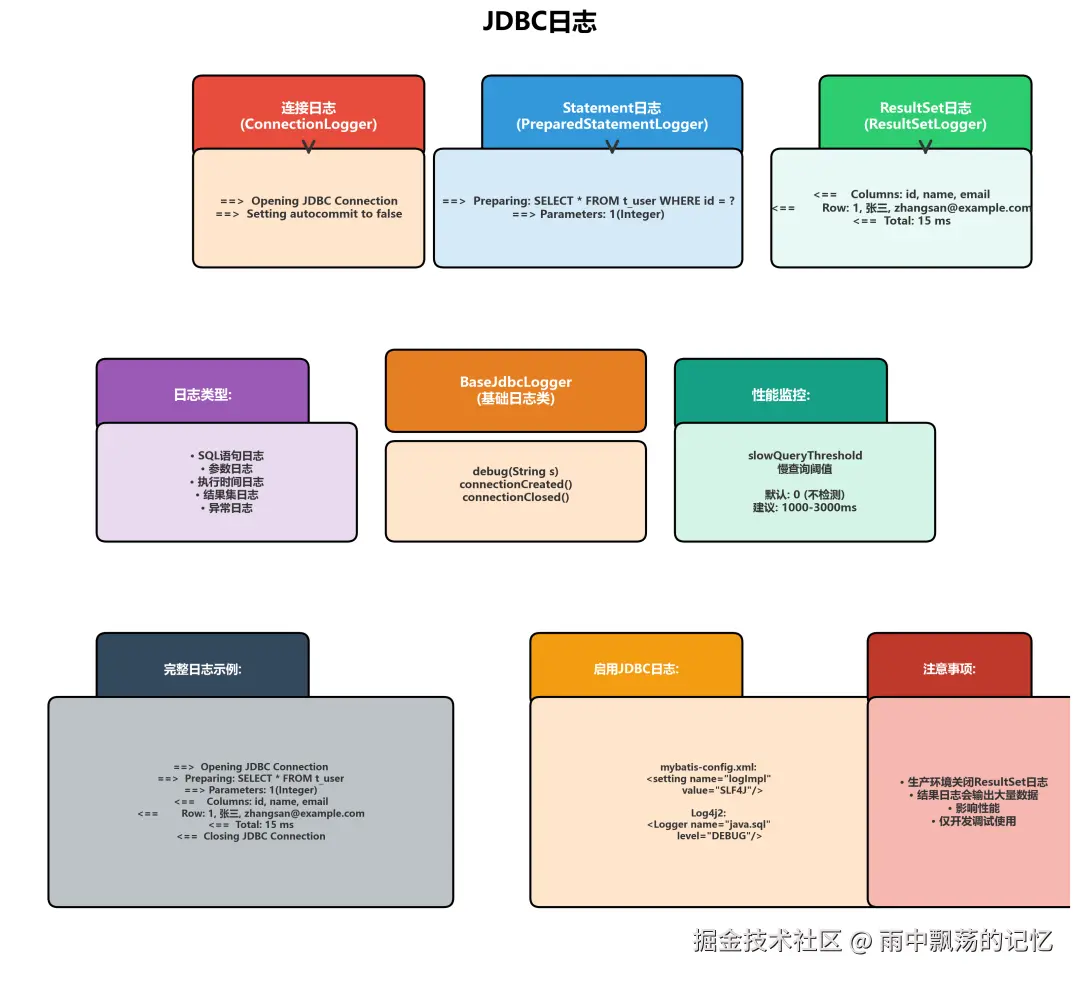
JDBC日志记录内容
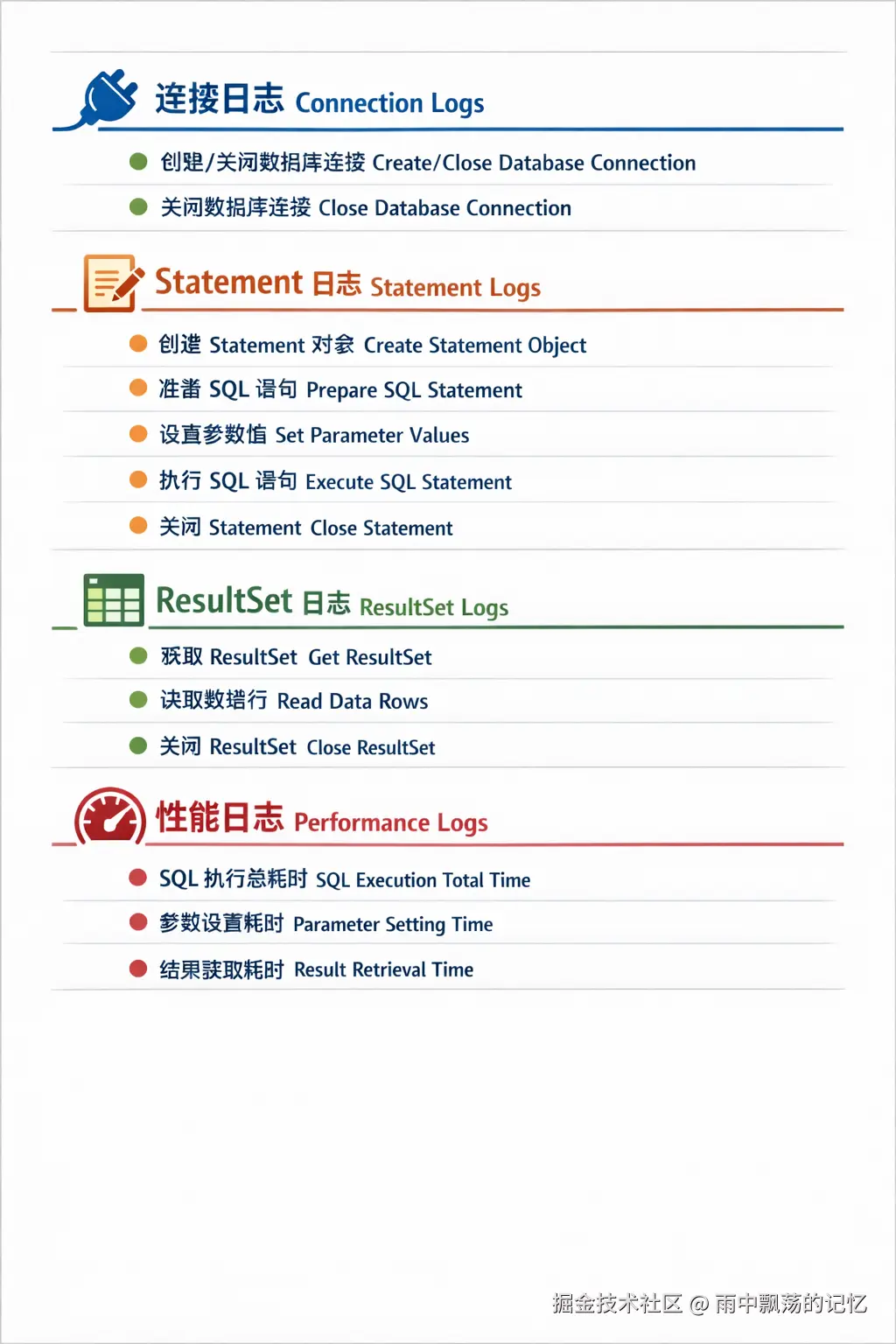
BaseJdbcLogger基础类
kotlin
public abstract class BaseJdbcLogger {
    // 日志对象
    protected Log statementLog;
    protected Log connectionLog;

    // 调试开关
    protected boolean isDebugEnabled;

    // 慢查询阈值(毫秒)
    protected int slowQueryThreshold;

    public BaseJdbcLogger(Log log, int queryThreshold) {
        this.statementLog = log;
        this.connectionLog = log;
        this.isDebugEnabled = log.isDebugEnabled();
        this.slowQueryThreshold = queryThreshold;
    }

    // 记录SQL执行
    protected void debug(String s, boolean isSql) {
        if (this.isDebugEnabled) {
            this.statementLog.debug(s);
        }
    }

    // 记录连接创建
    protected void connectionCreated(Connection conn) {
        if (this.connectionLog.isDebugEnabled()) {
            this.connectionLog.debug("==>  Opening JDBC Connection");
        }
    }

    // 记录连接关闭
    protected void connectionClosed(Connection conn) {
        if (this.connectionLog.isDebugEnabled()) {
            this.connectionLog.debug("<==  Closing JDBC Connection");
        }
    }
}
ConnectionLogger连接日志
scala
public class ConnectionLogger extends BaseJdbcLogger
    implements InvocationHandler {

    private final Connection connection;

    public ConnectionLogger(Connection conn, Log log, int queryThreshold) {
        super(log, queryThreshold);
        this.connection = conn;
    }

    @Override
    public Object invoke(Object proxy, Method method, Object[] args)
        throws Throwable {
        String methodName = method.getName();

        // 记录PreparedStatement创建
        if ("prepareStatement".equals(methodName) ||
            "prepareCall".equals(methodName)) {
            if (isDebugEnabled()) {
                debug("Preparing: " +
                    removeBreakingWhitespace((String) args[0]), true);
            }
        }

        // 记录连接关闭
        if ("close".equals(methodName)) {
            connectionClosed(connection);
            return null;
        }

        // 执行原方法
        return method.invoke(connection, args);
    }
}
PreparedStatementLogger语句日志
java
public class PreparedStatementLogger extends BaseJdbcLogger
    implements InvocationHandler {

    private final PreparedStatement statement;
    private final String sql;
    private final Object[] parameterValues;

    @Override
    public Object invoke(Object proxy, Method method, Object[] args)
        throws Throwable {
        String methodName = method.getName();

        // 记录参数设置
        if ("setString".equals(methodName) ||
            "setInt".equals(methodName) ||
            "setLong".equals(methodName)) {
            if (args.length == 2) {
                int paramIndex = (Integer) args[0];
                Object paramValue = args[1];
                parameterValues[paramIndex - 1] = paramValue;

                if (isDebugEnabled) {
                    debug("Parameters: " + paramIndex +
                        " => " + paramValue, true);
                }
            }
        }

        // 记录SQL执行
        if ("execute".equals(methodName) ||
            "executeUpdate".equals(methodName) ||
            "executeQuery".equals(methodName)) {

            if (isDebugEnabled) {
                debug("==>  Executing: " + sql, true);
                debug("==> Parameters: " +
                    getParameterString(), true);
            }

            // 计时执行
            long start = System.currentTimeMillis();
            Object result = method.invoke(statement, args);
            long cost = System.currentTimeMillis() - start;

            if (isDebugEnabled) {
                debug("<==  Total: " + cost + " ms", true);
            }

            // 慢查询告警
            if (slowQueryThreshold > 0 && cost > slowQueryThreshold) {
                connectionLog.warn("Slow query detected: " +
                    cost + " ms");
            }

            return result;
        }

        return method.invoke(statement, args);
    }

    private String getParameterString() {
        StringBuilder sb = new StringBuilder();
        for (int i = 0; i < parameterValues.length; i++) {
            if (i > 0) sb.append(", ");
            sb.append(i + 1).append(" => ").append(parameterValues[i]);
        }
        return sb.toString();
    }
}
ResultSetLogger结果集日志
java
public class ResultSetLogger extends BaseJdbcLogger
    implements InvocationHandler {

    private final ResultSet resultSet;
    private final List<String> columnNames = new ArrayList<>();
    private final List<String> columnValues = new ArrayList<>();
    @Override
    public Object invoke(Object proxy, Method method, Object[] args)
        throws Throwable {
        String methodName = method.getName();
        // 记录列名
        if ("next".equals(methodName)) {
            if (columnNames.isEmpty()) {
                ResultSetMetaData metaData = resultSet.getMetaData();
                int columnCount = metaData.getColumnCount();
                for (int i = 1; i <= columnCount; i++) {
                    columnNames.add(metaData.getColumnName(i));
                }
            }
        }
        // 记录结果值
        if ("getString".equals(methodName) ||
            "getInt".equals(methodName) ||
            "getObject".equals(methodName)) {
            Object result = method.invoke(resultSet, args);
            if (isDebugEnabled && result != null) {
                String columnName = columnNames.isEmpty() ?
                    "?" : columnNames.get(columnValues.size());
                columnValues.add(columnName + " = " + result);
            }
            return result;
        }
        // 记录结果集关闭
        if ("close".equals(methodName)) {
            if (isDebugEnabled && !columnValues.isEmpty()) {
                debug("<==    Columns: " + columnNames, true);
                debug("<==        Row: " + columnValues, true);
            }
            return null;
        }
        return method.invoke(resultSet, args);
    }
}
五、日志适配器:优雅的框架集成
MyBatis通过适配器模式实现了与各种日志框架的无缝集成。
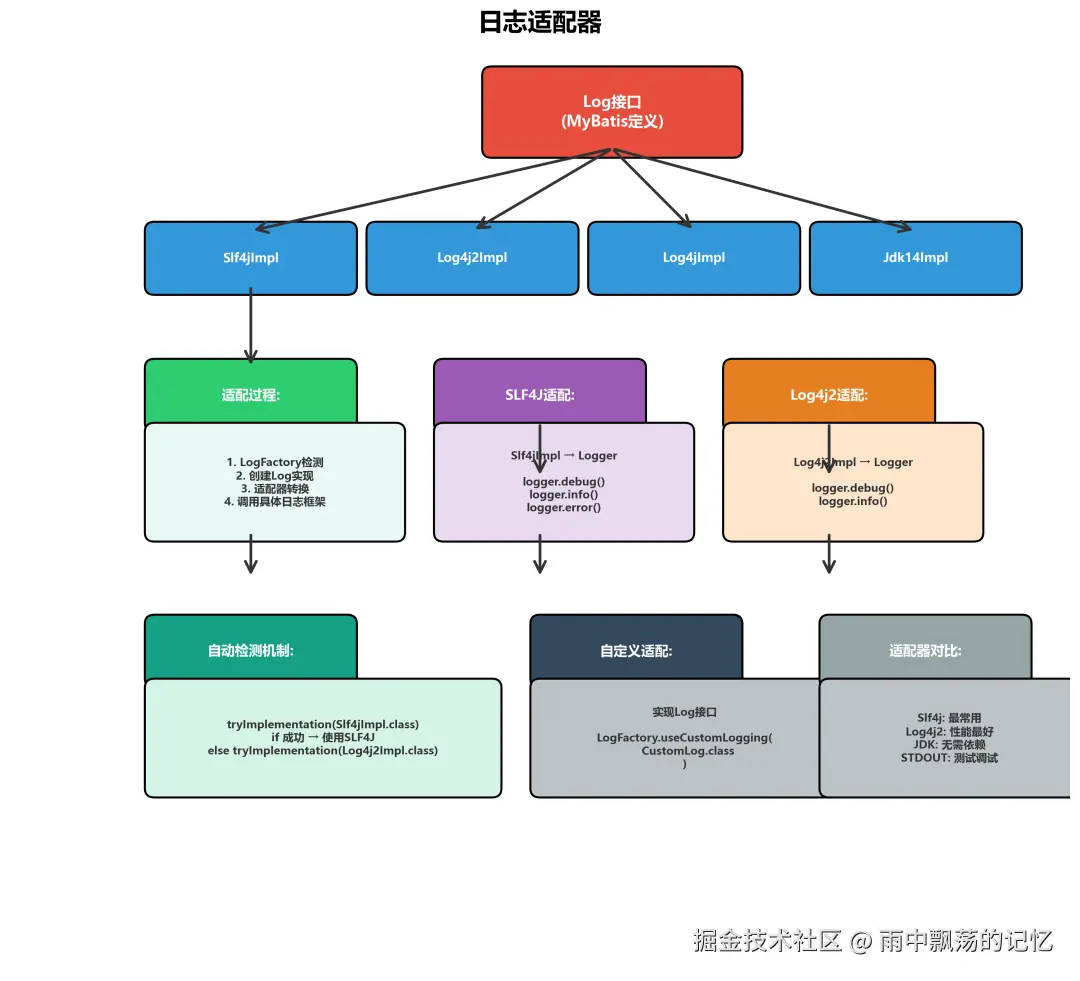
日志适配器的工作流程
markdown
MyBatis Log接口
    ↓
日志适配器 (Log4j2Impl)
    ↓
Log4j2 Logger
    ↓
日志输出(控制台/文件)
日志输出(控制台/文件)
LogFactory按照优先级自动检测并选择日志框架:
markdown
1. SLF4J (优先级最高)
2. Log4j2
3. Log4j
4. JDK Logging
5. STDOUT (标准输出)
6. NOOP (无日志
自定义日志适配器
如果需要使用自定义日志框架,可以轻松扩展:
typescript
public class CustomLog implements Log {
    private final CustomLogger logger;

    public CustomLog(String clazz) {
        this.logger = CustomLoggerFactory.getLogger(clazz);
    }

    @Override
    public boolean isDebugEnabled() {
        return logger.isDebugEnabled();
    }

    @Override
    public void debug(String s) {
        logger.debug(s);
    }

    @Override
    public void error(String s, Throwable e) {
        logger.error(s, e);
    }

    @Override
    public void warn(String s, Throwable e) {
        logger.warn(s, e);
    }
}

// 使用自定义日志
LogFactory.useCustomLogging(CustomLog.class);
主流日志框架对比
| 日志框架 | 优点 | 缺点 | 适用场景 |
|---|---|---|---|
| SLF4J | 统一日志门面性能优秀 | 需要绑定实现 | 大型项目 |
| Log4j2 | 性能最佳功能强大 | 配置相对复杂 | 高并发系统 |
| Log4j | 成熟稳定社区活跃 | 性能一般 | 老项目维护 |
| JDK Logging | 无需额外依赖简单轻量 | 功能有限 | 简单项目 |
| STDOUT | 配置简单即开即用 | 无格式化不可配置 | 开发测试 |
六、实战应用:日志在开发中的运用
让我们通过实际场景看看日志如何帮助我们解决问题。

场景1:SQL调试日志
记录完整的SQL语句和参数,快速定位问题:
sql
// 执行查询
User user = userMapper.selectById(1L);

// 控制台输出:
==>  Preparing: SELECT * FROM t_user WHERE id = ?
==> Parameters: 1(Integer)
<==    Columns: id, name, email, age, create_time
<==        Row: 1, 张三, zhangsan@example.com, 25, 2024-01-01 10:00:00
<==  Total: 15 ms
场景2:性能监控日志
识别慢查询,优化系统性能:
java
@Override
public Object query(...) throws SQLException {
    long start = System.currentTimeMillis();

    try {
        Object result = method.invoke(target, args);
        return result;
    } finally {
        long cost = System.currentTimeMillis() - start;

        // 慢查询告警
        if (cost > slowQueryThreshold) {
            logger.warn("Slow query: {} ms - SQL: {}",
                cost, sql);
        }

        if (isDebugEnabled) {
            logger.debug("Query cost: {} ms", cost);
        }
    }
}
场景3:参数日志
检查参数绑定是否正确:
sql
// 查询用户
List<User> users = userMapper.selectByCondition("张", 25);

// 日志输出:
==>  Preparing: SELECT * FROM t_user
     WHERE name LIKE CONCAT('%', ?, '%') AND age = ?
==> Parameters: 张(String), 25(Integer)
<==  Total: 22 ms
<==      Rows: 5
场景4:结果日志(开发环境)
less
// 日志输出:
<==    Columns: id, name, email
<==        Row: 1, 张三, zhangsan@example.com
<==        Row: 2, 李四, lisi@example.com
<==        Row: 3, 王五, wangwu@example.com
<==  Total: 3 rows
场景5:异常日志
详细记录SQL执行异常:
csharp
try {
    userMapper.insert(user);
} catch (Exception e) {
    // 日志输出:
    ==>  Preparing: INSERT INTO t_user (name, email) VALUES (?, ?)
    ==> Parameters: 张三(String), invalid-email(String)
    ### Error updating database.
    ### Cause: java.sql.SQLException: Incorrect string value
    ### The error may exist in UserMapper.xml
    ### The error may involve UserMapper.insert
    ### SQL: INSERT INTO t_user (name, email) VALUES (?, ?)
    ### Cause: java.sql.SQLException: Incorrect string value
}
场景6:事务日志
追踪事务的完整生命周期:
dart
// 开启事务
SqlSession session = sqlSessionFactory.openSession();

// 日志输出:
==>  Opening JDBC Connection
==>  Setting autocommit to false on JDBC Connection

// 提交事务
session.commit();

// 日志输出:
==>  Committing JDBC Connection
<==  Closing JDBC Connection
七、最佳实践
不同环境的日志配置策略
开发环境配置
yaml
logging:
  level:
    org.apache.ibatis: DEBUG
  # 启用DEBUG级别
  # 记录SQL和参数
  # 记录结果集
  # 记录执行时间
测试环境配置
yaml
logging:
  level:
    org.apache.ibatis: INFO
  # 启用INFO级别
  # 记录SQL和参数
  # 记录慢查询(>1秒)
  # 记录异常信息
生产环境配置
yaml
logging:
  level:
    org.apache.ibatis: WARN
  # 启用WARN级别
  # 仅记录慢查询(>3秒)
  # 记录错误和异常
性能优化
1️⃣ 合理设置日志级别
xml
<!-- 生产环境使用INFO或WARN级别 -->
<logger name="org.apache.ibatis" level="WARN"/>
2️⃣ 使用异步日志
xml
<!-- Log4j2异步日志配置 -->
<Async name="AsyncAppender">
    <AppenderRef ref="RollingFile"/>
</Async>
3️⃣ SQL日志单独存储
xml
<!-- SQL日志独立文件 -->
<RollingFile name="SqlLog" fileName="logs/sql.log">
    <PatternLayout pattern="%d{yyyy-MM-dd HH:mm:ss} - %msg%n"/>
</RollingFile>

<Logger name="org.apache.ibatis.jdbc" level="DEBUG">
    <AppenderRef ref="SqlLog"/>
</Logger>
4️⃣ 日志文件滚动策略
xml
<Policies>
    <!-- 每天滚动 -->
    <TimeBasedTriggeringPolicy interval="1"/>
    <!-- 单文件最大100MB -->
    <SizeBasedTriggeringPolicy size="100 MB"/>
</Policies>
<!-- 最多保留30天 -->
<DefaultRolloverStrategy max="30"/>
八、总结
MyBatis的日志模块为开发调试和性能优化提供了强大的支持。
markdown
1. Log接口 - MyBatis定义的统一日志接口,实现与框架解耦
2. 日志适配器 -通过适配器模式支持多种日志框架
3. JDBC日志 - 细粒度的JDBC操作日志记录
4. 灵活配置 - 支持多种配置方式,适应不同场景
5. 性能监控 - 通过日志识别性能瓶颈