1. 简介
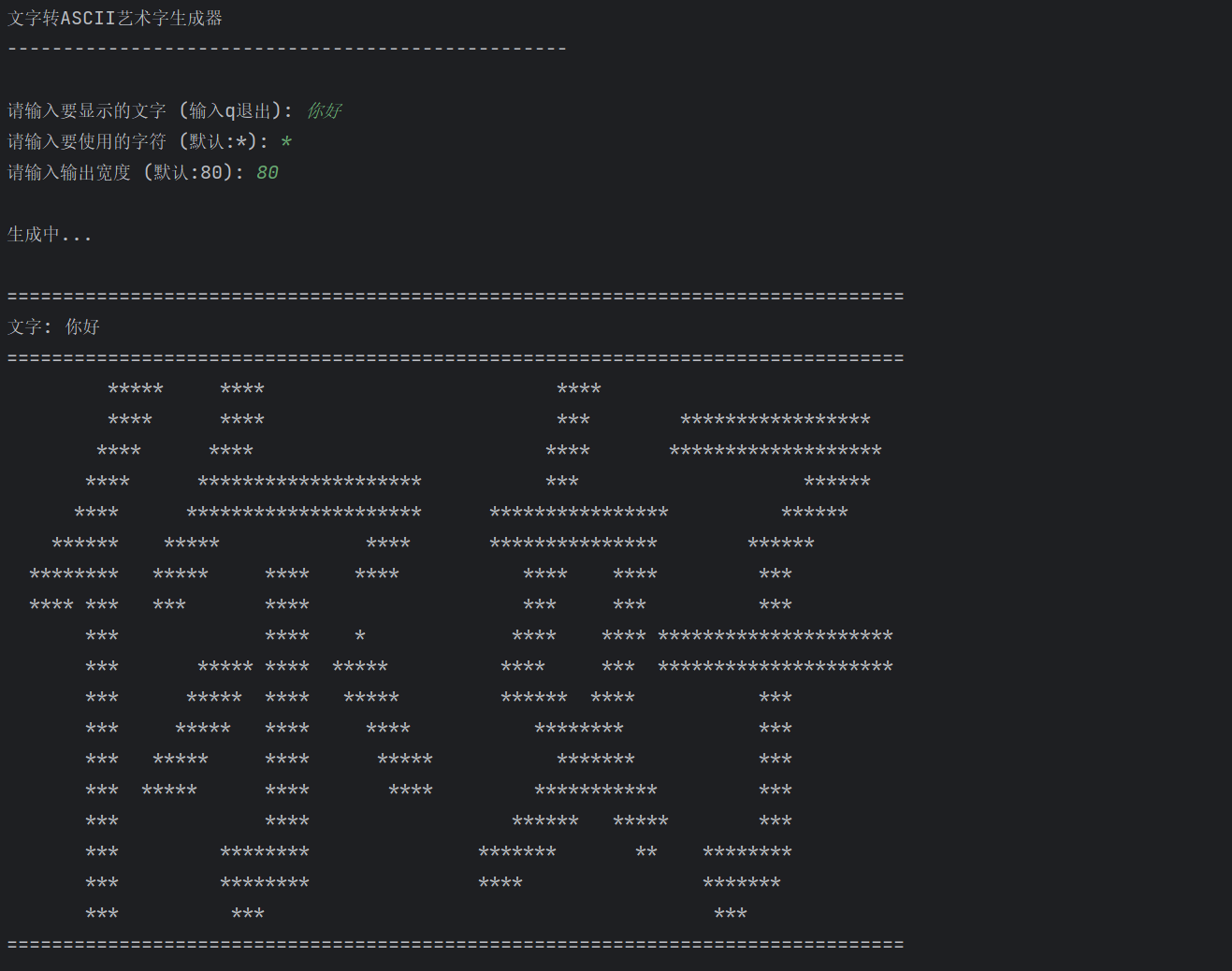
作为一个程序员,经常看到console里面有很多使用各种字符构建的文字,一直以为是自己拼出来的,但是这样老麻烦了,所以就想着用python的图像处理看看能不能实现这样的功能。
2. 具体依赖
- Python 3.x
- PIL (Pillow) - 图像处理
- NumPy - 数组操作
- 跨平台字体检测
3. 核心实现
3.1跨平台字体检测
python
def get_system_font():
    """获取系统可用的字体"""
    font_paths = []

    # Windows 字体路径
    if os.name == 'nt':
        font_dirs = [
            os.path.join(os.environ['WINDIR'], 'Fonts'),
            os.path.join(os.environ['SYSTEMROOT'], 'Fonts'),
        ]
        for font_dir in font_dirs:
            if os.path.exists(font_dir):
                # 中文常用字体
                chinese_fonts = [
                    'simhei.ttf',  # 黑体
                    'msyh.ttc',  # 微软雅黑
                    'simsun.ttc',  # 宋体
                    'msjh.ttc',  # 微软正黑体
                    'kaiu.ttf',  # 标楷体
                ]
                for font in chinese_fonts:
                    font_path = os.path.join(font_dir, font)
                    if os.path.exists(font_path):
                        return font_path
3.2 文字到ASCII转换算法
python
def text_to_ascii_simple(text, char='*', width=60):
    """
    简化的版本,兼容性更好
    """
    # 创建图片
    font_size = 80
    img_width = font_size * len(text) + 100
    img_height = font_size + 50

    img = Image.new('RGB', (img_width, img_height), 'white')
    draw = ImageDraw.Draw(img)

    # 获取字体
    font_path = get_system_font()

    try:
        if font_path:
            font = ImageFont.truetype(font_path, font_size)
        else:
            font = ImageFont.load_default()
    except:
        font = ImageFont.load_default()
3.3 字体检测机制
- Windows系统:检测C:\Windows\Fonts目录下的中文字体
- macOS系统:检测/System/Library/Fonts等目录
- Linux系统:检测/usr/share/fonts等目录
python
# Linux 字体路径
font_dirs = [
    '/usr/share/fonts',
    '/usr/local/share/fonts',
    os.path.expanduser('~/.fonts'),
]
3.4 图像处理
- 创建图像:根据文字长度创建适当大小的图像
- 文字绘制:使用检测到的字体绘制文字
- 灰度转换:将彩色图像转换为灰度图像
- 字符映射:根据灰度值映射为ASCII字符
python
# 转换为灰度
img_gray = img.convert('L')
img_array = np.array(img_gray)

# 转换为字符
lines = []
for y in range(new_h):
    line = ''.join([' ' if resized.getpixel((x, y)) > 200 else char for x in range(width)])
    lines.append(line)
3.5 智能裁剪算法
主要是为了将字符转成图片的时候去掉上部和下部的空白
python
# 找到文字边界
non_white_rows = np.where(np.any(arr < 250, axis=1))[0]
non_white_cols = np.where(np.any(arr < 250, axis=0))[0]

if len(non_white_rows) == 0 or len(non_white_cols) == 0:
    return [f"无法显示: {text}"]

top, bottom = non_white_rows[0], non_white_rows[-1]
left, right = non_white_cols[0], non_white_cols[-1]
4. 完整实现
python
from PIL import Image, ImageDraw, ImageFont
import numpy as np
import os


def get_system_font():
    """获取系统可用的字体"""
    font_paths = []

    # Windows 字体路径
    if os.name == 'nt':
        font_dirs = [
            os.path.join(os.environ['WINDIR'], 'Fonts'),
            os.path.join(os.environ['SYSTEMROOT'], 'Fonts'),
        ]
        for font_dir in font_dirs:
            if os.path.exists(font_dir):
                # 中文常用字体
                chinese_fonts = [
                    'simhei.ttf',  # 黑体
                    'msyh.ttc',  # 微软雅黑
                    'simsun.ttc',  # 宋体
                    'msjh.ttc',  # 微软正黑体
                    'kaiu.ttf',  # 标楷体
                ]
                for font in chinese_fonts:
                    font_path = os.path.join(font_dir, font)
                    if os.path.exists(font_path):
                        return font_path

                # 如果没找到中文字体,找第一个ttf文件
                for file in os.listdir(font_dir):
                    if file.lower().endswith(('.ttf', '.ttc', '.otf')):
                        return os.path.join(font_dir, file)

    # macOS 字体路径
    elif os.name == 'posix':
        font_dirs = [
            '/System/Library/Fonts',
            '/Library/Fonts',
            os.path.expanduser('~/Library/Fonts'),
        ]
        for font_dir in font_dirs:
            if os.path.exists(font_dir):
                # macOS 中文字体
                chinese_fonts = [
                    'PingFang.ttc',
                    'STHeiti.ttc',
                    'Hiragino Sans GB.ttc',
                    'Apple SD Gothic Neo.ttc',
                ]
                for font in chinese_fonts:
                    font_path = os.path.join(font_dir, font)
                    if os.path.exists(font_path):
                        return font_path

                # 找第一个支持中文的字体
                for file in os.listdir(font_dir):
                    if file.lower().endswith(('.ttf', '.ttc', '.otf')):
                        return os.path.join(font_dir, file)

    # Linux 字体路径
    font_dirs = [
        '/usr/share/fonts',
        '/usr/local/share/fonts',
        os.path.expanduser('~/.fonts'),
    ]
    for font_dir in font_dirs:
        if os.path.exists(font_dir):
            # Linux 中文字体
            chinese_fonts = [
                'wqy-microhei.ttc',  # 文泉驿微米黑
                'wqy-zenhei.ttc',  # 文泉驿正黑
                'droid-sans-fallback.ttf',
            ]
            for font in chinese_fonts:
                font_path = os.path.join(font_dir, font)
                if os.path.exists(font_path):
                    return font_path

            # 找第一个字体文件
            for root, dirs, files in os.walk(font_dir):
                for file in files:
                    if file.lower().endswith(('.ttf', '.ttc', '.otf')):
                        return os.path.join(root, file)

    return None


def text_to_custom_ascii(text, char='*', width=80, font_size=100):
    """
    将任意文字转换为自定义字符的ASCII艺术,自动去除上下空白

    参数:
    - text: 要转换的文字
    - char: 使用的字符
    - width: 输出宽度
    - font_size: 字体大小
    """

    # 获取字体
    font_path = get_system_font()

    if font_path:
        try:
            font = ImageFont.truetype(font_path, font_size)
            print(f"使用字体: {os.path.basename(font_path)}")
        except:
            print("警告: 字体加载失败,使用默认字体")
            font = ImageFont.load_default()
    else:
        print("警告: 未找到系统字体,使用默认字体")
        font = ImageFont.load_default()

    # 创建图片(根据文字长度自适应)
    # 对于中文字符,每个字符需要更多空间
    img_width = max(len(text.encode('utf-8')) * font_size // 2, width * 10)
    img_height = font_size * 2

    img = Image.new('RGB', (img_width, img_height), 'white')
    draw = ImageDraw.Draw(img)

    # 对于默认字体,使用不同的方法
    if font.path is None:  # 默认字体
        # 使用textsize替代textbbox(兼容旧版本)
        try:
            # 尝试使用textsize
            text_width, text_height = font.getsize(text)
            x = (img_width - text_width) // 2
            y = (img_height - text_height) // 2
            draw.text((x, y), text, fill='black', font=font)
        except:
            # 如果还不行,简化处理
            print("警告: 字体可能不支持中文,尝试简化处理")
            x = img_width // 4
            y = img_height // 4
            draw.text((x, y), text, fill='black', font=font)
    else:
        # 使用textbbox(新版本PIL)
        try:
            text_bbox = draw.textbbox((0, 0), text, font=font)
            text_width = text_bbox[2] - text_bbox[0]
            text_height = text_bbox[3] - text_bbox[1]

            x = (img_width - text_width) // 2
            y = (img_height - text_height) // 2

            draw.text((x, y), text, fill='black', font=font)
        except Exception as e:
            print(f"警告: textbbox失败 ({e}),使用备用方法")
            # 备用方法
            x = img_width // 4
            y = img_height // 4
            draw.text((x, y), text, fill='black', font=font)

    # 转换为灰度
    img_gray = img.convert('L')
    img_array = np.array(img_gray)

    # 自动检测文字区域(去除上下空白)
    # 找到非白色(灰度值<250)的行
    rows_with_content = np.where(np.any(img_array < 250, axis=1))[0]

    if len(rows_with_content) > 0:
        top = max(0, rows_with_content[0] - 2)  # 留一点边距
        bottom = min(img_height, rows_with_content[-1] + 3)

        # 裁剪图片,只保留文字部分
        img_cropped = img_gray.crop((0, top, img_width, bottom + 1))
        cropped_height = bottom - top + 1
    else:
        # 如果没有找到内容,使用原始图片
        img_cropped = img_gray
        cropped_height = img_height

    # 计算新的高度,保持宽高比
    aspect_ratio = cropped_height / img_width
    new_height = max(1, int(aspect_ratio * width))

    # 调整大小
    img_resized = img_cropped.resize((width, new_height))

    # 转换为字符(简化版本,更清晰)
    output_lines = []

    for y in range(new_height):
        line = ""
        for x in range(width):
            gray = img_resized.getpixel((x, y))
            # 简单的阈值处理
            if gray > 220:  # 较亮的部分
                line += " "
            else:
                line += char
        output_lines.append(line)

    # 再次去除结果中的空白行(可选)
    # 移除顶部空白行
    while output_lines and all(c == ' ' for c in output_lines[0]):
        output_lines.pop(0)

    # 移除底部空白行
    while output_lines and all(c == ' ' for c in output_lines[-1]):
        output_lines.pop()

    return output_lines


def text_to_ascii_simple(text, char='*', width=60):
    """
    简化的版本,兼容性更好
    """

    # 创建图片
    font_size = 80
    img_width = font_size * len(text) + 100
    img_height = font_size + 50

    img = Image.new('RGB', (img_width, img_height), 'white')
    draw = ImageDraw.Draw(img)

    # 获取字体
    font_path = get_system_font()

    try:
        if font_path:
            font = ImageFont.truetype(font_path, font_size)
        else:
            font = ImageFont.load_default()
    except:
        font = ImageFont.load_default()

    # 使用try-except处理字体绘制
    try:
        # 尝试绘制文字
        x = 50
        y = 25
        draw.text((x, y), text, fill=(0, 0, 0), font=font)
    except Exception as e:
        print(f"警告: 文字绘制失败 ({e}),使用英文模式")
        # 如果失败,使用ASCII字符
        text = text.encode('ascii', 'ignore').decode('ascii')
        if not text:
            text = "TEXT"
        draw.text((x, y), text, fill=(0, 0, 0), font=font)

    # 转换为灰度并裁剪
    gray = img.convert('L')
    arr = np.array(gray)

    # 找到文字边界
    non_white_rows = np.where(np.any(arr < 250, axis=1))[0]
    non_white_cols = np.where(np.any(arr < 250, axis=0))[0]

    if len(non_white_rows) == 0 or len(non_white_cols) == 0:
        return [f"无法显示: {text}"]

    top, bottom = non_white_rows[0], non_white_rows[-1]
    left, right = non_white_cols[0], non_white_cols[-1]

    # 裁剪,加一点边距
    margin = 3
    cropped = gray.crop((
        max(0, left - margin),
        max(0, top - margin),
        min(gray.width, right + margin),
        min(gray.height, bottom + margin)
    ))

    # 调整大小
    cw, ch = cropped.size
    new_h = max(1, int(ch / cw * width * 0.5))
    resized = cropped.resize((width, new_h))

    # 转换为字符
    lines = []
    for y in range(new_h):
        line = ''.join([' ' if resized.getpixel((x, y)) > 200 else char for x in range(width)])
        lines.append(line)

    # 去除结果中的空白行
    while lines and all(c == ' ' for c in lines[0]):
        lines.pop(0)
    while lines and all(c == ' ' for c in lines[-1]):
        lines.pop()

    return lines


def main():
    print("文字转ASCII艺术字生成器")
    print("-" * 50)

    while True:
        text = input("\n请输入要显示的文字 (输入q退出): ")
        if text.lower() == 'q':
            break

        char = input("请输入要使用的字符 (默认:*): ").strip() or "*"
        width = input("请输入输出宽度 (默认:80): ").strip()
        width = int(width) if width.isdigit() else 80

        print("\n生成中...")

        try:
            # 使用简化版本
            result = text_to_ascii_simple(text, char=char, width=width)

            # 计算输出宽度
            output_width = max(len(line) for line in result) if result else width

            print("\n" + "=" * output_width)
            print(f"文字: {text}")
            print("=" * output_width)

            for line in result:
                print(line)

            print("=" * output_width)

            # 保存选项
            save = input("\n是否保存到文件? (y/n): ").lower()
            if save == 'y':
                filename = input("文件名 (默认: text_art.txt): ").strip() or "text_art.txt"
                with open(filename, 'w', encoding='utf-8') as f:
                    f.write('\n'.join(result))
                print(f"已保存到 {filename}")

        except Exception as e:
            print(f"生成失败: {e}")
            print("尝试使用更简单的版本...")

            # 最简单的回退方案
            print("\n简单版本:")
            print("=" * width)
            for i in range(5):
                spaces = (width - len(text) * 3) // 2
                if i == 2:
                    print(" " * spaces + text)
                else:
                    print(" " * spaces + char * (len(text) * 3))
            print("=" * width)


if __name__ == "__main__":
    main()
5. 实现效果