目录
[1,SSH 协议和 HTTPS 协议](#1,SSH 协议和 HTTPS 协议)
一,分布式版本控制系统
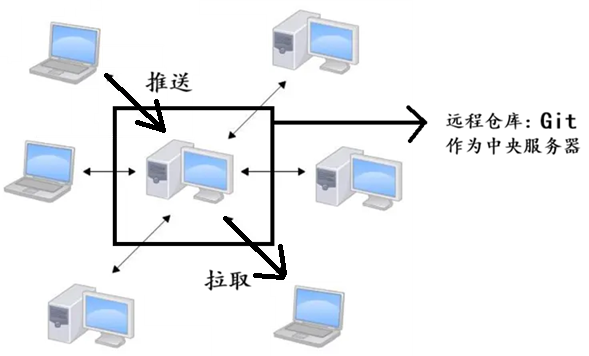
我们当前所说的所有内容(工作区,暂存区,版本库等等),都是在本地的笔记本或者计算机上。而我们的 Git 其实是分布式版本控制系统!
分布式版本控制系统的安全性,多个独立的本地机器要高很多 ,因为每个人电脑里都有完整的版本库 ,某个人的电脑坏掉了不要紧 ,随便从其他人那里复制一个就可以了。
二,创建远程仓库
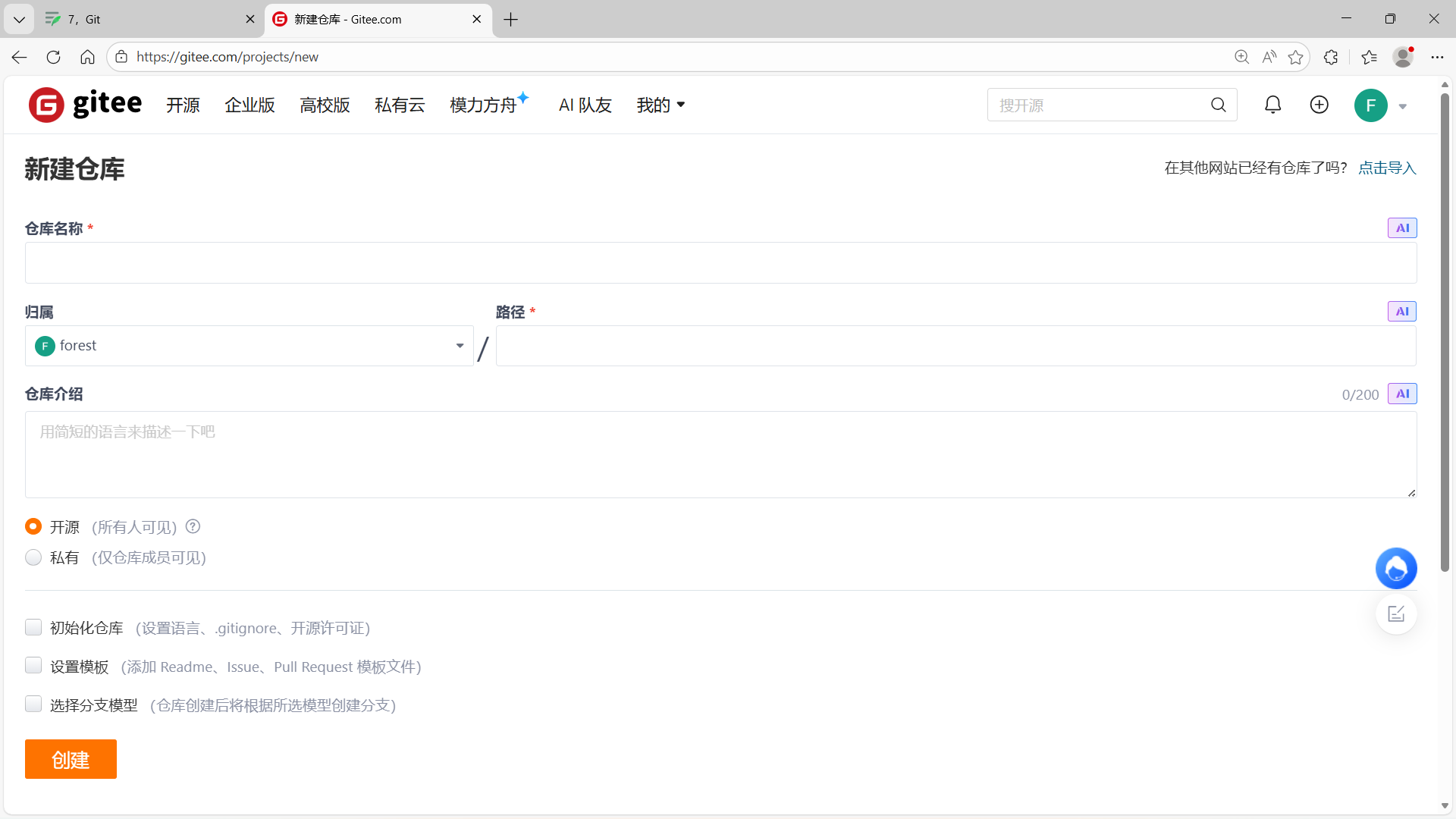
先在gitee上创建Git远程仓库,才能去使用它。
三,克隆远程仓库
1,SSH 协议和 HTTPS 协议
SSH 协议和 HTTPS 协议是 Git 最常使用的两种数据传输协议。
SSH 协议使用了公钥加密和公钥登陆机制 ,体现了其实用性和安全性 ,使用此协议需要将我们的公钥放上服务器,由 Git 服务器进行管理。
使用 HTTPS 方式时,没有要求,可以直接克隆下来。
2,克隆远程仓库示例
// 先在本地上创建公钥和私钥,再复制公钥id_rsa.pub到Git服务器
[user@iZwz9eoohx59fs5a6ampomZ ~]$ ssh-keygen -t rsa -C "123456789@qq.com"
    .
    .
    .
    .
    .
    .
[user@iZwz9eoohx59fs5a6ampomZ ~]$ cd .ssh
[user@iZwz9eoohx59fs5a6ampomZ .ssh]$ ls
id_rsa  id_rsa.pub
[user@iZwz9eoohx59fs5a6ampomZ .ssh]$ cat id_rsa.pub
ssh-rsa AAAAB . . . . . .

// 拿到Git服务器的SSH地址,再克隆远程仓库到本地
[user@iZwz9eoohx59fs5a6ampomZ ~]$ ll
total 12
drwxrwxr-x  3 user user 4096 Dec 23 13:04 gitCode
-rw-rw-r--  1 user user  827 Jun 12  2025 install.sh
drwxrwxr-x 16 user user 4096 Nov 17 13:55 qaq
[user@iZwz9eoohx59fs5a6ampomZ ~]$ git clone git@gitee.com:Goforest/linux-study.git
Cloning into 'linux-study'...
remote: Enumerating objects: 13, done.
remote: Counting objects: 100% (13/13), done.
remote: Compressing objects: 100% (12/12), done.
remote: Total 13 (delta 2), reused 0 (delta 0), pack-reused 0 (from 0)
Receiving objects: 100% (13/13), done.
Resolving deltas: 100% (2/2), done.
[user@iZwz9eoohx59fs5a6ampomZ ~]$ ll
total 16
drwxrwxr-x  3 user user 4096 Dec 23 13:04 gitCode
-rw-rw-r--  1 user user  827 Jun 12  2025 install.sh
drwxrwxr-x  4 user user 4096 Dec 24 21:46 linux-study
drwxrwxr-x 16 user user 4096 Nov 17 13:55 qaq
四,向远程仓库推送
1,Git命令
使用 git push origin 本地分支名:远程分支名 向远程仓库推送。
2,示例
[user@iZwz9eoohx59fs5a6ampomZ linux-study]$ vim README.en.md
[user@iZwz9eoohx59fs5a6ampomZ linux-study]$ cat README.en.md
Text git push ......
[user@iZwz9eoohx59fs5a6ampomZ linux-study]$ git add .
[user@iZwz9eoohx59fs5a6ampomZ linux-study]$ git commit -m "modified README.en.md"
[master 75ae6f6] modified README.en.md
 1 file changed, 2 insertions(+), 1 deletion(-)
[user@iZwz9eoohx59fs5a6ampomZ linux-study]$ git push origin master:master
Counting objects: 5, done.
Delta compression using up to 2 threads.
Compressing objects: 100% (2/2), done.
Writing objects: 100% (3/3), 325 bytes | 0 bytes/s, done.
Total 3 (delta 0), reused 0 (delta 0)
remote: Powered by GITEE.COM [1.1.23]
remote: Set trace flag 7d43a3b7
To git@gitee.com:Goforest/linux-study.git
   15ec7e3..75ae6f6  master -> master
[user@iZwz9eoohx59fs5a6ampomZ linux-study]$ git status
# On branch master
nothing to commit, working directory clean
五,从远程仓库拉取
1,Git命令
使用 git pull origin 本地分支名:远程分支名 向远程仓库拉取。
2,示例
[user@iZwz9eoohx59fs5a6ampomZ linux-study]$ cat README.en.md
Text git push ......

[user@iZwz9eoohx59fs5a6ampomZ linux-study]$ git pull origin master:master
remote: Enumerating objects: 5, done.
remote: Counting objects: 100% (5/5), done.
remote: Compressing objects: 100% (3/3), done.
remote: Total 3 (delta 0), reused 0 (delta 0), pack-reused 0 (from 0)
Unpacking objects: 100% (3/3), done.
From gitee.com:Goforest/linux-study
   cfc9d51..009d2ba  master     -> master
Warning: fetch updated the current branch head.
Warning: fast-forwarding your working tree from
Warning: commit cfc9d5120ef9e245671595fa4f8fad3570f93a34.
Already up-to-date.
[user@iZwz9eoohx59fs5a6ampomZ linux-study]$ cat README.en.md
Text git push ......
Text git pull ......
六,忽略特殊文件
1,Git命令
首先创建.gitignore文件,写入要忽略的文件,commit提交时就会忽略对应文件。
2,示例
[user@iZwz9eoohx59fs5a6ampomZ linux-study]$ vim .gitignore
[user@iZwz9eoohx59fs5a6ampomZ linux-study]$ cat .gitignore
# 可以直接写要忽略的文件名
file.txt

# 忽略所有使用此后缀的文件
*.so
*.ini

# !代表不忽略的文件
!c.so
[user@iZwz9eoohx59fs5a6ampomZ linux-study]$ ls -ail
total 28
1841911 drwxrwxr-x  4 user user 4096 Dec 25 10:39 .
1445705 drwx------ 14 user user 4096 Dec 24 21:45 ..
1841912 drwxrwxr-x  8 user user 4096 Dec 25 10:33 .git
1841952 drwxrwxr-x  2 user user 4096 Dec 24 21:46 .gitee
1841930 -rw-rw-r--  1 user user  134 Dec 25 10:44 .gitignore
1841955 -rw-rw-r--  1 user user   43 Dec 25 10:29 README.en.md
1841956 -rw-rw-r--  1 user user   67 Dec 25 10:30 README.md
[user@iZwz9eoohx59fs5a6ampomZ linux-study]$ touch a.so b.so c.so
[user@iZwz9eoohx59fs5a6ampomZ linux-study]$ touch file.txt
[user@iZwz9eoohx59fs5a6ampomZ linux-study]$ ls -ail
total 28
1841911 drwxrwxr-x  4 user user 4096 Dec 25 10:51 .
1445705 drwx------ 14 user user 4096 Dec 24 21:45 ..
1841989 -rw-rw-r--  1 user user    0 Dec 25 10:50 a.so
1841990 -rw-rw-r--  1 user user    0 Dec 25 10:50 b.so
1841991 -rw-rw-r--  1 user user    0 Dec 25 10:50 c.so
1841992 -rw-rw-r--  1 user user    0 Dec 25 10:51 file.txt
1841912 drwxrwxr-x  8 user user 4096 Dec 25 10:33 .git
1841952 drwxrwxr-x  2 user user 4096 Dec 24 21:46 .gitee
1841930 -rw-rw-r--  1 user user  134 Dec 25 10:44 .gitignore
1841955 -rw-rw-r--  1 user user   43 Dec 25 10:29 README.en.md
1841956 -rw-rw-r--  1 user user   67 Dec 25 10:30 README.md
[user@iZwz9eoohx59fs5a6ampomZ linux-study]$ git add .
[user@iZwz9eoohx59fs5a6ampomZ linux-study]$ git commit -m "text gitignore"
[master 35e5808] text gitignore
 2 files changed, 9 insertions(+)
 create mode 100644 .gitignore
 create mode 100644 c.so
[user@iZwz9eoohx59fs5a6ampomZ linux-study]$ git push origin matser
error: src refspec matser does not match any.
error: failed to push some refs to 'git@gitee.com:Goforest/linux-study.git'
[user@iZwz9eoohx59fs5a6ampomZ linux-study]$ git push origin master
Counting objects: 5, done.
Delta compression using up to 2 threads.
Compressing objects: 100% (3/3), done.
Writing objects: 100% (4/4), 478 bytes | 0 bytes/s, done.
Total 4 (delta 0), reused 0 (delta 0)
remote: Powered by GITEE.COM [1.1.23]
remote: Set trace flag f946eebc
To git@gitee.com:Goforest/linux-study.git
   9087ec3..35e5808  master -> master
七,配置命令别名
1,Git命令
# 全局配置(所有仓库生效,推荐)
git config --global alias.[别名] [原命令]

# 局部配置(仅当前仓库生效)
git config --local alias.[别名] [原命令]

# 系统级配置(所有用户所有仓库生效,极少用)
git config --system alias.[别名] [原命令]
2,示例
[user@iZwz9eoohx59fs5a6ampomZ linux-study]$ git status
# On branch master
nothing to commit, working directory clean
[user@iZwz9eoohx59fs5a6ampomZ linux-study]$ git config --global alias.st status
[user@iZwz9eoohx59fs5a6ampomZ linux-study]$ git st
# On branch master
nothing to commit, working directory clean
八,设置提交标签
1,理解标签
标签 tag,可以简单的理解为是对某次 commit 的一个标识 ,相当于起了一个别名。
例如:在项目 发布某个版本的时候 ,针对最后一次 commit 起一个 v1.0 这样的标签,来标识提交的版本号。
而这个标签有什么用呢?
相较于难以记住的 commit Id, tag 很好的解决这个问题 ,因为 tag 一定要给一个让人容易记住 ,且有意义的名字。
当我们需要回退到某个重要版本时 ,直接使用标签就能很快定位到对应的 commit。
2,使用标签
创建v1.0标签,并自动给最近一次的commit提交打上v1.0的标签。
[user@iZwz9eoohx59fs5a6ampomZ linux-study]$ git tag v1.0
[user@iZwz9eoohx59fs5a6ampomZ linux-study]$ git tag
v1.0
[user@iZwz9eoohx59fs5a6ampomZ linux-study]$ git tag -n
v1.0            text gitignore
[user@iZwz9eoohx59fs5a6ampomZ linux-study]$ cat .git/refs/tags/v1.0
35e58086257e5603bbf0d74e745e2f03ec3023fa
[user@iZwz9eoohx59fs5a6ampomZ linux-study]$ git log
commit 35e58086257e5603bbf0d74e745e2f03ec3023fa
Author: forest <123456789@qq.com>
Date:   Thu Dec 25 10:52:10 2025 +0800

    text gitignore

commit 9087ec35105be08202540c24f1c8ada52bf26dcd
Author: forest <123456789@qq.com>
Date:   Thu Dec 25 10:33:56 2025 +0800

    modified ReadMe
创建v0.9标签,并手动给特定一次的commit提交打上v0.9的标签。
[user@iZwz9eoohx59fs5a6ampomZ linux-study]$ git log --pretty=oneline --abbrev-commit
35e5808 text gitignore
9087ec3 modified ReadMe
009d2ba update README.en.md.
cfc9d51 update README.en.md.
75ae6f6 modified README.en.md
15ec7e3 update README.en.md.
6f63a66 write ReadMe
8d1f55d Initial commit
[user@iZwz9eoohx59fs5a6ampomZ linux-study]$ git tag v0.9 9087ec3
[user@iZwz9eoohx59fs5a6ampomZ linux-study]$ git tag
v0.9
v1.0
[user@iZwz9eoohx59fs5a6ampomZ linux-study]$ git tag -n
v0.9            modified ReadMe
v1.0            text gitignore
[user@iZwz9eoohx59fs5a6ampomZ linux-study]$ cat .git/refs/tags/v1.0
35e58086257e5603bbf0d74e745e2f03ec3023fa
[user@iZwz9eoohx59fs5a6ampomZ linux-study]$ git log
commit 35e58086257e5603bbf0d74e745e2f03ec3023fa
Author: forest <123456789@qq.com>
Date:   Thu Dec 25 10:52:10 2025 +0800

    text gitignore

commit 9087ec35105be08202540c24f1c8ada52bf26dcd
Author: forest <123456789@qq.com>
Date:   Thu Dec 25 10:33:56 2025 +0800

    modified ReadMe
创建带有说明的标签 git tag -a tag_name -m "XXX" commit_id,-a指定标签名 ,-m指定说明文字,向commit_id打上标签。然后,用git show tag_name查看。
[user@iZwz9eoohx59fs5a6ampomZ linux-study]$ git tag -a v0.8 -m "Tag ReadRe" 009d2ba
[user@iZwz9eoohx59fs5a6ampomZ linux-study]$ git tag -n
v0.8            Tag ReadRe
v0.9            modified ReadMe
v1.0            text gitignore
[user@iZwz9eoohx59fs5a6ampomZ linux-study]$ git show v0.8
tag v0.8
Tagger: forest <123456789@qq.com>
Date:   Thu Dec 25 14:15:29 2025 +0800

Tag ReadRe

commit 009d2ba4d936fb40a7aa9f8fbc5eefbf67ca7953
Author: forest <123456789@qq.com>
Date:   Thu Dec 25 02:12:22 2025 +0000

    update README.en.md.

    Signed-off-by: forest <123456789@qq.com>

diff --git a/README.en.md b/README.en.md
index 67f1fb6..bacdcc0 100644
--- a/README.en.md
+++ b/README.en.md
@@ -1,2 +1,2 @@
 Text git push ......
-Text git pull ......
+Text git pull origin master:master
\ No newline at end of file
删除标签,例如 git tag -d v0.9。
[user@iZwz9eoohx59fs5a6ampomZ linux-study]$ git tag -n
v0.8            Tag ReadRe
v0.9            modified ReadMe
v1.0            text gitignore
[user@iZwz9eoohx59fs5a6ampomZ linux-study]$ git tag -d v0.9
Deleted tag 'v0.9' (was 9087ec3)
[user@iZwz9eoohx59fs5a6ampomZ linux-study]$ git tag -n
v0.8            Tag ReadRe
v1.0            text gitignore
3,同步标签
推送单个标签 git push origin 标签名 ,此时查看远端码云 ,标签已经被更新!
推送全部标签 git push origin --tags,此时查看远端码云 ,标签已经被更新!
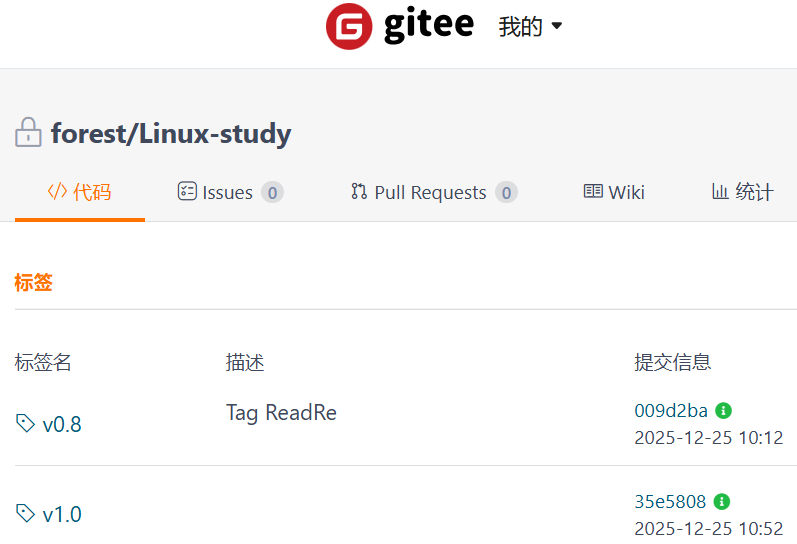
// 推送单个标签
[user@iZwz9eoohx59fs5a6ampomZ linux-study]$ git tag -d v0.9
Deleted tag 'v0.9' (was 9087ec3)
[user@iZwz9eoohx59fs5a6ampomZ linux-study]$ git tag -n
v0.8            Tag ReadRe
v1.0            text gitignore
[user@iZwz9eoohx59fs5a6ampomZ linux-study]$ git push origin v1.0
Total 0 (delta 0), reused 0 (delta 0)
remote: Powered by GITEE.COM [1.1.23]
remote: Set trace flag 814a9aa5
To git@gitee.com:Goforest/linux-study.git
 * [new tag]         v1.0 -> v1.0

// 推送全部标签
[user@iZwz9eoohx59fs5a6ampomZ linux-study]$ git push origin --tags
Counting objects: 1, done.
Writing objects: 100% (1/1), 158 bytes | 0 bytes/s, done.
Total 1 (delta 0), reused 0 (delta 0)
remote: Powered by GITEE.COM [1.1.23]
remote: Set trace flag 334b5e94
To git@gitee.com:Goforest/linux-study.git
 * [new tag]         v0.8 -> v0.8
同步删除本地和远程仓库的标签。
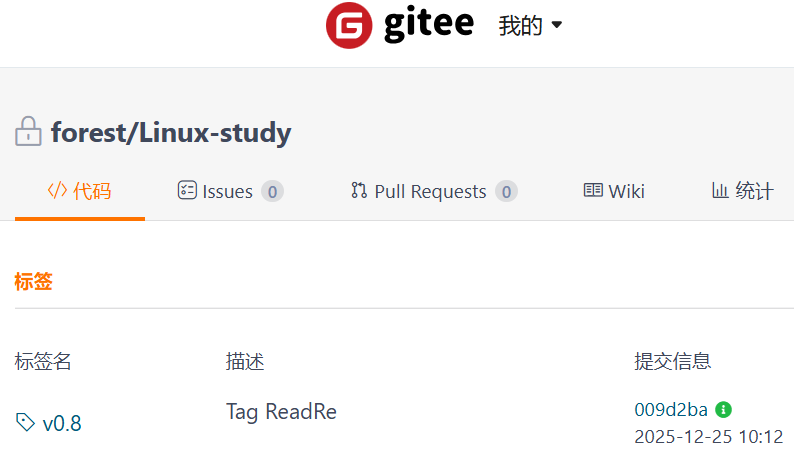
// 同步删除本地和远程仓库的标签
[user@iZwz9eoohx59fs5a6ampomZ linux-study]$ git tag -d v1.0
Deleted tag 'v1.0' (was 35e5808)
[user@iZwz9eoohx59fs5a6ampomZ linux-study]$ git tag -n
v0.8            Tag ReadRe
[user@iZwz9eoohx59fs5a6ampomZ linux-study]$ git push origin :v1.0
remote: Powered by GITEE.COM [1.1.23]
remote: Set trace flag 49403f90
To git@gitee.com:Goforest/linux-study.git
 - [deleted]         v1.0
点个赞吧666!不点赞,点个关注也行呀!OVO