快速入门
SpringBoot已经提供了对SpringDataRedis的支持,使用非常简单:
1.引入依赖
XML
<!--Redis依赖-->
<dependency>
    <groupId>org.springframework.boot</groupId>
    <artifactId>spring-boot-starter-data-redis</artifactId>
</dependency>

<!--连接池依赖-->
<dependency>
    <groupId>org.apache.commons</groupId>
    <artifactId>commons-pool2</artifactId>
</dependency>
2.配置文件
XML
spring:
  data:
    redis:
      host: 192.168.100.128
      port: 6379
      password: 1234
      database: 0
      lettuce:
        pool:
          max-active: 8      # 最大连接数
          max-idle: 8        # 最大空闲连接
          min-idle: 0        # 最小空闲连接
          max-wait: 100ms    # 获取连接等待时间
host 和 password 需要改成自己的
database默认为0,即1号库
3.注入RedisTemplate
java
@Autowired
private RedisTemplate redisTemplate;
4.编写测试
java
@SpringBootTest
public class RedisTest {
    @Autowired
    private RedisTemplate redisTemplate;

    @Test
    void testString() {
        // 插入一条string类型数据
        redisTemplate.opsForValue().set("name", "李四");
        // 读取一条string类型数据
        Object name = redisTemplate.opsForValue().get("name");
        System.out.println("name = " + name);
    }
}
序列化
在执行完测试之后,得到如下结果
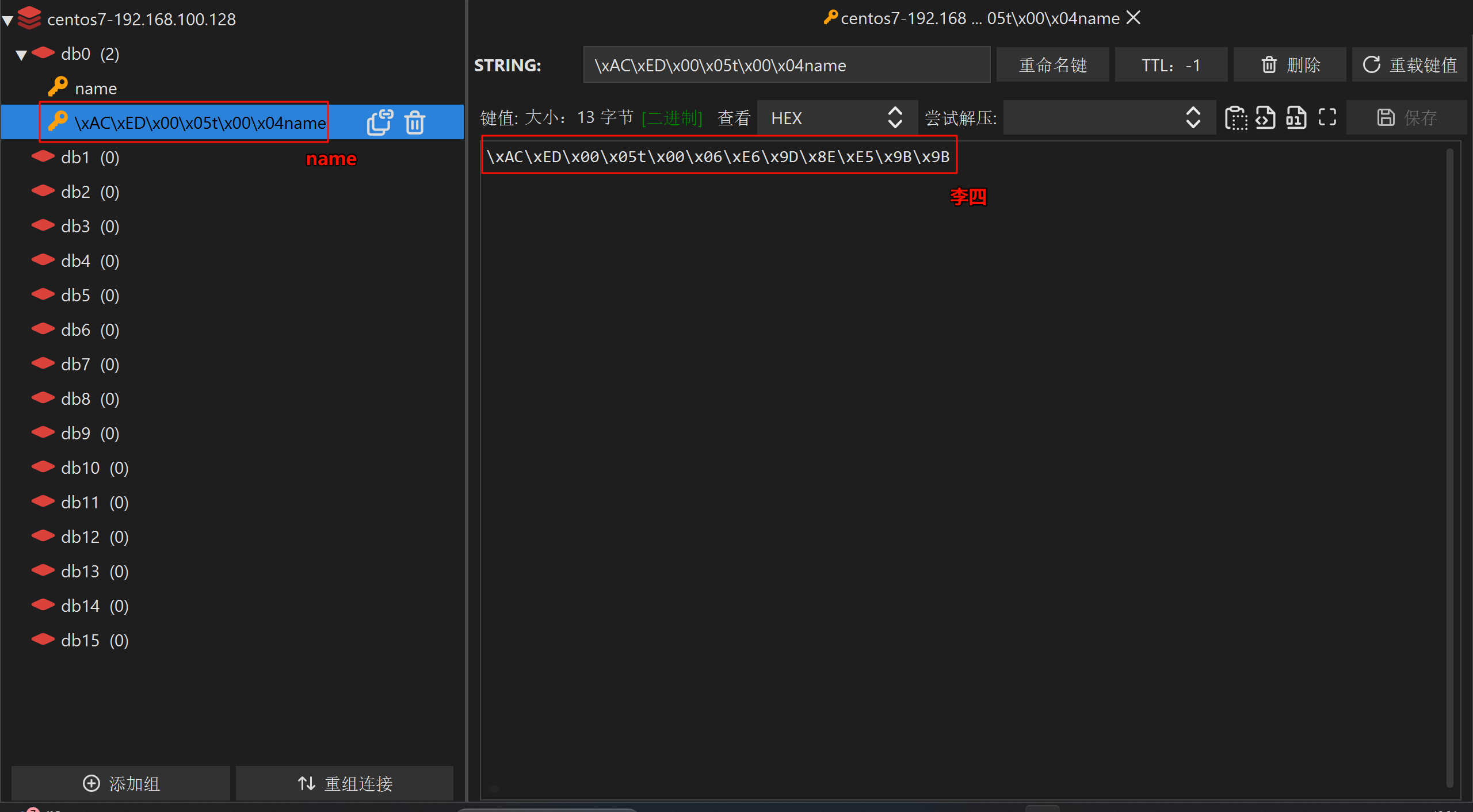
这并不是我们想要的,因为这里使用的是默认的序列化方式
接下来需要解决这个问题
方案一
自定义RedisTemplate的序列化方式,代码如下(可复用):
java
import org.springframework.context.annotation.Bean;
import org.springframework.context.annotation.Configuration;
import org.springframework.data.redis.connection.RedisConnectionFactory;
import org.springframework.data.redis.core.RedisTemplate;
import org.springframework.data.redis.serializer.GenericJackson2JsonRedisSerializer;
import org.springframework.data.redis.serializer.RedisSerializer;

@Configuration
public class RedisConfig {

    @Bean
    public RedisTemplate<String , Object> redisTemplate(RedisConnectionFactory redisConnectionFactory) {
        // 创建RedisTemplate对象
        RedisTemplate<String , Object> redisTemplate = new RedisTemplate<>();
        // 设置连接工厂
        redisTemplate.setConnectionFactory(redisConnectionFactory);
        // 创建JSON序列化工具
        GenericJackson2JsonRedisSerializer jsonRedisSerializer = new GenericJackson2JsonRedisSerializer();
        // 设置Key的序列化
        redisTemplate.setKeySerializer(RedisSerializer.string());
        redisTemplate.setHashKeySerializer(RedisSerializer.string());
        // 设置Value的序列化
        redisTemplate.setValueSerializer(jsonRedisSerializer);
        redisTemplate.setHashValueSerializer(jsonRedisSerializer);
        // 返回
        return redisTemplate;
    }

}
如果出现问题,可能是没有引入依赖(平时不需要引入,因为Spring Boot 整合的 Spring MVC会自动导入):
XML
<!--Jackson依赖-->
<dependency>
  <groupId>com.fasterxml.jackson.core</groupId>
  <artifactId>jackson-databind</artifactId>
</dependency>
这个时候测试结果为:
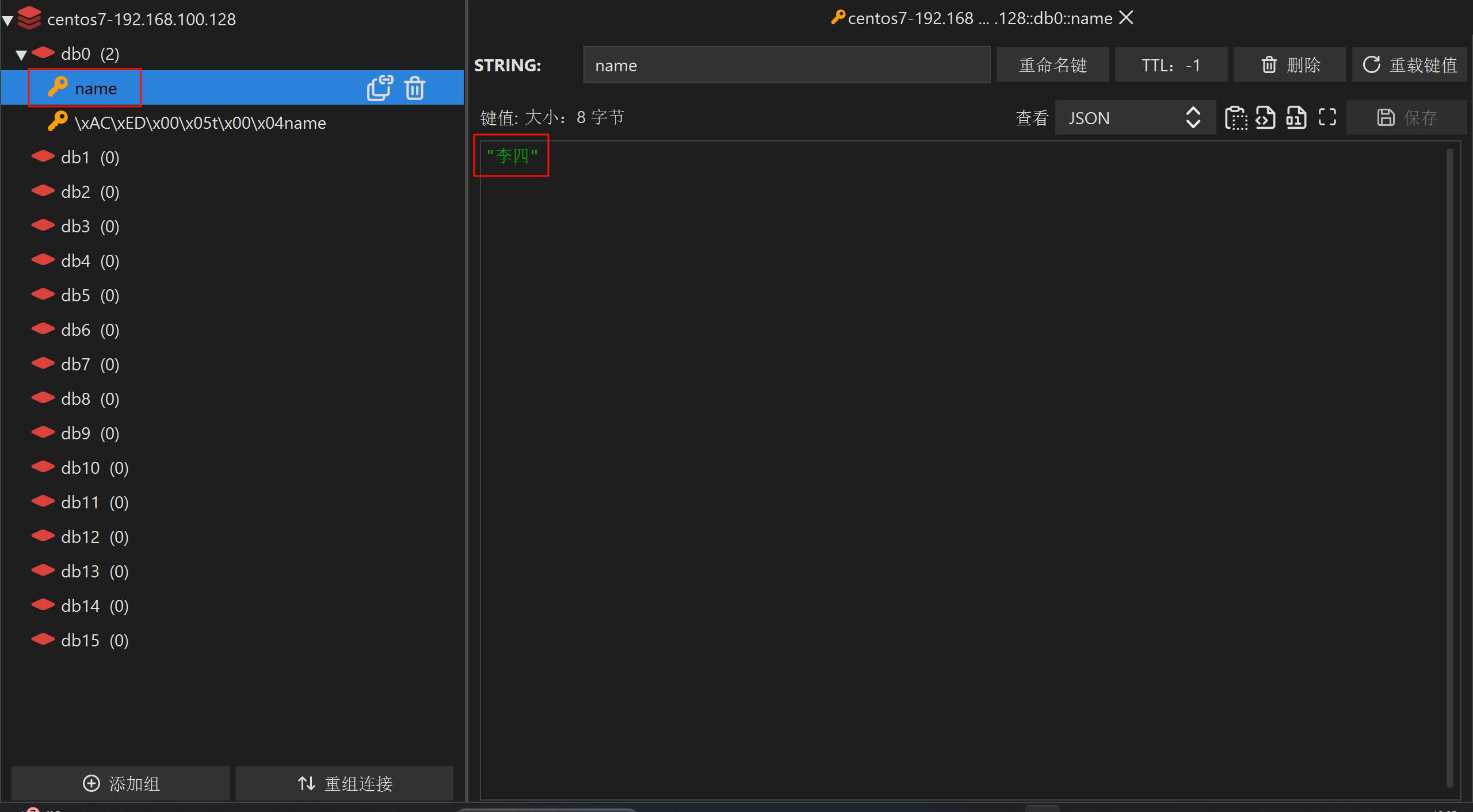
这才是我们想要的结果
但是这种方式在存储value为对象的时候,会把字节码也存进去,占用多余的空间

方案二(推荐)
使用SpringRedisTemplate
不需要额外的配置文件,测试代码如下:
java
import com.example.redis.pojo.User;
import com.fasterxml.jackson.core.JsonProcessingException;
import com.fasterxml.jackson.databind.ObjectMapper;
import org.junit.jupiter.api.Test;
import org.springframework.beans.factory.annotation.Autowired;
import org.springframework.boot.test.context.SpringBootTest;
import org.springframework.data.redis.core.StringRedisTemplate;

@SpringBootTest
public class RedisStringTest {

    @Autowired
    private StringRedisTemplate stringRedisTemplate;

    private static final ObjectMapper mapper = new ObjectMapper();

    @Test
    void testSaveUser() throws JsonProcessingException {

        // 创建User对象
        User user = new User("张三", 18);
        // 手动序列化
        String json = mapper.writeValueAsString(user);
        // 插入一条string类型数据
        stringRedisTemplate.opsForValue().set("user:200", json);
        // 读取一条string类型数据
        String jsonUser = stringRedisTemplate.opsForValue().get("user:200");
        // 手动反序列化
        User user1 = mapper.readValue(jsonUser, User.class);
        System.out.println("user1 = " + user1);
    }

}
这种方法需要手动的去序列化和反序列化对象,如果是字符串就不用了