起因
写了一个视频的剪裁的,后来就有写了一个视频消音的。
过程
UI还是用了一个视频剪裁的UI。见俺的另外一篇博客《用AI生成一个简单的视频剪辑工具》
因为这次的功能是消音,所以改了一下进度条的背景。在进度条的背景中显示音频的信息。
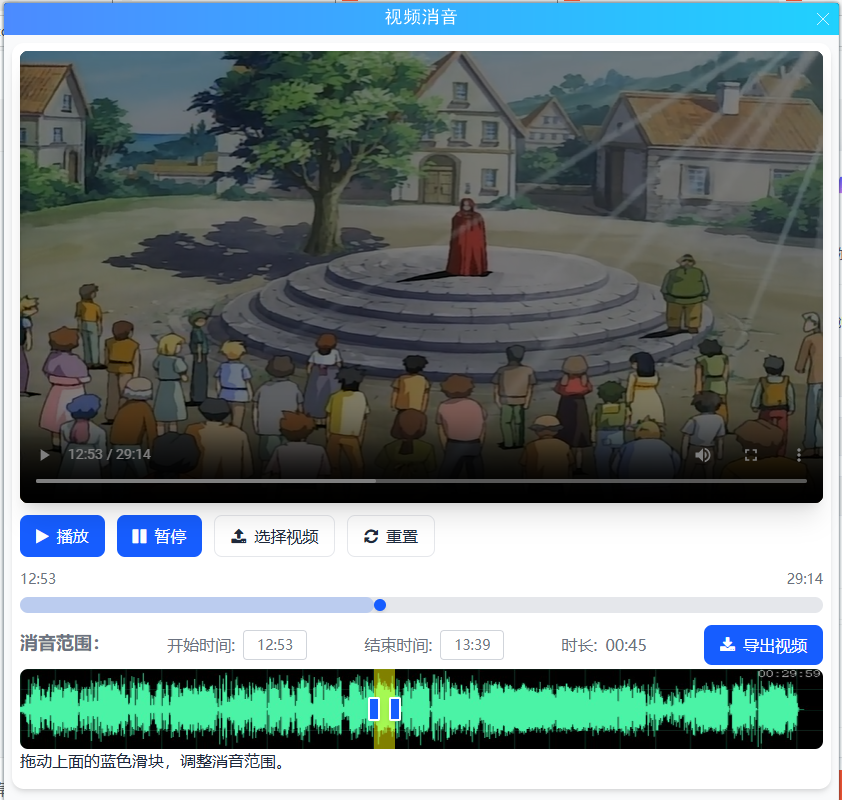
进度条的的改动非常小 ,只是在html加了个img
<img id="img_audio" style="position: absolute; display: inline-block; width: 100%; height: 100%;" src=" " />
js的改动
document.getElementById("img_audio").src = audioURL;
C#的修改,传了 audio_url 的img的地址
if (e.message == "get_video_url")
{
if (filename_tmp_org == "")
{
filename_tmp_org = System.IO.Path.Combine(TmpDir, Guid.NewGuid().ToString("N") + ".mp4");
filename_tmp_new = System.IO.Path.Combine(TmpDir, Guid.NewGuid().ToString("N") + ".mp4");
System.IO.File.Copy(filename, filename_tmp_org);
}
filename_tmp_org_audio = System.IO.Path.Combine(TmpDir, Guid.NewGuid().ToString("N") + ".jpg");
bool flag= get_audio_bg_url(filename_tmp_org, filename_tmp_org_audio).Result;
Dictionary<string, string> dict = new Dictionary<string, string>();
dict"video_url" = "file://" + filename_tmp_org;
dict"audio_url" = "file://" + filename_tmp_org_audio;
e.result = Newtonsoft.Json.JsonConvert.SerializeObject(dict);
}
C#的get_audio_bg_url 的处理比较简单 先用 ffmpeg @"-i ""fn1"" -vn -acodec mp3 ""fn2"" "
从视频中分离MP3音频。
然后用audio2img 方法, 生成进度条的背景
{
WaveAudioRendererSettings settings = new WaveAudioRendererSettings();
settings.Width = 1024;
settings.TopHeight = 88;
settings.BottomHeight = 88;
Bitmap bmp = AudioInfo.audio2img(mp3, settings);
bmp.Save(filename_tmp_org_audio, ImageFormat.Jpeg);
bmp.Dispose();
}
代码
cs
        private async   Task<bool> get_audio_bg_url(string filename_tmp_org, string filename_tmp_org_audio)
        {
            //ffmpeg -i input.mp4 -vn -acodec mp3 output.mp3
            string mp3 = System.IO.Path.ChangeExtension(filename_tmp_org_audio, ".mp3");
            string arguments = @"-i ""[fn1]"" -vn -acodec mp3 ""[fn2]""  ";
            arguments = arguments.Replace("[fn1]", filename_tmp_org);
            arguments = arguments.Replace("[fn2]", mp3);
            var compressor = new VideoCompressor(ffmpegPath);

            bool succ = false;
            {
                CompressionResult cr =   compressor.Exe(arguments);
                succ = cr.Success;
                if (succ)
                {
                    {
                        WaveAudioRendererSettings settings = new WaveAudioRendererSettings();
                        settings.Width = 1024;
                        settings.TopHeight = 88;
                        settings.BottomHeight = 88;
                        Bitmap bmp = AudioInfo.audio2img(mp3, settings);
                        bmp.Save(filename_tmp_org_audio, ImageFormat.Jpeg);
                        bmp.Dispose();
                    }
                }
                else
                {
                    err = cr.ErrorMessage;
                }
            }

            return succ;
        }
cs
    public class AudioInfo
    {
        public static double get_len(string fn)
        {
            AudioFileReader _reader = new AudioFileReader(fn);
            double len = _reader.TotalTime.TotalSeconds;
            _reader.Dispose();
            return len;
        }
        public static Bitmap audio2img(string fn, WaveAudioRendererSettings settings)
        {
            if (settings.TopPeakPen == null)
                settings.TopPeakPen = new Pen(Color.FromArgb(75, 243, 167));
            if (settings.BottomPeakPen == null)
                settings.BottomPeakPen = new Pen(Color.FromArgb(75, 243, 167));

            int Width = settings.Width;
            int Height = settings.TopHeight + settings.BottomHeight;
            Bitmap bmp = new Bitmap(Width, Height);
            Graphics g = Graphics.FromImage(bmp);
            g.FillRectangle(settings.BackgroundBrush, 0, 0, Width, Height);
            // 网格
            drawGraid(g, Width, Height);
            // 波形


            var midPoint = settings.TopHeight;
            int x = 0;

            MaxPeakProvider _maxPeakProvider = new MaxPeakProvider();
            _maxPeakProvider.Init(16, fn);
            _maxPeakProvider.Load(settings);
            WavePeakInfo currentPeak = _maxPeakProvider.GetPeakInfo(x);

            if (currentPeak == null)
                return null;
            string s = _maxPeakProvider.TotalTime.ToString(@"hh\:mm\:ss");
            Rectangle textrect = new Rectangle(0, 0, bmp.Width, bmp.Height);
            StringFormat sf = new StringFormat();
            sf.Alignment = StringAlignment.Far;
            sf.LineAlignment = StringAlignment.Near;
            g.DrawString(s, new Font("宋体", 15f, FontStyle.Regular), new SolidBrush(Color.White), textrect, sf);

            while (x < settings.Width)
            {
                WavePeakInfo nextPeak = _maxPeakProvider.GetPeakInfo(x);

                for (int n = 0; n < settings.PixelsPerPeak; n++)
                {
                    float lineHeight = settings.TopHeight * currentPeak.Max;
                    g.DrawLine(settings.TopPeakPen, x, midPoint, x, midPoint - lineHeight);
                    lineHeight = settings.BottomHeight * currentPeak.Min;
                    g.DrawLine(settings.BottomPeakPen, x, midPoint, x, midPoint - lineHeight);
                    x++;
                }

                for (int n = 0; n < settings.SpacerPixels; n++)
                {
                    float max = Math.Min(currentPeak.Max, nextPeak.Max);
                    float min = Math.Max(currentPeak.Min, nextPeak.Min);
                    float lineHeight = settings.TopHeight * max;
                    g.DrawLine(settings.TopSpacerPen, x, midPoint, x, midPoint - lineHeight);
                    lineHeight = settings.BottomHeight * min;
                    g.DrawLine(settings.BottomSpacerPen, x, midPoint, x, midPoint - lineHeight);
                    x++;
                }
                currentPeak = nextPeak;
            }

            g.Dispose();
            _maxPeakProvider.dispose_reader();
            return bmp;
        }
        public static void drawGraid(Graphics g, int width, int height)
        {
            Pen gridPen = new Pen(Color.FromArgb(18, 59, 40));
            for (int i = 0; i < width;)
            {
                g.DrawLine(gridPen, new Point(i, 0), new Point(i, width));
                i += 45;
            }
            //水平
            for (int j = 0; j < height;)
            {
                g.DrawLine(gridPen, new Point(0, j), new Point(width, j));
                j += 45;
            }

        }
    }

    public class WaveAudioRendererSettings
    {
        public WaveAudioRendererSettings()
        {
            Width = 800;
            TopHeight = 150;
            BottomHeight = 150;
            PixelsPerPeak = 1;
            SpacerPixels = 0;
            BackgroundColor = Color.Black;
        }

        // for display purposes only
        public string Name { get; set; }

        public int Width { get; set; }

        public int TopHeight { get; set; }
        public int BottomHeight { get; set; }
        public int PixelsPerPeak { get; set; }
        public int SpacerPixels { get; set; }
        public virtual Pen TopPeakPen { get; set; }
        public virtual Pen TopSpacerPen { get; set; }
        public virtual Pen BottomPeakPen { get; set; }
        public virtual Pen BottomSpacerPen { get; set; }
        public bool DecibelScale { get; set; }
        public Color BackgroundColor { get; set; }
        public Image BackgroundImage { get; set; }

        public int StartX { get; set; }
        public int EndX { get; set; }
        public Brush BackgroundBrush
        {
            get
            {
                if (BackgroundImage == null)
                    return new SolidBrush(BackgroundColor);

                return new TextureBrush(BackgroundImage, WrapMode.Clamp);
            }
        }

        protected static Pen CreateGradientPen(int height, Color startColor, Color endColor)
        {
            var brush = new LinearGradientBrush(new Point(0, 0), new Point(0, height), startColor, endColor);
            return new Pen(brush);
        }
    }

    public class WavePeakInfo
    {
        public WavePeakInfo(float min, float max)
        {
            Max = max;
            Min = min;
            IsSelected = false;
        }
        public float Min { get; private set; }
        public float Max { get; private set; }

        public bool IsSelected { get; set; }
    }
    public class MaxPeakProvider
    {
        //private float[] _mCollection = null;

        protected int mSamplesPerPeak = 0;
        protected int mBitsPerSample = 0;

        private List<WavePeakInfo> mWavePeakInfos;
        private WaveAudioRendererSettings _settings;
        private string _file;
        private AudioFileReader _reader;
        public TimeSpan TotalTime;

        public MaxPeakProvider()
        {
            mWavePeakInfos = new List<WavePeakInfo>();
        }

        public void Init(int bitsPerSample, string file)
        {
            mBitsPerSample = bitsPerSample;
            _file = file;
            _reader = new AudioFileReader(file);
            TotalTime = _reader.TotalTime;
        }
        public void dispose_reader()
        {
            if (_reader != null)
            {
                _reader.Dispose();
                _reader = null;
            }

        }
        public void Load(WaveAudioRendererSettings settings)
        {
            //_mCollection = collection;
            _settings = settings;
            int bytesPerSample = mBitsPerSample / 4;
            var samples = _reader.Length / (bytesPerSample);
            //var samplesPerPixel = (int)(samples / settings.Width);
            var samplesPerPixel = (int)(samples / settings.Width);
            var stepSize = settings.PixelsPerPeak + settings.SpacerPixels;
            mSamplesPerPeak = samplesPerPixel * stepSize;
            mWavePeakInfos.Clear();

        }

        public WavePeakInfo GetNextPeak(int index)
        {
            //if (_mCollection == null || mSamplesPerPeak == 0)
            //    return null;

            //if (_mCollection.Length <= index)
            //    return null;

            //float[] tt = _mCollection.Skip(index * mSamplesPerPeak).Take((index + 1) * mSamplesPerPeak).ToArray();
            //var max = (tt == null) ? 0 : tt.Take(mSamplesPerPeak).Max();
            //var min = (tt == null) ? 0 : tt.Take(mSamplesPerPeak).Min();

            if (mSamplesPerPeak == 0)
                return null;

            float[] ReadBuffer = new float[mSamplesPerPeak];
            var samplesRead = _reader.Read(ReadBuffer, 0, ReadBuffer.Length);
            var max = (samplesRead == 0) ? 0 : ReadBuffer.Take(mSamplesPerPeak).Max();
            var min = (samplesRead == 0) ? 0 : ReadBuffer.Take(mSamplesPerPeak).Min();

            WavePeakInfo info = new WavePeakInfo(min, max);
            mWavePeakInfos.Add(info);
            return info;
        }

        public WavePeakInfo GetPeakInfo(int index)
        {

            if (index >= mWavePeakInfos.Count)
                return GetNextPeak(index);

            return mWavePeakInfos[index];
        }

        public void UpdatePeakInfoStatus(int index)
        {

            if (index > mWavePeakInfos.Count)
                return;

            mWavePeakInfos[index].IsSelected = !mWavePeakInfos[index].IsSelected;
        }

        public void ResetPeakInfoStatus()
        {
            foreach (WavePeakInfo info in mWavePeakInfos)
            {
                info.IsSelected = false;
            }
        }

        public int GetSize(int index)
        {
            if (index >= _settings.Width)
            {
                index = _settings.Width - 1;
            }
            return index * mSamplesPerPeak * 2;
        }
    }