摘要:本文主要介绍了基于springboot+liquibase的数据库版本管理工具的使用说明;案例封装了liquibase的功能进行了业务增强,让实际生成环境使用更省心。
直接使用会遇到的问题
- 异常退出导致
databasechangeloglock锁表,需要手动清理数据。 - 无法满足多租户使用。
- 无法满足多数据库适配。
LiquibasePlus封装案例
只是在
Liquibase上做了功能增强。
pom.xml
xml
<dependencies>
    <dependency>
        <groupId>org.springframework.boot</groupId>
        <artifactId>spring-boot-starter-web</artifactId>
    </dependency>
    <dependency>
        <groupId>org.springframework.boot</groupId>
        <artifactId>spring-boot-starter-jdbc</artifactId>
    </dependency>
    <dependency>
        <groupId>org.liquibase</groupId>
        <artifactId>liquibase-core</artifactId>
    </dependency>
    <dependency>
        <groupId>mysql</groupId>
        <artifactId>mysql-connector-java</artifactId>
    </dependency>
</dependencies>
LiquibaseApplication
启动类
typescript
@SpringBootApplication
public class LiquibaseApplication {

    public static void main(String[] args) {
        SpringApplication.run(LiquibaseApplication.class, args);
    }
}
application.yml
配置文件
yaml
spring:
  datasource:
    driver-class-name: com.mysql.cj.jdbc.Driver
    username: super_admin
    password: super_admin
    url: jdbc:mysql://192.168.8.134:30635/test_1?useSSL=false&serverTimezone=UTC
  liquibase:
    enabled: false
  liquibase-plus:
    enabled: true
    driver-class-name: com.mysql.cj.jdbc.Driver
    username: super_admin
    password: super_admin
    jdbc-url: jdbc:mysql://192.168.8.134:30635/test_1?useSSL=false&serverTimezone=UTC
    change-log: classpath*:sql/mysql/changelog.xml
SpringLiquibasePlusProperties
属性配置类
arduino
@Data
public class SpringLiquibasePlusProperties {

    /** 是否开启 */
    private boolean enabled;
    /** 驱动名称 */
    private String driverClassName;
    /** 链接地址 */
    private String jdbcUrl;
    /** 用户名 */
    private String username;
    /** 密码 */
    private String password;
    /** 数据库schema */
    private String schema;
    /** 变更日志 */
    private String changeLog;

}
SpringLiquibasePlusExecutor
liquibase执行器
scss
@Slf4j
public class SpringLiquibasePlusExecutor {

    private final ResourceLoader resourceLoader;

    public SpringLiquibasePlusExecutor(ResourceLoader resourceLoader) {
        this.resourceLoader = resourceLoader;
    }

    /**
     * 初始化数据库
     * @param properties
     */
    public void execute(SpringLiquibasePlusProperties properties) throws Exception{
        try(HikariDataSource hikariDataSource = this.buildDataSource(properties)) {
            SpringLiquibase liquibase = new SpringLiquibase();
            liquibase.setDataSource(hikariDataSource);
            liquibase.setResourceLoader(resourceLoader);
            liquibase.setDatabaseChangeLogTable("databasechangelog");
            liquibase.setDatabaseChangeLogLockTable("databasechangeloglock");
            //指定changelog的位置,这里使用的一个master文件引用其他文件的方式
            liquibase.setChangeLog(properties.getChangeLog());
            liquibase.setShouldRun(true);
            // 检查锁表的情况
            removeTimeoutLock(hikariDataSource, liquibase.getDatabaseChangeLogLockTable());
            liquibase.afterPropertiesSet();
        }
    }

    /**
     * 构建数据源
     * @param properties
     * @return
     */
    private HikariDataSource buildDataSource(SpringLiquibasePlusProperties properties){
        HikariDataSource hikariDataSource = new HikariDataSource();
        hikariDataSource.setDriverClassName(properties.getDriverClassName());
        hikariDataSource.setJdbcUrl(properties.getJdbcUrl());
        hikariDataSource.setUsername(properties.getUsername());
        hikariDataSource.setPassword(properties.getPassword());
        hikariDataSource.setSchema(properties.getSchema());
        hikariDataSource.setMinimumIdle(1);
        hikariDataSource.setMaximumPoolSize(1);
        return hikariDataSource;
    }

    /**
     * 移除超时的锁
     * 如果要写得更好,先判断表存在没有,存在了再执行SQL语句,我这里捕获异常处理的
     * @param dataSource
     * @param tableName
     */
    public void removeTimeoutLock(DataSource dataSource, String tableName){
        // 超时5分钟就认为超时,这里可以自己自定义
        Timestamp lastDBLockTime = new Timestamp(new java.util.Date().getTime() - (5 * 60 * 1000));
        // 这里的SQL语句需要按照自己的数据库方式来,现阶段我就遇到`oracle`写法不一样
        String sql = String.format("UPDATE %s SET LOCKED = 0, LOCKGRANTED = NULL, LOCKEDBY = NULL WHERE LOCKED = 1 AND LOCKGRANTED < '%s'", tableName, lastDBLockTime);

        try (Connection connection = dataSource.getConnection(); Statement stmt = connection.createStatement()) {
            int updateCount = stmt.executeUpdate(sql);
            if(updateCount > 0){
                log.info("liquibase异常锁解除成功");
            }else {
                log.info("liquibase无异常锁");
            }
        } catch (Exception ex) {
            if(!(ex instanceof SQLException)){
                // 直接跳过不用处理异常了
                log.error("liquibase解锁异常", ex);
            }else {
                log.warn("liquibase初次加载");
            }
        }
    }

}SpringLiquibasePlusConfig启动配置
less
@Slf4j
@Configuration
@ConditionalOnProperty(
        prefix = "spring.liquibase-plus",
        name = {"enabled"}
)
public class SpringLiquibasePlusConfig {

    @Autowired
    private ResourceLoader resourceLoader;
    @Autowired
    private List<CustomTaskChange> customTaskChanges;

    @Bean
    @ConfigurationProperties(prefix = "spring.liquibase-plus",ignoreUnknownFields = false)
    public SpringLiquibasePlusProperties springLiquibasePlusProperties() {
        return new SpringLiquibasePlusProperties();
    }

    @Bean
    public SpringLiquibasePlusExecutor springLiquibasePlusExecuter(SpringLiquibasePlusProperties springLiquibasePlusProperties) throws Exception {
        log.info("Liquibase CustomTaskChange size: {}, names: {}", customTaskChanges.size(), customTaskChanges.stream().map(CustomTaskChange::getClass).collect(Collectors.toSet()));
        customTaskChanges.forEach(CustomChange::getConfirmationMessage);
        SpringLiquibasePlusExecutor springLiquibasePlusExecutor = new SpringLiquibasePlusExecutor(resourceLoader);
        springLiquibasePlusExecutor.execute(springLiquibasePlusProperties);
        return springLiquibasePlusExecutor;
    }

}
V1_00_00_ClearCustomTaskChange
sql中解决不了的,需要用java代码来进行版本管理的业务。
typescript
@Slf4j
@Component
public class V1_00_00_ClearCustomTaskChange implements CustomTaskChange {

    private static JdbcTemplate jdbcTemplate;

    @Autowired
    public void setJdbcTemplate(JdbcTemplate jdbcTemplate) {
        V1_00_00_ClearCustomTaskChange.jdbcTemplate = jdbcTemplate;
    }

    @Override
    public void execute(Database database) throws CustomChangeException {
        // 这里写liquibase简单的sql语句做不了的复杂写法,我这里只做简单演示,这里强烈建议用jdbcTemplate查询其他的表,并且只查询自己需要的字段
        List<Map<String, Object>> mapList = jdbcTemplate.queryForList("select * from school_01 where name = 'A'");
        if(CollectionUtils.isEmpty(mapList)) {
            for (int i = 0; i < 10; i++) {
                jdbcTemplate.update("insert into school_01(id, name) values (?, ?)", i, "A" + i);
            }
        }
    }

    @Override
    public String getConfirmationMessage() {
        return "SUCCESS";
    }

    @Override
    public void setUp() throws SetupException {

    }

    @Override
    public void setFileOpener(ResourceAccessor resourceAccessor) {

    }

    @Override
    public ValidationErrors validate(Database database) {
        return null;
    }
}
changelog.xml
主要的数据库版本管理文件
xml
<?xml version="1.0" encoding="UTF-8"?>
<databaseChangeLog
        xmlns="http://www.liquibase.org/xml/ns/dbchangelog"
        xmlns:xsi="http://www.w3.org/2001/XMLSchema-instance"
        xsi:schemaLocation="http://www.liquibase.org/xml/ns/dbchangelog
         http://www.liquibase.org/xml/ns/dbchangelog/dbchangelog-3.1.xsd">

    <!--  初始化表结构  -->
    <include file="/sql/mysql/V1.00.00.sql"/>
    <changeSet id="V1.00.00-003-1" author="huzhihui">
        <customChange class="com.github.sp3.liquibase.config.custom.V1_00_00_ClearCustomTaskChange"/>
    </changeSet>
    <include file="/sql/mysql/V1.00.01.sql"/>
</databaseChangeLog>
V1.00.00.sql
sql
--liquibase formatted sql

--changeset huzhihui:V1.00.00-001-1
--preconditions onFail:MARK_RAN onError:MARK_RAN
--precondition-sql-check expectedResult:0 select count(1) from information_schema.tables where table_schema = (select database()) and table_name = 'school_01';
--comment 测试表
CREATE TABLE `school_01` (
  `id` bigint(20) NOT NULL,
  `name` varchar(255) DEFAULT NULL,
  `create_time` datetime DEFAULT NULL,
  `time_zone` timestamp NULL DEFAULT NULL,
  `time_no_zone` datetime DEFAULT NULL,
  PRIMARY KEY (`id`)
) ENGINE=InnoDB;

--changeset huzhihui:V1.00.00-002-1
--preconditions onFail:MARK_RAN onError:MARK_RAN
--precondition-sql-check expectedResult:0 select count(1) from information_schema.tables where table_schema = (select database()) and table_name = 'school_02';
--comment 测试表
CREATE TABLE `school_02` (
 `id` bigint(20) NOT NULL,
 `name` varchar(255) DEFAULT NULL,
 `create_time` datetime DEFAULT NULL,
 `time_zone` timestamp NULL DEFAULT NULL,
 `time_no_zone` datetime DEFAULT NULL,
 PRIMARY KEY (`id`)
) ENGINE=InnoDB;
V1.00.01.sql
sql
--liquibase formatted sql

--changeset huzhihui:V1.00.01-001-1
--preconditions onFail:MARK_RAN onError:MARK_RAN
--precondition-sql-check expectedResult:0 select count(1) from information_schema.tables where table_schema = (select database()) and table_name = 'school_03';
--comment 测试表
CREATE TABLE `school_03` (
  `id` bigint(20) NOT NULL,
  `name` varchar(255) DEFAULT NULL,
  `create_time` datetime DEFAULT NULL,
  `time_zone` timestamp NULL DEFAULT NULL,
  `time_no_zone` datetime DEFAULT NULL,
  PRIMARY KEY (`id`)
) ENGINE=InnoDB;
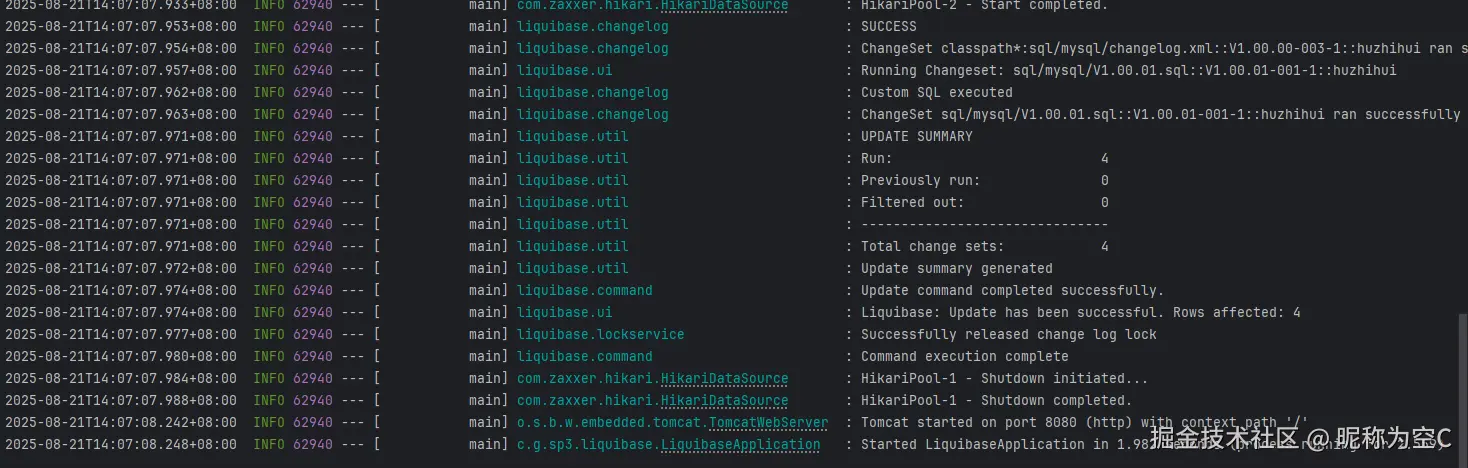
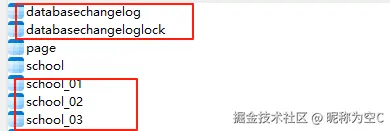
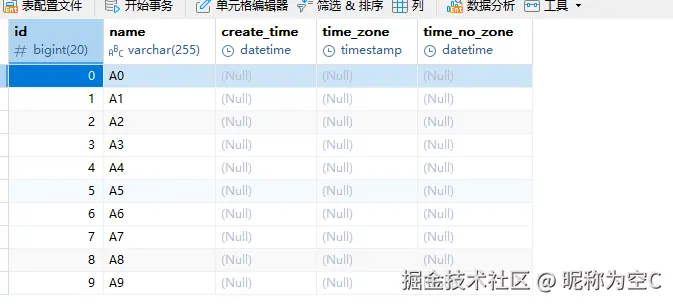
最终执行结果