场景: 在新能源车机系统有一套UI页面,手机有竖屏页面,手机又横屏页面,3种情况相互切换,频繁的切换,手机的竖屏页面有3个tab和3个对应fragment,一个外层Fragment包含3个fragment, 不停的切换导致的!
1.内存泄漏信息
yaml
2025-12-11 09:35:44.808 57579-61121 LeakCanary com.tencent.settings D │ GC Root: Global variable in native code
2025-12-11 09:35:44.808 57579-61121 LeakCanary com.tencent.settings D │
2025-12-11 09:35:44.808 57579-61121 LeakCanary com.tencent.settings D │ Leaking: NO (MainActivity↓ is not leaking)
2025-12-11 09:35:44.808 57579-61121 LeakCanary com.tencent.settings D │ ↓ -$$Lambda$ViewRootImpl$zmAX2p20-kqxknxcUyGhSNjsJvM.f$0
2025-12-11 09:35:44.808 57579-61121 LeakCanary com.tencent.settings D │ Leaking: NO (MainActivity↓ is not leaking)
2025-12-11 09:35:44.808 57579-61121 LeakCanary com.tencent.settings D │ mContext instance of com.tencent.settings.MainActivity with mDestroyed = false
2025-12-11 09:35:44.808 57579-61121 LeakCanary com.tencent.settings D │ ViewRootImpl#mView is not null
2025-12-11 09:35:44.808 57579-61121 LeakCanary com.tencent.settings D │ ↓ ViewRootImpl.mContext
2025-12-11 09:35:44.808 57579-61121 LeakCanary com.tencent.settings D ├─ com.tencent.settings.MainActivity instance
2025-12-11 09:35:44.808 57579-61121 LeakCanary com.tencent.settings D │ ↓ ComponentActivity.mLifecycleRegistry
2025-12-11 09:35:44.808 57579-61121 LeakCanary com.tencent.settings D │ ~~~~~~~~~~~~
2025-12-11 09:35:44.808 57579-61121 LeakCanary com.tencent.settings D │ Retaining 52 B in 2 objects
2025-12-11 09:35:44.808 57579-61121 LeakCanary com.tencent.settings D │ Anonymous class implementing androidx.lifecycle.LifecycleEventObserver
2025-12-11 09:35:44.808 57579-61121 LeakCanary com.tencent.settings D ├─ androidx.viewpager2.adapter.FragmentStateAdapter$FragmentMaxLifecycleEnforcer instance
2025-12-11 09:35:44.808 57579-61121 LeakCanary com.tencent.settings D │ ↓ FragmentStateAdapter$FragmentMaxLifecycleEnforcer.mViewPager
2025-12-11 09:35:44.808 57579-61121 LeakCanary com.tencent.settings D │ ~~~~~~~~~~
2025-12-11 09:35:44.808 57579-61121 LeakCanary com.tencent.settings D ├─ androidx.viewpager2.widget.ViewPager2 instance
2025-12-11 09:35:44.808 57579-61121 LeakCanary com.tencent.settings D │ Leaking: UNKNOWN
2025-12-11 09:35:44.808 57579-61121 LeakCanary com.tencent.settings D │ Retaining 85.1 kB in 1109 objects
2025-12-11 09:35:44.808 57579-61121 LeakCanary com.tencent.settings D │ View not part of a window view hierarchy
2025-12-11 09:35:44.808 57579-61121 LeakCanary com.tencent.settings D │ View.mAttachInfo is null (view detached)
2025-12-11 09:35:44.808 57579-61121 LeakCanary com.tencent.settings D │ View.mWindowAttachCount = 1
2025-12-11 09:35:44.808 57579-61121 LeakCanary com.tencent.settings D │ mContext instance of com.tencent.settings.MainActivity with mDestroyed = false
2025-12-11 09:35:44.808 57579-61121 LeakCanary com.tencent.settings D │ ↓ View.mParent
2025-12-11 09:35:44.808 57579-61121 LeakCanary com.tencent.settings D │ ~~~~~~~
2025-12-11 09:35:44.808 57579-61121 LeakCanary com.tencent.settings D Leaking: YES (ObjectWatcher was watching this because com.tencent.settings.PhoneAndroidFragment received
2025-12-11 09:35:44.808 57579-61121 LeakCanary com.tencent.settings D Fragment#onDestroyView() callback (references to its views should be cleared to prevent leaks))
2025-12-11 09:35:44.808 57579-61121 LeakCanary com.tencent.settings D key = 4e6eb9f9-742a-42b5-a71d-42543f7f1407
2025-12-11 09:35:44.808 57579-61121 LeakCanary com.tencent.settings D watchDurationMillis = 22525
2025-12-11 09:35:44.808 57579-61121 LeakCanary com.tencent.settings D View not part of a window view hierarchy
2025-12-11 09:35:44.808 57579-61121 LeakCanary com.tencent.settings D View.mWindowAttachCount = 1泄漏现象
LeakCanary的日志显示了这样一个泄漏链:
ini
GC Root: Global variable in native code
↓
ViewRootImpl的Lambda表达式
↓
MainActivity (mDestroyed = false)
↓
ComponentActivity.mLifecycleRegistry
↓
FragmentStateAdapter$FragmentMaxLifecycleEnforcer
↓
ViewPager2实例 (已从窗口分离)
↓
Fragment已销毁的视图 (应被回收但未被回收)
2. 主要泄漏点
PhoneAndroidFragment 已经收到了 onDestroyView() 回调
但其视图仍然被 ViewPager2 持有
ViewPager2 本身又被 FragmentMaxLifecycleEnforcer 持有
2.2 核心原因
FragmentStateAdapter$FragmentMaxLifecycleEnforcer 是一个生命周期观察者,它:
通过 MainActivity 的 mLifecycleRegistry 注册
持有 ViewPager2 的引用
导致 ViewPager2 及其子视图无法被释放
问题:谁持有 ViewPager2, 为什么PhoneAndroidFragment 不能被回收
markdown
1. GC Root (Native全局变量)
   ↓
2. ViewRootImpl的Lambda函数
   ↓
3. MainActivity (Activity本身未销毁)
   ↓
4. ComponentActivity.mLifecycleRegistry (生命周期注册表)
   ↓
5. FragmentStateAdapter$FragmentMaxLifecycleEnforcer (生命周期观察者)
   ↓
6. ViewPager2 实例 (关键持有者)
   ↓
7. ViewPager2 的内部状态 (RecyclerView、适配器等)
   ↓
8. PhoneAndroidFragment 的视图 (Fragment的View层次结构)
3.源码详细分析各环节:
3.1. FragmentMaxLifecycleEnforcer 是谁?
scala
// 这是ViewPager2的内部类,负责管理Fragment的生命周期
public class FragmentStateAdapter extends RecyclerView.Adapter<...> {
    class FragmentMaxLifecycleEnforcer {
        // 关键字段
        private ViewPager2 mViewPager;  // 持有ViewPager2的强引用
        private LifecycleEventObserver mLifecycleObserver;  // 生命周期观察者
    }
}
3.2. 为什么它持有ViewPager2?
当ViewPager2使用FragmentStateAdapter时,会自动创建一个FragmentMaxLifecycleEnforcer实例:
less
// 在FragmentStateAdapter构造函数中
public FragmentStateAdapter(@NonNull FragmentManager fragmentManager,
                           @NonNull Lifecycle lifecycle) {
    // ...
    mFragmentMaxLifecycleEnforcer = new FragmentMaxLifecycleEnforcer();
    lifecycle.addObserver(mFragmentMaxLifecycleEnforcer);  // 注册到Activity生命周期
}
3.3. PhoneAndroidFragment为什么不能被回收?
根本原因:ViewPager2仍然持有Fragment的视图引用
scss
// ViewPager2内部是通过RecyclerView实现的
// 当Fragment被销毁时,如果ViewPager2没有正确清理,就会:
1. ViewPager2的RecyclerView仍然缓存着Fragment的ViewHolder
2. Fragment的View仍然在ViewPager2的子View列表中
3. Fragment的onDestroyView()被调用,但View对象没有被GC回收
3.4 RecyclerView缓存问题
arduino
// ViewPager2内部使用RecyclerView,有以下缓存:
1. mAttachedScrap - 已附加的废弃视图
2. mCachedViews - 缓存视图(默认大小2)
3. mRecyclerPool - 回收池

// 当Fragment销毁时,如果View还在这些缓存中:
// 1. View不会被释放
// 2. Fragment的视图引用被保留
// 3. 导致内存泄漏
3.5. 屏幕切换影响
markdown
车机系统 ↔ 手机竖屏 ↔ 手机横屏
      ↓         ↓         ↓
布局完全不同   包含ViewPager2  布局完全不同
      ↓         ↓         ↓
每次切换需要   3个Tab频繁   每次切换需要
完全重建UI   切换Fragment  完全重建UI
具体的引用路径:
markdown
PhoneAndroidFragment的View被以下对象引用:
1. ViewPager2.mRecyclerView (RecyclerView实例)
   ↓
2. RecyclerView.mRecycler (RecyclerView.Recycler回收池)
   ↓
3. RecyclerView.Recycler.mCachedViews (缓存视图列表)
   ↓
4. 或 RecyclerView.Recycler.mAttachedScrap (附加的废弃视图)
   ↓
5. Fragment的View在缓存中等待复用
为什么会形成这个泄漏链?
场景重现:
-
初始化:
ini// MainActivity中 ViewPager2 viewPager = findViewById(R.id.view_pager); viewPager.adapter = new FragmentStateAdapter(this); // 此时,FragmentMaxLifecycleEnforcer被注册到Activity的生命周期 -
Fragment被销毁:
arduino// 当PhoneAndroidFragment收到onDestroyView()时 // 理想情况:ViewPager2应该释放对Fragment View的引用 // 实际情况:ViewPager2可能还在缓存这个View -
问题发生:
less// ViewPager2的FragmentStateAdapter没有正确处理 public void onViewRecycled(@NonNull FragmentViewHolder holder) { // 可能没有正确调用FragmentTransaction.remove() // 或者Fragment的View还在RecyclerView的缓存中 }
整体的流程图:
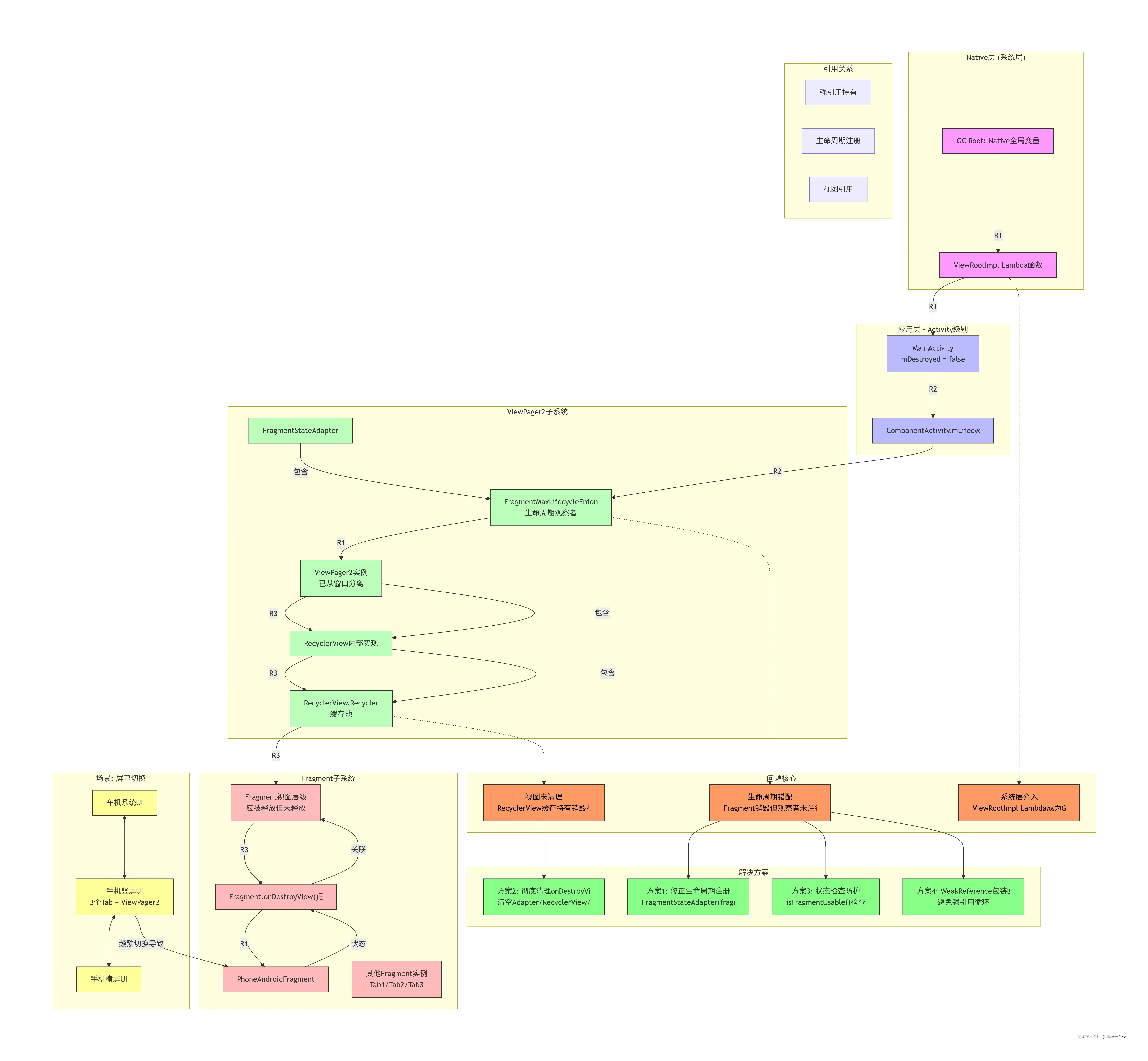
4. 日志深度分析
4.1. GC Root溯源
日志显示GC Root是Global variable in native code,这表明泄漏的源头在Android系统层。具体来说,是ViewRootImpl的Lambda表达式被native层的全局变量持有。
ViewRootImpl是Android窗口系统的核心组件,负责连接应用层的View和系统层的Window。当Activity创建窗口时,系统会创建对应的ViewRootImpl,并在native层注册各种回调。
4.2. 引用链分析
让我们逐级分析这个引用链:
- 系统层持有:native层的全局变量持有ViewRootImpl的Lambda引用
- Lambda捕获:该Lambda捕获了外部类的引用(即MainActivity)
- Activity存活 :MainActivity的
mDestroyed = false,表明Activity并未销毁 - 生命周期注册 :Activity的
mLifecycleRegistry持有FragmentMaxLifecycleEnforcer - ViewPager2关联 :
FragmentMaxLifecycleEnforcer持有ViewPager2的引用 - 视图未被释放 :ViewPager2持有已调用
onDestroyView()的Fragment视图
4.3. 关键状态信息
从日志中我们注意到几个关键状态:
View.mAttachInfo is null (view detached):ViewPager2已从窗口分离View not part of a window view hierarchy:视图不在窗口层级中mDestroyed = false:Activity未销毁PhoneAndroidFragment received Fragment#onDestroyView():Fragment的视图已被销毁
问题本质
生命周期错配
这个问题的核心是生命周期注册在错误的层级:
ini
// 错误写法:注册到Activity生命周期
adapter = new ViewPagerAdapter(getActivity());

// 正确写法:注册到Fragment生命周期
adapter = new ViewPagerAdapter(this);当ViewPager2的FragmentStateAdapter接收到Activity作为参数时,它内部创建的FragmentMaxLifecycleEnforcer会注册到Activity的生命周期。这意味着:
- 即使Fragment的视图被销毁,
FragmentMaxLifecycleEnforcer仍然存活 FragmentMaxLifecycleEnforcer持有ViewPager2的引用- ViewPager2持有Fragment已销毁的视图
- 导致Fragment视图无法被GC回收
ViewRootImpl的介入
为什么系统层的ViewRootImpl会参与这个泄漏链?
当Activity显示时,系统会创建ViewRootImpl来管理窗口。ViewRootImpl可能创建一些Lambda回调(如窗口焦点变化、输入事件处理等),这些Lambda隐式捕获了Activity引用。由于这些回调被native层全局变量引用,它们成为了GC Root,阻止了Activity及其关联对象的回收。
5. 解决方案
方案一:修正生命周期注册(核心修复)
核心要记住:FragmentStateAdapter必须使用Fragment的生命周期,而非Activity,这是解决此类问题的关键。
修改ViewPagerAdapter的构造函数调用:
csharp
// PhoneAndroidFragment.java
private void initView() {
    // 将原有的:
    // adapter = new ViewPagerAdapter(getActivity());
    // 改为:
    adapter = new ViewPagerAdapter(this);  // 传递Fragment本身
}增强ViewPagerAdapter支持Fragment:
less
// ViewPagerAdapter.java
public class ViewPagerAdapter extends FragmentStateAdapter {

    // 保留原有的Activity构造函数
    public ViewPagerAdapter(@NonNull FragmentActivity fragmentActivity) {
        super(fragmentActivity);
    }

    // 新增Fragment构造函数(关键修复)
    public ViewPagerAdapter(@NonNull Fragment fragment) {
        super(fragment);
    }

    // ... 其他代码
}
方案二:彻底清理onDestroyView()
ini
@Override
public void onDestroyView() {
    isDestroyed = true;

    // 1. 清理Handler
    if (handler != null) {
        handler.removeCallbacksAndMessages(null);
    }

    // 2. 取消ViewPager2回调
    if (viewDataBinding != null && pageChangeCallback != null) {
        viewDataBinding.phoneSettingPager.unregisterOnPageChangeCallback(pageChangeCallback);
        pageChangeCallback = null;
    }

    // 3. 清理ViewPager2适配器
    if (viewDataBinding != null && viewDataBinding.phoneSettingPager != null) {
        // 清理内部RecyclerView
        View child = viewDataBinding.phoneSettingPager.getChildAt(0);
        if (child instanceof RecyclerView) {
            RecyclerView recyclerView = (RecyclerView) child;
            recyclerView.setAdapter(null);
            recyclerView.setLayoutManager(null);
            recyclerView.getRecycledViewPool().clear();
        }

        // 清理ViewPager2适配器
        viewDataBinding.phoneSettingPager.setAdapter(null);
    }

    // 4. 清理适配器引用
    adapter = null;

    EventBusUtils.unRegister(this);
    super.onDestroyView();
}
方案三:添加状态检查和防护
scss
// 添加状态检查方法
private boolean isFragmentUsable() {
    return !isDestroyed &&
           isAdded() &&
           getActivity() != null &&
           !getActivity().isFinishing() &&
           getView() != null;
}

// 在所有回调中使用状态检查
@Subscribe(threadMode = ThreadMode.MAIN)
public void onEvent(SomeEvent event) {
    if (!isFragmentUsable()) return;

}
方案四:使用WeakReference包装回调
scala
// 安全的回调包装类
class SafePageChangeCallback extends ViewPager2.OnPageChangeCallback {
    private WeakReference<PhoneAndroidFragment> fragmentRef;

    public SafePageChangeCallback(PhoneAndroidFragment fragment) {
        this.fragmentRef = new WeakReference<>(fragment);
    }

    @Override
    public void onPageSelected(int position) {
        PhoneAndroidFragment fragment = fragmentRef.get();
        if (fragment == null || !fragment.isFragmentUsable()) {
            return;
        }

    }
}