<template>
  <div class="floor-management">
    <!-- 使用 el-select 组件 -->
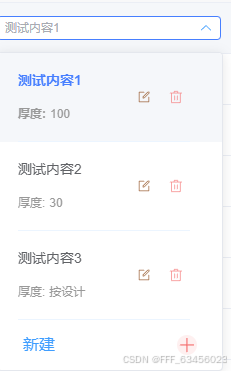
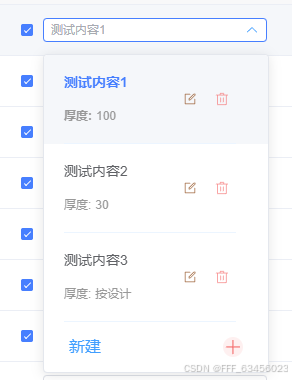
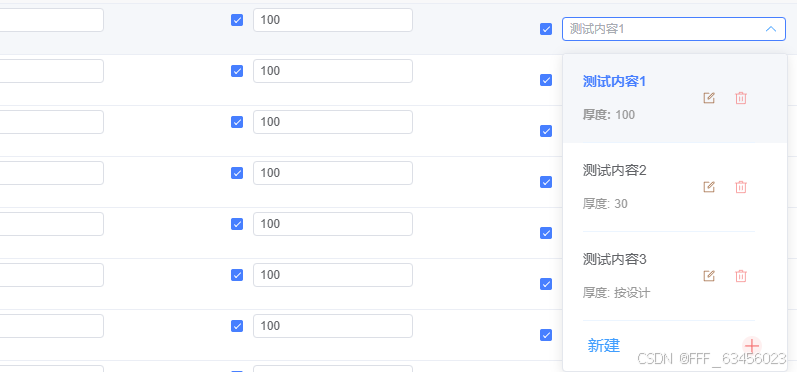
    <el-select v-model="selectedFloor" placeholder="测试内容" class="floor-select" :popper-class="'floor-select-popper'"
      @visible-change="handleVisibleChange">
      <!-- 自定义下拉框内容 -->
      <el-option v-for="floor in floorList" :key="floor.id" :value="floor.id" :label="floor.displayText"
        class="custom-option">
        <!-- 自定义每个选项的内容 -->
        <div class="floor-option-content" @click="handleOptionClick(floor)">
          <!-- 左侧:测试内容信息 -->
          <div class="floor-info-left">
            <div class="floor-name"> {{ floor.name }} </div>
            <div class="floor-thickness">厚度: <span class="thickness-value">{{ floor.thickness }}</span></div>
          </div>
          <!-- 右侧:操作按钮 -->
          <div class="floor-actions-right" @click.stop>
            <!-- 编辑按钮 -->
            <el-icon class="action-icon edit-icon" @click="handleEdit(floor)">
              <Edit />
            </el-icon>
            <!-- 删除按钮 -->
            <el-icon class="action-icon delete-icon" @click="handleDelete(floor)">
              <Delete />
            </el-icon>
          </div>
        </div>
      </el-option>
      <!-- 新建按钮 -->
      <div class="new-floor-item" @click="handleCreate">
        <span>新建</span>
        <el-icon class="plus-icon">
          <Plus />
        </el-icon>
      </div>
    </el-select>

    <!-- 编辑/新增弹窗 -->
    <el-dialog v-model="dialogVisible" :title="isEditing ? '编辑测试内容' : '新增测试内容'" width="400px" append-to-body
      :close-on-click-modal="false">
      <el-form :model="formData" :rules="formRules" ref="formRef" label-width="80px">
        <el-form-item label="名称" prop="name">
          <el-input v-model="formData.name" placeholder="请输入测试内容名称" @input="autoGenerateNumber" />
        </el-form-item>

        <el-form-item label="厚度" prop="thickness">
          <div class="thickness-form-group">
            <el-input v-if="formData.thicknessType === 'number'" v-model.number="formData.thicknessValue" type="number"
              placeholder="输入厚度值" style="width: 120px">
              <template #append>mm</template>
            </el-input>
            <el-input v-else v-model="formData.customThickness" placeholder="如:按设计" style="width: 200px" />

            <el-radio-group v-model="formData.thicknessType" class="thickness-type-group"
              @change="handleThicknessTypeChange">
              <el-radio label="number">数值</el-radio>
              <el-radio label="custom">自定义</el-radio>
            </el-radio-group>
          </div>
        </el-form-item>
      </el-form>

      <template #footer>
        <span class="dialog-footer">
          <el-button @click="dialogVisible = false">取消</el-button>
          <el-button type="primary" @click="handleSave">确定</el-button>
        </span>
      </template>
    </el-dialog>
  </div>
</template>

<script setup>
import { ref, reactive, computed, onMounted, nextTick } from 'vue'
import { ElMessage, ElMessageBox } from 'element-plus'
import { Edit, Delete, Plus } from '@element-plus/icons-vue'

// 当前选中的测试内容
const selectedFloor = ref('1')

// 弹窗控制
const dialogVisible = ref(false)
const isEditing = ref(false)
const formRef = ref(null)

// 表单数据
const formData = reactive({
  id: '',
  name: '',
  number: '',
  thicknessType: 'number',
  thicknessValue: 100,
  customThickness: '',
  showNumber: true
})

// 表单验证规则
const formRules = {
  name: [
    { required: true, message: '请输入名称', trigger: 'blur' },
    { min: 2, max: 20, message: '名称长度在2-20个字符', trigger: 'blur' }
  ],
  thickness: [
    {
      validator: (rule, value, callback) => {
        if (formData.thicknessType === 'number') {
          if (formData.thicknessValue === null || formData.thicknessValue === undefined || formData.thicknessValue === '') {
            callback(new Error('请输入厚度值'))
          } else if (formData.thicknessValue <= 0) {
            callback(new Error('厚度必须大于0'))
          } else if (formData.thicknessValue > 1000) {
            callback(new Error('厚度不能超过1000mm'))
          } else {
            callback()
          }
        } else {
          if (!formData.customThickness?.trim()) {
            callback(new Error('请输入厚度描述'))
          } else if (formData.customThickness.length > 20) {
            callback(new Error('厚度描述不能超过20个字符'))
          } else {
            callback()
          }
        }
      },
      trigger: 'blur'
    }
  ]
}

// 测试内容数据列表
const floorList = ref([
  {
    id: '1',
    name: '测试内容1',
    number: '1',
    thickness: '100',
    thicknessType: 'number',
    thicknessValue: 100,
    showNumber: true,
    displayText: '测试内容1 厚度: 100'
  },
  {
    id: '2',
    name: '测试内容2',
    number: '2',
    thickness: '30',
    thicknessType: 'number',
    thicknessValue: 30,
    showNumber: true,
    displayText: '测试内容2 厚度: 30'
  },
  {
    id: '3',
    name: '测试内容3',
    number: '3',
    thickness: '按设计',
    thicknessType: 'custom',
    customThickness: '按设计',
    showNumber: true,
    displayText: '测试内容3 厚度: 按设计'
  }
])

// 计算选中的测试内容对象
const currentFloor = computed(() => {
  return floorList.value.find(item => item.id === selectedFloor.value)
})

// 新增方法:处理选项点击
const handleOptionClick = (floor) => {
  selectedFloor.value = floor.id
  // 关闭下拉框
  const select = document.querySelector('.floor-select .el-select')
  if (select) {
    select.blur()
  }
}

// 处理下拉框显示/隐藏
const handleVisibleChange = (visible) => {
  if (visible) {
    nextTick(() => {
      // 调整下拉框宽度
      const dropdown = document.querySelector('.floor-select-popper')
      if (dropdown) {
        dropdown.style.minWidth = '280px'
      }
    })
  }
}

// 编辑测试内容
const handleEdit = (floor) => {
  isEditing.value = true
  Object.assign(formData, {
    id: floor.id,
    name: floor.name,
    number: floor.number,
    thicknessType: floor.thicknessType,
    thicknessValue: floor.thicknessValue || 100,
    customThickness: floor.customThickness || '',
    showNumber: floor.showNumber
  })
  dialogVisible.value = true
}

// 删除测试内容
const handleDelete = (floor) => {
  if (floorList.value.length <= 1) {
    ElMessage.warning('至少需要保留一个测试内容')
    return
  }

  ElMessageBox.confirm(
    `确定要删除"${floor.name}"吗?`,
    '删除确认',
    {
      confirmButtonText: '确定',
      cancelButtonText: '取消',
      type: 'warning',
      customClass: 'delete-confirm-dialog'
    }
  ).then(() => {
    const index = floorList.value.findIndex(item => item.id === floor.id)
    if (index !== -1) {
      const deletedFloor = floorList.value[index]
      floorList.value.splice(index, 1)

      // 如果删除的是当前选中的,自动选中上一个
      if (selectedFloor.value === floor.id) {
        if (index > 0) {
          selectedFloor.value = floorList.value[index - 1].id
        } else if (floorList.value.length > 0) {
          selectedFloor.value = floorList.value[0].id
        } else {
          selectedFloor.value = ''
        }
      }

      // 重新编号
      renumberFloors()

      ElMessage.success('删除成功')
      emit('delete', deletedFloor)
    }
  }).catch(() => { })
}

// 新增测试内容
const handleCreate = () => {
  isEditing.value = false
  resetForm()
  formData.id = 'floor_' + Date.now()
  dialogVisible.value = true
}

// 切换厚度类型
const handleThicknessTypeChange = (type) => {
  if (type === 'number') {
    formData.thicknessValue = 100
  } else {
    formData.customThickness = '按设计'
  }
}

// 自动生成编号
const autoGenerateNumber = () => {
  if (!isEditing.value && formData.name && !formData.number) {
    formData.number = (floorList.value.length + 1).toString()
  }
}

// 保存测试内容
const handleSave = async () => {
  if (!formRef.value) return

  try {
    await formRef.value.validate()

    const thickness = formData.thicknessType === 'number'
      ? formData.thicknessValue.toString()
      : formData.customThickness

    if (isEditing.value) {
      // 编辑现有测试内容
      const index = floorList.value.findIndex(item => item.id === formData.id)
      if (index !== -1) {
        const updatedFloor = {
          ...floorList.value[index],
          name: formData.name,
          thickness: thickness,
          thicknessType: formData.thicknessType,
          thicknessValue: formData.thicknessValue,
          customThickness: formData.customThickness,
          displayText: `${formData.name} 厚度: ${thickness}`
        }

        floorList.value[index] = updatedFloor
        ElMessage.success('更新成功')
        emit('update', updatedFloor)
      }
    } else {
      // 新增测试内容
      const floorName = formData.name || `测试内容${formData.number}`
      const newFloor = {
        id: formData.id,
        name: floorName,
        number: formData.number || (floorList.value.length + 1).toString(),
        thickness: thickness,
        thicknessType: formData.thicknessType,
        thicknessValue: formData.thicknessValue,
        customThickness: formData.customThickness,
        showNumber: true,
        displayText: `${floorName} 厚度: ${thickness}`
      }

      floorList.value.push(newFloor)
      // 自动选中新增的测试内容
      selectedFloor.value = newFloor.id

      ElMessage.success('添加成功')
      emit('create', newFloor)
    }

    dialogVisible.value = false
    resetForm()

  } catch (error) {
    console.error('表单验证失败:', error)
  }
}

// 重新编号
const renumberFloors = () => {
  floorList.value.forEach((item, index) => {
    const newNumber = (index + 1).toString()
    item.number = newNumber
    item.name = `测试内容${newNumber}`
    item.displayText = `${item.name} 厚度: ${item.thickness}`
  })
}

// 重置表单
const resetForm = () => {
  Object.assign(formData, {
    id: '',
    name: '',
    number: '',
    thicknessType: 'number',
    thicknessValue: 100,
    customThickness: '',
    showNumber: true
  })
}

// 初始化
onMounted(() => {
  // 初始化选中第一个
  if (floorList.value.length > 0 && !selectedFloor.value) {
    selectedFloor.value = floorList.value[0].id
  }
})

// 暴露给父组件的方法
defineExpose({
  getSelectedFloor: () => currentFloor.value,
  getFloorList: () => floorList.value,
  addFloor: (floor) => {
    const newFloor = {
      ...floor,
      id: 'floor_' + Date.now(),
      number: (floorList.value.length + 1).toString(),
      displayText: `${floor.name} 厚度: ${floor.thickness}`
    }
    floorList.value.push(newFloor)
  }
})

// 定义事件
const emit = defineEmits(['change', 'create', 'update', 'delete'])
</script>

<style scoped lang="scss">
.floor-management {
  width: 280px;
}

.floor-select {
  width: 80%;
}

.floor-select :deep(.el-input__wrapper) {
  border-radius: 4px;
  border: 1px solid #DCDFE6;
  box-shadow: none;
}

.floor-select :deep(.el-input__wrapper:hover) {
  border-color: #C0C4CC;
}

.floor-select :deep(.el-input__wrapper.is-focus) {
  border-color: #409EFF;
  box-shadow: 0 0 0 2px rgba(64, 158, 255, 0.1);
}

.floor-select :deep(.el-select__caret) {
  color: #C0C4CC;
}

.floor-select :deep(.el-select__caret.is-reverse) {
  color: #409EFF;
}

/* 自定义选项样式 - 关键修复 */
.floor-option-content {
  display: flex;
  justify-content: space-between;
  align-items: center;
  width: 100%;
  cursor: pointer;
  transition: background-color 0.2s;
  border-bottom: 1px solid #ECF5FF;
  padding: 5px 0px;
}

.custom-option {
  height: auto;
}

:deep(.el-select-dropdown__item) {
  padding: 0 8px !important;
  height: auto !important;
  display: flex;
  align-items: center;
  border-bottom: 1px solid #f0f0f0;
}

:deep(.el-select-dropdown__item):last-child {
  border-bottom: none;
}

:deep(.el-select-dropdown__item.selected) {
  background-color: #ECF5FF !important;
  position: relative;
}

:deep(.el-select-dropdown__item.selected)::after {
  content: "✓";
  position: absolute;
  right: 10px;
  color: #409EFF;
  font-weight: bold;
  font-size: 16px;
}

:deep(.el-select-dropdown__item.selected) .floor-actions-right {
  margin-right: 20px;
}

:deep(.el-select-dropdown__item):hover {
  background-color: #F5F7FA !important;
}

.floor-info-left {
  flex: 1;
  min-width: 0;
}

.floor-name {
  display: flex;
  align-items: center;
  gap: 5px;
}

.floor-name .floor-copntent {
  color: #333;
  font-weight: 500;
}

.floor-number {
  color: #666;
}

.floor-thickness {
  font-size: 12px;
  color: #999;
  display: flex;
  align-items: center;
  gap: 4px;
}

.thickness-value {
  font-weight: 500;
}


/* 右侧操作按钮 */
.floor-actions-right {
  display: flex;
  gap: 12px;
  padding: 0 4px;
  opacity: 0.7;
  transition: opacity 0.2s;
}

:deep(.el-select-dropdown__item):hover .floor-actions-right {
  opacity: 1;
}

/* 操作图标样式 */
.action-icon {
  width: 20px;
  height: 20px;
  cursor: pointer;
  color: #8B4513;
  transition: all 0.2s;
  padding: 2px;
  border-radius: 3px;
  // border: 1px solid transparent;
  display: flex;
  align-items: center;
  justify-content: center;
}

.action-icon:hover {
  background-color: #F5F5F5;
  border-color: #E8E8E8;
  transform: scale(1.1);
}

.delete-icon {
  color: #F56C6C;
}

/* 分隔线 */
.custom-divider {
  height: 1px;
  background: linear-gradient(to right,
      transparent 0%,
      #f0f0f0 20%,
      #f0f0f0 80%,
      transparent 100%);
  margin: 8px 12px;
}

/* 新建选项 */
.new-floor-item {
  display: flex;
  align-items: center;
  justify-content: space-between;
  padding: 15px 25px;
  cursor: pointer;
  color: #409EFF;
  transition: all 0.2s;
  user-select: none;
  font-size: 16px;
}

.new-floor-item:hover {
  background-color: #F5F7FA;
  color: #66B1FF;
}

.plus-icon {
  color: #F56C6C;
  font-size: 18px;
  font-weight: bold;
  width: 20px;
  height: 20px;
  display: flex;
  align-items: center;
  justify-content: center;
  background: #FEF0F0;
  // border: 1px solid #FDE2E2;
  border-radius: 50%;
  transition: all 0.2s;
}

.new-floor-item:hover .plus-icon {
  background: #FFEBEB;
  border-color: #F56C6C;
  transform: rotate(90deg);
}

/* 对话框表单样式 */
.thickness-form-group {
  display: flex;
  align-items: center;
  gap: 12px;
  flex-wrap: wrap;
}

.thickness-type-group {
  margin-left: auto;
}
</style>

<style>
/* 全局下拉框样式 - 修复显示不完整问题 */
.floor-select-popper {
  /* min-width: 200px !important; */
  box-shadow: 0 2px 12px 0 rgba(0, 0, 0, 0.1) !important;
  /* border: 1px solid #E4E7ED !important; */
  border-radius: 4px !important;
  overflow: hidden !important;
}

.floor-select-popper .el-select-dropdown__wrap {
  max-height: 400px !important;
  overflow-y: auto !important;
}

.floor-select-popper .el-select-dropdown__list {
  padding: 0 !important;
}

/* 修复选中项背景色 */
.floor-select-popper .el-select-dropdown__item.selected {
  background-color: #ECF5FF !important;
}

.floor-select-popper .el-select-dropdown__item:hover:not(.selected) {
  background-color: #F5F7FA !important;
}

/* 滚动条样式 */
.floor-select-popper .el-select-dropdown__wrap::-webkit-scrollbar {
  width: 6px;
}

.floor-select-popper .el-select-dropdown__wrap::-webkit-scrollbar-track {
  background: #f5f5f5;
  border-radius: 3px;
}

.floor-select-popper .el-select-dropdown__wrap::-webkit-scrollbar-thumb {
  background: #c1c1c1;
  border-radius: 3px;
}

.floor-select-popper .el-select-dropdown__wrap::-webkit-scrollbar-thumb:hover {
  background: #a8a8a8;
}
</style>