最终效果:
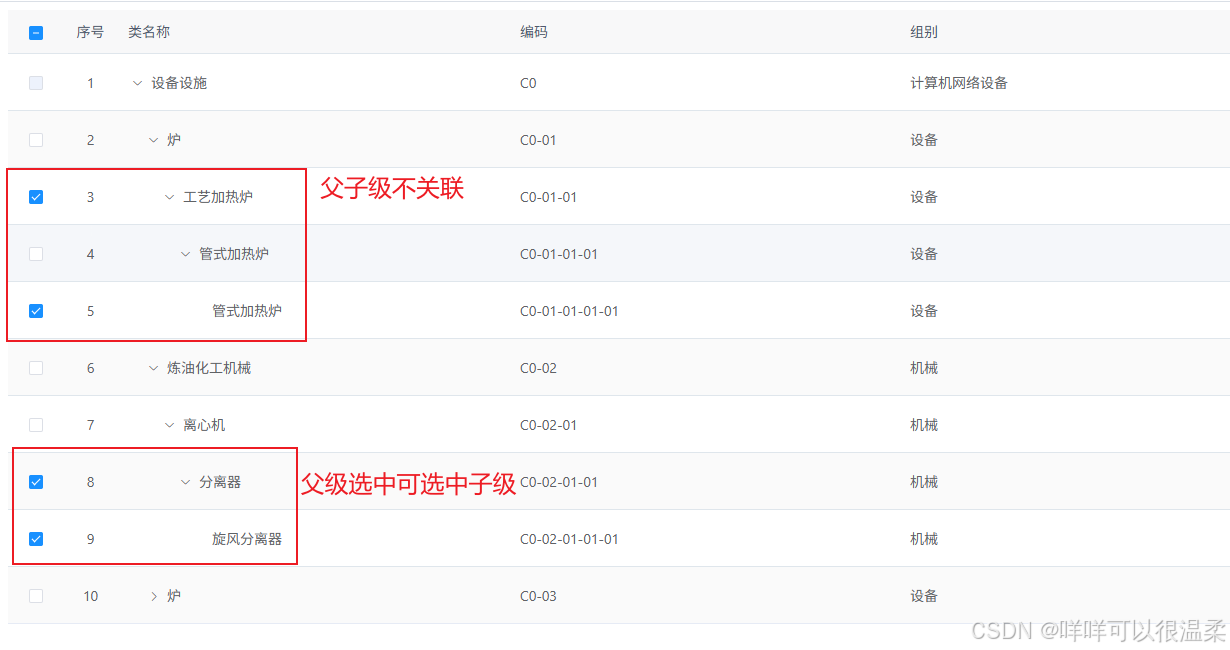
需求描述:
1.父级复选框可控制子级复选框状态:点击父级复选框选中或不选中时,子级复选框根据父级状态更新选中状态。
2.子级复选框不可控制父级复选框状态:子级复选框全选时,不会默认勾选父级复选框。父级全选后取消所有子级复选框,父级复选框状态不会改变。
解决方法:
我的思路是给table列表数据添加一个标识 (isCheck = false),通过点击复选框改变标识,再通过标识来控制复选框选中状态。
基础代码
html
        <el-table
          ref="treeTable"
          v-loading="loading"
          :data="tableList"
          row-key="id"
          stripe
          class="table_hei296"
          :expand-row-keys="expandRowKeys"
          @select="handleSelection"
          @select-all="selectAll"
          :tree-props="{children: 'children', hasChildren: 'hasChildren'}"
        >
          <el-table-column type="selection" width="55" align="center" :selectable="handleSelectable"/>
          <el-table-column type="index" width="55" align="center" label="序号"/>
          <el-table-column prop="name" label="类名称" show-overflow-tooltip />
          <el-table-column prop="code" label="编码" show-overflow-tooltip />
          <el-table-column prop="groupType" label="组别" show-overflow-tooltip />
        </el-table>
1.初始化table列表数据。
javascript
    initCheckedBox() {
      const initList = function(data) {
        data.forEach(function(item) {
          item.isCheck = false // 未选中
          if (item.children) {
            initList(item.children)
          }
        })
        return data
      }
      this.rightCheckList = initList(this.tableList)
    },
2.当用户手动勾选全选 Checkbox 时触发的事件
javascript
    // 当用户手动勾选全选 Checkbox 时触发的事件
    selectAll(selection) {
      if (!this.checkAll) {
        this.checkAll = true
        this.isAllChecked(this.rightCheckList, true)
      } else {
        this.checkAll = false
        this.isAllChecked(this.rightCheckList, false)
      }

      const selectCheck = this.$getNodesIterative(this.rightCheckList, 'children', 'isCheck', true)
      this.selectedRows = selectCheck.map(item => item.id)
    },

    // 是否全选中
    isAllChecked(data, status) {
      if (data === undefined) {
        const imitData = []
        imitData.push(data)
      } else {
        data.forEach(item => {
          item.isCheck = item.parentId === 0 ? false : status
          this.$refs.treeTable.toggleRowSelection(item, item.isCheck)
          if (item.children) {
            this.isAllChecked(item.children, status)
          }
        })
      }
    },
checkAll默认false
3.当用户手动勾选数据行的 Checkbox 时触发的事件
javascript
     handleSelection(selection, row) {
      row.isCheck = !row.isCheck
      if(row.children.length === 0 && row.isCheck === true){
        this.checkedParentRow(row, this.rightCheckList)
      } else if(row.children.length === 0 && row.isCheck === false){
        this.clearParentRow(row, this.rightCheckList)
      } else if(row.children.length > 0 && row.isCheck === true){
        this.isAllChecked(row.children, true)
      } else if(row.children.length > 0 && row.isCheck === false){
        this.isAllChecked(row.children, false)
      }

      const selectCheck = this.$getNodesIterative(this.rightCheckList, 'children', 'isCheck', true)
      this.selectedRows = selectCheck.map(item => item.id)
    },

    // 选中子节点默认选中父节点,暂时不用,这段与需求不同,可不写。
    // 如果有这个需求可写,并取消if隐藏代码
    checkedParentRow(data, obj) {
      for(var item in obj){
        if(obj[item].id === data.parentId){
          var every = obj[item].children.every(function(item) {
            return item.isCheck === true
          })
          // if (every) {
          //   obj[item].isCheck = true
          //   this.$refs.treeTable.toggleRowSelection(obj[item], true)
          // }
        }
      }
    },


    // 子节点都未被选中,父节点默认取消选中
    clearParentRow(data, obj) {
      const parentRow = this.$findTreeObjById(obj, 'id', data.parentId)
      parentRow.isCheck = false
      this.$refs.treeTable.toggleRowSelection(parentRow, false)
},this.getNodesIterative与this.findTreeObjById写成了全局方法,如下:
javascript
/**
 *
 * @param {Array} treeList 树形数据
 * @param {string} targetType 树形数据中所查找的键值
 * @param {string} target 树形数据中所查找的值
 * @returns
 */
export function findTreeObjById(treeList, targetType, target) {
  for (const item of treeList) {
    // 匹配当前节点
    if (item[targetType] === target) return item;
    // 递归查找子节点
    if (item.children && item.children.length > 0) {
      const res = findTreeObjById(item.children, targetType, target);
      if (res) return res;
    }
  }
  return null; // 无匹配
}

/**
 * 提取树形结构中所有type为true的节点(迭代版,避免栈溢出)
 * @param {Array} tree 树形结构数组
 * @param {string} childrenKey 子节点字段名
 * @param {string} key 判断键值
 * @param  flagValue 判断键值
 * @returns {Array} 平级的符合条件的节点数组
 */
export function getNodesIterative(tree, childrenKey, key, flagValue) {
  const result = [];
  // 用栈存储待遍历的节点(初始为根节点数组)
  const stack = [...tree];

  while (stack.length > 0) {
    const node = stack.pop(); // 栈顶取出节点(也可用shift()实现队列,效率略低)

    // 筛选type为true的节点
    if (node[key] === flagValue) {
      result.push({ ...node });
    }

    // 子节点入栈(继续遍历)
    if (Array.isArray(node[childrenKey])) {
      stack.push(...node[childrenKey]);
    }
  }

  return result;
}

export default {
  findTreeObjById,
  getNodesIterative
}
总结:
这个功能两个项目中都用到了,所以记录下~
提醒自己:这段代码写了两三年了,没做优化,后面记得优化一下呀~