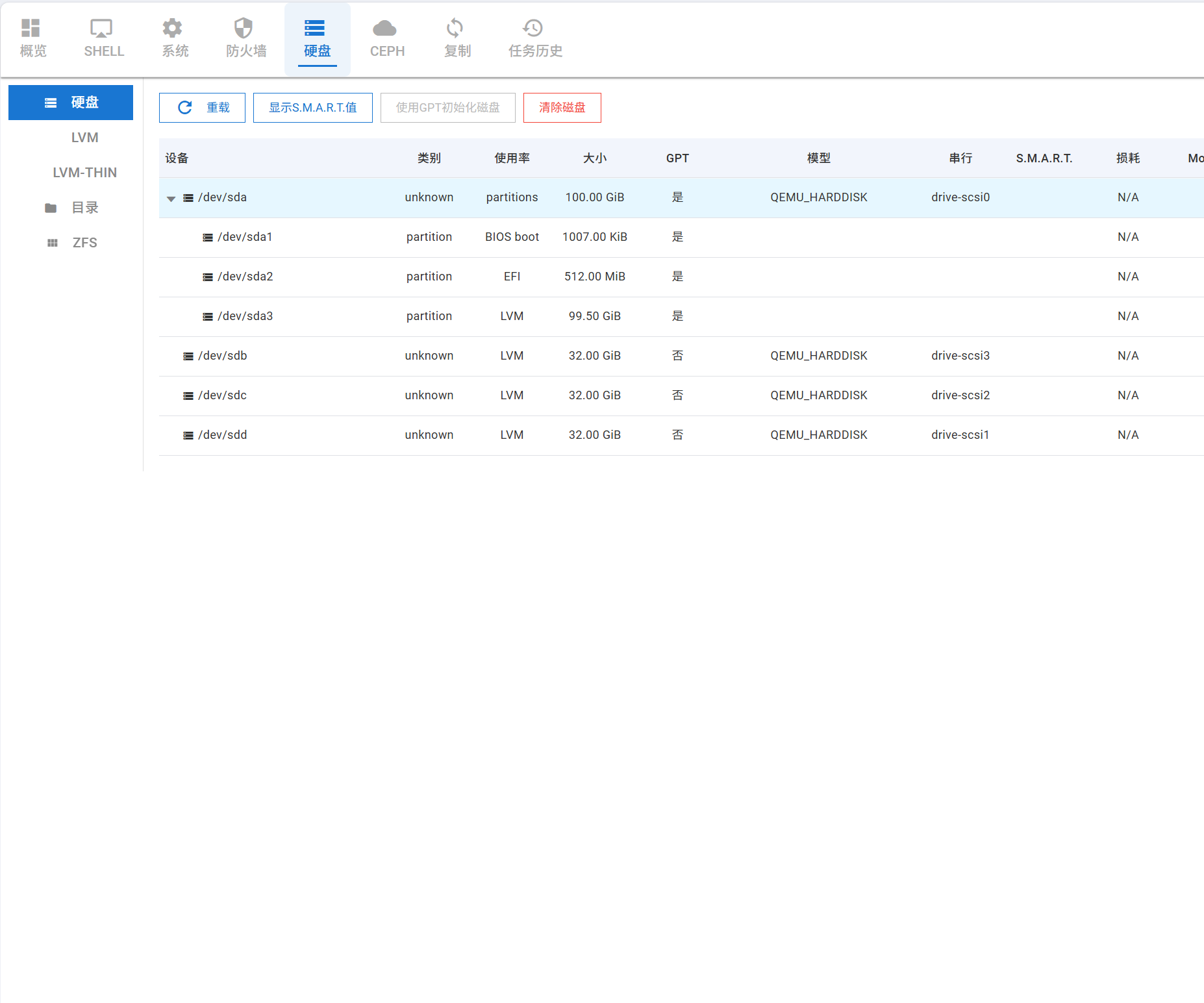
在 Vue2 中,主流组件库如 Element UI 或 AntV 的表格组件都内置了树形结构配置。但当我使用相对小众的 Quasar 组件库时,发现其表格组件缺乏树形结构功能。最初我尝试通过展开行来实现,但遇到了列对齐问题和选择行逻辑需要调整的麻烦。
于是我开始寻找能实现树形结构的轻量级解决方案。Deepseek 推荐了 vue-table-with-tree-grid,查阅文档后发现这个包确实简洁轻量。实际使用后,表格显示效果符合预期:
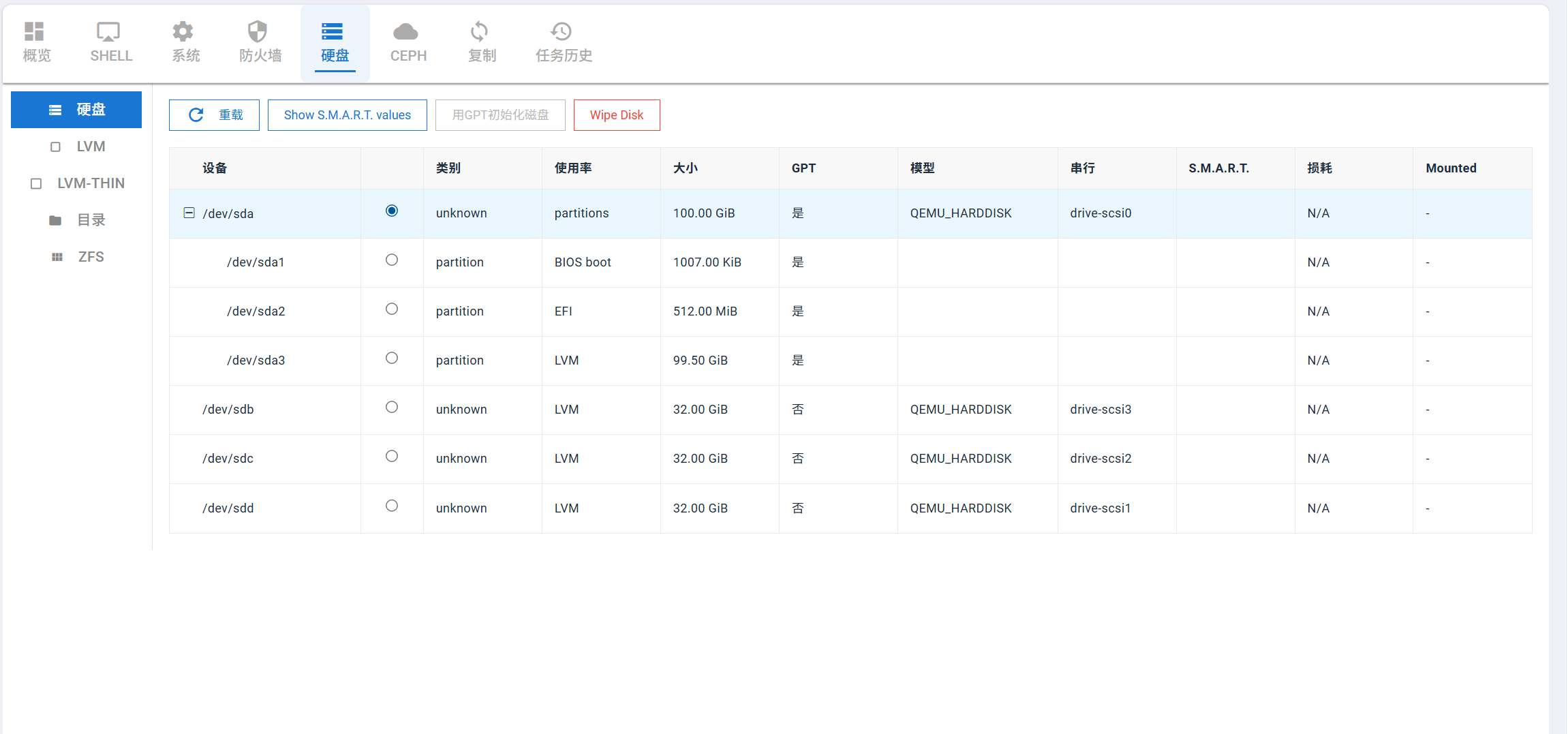
但是使用选择行功能时遇到诸多问题,我发现Table Events中的事件参数与文档描述不符,无法获取当前行数据。尝试多个事件均未奏效,最终通过自定义单选按钮列实现了单选功能。
cpp
<template>
  <div class="q-pa-md">
    <div class="row q-mb-md q-gutter-sm">
      <!-- 按钮保持不变 -->
      <q-btn
        no-caps
        outline
        class="u-button"
        size="12px"
        color="primary"
        :label="$t('Reload')"
        icon="refresh"
        @click="reload"
      />
      <q-btn
        no-caps
        outline
        class="u-button"
        size="12px"
        :color="canShowSmart ? 'primary' : 'grey'"
        :label="$t('Show S.M.A.R.T. values')"
        @click="openSmartWindow"
        :disable="!canShowSmart"
      />
      <q-btn
        no-caps
        outline
        class="u-button"
        size="12px"
        :color="canInitGPT ? 'primary' : 'grey'"
        :label="$t('Initialize Disk with GPT')"
        @click="initGPT"
        :disable="!canInitGPT"
      />
      <q-btn
        no-caps
        outline
        class="u-button"
        size="12px"
        :color="canWipeDisk ? 'red' : 'grey'"
        :label="$t('Wipe Disk')"
        @click="wipeDisk"
        :disable="!canWipeDisk"
      />
    </div>
    <zk-table
      ref="table"
      sum-text="sum"
        index-text="#"
      :data="rows"
      :columns="treeColumns"
      :stripe="config.stripe"
      :border="config.border"
      :show-header="config.showHeader"
      :show-summary="config.showSummary"
      :show-row-hover="config.showRowHover"
      :show-index="config.showIndex"
      :tree-type="config.treeType"
      :is-fold="config.isFold"
      :expand-type="config.expandType"
      :selection-type="false"
    >
      <!-- 自定义选择列 -->
      <template slot="check" scope="scope">
        <input
          type="radio"
          :name="radioGroupName"
          :checked="isRowSelected(scope.row)"
          @click.stop="handleRadioClick(scope.row)"
          class="radio-select"
        />
      </template>

      <!-- 自定义设备列,包含图标 -->
      <template slot="device" scope="scope">
        <!-- <q-icon name="storage" size="sm" class="q-mr-xs" /> -->
        {{ scope.row.device }}
      </template>
      <!-- 自定义使用率列 -->
      <template slot="usage" scope="scope">
        {{ scope.row.used }}
      </template>
      <!-- 自定义大小列 -->
      <template slot="size" scope="scope">
        {{ formatSizeSafe(scope.row.size) }}
      </template>
      <!-- 自定义 GPT 列 -->
      <template slot="gpt" scope="scope">
        {{ renderBool(scope.row.gpt) }}
      </template>
      <!-- 自定义串行号列 -->
      <template slot="serial" scope="scope">
        {{ scope.row.serial }}
      </template>
      <!-- 自定义状态列 -->
      <template slot="status" scope="scope">
        {{ scope.row.status }}
      </template>
      <!-- 自定义磨损度列 -->
      <template slot="wearout" scope="scope">
        {{ renderWearout(scope.row.wearout) }}
      </template>
      <!-- 自定义挂载列 -->
      <template slot="mounted" scope="scope">
        {{ renderBool(scope.row.mounted) }}
      </template>
    </zk-table>

    <task-progress v-model="showTaskProgress" :upid="taskUpid" @done="onTaskDone" />
    <smart-window v-model="showSmartWindow" :baseurl="baseurl" :dev="smartDisk" />
    <wipe-disk-dialog
      v-model="showWipeDiskDialog"
      :disk-info="wipeDiskInfo"
      @confirm="doWipeDisk"
    />
  </div>
</template>

<script>
import { formatSize } from 'src/utils/modules/pve'
import promise from 'src/promise'
import util from 'src/utils'
import request from 'src/utils/request'
import TaskProgress from './TaskProgress.vue'
import SmartWindow from './SmartWindow.vue'
import WipeDiskDialog from './WipeDiskDialog.vue'
import Vue from 'vue'
import ZkTable from 'vue-table-with-tree-grid'
Vue.use(ZkTable)

export default {
  name: 'DiskList',
  components: { TaskProgress, SmartWindow, WipeDiskDialog, ZkTable },
  props: {
    node: {
      type: String,
      required: true,
    },
  },
  data() {
    return {
      config: {
        stripe: false,
        border: true,
        showHeader: true,
        showSummary: false,
        showRowHover: true,
        showIndex: false,
        treeType: true,
        isFold: false,
        expandType: false,
        selectionType: false, // 禁用组件自带的复选框
      },

      loading: false,
      rows: [],
      selectedRow: null, // 改为单个选中的行
      radioGroupName: 'diskSelection', // 单选按钮组名,确保同一时间只有一个被选中
      treeColumns: [
        {
          prop: 'device',
          label: this.$i18n.t('Device'),
          align: 'left',
          field: 'device',
          sortable: true,
          type: 'template',
          template: 'device',
          minWidth: '150px',
        },
        {
          label: '',
          type: 'template',
          template: 'check',
          width: '60px',
          align: 'center',
          prop: 'check',
        },
        {
          prop: 'type',
          label: this.$i18n.t('Type'),
          align: 'left',
          field: 'type',
          sortable: true,
        },
        {
          prop: 'usage',
          label: this.$i18n.t('Usage'),
          align: 'left',
          field: 'used',
          sortable: true,
          type: 'template',
          template: 'usage',
        },
        {
          prop: 'size',
          label: this.$i18n.t('Size'),
          align: 'left',
          field: 'size',
          sortable: true,
          type: 'template',
          template: 'size',
        },
        {
          prop: 'gpt',
          label: this.$i18n.t('GPT'),
          align: 'left',
          field: 'gpt',
          sortable: true,
          type: 'template',
          template: 'gpt',
        },
        {
          prop: 'model',
          label: this.$i18n.t('Model'),
          align: 'left',
          field: 'model',
          sortable: true,
          minWidth: '120px',
        },
        {
          prop: 'serial',
          label: this.$i18n.t('Serial'),
          align: 'left',
          field: 'serial',
          sortable: true,
          type: 'template',
          template: 'serial',
        },
        {
          prop: 'status',
          label: this.$i18n.t('S.M.A.R.T.'),
          align: 'left',
          field: 'status',
          sortable: true,
          type: 'template',
          template: 'status',
        },
        {
          prop: 'wearout',
          label: this.$i18n.t('Wearout'),
          align: 'left',
          field: 'wearout',
          sortable: true,
          type: 'template',
          template: 'wearout',
        },
        {
          prop: 'mounted',
          label: this.$i18n.t('Mounted'),
          align: 'left',
          field: 'mounted',
          sortable: true,
          type: 'template',
          template: 'mounted',
        },
      ],
      showTaskProgress: false,
      taskUpid: '',
      showSmartWindow: false,
      smartDisk: '',
      showWipeDiskDialog: false,
      wipeDiskInfo: null,
    }
  },
  computed: {
    baseurl() {
      return `/api2/json/nodes/${this.node}/disks`
    },
    exturl() {
      return `/api2/extjs/nodes/${this.node}/disks`
    },
    // 修改计算属性,基于 selectedRow
    canShowSmart() {
      return this.selectedRow !== null
    },
    canInitGPT() {
      if (!this.selectedRow) return false
      const used = this.selectedRow.rawUsed
      return !used || used === 'unused'
    },
    canWipeDisk() {
      return this.selectedRow !== null
    },
    // 提供一个selected数组的兼容属性,避免修改过多代码
    selected() {
      return this.selectedRow ? [this.selectedRow] : []
    },
  },
  mounted() {
    this.load()
  },
  methods: {
    // 判断行是否被选中
    isRowSelected(row) {
      return this.selectedRow && this.selectedRow.id === row.id
    },

    // 处理单选按钮点击
    handleRadioClick(row) {
      // 如果已经选中,则取消选中
      if (this.isRowSelected(row)) {
        this.selectedRow = null
      } else {
        // 否则选中当前行
        this.selectedRow = row
      }
      console.log('当前选中行:', this.selectedRow)
    },

    reload() {
      this.load()
      this.selectedRow = null // 清空选中
    },

    openSmartWindow() {
      if (!this.canShowSmart) return
      this.smartDisk = this.selectedRow.name || this.selectedRow.device
      this.showSmartWindow = true
    },

    initGPT() {
      if (!this.canInitGPT) return
      const disk = this.selectedRow.name || this.selectedRow.device
      this.$q
        .dialog({
          title: this.$i18n.t('Initialize Disk with GPT'),
          message: `${this.$i18n.t('Are you sure you want to initialize disk')} ${disk}?`,
          cancel: true,
          persistent: true,
        })
        .onOk(() => {
          this.doInitGPT(disk)
        })
    },

    async doInitGPT(disk) {
      try {
        const res = await request({
          url: `${this.exturl}/initgpt`,
          method: 'post',
          params: { disk },
        })
        this.taskUpid =
          res && res.data && res.data.data ? res.data.data : res && res.data ? res.data : ''
        this.showTaskProgress = true
      } catch (e) {
        util.common.errorNotify(e)
      }
    },

    wipeDisk() {
      if (!this.canWipeDisk) return
      const diskData = this.selectedRow
      this.wipeDiskInfo = {
        device: diskData.name || diskData.device,
        type: diskData.type || '',
        usage: diskData.used || '',
        size: diskData.size || 0,
        serial: diskData.serial || '',
      }
      this.showWipeDiskDialog = true
    },

    async doWipeDisk(disk) {
      try {
        const res = await request({
          url: `${this.exturl}/wipedisk`,
          method: 'put',
          params: { disk },
        })
        this.taskUpid =
          res && res.data && res.data.data ? res.data.data : res && res.data ? res.data : ''
        this.showTaskProgress = true
        this.showWipeDiskDialog = false
      } catch (e) {
        util.common.errorNotify(e)
      }
    },

    onTaskDone(success) {
      if (success) {
        this.reload()
      }
    },

    formatSizeSafe(size) {
      if (!size && size !== 0) return '-'
      return formatSize(Number(size))
    },

    renderBool(v) {
      if (v === undefined || v === null || v === '') return '-'
      return v ? this.$i18n.t('Yes') : this.$i18n.t('No')
    },

    renderWearout(v) {
      if (typeof v === 'number' && !Number.isNaN(v)) {
        return `${100 - v}%`
      }
      return this.$i18n.t('N/A')
    },

    normalizeUsage(v) {
      const map = {
        bios: 'BIOS boot',
        zfsreserved: 'ZFS reserved',
        efi: 'EFI',
        lvm: 'LVM',
        zfs: 'ZFS',
      }
      if (!v) return this.$i18n.t('No')
      return map[v] || v
    },

    buildRows(disks) {
      const roots = []
      const byDevpath = {}
      let rowId = 0

      ;(disks || []).forEach((d) => {
        const devpath = d.devpath || d.name || d.device || '-'
        const row = {
          id: `row_${rowId++}`, // 给每一行一个唯一ID
          device: devpath,
          name: d.name,
          rawUsed: d.used,
          type: d['disk-type'] || d.type || '',
          used: this.normalizeUsage(d.used),
          size: d.size,
          gpt: d.gpt,
          model: d.model,
          serial: d.serial,
          status: d.status,
          mounted: d.mounted,
          wearout: d.wearout,
          parent: d.parent,
          children: [],
        }

        const parts = d.partitions || []
        row.children = (parts || []).map((p) => {
          const pDevpath = p.devpath || p.name || p.device || ''
          return {
            id: `row_${rowId++}`, // 子行也有唯一ID
            device: pDevpath,
            name: p.name,
            rawUsed: p.used,
            type: p['disk-type'] || 'partition',
            used: this.normalizeUsage(p.used === 'filesystem' ? p.filesystem : p.used),
            size: p.size,
            gpt: p.gpt,
            model: p.model,
            serial: p.serial,
            status: p.status,
            mounted: p.mounted,
            wearout: p.wearout,
          }
        })

        byDevpath[d.devpath || devpath] = row
      })

      Object.values(byDevpath).forEach((row) => {
        if (row.parent && byDevpath[row.parent]) {
          byDevpath[row.parent].children.push(row)
        } else {
          roots.push(row)
        }
      })

      return roots
    },

    load() {
      if (!this.node) return
      this.loading = true
      promise.hostPromise
        .getDisksData(this.node, { 'include-partitions': 1 })
        .then((res) => {
          this.rows = this.buildRows(res)
          this.selectedRow = null // 数据加载后清空选择
        })
        .catch((err) => {
          util.common.errorNotify(err)
          this.rows = []
        })
        .finally(() => {
          this.loading = false
        })
    },
  },
}
</script>

<style lang="scss" scoped>
// 树形表格样式
::v-deep .u-tree-table {
  .tree-table-wrapper {
    width: 100%;
  }
}

// 单选按钮样式
.radio-select {
  cursor: pointer;
  width: 16px;
  height: 16px;
}

// 选中行样式
::v-deep .zk-table__body tr.selected-row > td {
  background-color: #e3f2fd !important;
}

// 鼠标悬停效果
::v-deep .zk-table__body tr:hover > td {
  background-color: #f5f5f5 !important;
}

::v-deep .zk-table__body tr.selected-row:hover > td {
  background-color: #bbdefb !important;
}
</style>
功能是实现了,但是我看起来这个表格是在奇怪,因为这个单选框也没法放在最左侧,放在最左侧表格展开项的展开按钮会错行。如果你不介意看着有问题,上面我的代码已经解决了我的需求,树形表格加上可以单选行。
但是我想万一以后还要多选或者多了其他功能,可能修改起来比较麻烦,于是我有问deepseek还有什么包可以用吗,deepseek推荐了Vxe table,于是我又使用Vxe table做成组件使用:
cpp
<template>
  <vxe-table
    ref="tableRef"
    :data="data"
    :tree-config="treeConfig"
    :row-config="rowConfig"
    :loading="loading"
    :show-header="showHeader"
    :border="border"
    :row-class-name="rowClassName"
    :size="size"
    :empty-text="emptyText || $t('no record can be found')"
    @current-change="handleCurrentChange"
    @row-click="handleRowClick"
  >
    <slot />
  </vxe-table>
</template>

<script>
export default {
  name: 'VxeTreeTable',
  props: {
    // 表格数据
    data: {
      type: Array,
      default: () => [],
    },
    // 树形配置
    treeConfig: {
      type: Object,
      default: () => ({
        children: 'children',
        expandAll: true,
      }),
    },
    // 行配置
    rowConfig: {
      type: Object,
      default: () => ({
        isCurrent: true,
        isHover: true,
      }),
    },
    // 加载状态
    loading: {
      type: Boolean,
      default: false,
    },
    // 是否显示表头
    showHeader: {
      type: Boolean,
      default: true,
    },
    // 边框
    border: {
      type: [Boolean, String],
      default: 'none',
    },
    // 行类名
    rowClassName: {
      type: String,
      default: 'rowClass',
    },
    // 尺寸
    size: {
      type: String,
      default: 'small',
    },
    // 空数据文本
    emptyText: {
      type: String,
      default: '',
    },
    // 当前选中的行
    selectedRow: {
      type: Object,
      default: null,
    },
  },
  watch: {
    selectedRow: {
      handler(newRow) {
        if (this.$refs.tableRef) {
          if (newRow) {
            this.$refs.tableRef.setCurrentRow(newRow)
          } else {
            this.$refs.tableRef.clearRadioRow()
          }
        }
      },
      immediate: true,
    },
  },
  methods: {
    handleCurrentChange({ row }) {
      this.$emit('current-change', { row })
      this.$emit('update:selectedRow', row)
    },
    handleRowClick({ row }) {
      this.$emit('row-click', { row })
    },
    // 清空选择
    clearSelection() {
      if (this.$refs.tableRef) {
        this.$refs.tableRef.clearRadioRow()
      }
    },
    // 设置当前行
    setCurrentRow(row) {
      if (this.$refs.tableRef) {
        this.$refs.tableRef.setCurrentRow(row)
      }
    },
    // 刷新数据
    reloadData(data) {
      if (this.$refs.tableRef) {
        this.$refs.tableRef.reloadData(data)
      }
    },
  },
}
</script>

<style lang="scss" scoped>
// vxe-table 选中行样式
::v-deep .vxe-table--body .vxe-body--row.row--current {
  background-color: #e3f2fd !important;
}

// 鼠标悬停效果
::v-deep .vxe-table--body .vxe-body--row.row--hover {
  background-color: #f5f5f5 !important;
}

::v-deep .vxe-table--body .vxe-body--row.row--current.row--hover {
  background-color: #bbdefb !important;
}

// 树形表格展开图标样式
::v-deep .vxe-table--tree-node {
  display: flex;
  align-items: center;
}

::v-deep .vxe-cell--title {
  font-weight: 500;
  font-size: 12px;
  color: #333;
  font-family: 'Roboto', '-apple-system', 'Helvetica Neue', Helvetica, Arial, sans-serif;
}

::v-deep .vxe-header--column {
  background-color: #f2f5fc !important;
  border-bottom: 1px solid #dfe1e6;
}

::v-deep .rowClass .vxe-cell {
  font-size: 12px;
  color: #333;
  font-family: 'Roboto', '-apple-system', 'Helvetica Neue', Helvetica, Arial, sans-serif;
}

::v-deep .rowClass td {
  border-bottom: 1px solid #dfe1e6;
}
</style>
使用组件:
cpp
<template>
  <div class="q-pa-md">
    <div class="row q-mb-md q-gutter-sm">
      <!-- 按钮保持不变 -->
      <q-btn
        no-caps
        outline
        class="u-button"
        size="12px"
        color="primary"
        :label="$t('Reload')"
        icon="refresh"
        @click="reload"
      />
      <q-btn
        no-caps
        outline
        class="u-button"
        size="12px"
        :color="canShowSmart ? 'primary' : 'grey'"
        :label="$t('Show S.M.A.R.T. values')"
        @click="openSmartWindow"
        :disable="!canShowSmart"
      />
      <q-btn
        no-caps
        outline
        class="u-button"
        size="12px"
        :color="canInitGPT ? 'primary' : 'grey'"
        :label="$t('Initialize Disk with GPT')"
        @click="initGPT"
        :disable="!canInitGPT"
      />
      <q-btn
        no-caps
        outline
        class="u-button"
        size="12px"
        :color="canWipeDisk ? 'red' : 'grey'"
        :label="$t('Wipe Disk')"
        @click="wipeDisk"
        :disable="!canWipeDisk"
      />
    </div>

    <!-- 使用公共的 vxe-table 树形表格组件 -->
    <u-vxe-tree-table
      ref="tableRef"
      :data="rows"
      :tree-config="{ children: 'children', expandAll: true }"
      :loading="loading"
      :selected-row.sync="selectedRow"
      @current-change="handleRadioChange"
    >
      <!-- 设备列 -->
      <vxe-column field="device" :title="$t('Device')" min-width="150" tree-node align="left">
        <template #default="{ row }">
          <div class="flex items-center">
            <q-icon name="storage" size="12px" class="q-mr-xs" /> <span>{{ row.device }}</span>
          </div>
        </template>
      </vxe-column>

      <!-- 类型列 -->
      <vxe-column field="type" :title="$t('Type')" align="center">
        <template #default="{ row }">
          <span>{{ row.type }}</span>
        </template>
      </vxe-column>

      <!-- 使用率列 -->
      <vxe-column field="used" :title="$t('Usage')" align="center">
        <template #default="{ row }">
          <span>{{ row.used }}</span>
        </template>
      </vxe-column>

      <!-- 大小列 -->
      <vxe-column field="size" :title="$t('Size')" align="center">
        <template #default="{ row }">
          <span>{{ formatSizeSafe(row.size) }}</span>
        </template>
      </vxe-column>

      <!-- GPT列 -->
      <vxe-column field="gpt" :title="$t('GPT')" align="center">
        <template #default="{ row }">
          <span>{{ renderBool(row.gpt) }}</span>
        </template>
      </vxe-column>

      <!-- 型号列 -->
      <vxe-column field="model" :title="$t('Model')" min-width="120" align="center">
        <template #default="{ row }">
          <span>{{ row.model }}</span>
        </template>
      </vxe-column>

      <!-- 序列号列 -->
      <vxe-column field="serial" :title="$t('Serial')" align="center">
        <template #default="{ row }">
          <span>{{ row.serial }}</span>
        </template>
      </vxe-column>

      <!-- SMART状态列 -->
      <vxe-column field="status" :title="$t('S.M.A.R.T.')" align="center">
        <template #default="{ row }">
          <span>{{ row.status }}</span>
        </template>
      </vxe-column>

      <!-- 磨损度列 -->
      <vxe-column field="wearout" :title="$t('Wearout')" align="center">
        <template #default="{ row }">
          <span>{{ renderWearout(row.wearout) }}</span>
        </template>
      </vxe-column>

      <!-- 挂载列 -->
      <vxe-column field="mounted" :title="$t('Mounted')" align="center">
        <template #default="{ row }">
          <span>{{ renderBool(row.mounted) }}</span>
        </template>
      </vxe-column>
    </u-vxe-tree-table>

    <!-- 原有的弹窗组件保持不变 -->
    <task-progress v-model="showTaskProgress" :upid="taskUpid" @done="onTaskDone" />
    <smart-window v-model="showSmartWindow" :baseurl="baseurl" :dev="smartDisk" />
    <wipe-disk-dialog
      v-model="showWipeDiskDialog"
      :disk-info="wipeDiskInfo"
      @confirm="doWipeDisk"
    />
  </div>
</template>

<script>
import { formatSize } from 'src/utils/modules/pve'
import promise from 'src/promise'
import util from 'src/utils'
import request from 'src/utils/request'
import TaskProgress from './TaskProgress.vue'
import SmartWindow from './SmartWindow.vue'
import WipeDiskDialog from './WipeDiskDialog.vue'
import Vue from 'vue'
import VXETable from 'vxe-table'
import 'vxe-table/lib/style.css'

Vue.use(VXETable)
export default {
  name: 'DiskList',
  components: { TaskProgress, SmartWindow, WipeDiskDialog },
  props: {
    node: {
      type: String,
      required: true,
    },
  },
  data() {
    return {
      loading: false,
      rows: [],
      selectedRow: null, // 当前选中的行
      showTaskProgress: false,
      taskUpid: '',
      showSmartWindow: false,
      smartDisk: '',
      showWipeDiskDialog: false,
      wipeDiskInfo: null,
    }
  },
  computed: {
    baseurl() {
      return `/api2/json/nodes/${this.node}/disks`
    },
    exturl() {
      return `/api2/extjs/nodes/${this.node}/disks`
    },
    canShowSmart() {
      return this.selectedRow !== null
    },
    canInitGPT() {
      if (!this.selectedRow) return false
      const used = this.selectedRow.rawUsed
      return !used || used === 'unused'
    },
    canWipeDisk() {
      return this.selectedRow !== null
    },
    // 提供一个selected数组的兼容属性
    selected() {
      return this.selectedRow ? [this.selectedRow] : []
    },
  },
  mounted() {
    this.load()
  },
  methods: {
    // 处理单选按钮变化
    handleRadioChange({ row }) {
      console.log('点击行:', row)
      this.selectedRow = row
    },

    reload() {
      this.load()
      this.selectedRow = null
      this.$nextTick(() => {
        if (this.$refs.tableRef) {
          this.$refs.tableRef.clearSelection()
        }
      })
    },

    openSmartWindow() {
      if (!this.canShowSmart) return
      this.smartDisk = this.selectedRow.name || this.selectedRow.device
      this.showSmartWindow = true
    },

    initGPT() {
      if (!this.canInitGPT) return
      const disk = this.selectedRow.name || this.selectedRow.device
      this.$q
        .dialog({
          title: this.$i18n.t('Initialize Disk with GPT'),
          message: `${this.$i18n.t('Are you sure you want to initialize disk')} ${disk}?`,
          cancel: true,
          persistent: true,
        })
        .onOk(() => {
          this.doInitGPT(disk)
        })
    },

    async doInitGPT(disk) {
      try {
        const res = await request({
          url: `${this.exturl}/initgpt`,
          method: 'post',
          params: { disk },
        })
        this.taskUpid =
          res && res.data && res.data.data ? res.data.data : res && res.data ? res.data : ''
        this.showTaskProgress = true
      } catch (e) {
        util.common.errorNotify(e)
      }
    },

    wipeDisk() {
      if (!this.canWipeDisk) return
      const diskData = this.selectedRow
      this.wipeDiskInfo = {
        device: diskData.name || diskData.device,
        type: diskData.type || '',
        usage: diskData.used || '',
        size: diskData.size || 0,
        serial: diskData.serial || '',
      }
      this.showWipeDiskDialog = true
    },

    async doWipeDisk(disk) {
      try {
        const res = await request({
          url: `${this.exturl}/wipedisk`,
          method: 'put',
          params: { disk },
        })
        this.taskUpid =
          res && res.data && res.data.data ? res.data.data : res && res.data ? res.data : ''
        this.showTaskProgress = true
        this.showWipeDiskDialog = false
      } catch (e) {
        util.common.errorNotify(e)
      }
    },

    onTaskDone(success) {
      if (success) {
        this.reload()
      }
    },

    formatSizeSafe(size) {
      if (!size && size !== 0) return '-'
      return formatSize(Number(size))
    },

    renderBool(v) {
      if (v === undefined || v === null || v === '') return '-'
      return v ? this.$i18n.t('Yes') : this.$i18n.t('No')
    },

    renderWearout(v) {
      if (typeof v === 'number' && !Number.isNaN(v)) {
        return `${100 - v}%`
      }
      return this.$i18n.t('N/A')
    },

    normalizeUsage(v) {
      const map = {
        bios: 'BIOS boot',
        zfsreserved: 'ZFS reserved',
        efi: 'EFI',
        lvm: 'LVM',
        zfs: 'ZFS',
      }
      if (!v) return this.$i18n.t('No')
      return map[v] || v
    },

    buildRows(disks) {
      const roots = []
      const byDevpath = {}
      let rowId = 0

      ;(disks || []).forEach((d) => {
        const devpath = d.devpath || d.name || d.device || '-'
        const row = {
          id: `row_${rowId++}`, // 给每一行一个唯一ID
          device: devpath,
          name: d.name,
          rawUsed: d.used,
          type: d['disk-type'] || d.type || '',
          used: this.normalizeUsage(d.used),
          size: d.size,
          gpt: d.gpt,
          model: d.model,
          serial: d.serial,
          status: d.status,
          mounted: d.mounted,
          wearout: d.wearout,
          parent: d.parent,
          children: [],
        }

        const parts = d.partitions || []
        row.children = (parts || []).map((p) => {
          const pDevpath = p.devpath || p.name || p.device || ''
          return {
            id: `row_${rowId++}`, // 子行也有唯一ID
            device: pDevpath,
            name: p.name,
            rawUsed: p.used,
            type: p['disk-type'] || 'partition',
            used: this.normalizeUsage(p.used === 'filesystem' ? p.filesystem : p.used),
            size: p.size,
            gpt: p.gpt,
            model: p.model,
            serial: p.serial,
            status: p.status,
            mounted: p.mounted,
            wearout: p.wearout,
          }
        })

        byDevpath[d.devpath || devpath] = row
      })

      Object.values(byDevpath).forEach((row) => {
        if (row.parent && byDevpath[row.parent]) {
          byDevpath[row.parent].children.push(row)
        } else {
          roots.push(row)
        }
      })

      return roots
    },

    load() {
      if (!this.node) return
      this.loading = true
      promise.hostPromise
        .getDisksData(this.node, { 'include-partitions': 1 })
        .then((res) => {
          this.rows = this.buildRows(res)
          this.selectedRow = null // 数据加载后清空选择
        })
        .catch((err) => {
          util.common.errorNotify(err)
          this.rows = []
        })
        .finally(() => {
          this.loading = false
        })
    },
  },
}
</script>

<style lang="scss" scoped>
</style>
效果图: