vue 表格 vxe-table 手动操作单元格范围选择,手动选择 excel 指定区域的用法,当需要通用调用方法来手动选择知道区域时,可以通过调用 setCellAreas 方法将指定区域的单元格选中。
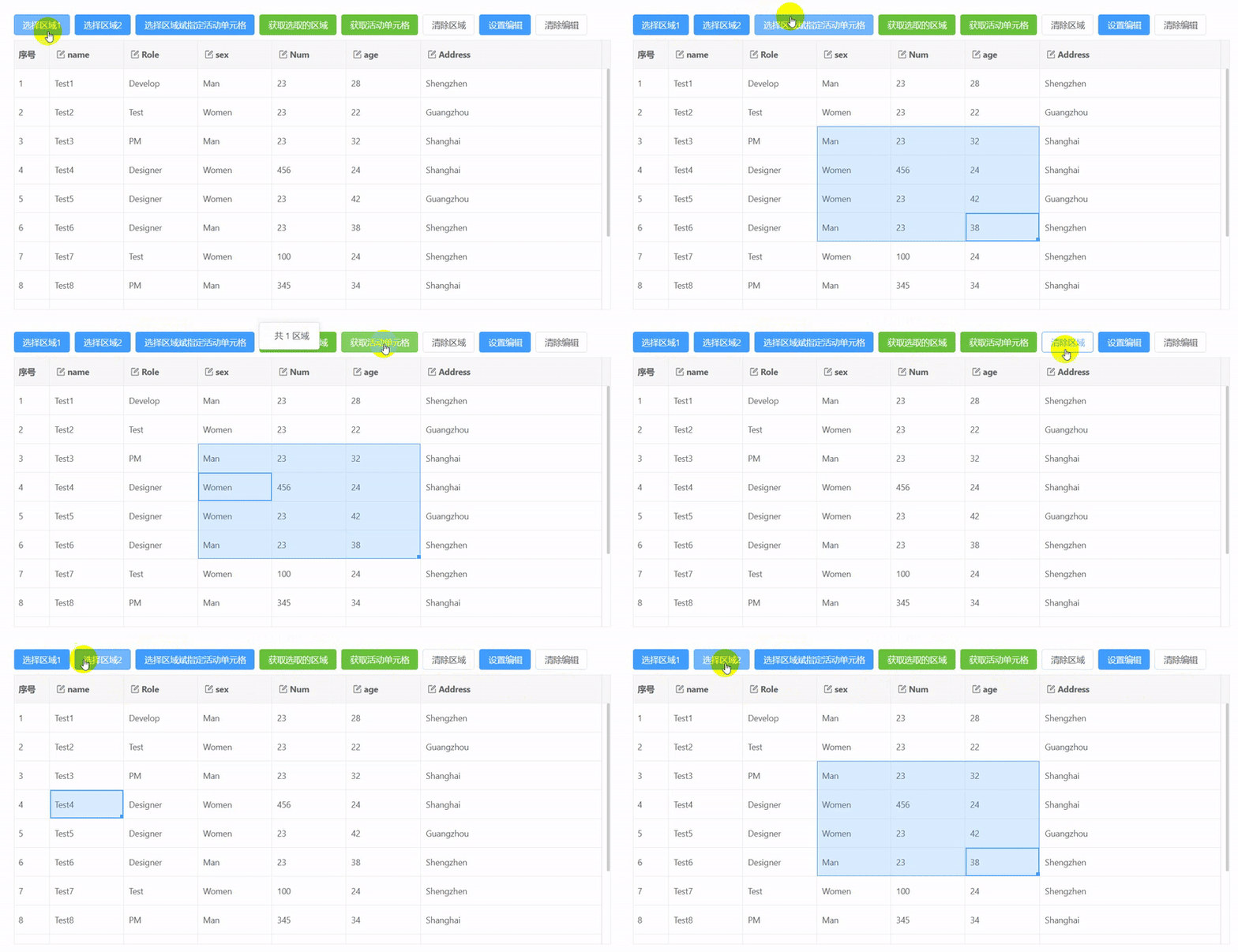
常用方法说明:
getCellAreas 用于获取当前已选的区域的单元格
setCellAreas 用于选中指定区域的单元格
clearCellAreas 用于清除当前选中的区域单元格
html
<template>
  <div>
    <vxe-grid ref="gridRef" v-bind="gridOptions">
      <template #toolbarButtons>
        <vxe-button status="primary" @click="selectCellAreas1()">选择区域1</vxe-button>
        <vxe-button status="primary" @click="selectCellAreas2()">选择区域2</vxe-button>
        <vxe-button status="primary" @click="selectCellAreas3()">选择区域斌指定活动单元格</vxe-button>
        <vxe-button status="success" @click="saveCellAreas()">获取选取的区域</vxe-button>
        <vxe-button status="success" @click="saveActiveArea()">获取活动单元格</vxe-button>
        <vxe-button @click="clearCellAreas()">清除区域</vxe-button>
        <vxe-button status="primary" @click="activeEditCell()">设置编辑</vxe-button>
        <vxe-button @click="clearEditCell()">清除编辑</vxe-button>
      </template>
    </vxe-grid>
  </div>
</template>

<script setup>
import { ref, reactive } from 'vue'
import { VxeUI } from 'vxe-pc-ui'

const gridRef = ref()

const gridOptions = reactive({
  border: true,
  height: 500,
  showOverflow: true,
  toolbarConfig: {
    slots: {
      buttons: 'toolbarButtons'
    }
  },
  columnConfig: {
    resizable: true
  },
  mouseConfig: {
    area: true // 是否开启区域选取
  },
  areaConfig: {
    multiple: true // 是否启用多区域选取功能
  },
  editConfig: {
    mode: 'cell', // 单元格编辑模式
    trigger: 'dblclick' // 双击单元格激活编辑状态
  },
  keyboardConfig: {
    isArrow: true, // 是否开启方向键功能
    isShift: true, // 是否开启同时按住方向键以活动区域为起始,向指定方向扩展单元格区域
    isTab: true, // 是否开启 Tab 键功能
    isEnter: true, // 是否开启回车键功能
    isEdit: true, // 是否开启任意键进入编辑(功能键除外)
    isDel: true, // 是否开启删除键功能
    isEsc: true, // 是否开启Esc键关闭编辑功能
    isFNR: true, // 是否开启查找与替换
    isClip: true // 是否开启复制粘贴
  },
  columns: [
    { type: 'seq', width: 60 },
    { field: 'name', title: 'name', editRender: { name: 'VxeInput' } },
    { field: 'role', title: 'Role', editRender: { name: 'VxeInput' } },
    { field: 'sex', title: 'sex', editRender: { name: 'VxeInput' } },
    { field: 'num', title: 'Num', editRender: { name: 'VxeInput' } },
    { field: 'age', title: 'age', editRender: { name: 'VxeInput' } },
    { field: 'address', title: 'Address', width: 300, editRender: { name: 'VxeInput' } }
  ],
  data: [
    { id: 10001, name: 'Test1', role: 'Develop', sex: 'Man', num: 23, age: 28, address: 'Shengzhen' },
    { id: 10002, name: 'Test2', role: 'Test', sex: 'Women', num: 23, age: 22, address: 'Guangzhou' },
    { id: 10003, name: 'Test3', role: 'PM', sex: 'Man', num: 23, age: 32, address: 'Shanghai' },
    { id: 10004, name: 'Test4', role: 'Designer', sex: 'Women', num: 456, age: 24, address: 'Shanghai' },
    { id: 10005, name: 'Test5', role: 'Designer', sex: 'Women', num: 23, age: 42, address: 'Guangzhou' },
    { id: 10006, name: 'Test6', role: 'Designer', sex: 'Man', num: 23, age: 38, address: 'Shengzhen' },
    { id: 10007, name: 'Test7', role: 'Test', sex: 'Women', num: 100, age: 24, address: 'Shengzhen' },
    { id: 10008, name: 'Test8', role: 'PM', sex: 'Man', num: 345, age: 34, address: 'Shanghai' },
    { id: 10009, name: 'Test9', role: 'Designer', sex: 'Man', num: 67, age: 52, address: 'Shanghai' },
    { id: 10010, name: 'Test10', role: 'Test', sex: 'Women', num: 23, age: 44, address: 'Guangzhou' },
    { id: 10011, name: 'Test11', role: 'Designer', sex: 'Man', num: 56, age: 52, address: 'Shanghai' },
    { id: 10012, name: 'Test12', role: 'Test', sex: 'Women', num: 23, age: 16, address: 'Guangzhou' }
  ]
})

const selectCellAreas1 = () => {
  const $grid = gridRef.value
  if ($grid) {
    const { visibleColumn } = $grid.getTableColumn()
    const { visibleData } = $grid.getTableData()
    $grid.setCellAreas([
      {
        startRow: visibleData[3],
        endRow: visibleData[3],
        startColumn: visibleColumn[1],
        endColumn: visibleColumn[1]
      }
    ])
  }
}

const selectCellAreas2 = () => {
  const $grid = gridRef.value
  if ($grid) {
    const { visibleColumn } = $grid.getTableColumn()
    const { visibleData } = $grid.getTableData()
    $grid.setCellAreas([
      {
        startRow: visibleData[2],
        endRow: visibleData[5],
        startColumn: visibleColumn[3],
        endColumn: visibleColumn[5]
      }
    ])
  }
}

const selectCellAreas3 = () => {
  const $grid = gridRef.value
  if ($grid) {
    const { visibleColumn } = $grid.getTableColumn()
    const { visibleData } = $grid.getTableData()
    $grid.setCellAreas([
      {
        startRow: visibleData[2],
        endRow: visibleData[5],
        startColumn: visibleColumn[3],
        endColumn: visibleColumn[5]
      }
    ], {
      // 同时指定活动单元格,必须存在于当前区域中
      row: visibleData[3],
      column: visibleColumn[3]
    })
  }
}

const saveCellAreas = () => {
  const $grid = gridRef.value
  if ($grid) {
    const cellAreas = $grid.getCellAreas()
    cellAreas.forEach((areas, i) => {
      const { rows, cols } = areas
      console.log(`第 ${i + 1} 区域:共 ${rows.length} 行 ${cols.length} 列`, rows, cols.map(column => column.field))
    })
    VxeUI.modal.message({
      content: `共 ${cellAreas.length} 区域`
    })
  }
}

const saveActiveArea = () => {
  const $grid = gridRef.value
  if ($grid) {
    const activeCellArea = $grid.getActiveCellArea()
    if (activeCellArea) {
      const { row, column } = activeCellArea
      VxeUI.modal.message({
        content: `行:${row.name} 列:${column.field}`
      })
    } else {
      VxeUI.modal.message({
        content: '不存在活动单元格',
        status: 'info'
      })
    }
  }
}

const clearCellAreas = () => {
  const $grid = gridRef.value
  if ($grid) {
    $grid.clearCellAreas()
  }
}

const activeEditCell = () => {
  const $grid = gridRef.value
  if ($grid) {
    const { visibleData } = $grid.getTableData()
    $grid.setEditRow(visibleData[1])
  }
}

const clearEditCell = () => {
  const $grid = gridRef.value
  if ($grid) {
    $grid.clearEdit()
  }
}
</script>