在上一篇文章中,我们学习了模板编译的三个阶段。今天,我们将深入AST转换阶段的核心优:静态提升 和补丁标志。这两个优化是 Vue3 性能大幅提升的关键,它们让 Vue 在运行时能够跳过大量不必要的比较,实现精准更新。
前言:从一次渲染说起
想象一下,我们正在读一本电子书:这其中 99% 的内容是固定的,只有 1% 的页码会变化,这时候我们会怎么做:
- 普通方式:每次变化时,重读整本书(Vue2的方式)
- 优化方式:只重新读变化的页码(Vue3的方式)
这就是静态提升和补丁标志的核心思想:标记不变的内容,跳过重复工作。
静态节点标记(PatchFlags)
什么是补丁标志?
补丁标志 是一个位掩码,用来标记节点的动态内容类型。它告诉渲染器:这个节点哪些部分是需要关注的变化点。
Vue3 中定义了丰富的补丁标志:
javascript
const PatchFlags = {
  TEXT: 1,                    // 动态文本内容
  CLASS: 1 << 1,              // 动态 class
  STYLE: 1 << 2,              // 动态 style
  PROPS: 1 << 3,              // 动态属性
  FULL_PROPS: 1 << 4,         // 全量比较
  HYDRATE_EVENTS: 1 << 5,     // 事件监听
  STABLE_FRAGMENT: 1 << 6,    // 稳定 Fragment
  KEYED_FRAGMENT: 1 << 7,     // 带 key 的 Fragment
  UNKEYED_FRAGMENT: 1 << 8,   // 无 key 的 Fragment
  NEED_PATCH: 1 << 9,         // 需要非 props 比较
  DYNAMIC_SLOTS: 1 << 10,     // 动态插槽

  HOISTED: -1,                // 静态提升节点
  BAIL: -2                    // 退出优化
};
位掩码的作用
位掩码可以用一个数字表示多个标记,以上述补丁标志为例,如果一个节点既有动态 class,又有动态 style,该怎么处理:
javascript
// 组合标记:class和style都是动态的
const combined = CLASS | STYLE;  // 110 = 6
动态内容的识别
编译器是如何识别哪些内容是动态的?其实编译器也是根据补丁标志来进行判断处理的,例如以下模板示例:
html
<div
  class="static"
  :class="dynamicClass"
  :style="dynamicStyle"
  id="static-id"
>
  <h1>静态标题</h1>
  <p>{{ dynamicText }}</p>
  <button @click="handler">点击</button>
</div>
通过编译后的标记:
javascript
// 编译后的标记
function render(ctx) {
  return createVNode('div', {
    class: ['static', ctx.dynamicClass],  // class部分是动态的
    style: ctx.dynamicStyle,               // style是动态的
    id: 'static-id'                        // id是静态的
  }, [
    createVNode('h1', null, '静态标题'),    // 完全静态
    createVNode('p', null, ctx.dynamicText, PatchFlags.TEXT),  // 只有文本动态
    createVNode('button', {
      onClick: ctx.handler
    }, '点击', PatchFlags.EVENTS)           // 只有事件动态
  ], PatchFlags.CLASS | PatchFlags.STYLE);  // div的class和style动态
}
如果没有标记,说明是静态节点,什么都不用做。
静态提升(HoistStatic)
静态提升的原理
静态提升是将完全静态的节点提取到渲染函数之外,避免每次渲染都重新创建,还是以上一节的代码为例:
javascript
const _hoisted_1 = createVNode('h1', null, '静态标题', PatchFlags.HOISTED);

function render(ctx) {
  return createVNode('div', null, [
    _hoisted_1,  // 直接复用
    createVNode('p', null, ctx.dynamicText, PatchFlags.TEXT)
  ]);
}
静态节点的判定规则
当一个节点同时满足以下条件时,这时我们就判定它为静态节点:
- 没有动态绑定:不存在双向绑定
v-model(简写:)、v-bind、v-on等 - 没有指令:不存在
v-if、v-for、v-slot等指令 - 没有插值:不存在 {{ }} 等插值语句
- 所有子节点也都是静态的
静态提升的深度
Vue3 不仅提升顶层静态节点,还会提升深层静态节点:
javascript
<template>
  <div>
    <div>  <!-- 这个div不是静态的,因为它有动态子节点 -->
      <span>完全静态</span>  <!-- 但这个span是静态的,会被提升 -->
      <span>{{ text }}</span>
    </div>
    <div class="static">  <!-- 这个div是静态的,会被提升 -->
      <span>静态1</span>
      <span>静态2</span>
    </div>
  </div>
</template>
动态节点收集
Block的概念
Block 是Vue3中一个重要的优化概念,它会收集当前模板中的所有动态节点。通常情况下,我们会约定组件模版的根节点作为 Block 角色,从根节点开始,所有动态子代节点都会被收集到根节点的 dynamicChildren 数组中,以此来形成一颗 Block Tree 。
到了这里,也许会有人问:如果我的 Vue 组件模板中,都是静态节点,不存在动态节点呢? 这种情况也是存在的,这种情况下,就只存在根节点一个 Block,无法形成树,因此也不用额外处理。
Block Tree
Block 会收集所有后代动态节点,形成动态节点树 Block Tree。我们来看下面一个模板代码示例:
html
<div>  <!-- 这是Block -->
  <span>静态</span>
  <p :class="dynamic">动态1</p>
  <div>
    <span>静态</span>
    <span>{{ text }}</span>  <!-- 动态2 -->
  </div>
</div>
这段代码完整转成树形结构应该是这样的: 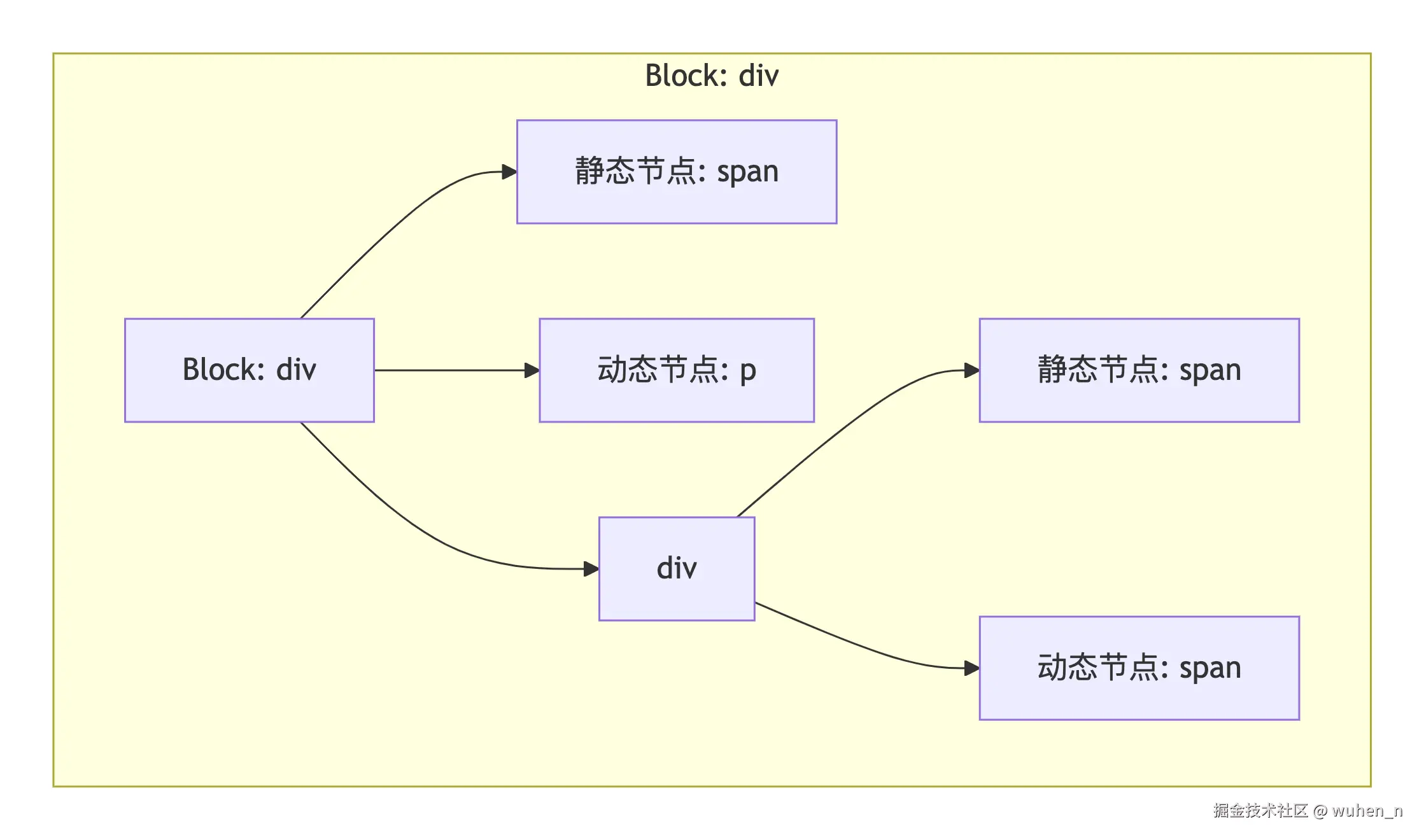 只收集动态节点,形成的动态节点树: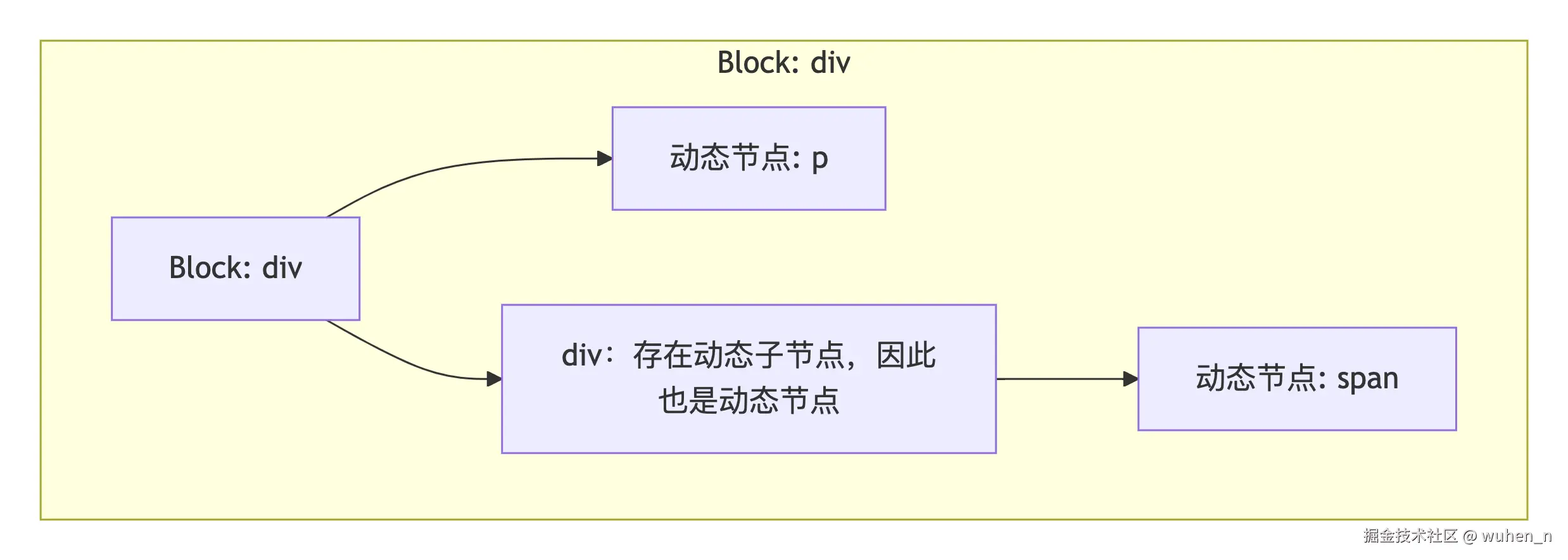
更新时的优化
有了动态节点树,更新时只需要遍历 dynamicChildren:
javascript
function patchChildren(oldNode, newNode, container) {
  if (newNode.dynamicChildren) {
    // 只更新动态节点
    for (let i = 0; i < newNode.dynamicChildren.length; i++) {
      patch(
        oldNode.dynamicChildren[i],
        newNode.dynamicChildren[i],
        container
      );
    }
  } else {
    // 没有动态节点,说明是完全静态,什么都不用做
  }
}
节点转换器的设计
转换器的整体架构
javascript
/**
 * AST转换器
 */
class ASTTransformer {
  constructor(ast, options = {}) {
    this.ast = ast;
    this.options = options;
    this.context = {
      currentNode: null,
      parent: null,
      staticNodes: new Set(),
      dynamicNodes: new Set(),
      patchFlags: new Map(),
      hoisted: [],        // 提升的静态节点
      replaceNode: (node) => {
        // 替换当前节点
      },
      removeNode: () => {
        // 删除当前节点
      }
    };
  }

  /**
   * 执行转换
   */
  transform() {
    // 1. 遍历AST,标记静态节点
    this.traverse(this.ast);

    // 2. 计算补丁标志
    this.computePatchFlags();

    // 3. 提取静态节点
    this.hoistStatic();

    return this.ast;
  }

  /**
   * 遍历AST
   */
  traverse(node, parent = null) {
    if (!node) return;

    this.context.currentNode = node;
    this.context.parent = parent;

    // 应用所有转换插件
    for (const plugin of this.plugins) {
      plugin(node, this.context);
    }

    // 递归处理子节点
    if (node.children) {
      for (const child of node.children) {
        this.traverse(child, node);
      }
    }
  }
}
静态节点检测插件
javascript
/**
 * 静态节点检测插件
 */
const detectStaticPlugin = (node, context) => {
  if (node.type === 'Element') {
    // 检查是否有动态绑定
    const hasDynamic = checkDynamic(node);

    if (!hasDynamic) {
      // 检查所有子节点
      const childrenStatic = node.children?.every(child =>
        context.staticNodes.has(child) || child.type === 'Text'
      ) ?? true;

      if (childrenStatic) {
        context.staticNodes.add(node);
        node.isStatic = true;
      }
    }
  } else if (node.type === 'Text') {
    // 文本节点默认是静态的
    node.isStatic = true;
  }
};

/**
 * 检查节点是否包含动态内容
 */
function checkDynamic(node) {
  if (!node.props) return false;

  for (const prop of node.props) {
    // 检查指令
    if (prop.name.startsWith('v-') || prop.name.startsWith('@') || prop.name.startsWith(':')) {
      return true;
    }

    // 检查动态属性值
    if (prop.value && prop.value.includes('{{')) {
      return true;
    }
  }

  return false;
}
补丁标志计算插件
javascript
/**
 * 补丁标志计算插件
 */
const patchFlagPlugin = (node, context) => {
  if (node.type !== 'Element' || node.isStatic) return;

  let patchFlag = 0;
  const dynamicProps = [];

  if (node.props) {
    for (const prop of node.props) {
      if (prop.name === 'class' && isDynamic(prop)) {
        patchFlag |= PatchFlags.CLASS;
        dynamicProps.push('class');
      } else if (prop.name === 'style' && isDynamic(prop)) {
        patchFlag |= PatchFlags.STYLE;
        dynamicProps.push('style');
      } else if (prop.name.startsWith('@')) {
        patchFlag |= PatchFlags.EVENTS;
        dynamicProps.push(prop.name.slice(1));
      } else if (prop.name.startsWith(':')) {
        patchFlag |= PatchFlags.PROPS;
        dynamicProps.push(prop.name.slice(1));
      }
    }
  }

  // 检查文本内容
  if (node.children) {
    for (const child of node.children) {
      if (child.type === 'Interpolation') {
        patchFlag |= PatchFlags.TEXT;
        break;
      }
    }
  }

  if (patchFlag) {
    node.patchFlag = patchFlag;
    node.dynamicProps = dynamicProps;
    context.dynamicNodes.add(node);
  }
};

/**
 * 判断属性是否为动态
 */
function isDynamic(prop) {
  return prop.value && (
    prop.value.includes('{{') ||
    prop.value.startsWith('_ctx.') ||
    prop.value.includes('$event')
  );
}
静态提升插件
javascript
/**
 * 静态提升插件
 */
const hoistStaticPlugin = (node, context) => {
  if (node.type === 'Element' && node.isStatic) {
    // 生成唯一的变量名
    const hoistName = `_hoisted_${context.hoisted.length + 1}`;

    // 存储到提升列表
    context.hoisted.push({
      name: hoistName,
      node: node
    });

    // 替换为变量引用
    const replacement = {
      type: 'HoistReference',
      name: hoistName,
      original: node
    };

    context.replaceNode(replacement);
  }
};

/**
 * 生成提升的代码
 */
function generateHoisted(hoisted) {
  let code = '';

  for (const { name, node } of hoisted) {
    code += `\nconst ${name} = createVNode(`;
    code += `'${node.tag}', `;
    code += generateProps(node.props);
    code += `, ${generateChildren(node.children)}`;
    code += `, PatchFlags.HOISTED);\n`;
  }

  return code;
}
常量提升原理
常量的识别
除了静态节点外,常量表达式也会被提升,我们来看下面一个模板示例:
html
<div>
  <p>{{ 1 + 2 }}</p>  <!-- 常量表达式 -->
</div>
{{ 1 + 2 }} 是一个常量表达式,它在编译时,也会提升:
javascript
const _hoisted_1 = 1 + 2;  // 常量表达式提升

function render(ctx) {
  return createVNode('div', null, [
    createVNode('p', null, _hoisted_1, PatchFlags.TEXT),
    createVNode('p', null, ctx.message, PatchFlags.TEXT)
  ]);
}
常量检测的实现
javascript
/**
 * 常量检测插件
 */
const constantDetectPlugin = (node, context) => {
  if (node.type === 'Interpolation') {
    // 检查表达式是否为常量
    if (isConstantExpression(node.content)) {
      node.isConstant = true;

      // 生成常量名
      const constantName = `_constant_${context.constants.length + 1}`;
      context.constants.push({
        name: constantName,
        value: node.content
      });

      // 替换为常量引用
      context.replaceNode({
        type: 'ConstantReference',
        name: constantName
      });
    }
  }
};

/**
 * 判断表达式是否为常量
 */
function isConstantExpression(expr) {
  // 简单判断:只包含字面量和算术运算符
  const constantPattern = /^[\d\s\+\-\*\/\(\)]+$/;
  return constantPattern.test(expr);
}
缓存内联事件处理函数
事件处理函数的问题
在 JavaScript 中,每次重新渲染都会创建新的函数,如以下模板示例:
html
<template>
  <button @click="() => count++">点击</button>
</template>
在每次渲染时,都会创建新函数:
javascript
function render(ctx) {
  return createVNode('button', {
    onClick: () => ctx.count++  // 每次都不同
  }, '点击');
}
这么处理会有什么问题呢?在每次渲染时,都会为 button 创建一个全新的事件处理对象,里面的 onClick 也会是一个全新的函数。这就会导致渲染器每次渲染都会进行一次更新,造成额外的性能浪费。
事件缓存机制
为了解决上述问题,Vue3 采用了事件缓存机制,对内联事件处理函数进行缓存:
javascript
function render(ctx, _cache) {
  return createVNode('button', {
    onClick: _cache[0] || (_cache[0] = ($event) => ctx.count++)
  }, '点击');
}
缓存插件的实现
javascript
/**
 * 事件缓存插件
 */
const cacheEventHandlerPlugin = (node, context) => {
  if (node.type === 'Element' && node.props) {
    let cacheIndex = 0;

    for (let i = 0; i < node.props.length; i++) {
      const prop = node.props[i];

      if (prop.name.startsWith('@') || prop.name === 'onClick') {
        // 生成缓存代码
        const eventName = prop.name.replace(/^@|^on/, '').toLowerCase();
        const handler = prop.value;

        prop.cached = true;
        prop.cacheIndex = cacheIndex++;
        prop.cachedCode = `_cache[${prop.cacheIndex}] || (_cache[${prop.cacheIndex}] = $event => ${handler})`;
      }
    }
  }
};

/**
 * 生成事件缓存代码
 */
function generateEventCode(node, context) {
  if (!node.props) return 'null';

  const propsObj = {};

  for (const prop of node.props) {
    if (prop.cached) {
      // 使用缓存
      propsObj[prop.name] = prop.cachedCode;
    } else {
      // 普通属性
      propsObj[prop.name] = prop.value;
    }
  }

  return JSON.stringify(propsObj);
}
结语
静态提升和补丁标志是 Vue3 性能优化的两大法宝,它们让 Vue 能够在运行时精准地只更新变化的部分。理解这些优化,不仅帮助我们写出更高效的代码,也让我们对 Vue 的设计哲学有更深的理解。
对于文章中错误的地方或有任何疑问,欢迎在评论区留言讨论!