下载
下载命令:curl -o "D:\Softs\arthas-boot.jar" https://alibaba.github.io/arthas/arthas-boot.jar -k
cmd
C:\Users\Administrator>curl -o "D:\Softs\arthas-boot.jar" https://alibaba.github.io/arthas/arthas-boot.jar  -k
  % Total    % Received % Xferd  Average Speed   Time    Time     Time  Current
                                 Dload  Upload   Total   Spent    Left  Speed
100  143k  100  143k    0     0  99279      0  0:00:01  0:00:01 --:--:-- 99748

C:\Users\Administrator>
安装
执行命令java -jar arthas-boot.jar 之后,键入java运行程序的序号,下面键入1,接着按enter键。
bash
D:\Softs>java -jar arthas-boot.jar
[INFO] JAVA_HOME: D:\Program Files\Java\jre1.8.0_231
[INFO] arthas-boot version: 4.1.4
[INFO] Process 4448 already using port 3658
[INFO] Process 4448 already using port 8563
[INFO] Found existing java process, please choose one and input the serial number of the process, eg : 1. Then hit ENTER.
* [1]: 4448 com.intellij.idea.Main
  [2]: 18788 arthas-boot.jar
1
[ERROR] Can not read arthas version from: https://arthas.aliyun.com/api/latest_version
[INFO] arthas home: C:\Users\Administrator\.arthas\lib\4.1.4\arthas
[INFO] The target process already listen port 3658, skip attach.
[INFO] arthas-client connect 127.0.0.1 3658
  ,---.  ,------. ,--------.,--.  ,--.  ,---.   ,---.
 /  O  \ |  .--. ''--.  .--'|  '--'  | /  O  \ '   .-'
|  .-.  ||  '--'.'   |  |   |  .--.  ||  .-.  |`.  `-.
|  | |  ||  |\  \    |  |   |  |  |  ||  | |  |.-'    |
`--' `--'`--' '--'   `--'   `--'  `--'`--' `--'`-----'

wiki         https://arthas.aliyun.com/doc
tutorials    https://arthas.aliyun.com/doc/arthas-tutorials.html
version      4.1.4
main_class   com.intellij.idea.Main
pid          4448
start_time   2026-01-06 23:01:58.655
current_time 2026-01-06 23:04:00.803

[arthas@4448]$
注:在执行命令前必须存在至少一个java进程,否则会提示
bash
D:\>java -jar arthas-boot.jar
[INFO] JAVA_HOME: D:\Program Files\Java\jre1.8.0_231
[INFO] arthas-boot version: 4.1.4
[ERROR] Cannot find java process. Try to run `jps` or `jcmd` commands to list the instrumented Java HotSpot VMs on the target system.
Please select an available pid安装好之后,可以用help命令查看有哪些命令
bash
[arthas@4448]$ help
 NAME         DESCRIPTION
 help         Display Arthas Help
 auth         Authenticates the current session
 keymap       Display all the available keymap for the specified connection.
 sc           Search all the classes loaded by JVM
 sm           Search the method of classes loaded by JVM
 classloader  Show classloader info
 jad          Decompile class
 getstatic    Show the static field of a class
 monitor      Monitor method execution statistics, e.g. total/success/failure count, average rt, fail rate, etc.
 stack        Display the stack trace for the specified class and method
 thread       Display thread info, thread stack
 trace        Trace the execution time of specified method invocation.
 watch        Display the input/output parameter, return object, and thrown exception of specified method invocation
 tt           Time Tunnel
 jvm          Display the target JVM information
 memory       Display jvm memory info.
 perfcounter  Display the perf counter information.
 ognl         Execute ognl expression.
 mc           Memory compiler, compiles java files into bytecode and class files in memory.
 redefine     Redefine classes. @see Instrumentation#redefineClasses(ClassDefinition...)
 retransform  Retransform classes. @see Instrumentation#retransformClasses(Class...)
 dashboard    Overview of target jvm's thread, memory, gc, vm, tomcat info.
 dump         Dump class byte array from JVM
 heapdump     Heap dump
 options      View and change various Arthas options
 cls          Clear the screen
 reset        Reset all the enhanced classes
 version      Display Arthas version
 session      Display current session information
 sysprop      Display and change the system properties.
 sysenv       Display the system env.
 vmoption     Display, and update the vm diagnostic options.
 logger       Print logger info, and update the logger level
 history      Display command history
 cat          Concatenate and print files
 base64       Encode and decode using Base64 representation
 echo         write arguments to the standard output
 pwd          Return working directory name
 mbean        Display the mbean information
 grep         grep command for pipes.
 tee          tee command for pipes.
 profiler     Async Profiler. https://github.com/jvm-profiling-tools/async-profiler
 vmtool       jvm tool
 stop         Stop/Shutdown Arthas server and exit the console.
 jfr          Java Flight Recorder Command
[arthas@4448]$
常用命令
trace 类名 方法名 跟踪方法发调用耗时(可用于性能瓶颈分析)
dashboard 查看运行信息,第一部分是运行的线程;第二部分是内存状态信息;第三部分是jvm虚拟机运行时的状态,刷新会在下面继续输出。Ctrl+C可以退出命令。
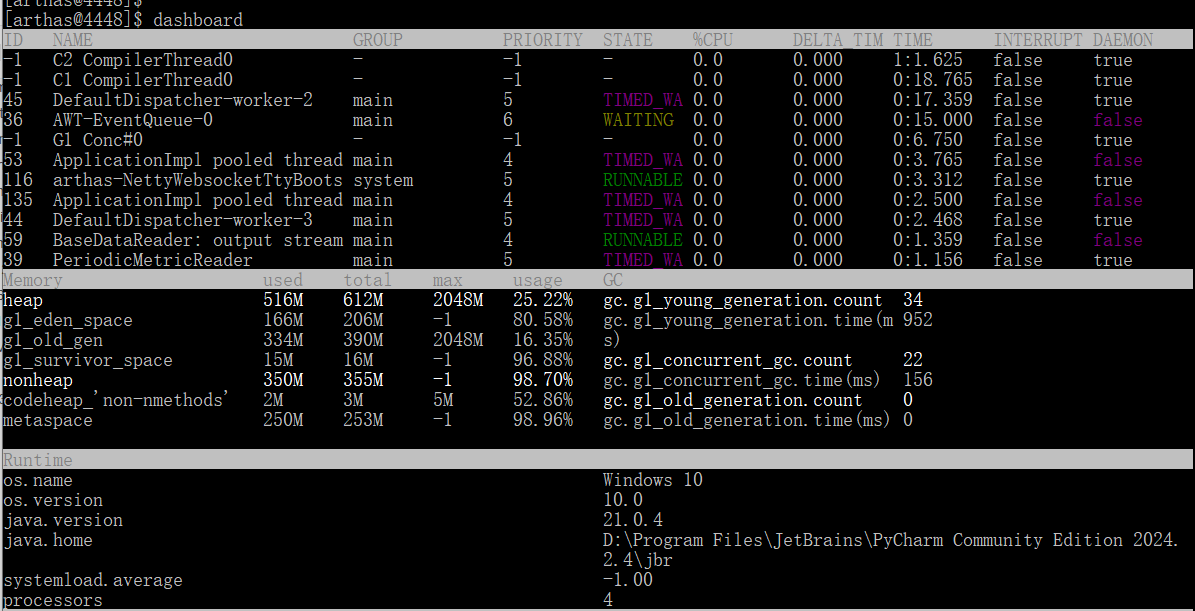
thread 用于查看和分析JVM线程信息,是排查线程相关问题的核心工具。
thread ID 查看指定线程的信息
bash
[arthas@4448]$ thread
Threads Total: 71, NEW: 0, RUNNABLE: 30, BLOCKED: 0, WAITING: 6, TIMED_WAITING: 21, TERMINATED: 0, Internal threads: 14
ID   NAME                          GROUP          PRIORITY  STATE    %CPU      DELTA_TIM TIME      INTERRUPT DAEMON
1    main                          main           5         TIMED_WA 0.0       0.000     0:0.843   false     false
9    Reference Handler             system         10        RUNNABLE 0.0       0.000     0:0.000   false     true
10   Finalizer                     system         8         WAITING  0.0       0.000     0:0.000   false     true
11   Signal Dispatcher             system         9         RUNNABLE 0.0       0.000     0:0.000   false     true
12   Attach Listener               system         5         RUNNABLE 0.0       0.000     0:0.062   false     true
17   Common-Cleaner                InnocuousThrea 8         TIMED_WA 0.0       0.000     0:0.000   false     true
18   Notification Thread           system         9         RUNNABLE 0.0       0.000     0:0.000   false     true
28   Java2D Disposer               system         10        WAITING  0.0       0.000     0:0.000   false     true
29   AWT-Shutdown                  system         5         WAITING  0.0       0.000     0:0.000   false     false
30   AWT-Windows                   system         6         RUNNABLE 0.0       0.000     0:0.984   false     true
33   External Command Listener     main           5         RUNNABLE 0.0       0.000     0:0.000   false     true
34   kotlinx.coroutines.DefaultExe main           5         TIMED_WA 0.0       0.000     0:0.046   false     true
36   AWT-EventQueue-0              main           6         WAITING  0.0       0.000     0:15.000  false     false
39   PeriodicMetricReader          main           5         TIMED_WA 0.0       0.000     0:1.359   false     true
40   Coroutines Debugger Cleaner   main           5         WAITING  0.0       0.000     0:0.000   false     true
41   JVMResponsivenessMonitor      main           5         TIMED_WA 0.0       0.000     0:0.015   false     true
44   DefaultDispatcher-worker-3    main           5         TIMED_WA 0.0       0.000     0:2.500   false     true
45   DefaultDispatcher-worker-2    main           5         TIMED_WA 0.0       0.000     0:17.390  false     true
46   Periodic tasks thread         main           5         TIMED_WA 0.0       0.000     0:0.140   false     true
51   JNA Cleaner                   main           5         TIMED_WA 0.0       0.000     0:0.015   false     true
53   ApplicationImpl pooled thread main           4         TIMED_WA 0.0       0.000     0:4.468   false     false
54   Netty Builtin Server 1        main           5         RUNNABLE 0.0       0.000     0:0.484   false     true
55   TimerQueue                    system         5         TIMED_WA 0.0       0.000     0:0.109   false     true
58   fsnotifier.exe                main           4         RUNNABLE 0.0       0.000     0:0.000   false     false
59   BaseDataReader: output stream main           4         RUNNABLE 0.0       0.000     0:1.421   false     false
60   BaseDataReader: error stream  main           4         RUNNABLE 0.0       0.000     0:0.000   false     false
91   arthas-timer                  system         5         WAITING  0.0       0.000     0:0.000   false     true
[arthas@4448]$ thread 1
"main" Id=1 TIMED_WAITING on kotlinx.coroutines.BlockingCoroutine@4ccf919d
    at java.base@21.0.4/jdk.internal.misc.Unsafe.park(Native Method)
    -  waiting on kotlinx.coroutines.BlockingCoroutine@4ccf919d
    at java.base@21.0.4/java.util.concurrent.locks.LockSupport.parkNanos(LockSupport.java:269)
    at kotlinx.coroutines.BlockingCoroutine.joinBlocking(Builders.kt:120)
    at kotlinx.coroutines.BuildersKt__BuildersKt.runBlocking$BuildersKt__BuildersKt(Builders.kt:84)
    at kotlinx.coroutines.BuildersKt__BuildersKt.runBlocking(Builders.kt:52)
    at kotlinx.coroutines.BuildersKt.runBlocking(Unknown Source)
    at kotlinx.coroutines.BuildersKt__BuildersKt.runBlocking$default(Builders.kt:48)
    at kotlinx.coroutines.BuildersKt.runBlocking$default(Unknown Source)
    at com.intellij.idea.Main.mainImpl(Main.kt:64)
    at com.intellij.idea.Main.main(Main.kt:49)

[arthas@4448]$
[arthas@4448]$ thread 28
"Java2D Disposer" Id=28 WAITING on java.util.concurrent.locks.AbstractQueuedSynchronizer$ConditionObject@3ab74b3
    at java.base@21.0.4/jdk.internal.misc.Unsafe.park(Native Method)
    -  waiting on java.util.concurrent.locks.AbstractQueuedSynchronizer$ConditionObject@3ab74b3
    at java.base@21.0.4/java.util.concurrent.locks.LockSupport.park(LockSupport.java:371)
    at java.base@21.0.4/java.util.concurrent.locks.AbstractQueuedSynchronizer$ConditionNode.block(AbstractQueuedSynchronizer.java:519)
    at java.base@21.0.4/java.util.concurrent.ForkJoinPool.unmanagedBlock(ForkJoinPool.java:4013)
    at java.base@21.0.4/java.util.concurrent.ForkJoinPool.managedBlock(ForkJoinPool.java:3961)
    at java.base@21.0.4/java.util.concurrent.locks.AbstractQueuedSynchronizer$ConditionObject.await(AbstractQueuedSynchronizer.java:1707)
    at java.base@21.0.4/java.lang.ref.ReferenceQueue.await(ReferenceQueue.java:67)
    at java.base@21.0.4/java.lang.ref.ReferenceQueue.remove0(ReferenceQueue.java:158)
    at java.base@21.0.4/java.lang.ref.ReferenceQueue.remove(ReferenceQueue.java:234)
    at java.desktop/sun.java2d.Disposer.run(Disposer.java:145)
    at java.base@21.0.4/java.lang.Thread.runWith(Thread.java:1596)
    at java.base@21.0.4/java.lang.Thread.run(Thread.java:1583)

[arthas@4448]$
jad 类名 反编译类
jad 类名 方法名 反编译类中的方法
如果不带类名则会报如下错
bash
[arthas@4448]$ jad
The argument 'class-pattern' is required, description: Class name pattern, use either '.' or '/' as separator
[arthas@4448]$
watch 类名 方法名 观察表达式 观察方法执行的实时数据。