从源码层面深入理解MyBatis连接池的设计与实现
一、MyBatis整体架构与数据源模块
在深入数据源模块之前,我们先了解MyBatis的整体架构,以及数据源模块在其中的重要地位。
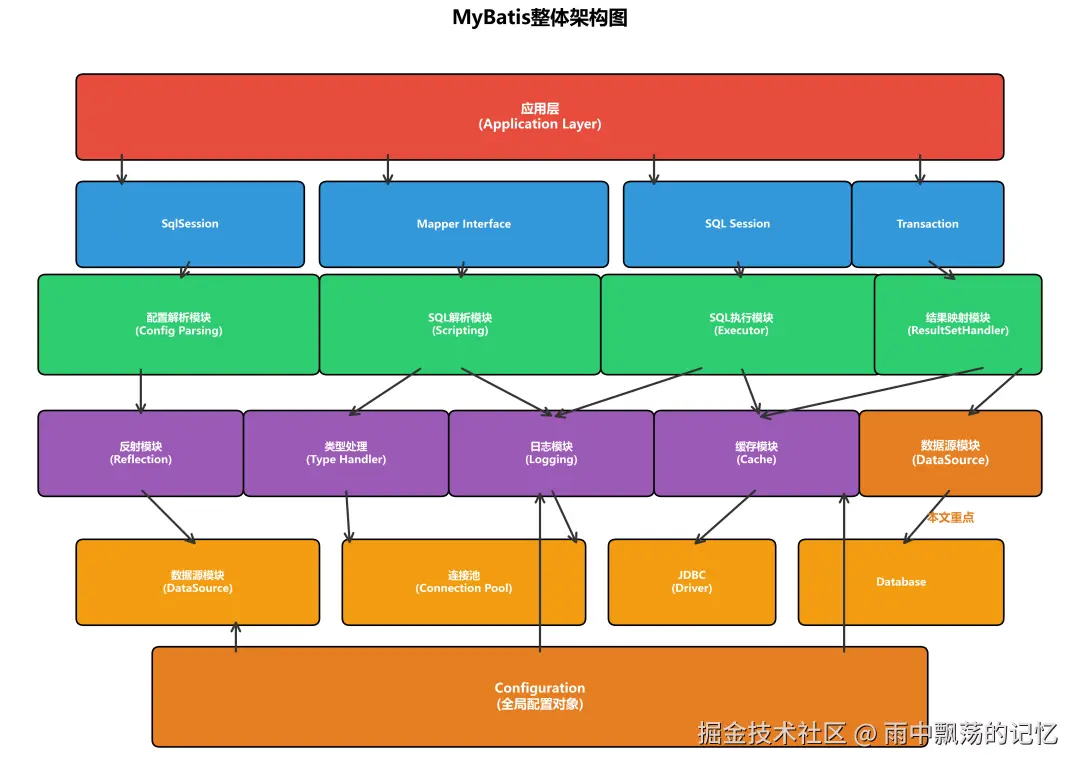
从架构图可以看出,MyBatis采用了分层架构设计,而数据源模块(DataSource)位于基础支撑层,是数据库访问的基础设施。它负责管理数据库连接、维护连接池、提供高效的连接获取和释放机制,是整个框架与数据库交互的入口。
1.1 数据源模块的核心职责
数据源模块主要承担以下核心职责:
管理数据库连接 - 创建、初始化和管理数据库连接
连接池管理 - 维护连接池,提高连接复用率
连接获取与释放 - 提供高效的连接获取和释放机制
连接配置管理 - 管理数据库连接的配置信息
性能优化 - 通过连接池减少连接创建开销
1.2 为什么需要连接池?
在传统的JDBC编程中,每次数据库操作都需要创建和关闭连接:
java
//传统方式:每次创建新连接
Connection conn = DriverManager.getConnection(url, user, password);
try {
    // 执行SQL操作
} finally {
    conn.close(); // 关闭连接
}
这种方式存在明显问题:
频繁创建连接 - 连接创建是昂贵的操作
资源浪费 - 频繁创建和销毁连接消耗资源
性能低下 - 每次操作都要等待连接建立
使用连接池后的流程:
markdown
应用启动 → 创建连接池 → 预创建N个连接
    ↓
业务请求 → 从池中获取连接 → 执行操作 → 归还连接到池
    ↓
应用关闭 → 销毁连接池 → 释放所有连接
1.3 MyBatis的数据源类型
| 数据源类型 | 说明 | 使用场景 |
|---|---|---|
| UNPOOLED | 不使用连接池 | 测试环境、简单应用 |
| POOLED | 使用连接池 | 生产环境、高并发应用 |
| JNDI | 使用JNDI查找 | 应用服务器环境 |
二、数据源接口架构
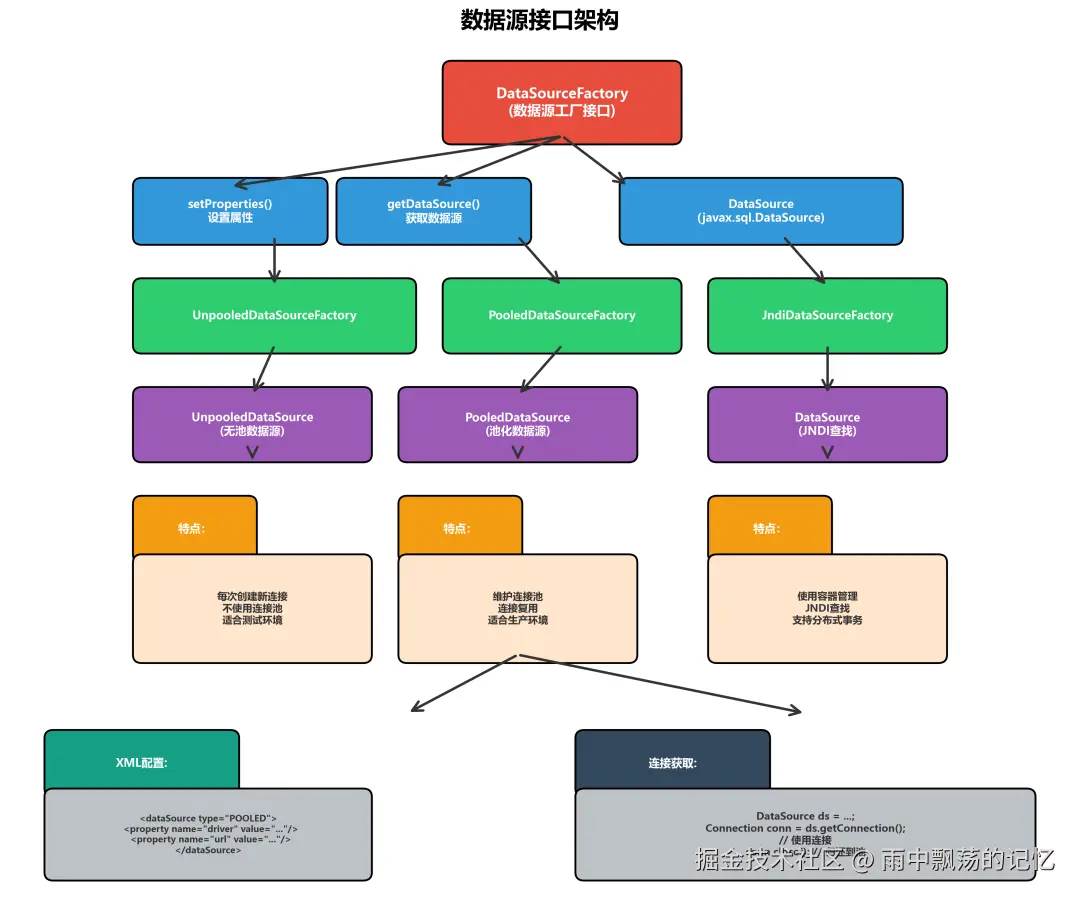
MyBatis的数据源模块采用了清晰的接口设计。
2.1 DataSource接口
DataSource是数据源的顶层接口:
java
public interface DataSource {
    // 获取数据库连接
    Connection getConnection() throws SQLException;
    Connection getConnection(String username, String password)
        throws SQLException;
}虽然MyBatis没有直接定义DataSource接口(使用的是javax.sql.DataSource),但它通过工厂模式创建不同类型的DataSource实现。
2.2 DataSourceFactory接口
MyBatis定义了DataSourceFactory接口用于创建DataSource:
csharp
public interface DataSourceFactory {
    // 设置数据源属性
    void setProperties(Properties props);
    // 获取数据源
    DataSource getDataSource();
}
2.3数据源工厂实现
MyBatis提供了三种DataSourceFactory实现:
java
DataSourceFactory
├── UnpooledDataSourceFactory (无池数据源工厂)
├── PooledDataSourceFactory (池化数据源工厂)
└── JndiDataSourceFactory (JNDI数据源工厂)
public class UnpooledDataSourceFactory implements DataSourceFactory {
    private static final String DRIVER_PROPERTY_PREFIX = "driver.";
    private static final int DRIVER_PROPERTY_PREFIX_LENGTH =
        DRIVER_PROPERTY_PREFIX.length();

    protected DataSource dataSource;

    public UnpooledDataSourceFactory() {
        this.dataSource = new UnpooledDataSource();
    }

    @Override
    public void setProperties(Properties properties) {
        Properties driverProperties = new Properties();
        DataSource dataSource = getDataSource();

        // 创建数据源
        MetaObject metaDataSource =
            SystemMetaObject.forObject(dataSource);

        // 设置属性
        for (Object key : properties.keySet()) {
            String propertyName = (String) key;
            if (propertyName.startsWith(DRIVER_PROPERTY_PREFIX)) {
                driverProperties.setProperty(
                    propertyName.substring(DRIVER_PROPERTY_PREFIX_LENGTH),
                    properties.getProperty(propertyName)
                );
            } else if (metaDataSource.hasSetter(propertyName)) {
                String value = (String) properties.get(propertyName);
                Object convertedValue =
                    convertValue(metaDataSource, propertyName, value);
                metaDataSource.setValue(propertyName, convertedValue);
            }
        }

        if (dataSource instanceof UnpooledDataSource) {
            ((UnpooledDataSource) dataSource)
                .setDriverProperties(driverProperties);
        }
    }

    @Override
    public DataSource getDataSource() {
        return dataSource;
    }
}
public class PooledDataSourceFactory extends UnpooledDataSourceFactory {
    public PooledDataSourceFactory() {
        //注意:这里创建的是PooledDataSource
        this.dataSource = new PooledDataSource();
    }
}UnpooledDataSource是不使用连接池的数据源实现,每次请求都创建新连接。
3.1 UnpooledDataSource核心代码
java
public class UnpooledDataSource implements DataSource {
    // 驱动配置
    private Class<?> driver;
    private String url;
    private String username;
    private String password;
    private Boolean autoCommit;
    private Integer defaultTransactionIsolationLevel;
    private Properties driverProperties;

    // 缓存驱动,避免重复加载
    private static Map<String, Driver> registeredDrivers =
        new ConcurrentHashMap<>();

    @Override
    public Connection getConnection() throws SQLException {
        return doGetConnection(username, password);
    }

    @Override
    public Connection getConnection(String username, String password)
        throws SQLException {
        return doGetConnection(username, password);
    }

    private Connection doGetConnection(String username, String password)
        throws SQLException {
        Properties props = new Properties();
        if (driverProperties != null) {
            props.putAll(driverProperties);
        }
        if (username != null) {
            props.setProperty("user", username);
        }
        if (password != null) {
            props.setProperty("password", password);
        }
        return doGetConnection(props);
    }

    private Connection doGetConnection(Properties properties)
        throws SQLException {
        // 初始化驱动
        initializeDriver();
        // 获取连接
        Connection connection =
            DriverManager.getConnection(url, properties);
        // 配置连接
        configureConnection(connection);
        return connection;
    }

    private synchronized void initializeDriver() throws SQLException {
        if (!registeredDrivers.containsKey(driver)) {
            try {
                Class<?> driverType = Class.forName(driver);
                Driver driverInstance = (Driver) driverType.newInstance();
                DriverManager.registerDriver(
                    new DriverProxy(driverInstance)
                );
                registeredDrivers.put(driver, driverInstance);
            } catch (Exception e) {
                throw new SQLException(
                    "Error setting driver on UnpooledDataSource. Cause: " + e
                );
            }
        }
    }

    private void configureConnection(Connection conn) throws SQLException {
        if (autoCommit != null && conn.getAutoCommit() != autoCommit) {
            conn.setAutoCommit(autoCommit);
        }
        if (defaultTransactionIsolationLevel != null) {
            conn.setTransactionIsolation(defaultTransactionIsolationLevel);
        }
    }
}
3.2 UnpooledDataSource特点
优点:
实现简单,易于理解
不需要维护连接池状态
适合测试和简单应用
缺点:
每次都创建新连接,性能低
频繁创建销毁连接,资源消耗大
不适合高并发场景
四、PooledDataSource实现
PooledDataSource是MyBatis的连接池实现,提供了高效的连接管理。
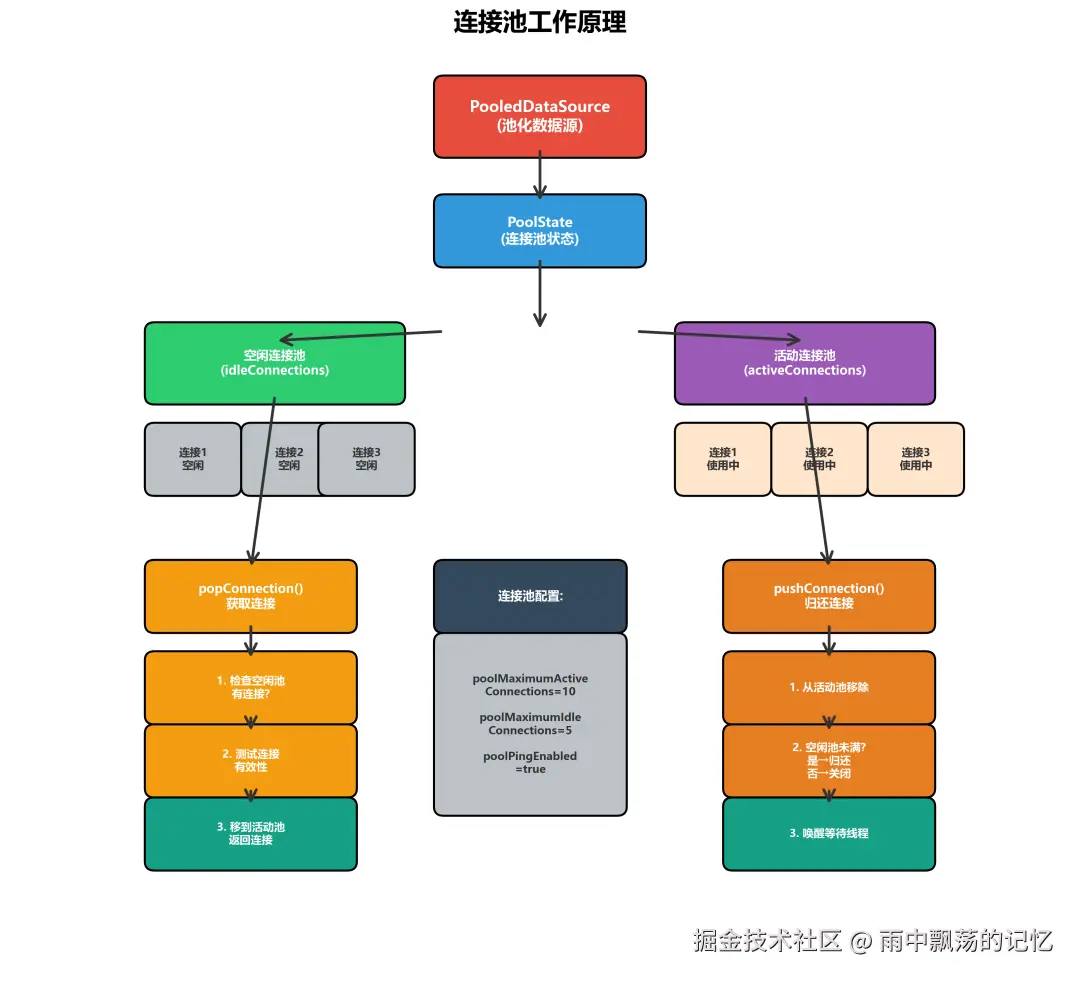
4.1 PooledDataSource核心结构
arduino
public class PooledDataSource implements DataSource {
    // 数据源状态
    private final PoolState state;
    // 无池数据源(用于创建实际连接)
    private final UnpooledDataSource dataSource;
    // 连接池配置
    private int expectedTransactionType;
    // 最大活动连接数
    private int poolMaximumActiveConnections = 10;
    // 最大空闲连接数
    private int poolMaximumIdleConnections = 5;
    // 最大Checkout时间(毫秒)
    private int poolMaximumCheckoutTime = 20000;
    // 等待时间(毫秒)
    private int poolTimeToWait = 20000;
    // 最大连接数
    private int poolMaximumLocalBadConnectionTolerance = 3;
    // 测试连接的SQL
    private String poolPingQuery = "NO PING QUERY SET";
    // 是否测试连接
    private boolean poolPingEnabled;
    // 测试连接的间隔(毫秒)
    private int poolPingConnectionsNotUsedFor;

    public PooledDataSource() {
        state = new PoolState(this);
        dataSource = new UnpooledDataSource();
    }

    public PooledDataSource(String driver, String url,
        String username, String password) {
        state = new PoolState(this);
        dataSource = new UnpooledDataSource(driver, url, username, password);
    }

    @Override
    public Connection getConnection() throws SQLException {
        return popConnection(
            dataSource.getUsername(),
            dataSource.getPassword()
        ).getProxyConnection();
    }

    @Override
    public Connection getConnection(String username, String password)
        throws SQLException {
        return popConnection(username, password).getProxyConnection();
    }
}
4.2 PoolState连接池状态
arduino
public class PoolState {
    //数据源
    protected PooledDataSource dataSource;

    //空闲连接列表
    protected final List<PooledConnection> idleConnections =
        new ArrayList<>();
    //活动连接列表
    protected final List<PooledConnection> activeConnections =
        new ArrayList<>();

    // 统计指标
    protected long requestCount = 0;              // 请求计数
    protected long accumulatedRequestTime = 0;    // 累计请求时间
    protected long accumulatedCheckoutTime = 0;   // 累计Checkout时间
    protected long accumulatedWaitTime = 0;       // 累计等待时间
    protected long badConnectionCount = 0;        // 累计无效连接数

    public PoolState(PooledDataSource dataSource) {
        this.dataSource = dataSource;
    }
}
4.3 popConnection获取连接
ini
private PooledConnection popConnection(String username, String password)
    throws SQLException {
    boolean countedWait = false;
    PooledConnection conn = null;
    long t = System.currentTimeMillis();
    int localBadConnectionCount = 0;

    while (conn == null) {
        synchronized (state) {
            //检查是否有空闲连接
            if (!state.idleConnections.isEmpty()) {
                // 从空闲连接池获取
                conn = state.idleConnections.remove(0);
                if (log.isDebugEnabled()) {
                    log.debug("Checked out connection " +
                        conn.getRealHashCode() + " from pool.");
                }
            } else {
                //没有空闲连接
                if (state.activeConnections.size() <
                    poolMaximumActiveConnections) {
                    // 可以创建新连接
                    conn = new PooledConnection(
                        dataSource.getConnection(), this
                    );
                    if (log.isDebugEnabled()) {
                        log.debug("Created connection " +
                            conn.getRealHashCode() + ".");
                    }
                } else {
                    //活动连接已满,需要等待
                    countedWait = true;
                    try {
                        state.wait(poolTimeToWait);
                    } catch (InterruptedException e) {
                        break;
                    }
                }
            }

            if (conn != null) {
                //检查连接是否有效
                if (conn.isValid()) {
                    // 测试连接
                    if (!poolPingEnabled ||
                        conn.pingConnection(poolPingConnectionsNotUsedFor)) {
                        // 连接有效,加入活动连接池
                        state.activeConnections.add(conn);
                        state.requestCount++;
                        state.accumulatedRequestTime +=
                            System.currentTimeMillis() - t;
                        return conn;
                    }
                }
                // 连接无效,标记为坏连接
                state.badConnectionCount++;
                localBadConnectionCount++;
                if (conn.getRealConnection() != null) {
                    conn.close();
                }
                conn = null;
            }
        }

        //检查是否超时
        if (!countedWait) {
            countedWait = true;
        } else if (localBadConnectionCount >
            poolMaximumLocalBadConnectionTolerance) {
            throw new SQLException(
                "PooledDataSource: Could not get a good connection."
            );
        }
    }

    if (conn == null) {
        throw new SQLException(
            "PooledDataSource: Unknown error. Could not get a connection."
        );
    }

    return conn;
}
4.4 pushConnection归还连接
scss
protected void pushConnection(PooledConnection conn) throws SQLException {
    synchronized (state) {
        //从活动连接池移除
        state.activeConnections.remove(conn);

        //检查连接是否有效
        if (conn.isValid()) {
            //检查空闲连接池是否已满
            if (state.idleConnections.size() < poolMaximumIdleConnections &&
                conn.getConnectionType() == expectedTransactionType) {
                // 归还到空闲连接池
                state.accumulatedCheckoutTime += conn.getCheckoutTime();
                if (!conn.getRealConnection().getAutoCommit()) {
                    conn.getRealConnection().rollback();
                }
                PooledConnection newConn = new PooledConnection(
                    conn.getRealConnection(), this
                );
                state.idleConnections.add(newConn);
                state.requestCount++;
                conn.invalidate();
                if (log.isDebugEnabled()) {
                    log.debug("Returned connection " +
                        newConn.getRealHashCode() + " to pool.");
                }
                state.notifyAll();
            } else {
                //空闲连接池已满,关闭连接
                state.accumulatedCheckoutTime += conn.getCheckoutTime();
                if (!conn.getRealConnection().getAutoCommit()) {
                    conn.getRealConnection().rollback();
                }
                conn.getRealConnection().close();
                if (log.isDebugEnabled()) {
                    log.debug("Closed connection " +
                        conn.getRealHashCode() + ".");
                }
                conn.invalidate();
            }
        } else {
            //连接无效
            if (log.isDebugEnabled()) {
                log.debug("A bad connection (" +
                    conn.getRealHashCode() + ") was returned to the pool.");
            }
            state.badConnectionCount++;
        }
    }
}
4.5 PooledConnection代理连接
PooledConnection使用动态代理模式,拦截close()方法,将连接归还到池而不是真正关闭。
java
class PooledConnection implements InvocationHandler {
    // 实际连接
    private final Connection realConnection;
    // 代理连接
    private final Connection proxyConnection;
    // 数据源
    private final PooledDataSource dataSource;
    // Checkout时间
    private long checkoutTimestamp;
    // 最后使用时间
    private long lastUsedTimestamp;
    // 连接类型
    private int connectionType;
    // 是否有效
    private boolean valid;

    public PooledConnection(Connection realConnection,
        PooledDataSource dataSource) {
        this.realConnection = realConnection;
        this.dataSource = dataSource;
        this.valid = true;

        //创建动态代理
        this.proxyConnection = (Connection) Proxy.newProxyInstance(
            Connection.class.getClassLoader(),
            new Class[]{Connection.class},
            this
        );

        this.checkoutTimestamp = System.currentTimeMillis();
        this.lastUsedTimestamp = checkoutTimestamp;
    }

    @Override
    public Object invoke(Object proxy, Method method, Object[] args)
        throws Throwable {
        String methodName = method.getName();

        // close方法特殊处理
        if (CLOSE.equals(methodName)) {
            // 不真正关闭,而是归还到连接池
            dataSource.pushConnection(this);
            return null;
        }

        try {
            // 调用实际连接的方法
            if (!Object.class.equals(method.getDeclaringClass())) {
                checkConnection(); // 检查连接状态
            }
            return method.invoke(realConnection, args);
        } catch (Throwable t) {
            throw ExceptionUtil.unwrapThrowable(t);
        }
    }

    public Connection getProxyConnection() {
        return proxyConnection;
    }

    public Connection getRealConnection() {
        return realConnection;
    }

    private void checkConnection() throws SQLException {
        if (!valid) {
            throw new SQLException(
                "Error accessing PooledConnection. Connection is closed."
            );
        }
    }

    public boolean isValid() {
        return valid && realConnection != null;
    }

    public void invalidate() {
        valid = false;
    }

    public long getCheckoutTime() {
        return System.currentTimeMillis() - checkoutTimestamp;
    }

    // 连接有效性测试
    public boolean pingConnection(int pingInterval) {
        if (pingInterval > 0 &&
            System.currentTimeMillis() - lastUsedTimestamp > pingInterval) {
            try {
                if (realConnection.isClosed()) {
                    return false;
                }
                Statement stmt = realConnection.createStatement();
                if (poolPingQuery != null && !poolPingQuery.isEmpty()) {
                    stmt.execute(poolPingQuery);
                }
                stmt.close();
                return true;
            } catch (SQLException e) {
                return false;
            }
        }
        return true;
    }
}
五、数据源配置流程
MyBatis支持多种方式配置数据源。
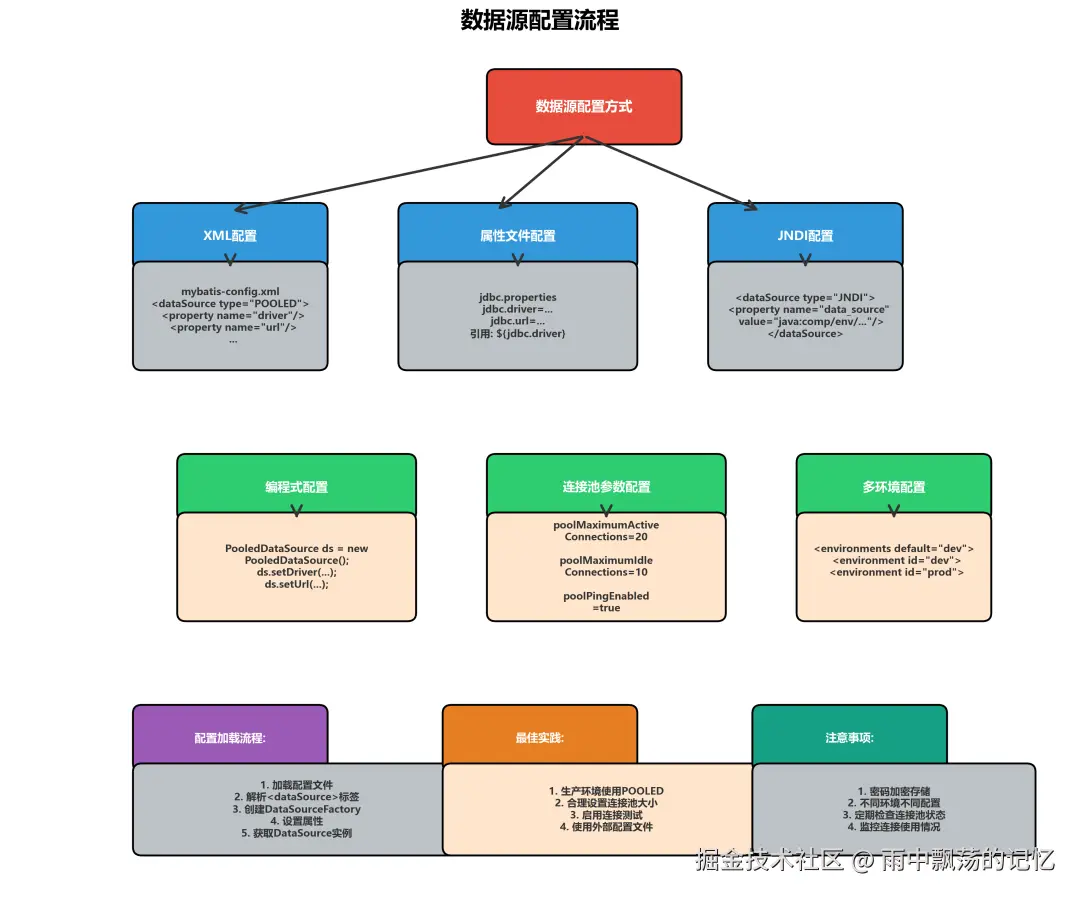
5.1 XML配置方式
xml
<?xml version="1.0" encoding="UTF-8" ?>
<!DOCTYPE configuration PUBLIC "-//mybatis.org//DTD Config 3.0//EN"
"http://mybatis.org/dtd/mybatis-3-config.dtd">
<configuration>
<!-- 配置环境 -->
<environments default="development">
<environment id="development">
<!-- 事务管理器 -->
<transactionManager type="JDBC"/>
<!-- 数据源配置 -->
<dataSource type="POOLED">
<!-- JDBC驱动 -->
<property name="driver"
value="com.mysql.cj.jdbc.Driver"/>
<!-- 数据库URL -->
<property name="url"
value="jdbc:mysql://localhost:3306/mybatis?useSSL=false&serverTimezone=UTC"/>
<!-- 用户名 -->
<property name="username" value="root"/>
<!-- 密码 -->
<property name="password" value="123456"/>
<!-- 连接池配置 -->
<!-- 默认事务隔离级别 -->
<property name="defaultTransactionIsolationLevel" value="2"/>
<!-- 最大活动连接数 -->
<property name="poolMaximumActiveConnections" value="20"/>
<!-- 最大空闲连接数 -->
<property name="poolMaximumIdleConnections" value="10"/>
<!-- 最大Checkout时间(毫秒) -->
<property name="poolMaximumCheckoutTime" value="20000"/>
<!-- 等待时间(毫秒) -->
<property name="poolTimeToWait" value="20000"/>
<!-- 最大本地坏连接容忍度 -->
<property name="poolMaximumLocalBadConnectionTolerance"
value="3"/>
<!-- 连接测试配置 -->
<!-- 是否启用Ping查询 -->
<property name="poolPingEnabled" value="true"/>
<!-- Ping查询SQL -->
<property name="poolPingQuery" value="SELECT 1"/>
<!-- 未使用超过此时间(毫秒)才进行Ping测试 -->
<property name="poolPingConnectionsNotUsedFor" value="60000"/>
</dataSource>
</environment>
<!-- 生产环境配置 -->
<environment id="production">
<transactionManager type="JDBC"/>
<dataSource type="POOLED">
<property name="driver" value="com.mysql.cj.jdbc.Driver"/>
<property name="url"
value="jdbc:mysql://prod-server:3306/mybatis"/>
<property name="username" value="prod_user"/>
<property name="password" value="prod_password"/>
<!-- 生产环境连接池配置 -->
<property name="poolMaximumActiveConnections" value="50"/>
<property name="poolMaximumIdleConnections" value="20"/>
<property name="poolPingEnabled" value="true"/>
<property name="poolPingQuery" value="SELECT 1"/>
<property name="poolPingConnectionsNotUsedFor" value="30000"/>
</dataSource>
</environment>
</environments>
</configuration>5.2 属性文件配置方式
创建jdbc.properties文件:
bash
JDBC配置jdbc.driver=com.mysql.cj.jdbc.Driverjdbc.url=jdbc:mysql://localhost:3306/mybatis?useSSL=false&serverTimezone=UTCjdbc.username=rootjdbc.password=123456# 连接池配置jdbc.poolMaximumActiveConnections=20jdbc.poolMaximumIdleConnections=10jdbc.poolMaximumCheckoutTime=20000jdbc.poolTimeToWait=20000在MyBatis配置中引用:
ini
<configuration>
    <!-- 引入属性文件 -->
    <properties resource="jdbc.properties"/>

    <environments default="development">
        <environment id="development">
            <transactionManager type="JDBC"/>
            <dataSource type="POOLED">
                <property name="driver" value="${jdbc.driver}"/>
                <property name="url" value="${jdbc.url}"/>
                <property name="username" value="${jdbc.username}"/>
                <property name="password" value="${jdbc.password}"/>
                <property name="poolMaximumActiveConnections"
                    value="${jdbc.poolMaximumActiveConnections}"/>
                <property name="poolMaximumIdleConnections"
                    value="${jdbc.poolMaximumIdleConnections}"/>
            </dataSource>
        </environment>
    </environments>
</configuration>
5.3 JNDI配置方式
ini
<dataSource type="JNDI">
    <property name="data_source" value="java:comp/env/jdbc/MyDS"/>
</dataSource>
5.4 编程式配置
ini
// 创建数据源
PooledDataSource dataSource = new PooledDataSource();
dataSource.setDriver("com.mysql.cj.jdbc.Driver");
dataSource.setUrl("jdbc:mysql://localhost:3306/mybatis");
dataSource.setUsername("root");
dataSource.setPassword("123456");
// 配置连接池
dataSource.setPoolMaximumActiveConnections(20);
dataSource.setPoolMaximumIdleConnections(10);
dataSource.setPoolPingEnabled(true);
dataSource.setPoolPingQuery("SELECT 1");
// 创建SqlSessionFactory
TransactionFactory transactionFactory = new JdbcTransactionFactory();
Environment environment = new Environment(
    "development", transactionFactory, dataSource
);
Configuration configuration = new Configuration(environment);
configuration.addMapper(UserMapper.class);
SqlSessionFactory sqlSessionFactory =
    new SqlSessionFactoryBuilder().build(configuration);
六、连接获取与释放流程
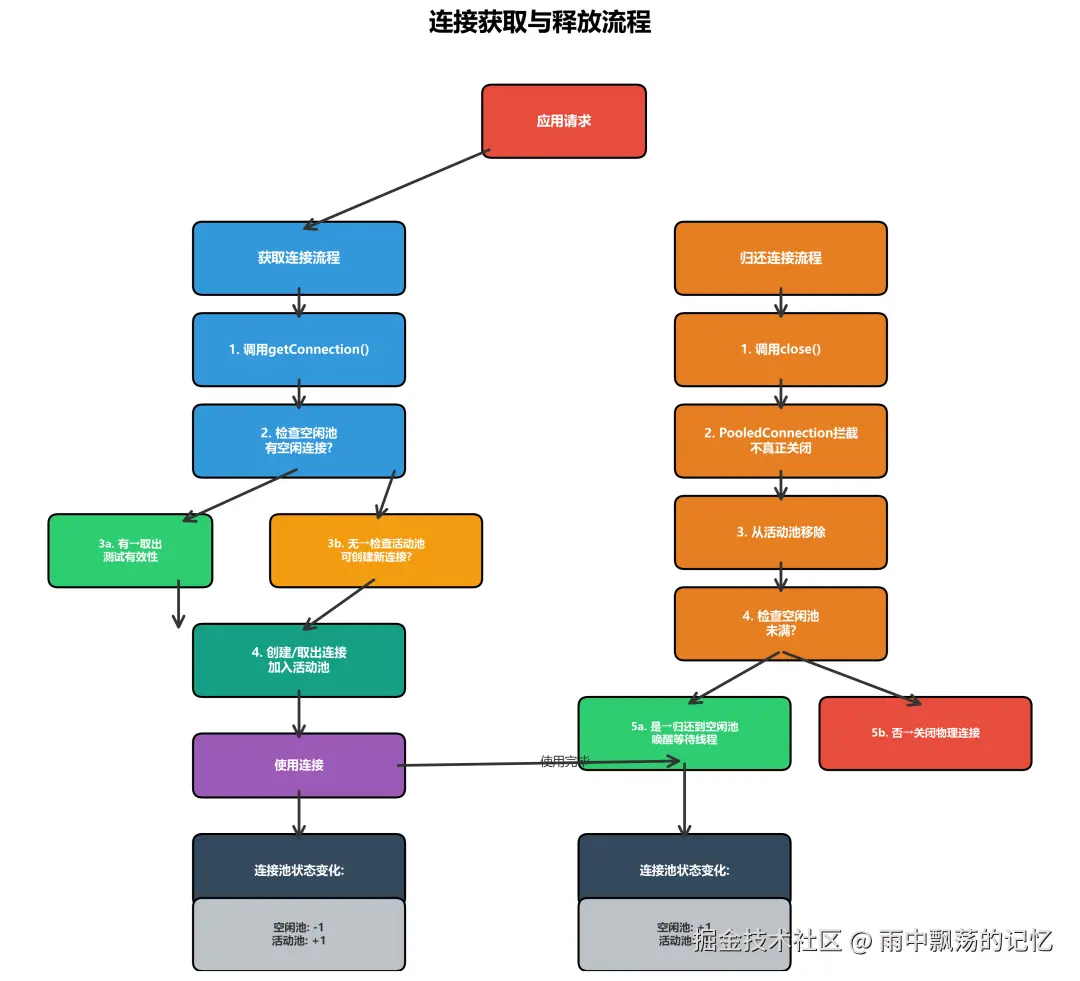
理解连接的获取和释放流程对于使用连接池至关重要。
6.1 连接获取流程
markdown
1. 应用请求连接
   ↓
2. 调用dataSource.getConnection()
   ↓
3. 检查空闲连接池
   ├─ 有空闲连接 → 取出连接
   │                ↓
   │             测试连接有效性
   │                ├─ 有效 → 返回连接
   │                └─ 无效 → 创建新连接
   │
   └─ 无空闲连接
       ↓
      检查活动连接数
       ├─ 未达上限 → 创建新连接 → 返回
       └─ 已达上限 → 等待空闲连接
6.2 连接释放流程
markdown
. 应用调用connection.close()
   ↓
2. PooledConnection拦截close调用
   ↓
3. 不真正关闭,而是执行归还逻辑
   ↓
4. 从活动连接池移除
   ↓
5. 检查空闲连接池
   ├─ 未满 → 归还到空闲连接池
   └─ 已满 → 真正关闭物理连接
6.3 连接使用示例
scss
// 获取SqlSession
SqlSession session = sqlSessionFactory.openSession();
try {
    // 获取Mapper
    UserMapper mapper = session.getMapper(UserMapper.class);

    // 执行查询(内部自动获取连接)
    User user = mapper.selectById(1L);

    // 执行更新
    user.setName("张三");
    mapper.update(user);

    // 提交事务
    session.commit();
} catch (Exception e) {
    // 回滚事务
    session.rollback();
    throw e;
} finally {
    //关闭Session(归还连接到池)
    session.close();
}
七、连接池类型对比
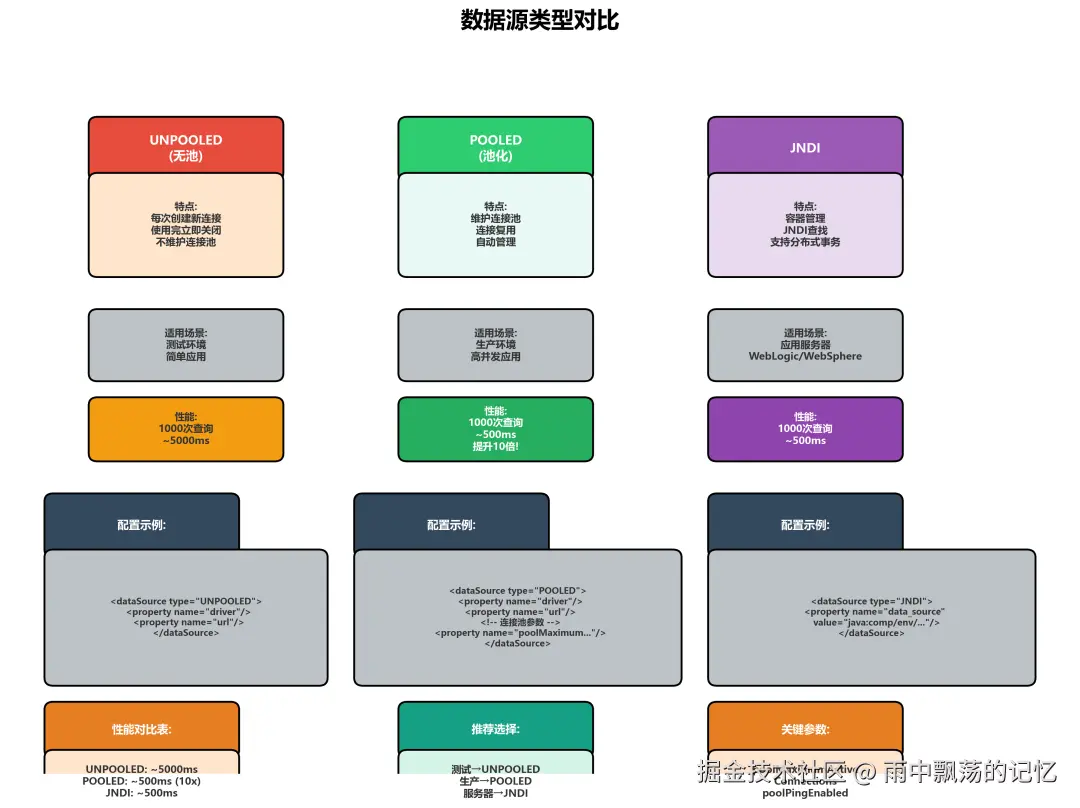
MyBatis支持三种数据源类型,各有适用场景。
7.1 UNPOOLED(无池)
特点:
每次请求创建新连接
使用完毕立即关闭
不维护连接池
配置:
ini
<dataSource type="UNPOOLED">
    <property name="driver" value="com.mysql.cj.jdbc.Driver"/>
    <property name="url" value="jdbc:mysql://localhost:3306/mybatis"/>
    <property name="username" value="root"/>
    <property name="password" value="123456"/>
</dataSource>
适用场景:
测试环境
简单应用
不需要高并发的场景
7.2 POOLED(池化)
特点:
维护连接池
连接复用
自动管理连接生命周期
配置:
xml
<dataSource type="POOLED">
    <property name="driver" value="com.mysql.cj.jdbc.Driver"/>
    <property name="url" value="jdbc:mysql://localhost:3306/mybatis"/>
    <property name="username" value="root"/>
    <property name="password" value="123456"/>
    <!-- 连接池配置 -->
    <property name="poolMaximumActiveConnections" value="20"/>
    <property name="poolMaximumIdleConnections" value="10"/>
</dataSource>适用场景:
生产环境
高并发应用
需要优化性能的场景7.3 JNDI
特点:
使用应用服务器管理的DataSource
通过JNDI查找获取
支持分布式事务
配置:
ini
<dataSource type="JNDI">
    <property name="data_source" value="java:comp/env/jdbc/MyDS"/>
</dataSource>
适用场景:
应用服务器环境(WebLogic、WebSphere等)
需要分布式事务支持
集中管理数据源7.4 连接池配置参数说明| 参数 | 默认值 | 说明 |
|---|---|---|
| poolMaximumActiveConnections | 10 | 最大活动连接数 |
| poolMaximumIdleConnections | 5 | 最大空闲连接数 |
| poolMaximumCheckoutTime | 20000 | 最大Checkout时间(毫秒) |
| poolTimeToWait | 20000 | 等待连接时间(毫秒) |
| poolPingEnabled | false | 是否启用Ping测试 |
| poolPingQuery | "NO PING QUERY SET" | Ping测试SQL |
| poolPingConnectionsNotUsedFor | 0 | 未使用多久才Ping(毫秒) |
| poolMaximumLocalBadConnectionTolerance | 3 | 最大本地坏连接容忍度 |
八、最佳实践
8.1 常见问题解决
xml
// 错误示例:忘记关闭连接
SqlSession session = sqlSessionFactory.openSession();
User user = session.selectOne(
    "com.example.mapper.UserMapper.selectById", 1L
);
//没有关闭session,连接泄漏!

//正确示例:及时关闭
SqlSession session = sqlSessionFactory.openSession();
try {
    User user = session.selectOne(
        "com.example.mapper.UserMapper.selectById", 1L
    );
} finally {
    session.close(); // 确保连接归还到池
}
<!-- 解决方案1:增加连接池大小 -->
<property name="poolMaximumActiveConnections" value="50"/>

<!-- 解决方案2:减少Checkout时间 -->
<property name="poolMaximumCheckoutTime" value="10000"/>
<!-- 解决方案3:增加等待时间 -->
<property name="poolTimeToWait" value="30000"/>
8.2 连接池监控
scss
// 获取连接池状态
PooledDataSource dataSource = (PooledDataSource) sqlSessionFactory
    .getConfiguration()
    .getEnvironment()
    .getDataSource();

// 获取PoolState
PoolState poolState = dataSource.getPoolState();

// 监控指标
System.out.println("连接池状态:");
System.out.println("空闲连接数:" +
    poolState.getIdleConnections().size());
System.out.println("活动连接数:" +
    poolState.getActiveConnections().size());
System.out.println("请求总数:" +
    poolState.getRequestCount());
System.out.println("坏连接数:" +
    poolState.getBadConnectionCount());
九、总结
MyBatis的数据源模块提供了灵活而强大的数据库连接管理能力。
arduino
DataSourceFactory - 创建数据源的工厂接口
UnpooledDataSource - 不使用连接池的数据源
PooledDataSource - 使用连接池的数据源
PooledConnection - 代理连接,拦截close方法
PoolState - 维护连接池