SRC_ATOP
Discards the source pixels that do not cover destination pixels. Draws remaining source pixels over destination pixels.
计算公式:
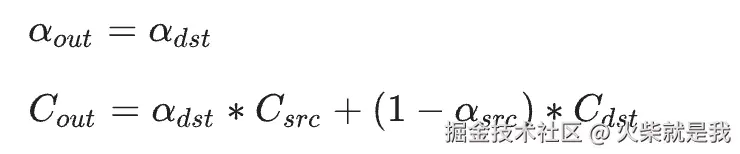
在src.a 跟 dst.a 都是1的情况下,整体效果跟srcIn一样。
但是当dst.a = 1 的时候颜色值就是 src.a 从0-1变化的时候 就是src.c + src.dst * (1 - src.a)
例子:
js
  @override
  void paint(Canvas canvas, Size size) {
    var width = size.width;
    var height = size.height;

    canvas.saveLayer(Rect.fromLTWH(0, 0, width, height), Paint());
    Paint dstPaint = Paint()..color = Colors.red;
    dstPaint.strokeWidth = 20;
    dstPaint.style = PaintingStyle.stroke;

    canvas.drawCircle(Offset(width/2,height/2), 10, dstPaint);

    canvas.drawCircle(Offset(width/2,height/2), 50, dstPaint);

    canvas.drawCircle(Offset(width/2,height/2), 90, dstPaint);

    canvas.drawCircle(Offset(width/2,height/2), 130, dstPaint);

    var srcPaint = Paint()
      ..color = Colors.blue.withOpacity(0.5) // 源颜色:蓝色
      ..style = PaintingStyle.stroke // 填充模式
      ..strokeWidth = 70
      ..blendMode = BlendMode.srcATop; // 混合模式
    // canvas.drawRect(Rect.fromLTWH(0, 0, width, height), srcPaint);
    canvas.drawImageRect(image!, Rect.fromLTWH(0, 0, image!.width.toDouble(), image!.height.toDouble()), Rect.fromLTWH(0, 0, width, height), srcPaint);
    canvas.restore();
  }
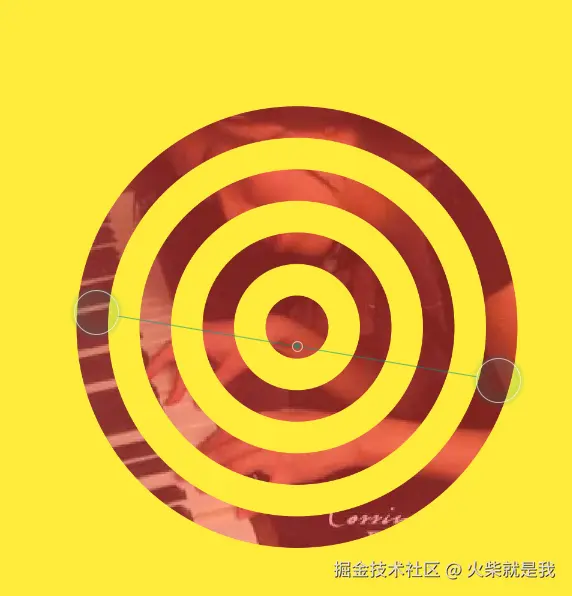
这里src.a = 0.5 相当于在src.c中混入了 0.5*dst.c 所以图片就看起来有点泛红。效果图如下: