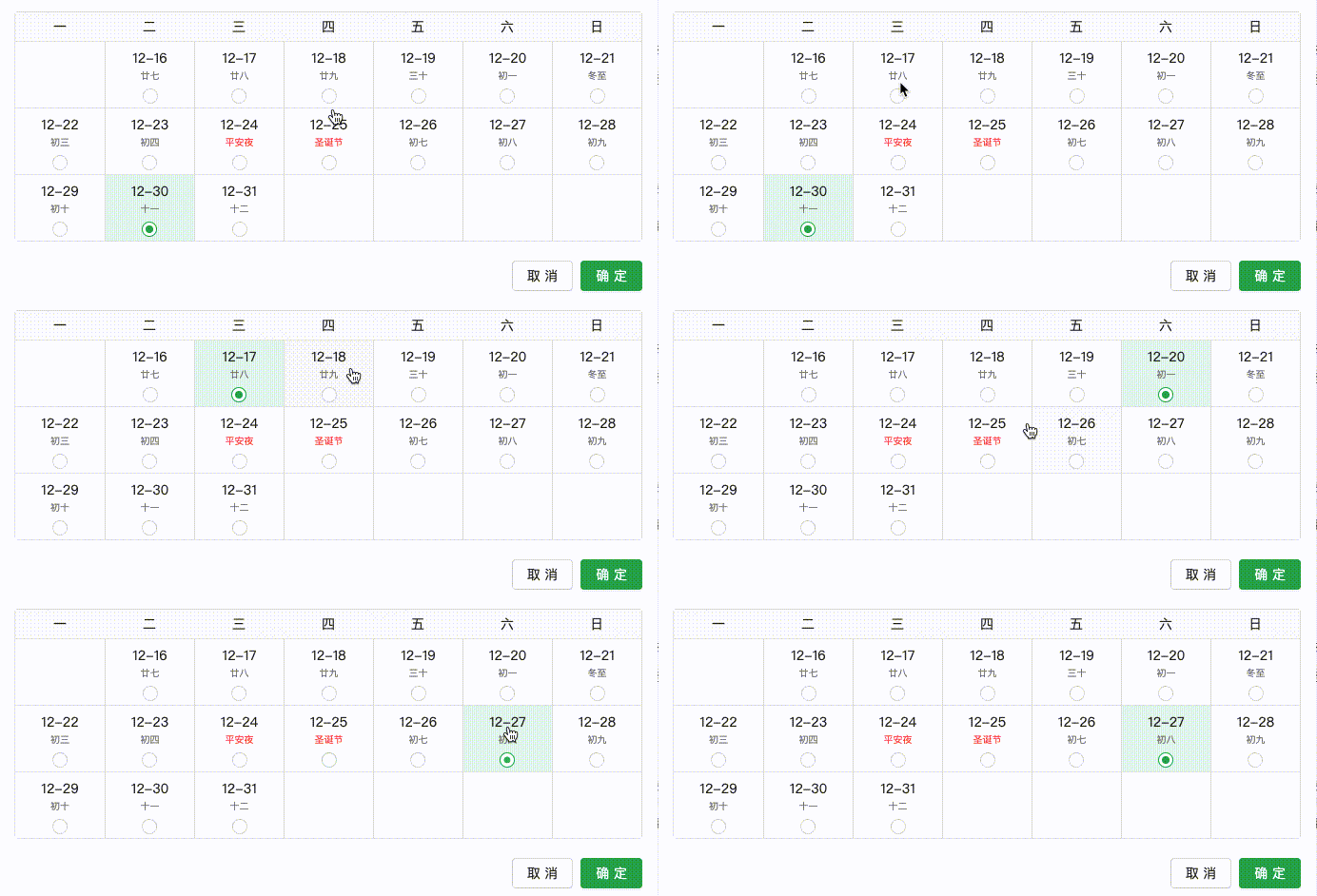
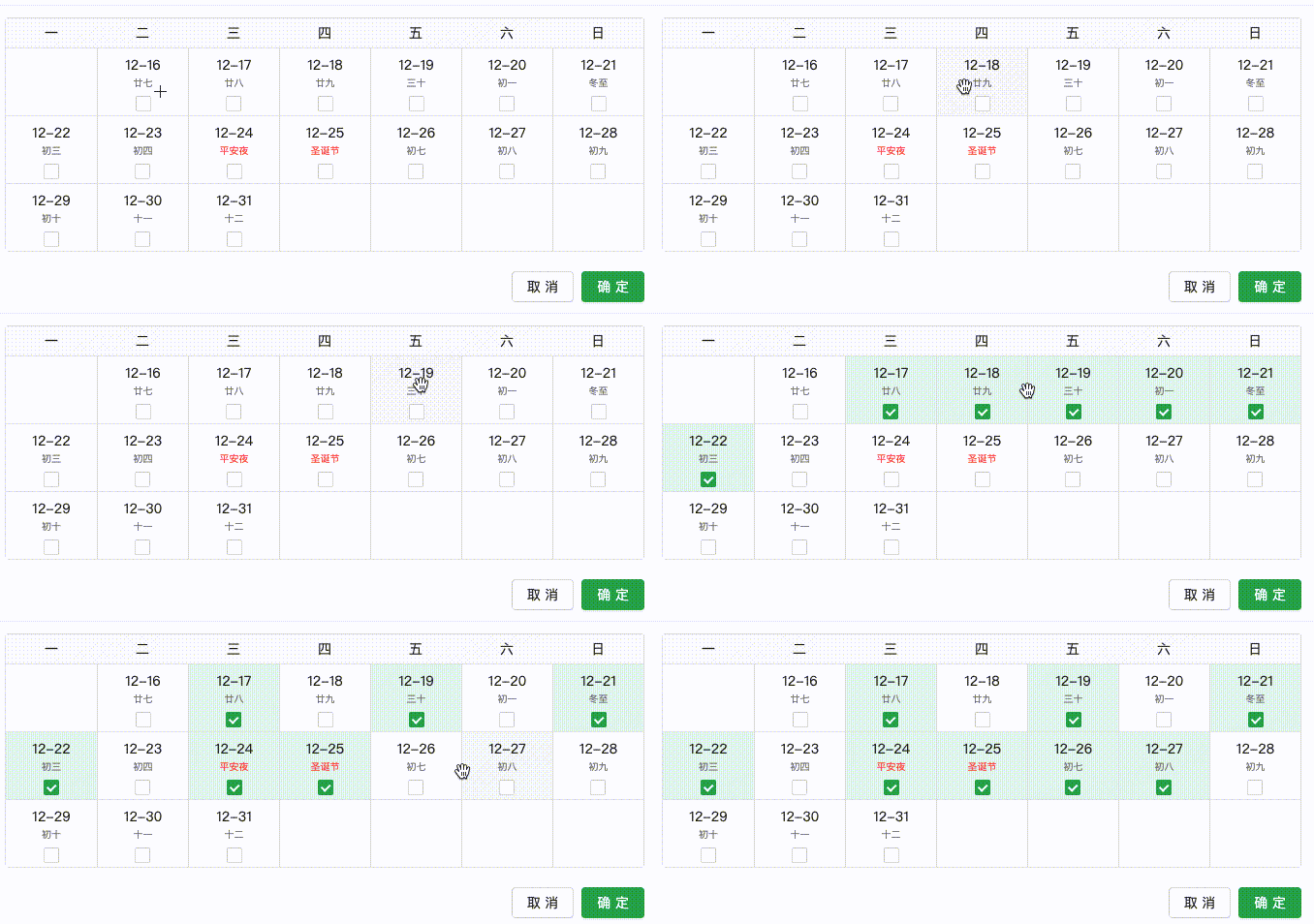
功能包括(动图在最下面)
1、日历的时间范围支持动态传入
2、支持单选和多选模式
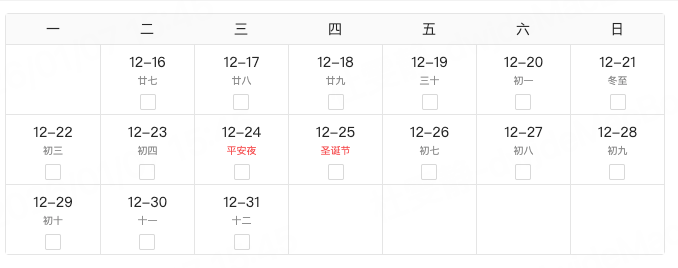
3、支持农历、阴历信息展示
4、支持节假日显示
5、支持单次点击选中,反选等功能
6、支持拖拽选中,再次拖拽取消选中
CalendarSelect.tsx
TypeScript
import React, { useState, useRef, useEffect, useCallback } from 'react';
import Lunar from 'lunar-javascript';
import styles from './index.module.less';
import dayjs from 'dayjs';
import { Checkbox, Radio } from 'antd';

interface IProps {
  /**
   * 是否是单选
   */
  isRadio?: boolean;
  /**
   * 时间戳
   */
  value?: IRangeTime[];
  /**
   * 变化事件
   */
  onSelected?: (selectedTimeRanges: IRangeTime[]) => void;
  /**
   * 统计周期
   */
  timeRange: number[];
}
export interface IRangeTime {
  /**
   * 起始时间
   */
  holidayDateStart: number;
  /**
   * 结束时间
   */
  holidayDateEnd: number;
}
interface ICalendarData {
  /**
   * 日期
   */
  date?: number | null;
  index?: number;
  key?: string;
  /**
   * 是否是占位符
   */
  isPlaceholder?: boolean;
  /**
   * 阴历日期
   */
  solarDay?: string;
  /**
   * 农历日期
   */
  lunarDay?: string;
  /**
   * 节气
   */
  solarTerm?: string;
  /**
   * 节假日
   */
  holiday?: string[];
}

interface IPosition {
  top?: number;
  bottom?: number;
  left?: number;
  right?: number;
  width?: number;
  height?: number;
}
const CalendarRangeSelector = (props: IProps) => {
  const { isRadio = true, value, onSelected, timeRange } = props;
  // 日历数据(包含日期、是否占位、农历、节气、节假日)
  const [days, setDays] = useState<ICalendarData[]>([]);
  // 缓存的单元格位置(预计算,避免动态查询DOM)
  const cellPositionsRef = useRef<(IPosition | null)[]>([]);
  // 选中的日期区间(双重数组:[{start, end}, ...],单选时为[{start, end}])
  const [selectedRanges, setSelectedRanges] = useState<
    { start: number; end: number }[]
  >([]);
  const [selectedTimeRanges, setSelectedTimeRanges] = useState<IRangeTime[]>(
    [],
  );

  // 拖拽状态
  const [isDragging, setIsDragging] = useState(false);
  // 拖拽起始索引
  const [dragStartIndex, setDragStartIndex] = useState<number | undefined>();
  // 上一次有效选中的索引(防重复触发)
  const [lastValidIndex, setLastValidIndex] = useState<number | undefined>();
  // 记录现在mover在托拽的index集合
  const [currentMoveIndexArr, setCurrentMoveIndexArr] = useState<number[]>([]);
  // 判断是不是单次点击
  const [isSingleClick, setIsSingleClick] = useState<boolean>(false);

  // 日历容器引用
  const calendarRef = useRef<HTMLDivElement>(null);

  const DATA_WEEK = ['一', '二', '三', '四', '五', '六', '日'];

  // 初始化
  useEffect(() => {
    // 依据当前选中的时间来决定显示几月的日期
    generateCalendarByRange(timeRange);
    // 赋值当前选中的日期
    setSelectedTimeRanges(value ?? []);
  }, [value, timeRange]);

  /**
   * 生成日历数据并预计算单元格位置
   */
  const generateCalendarByRange = (timeRange: number[]) => {
    // 解析时间戳范围 [startTimestamp, endTimestamp]
    const [startTimestamp, endTimestamp] = timeRange;

    // 验证时间戳有效性
    if (!startTimestamp || !endTimestamp || startTimestamp > endTimestamp) {
      console.error('无效的时间戳范围');
      return [];
    }

    // 转换为dayjs对象(基于时间戳)
    const startDate = dayjs(startTimestamp);
    const endDate = dayjs(endTimestamp);

    const allCalendarDays: ICalendarData[] = [];
    let currentIndex = 0; // 全局索引:包含所有占位符和实际日期
    let currentDate = startDate.clone();

    // 1. 添加开始日期所在周的前置占位符(计入全局索引)
    const firstDayOfWeek = currentDate.day() || 7; // 1=周一,7=周日
    const daysToPrepend = firstDayOfWeek - 1;

    for (let i = daysToPrepend; i > 0; i--) {
      const placeholderDate = currentDate.clone().subtract(i, 'day');
      allCalendarDays.push({
        date: null,
        index: currentIndex, // 占位符索引(全局递增)
        isPlaceholder: true,
        solarDay: '',
        lunarDay: '',
        solarTerm: '',
        holiday: [],
        key: `pre-${placeholderDate.valueOf()}`,
      });
      currentIndex++; // 索引递增
    }

    // 初始化选择范围索引(与value长度匹配)
    let selectRangeIndex: { start?: number; end?: number }[] =
      value?.map(() => ({ start: -1, end: -1 })) || [];

    // 2. 添加范围内的实际日期(计入全局索引)
    currentDate = startDate.clone(); // 重置为起始日期
    while (currentDate.isBefore(endDate) || currentDate.isSame(endDate)) {
      const currentTime = currentDate.valueOf();
      const date = currentDate.toDate();
      const lunar = Lunar.Solar.fromDate(date).getLunar();

      // 推入实际日期(包含全局索引)
      allCalendarDays.push({
        date: currentTime, // 时间戳
        index: currentIndex, // 全局索引(包含占位符)
        isPlaceholder: false,
        solarDay: `${String(currentDate.month() + 1).padStart(2, '0')}-${String(currentDate.date()).padStart(2, '0')}`,
        lunarDay: lunar.getDayInChinese(),
        solarTerm: lunar.getJieQi() || '',
        holiday: [
          ...lunar.getFestivals(),
          ...Lunar.Solar.fromDate(date).getFestivals(),
        ],
        key: currentTime.toString(),
      });

      // 处理选择范围索引计算
      if (isRadio) {
        // 单选逻辑:匹配开始时间
        if (currentTime === value?.[0]?.holidayDateStart) {
          selectRangeIndex = [{ start: currentIndex, end: currentIndex }];
        }
      } else {
        // 多选逻辑:遍历value匹配开始/结束时间(修复变量名冲突)
        value?.forEach((item, itemIndex) => {
          // 匹配开始时间
          if (item?.holidayDateStart === currentTime) {
            selectRangeIndex[itemIndex] = {
              ...selectRangeIndex[itemIndex],
              start: currentIndex,
            };
          }
          // 匹配结束时间
          if (item?.holidayDateEnd === currentTime) {
            selectRangeIndex[itemIndex] = {
              ...selectRangeIndex[itemIndex],
              end: currentIndex,
            };
          }
        });
      }

      currentDate = currentDate.add(1, 'day');
      currentIndex++; // 全局索引递增
    }

    // 3. 添加添加结束日期所在周的后置占位符(计入全局索引)
    const lastDayOfWeek = endDate.day() || 7;
    const daysToAppend = 7 - lastDayOfWeek;

    for (let i = 1; i <= daysToAppend; i++) {
      const placeholderDate = endDate.clone().add(i, 'day');
      allCalendarDays.push({
        date: null,
        index: currentIndex, // 后置占位符索引
        isPlaceholder: true,
        solarDay: '',
        lunarDay: '',
        solarTerm: '',
        holiday: [],
        key: `post-${placeholderDate.valueOf()}`,
      });
      currentIndex++; // 索引递增
    }

    // @ts-ignore
    setSelectedRanges(selectRangeIndex);
    setDays(allCalendarDays);
    precomputeCellPositions(allCalendarDays);
  };

  /**
   * 预计算所有非占位符单元格的实际位置(基于固定样式尺寸)
   */
  const precomputeCellPositions = (calendarDays: ICalendarData[]) => {
    // 组件重新加载时,有延迟
    setTimeout(() => {
      if (!calendarRef.current) return;
      const containerWidth = calendarRef.current.clientWidth;
      if (containerWidth === 0) return; // 避免容器宽度为0时计算错误

      const cellWidth = containerWidth / 7; // 7列等宽(与样式一致)
      const cellHeight = 70; // 固定行高(与样式一致)

      const positions: (IPosition | null)[] = [];
      let colIndex = 0;
      let rowIndex = 0;

      calendarDays.forEach((day: ICalendarData, index: number) => {
        if (day.isPlaceholder) {
          positions[index] = null; // 占位符位置设为null
          colIndex++;
          if (colIndex >= 7) {
            rowIndex++;
            colIndex = 0;
          }
          return;
        }

        // 计算单元格左上角坐标(相对于容器)
        const left = colIndex * cellWidth;
        const top = rowIndex * cellHeight;
        positions[index] = {
          left,
          top,
          right: left + cellWidth,
          bottom: top + cellHeight,
          width: cellWidth,
          height: cellHeight,
        };
        // 更新行列索引
        colIndex++;
        if (colIndex >= 7) {
          rowIndex++;
          colIndex = 0;
        }
      });

      cellPositionsRef.current = positions;
    }, 0);
  };

  /**
   * 高精度计算鼠标位置对应的日期索引(基于预计算的位置)
   */
  const getIndexFromMousePosition = useCallback(
    (e: MouseEvent) => {
      if (!calendarRef.current || cellPositionsRef.current.length === 0)
        return null;

      const rect = calendarRef.current.getBoundingClientRect();
      const clientX = e.clientX - rect.left; // 鼠标相对于容器左侧的X坐标,比较准确
      const clientY = e.clientY - rect.top; // 鼠标相对于容器顶部的Y坐标

      // 遍历预计算的非占位符位置
      for (let i = 0; i < cellPositionsRef.current.length; i++) {
        const pos = cellPositionsRef.current[i];
        if (!pos) continue; // 跳过占位符

        // 精确判断鼠标是否在单元格内(包含边框1px误差)
        const isInside =
          clientX >= (pos.left ?? 0) + 2 && // 左边界容错(-2px)
          clientX <= (pos.right ?? 0) - 2 && // 右边界容错(+2px)
          clientY >= (pos.top ?? 0) + 2 && // 上边界容错(-2px)
          clientY <= (pos.bottom ?? 0) - 2; // 下边界容错(+2px)
        if (isInside) return i; // 找到目标单元格索引
      }

      return null; // 未找到有效单元格
    },
    [days], // 依赖days,确保数据变化时重新计算
  );

  /**
   * 合并相邻或重叠的区间(通用逻辑)
   * @param ranges 待合并的区间数组
   * @returns 合并后的区间数组
   */
  const mergeRanges = (
    ranges: Array<{ start: number; end: number }>,
  ): Array<{ start: number; end: number }> => {
    if (ranges.length === 0) return [];
    // 按起始点排序
    const sortedRanges = [...ranges].sort((a, b) => a.start - b.start);
    const merged: Array<{ start: number; end: number }> = sortedRanges[0]
      ? [sortedRanges[0]]
      : [];
    for (let i = 1; i < sortedRanges.length; i++) {
      const current = sortedRanges[i];
      const last = merged[merged.length - 1];
      if (current && last) {
        if (current.start <= last.end + 1) {
          // 合并相邻或重叠区间
          merged[merged.length - 1] = {
            start: last.start,
            end: Math.max(last.end, current.end),
          };
        } else {
          merged.push(current);
        }
      }
    }
    // 将下标转换成时间戳
    handleTimeRange(merged);
    return merged;
  };

  /**
   * 拆分包含目标索引的区间(通用逻辑)
   * @param ranges 原区间数组
   * @param targetIndex 要取消的目标索引
   * @returns 拆分后的区间数组(包含未拆分的无关区间和拆分后的子区间)
   */
  const splitRanges = (
    ranges: Array<{ start: number; end: number }>,
    targetIndex: number,
  ): Array<{ start: number; end: number }> => {
    return ranges.flatMap(range => {
      // 情况1:当前索引不在区间内 → 保留原区间
      if (targetIndex < range.start || targetIndex > range.end) return [range];
      // 情况2:区间仅有一个点 → 取消后移除
      if (range.start === range.end) return [];
      // 情况3:取消的是起点 → 缩短为 [start+1, end]
      if (targetIndex === range.start) {
        return range.start + 1 <= range.end
          ? [{ start: range.start + 1, end: range.end }]
          : [];
      }
      // 情况4:取消的是终点 → 缩短为 [start, end-1]
      if (targetIndex === range.end) {
        return range.end - 1 >= range.start
          ? [{ start: range.start, end: range.end - 1 }]
          : [];
      }
      // 情况5:取消的是中间点 → 拆分为 [start, index-1] 和 [index+1, end]
      return [
        { start: range.start, end: targetIndex - 1 },
        { start: targetIndex + 1, end: range.end },
      ];
    });
  };

  /**
   * 切换单个日期的选中状态(核心逻辑:单选/多选模式独立处理)
   */
  const toggleSingleDate = (index: number) => {
    setSelectedRanges(prev => {
      if (!isRadio) {
        // -------------------- 多选模式逻辑 --------------------
        const isContained = prev.some(
          range => index >= range.start && index <= range.end,
        );
        if (isContained) {
          // 步骤1:过滤无关区间 + 拆分包含目标索引的区间
          const filteredRanges = prev.filter(
            range => !(index >= range.start && index <= range.end),
          );
          const splitRangesResult = splitRanges(prev, index); // 使用公共拆分函数
          // 步骤2:合并所有相关区间(过滤后的无关区间 + 拆分后的子区间)
          const allRanges = [...filteredRanges, ...splitRangesResult];
          handleTimeRange(allRanges);
          return mergeRanges(allRanges); // 使用公共合并函数
        } else {
          // 步骤1:添加当前索引为单元素区间
          const newRanges = [...prev, { start: index, end: index }];
          handleTimeRange(newRanges);
          return mergeRanges(newRanges); // 使用公共合并函数
        }
      } else {
        // -------------------- 单选模式逻辑 --------------------
        // 检查当前索引是否已被选中(存在单元素区间)
        const isContained = prev.some(
          range => range.start === index && range.end === index,
        );
        const radioSelectRang = isContained
          ? []
          : [{ start: index, end: index }];

        // 更新时间范围(根据实际需求调整)
        if (radioSelectRang.length === 0) {
          setSelectedTimeRanges([]);
        } else {
          const [selectedRange] = radioSelectRang;
          if (selectedRange) {
            setSelectedTimeRanges([
              {
                holidayDateStart: dayjs(
                  days[selectedRange?.start]?.date,
                ).valueOf(),
                holidayDateEnd: dayjs(days[selectedRange?.end]?.date).valueOf(),
              },
            ]);
          }
        }
        return radioSelectRang; // 单选模式强制仅保留当前选中区间
      }
    });
  };

  /**
   * 处理鼠标按下(开始拖拽,单选模式直接选中,多选模式准备拖拽)
   */
  const handleMouseDown = (
    e: React.MouseEvent<HTMLDivElement, MouseEvent>,
    index: number,
  ) => {
    if (days[index]?.isPlaceholder) return;
    e.preventDefault(); // 防止文本选中
    setDragStartIndex(index);
    setLastValidIndex(index); // 记录上一次有效索引
    setIsDragging(true);
  };

  /**
   * 处理鼠标移动(多选模式:扩展选中范围,保留已有选择)
   */
  const handleMouseMove = (e: React.MouseEvent<HTMLDivElement, MouseEvent>) => {
    if (!isDragging) return;
    setIsSingleClick(false);
    const currentIndex = getIndexFromMousePosition(e.nativeEvent);
    if (currentIndex === null) return;

    // 生成从dragStartIndex到currentIndex的连续索引范围
    const start = Math.min(dragStartIndex ?? 0, currentIndex);
    const end = Math.max(dragStartIndex ?? 0, currentIndex);

    // 使用Array.from更简洁地生成索引数组
    const selectedIndices = Array.from(
      { length: end - start + 1 },
      (_, i) => start + i,
    ).filter(index => !days[index]?.isPlaceholder); // 过滤占位符

    setCurrentMoveIndexArr(selectedIndices);
  };

  const handleMouseLeave = () => {
    if (isDragging) {
      // 鼠标移出边界时,强制结束拖拽
      setIsDragging(false);
      setCurrentMoveIndexArr([]);
      setLastValidIndex(undefined);
      setDragStartIndex(undefined);
      setIsSingleClick(false);
    }
  };

  /**
   * 处理鼠标松开(结束拖拽)
   */
  const handleMouseUp = (e: React.MouseEvent<HTMLDivElement, MouseEvent>) => {
    if (!isDragging || isRadio) return;
    setIsDragging(false);
    const finallyIndex = getIndexFromMousePosition(e.nativeEvent);
    // 仅当新索引有效且与上一次有效索引不同时才更新
    if (finallyIndex === null || finallyIndex === lastValidIndex) return;

    // 计算当前拖拽范围(start<=end)
    const [start, end] = [
      Math.min(dragStartIndex ?? 0, finallyIndex),
      Math.max(dragStartIndex ?? 0, finallyIndex),
    ];
    // 生成拖拽范围内的有效索引
    const validIndices = Array.from(
      { length: end - start + 1 },
      (_, i) => start + i,
    ).filter(index => !days[index]?.isPlaceholder);

    // 复制当前选中区间
    const newRanges = [...selectedRanges];

    // 处理拖拽选中的每个索引
    validIndices.forEach(i => {
      // 查找包含当前索引的区间
      const coveredRangeIndex = newRanges.findIndex(
        range => i >= range.start && i <= range.end,
      );

      if (coveredRangeIndex !== -1) {
        const coveredRange = newRanges[coveredRangeIndex];

        // 情况1:完全覆盖整个区间
        if (coveredRange?.start === i && coveredRange?.end === i) {
          newRanges.splice(coveredRangeIndex, 1); // 移除整个区间
        }
        // 情况2:覆盖区间的开始部分
        else if (coveredRange?.start === i) {
          newRanges[coveredRangeIndex] = {
            start: i + 1,
            end: coveredRange.end,
          };
        }
        // 情况3:覆盖区间的结束部分
        else if (coveredRange?.end === i) {
          newRanges[coveredRangeIndex] = {
            start: coveredRange?.start,
            end: i - 1,
          };
        }
        // 情况4:覆盖区间的中间部分
        else {
          // 拆分为两个区间
          coveredRange &&
            newRanges.splice(
              coveredRangeIndex,
              1,
              { start: coveredRange?.start, end: i - 1 },
              { start: i + 1, end: coveredRange?.end },
            );
        }
      } else {
        // 未覆盖任何区间,添加为新的单元素区间
        newRanges.push({ start: i, end: i });
      }
    });

    // 合并相邻区间(保持原有逻辑不变)
    const mergedRanges: { start: number; end: number }[] = [];
    newRanges.sort((a, b) => a.start - b.start);
    newRanges.forEach(range => {
      if (mergedRanges.length === 0) {
        mergedRanges.push(range);
      } else {
        const last = mergedRanges[mergedRanges.length - 1];
        if (last) {
          if (range.start <= last?.end + 1) {
            mergedRanges[mergedRanges.length - 1] = {
              start: last?.start,
              end: Math.max(last?.end, range.end),
            };
          } else {
            mergedRanges.push(range);
          }
        }
      }
    });
    setSelectedRanges(mergedRanges);
    handleTimeRange(mergedRanges);
    setLastValidIndex(finallyIndex); // 更新上一次有效索引
    setCurrentMoveIndexArr([]);
  };

  const handleTimeRange = (indexRange: { start: number; end: number }[]) => {
    // 将下标映射成时间戳
    const _timeRange = indexRange.map(item => ({
      holidayDateStart: dayjs(days[item.start]?.date).valueOf(),
      holidayDateEnd: dayjs(days[item.end]?.date).valueOf(),
    }));
    setSelectedTimeRanges(_timeRange);
  };

  useEffect(() => {
    onSelected?.(selectedTimeRanges);
  }, [selectedTimeRanges, value]);

  return (
    <div className={styles['calendar-container']}>
      {/* 日历头部(周几) */}
      <div className={styles['header-row']}>
        {DATA_WEEK.map(day => (
          <div key={day} className={styles['header-cell']}>
            {day}
          </div>
        ))}
      </div>

      {/* 日历主体(日期网格) */}
      <div
        className={styles['calendar-body']}
        ref={calendarRef}
        onMouseMove={handleMouseMove}
        onMouseUp={handleMouseUp}
        onMouseLeave={handleMouseLeave}
      >
        <div className={styles['grid']}>
          {days.map((day, index) => {
            const isSelected = !isRadio
              ? selectedRanges.some(
                  range => index >= range.start && index <= range.end,
                )
              : selectedRanges.length === 1 &&
                selectedRanges[0]?.start === index &&
                selectedRanges[0]?.end === index;

            return (
              <div
                key={day.key}
                className={`${styles['cell']}
                                            ${day.isPlaceholder ? styles['placeholder'] : ''}
                                            ${isSelected ? styles['selected'] : ''}
                                            ${currentMoveIndexArr?.includes(index) && isDragging && !isSingleClick ? styles['selected'] : ''}`}
                style={{
                  cursor: !isRadio ? 'grab' : 'pointer',
                  userSelect: 'none',
                }}
                // 复选框时候才会涉及托拽
                onMouseDown={e => {
                  if (day.isPlaceholder) return;
                  !isRadio && handleMouseDown(e, index);
                }}
                onClick={() => {
                  if (day.isPlaceholder) return;
                  setIsSingleClick(true);
                  toggleSingleDate(index);
                }}
              >
                {!day.isPlaceholder && (
                  <div className={styles['content']}>
                    {/* 阳历日期 */}
                    <div className={styles['solar-day']}>{day.solarDay}</div>

                    {/* 阴历/节气/节假日 */}
                    <>
                      {day.solarTerm ? (
                        <span className={styles['solar-term']}>
                          {day.solarTerm}
                        </span>
                      ) : (
                        <>
                          {day.holiday?.length ? (
                            <span
                              className={styles['holiday-tag']}
                              title={day.holiday.join('、')}
                            >
                              {day.holiday.join('、')}
                            </span>
                          ) : (
                            <span className={styles['solar-term']}>
                              {day.lunarDay}
                            </span>
                          )}
                        </>
                      )}
                    </>

                    {/* 动态渲染选择控件 */}
                    <div className={styles['selector']}>
                      {isRadio ? (
                        <Radio
                          name="selectedDate"
                          checked={isSelected}
                          className={'mt-3 mr-0'}
                        />
                      ) : (
                        <Checkbox checked={isSelected} className={'mt-3'} />
                      )}
                    </div>
                  </div>
                )}
              </div>
            );
          })}
        </div>
      </div>
    </div>
  );
};

export default CalendarRangeSelector;
CalendarSelect.组件的样式:index.module.less
TypeScript
// 日历容器整体样式
.calendar-container {
  box-sizing: border-box;
  width: 660px;
  margin-bottom: 20px;
  background-color: #fff;
  border: 1px solid #e5e5e5;
  border-radius: 4px;
}

// 表头行样式(周一到周日)
.header-row {
  position: sticky; // 固定表头
  top: 0;
  z-index: 2; // 确保在日期上方
  display: grid;
  grid-template-columns: repeat(7, 1fr);
  grid-auto-rows: 30px; // 固定行高
  background-color: #fafafa;
}

// 表头单元格样式
.header-cell {
  box-sizing: border-box;
  display: flex;
  align-items: center;
  justify-content: center;
  width: 94px; // 与grid列宽一致(660px/7≈94px)
  font-size: 14px;
  font-weight: 500;
  line-height: 22px;
  color: #262626;
}

// 日历主体(日期网格容器)- 关键调整
.calendar-body {
  position: relative;
  width: 100%; // 宽度占满容器

  // 日期网格布局(7列等宽)
  .grid {
    display: grid;
    grid-template-columns: repeat(7, 1fr); // 7列等宽(与容器宽度一致)
    grid-auto-rows: 70px; // 固定行高(与样式一致)
    width: 100%; // 宽度占满容器
  }

  // 单元格基础样式
  .cell {
    position: relative;
    display: flex;
    align-items: center;
    justify-content: center;
    width: 94px; // 固定列宽(660px/7≈94px)
    height: 70px; // 固定行高(与grid-auto-rows一致)
    cursor: pointer;
    user-select: none; // 防止文本选中
    background-color: #fff;
    border-top: 1px solid #e5e5e5;
    border-left: 1px solid #e5e5e5;
    transition: all 0.2s ease;

    // 每行第一个单元格移除左边框(已被表头覆盖)
    &:nth-child(7n + 1) {
      border-left: none;
    }

    // 最后一行单元格移除底部边框(与容器高度匹配)
    &:nth-child(7n) {
      border-bottom: none; // 修复底部边框缺失
    }

    // 占位格样式(月初/月末的空白格)
    &.placeholder {
      background-color: #fff;
    }

    // 选中状态(最终确定的范围)
    &.selected {
      position: relative;
      z-index: 1; // 确保选中单元格在上层
      background-color: #e8f7ee !important; // 统一的选中背景色

      // 起始单元格(左边界圆角)
      &.start {
        border-right: none;
        border-top-left-radius: 4px;
        border-bottom-left-radius: 4px;
      }

      // 结束单元格(右边界圆角)
      &.end {
        border-left: none;
        border-top-right-radius: 4px;
        border-bottom-right-radius: 4px;
      }
    }

    // 预选状态(hover时的范围,仅在未点击时显示)
    &:hover {
      background-color: #f7f7f7; // 与选中状态区分的浅蓝背景
    }
  }

  .content {
    display: flex;
    flex-direction: column;
    align-items: center;
  }

  // 阳历日期
  .solar-day {
    margin-top: 5px;
    font-size: 14px;
    font-weight: 500;
    color: #262626;
  }
  // 时节
  .solar-term {
    font-size: 10px;
    font-weight: 400;
    color: #8c8c8c;
  }
  // 节假日
  .holiday-tag {
    width: 70px;
    overflow: hidden; /* 超出部分隐藏 */
    font-size: 10px;
    font-weight: 400;
    color: #ff4d4f;
    text-align: center;
    text-overflow: ellipsis; /* 超出部分显示省略号 */
    white-space: nowrap; /* 禁止换行 */
  }
}
TypeScript
  <CalendarRangeSelector
            value={calendarData} //当前选中的时间
            timeRange={timeRange} //整个日历的时间范畴
            onSelected={selectedTimeRanges => handleChange(selectedTimeRanges)}
            isRadio={isRadio} //多选还是单选模式
          >
</CalendarRangeSelector>
效果图:单选/多选