The source pixels are drawn over the destination pixels.
公式:
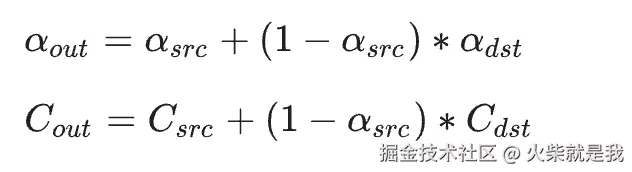
在dst.a = 1 的情况下, a = 1 ,c = src.c + (1-src.a)*dst.c, 这个可以用来两张图片的切换。效果图如下:

上面的是通过两张图片叠加修改透明度的方式,下面的是通过src_over 混合方式,可以看出下面的方式更柔和一点。
关键代码:
js
  @override
  void paint(Canvas canvas, Size size) {
    var width = size.width;
    var height = size.height;

    canvas.saveLayer(Rect.fromLTWH(0, 0, width, height), Paint());
    Paint dstPaint = Paint()..color = Colors.red;
    dstPaint.strokeWidth = 20;
    dstPaint.style = PaintingStyle.stroke;

    canvas.drawImageRect(image1!, Rect.fromLTWH(0, 0, image!.width.toDouble(), image!.height.toDouble()), Rect.fromLTWH(0, 0, width, height), dstPaint);


    var srcPaint = Paint()
      ..color = Colors.blue.withOpacity(listener.value) // 源颜色:蓝色
      ..style = PaintingStyle.stroke // 填充模式
      ..strokeWidth = 70
      ..blendMode = BlendMode.srcOver; // 混合模式
    // canvas.drawRect(Rect.fromLTWH(0, 0, width, height), srcPaint);
    canvas.drawImageRect(image!, Rect.fromLTWH(0, 0, image!.width.toDouble(), image!.height.toDouble()), Rect.fromLTWH(0, 0, width, height), srcPaint);

    canvas.restore();
  }