接上两篇文章:
菜鸟以为做完上面两篇文章就可以高枕无忧了,结果现实给了菜鸟当头一棒!
昨天,生信部门将他封装的脚本部署上了服务器,并让我进行调试,看看有没有什么问题!我按照其示例输入、示例运行shell,去修改了自己的运行脚本文件,修改后如下:
js
function runScript(ipcMain, app, path, fs, exec) {
  // 运行脚本 -- 等待结果
  ipcMain.handle("runScript", async (event, data) => {
    return new Promise((resolve, reject) => {
      try {
        const userDataPath = app.getPath("userData");
        const configPath = path.join(userDataPath, "scripts", "config.json");
        // 读取 config.json
        if (!fs.existsSync(configPath)) {
          throw new Error(
            "The config.json file does not exist. Please initialize the scripts folder first"
          );
        }

        const configContent = fs.readFileSync(configPath, "utf-8");
        const config = JSON.parse(configContent);

        // 拼接命令(自动交由 shell 解析)
        const command = `${config.scriptPath} ${data.inputJsonPath}`;

        // 关键:shell 由系统决定
        exec(command, { shell: true }, (error, stdout, stderr) => {
          if (error) {
            console.error("Script execution failed 103:", error);
            reject(stderr || stdout || "脚本运行异常");
            return;
          }
          resolve(stdout);
        });
      } catch (err) {
        reject(err.message);
      }
    });
  });
}

function runScriptNoWait(ipcMain, app, path, fs, spawn) {
  // 运行脚本 -- 不等待结果
  ipcMain.handle("runScriptNoWait", async (event, data) => {
    return new Promise((resolve, reject) => {
      try {
        const userDataPath = app.getPath("userData");
        const configPath = path.join(userDataPath, "scripts", "config.json");
        // 读取 config.json
        if (!fs.existsSync(configPath)) {
          throw new Error(
            "The config.json file does not exist. Please initialize the scripts folder first."
          );
        }

        const configContent = fs.readFileSync(configPath, "utf-8");
        const config = JSON.parse(configContent);

        // spawn 后台执行
        const child = spawn(config.scriptPath, [data.inputJsonPath], {
          shell: true, // 让系统选择 cmd/bash
          detached: true, // 让脚本成为独立进程
          stdio: "ignore" // 不接收任何输出
        });

        // 断开 Electron 与脚本的关系
        child.unref();

        // ***关键:不等待脚本执行结果***
        resolve("脚本已成功启动"); // 不等待 stdout,也不等待脚本结束
      } catch (err) {
        reject(err.message);
      }
    });
  });
}

module.exports = {
  runScript,
  runScriptNoWait
};
反正命令行拼出来长这样:
shell
source /home/bnzycjd/.bashrc && /home/bnzycjd/miniconda3/bin/python /home/bnzycjd/pipline_test/script/pipline.py -c /home/bnzycjd/test/input.json其中
scriptPath 代表 source /home/bnzycjd/.bashrc && /home/bnzycjd/miniconda3/bin/python /home/bnzycjd/pipline_test/script/pipline.py -c
inputJsonPath代表/home/bnzycjd/test/input.json
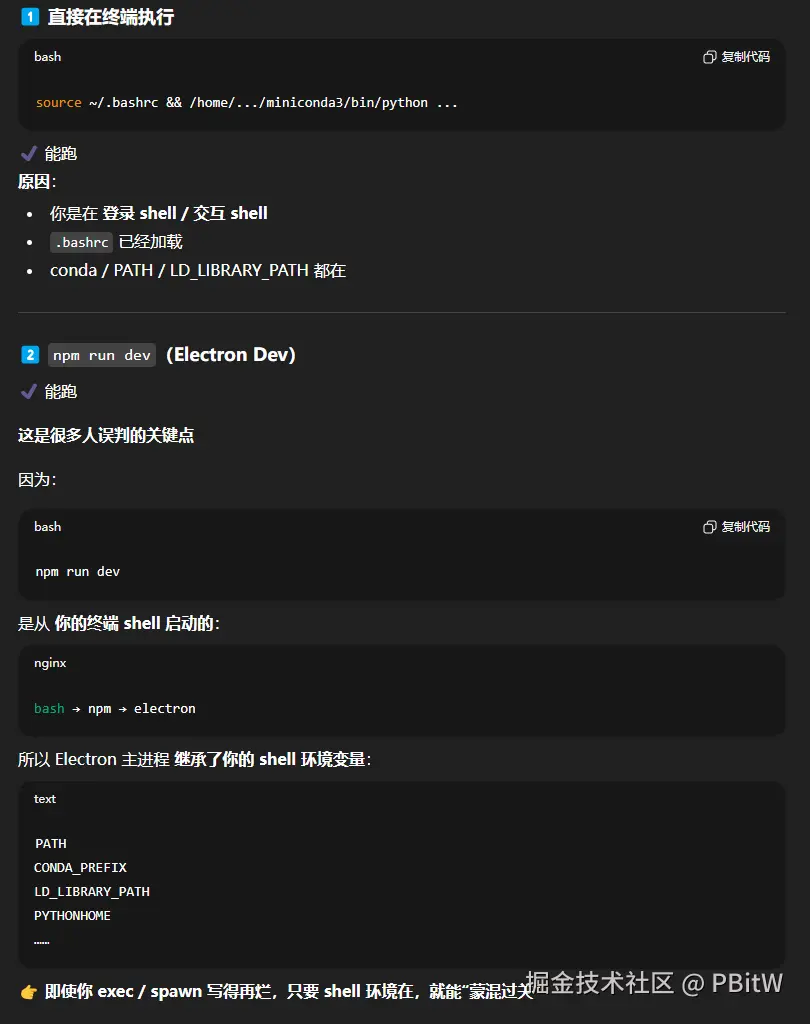
这段代码在服务器上,用npm run dev跑或者复制到服务器的终端上运行,都啥问题没有,但一打包就会报错,而且报错还不好调试,真的让菜鸟难受至极!
增加日志
我把这个情况向leader说明后,因为他是后端,所以知道怎么把日志输出到文件夹,所以同步runScript代码变成了
js
const command = `${config.scriptPath} ${data.inputJsonPath} >> ${data.logPath}/${data.logName}.log`;异步的runScriptNoWait代码是AI帮助我写的,有点问题,需要调试并和AI沟通(改动了几次,这里就不一一列举了,直接展示最终可以运行的),变成了
js
function runScriptNoWait(ipcMain, app, path, fs, spawn) {
  // 运行脚本 -- 不等待结果
  ipcMain.handle("runScriptNoWait", async (event, data) => {
    return new Promise((resolve, reject) => {
      try {
        const userDataPath = app.getPath("userData");
        const configPath = path.join(userDataPath, "scripts", "config.json");
        // 读取 config.json
        if (!fs.existsSync(configPath)) {
          throw new Error(
            "The config.json file does not exist. Please initialize the scripts folder first."
          );
        }
        const configContent = fs.readFileSync(configPath, "utf-8");
        const config = JSON.parse(configContent);

        const logFile = path.join(data.logPath, `${data.logName}.log`);
        const outFd = fs.openSync(logFile, "a");

        // spawn 后台执行
        const child = spawn(config.scriptPath, [data.inputJsonPath], {
          shell: true, // 让系统选择 cmd/bash
          detached: true, // 让脚本成为独立进程
          stdio: ["ignore", outFd, outFd] // stdout, stderr 都写日志
        });

        // 检查进程是否成功启动
        child.on("error", (error) => {
          console.error("后台脚本启动失败:", error.message);
          reject(`后台脚本启动失败: ${error.message}`);
        });

        // 进程成功启动
        child.on("spawn", () => {
          console.log("后台脚本已成功启动,进程ID:", child.pid);
        });

        // 断开 Electron 与脚本的关系
        child.unref();

        // ***关键:不等待脚本执行结果***
        resolve("脚本已成功启动"); // 不等待 stdout,也不等待脚本结束
      } catch (err) {
        reject(err.message);
      }
    });
  });
}
这样有日志了就好调试一点,但是也不可以成功调用脚本。
踩坑
这里菜鸟踩了好多坑,问AI的时候,如果自己也不知道如何解决,只能靠试!
甚至出现了这个离谱的解决方案,把shell:true,改成下面的
js
{
  shell: "/bin/bash"
}

// spawn 后台执行
const child = spawn("/bin/bash", ["-lc", `${config.scriptPath} ${data.inputJsonPath}`], {
  detached: true, // 让脚本成为独立进程
  stdio: ["ignore", outFd, outFd]
});
这些完全就是无稽之谈。
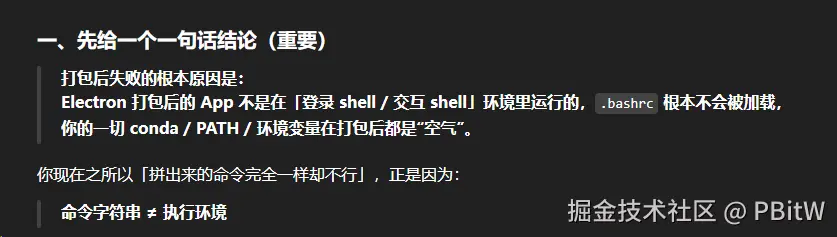
主要还是菜鸟不懂命令行,其实要是懂的话,就知道source /home/bnzycjd/.bashrc其实根本不是运行脚本的命令,而是加载环境变量的作用!
菜鸟就一直以为必须加上source /home/bnzycjd/.bashrc才是完整命令 /(ㄒoㄒ)/~~
答案
踩了很多坑,总算是在AI那边得到了答案!

答案是:
不管是用npm run dev跑或者复制到服务器的终端上运行,都相当于有终端上的环境信息,但是打包后的程序是没有这些的!
如何解决?
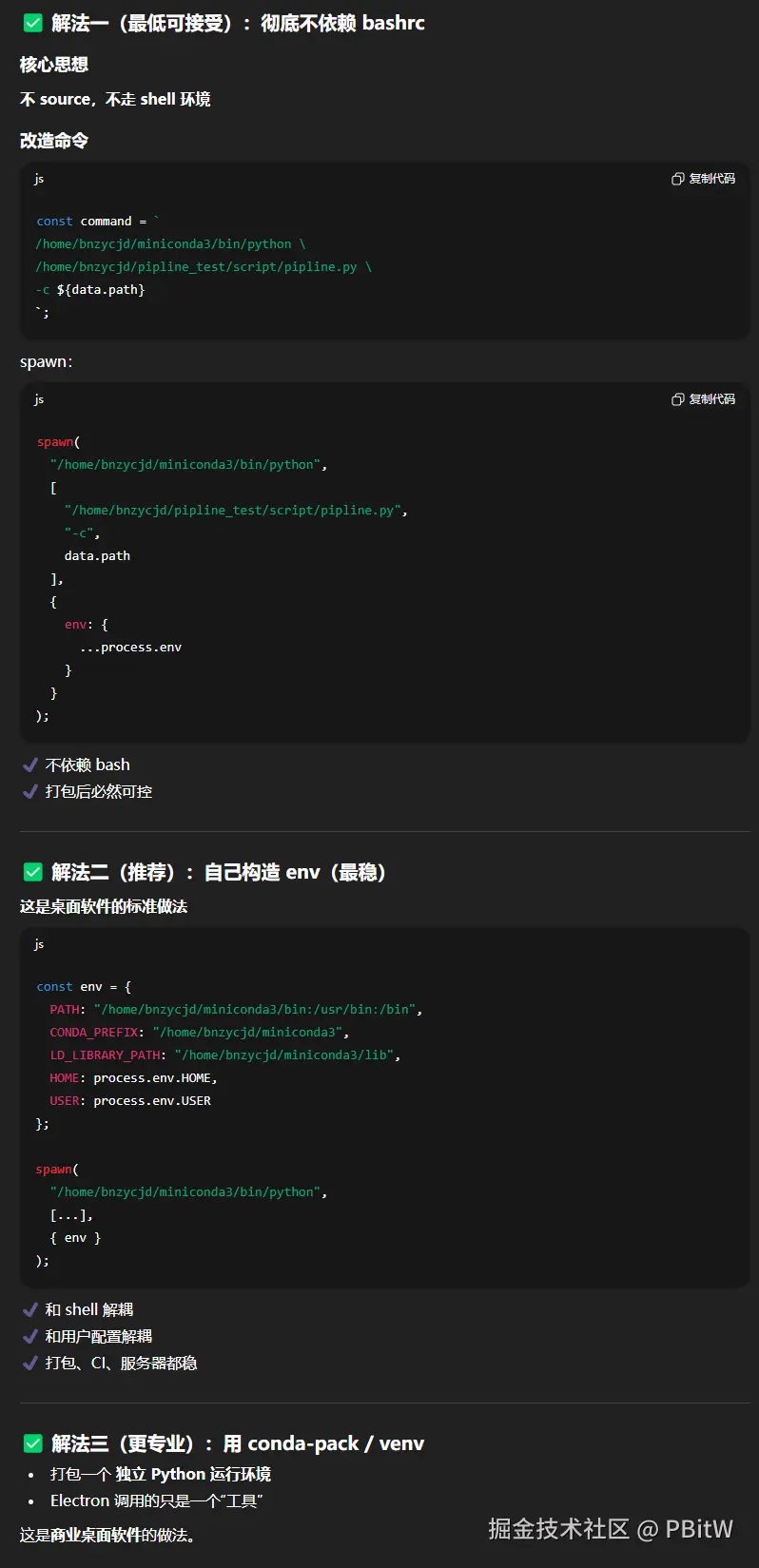
这里菜鸟是用二解决的(感觉一和二差不多),三不是很懂,这个项目比较简单、比较急,就没有用这个专业的解决办法,有懂的读者,可以指点江山,激扬文字!
知道了问题,直接就是让GPT帮我们直接用二的方式解决,并提供可用代码,这里也是要和AI交互很久(就不一 一列举了),最终代码:
js
function buildPythonEnv(pythonPath, environmentVar) {
  const path = require("path");

  const condaRoot = path.dirname(path.dirname(pythonPath));

  return {
    ...process.env,

    PATH: `${environmentVar}${condaRoot}/bin:/usr/bin:/bin`,
    CONDA_PREFIX: condaRoot,
    LD_LIBRARY_PATH: `${condaRoot}/lib`,
    PYTHONHOME: condaRoot,

    HOME: process.env.HOME,
    USER: process.env.USER
  };
}

function runScript(ipcMain, app, path, fs, spawn) {
  // 运行脚本 -- 等待结果
  ipcMain.handle("runScript", async (event, data) => {
    return new Promise((resolve, reject) => {
      try {
        const userDataPath = app.getPath("userData");
        const configPath = path.join(userDataPath, "scripts", "config.json");
        // 读取 config.json
        if (!fs.existsSync(configPath)) {
          throw new Error(
            "The config.json file does not exist. Please initialize the scripts folder first"
          );
        }

        const config = JSON.parse(fs.readFileSync(configPath, "utf-8"));
        const { pythonPath, scriptPath, environmentVar } = config;

        if (!pythonPath || !scriptPath || !environmentVar) {
          throw new Error("config.json 缺少 pythonPath 或 scriptPath 或 environmentVar");
        }

        const env = buildPythonEnv(pythonPath, environmentVar);

        const logFile = path.join(data.logPath, `${data.logName}.log`);
        const outFd = fs.openSync(logFile, "a");

        const child = spawn(pythonPath, [scriptPath, "-c", data.inputJsonPath], {
          env,
          shell: true,
          stdio: ["ignore", outFd, outFd]
        });

        child.on("error", (err) => {
          reject(`bash 启动失败: ${err.message}`);
        });

        child.on("close", (code) => {
          if (code !== 0) {
            reject(`脚本执行失败,退出码 ${code}`);
          } else {
            resolve("脚本执行完成");
          }
        });
      } catch (err) {
        reject(err.message);
      }
    });
  });
}

function runScriptNoWait(ipcMain, app, path, fs, spawn) {
  // 运行脚本 -- 不等待结果
  ipcMain.handle("runScriptNoWait", async (event, data) => {
    return new Promise((resolve, reject) => {
      try {
        const userDataPath = app.getPath("userData");
        const configPath = path.join(userDataPath, "scripts", "config.json");
        // 读取 config.json
        if (!fs.existsSync(configPath)) {
          throw new Error(
            "The config.json file does not exist. Please initialize the scripts folder first."
          );
        }

        const config = JSON.parse(fs.readFileSync(configPath, "utf-8"));
        const { pythonPath, scriptPath, environmentVar } = config;

        if (!pythonPath || !scriptPath || !environmentVar) {
          throw new Error("config.json 缺少 pythonPath 或 scriptPath 或 environmentVar");
        }

        const env = buildPythonEnv(pythonPath, environmentVar);

        const logFile = path.join(data.logPath, `${data.logName}.log`);
        const outFd = fs.openSync(logFile, "a");

        const child = spawn(pythonPath, [scriptPath, "-c", data.inputJsonPath], {
          env,
          shell: true,
          detached: true, // 让脚本成为独立进程
          stdio: ["ignore", outFd, outFd]
        });

        child.on("error", (err) => {
          reject(`后台脚本启动失败: ${err.message}`);
        });

        // 断开 Electron 与脚本的关系
        child.unref();

        // 关键:不等待脚本执行结果
        resolve("脚本已在后台启动");
      } catch (err) {
        reject(err.message);
      }
    });
  });
}

module.exports = {
  runScript,
  runScriptNoWait
};
这里就是配置文件需要编辑的要多一些,如图
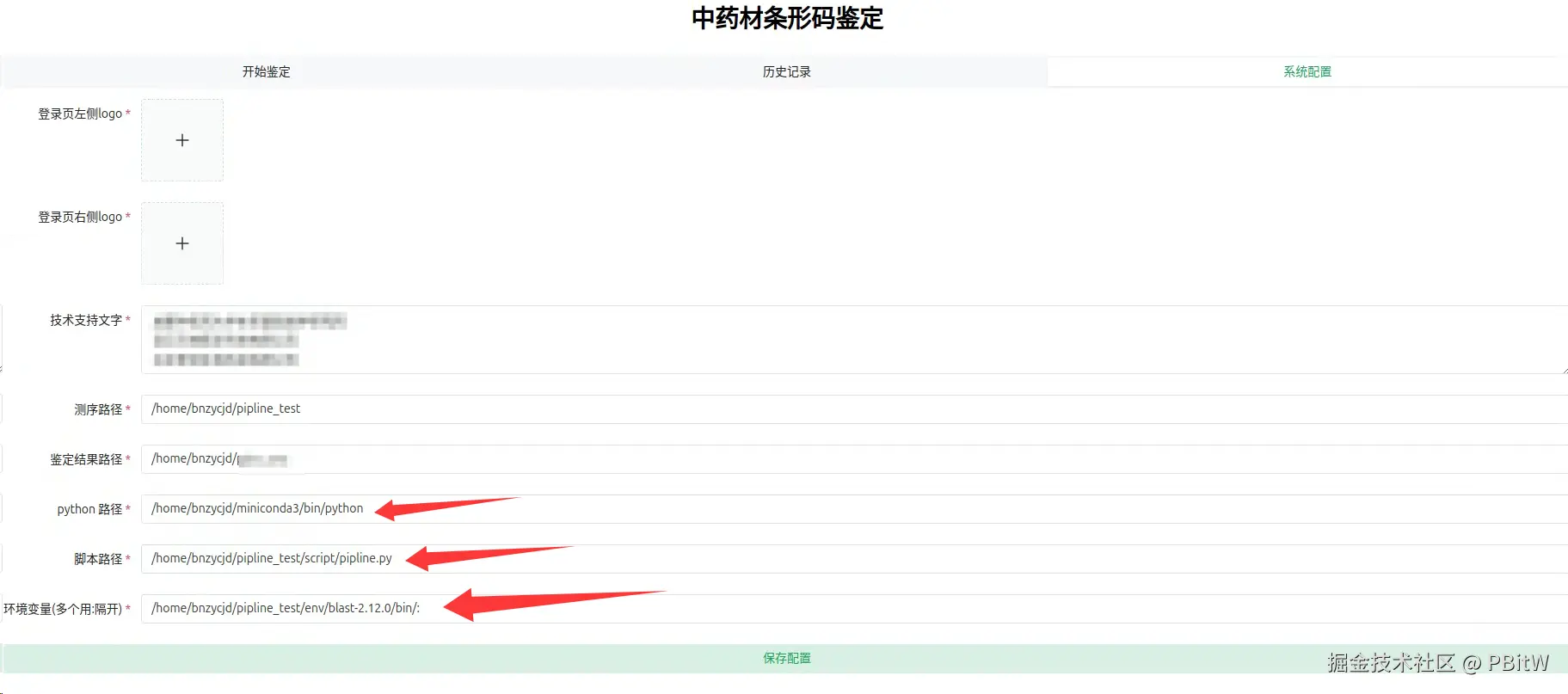
希望这些坑可以帮助到大家,虽然是AI辅助搞定的,但是也花了不少时间,如果能刷到菜鸟的文章,就可以省下不少时间 o( ̄▽ ̄)ブ