1.背景描述
在网络购物日益普及的场景下,用户需要一个轻量、高效的在线商城系统,实现商品浏览、搜
索、登录验证等核心功能。当前部分简易商城系统存在功能冗余、运行依赖复杂等问题,而本系统
基于 C 语言开发,无需复杂运行环境,可快速部署在 Linux 平台。
该系统将整合 Web 服务器、SQLite 数据库查询、静态页面展示等功能,支持用户登录验证、商
品搜索、商品详情查看等核心操作,让用户通过浏览器即可完成基础购物相关查询操作,满足简易
场景下的商城使用需求。
2.主要功能实现
(1)登录商城(没有账号可以进行注册)
(2)登陆后进入商品页,可以搜索商品
(3)点击商品查看商品详情。
3.结构框图
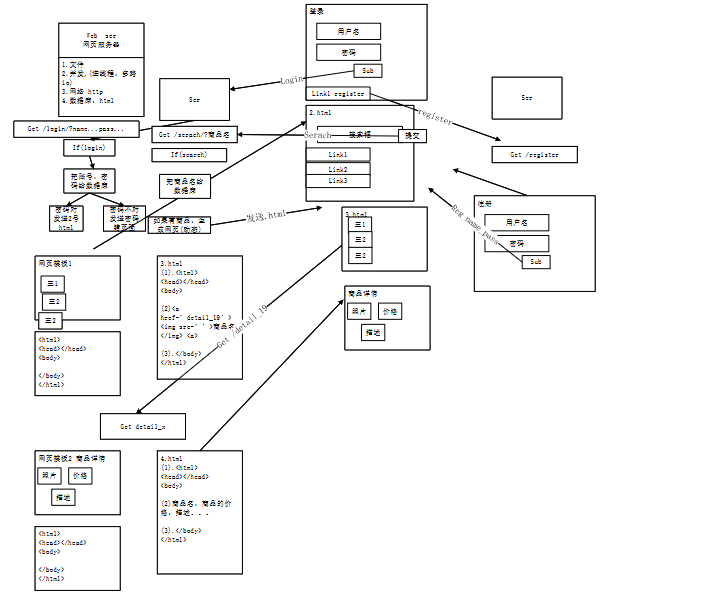
4.代码实现
(1)设计登录界面,注册界面,搜索界面以及商品详情页四个html文件
可根据
html
<style>
      body{
        background-image: url(5.jpg);
      }
    </style>
为不同界面添加背景图。
登陆界面
html
<body>
<div class="login-box">
<h2 align=center>用户登录</h2>
<form action="http://127.0.0.1:80/login" method="GET">
<div class="form-item">
<h3 align=center><label for="username">用户名</label>
<input type="text" id="username" name="username" placeholder="请输入用户名" required></h3>
</div>
<div class="form-item">
<h3 align=center><label for="password">密    码</label>
<input type="password" id="password" name="password" placeholder="请输入密码" required></h3>
</div>
<h3 align=center><button type="submit" class="login-btn">登录</button></h3>
</form>
<div class="register-link">
<h3 align=center>还没有账号?<a href="http://127.0.0.1:80/register.html">立即注册</a></h3>
</div>
</div>
</body>注册界面
html
<body>
<div class="register-box">
<h2 align="center">用户注册</h2>
<form action="http://127.0.0.1:80/register_submit" method="GET">
<div class="form-item">
<h3 align="center"><label for="username">用  户  名</label>
<input type="text" id="username" name="username" placeholder="请输入用户名" required></h3>
</div>
<div class="form-item">
<h3 align="center"><label for="password">密        码</label>
<input type="password" id="password" name="password" placeholder="请输入密码" required></h3>
</div>
<div class="form-item">
<h3 align="center"><label for="password2">确认密码</label>
<input type="password" id="password2" name="password2" placeholder="请再次输入密码" required></h3>
</div>
<h3 align="center"><button type="submit" class="register-btn">注册</button></h3>
</form>
</div>
</body>搜索界面
html
<body>
    <div class="nav">
        <a href="http://127.0.0.1:80/01.html">返回商品首页</a> |
        <a href="http://127.0.0.1:80/">退出登录</a>
    </div>

    <div class="search-box">
        <input type="text" placeholder="请输入商品名称搜索...">
        <button>搜索</button>
    </div>

    <h2 class="result-title">暂无搜索结果,请返回商品首页浏览</h2>
</body>
商品详情页
html
<body>
    <div class="nav">
        <a href="http://127.0.0.1:80/">退出登录</a>
    </div>

    <!-- 搜索框区域 -->
    <div class="search-container">
        <input type="text" id="search-input" placeholder="请输入商品名称">
        <button onclick="searchGoods()">搜索</button>
    </div>

    <!-- 无结果提示 -->
    <div class="no-result" id="no-result">暂无商品</div>

    <!-- 商品列表区域 -->
    <div class="goods-list" id="goods-list">
        <div class="goods-item show" data-name="苹果">
            <img src="http://127.0.0.1:80/1.jpg" alt="苹果">
            <h3>苹果</h3>
            <p class="price">¥4399.00</p>
            <a href="http://127.0.0.1:80/goods?id=1">查看详情</a>
        </div>
        //可根据以上描述添加其他物品信息

    <script>
        // 搜索商品函数
        function searchGoods() {
            // 获取搜索关键词
            const keyword = document.getElementById('search-input').value.trim().toLowerCase();
            const goodsItems = document.querySelectorAll('.goods-item');
            const noResult = document.getElementById('no-result');
            let hasMatch = false;

            // 遍历所有商品
            goodsItems.forEach(item => {
                // 获取商品名称并转为小写
                const goodsName = item.getAttribute('data-name').toLowerCase();

                // 如果关键词为空,显示所有商品
                if (keyword === '') {
                    item.classList.add('show');
                    hasMatch = true;
                }
                // 否则匹配关键词
                else if (goodsName.includes(keyword)) {
                    item.classList.add('show');
                    hasMatch = true;
                }
                // 不匹配则隐藏
                else {
                    item.classList.remove('show');
                }
            });

            // 显示/隐藏无结果提示
            noResult.style.display = hasMatch ? 'none' : 'block';
        }

        // 支持回车搜索
        document.getElementById('search-input').addEventListener('keypress', function(e) {
            if (e.key === 'Enter') {
                searchGoods();
            }
        });

        // 页面加载时显示所有商品
        window.onload = function() {
            searchGoods();
        };
    </script>
</body>
可以添加不同的商品信息。
(2)相关代码示例
cpp
#include <fcntl.h>
#include <netinet/in.h>
#include <netinet/ip.h>
#include <stdio.h>
#include <stdlib.h>
#include <string.h>
#include <sys/socket.h>
#include <sys/types.h>
#include <unistd.h>

typedef struct sockaddr*(SA);

// 文件类型枚举
typedef enum {
    FILE_HTML,
    FILE_PNG,
    FILE_JPG
} FILE_TYPE;

// 模拟用户存储
typedef struct {
    char username[32];
    char password[32];
} User;
User users[100];
int user_count = 0;

// 检查用户
int check_user(const char* name, const char* pass) {
    for (int i = 0; i < user_count; i++) {
        if (strcmp(users[i].username, name) == 0 && strcmp(users[i].password, pass) == 0) {
            return i;
        }
    }
    return -1;
}

// 注册用户
int register_user(const char* name, const char* pass) {
    for (int i = 0; i < user_count; i++) {
        if (strcmp(users[i].username, name) == 0) {
            return -1;
        }
    }
    if (user_count < 100) {
        strncpy(users[user_count].username, name, 31);
        strncpy(users[user_count].password, pass, 31);
        user_count++;
        return 0;
    }
    return -2;
}

// 发送文件
int send_file(int conn, char* filename, FILE_TYPE type) {
    char content_type[64];
    if (type == FILE_HTML) strcpy(content_type, "text/html;charset=utf-8");
    else if (type == FILE_PNG) strcpy(content_type, "image/png");
    else if (type == FILE_JPG) strcpy(content_type, "image/jpeg");

    int fd = open(filename, O_RDONLY);
    if (fd == -1) {
        char resp[512];
        sprintf(resp, "HTTP/1.1 404 Not Found\r\nContent-Type: text/html\r\nConnection: close\r\nContent-Length: %ld\r\n\r\n<h1>文件不存在</h1>", strlen("<h1>文件不存在</h1>"));
        send(conn, resp, strlen(resp), 0);
        return 1;
    }

    // 获取文件大小
    long size = lseek(fd, 0, SEEK_END);
    lseek(fd, 0, SEEK_SET);

    // 发送响应头
    char header[512];
    sprintf(header, "HTTP/1.1 200 OK\r\nContent-Type: %s\r\nContent-Length: %ld\r\nConnection: close\r\n\r\n", content_type, size);
    send(conn, header, strlen(header), 0);

    // 发送文件内容
    char buf[4096];
    ssize_t n;
    while ((n = read(fd, buf, sizeof(buf))) > 0) {
        send(conn, buf, n, 0);
    }
    close(fd);
    return 0;
}

// 发送文本响应
void send_text(int conn, const char* status, const char* content) {
    char resp[2048];
    sprintf(resp, "HTTP/1.1 %s\r\nContent-Type: text/html;charset=utf-8\r\nConnection: close\r\nContent-Length: %ld\r\n\r\n%s", status, strlen(content), content);
    send(conn, resp, strlen(resp), 0);
}
void send_goods_page(int conn, int goods_id) {
    // 商品数据
    const char* names[4] = {"苹果", "小米", "oppo", "三星"};
    float prices[4] = {4399.00, 2999.00, 3299.00, 2599.00};
    int stocks[4] = {1000, 800, 500, 1200};
    const char* colors[4] = {"白色/黑色/灰色", "蓝色/黑色/浅蓝", "白色/黑色/米色", "黑色/白色/灰色"};

    // 确保ID有效
    if (goods_id < 1 || goods_id > 4) goods_id = 1;
    int idx = goods_id - 1;

    // 硬编码商品详情页HTML
    char html[8192];
    sprintf(html,
        "<!DOCTYPE html>"
        "<html lang='zh-CN'>"
        "<head>"
        "<meta charset='UTF-8'>"
        "<title>%s - 商品商城</title>"
        "<style>"
        "* {margin:0;padding:0;box-sizing:border-box;}"
        "body {font-family:'Microsoft YaHei';margin:50px;background:#f9f9f9;}"
        ".nav {margin-bottom:30px;padding-bottom:10px;border-bottom:1px solid #eee;}"
        "a {color:#0088ff;text-decoration:none;margin-right:10px;}"
        "a:hover {text-decoration:underline;}"
        ".goods-detail {display:flex;gap:30px;padding:20px;background:white;border-radius:8px;box-shadow:0 2px 8px rgba(0,0,0,0.08);}"
        ".goods-img img {width:300px;height:220px;object-fit:cover;border:1px solid #eee;border-radius:4px;}"
        ".thumb-img {margin-top:10px;}"
        ".thumb-img img {width:80px;height:60px;margin-right:5px;object-fit:cover;cursor:pointer;border:1px solid #eee;border-radius:4px;}"
        ".goods-info h2 {margin-bottom:15px;color:#e64340;font-size:20px;}"
        ".goods-info p {margin:10px 0;font-size:16px;color:#555;}"
        ".goods-info .price {font-size:22px;color:#e64340;font-weight:bold;}"
        ".goods-info button {padding:10px 25px;background:#e64340;color:white;border:none;border-radius:4px;cursor:pointer;margin-right:10px;margin-top:15px;}"
        "</style>"
        "</head>"
        "<body>"
        "<div class='nav'>"
        "<a href='http://127.0.0.1:80/01.html'>返回商品首页</a> | "
        "<a href='http://127.0.0.1:80/'>退出登录</a>"
        "</div>"
        "<div class='goods-detail'>"
        "<div class='goods-img'>"
        "<img src='http://127.0.0.1:80/%d.jpg' alt='商品图片' id='main-img'>"
        "</div>"
        "<div class='goods-info'>"
        "<h2>%s</h2>"
        "<p class='price'>价格:¥%.2f</p>"
        "<p>库存:%d</p>"
        "<p>颜色:%s</p>"
        "</div>"
        "</div>"
        "<script>"
        "function changeImg(n){document.getElementById('main-img').src='http://127.0.0.1:80/'+n+'.jpg';}"
        "</script>"
        "</body>"
        "</html>",
        names[idx], goods_id, names[idx], prices[idx], stocks[idx],colors[idx]
    );

    // 发送响应
    char resp[8192];
    sprintf(resp, "HTTP/1.1 200 OK\r\nContent-Type: text/html;charset=utf-8\r\nConnection: close\r\nContent-Length: %ld\r\n\r\n%s", strlen(html), html);
    send(conn, resp, strlen(resp), 0);
}

int main() {
    // 初始化测试用户
    strcpy(users[0].username, "zhangsan");
    strcpy(users[0].password, "123");
    user_count = 1;

    // 创建套接字
    int listen_fd = socket(AF_INET, SOCK_STREAM, 0);
    if (listen_fd == -1) {
        perror("socket error");
        return 1;
    }

    // 端口复用
    int opt = 1;
    setsockopt(listen_fd, SOL_SOCKET, SO_REUSEADDR, &opt, sizeof(opt));

    // 绑定地址
    struct sockaddr_in server_addr;
    memset(&server_addr, 0, sizeof(server_addr));
    server_addr.sin_family = AF_INET;
    server_addr.sin_addr.s_addr = INADDR_ANY;
    server_addr.sin_port = htons(80);

    if (bind(listen_fd, (SA)&server_addr, sizeof(server_addr)) == -1) {
        perror("bind error");
        close(listen_fd);
        return 1;
    }

    // 监听
    if (listen(listen_fd, 10) == -1) {
        perror("listen error");
        close(listen_fd);
        return 1;
    }
    printf("账号:zhangsan / 123\n");

    // 主循环
    while (1) {
        struct sockaddr_in client_addr;
        socklen_t client_len = sizeof(client_addr);
        int conn_fd = accept(listen_fd, (SA)&client_addr, &client_len);
        if (conn_fd == -1) {
            perror("accept error");
            continue;
        }

        // 读取请求
        char buf[2048];
        ssize_t n = read(conn_fd, buf, sizeof(buf)-1);
        if (n <= 0) {
            close(conn_fd);
            continue;
        }
        buf[n] = '\0';

        // 解析请求路径
        char* method = strtok(buf, " ");
        char* path = strtok(NULL, " ");
        if (!method || !path) {
            close(conn_fd);
            continue;
        }

        // 路由处理
        if (strcmp(method, "GET") == 0) {
            // 登录页
            if (strcmp(path, "/") == 0 || strcmp(path, "/03.html") == 0) {
                send_file(conn_fd, "./03.html", FILE_HTML);
            }
            // 登录请求
            else if (strncmp(path, "/login", 6) == 0) {
                char* name = strstr(path, "username=");
                char* pass = strstr(path, "password=");
                if (name && pass) {
                    name += 9; pass += 9;
                    char* end = strchr(name, '&'); if (end) *end = '\0';
                    end = strchr(pass, '&'); if (end) *end = '\0';
                    if (check_user(name, pass) != -1) {
                        send_file(conn_fd, "./01.html", FILE_HTML);
                    } else {
                        send_file(conn_fd, "./04.html", FILE_HTML);
                    }
                } else {
                    send_text(conn_fd, "400 Bad Request", "<h1>参数错误</h1>");
                }
            }
            // 注册页
            else if (strcmp(path, "/register.html") == 0) {
                send_file(conn_fd, "./register.html", FILE_HTML);
            }
            // 注册请求
            else if (strncmp(path, "/register_submit", 15) == 0) {
                char* name = strstr(path, "username=");
                char* pass = strstr(path, "password=");
                char* pass2 = strstr(path, "password2=");
                if (name && pass && pass2) {
                    name += 9; pass += 9; pass2 += 10;
                    char* end = strchr(name, '&'); if (end) *end = '\0';
                    end = strchr(pass, '&'); if (end) *end = '\0';
                    end = strchr(pass2, '&'); if (end) *end = '\0';
                    if (strcmp(pass, pass2) != 0) {
                        send_text(conn_fd, "200 OK", "<h1>注册失败:两次密码不一致</h1><a href='http://127.0.0.1:80/register.html'>重新注册</a>");
                    } else if (register_user(name, pass) == -1) {
                        send_text(conn_fd, "200 OK", "<h1>注册失败:用户名已存在</h1><a href='http://127.0.0.1:80/register.html'>重新注册</a>");
                    } else {
                        send_text(conn_fd, "200 OK", "<h1>注册成功!</h1><a href='http://127.0.0.1:80/'>立即登录</a>");
                    }
                } else {
                    send_text(conn_fd, "400 Bad Request", "<h1>参数错误</h1>");
                }
            }
            // 商品首页(包含搜索功能)
            else if (strcmp(path, "/01.html") == 0) {
                send_file(conn_fd, "./01.html", FILE_HTML);
            }
            // 登录失败页
            else if (strcmp(path, "/04.html") == 0) {
                send_file(conn_fd, "./04.html", FILE_HTML);
            }
            // 搜索页(重定向到商品首页)
            else if (strcmp(path, "/search.html") == 0 || strncmp(path, "/search", 7) == 0) {
                send_file(conn_fd, "./01.html", FILE_HTML);
            }
            // 商品详情页
            else if (strncmp(path, "/goods", 6) == 0) {
                int goods_id = 1;
                char* id_str = strstr(path, "id=");
                if (id_str) goods_id = atoi(id_str + 3);
                send_goods_page(conn_fd, goods_id);
            }
            // 图片资源
            else if (strstr(path, ".jpg") || strstr(path, ".png")) {
                char file_path[256];
                sprintf(file_path, ".%s", path);
                send_file(conn_fd, file_path, strstr(path, ".png") ? FILE_PNG : FILE_JPG);
            }
            // 404
            else {
                send_text(conn_fd, "404 Not Found", "<h1>页面不存在</h1><a href='http://127.0.0.1:80/'>返回首页</a>");
            }
        }

        close(conn_fd);
    }

    close(listen_fd);
    return 0;
}
5.结果展示
在线商城