ffi-napi运行失败:No native build was found,报错如下:
javascript
renderer.dev.js:113102 Uncaught Error: No native build was found for platform=win32 arch=x64 runtime=electron abi=76 uv=1 libc=glibc
    at Function.module.exports../node_modules/node-gyp-build/index.js.load.path (renderer.dev.js:113102)
    at load (renderer.dev.js:113067)
    at Object../node_modules/ref-napi/lib/ref.js (renderer.dev.js:184979)
    at __webpack_require__ (renderer.dev.js:771)
    at fn (renderer.dev.js:131)
    at Object../node_modules/ffi-napi/lib/ffi.js (renderer.dev.js:89883)
    at __webpack_require__ (renderer.dev.js:771)
    at fn (renderer.dev.js:131)
    at Module.<anonymous> (renderer.dev.js:26630)
at Module../app/services/webdav-io.ts (renderer.dev.js:27293)解决办法:这是由于在build的时候找不到可运行的.node文件导致的,需要在webpack手动加入node文件,一般文件命名为webpack.config.js ,参考代码如下,也就是要给plugins和externals里加上ffi_napi :
javascript
const CopyWebpackPlugin = require('copy-webpack-plugin');
const path = require('path');
// 给后端配置追加 CopyWebpackPlugin,复制 .node 文件到正确路径
nodeConfig.config.plugins.push(
    new CopyWebpackPlugin({
        patterns: [
            // 复制 ref-napi 的 .node 文件到 lib/backend/native/ 下(匹配 Theia 的 node-loader 配置)
            {
                from: path.resolve(__dirname, '../../node_modules/ref-napi/build/Release/ref_napi.node'),
                to: path.resolve(__dirname, 'lib/backend/native/ref_napi.node'),
                force: true // 强制覆盖已有文件
            },
            // 复制 ffi-napi 的 .node 文件
            {
                from: path.resolve(__dirname, '../../node_modules/@napi-ffi/ffi-napi/build/Release/ffi_napi.node'),
                to: path.resolve(__dirname, 'lib/backend/native/ffi_napi.node'),
                force: true
            }
        ]
    })
);

// 给后端配置追加 externals,排除原生模块打包
nodeConfig.config.externals = {
    ...nodeConfig.config.externals, // 保留原有 externals
    "ref-napi": "commonjs ref-napi",
    "@napi-ffi/ffi-napi": "commonjs @napi-ffi/ffi-napi"
};
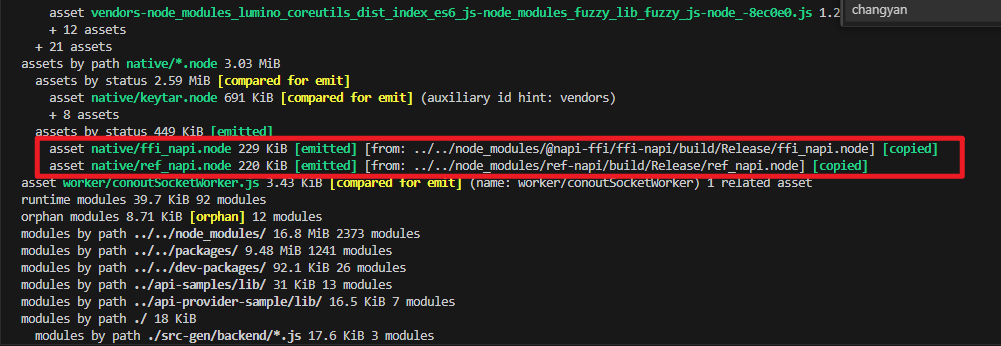
然后重新构建,可以看到成功不报错了:
如果是在之后Electron使用过程中遇到了External buffers are not allowed 报错问题,请参考我的这篇文章解决:https://blog.csdn.net/changyana/article/details/156726286