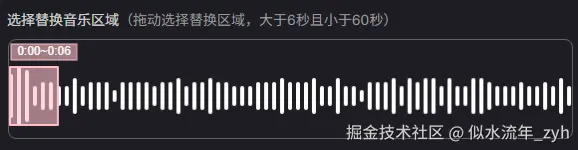
<template>
  <div class="slide-canvas" ref="boxRef" v-loading="loading">
    <canvas class="canvas" ref="slideCanvasRef"></canvas>
    <canvas class="canvas" ref="timeCanvasRef"></canvas>
    <canvas
      class="canvas"
      ref="slideTopCanvasRef"
      @mousedown="startDrawing"
      @mousemove="moveDraw"
      @mouseup="stopDrawing"
      @mouseleave="stopDrawing"
    ></canvas>
  </div>
</template>

<script setup>
import { onMounted, ref } from "vue";
import { AudioOfflineAnalyzer } from "./componsion.js";
import { formatTime } from '@/utils/utils.js'
// 展示图
const slideCanvasRef = ref(null);
const slideCtx = ref(null);
// 矩形拖动图
const slideTopCanvasRef = ref(null);
const slideTopCtx = ref(null);
// 时间展示图
const timeCanvasRef = ref(null);
const timeCtx = ref(null);
// 初始化
const initCanvas = () => {
  const canvas = slideCanvasRef.value;
  const topCanvas = slideTopCanvasRef.value;
  const timeCanvas = timeCanvasRef.value;

  // 设置实际 Canvas 尺寸
  canvas.width = width;
  canvas.height = height;
  topCanvas.width = width;
  topCanvas.height = height;

  timeCanvas.width = width;
  timeCanvas.height = height;

  slideCtx.value = canvas.getContext("2d");
  slideTopCtx.value = topCanvas.getContext("2d");
  timeCtx.value = timeCanvas.getContext("2d");
  const ctx = slideCtx.value;

  // console.log(width, height);
  // 清空画布
  ctx.clearRect(0, 0, canvas.width, canvas.height);
};

const maxWidth = ref('0');

let isDragging = false; // true 开始拖动
let isOffset = false; // true offset开始拖动

let scale = 1; // 展示图缩放

let isScale = false; // true 开始拉伸
let dragStartX = 0; // 拖动距离x
let dragStartY = 0; // 拖动距离Y
let reatW = 0; // 矩形宽度
let reatH = 0; // 矩形高度

let offsetX = 0; // 展示图平移距离

let leftX = -1; // 拉左侧矩形边框计算距离
let rightX = -1; // 拉右侧矩形边框计算距离

const topTimeHeight = 14; // 展示图上部留有的距离,用于更好的展示时间
const contentPadding = 26; // 展示图上下的内边距, 个15
const timeWidht = 66; // 展示时间的宽度,便于计算展示时间中点

// 最小展示宽度 6 秒
const minCount = 6;
const maxCount = 60;

const secondW = 4; // 没一秒音频的宽度
const reatBorderW = 2; // 矩形边框宽度
const gap = 4; // 没一秒的音频间隔
const startX = 2; // 开始设置左侧内边距的距离

const endX = -2; // 开始设置右侧侧内边距的距离,应该是负数或0 , 结束秒是带音频间隔的
// 矩形展示高度
let rH = 0;
// 矩形Y轴中点
let centerY = 0;
// 矩形开始Y轴 与 结束 Y 轴
let startY = 0;
let endY = 0;

let showTimeOption = 'center'

let LPCanvas = null; // 离屏,绘制整个音乐的频率图
let LPCanvasW = 0; // 离屏的宽度,根据数据计算
let startTime = 0; // 选择的开始时间,暴露出去
let endTime = 0; // 选择的结束时间,暴露出去

const boxRef = ref(null); // 包裹canvas盒子,用于计算展示高宽
let width = 0; // 包裹canvas盒子 宽
let height = 0; // 包裹canvas盒子 高
let duration = 0; // 音乐文件时长

let audioUploadPL = null; // 音频文件对象,
const audioPLList = ref([]); // 音频文件 频率列表,用于展示每一秒的频率不同
const loading = ref(false); // 切换音频,加载音频文件过渡

let pointArr = null; // 矩形 计算时间段的4个点数据
// 获取时间并画出展示时间
const getTime = () => {
  if (duration) {
    let s = Math.round(
      ((offsetX + pointArr.leftTop[0]) / LPCanvasW) * duration
    ) || 0;
    let e = Math.round(
      ((offsetX + pointArr.rightBottom[0]) / LPCanvasW) * duration
    ) || 0;
    startTime = formatTime(s)
    endTime = formatTime(e)
    creatText(
      pointArr.leftTop[0] + (pointArr.rightBottom[0] - pointArr.leftTop[0]) / 2
    );
  }
};
// 画展示时间
const creatText = (x) => {
  const ctx = timeCtx.value;
  ctx.clearRect(0, 0, width, height);

  // 文字内容
  const text = `${startTime}~${endTime}`;

  // 设置字体样式
  ctx.font = "12px Arial";

  // 计算文字宽度
  const textWidth = ctx.measureText(text).width;

  // 矩形参数
  const padding = 4;  // 内边距
  const rectWidth = timeWidht;
  const rectHeight = 16;  // 包含上下内边距

  let rectX = x - rectWidth / 2;  // 矩形水平居中
  let tx = x
  if (reatW < rectWidth) {
    if (pointArr.leftTop[0] < 10) {
      rectX = x - rectWidth / 2 + 10
      tx = tx + 10
    }
    if (pointArr.rightTop[0] > width - 10) {
      rectX = x - rectWidth / 2 - 10
      tx = tx - 10
    }
  }
  const rectY = topTimeHeight - 10;  // 矩形位置

  // 绘制矩形背景
  ctx.fillStyle = "#ffc0cb96";  // 半透明粉色背景
  ctx.fillRect(rectX, rectY, rectWidth, rectHeight);

  // 绘制矩形边框
  ctx.strokeStyle = "pink";
  ctx.lineWidth = 1;
  ctx.strokeRect(rectX, rectY, rectWidth, rectHeight);

  // 绘制文字
  ctx.fillStyle = "#ffffff";
  ctx.textAlign = "center";  // 水平居中
  ctx.textBaseline = "middle";  // 垂直居中
  ctx.fillText(text, tx, rectY + rectHeight / 2);  // 在矩形中心绘制文字
};

// 绘制离屏 Canvas
const creatCanvas = (arr) => {
  const canvas = document.createElement("canvas");
  canvas.height = height;
  const w = gap + secondW;
  // 每个数据都是4的宽度,4的间隔 再加上left 的 4 内边距
  LPCanvasW = arr.length * w + startX + endX;
  canvas.width = LPCanvasW;
  const ctx = canvas.getContext("2d");
  ctx.strokeStyle = "white";
  ctx.lineWidth = secondW;
  ctx.lineCap = "round"; // 设置线条端点为圆角
  // ctx.lineJoin = "round"; // 设置线条连接处为圆角

  // const centerY = height / 2;

  const minH = Math.round((rH + 5) / 8);

  for (let index = 0; index < arr.length; index++) {
    const type = arr[index].type;
    const startY = centerY - (minH * type) / 2;
    const endY = centerY + (minH * type) / 2;

    const statrPoint = [startX + index * w, startY];
    const endPoint = [startX + index * w, endY];

    ctx.beginPath();
    ctx.moveTo(statrPoint[0], statrPoint[1]);
    ctx.lineTo(endPoint[0], endPoint[1]);
    ctx.stroke();
  }
  return canvas;
};
// 拖动后,画展示图
const cleartLine = (x = 0) => {
  const ctx = slideCtx.value;
  ctx.clearRect(0, 0, width, height);
  if (LPCanvas) {
    ctx.drawImage(LPCanvas, x, 0, scale * width, height, 0, 0, width, height);
  }
};
// 缩放后,画展示图
const scaleLine = (scale) => {
  const ctx = slideCtx.value;
  ctx.clearRect(0, 0, width, height);
  if (LPCanvas) {
    let w = scale * width;
    if (w >= LPCanvasW) w = LPCanvasW;
    offsetX = offsetX / scale;

    ctx.drawImage(LPCanvas, offsetX, 0, w, height, 0, 0, width, height);
  }
};

// 一进来开始画的矩形
const initReat = () => {
  // 矩形展示高度
  rH = Math.floor(height - topTimeHeight - contentPadding);
  // 矩形Y轴中点
  centerY = (height - topTimeHeight) / 2 + topTimeHeight;
  // 矩形开始Y轴 与 结束 Y 轴
  startY = centerY - rH / 2;
  endY = centerY + rH / 2;
  const sx = reatBorderW / 2;
  const sy = centerY - rH / 2;
  const ex = reatBorderW / 2 + (gap + secondW) * minCount;
  const ey = centerY + rH / 2;
  pointArr = {
    leftTop: [sx, sy],
    rightTop: [ex, sy],
    leftBottom: [sx, ey],
    rightBottom: [ex, ey],
  };
  reatW = (gap + secondW) * minCount;
};
// 画矩形,注意要先设置矩形4个点,这个根据点来画的,不计算点
const creatReat = () => {
  const canvas = slideTopCanvasRef.value;
  const ctx = slideTopCtx.value;
  // 清空画布
  ctx.clearRect(0, 0, canvas.width, canvas.height);
  // 初始化矩形
  dragStartX = pointArr.leftTop[0];
  dragStartY = pointArr.leftTop[1];
  // reatW = pointArr.rightBottom[0] - pointArr.leftTop[0];
  // reatH = pointArr.rightBottom[1] - pointArr.leftTop[1];
  ctx.strokeStyle = "pink";
  ctx.lineWidth = reatBorderW;
  // ctx.lineCap = "round";  // 设置线条端点为圆角
  ctx.lineJoin = "round"; // 设置线条连接处为圆角
  ctx.fillStyle = "#ffc0cb96";
  ctx.beginPath();
  ctx.moveTo(pointArr.leftTop[0], pointArr.leftTop[1]);
  ctx.lineTo(pointArr.rightTop[0], pointArr.rightTop[1]);
  ctx.lineTo(pointArr.rightBottom[0], pointArr.rightBottom[1]);
  ctx.lineTo(pointArr.leftBottom[0], pointArr.leftBottom[1]);
  ctx.closePath(); // 自动连接最后一点到起始点
  ctx.fill();
  ctx.stroke();

  ctx.beginPath();
};

// canvas css与本身的宽高不一致统一一下,方便计算
function windowToCanvas(x, y, rect) {
  // 获取Canvas的边界矩形
  const canvas = slideCanvasRef.value;

  // 计算缩放比例
  const scaleX = canvas.width / rect.width;
  const scaleY = canvas.height / rect.height;

  // 转换为Canvas坐标
  const canvasX = (x - rect.left) * scaleX;
  const canvasY = (y - rect.top) * scaleY;

  return { x: canvasX, y: canvasY };
}
// 是否拖动矩形判断
const isPointInReat = (x, y) => {
  if (pointArr) {
    const minx = pointArr.leftTop[0];
    const miny = pointArr.leftTop[1];
    const maxx = pointArr.rightBottom[0];
    const maxy = pointArr.rightBottom[1];
    if (x > minx && x < maxx && y > miny && y < maxy) {
      return true;
    }
  }
  return false;
};
// 是否拖动背景音频判断
const isOffsetReat = (x, y) => {
  if (pointArr) {
    const minx = pointArr.leftTop[0];
    const miny = pointArr.leftTop[1];
    const maxx = pointArr.rightBottom[0];
    const maxy = pointArr.rightBottom[1];
    if ((x < minx || x > maxx) && y > miny && y < maxy) {
      return true;
    }
  }
  return false;
};
// 判断是否拉伸,边框左右5判断
const isScaleReat = (x, y) => {
  if (pointArr) {
    const minx = pointArr.leftTop[0];
    const maxx = pointArr.rightBottom[0];
    const miny = pointArr.leftTop[1];
    const maxy = pointArr.rightBottom[1];
    if (
      Math.abs(x - minx) < 5 ||
      (Math.abs(x - maxx) < 5 && y > miny && y < maxy)
    ) {
      return {
        isLeft: Math.abs(x - minx) < 5,
        isRight: Math.abs(x - maxx) < 5,
      };
    }
  }
  return false;
};
// 画矩形
const setDraw = () => {
  const canvas = slideTopCanvasRef.value;
  const ctx = slideTopCtx.value;
  // 清空画布
  ctx.clearRect(0, 0, canvas.width, canvas.height);
  // ctx.restore();
  creatReat();
};
// 缩放,没做完不想做了,做了一部分不确定是否有bug
const zoomIn = () => {
  scale -= 0.1;
  if (scale <= 1) scale = 1;
  scaleLine(scale);
};
const zoomOut = () => {
  scale += 0.1;
  scaleLine(scale);
};
// 拖动矩形
const setPointArr = (x) => {
  const sx = pointArr.leftTop[0] + x;
  if (sx <= 0) {
    return;
  }
  pointArr.leftTop[0] = sx;
  pointArr.rightTop[0] = sx + reatW;
  pointArr.leftBottom[0] = sx;
  pointArr.rightBottom[0] = sx + reatW;
};
// 计算拉伸矩形的变化的点
const setPointArrWidth = (type, x) => {
  // if (pointArr.rightBottom[0] - pointArr.leftTop[0] < (6 * 8 - 4) / scale) {
  //   return false
  // }
  const minV = minCount * (gap + secondW);
  const maxV = maxCount * (gap + secondW);
  if (type === "left") {
    const sx = pointArr.leftTop[0] + x;
    const lx = pointArr.rightBottom[0] - sx;
    if (lx > minV && lx <= maxV) {
      pointArr.leftTop[0] = sx;
      pointArr.leftBottom[0] = sx;
    }
  } else {
    const sx = pointArr.rightBottom[0] + x;
    const lx = sx - pointArr.leftTop[0];

    if (lx > minV && lx <= maxV) {
      pointArr.rightTop[0] = sx;
      pointArr.rightBottom[0] = sx;
    }
  }
  reatW = pointArr.rightBottom[0] - pointArr.leftTop[0];
  // return true
};
// 开始拖动
const startDrawing = (e) => {
  const rect = slideTopCanvasRef.value.getBoundingClientRect();
  const { x, y } = windowToCanvas(e.clientX, e.clientY, rect);
  const scaleData = isScaleReat(x, y);
  if (scaleData) {
    isScale = true;
    if (scaleData.isLeft) {
      leftX = x;
      rightX = -1;
    }
    if (scaleData.isRight) {
      rightX = x;
      leftX = -1;
    }
  } else if (isPointInReat(x, y)) {
    isDragging = true;
    dragStartX = x;
  } else if (isOffsetReat(x, y)) {
    isOffset = true;
    dragStartX = x;
  }
};
// 定时器函数
let timeInterval = null;
const setOffset = (type) => {
  if (!timeInterval) {
    timeInterval = setInterval(() => {
      // console.log(offsetX, width, offsetX + width, startX, LPCanvasW)
      if (offsetX + width * scale + startX > LPCanvasW || offsetX < 0) {
        clearInterval(timeInterval);
        timeInterval = null;
        if (offsetX < 0) {
          offsetX = 0;
        } else {
          offsetX = LPCanvasW - width * scale - startX;
        }
        return;
      }
      offsetX += 1 * type;
      getTime();
      cleartLine(offsetX);
    }, 10);
  }
};
// 拖动中
const moveDraw = (e) => {
  // 获取鼠标相对于画布的位置
  const rect = slideTopCanvasRef.value.getBoundingClientRect();

  const { x, y } = windowToCanvas(e.clientX, e.clientY, rect);
  if (isScaleReat(x, y)) {
    slideTopCanvasRef.value.style = "cursor: e-resize;";
  } else if (isPointInReat(x, y)) {
    slideTopCanvasRef.value.style = "cursor: grabbing;";
  } else if (isOffsetReat(x, y)) {
    slideTopCanvasRef.value.style = "cursor: grabbing;";
  } else {
    slideTopCanvasRef.value.style = "cursor: context-menu;";
  }
  if (isDragging) {
    const num = reatBorderW / 2
    if (pointArr.leftTop[0] + x - dragStartX + reatW + num > width) {
      setOffset(1);
    } else if (
      pointArr.leftTop[0] + x - dragStartX <= num &&
      offsetX > 0
    ) {
      setOffset(-1);
    } else {
      if (timeInterval) {
        clearInterval(timeInterval);
        timeInterval = null;
      }
      setPointArr(x - dragStartX);
      setDraw();
      getTime();
    }
    dragStartX = x;
  }
  if (isOffset) {
    const dx = dragStartX - x;
    if (offsetX + dx + width * scale < LPCanvasW && offsetX + dx > 0) {
      offsetX = offsetX + dx;
    } else if (offsetX + dx <= 0) {
      offsetX = 0;
    } else {
      offsetX = LPCanvasW - width * scale;
    }
    cleartLine(offsetX);
    dragStartX = x;
    getTime();
  }
  if (isScale) {
    if (rightX !== -1) {
      setPointArrWidth("right", x - rightX);
      setDraw();
      rightX = x;
    } else {
      setPointArrWidth("left", x - leftX);
      setDraw();
      leftX = x;
    }
    getTime();
  }
};
// 拖动结束
const stopDrawing = () => {
  isDragging = false;
  isScale = false;
  isOffset = false;
  if (timeInterval) {
    clearInterval(timeInterval);
    timeInterval = null;
  }
};
// 加载音频数据
const loadMusicList = async (url) => {
  boxRef.value.style = `width: 100%`
  offsetX = 0
  if (!audioUploadPL) {
    audioUploadPL = new AudioOfflineAnalyzer();
  }

  audioPLList.value = [];
  const arr = [];
  loading.value = true;
  audioUploadPL.dispose();
  await audioUploadPL.loadAudioFile(url);
  duration = Math.floor(audioUploadPL.duration);
  for (let i = 0; i < duration; i++) {
    const l = await audioUploadPL.analyzeAtTime(i);
    const pl = Math.round(l.dominantFrequency);
    switch (true) {
      case pl >= 20 && pl <= 60:
        arr.push({
          name: "超低音",
          type: 1,
          frequency: pl,
        });
        break;
      case pl > 60 && pl <= 250:
        arr.push({
          name: "低音",
          type: 2,
          frequency: pl,
        });
        break;
      case pl > 250 && pl <= 500:
        arr.push({
          name: "中低音",
          type: 3,
          frequency: pl,
        });
        break;
      case pl > 500 && pl <= 2000:
        arr.push({
          name: "中音",
          type: 4,
          frequency: pl,
        });
        break;
      case pl > 2000 && pl <= 4000:
        arr.push({
          name: "中高音",
          type: 5,
          frequency: pl,
        });
        break;
      case pl > 4000 && pl <= 6000:
        arr.push({
          name: "高音",
          type: 6,
          frequency: pl,
        });
        break;
      case pl > 6000 && pl <= 20000:
        arr.push({
          name: "超高音",
          type: 7,
          frequency: pl,
        });
        break;
      default:
        arr.push({
          name: "超低音",
          type: 1,
          frequency: pl,
        });
        break;
    }
  }
  audioPLList.value = arr;

  // const w = arr.length * (gap + secondW) + startX + endX;
  // maxWidth.value = arr.length * (gap + secondW) + startX + endX;
  // // console.log(w, width)
  // width = maxWidth.value < width ? maxWidth.value : width
  let w = boxRef.value.clientWidth;
  let aw = arr.length * (gap + secondW) + startX + endX
  width = w > aw ? aw : w
  boxRef.value.style = `width: ${width}px`
  // console.log()
  height = boxRef.value.clientHeight;
  initCanvas();

  // minWidth.value = width
  // 每个数据都是4的宽度,4的间隔 再加上left 的 4 内边距
  initReat();
  creatReat();
  LPCanvas = creatCanvas(arr);
  cleartLine();
  getTime();
  loading.value = false;
};
// onMounted(() => {
//   // 计算展示图的盒子高宽,用户canvas初始化宽高,便于计算,不设置会到时计算与展示模糊等问题
//   width = boxRef.value.clientWidth;
//   height = boxRef.value.clientHeight;
//   initCanvas();
// });

defineExpose({
  loadMusicList,
  zoomIn,
  zoomOut,
});
</script>

<style scoped lang="scss">
.slide-canvas {
  position: relative;
  width: 100%;
  height: 100px;
  border: 1px solid rgba(255, 255, 255, 0.3);
  border-radius: 8px;
  box-sizing: border-box;
  .canvas {
    position: absolute;
    left: 0;
    top: 0;
    width: 100%;
    height: 100%;
  }
}
</style>
export class AudioOfflineAnalyzer {
  constructor() {
    this.audioBuffer = null;
    this.sampleRate = null;
    this.duration = 0;
  }

  async fetchArrayBufferFromUrl(url) {
    try {
      const response = await fetch(url);
      if (!response.ok) {
        throw new Error(`HTTP error! status: ${response.status}`);
      }
      const arrayBuffer = await response.arrayBuffer();
      return arrayBuffer;
    } catch (error) {
      console.error('获取URL数据失败:', error);
      throw error;
    }
  }

  // 加载音频文件
  async loadAudioFile(file) {
    let arrayBuffer
    arrayBuffer = typeof file === "string"
      ? await this.fetchArrayBufferFromUrl(file)
      : await file.arrayBuffer();

    // const arrayBuffer = await file.arrayBuffer();
    const audioContext = new (window.AudioContext ||
      window.webkitAudioContext)();
    this.audioBuffer = await audioContext.decodeAudioData(arrayBuffer);
    this.sampleRate = this.audioBuffer.sampleRate;
    this.duration = this.audioBuffer.duration;

    // console.log(
    //   `音频加载成功: ${this.duration.toFixed(2)}秒, 采样率: ${this.sampleRate}Hz`
    // );
    return this;
  }

  // 分析特定时间点的频率
  async analyzeAtTime(targetTime, windowSize = 0.1) {
    if (!this.audioBuffer) {
      throw new Error("请先加载音频文件");
    }

    if (targetTime < 0 || targetTime > this.duration) {
      throw new Error(
        `时间点 ${targetTime} 超出音频范围 (0-${this.duration.toFixed(2)})`
      );
    }

    // 计算分析窗口
    const startTime = Math.max(0, targetTime - windowSize / 2);
    const endTime = Math.min(this.duration, targetTime + windowSize / 2);
    const analysisDuration = endTime - startTime;

    // 创建离线上下文
    const offlineContext = new OfflineAudioContext(
      this.audioBuffer.numberOfChannels,
      Math.ceil(analysisDuration * this.sampleRate),
      this.sampleRate
    );

    // 创建音频源
    const source = offlineContext.createBufferSource();
    source.buffer = this.audioBuffer;

    // 创建分析器链
    const analyser = offlineContext.createAnalyser();
    analyser.fftSize = 8192; // 高FFT大小提高频率分辨率
    analyser.smoothingTimeConstant = 0.3;

    // 连接节点
    source.connect(analyser);
    analyser.connect(offlineContext.destination);

    // 从开始时间播放
    source.start(0, startTime);

    // 渲染并获取数据
    await offlineContext.startRendering();

    // 获取频率数据
    const frequencyData = new Float32Array(analyser.frequencyBinCount);
    analyser.getFloatFrequencyData(frequencyData);

    // 获取波形数据
    const waveformData = new Float32Array(analyser.fftSize);
    analyser.getFloatTimeDomainData(waveformData);

    return this.processAnalysisResults(frequencyData, waveformData, targetTime);
  }

  // 分析整个音频的时间-频率图谱
  async analyzeFullSpectrogram(resolution = 100) {
    if (!this.audioBuffer) {
      throw new Error("请先加载音频文件");
    }

    const spectrogram = [];
    const timeStep = this.duration / resolution;

    // console.log(`开始分析频谱图,分辨率: ${resolution} 点`);

    // 创建进度回调
    const updateProgress = (current, total) => {
      const percent = Math.round((current / total) * 100);
      // console.log(`进度: ${percent}%`);

      // 如果有UI进度条,可以更新它
      if (typeof this.onProgress === "function") {
        this.onProgress(percent);
      }
    };

    for (let i = 0; i < resolution; i++) {
      const time = i * timeStep;
      const analysis = await this.analyzeAtTime(time, 0.05);

      spectrogram.push({
        time,
        dominantFrequency: analysis.dominantFrequency,
        energy: analysis.totalEnergy,
        amplitude: analysis.dominantAmplitude,
        note: analysis.note,
        bands: analysis.bands,
      });

      // 显示进度
      if (i % 10 === 0) {
        updateProgress(i, resolution);
      }
    }

    updateProgress(resolution, resolution);
    return spectrogram;
  }

  // 处理分析结果
  processAnalysisResults(frequencyData, waveformData, targetTime) {
    const nyquist = this.sampleRate / 2;
    const freqResolution = nyquist / frequencyData.length;

    // 1. 计算总能量
    let totalEnergy = 0;
    let peakAmplitude = -Infinity;
    let peakFrequencyIndex = 0;

    for (let i = 0; i < frequencyData.length; i++) {
      const amplitude = frequencyData[i];
      // 将dB转换为线性能量
      if (amplitude > -100) {
        totalEnergy += Math.pow(10, amplitude / 10);
      }

      if (amplitude > peakAmplitude) {
        peakAmplitude = amplitude;
        peakFrequencyIndex = i;
      }
    }

    const dominantFrequency = peakFrequencyIndex * freqResolution;

    // 2. 计算RMS(均方根)值
    let rms = 0;
    for (let i = 0; i < waveformData.length; i++) {
      rms += waveformData[i] * waveformData[i];
    }
    rms = Math.sqrt(rms / waveformData.length);

    // 3. 频带分析
    const bands = this.analyzeFrequencyBands(frequencyData, freqResolution);

    // 4. 检测音符
    const note = this.frequencyToNote(dominantFrequency);

    // 5. 检测静音/有声
    const isSilent = peakAmplitude < -60; // 低于-60dB认为是静音

    // 6. 转换为总能量dB
    const totalEnergyDb = totalEnergy > 0 ? 10 * Math.log10(totalEnergy) : -100;

    return {
      time: targetTime,
      dominantFrequency,
      dominantAmplitude: peakAmplitude,
      totalEnergy: totalEnergyDb,
      rms,
      note,
      isSilent,
      bands,
      frequencySpectrum: Array.from(frequencyData),
      waveform: Array.from(waveformData.slice(0, 100)), // 只取前100个点用于显示
    };
  }

  // 分析频率带
  analyzeFrequencyBands(frequencyData, freqResolution) {
    const bands = [
      { name: "超低音", range: [20, 60], color: "#003366" },
      { name: "低音", range: [60, 250], color: "#0066cc" },
      { name: "中低音", range: [250, 500], color: "#0099ff" },
      { name: "中音", range: [500, 2000], color: "#00ccff" },
      { name: "中高音", range: [2000, 4000], color: "#00ffff" },
      { name: "高音", range: [4000, 6000], color: "#ff9900" },
      { name: "超高音", range: [6000, 20000], color: "#ff3300" },
    ];

    return bands.map((band) => {
      const [minFreq, maxFreq] = band.range;
      const startIdx = Math.floor(minFreq / freqResolution);
      const endIdx = Math.floor(maxFreq / freqResolution);

      let max = -Infinity;
      let avg = 0;
      let count = 0;

      for (let i = startIdx; i < endIdx && i < frequencyData.length; i++) {
        const value = frequencyData[i];
        if (value > max) max = value;
        if (value > -100) {
          // 忽略非常低的信号
          avg += value;
          count++;
        }
      }

      return {
        name: band.name,
        range: band.range,
        color: band.color,
        max: max > -100 ? max : -100,
        average: count > 0 ? avg / count : -100,
        energy: max > -100 ? Math.pow(10, max / 10) : 0,
      };
    });
  }

  // 频率转音符
  frequencyToNote(frequency) {
    if (frequency < 20 || frequency > 4000) return null;

    const A4 = 440;
    const notes = [
      "C",
      "C#",
      "D",
      "D#",
      "E",
      "F",
      "F#",
      "G",
      "G#",
      "A",
      "A#",
      "B",
    ];

    // 计算半音数
    const halfSteps = 12 * Math.log2(frequency / A4);
    const roundedHalfSteps = Math.round(halfSteps);

    // 计算八度和音符索引
    const octave = Math.floor(roundedHalfSteps / 12) + 4;
    const noteIndex = ((roundedHalfSteps % 12) + 12) % 12;

    // 计算音分偏差
    const cents = Math.round((halfSteps - roundedHalfSteps) * 100);

    return {
      name: notes[noteIndex],
      octave: octave,
      frequency: A4 * Math.pow(2, roundedHalfSteps / 12),
      cents: cents,
    };
  }

  // 设置进度回调
  setProgressCallback(callback) {
    this.onProgress = callback;
  }

  // 获取音频信息
  getAudioInfo() {
    if (!this.audioBuffer) return null;

    return {
      duration: this.duration,
      sampleRate: this.sampleRate,
      channels: this.audioBuffer.numberOfChannels,
      length: this.audioBuffer.length,
    };
  }

  // 清理资源
  dispose() {
    this.audioBuffer = null;
    this.sampleRate = null;
    this.duration = 0;
  }
}