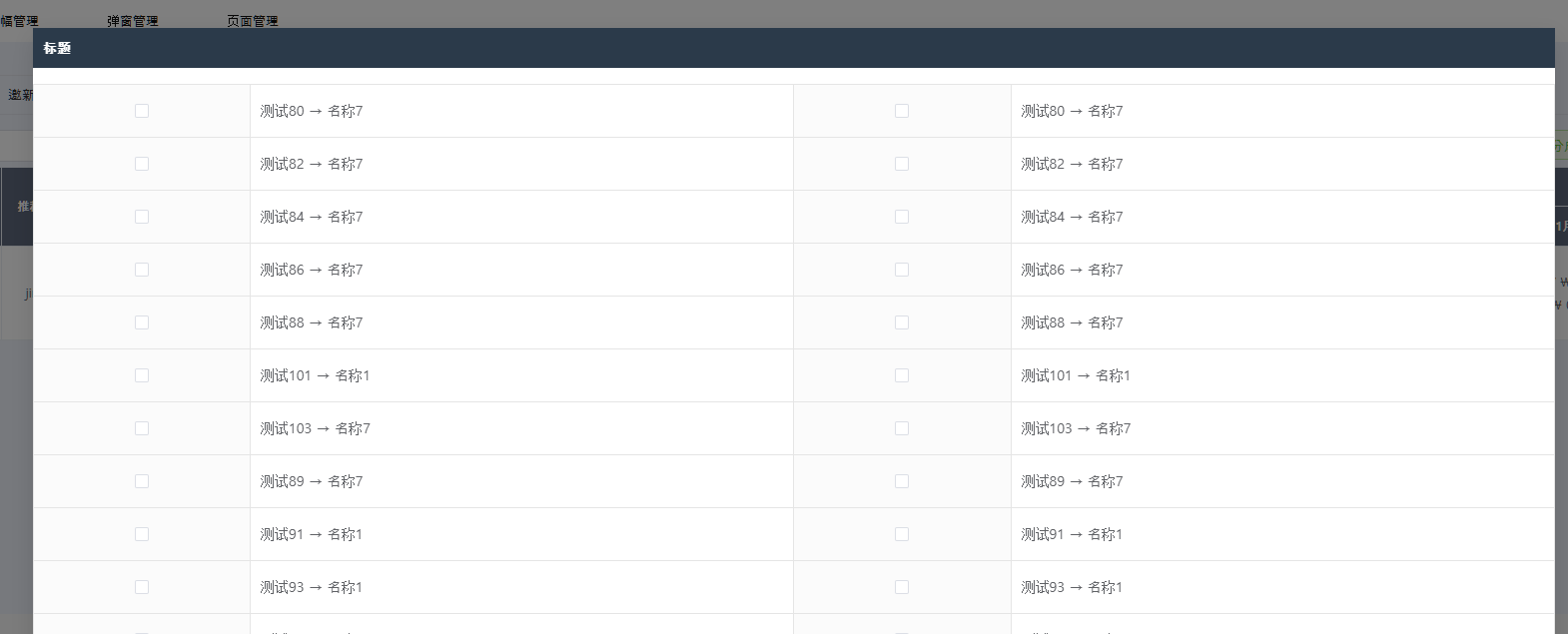
javascript
<template>
    <el-dialog v-model="visible" width="80%" :show-close="false" :style="{ padding: 0, height: '70%' }">
        <template #title>
            <div class="section-header" style="background-color: #2b3a4a; padding: 10px; color: white;">
                {{ t('user_recom.会员分成设置') }}
            </div>
        </template>

        <!-- 表格 -->
        <table class="order_write order_table_top">
            <colgroup>
                <col width="12%" />
                <col />
                <col width="12%" />
                <col />
            </colgroup>

            <tbody>
                <tr v-for="(row, index) in tableRows" :key="index">
                    <!-- 左 -->
                    <th class="parrent_menu">
                        <el-checkbox v-if="row[0]" v-model="row[0].isChecked" />
                    </th>
                    <td>
                        <template v-if="row[0]">
                            {{ row[0].type }} →
                            {{ row[0].surcharge_name }}
                        </template>
                    </td>

                    <!-- 右 -->
                    <th class="parrent_menu">
                        <el-checkbox v-if="row[1]" v-model="row[1].isChecked" />
                    </th>
                    <td>
                        <template v-if="row[1]">
                            {{ row[1].type }} →
                            {{ row[1].surcharge_name }}
                        </template>
                    </td>
                </tr>
            </tbody>
        </table>
        <table class="order_write order_table_top">
            <colgroup>
                <col width="12%" />
                <col />
                <col width="12%" />
                <col />
            </colgroup>

            <tbody>
                <tr v-for="(row, index) in tableRows" :key="index">
                    <!-- 左 -->
                    <th class="parrent_menu">
                        <el-checkbox v-if="row[0]" v-model="row[0].isChecked" />
                    </th>
                    <td>
                        <template v-if="row[0]">
                            {{ row[0].type }} →
                            {{ row[0].surcharge_name }}
                        </template>
                    </td>

                    <!-- 右 -->
                    <th class="parrent_menu">
                        <el-checkbox v-if="row[1]" v-model="row[1].isChecked" />
                    </th>
                    <td>
                        <template v-if="row[1]">
                            {{ row[1].type }} →
                            {{ row[1].surcharge_name }}
                        </template>
                    </td>
                </tr>
            </tbody>
        </table>


        <!-- 弹窗底部 -->
        <template #footer>
            <div class="footer-btn">
                <el-button type="primary" @click="handleSave" :disabled="saveLoading">{{ t('btn.enter') }}</el-button>
                <el-button type="primary" plain @click="visible = false">
                    {{ t('btn.close') }}
                </el-button>
            </div>
        </template>
    </el-dialog>
</template>

<script setup>
import { ref, computed, reactive } from 'vue'
import { useI18n } from 'vue-i18n'
import { toast } from '~/composables/util'
import { formatAmount } from '~/composables/validate'
import { recomdService } from '~/api/user'
const { t } = useI18n()
const visible = ref(false)
const tableList = ref([])
const saveLoading = ref(false)

const tableRows = computed(() => {
    const rows = []
    for (let i = 0; i < tableList.value.length; i += 2) {
        rows.push([
            tableList.value[i],
            tableList.value[i + 1] || null
        ])
    }
    return rows
})


const getSettingList = async () => {
    const res = await recomdService.getCommissionInit()
    if (res.code === 200) {
        let resData = res.data
        if (resData.length > 0) {
            tableList.value = resData.map(item => {
                return {
                    ...item,
                    isChecked: Boolean(item.isChecked)
                }
            })
        }

    } else {
        tableList.value = []
        setTimeout(() => {
            toast(res.msg, 'error')
            visible.value = false
        }, 2000)
    }

}


const handleSave = async () => {
    const checkedCodes = tableList.value
        .filter(item => item.isChecked)
        .map(item => item.surcharge_code)

    if (!checkedCodes.length) {
        toast(t('sys.choose-one-item'), 'warning')
        return
    }

    saveLoading.value = true
    try {
        const res = await recomdService.setMemberCommission({
            : checkedCodes
        })
        if (res.code === 200) {
            visible.value = false
        }
    } finally {
        saveLoading.value = false
    }
}


const open = () => {
    visible.value = true
    getSettingList()
}

defineExpose({ open })


</script>

<style scoped>
.select-box {
    width: 150px;
    margin-right: 3px;
}

.search-input {
    width: 120px;
    margin-right: 3px;
}

.main-table {
    margin-top: 10px;
    max-height: 480px;
    overflow-y: auto;
}


.charge-wrap {
    display: flex;
    flex-wrap: wrap;
}

.charge-item {
    width: 30%;
    margin-right: 1px;
    white-space: nowrap;
}
</style>