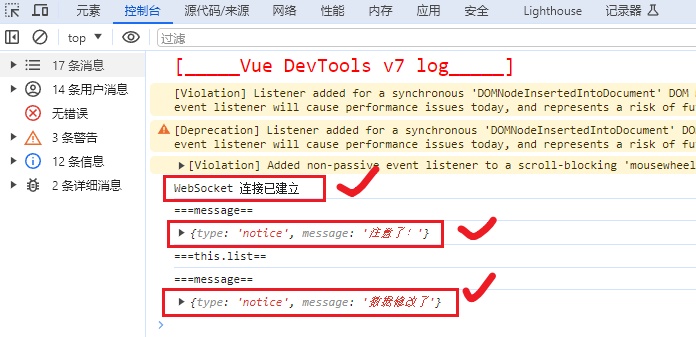
图示:
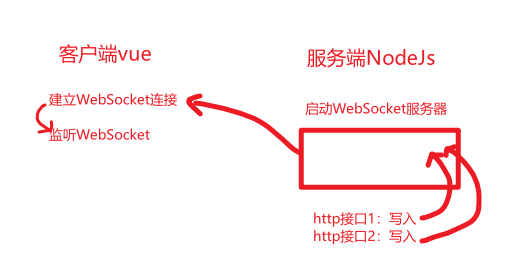
在Nodejs中的写法:
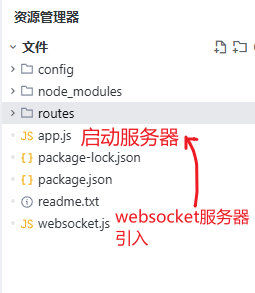
websocket.js:
const WebSocket = require("ws");

// 创建全局 WebSocket 服务器实例
let wss = null;
let vueClients = new Set();

// 初始化 WebSocket 服务器
function initWebSocket(server) {
  if (!wss) {
    wss = new WebSocket.Server({ server });

    // WebSocket 连接处理
    wss.on("connection", (ws) => {
      console.log("Vue客户端已连接");
      vueClients.add(ws);
      ws.on("close", () => {
        vueClients.delete(ws);
      });
      ws.on("error", (error) => {
        console.error("Vue客户端错误:", error);
      });
      // 发送消息给客户端说"注意了!" 使用json格式
      ws.send(JSON.stringify({ type: "notice", message: "注意了!" }));
    });
  }
  return wss;
}

// 获取 WebSocket 服务器实例
function getWebSocketServer() {
  return wss;
}

// 获取 Vue 客户端集合
function getVueClients() {
  return vueClients;
}

module.exports = {
  initWebSocket,
  getWebSocketServer,
  getVueClients
};
app.js
const express = require("express");
const http = require("http");
const app = express();
const { db } = require("./config/database"); //连接数据库
// 创建HTTP服务器
const server = http.createServer(app);
// 引入websocket.js
const { initWebSocket } = require("./websocket");
// 初始化WebSocket服务器
initWebSocket(server);

.....省略


server.listen(8060, () => {
  console.log("✅ 服务器已启动:http://localhost:8060");
  console.log("✅ WebSocket 已启用:ws://localhost:8060");
  console.log(`📝 白名单配置:`);
  publicPaths.forEach((path) => {
    console.log(`  - ${path}`);
  });
});
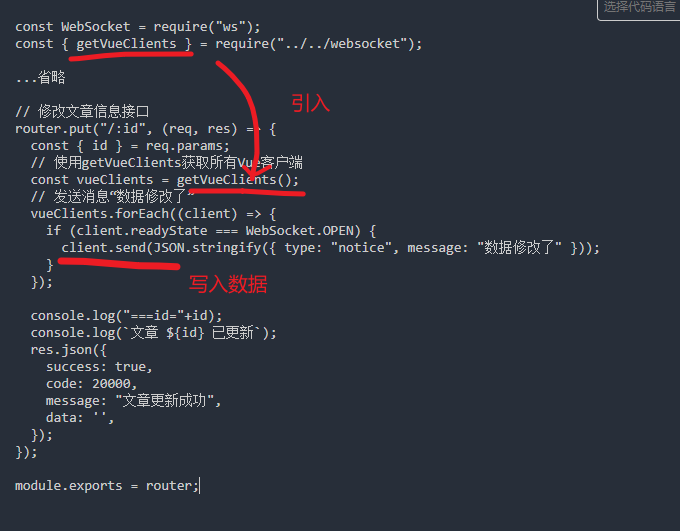
在使用的接口中引入websocket服务器,并写入数据:
aritcle.js:
const WebSocket = require("ws");
const { getVueClients } = require("../../websocket");

...省略

// 修改文章信息接口
router.put("/:id", (req, res) => {
  const { id } = req.params;
  // 使用getVueClients获取所有Vue客户端
  const vueClients = getVueClients();
  // 发送消息"数据修改了"
  vueClients.forEach((client) => {
    if (client.readyState === WebSocket.OPEN) {
      client.send(JSON.stringify({ type: "notice", message: "数据修改了" }));
    }
  });

  console.log("===id="+id);
  console.log(`文章 ${id} 已更新`);
  res.json({
    success: true,
    code: 20000,
    message: "文章更新成功",
    data: '',
  });
});

module.exports = router;
解释:
这个时候看客户端Vue:
<template>
  <div class="app-container">
    <div class="filter-container">
      <el-button class="filter-item" type="primary" icon="el-icon-refresh" @click="fetchData">
        刷新
      </el-button>
    </div>

    <el-table v-loading="listLoading" :data="list" border fit highlight-current-row style="width: 100%;">
      <el-table-column label="ID" prop="id" align="center" width="80">
        <template slot-scope="{row}">
          <span>{{ row.id }}</span>
        </template>
      </el-table-column>

      <el-table-column label="标题" min-width="200">
        <template slot-scope="{row}">
          <span class="link-type" @click="handleView(row)">{{ row.title }}</span>
        </template>
      </el-table-column>

      <el-table-column label="内容" min-width="300">
        <template slot-scope="{row}">
          <span>{{ row.content }}</span>
        </template>
      </el-table-column>

      <el-table-column label="更新时间" width="180" align="center">
        <template slot-scope="{row}">
          <span>{{ row.updatedAt | parseTime('{y}-{m}-{d} {h}:{i}') }}</span>
        </template>
      </el-table-column>

      <el-table-column label="操作" align="center" width="120" class-name="small-padding fixed-width">
        <template slot-scope="{row}">
          <el-button type="primary" size="mini" @click="handleView(row)">
            查看
          </el-button>
          <el-button type="primary" size="mini" @click="handleUpdate(row)">
            修改
          </el-button>
        </template>
      </el-table-column>
    </el-table>

    <el-dialog :title="textMap[dialogStatus]" :visible.sync="dialogFormVisible">
      <el-form ref="dataForm" :model="temp" label-position="left" label-width="70px"
        style="width: 400px; margin-left:50px;">
        <el-form-item label="ID">
          <span>{{ temp.id }}</span>
        </el-form-item>
        <el-form-item label="标题">
          <span>{{ temp.title }}</span>
        </el-form-item>
        <el-form-item label="内容">
          <span>{{ temp.content }}</span>
        </el-form-item>
        <el-form-item label="更新时间">
          <span>{{ temp.updatedAt | parseTime('{y}-{m}-{d} {h}:{i}:{s}') }}</span>
        </el-form-item>
      </el-form>
      <div slot="footer" class="dialog-footer">
        <el-button @click="dialogFormVisible = false">关闭</el-button>
      </div>
    </el-dialog>
  </div>
</template>

<script>
import { fetchArticles, updateArticle } from '@/api/article'

export default {
  name: 'Ac24Index',
  filters: {
    parseTime(time, cFormat) {
      if (!time) return ''
      const format = cFormat || '{y}-{m}-{d} {h}:{i}:{s}'
      let date
      if (typeof time === 'object') {
        date = time
      } else {
        if ((typeof time === 'string') && (/^[0-9]+$/.test(time))) {
          time = parseInt(time)
        }
        if ((typeof time === 'number') && (time.toString().length === 10)) {
          time = time * 1000
        }
        date = new Date(time)
      }
      const formatObj = {
        y: date.getFullYear(),
        m: date.getMonth() + 1,
        d: date.getDate(),
        h: date.getHours(),
        i: date.getMinutes(),
        s: date.getSeconds(),
        a: date.getDay()
      }
      const time_str = format.replace(/{(y|m|d|h|i|s|a)+}/g, (result, key) => {
        let value = formatObj[key]
        if (key === 'a') { return ['日', '一', '二', '三', '四', '五', '六'][value] }
        if (result.length > 0 && value < 10) {
          value = '0' + value
        }
        return value || 0
      })
      return time_str
    }
  },
  data() {
    return {
      list: null,
      listLoading: true,
      dialogFormVisible: false,
      dialogStatus: '',
      textMap: {
        view: '查看文章'
      },
      temp: {
        id: undefined,
        title: '',
        content: '',
        updatedAt: ''
      },
      ws: null
    }
  },
  created() {
    this.fetchData()
    this.initWebSocket()
  },
  methods: {
    fetchData() {
      this.listLoading = true
      fetchArticles().then(response => {

        if (response.success) {
          this.list = response.data.items
          console.log("===this.list==")

        } else {
          console.log("===this.list no data==")
          this.$message({
            message: '获取数据失败',
            type: 'error',
            duration: 5 * 1000
          })
        }
        this.listLoading = false
      }).catch(error => {
        console.error('API调用失败:', error)
        this.listLoading = false
        this.$message({
          message: 'API调用失败,请检查网络连接',
          type: 'error',
          duration: 5 * 1000
        })
      })
    },

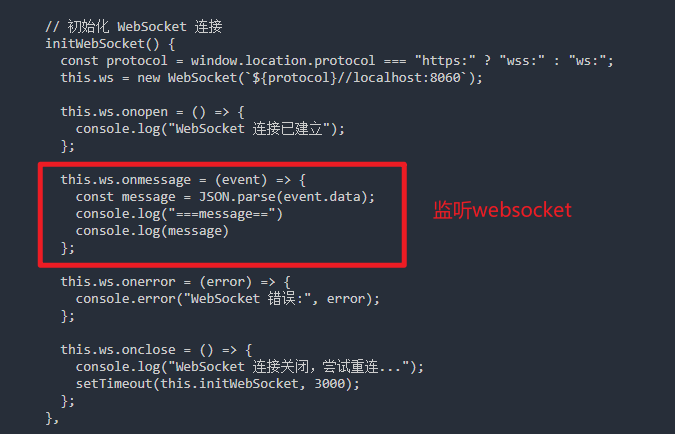
    // 初始化 WebSocket 连接
    initWebSocket() {
      const protocol = window.location.protocol === "https:" ? "wss:" : "ws:";
      this.ws = new WebSocket(`${protocol}//localhost:8060`);

      this.ws.onopen = () => {
        console.log("WebSocket 连接已建立");
      };

      this.ws.onmessage = (event) => {
        const message = JSON.parse(event.data);
        console.log("===message==")
        console.log(message)
      };

      this.ws.onerror = (error) => {
        console.error("WebSocket 错误:", error);
      };

      this.ws.onclose = () => {
        console.log("WebSocket 连接关闭,尝试重连...");
        setTimeout(this.initWebSocket, 3000);
      };
    },


    handleView(row) {
      this.temp = Object.assign({}, row)
      this.dialogStatus = 'view'
      this.dialogFormVisible = true
      this.$nextTick(() => {
        this.$refs['dataForm'].clearValidate()
      })
    },
    handleUpdate(row) {
      //  调用updateArticle方法
      updateArticle(row.id).then(response => {
        if (response.success) {
          this.$message({
            message: '修改成功',
            type: 'success',
            duration: 5 * 1000
          })

        } else {
          this.$message({
            message: '修改失败',
            type: 'error',
            duration: 5 * 1000
          })
        }
      }).catch(error => {
        console.error('API调用失败:', error)
        this.$message({
          message: 'API调用失败,请检查网络连接',
          type: 'error',
          duration: 5 * 1000
        })
      })
    },
  }
}
</script>

<style scoped>
.app-container {
  padding: 20px;
}

.filter-container {
  padding-bottom: 10px;
}

.link-type {
  color: #1890ff;
  cursor: pointer;
}

.link-type:hover {
  color: #40a9ff;
  text-decoration: underline;
}
</style>
解释:
最终展示: