以下是一个完整的Vue 3 + Element Plus前端实现,与前篇的FastAPI后端配合使用:
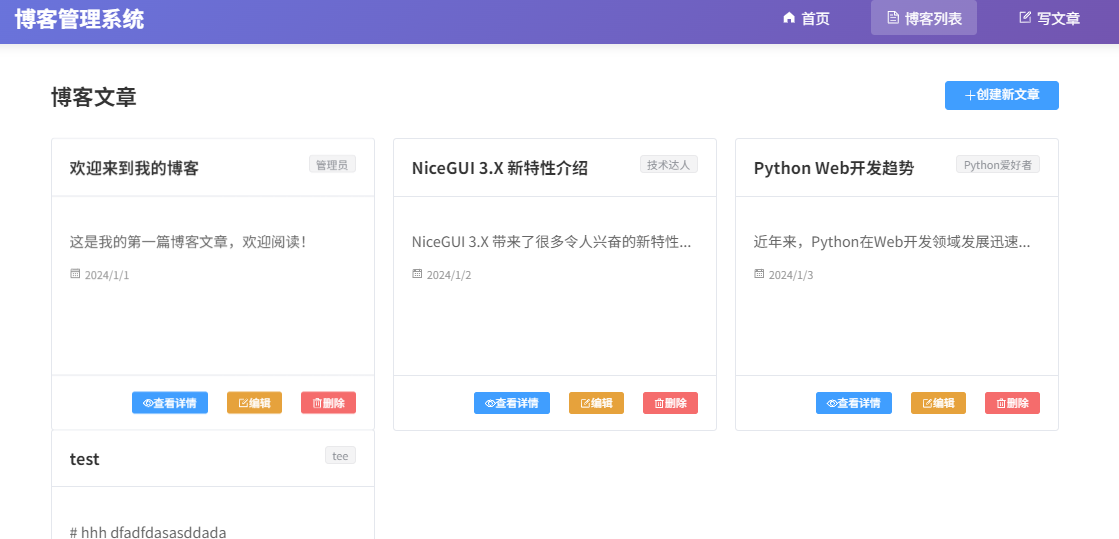
项目结构
frontend/
├── src/
│   ├── components/
│   │   ├── BlogHeader.vue
│   │   └── BlogSidebar.vue
│   ├── views/
│   │   ├── HomeView.vue
│   │   ├── BlogList.vue
│   │   ├── BlogDetail.vue
│   │   ├── CreateBlog.vue
│   │   └── EditBlog.vue
│   ├── router/
│   │   └── index.js
│   ├── api/
│   │   └── blog.js
│   ├── App.vue
│   └── main.js
└── package.json
1. 安装依赖
bash
# 创建Vue项目
npm create vue@latest blog-frontend

# 进入项目目录
cd blog-frontend

# 安装Element Plus和axios
npm install element-plus axios
npm install @element-plus/icons-vue
TypeScript # 可以不选,用JavaScript足够
JSX 支持 # 不选,Vue模板语法更适合
• Router(单页面应用开发) # 必须选 ,多页面路由需要
• Pinia(状态管理) # 建议选 ,管理用户状态等
Vitest(单元测试) # 可以不选,简化项目
端到端测试 # 可以不选,简化项目
• ESLint(错误预防) # 建议选 ,保持代码规范
• Prettier(代码格式化) # 建议选,统一代码风格
2. 主要文件代码
src/main.js
javascript
import { createApp } from 'vue'
import { createPinia } from 'pinia'
import ElementPlus from 'element-plus'
import 'element-plus/dist/index.css'
import * as ElementPlusIconsVue from '@element-plus/icons-vue'
import App from './App.vue'
import router from './router'

const app = createApp(App)

// 注册所有图标
for (const [key, component] of Object.entries(ElementPlusIconsVue)) {
  app.component(key, component)
}

app.use(createPinia())
app.use(router)
app.use(ElementPlus)

app.mount('#app')
src/App.vue
vue
<template>
  <div id="app">
    <el-container class="app-container">
      <!-- 头部导航 -->
      <el-header class="app-header">
        <div class="header-content">
          <h1 class="logo">博客管理系统</h1>
          <div class="nav-links">
            <router-link to="/" class="nav-link">
              <el-icon><HomeFilled /></el-icon>
              首页
            </router-link>
            <router-link to="/blogs" class="nav-link">
              <el-icon><Document /></el-icon>
              博客列表
            </router-link>
            <router-link to="/create" class="nav-link">
              <el-icon><Edit /></el-icon>
              写文章
            </router-link>
          </div>
        </div>
      </el-header>

      <!-- 主要内容 -->
      <el-main class="app-main">
        <router-view />
      </el-main>

      <!-- 底部 -->
      <el-footer class="app-footer">
        <div class="footer-content">
          <p>© 2024 博客管理系统 | Powered by Vue 3 + Element Plus + FastAPI</p>
          <p>
            <el-link href="http://localhost:8000/docs" target="_blank" type="info">
              API文档
            </el-link>
          </p>
        </div>
      </el-footer>
    </el-container>
  </div>
</template>

<script setup>
import { HomeFilled, Document, Edit } from '@element-plus/icons-vue'
</script>

<style scoped>
.app-container {
  min-height: 100vh;
  display: flex;
  flex-direction: column;
}

.app-header {
  background: linear-gradient(135deg, #667eea 0%, #764ba2 100%);
  color: white;
  box-shadow: 0 2px 12px rgba(0, 0, 0, 0.1);
}

.header-content {
  display: flex;
  justify-content: space-between;
  align-items: center;
  height: 100%;
  max-width: 1200px;
  margin: 0 auto;
  padding: 0 20px;
}

.logo {
  margin: 0;
  font-size: 24px;
  font-weight: 600;
}

.nav-links {
  display: flex;
  gap: 30px;
}

.nav-link {
  display: flex;
  align-items: center;
  gap: 5px;
  color: white;
  text-decoration: none;
  font-size: 16px;
  padding: 8px 16px;
  border-radius: 4px;
  transition: all 0.3s;
}

.nav-link:hover {
  background: rgba(255, 255, 255, 0.1);
}

.nav-link.router-link-active {
  background: rgba(255, 255, 255, 0.2);
}

.app-main {
  flex: 1;
  max-width: 1200px;
  margin: 0 auto;
  padding: 20px;
  width: 100%;
}

.app-footer {
  background: #f8f9fa;
  color: #666;
  border-top: 1px solid #e4e7ed;
}

.footer-content {
  max-width: 1200px;
  margin: 0 auto;
  padding: 20px;
  text-align: center;
}

.footer-content p {
  margin: 5px 0;
}
</style>
src/router/index.js
javascript
import { createRouter, createWebHistory } from 'vue-router'
import HomeView from '../views/HomeView.vue'

const routes = [
  {
    path: '/',
    name: 'home',
    component: HomeView
  },
  {
    path: '/blogs',
    name: 'blogs',
    component: () => import('../views/BlogList.vue')
  },
  {
    path: '/blogs/:id',
    name: 'blog-detail',
    component: () => import('../views/BlogDetail.vue')
  },
  {
    path: '/create',
    name: 'create-blog',
    component: () => import('../views/CreateBlog.vue')
  },
  {
    path: '/edit/:id',
    name: 'edit-blog',
    component: () => import('../views/EditBlog.vue')
  }
]

const router = createRouter({
  history: createWebHistory(),
  routes
})

export default router
src/api/blog.js
javascript
import axios from 'axios'

// 创建axios实例
const api = axios.create({
  baseURL: 'http://localhost:8000/api',
  timeout: 10000,
  headers: {
    'Content-Type': 'application/json'
  }
})

// 博客API
export const blogApi = {
  // 获取所有博客
  getAllBlogs() {
    return api.get('/posts')
  },

  // 获取单个博客
  getBlogById(id) {
    return api.get(`/posts/${id}`)
  },

  // 创建博客
  createBlog(blogData) {
    return api.post('/posts', blogData)
  },

  // 更新博客
  updateBlog(id, blogData) {
    return api.put(`/posts/${id}`, blogData)
  },

  // 删除博客
  deleteBlog(id) {
    return api.delete(`/posts/${id}`)
  }
}
src/views/HomeView.vue
vue
<template>
  <div class="home">
    <el-row :gutter="20">
      <el-col :span="24">
        <el-card class="welcome-card">
          <template #header>
            <div class="card-header">
              <h2>欢迎使用博客管理系统</h2>
            </div>
          </template>
          <div class="welcome-content">
            <el-icon class="welcome-icon"><Reading /></el-icon>
            <p class="welcome-text">
              这是一个基于 Vue 3 + Element Plus + FastAPI 的完整博客管理系统。
              您可以浏览、创建、编辑和删除博客文章。
            </p>
            <div class="action-buttons">
              <el-button
                type="primary"
                size="large"
                @click="$router.push('/blogs')"
                class="action-button"
              >
                <el-icon><List /></el-icon>
                浏览博客
              </el-button>
              <el-button
                type="success"
                size="large"
                @click="$router.push('/create')"
                class="action-button"
              >
                <el-icon><Edit /></el-icon>
                写新文章
              </el-button>
            </div>
          </div>
        </el-card>
      </el-col>
    </el-row>

    <el-row :gutter="20" class="features">
      <el-col :xs="24" :sm="12" :md="8" v-for="feature in features" :key="feature.title">
        <el-card class="feature-card">
          <div class="feature-icon">
            <component :is="feature.icon" />
          </div>
          <h3>{{ feature.title }}</h3>
          <p>{{ feature.description }}</p>
        </el-card>
      </el-col>
    </el-row>
  </div>
</template>

<script setup>
import { ref } from 'vue'
import { Reading, List, Edit, DataBoard, Setting, User } from '@element-plus/icons-vue'

const features = ref([
  {
    title: '简洁易用',
    description: '直观的用户界面,操作简单便捷',
    icon: 'Setting'
  },
  {
    title: '功能完整',
    description: '完整的CRUD操作,满足所有博客管理需求',
    icon: 'DataBoard'
  },
  {
    title: '响应式设计',
    description: '适配各种设备,提供良好的移动端体验',
    icon: 'User'
  }
])
</script>

<style scoped>
.home {
  padding: 20px;
}

.welcome-card {
  margin-bottom: 30px;
  text-align: center;
  border: none;
  box-shadow: 0 2px 12px rgba(0, 0, 0, 0.1);
}

.card-header {
  display: flex;
  justify-content: space-between;
  align-items: center;
}

.welcome-content {
  padding: 40px 20px;
}

.welcome-icon {
  font-size: 60px;
  color: #409EFF;
  margin-bottom: 20px;
}

.welcome-text {
  font-size: 18px;
  color: #666;
  margin-bottom: 30px;
  line-height: 1.6;
}

.action-buttons {
  display: flex;
  justify-content: center;
  gap: 20px;
  margin-top: 30px;
}

.action-button {
  padding: 15px 30px;
}

.features {
  margin-top: 30px;
}

.feature-card {
  height: 100%;
  text-align: center;
  border: none;
  box-shadow: 0 2px 12px rgba(0, 0, 0, 0.1);
  transition: transform 0.3s;
}

.feature-card:hover {
  transform: translateY(-5px);
}

.feature-icon {
  font-size: 40px;
  color: #67C23A;
  margin-bottom: 20px;
}

.feature-card h3 {
  margin: 10px 0;
  color: #333;
}

.feature-card p {
  color: #666;
  line-height: 1.5;
}
</style>
src/views/BlogList.vue
vue
<template>
  <div class="blog-list">
    <el-row :gutter="20">
      <el-col :span="24">
        <div class="page-header">
          <h2>博客文章</h2>
          <el-button
            type="primary"
            @click="$router.push('/create')"
            class="create-btn"
          >
            <el-icon><Plus /></el-icon>
            创建新文章
          </el-button>
        </div>
      </el-col>
    </el-row>

    <el-row :gutter="20" v-loading="loading">
      <el-col
        :xs="24"
        :sm="12"
        :lg="8"
        v-for="blog in blogs"
        :key="blog.id"
      >
        <el-card class="blog-card" shadow="hover">
          <template #header>
            <div class="blog-header">
              <h3 class="blog-title">{{ blog.title }}</h3>
              <el-tag type="info" size="small">
                {{ blog.author }}
              </el-tag>
            </div>
          </template>

          <div class="blog-content">
            <p class="blog-excerpt">
              {{ truncateContent(blog.content) }}
            </p>

            <div class="blog-meta">
              <div class="meta-item">
                <el-icon><Calendar /></el-icon>
                <span>{{ formatDate(blog.created_at) }}</span>
              </div>
              <div class="meta-item" v-if="blog.updated_at !== blog.created_at">
                <el-icon><Refresh /></el-icon>
                <span>更新于 {{ formatDate(blog.updated_at) }}</span>
              </div>
            </div>
          </div>

          <template #footer>
            <div class="blog-actions">
              <el-button
                type="primary"
                size="small"
                @click="viewBlog(blog.id)"
              >
                <el-icon><View /></el-icon>
                查看详情
              </el-button>
              <el-button
                type="warning"
                size="small"
                @click="editBlog(blog.id)"
              >
                <el-icon><Edit /></el-icon>
                编辑
              </el-button>
              <el-button
                type="danger"
                size="small"
                @click="confirmDelete(blog)"
              >
                <el-icon><Delete /></el-icon>
                删除
              </el-button>
            </div>
          </template>
        </el-card>
      </el-col>
    </el-row>

    <!-- 空状态 -->
    <el-empty
      v-if="!loading && blogs.length === 0"
      description="暂无博客文章"
      class="empty-state"
    >
      <el-button type="primary" @click="$router.push('/create')">
        创建第一篇博客
      </el-button>
    </el-empty>
  </div>
</template>

<script setup>
import { ref, onMounted } from 'vue'
import { useRouter } from 'vue-router'
import { ElMessage, ElMessageBox } from 'element-plus'
import { blogApi } from '../api/blog'
import {
  Plus,
  Calendar,
  Refresh,
  View,
  Edit,
  Delete
} from '@element-plus/icons-vue'

const router = useRouter()
const blogs = ref([])
const loading = ref(false)

// 获取博客列表
const fetchBlogs = async () => {
  try {
    loading.value = true
    const response = await blogApi.getAllBlogs()
    blogs.value = response.data
  } catch (error) {
    ElMessage.error('获取博客列表失败:' + error.message)
  } finally {
    loading.value = false
  }
}

// 查看博客详情
const viewBlog = (id) => {
  router.push(`/blogs/${id}`)
}

// 编辑博客
const editBlog = (id) => {
  router.push(`/edit/${id}`)
}

// 确认删除
const confirmDelete = (blog) => {
  ElMessageBox.confirm(
    `确定要删除文章 "${blog.title}" 吗?`,
    '删除确认',
    {
      confirmButtonText: '确定删除',
      cancelButtonText: '取消',
      type: 'warning',
      center: true
    }
  ).then(async () => {
    try {
      await blogApi.deleteBlog(blog.id)
      ElMessage.success('文章删除成功')
      fetchBlogs() // 重新加载列表
    } catch (error) {
      ElMessage.error('删除失败:' + error.message)
    }
  }).catch(() => {
    // 用户取消
  })
}

// 截断内容
const truncateContent = (content, length = 100) => {
  if (content.length <= length) return content
  return content.substring(0, length) + '...'
}

// 格式化日期
const formatDate = (dateString) => {
  if (!dateString) return ''
  const date = new Date(dateString)
  return date.toLocaleDateString('zh-CN')
}

onMounted(() => {
  fetchBlogs()
})
</script>

<style scoped>
.blog-list {
  padding: 20px;
}

.page-header {
  display: flex;
  justify-content: space-between;
  align-items: center;
  margin-bottom: 30px;
}

.page-header h2 {
  margin: 0;
  color: #333;
}

.create-btn {
  padding: 10px 20px;
}

.blog-card {
  margin-bottom: 20px;
  height: 100%;
  transition: transform 0.3s;
}

.blog-card:hover {
  transform: translateY(-5px);
}

.blog-header {
  display: flex;
  justify-content: space-between;
  align-items: flex-start;
}

.blog-title {
  margin: 0;
  font-size: 18px;
  color: #333;
  flex: 1;
  overflow: hidden;
  text-overflow: ellipsis;
  white-space: nowrap;
}

.blog-content {
  min-height: 120px;
}

.blog-excerpt {
  color: #666;
  line-height: 1.6;
  margin-bottom: 15px;
  display: -webkit-box;
  -webkit-line-clamp: 3;
  -webkit-box-orient: vertical;
  overflow: hidden;
}

.blog-meta {
  display: flex;
  flex-direction: column;
  gap: 8px;
  font-size: 12px;
  color: #999;
}

.meta-item {
  display: flex;
  align-items: center;
  gap: 5px;
}

.blog-actions {
  display: flex;
  justify-content: flex-end;
  gap: 10px;
}

.empty-state {
  margin-top: 50px;
}

@media (max-width: 768px) {
  .page-header {
    flex-direction: column;
    align-items: stretch;
    gap: 15px;
  }

  .create-btn {
    width: 100%;
  }
}
</style>
src/views/BlogDetail.vue
vue
<template>
  <div class="blog-detail">
    <div v-if="loading" class="loading-container">
      <el-skeleton :rows="10" animated />
    </div>

    <div v-else-if="blog" class="blog-content">
      <!-- 返回按钮 -->
      <el-button
        type="info"
        @click="$router.back()"
        class="back-btn"
      >
        <el-icon><ArrowLeft /></el-icon>
        返回列表
      </el-button>

      <!-- 博客内容 -->
      <el-card class="blog-card">
        <template #header>
          <div class="blog-header">
            <h1 class="blog-title">{{ blog.title }}</h1>
            <div class="blog-meta">
              <el-tag type="primary" size="large">
                {{ blog.author }}
              </el-tag>
              <div class="meta-info">
                <div class="meta-item">
                  <el-icon><Calendar /></el-icon>
                  <span>发布于 {{ formatDateTime(blog.created_at) }}</span>
                </div>
                <div class="meta-item" v-if="blog.updated_at !== blog.created_at">
                  <el-icon><Refresh /></el-icon>
                  <span>更新于 {{ formatDateTime(blog.updated_at) }}</span>
                </div>
              </div>
            </div>
          </div>
        </template>

        <div class="content-body">
          <div class="content-text">
            <p v-for="(paragraph, index) in contentParagraphs"
               :key="index"
               class="paragraph">
              {{ paragraph }}
            </p>
          </div>
        </div>

        <template #footer>
          <div class="blog-actions">
            <el-button-group>
              <el-button
                type="primary"
                @click="editBlog"
              >
                <el-icon><Edit /></el-icon>
                编辑文章
              </el-button>
              <el-button
                type="danger"
                @click="confirmDelete"
              >
                <el-icon><Delete /></el-icon>
                删除文章
              </el-button>
            </el-button-group>
          </div>
        </template>
      </el-card>
    </div>

    <div v-else class="not-found">
      <el-result
        icon="error"
        title="文章不存在"
        sub-title="您访问的文章可能已被删除或不存在"
      >
        <template #extra>
          <el-button type="primary" @click="$router.push('/blogs')">
            返回博客列表
          </el-button>
        </template>
      </el-result>
    </div>
  </div>
</template>

<script setup>
import { ref, onMounted, computed } from 'vue'
import { useRoute, useRouter } from 'vue-router'
import { ElMessage, ElMessageBox } from 'element-plus'
import { blogApi } from '../api/blog'
import {
  ArrowLeft,
  Calendar,
  Refresh,
  Edit,
  Delete
} from '@element-plus/icons-vue'

const route = useRoute()
const router = useRouter()
const blog = ref(null)
const loading = ref(true)

// 获取博客详情
const fetchBlog = async () => {
  try {
    loading.value = true
    const id = parseInt(route.params.id)
    const response = await blogApi.getBlogById(id)
    blog.value = response.data
  } catch (error) {
    ElMessage.error('获取博客详情失败:' + error.message)
    blog.value = null
  } finally {
    loading.value = false
  }
}

// 编辑博客
const editBlog = () => {
  router.push(`/edit/${blog.value.id}`)
}

// 确认删除
const confirmDelete = () => {
  ElMessageBox.confirm(
    `确定要删除文章 "${blog.value.title}" 吗?此操作不可恢复。`,
    '删除确认',
    {
      confirmButtonText: '确定删除',
      cancelButtonText: '取消',
      type: 'warning',
      center: true
    }
  ).then(async () => {
    try {
      await blogApi.deleteBlog(blog.value.id)
      ElMessage.success('文章删除成功')
      router.push('/blogs')
    } catch (error) {
      ElMessage.error('删除失败:' + error.message)
    }
  }).catch(() => {
    // 用户取消
  })
}

// 格式化日期时间
const formatDateTime = (dateString) => {
  if (!dateString) return ''
  const date = new Date(dateString)
  return date.toLocaleString('zh-CN')
}

// 将内容分割为段落
const contentParagraphs = computed(() => {
  if (!blog.value?.content) return []
  return blog.value.content.split('\n').filter(p => p.trim())
})

onMounted(() => {
  fetchBlog()
})
</script>

<style scoped>
.blog-detail {
  padding: 20px;
  max-width: 900px;
  margin: 0 auto;
}

.loading-container {
  padding: 40px;
}

.back-btn {
  margin-bottom: 20px;
}

.blog-card {
  border: none;
  box-shadow: 0 4px 20px rgba(0, 0, 0, 0.1);
}

.blog-header {
  padding-bottom: 20px;
  border-bottom: 1px solid #e4e7ed;
}

.blog-title {
  margin: 0 0 20px 0;
  font-size: 32px;
  color: #333;
  line-height: 1.3;
}

.blog-meta {
  display: flex;
  justify-content: space-between;
  align-items: center;
  flex-wrap: wrap;
  gap: 15px;
}

.meta-info {
  display: flex;
  gap: 20px;
  font-size: 14px;
  color: #666;
}

.meta-item {
  display: flex;
  align-items: center;
  gap: 5px;
}

.content-body {
  padding: 30px 0;
}

.content-text {
  font-size: 16px;
  line-height: 1.8;
  color: #333;
}

.paragraph {
  margin-bottom: 20px;
  text-indent: 2em;
}

.paragraph:last-child {
  margin-bottom: 0;
}

.blog-actions {
  padding-top: 20px;
  border-top: 1px solid #e4e7ed;
  display: flex;
  justify-content: flex-end;
}

.not-found {
  padding: 100px 20px;
}

@media (max-width: 768px) {
  .blog-title {
    font-size: 24px;
  }

  .blog-meta {
    flex-direction: column;
    align-items: flex-start;
    gap: 10px;
  }

  .meta-info {
    flex-direction: column;
    gap: 10px;
  }

  .content-body {
    padding: 20px 0;
  }

  .content-text {
    font-size: 15px;
  }
}
</style>
src/views/CreateBlog.vue 和 src/views/EditBlog.vue
vue
<template>
  <div class="blog-editor">
    <el-page-header
      @back="$router.back()"
      :content="isEditMode ? '编辑文章' : '创建新文章'"
      class="page-header"
    />

    <el-card class="editor-card">
      <template #header>
        <h3>{{ isEditMode ? '编辑文章' : '写新文章' }}</h3>
      </template>

      <el-form
        ref="formRef"
        :model="form"
        :rules="rules"
        label-width="80px"
        class="blog-form"
      >
        <el-form-item label="文章标题" prop="title">
          <el-input
            v-model="form.title"
            placeholder="请输入文章标题"
            size="large"
            clearable
          />
        </el-form-item>

        <el-form-item label="作者" prop="author">
          <el-input
            v-model="form.author"
            placeholder="请输入作者姓名"
            size="large"
            clearable
          />
        </el-form-item>

        <el-form-item label="文章内容" prop="content">
          <el-input
            v-model="form.content"
            type="textarea"
            :rows="15"
            placeholder="请输入文章内容,支持 Markdown 格式..."
            resize="none"
          />
          <div class="editor-tips">
            <el-tag type="info" size="small">
              <el-icon><InfoFilled /></el-icon>
              提示:您可以使用 Markdown 语法格式化文本
            </el-tag>
          </div>
        </el-form-item>

        <el-form-item>
          <el-button
            type="primary"
            @click="submitForm"
            :loading="submitting"
            size="large"
            class="submit-btn"
          >
            {{ isEditMode ? '更新文章' : '发布文章' }}
          </el-button>
          <el-button
            @click="$router.back()"
            size="large"
          >
            取消
          </el-button>
        </el-form-item>
      </el-form>
    </el-card>
  </div>
</template>

<script setup>
import { ref, reactive, onMounted } from 'vue'
import { useRoute, useRouter } from 'vue-router'
import { ElMessage } from 'element-plus'
import { blogApi } from '../api/blog'
import { InfoFilled } from '@element-plus/icons-vue'

const route = useRoute()
const router = useRouter()
const formRef = ref(null)
const submitting = ref(false)

// 判断是否为编辑模式
const isEditMode = route.name === 'edit-blog'

// 表单数据
const form = reactive({
  title: '',
  author: '',
  content: ''
})

// 表单验证规则
const rules = {
  title: [
    { required: true, message: '请输入文章标题', trigger: 'blur' },
    { min: 3, message: '标题长度至少 3 个字符', trigger: 'blur' },
    { max: 100, message: '标题长度不能超过 100 个字符', trigger: 'blur' }
  ],
  author: [
    { required: true, message: '请输入作者姓名', trigger: 'blur' },
    { min: 2, message: '作者姓名至少 2 个字符', trigger: 'blur' },
    { max: 50, message: '作者姓名不能超过 50 个字符', trigger: 'blur' }
  ],
  content: [
    { required: true, message: '请输入文章内容', trigger: 'blur' },
    { min: 10, message: '文章内容至少 10 个字符', trigger: 'blur' }
  ]
}

// 编辑模式下加载数据
const loadBlogData = async () => {
  if (!isEditMode) return

  try {
    const id = parseInt(route.params.id)
    const response = await blogApi.getBlogById(id)
    const blog = response.data

    form.title = blog.title
    form.author = blog.author
    form.content = blog.content
  } catch (error) {
    ElMessage.error('加载文章失败:' + error.message)
    router.push('/blogs')
  }
}

// 提交表单
const submitForm = async () => {
  if (!formRef.value) return

  try {
    await formRef.value.validate()
    submitting.value = true

    if (isEditMode) {
      const id = parseInt(route.params.id)
      await blogApi.updateBlog(id, {
        ...form
      })
      ElMessage.success('文章更新成功')
    } else {
      await blogApi.createBlog({
        ...form
      })
      ElMessage.success('文章创建成功')
    }

    router.push('/blogs')
  } catch (error) {
    if (error.name !== 'ValidationError') {
      ElMessage.error(isEditMode ? '更新失败:' + error.message : '创建失败:' + error.message)
    }
  } finally {
    submitting.value = false
  }
}

onMounted(() => {
  loadBlogData()
})
</script>

<style scoped>
.blog-editor {
  padding: 20px;
  max-width: 800px;
  margin: 0 auto;
}

.page-header {
  margin-bottom: 20px;
}

.editor-card {
  border: none;
  box-shadow: 0 2px 12px rgba(0, 0, 0, 0.1);
}

.editor-card :deep(.el-card__header) {
  border-bottom: 1px solid #e4e7ed;
  padding: 20px;
}

.editor-card h3 {
  margin: 0;
  color: #333;
  font-size: 18px;
}

.blog-form {
  padding: 10px;
}

.editor-tips {
  margin-top: 10px;
}

.submit-btn {
  min-width: 120px;
}

@media (max-width: 768px) {
  .blog-editor {
    padding: 10px;
  }

  .editor-card {
    margin: 0 -10px;
  }
}
</style>
3. 运行说明
- 启动后端服务:
bash
cd backend
python main.py
# 后端将在 http://localhost:8000 运行- 启动前端服务:
bash
cd frontend
npm run dev
# 前端将在 http://localhost:5173 运行- 配置跨域:后端代码中已经配置了CORS,允许所有源访问。
4. 功能特点
- 响应式设计:适配桌面端和移动端
- 完整CRUD操作 :
- 创建博客文章
- 查看博客列表
- 查看博客详情
- 编辑博客文章
- 删除博客文章
- 用户体验优化 :
- 加载状态指示
- 操作确认对话框
- 表单验证
- 错误处理
- 美观的UI:使用Element Plus组件,现代化设计
- API集成:与FastAPI后端无缝集成
这个前端应用提供了一个完整的博客管理界面,用户可以方便地管理博客文章,所有操作都会通过API与后端交互。