nicegui文件上传归纳,将常见的文件上传都写了一下,以后我们就直接用,不用再辛辛苦苦的跑路了。
一、所有文件上传
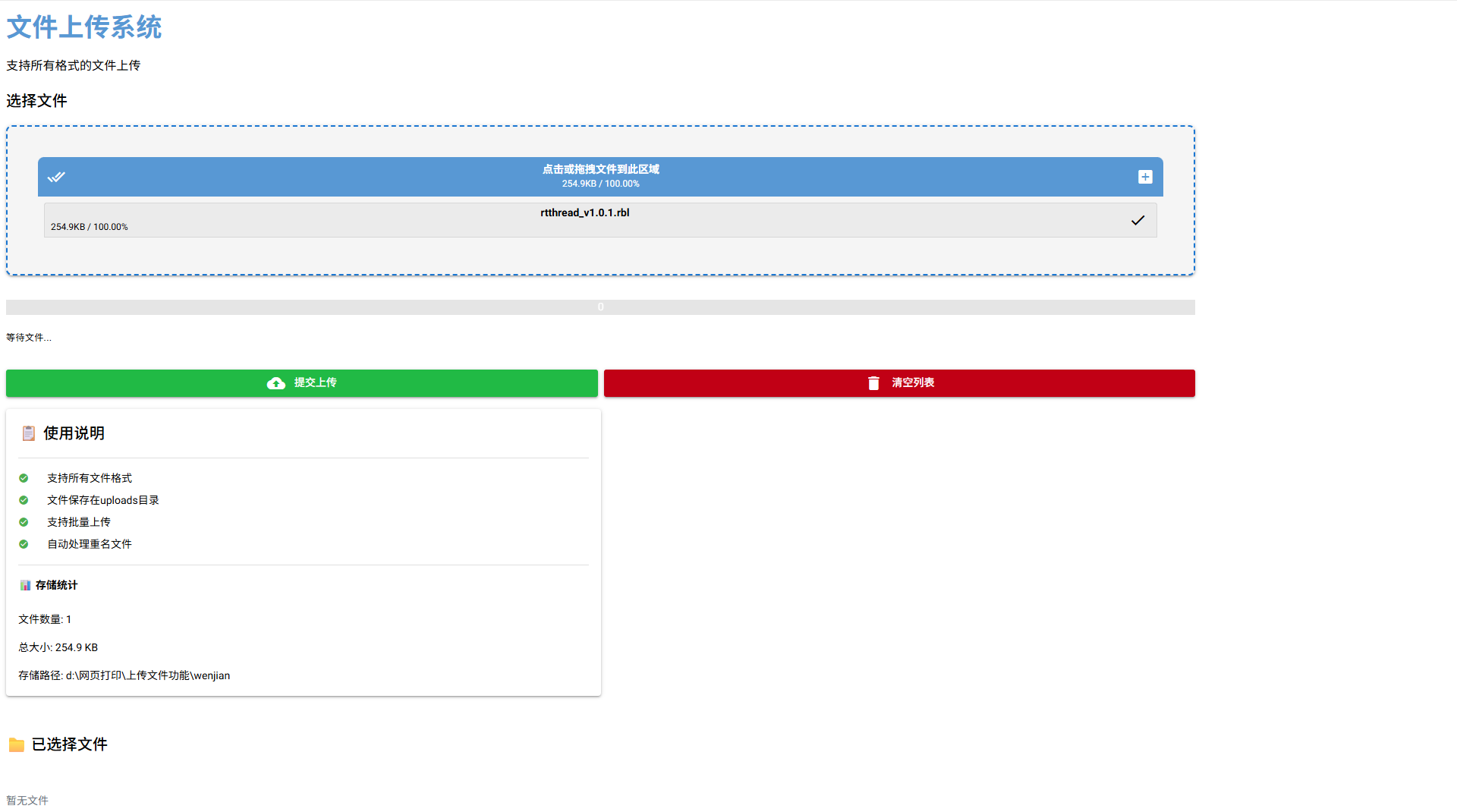
rbl文件上传例子
python
import os
import asyncio
from pathlib import Path
from datetime import datetime
from nicegui import ui, app
BASE_DIR = Path(__file__).parent # 脚本所在目录
upload_dir = BASE_DIR / 'wenjian'
upload_dir.mkdir(exist_ok=True)
class FileUploadApp:
# 创建 data 目录(如果不存在)
def __init__(self):
self.uploaded_files = []
self.setup_ui()
def setup_ui(self):
"""设置UI界面"""
# 应用标题
ui.label('文件上传系统').classes('text-h4 text-weight-bold text-primary')
ui.label('支持所有格式的文件上传').classes('text-subtitle1')
with ui.row().classes('w-full'):
# 左侧:上传区域
with ui.column().classes('w-2/3'):
self.setup_upload_section()
# 右侧:信息和状态区域
with ui.column().classes('w-1/3'):
self.setup_info_section()
# 已上传文件列表
self.setup_file_list()
def setup_upload_section(self):
"""设置上传区域"""
ui.label('选择文件').classes('text-h6')
# 使用正确的上传组件配置
self.upload = ui.upload(
label='点击或拖拽文件到此区域',
multiple=True,
max_file_size=100 * 1024 * 1024,
on_upload=self.handle_upload,
auto_upload=True
).classes('w-full')
# 设置样式 - 使用单行字符串
self.upload.props('style="border: 2px dashed #1976d2; border-radius: 8px; padding: 40px; text-align: center; cursor: pointer; background-color: #f5f5f5;"')
self.upload.props('accept="*/*"')
# 进度条
self.progress = ui.linear_progress(0).classes('w-full mt-4')
self.progress_label = ui.label('等待文件...').classes('text-caption mt-1')
# 按钮区域
with ui.row().classes('w-full mt-4 gap-2'):
self.submit_button = ui.button(
'提交上传',
on_click=self.submit_files,
icon='cloud_upload',
color='positive'
).classes('flex-grow')
ui.button(
'清空列表',
on_click=self.clear_files,
icon='delete',
color='negative'
).classes('flex-grow')
def setup_info_section(self):
"""设置信息区域"""
with ui.card().classes('w-full'):
ui.label('📋 使用说明').classes('text-h6')
ui.separator()
with ui.column().classes('w-full gap-2'):
with ui.row().classes('items-center'):
ui.icon('check_circle').classes('text-green')
ui.label('支持所有文件格式').classes('ml-2')
with ui.row().classes('items-center'):
ui.icon('check_circle').classes('text-green')
ui.label('文件保存在uploads目录').classes('ml-2')
with ui.row().classes('items-center'):
ui.icon('check_circle').classes('text-green')
ui.label('支持批量上传').classes('ml-2')
with ui.row().classes('items-center'):
ui.icon('check_circle').classes('text-green')
ui.label('自动处理重名文件').classes('ml-2')
ui.separator()
# 存储信息
self.storage_info = ui.column().classes('w-full')
self.update_storage_info()
def setup_file_list(self):
"""设置已上传文件列表"""
ui.label('📁 已选择文件').classes('text-h6 mt-8')
self.file_list_container = ui.column().classes('w-full')
async def handle_upload(self, e):
"""处理文件上传事件 - 针对SmallFileUpload对象的正确处理方法"""
try:
# 获取文件名 - 从e.file.name获取
file_name = e.file.name if hasattr(e, 'file') and hasattr(e.file, 'name') else 'unknown'
# 获取文件内容 - SmallFileUpload对象有特殊处理方法
file_content = None
# 打印调试信息
print(f"处理文件: {file_name}")
print(f"文件对象类型: {type(e.file)}")
# 方法1: 尝试使用read()方法 - 这是一个协程,需要await
if hasattr(e.file, 'read'):
try:
print("使用 e.file.read()")
# 注意:read()是异步方法,需要await
file_content = await e.file.read()
print(f"读取到的内容类型: {type(file_content)}")
print(f"内容长度: {len(file_content) if file_content else 0}")
except Exception as read_error:
print(f"读取错误: {read_error}")
# 方法2: 如果read()失败,尝试其他方式
if file_content is None:
# 检查是否有text属性
if hasattr(e.file, 'text'):
print("使用 e.file.text")
text_content = e.file.text
# text属性也可能是异步的
if asyncio.iscoroutine(text_content):
text_content = await text_content
if text_content:
file_content = text_content.encode('utf-8')
if file_content is None:
ui.notify(f'无法读取文件 {file_name} 的内容,请检查文件格式', type='warning')
return
# 确保file_content是bytes类型
if isinstance(file_content, str):
file_content = file_content.encode('utf-8')
elif not isinstance(file_content, bytes):
# 尝试转换为bytes
try:
file_content = bytes(file_content)
except:
ui.notify(f'文件 {file_name} 内容格式不支持: {type(file_content)}', type='warning')
return
# 添加到上传文件列表
self.uploaded_files.append({
'name': file_name,
'type': self.get_file_type(file_name),
'size': len(file_content),
'content': file_content,
'upload_time': datetime.now().strftime('%Y-%m-%d %H:%M:%S')
})
# 更新文件列表显示
self.update_file_list()
ui.notify(f'已添加文件: {file_name}', type='positive')
except Exception as ex:
ui.notify(f'处理文件时出错: {str(ex)}', type='negative')
# 打印详细的错误信息以便调试
import traceback
print(f"详细错误信息:\n{traceback.format_exc()}")
def get_file_type(self, filename: str) -> str:
"""获取文件类型"""
ext = Path(filename).suffix.lower()
type_map = {
# 图片
'.jpg': '图片', '.jpeg': '图片', '.png': '图片', '.gif': '图片',
'.bmp': '图片', '.svg': '图片', '.webp': '图片', '.ico': '图标',
'.tiff': '图片', '.tif': '图片',
# 文档
'.pdf': 'PDF文档', '.doc': 'Word文档', '.docx': 'Word文档',
'.txt': '文本文件', '.rtf': '富文本', '.md': 'Markdown',
'.odt': '文档',
# 表格
'.xls': 'Excel文件', '.xlsx': 'Excel文件', '.csv': 'CSV文件',
'.ods': '表格',
# 演示文稿
'.ppt': 'PPT文件', '.pptx': 'PPT文件', '.odp': '演示文稿',
# 压缩文件
'.zip': '压缩文件', '.rar': '压缩文件', '.7z': '压缩文件',
'.tar': '压缩文件', '.gz': '压缩文件', '.bz2': '压缩文件',
# 音频
'.mp3': '音频文件', '.wav': '音频文件', '.flac': '音频文件',
'.aac': '音频文件', '.ogg': '音频文件', '.wma': '音频文件',
# 视频
'.mp4': '视频文件', '.avi': '视频文件', '.mov': '视频文件',
'.mkv': '视频文件', '.flv': '视频文件', '.wmv': '视频文件',
'.webm': '视频文件',
# 代码
'.py': 'Python代码', '.js': 'JavaScript代码', '.html': 'HTML文件',
'.css': 'CSS样式表', '.json': 'JSON数据', '.xml': 'XML文件',
'.java': 'Java代码', '.cpp': 'C++代码', '.c': 'C代码',
'.cs': 'C#代码', '.php': 'PHP代码', '.rb': 'Ruby代码',
# RBL文件
'.rbl': 'RBL文件',
# 可执行文件
'.exe': '可执行文件', '.msi': '安装程序', '.dmg': '磁盘映像',
'.app': '应用程序',
# 字体
'.ttf': '字体文件', '.otf': '字体文件', '.woff': '字体文件',
'.woff2': '字体文件',
# 配置文件
'.ini': '配置文件', '.cfg': '配置文件', '.conf': '配置文件',
'.yaml': '配置文件', '.yml': '配置文件',
# 其他
'.iso': '光盘映像', '.img': '磁盘映像',
}
return type_map.get(ext, f'{ext[1:].upper()}文件' if ext else '未知文件')
def update_file_list(self):
"""更新文件列表显示"""
self.file_list_container.clear()
if not self.uploaded_files:
with self.file_list_container:
ui.label('暂无文件').classes('text-center text-gray-500 py-8')
return
with self.file_list_container:
for file_info in self.uploaded_files:
with ui.card().classes('w-full mb-2'):
with ui.row().classes('items-center w-full'):
# 文件图标
ui.icon(self.get_file_icon(file_info['name'])).classes('text-2xl text-blue-500')
# 文件信息
with ui.column().classes('ml-3 flex-grow'):
ui.label(file_info['name']).classes('font-bold truncate max-w-xs')
with ui.row().classes('text-xs text-gray-600'):
ui.label(file_info['type'])
ui.label('•').classes('mx-1')
ui.label(self.format_file_size(file_info['size']))
ui.label('•').classes('mx-1')
ui.label(file_info['upload_time'])
# 删除按钮
ui.button(
icon='delete',
on_click=lambda f=file_info: self.remove_file(f),
color='red'
).props('flat dense').classes('text-xs')
def get_file_icon(self, filename: str) -> str:
"""获取文件图标"""
ext = Path(filename).suffix.lower()
icon_map = {
# 图片
'.jpg': 'image', '.jpeg': 'image', '.png': 'image',
'.gif': 'image', '.bmp': 'image', '.svg': 'image',
'.webp': 'image', '.ico': 'image', '.tiff': 'image',
# 文档
'.pdf': 'picture_as_pdf', '.doc': 'description', '.docx': 'description',
'.txt': 'article', '.rtf': 'article', '.md': 'article',
'.odt': 'description',
# 表格
'.xls': 'table_chart', '.xlsx': 'table_chart', '.csv': 'table_chart',
'.ods': 'table_chart',
# 演示文稿
'.ppt': 'slideshow', '.pptx': 'slideshow', '.odp': 'slideshow',
# 压缩文件
'.zip': 'folder_zip', '.rar': 'folder', '.7z': 'folder',
'.tar': 'folder', '.gz': 'folder', '.bz2': 'folder',
# 音频
'.mp3': 'music_note', '.wav': 'music_note', '.flac': 'music_note',
'.aac': 'music_note', '.ogg': 'music_note', '.wma': 'music_note',
# 视频
'.mp4': 'movie', '.avi': 'movie', '.mov': 'movie',
'.mkv': 'movie', '.flv': 'movie', '.wmv': 'movie',
'.webm': 'movie',
# 代码
'.py': 'code', '.js': 'javascript', '.html': 'html',
'.css': 'css', '.json': 'code', '.xml': 'code',
'.java': 'code', '.cpp': 'code', '.c': 'code',
'.cs': 'code', '.php': 'code', '.rb': 'code',
# RBL文件
'.rbl': 'description',
# 可执行文件
'.exe': 'settings_applications', '.msi': 'settings_applications',
'.dmg': 'settings_applications', '.app': 'settings_applications',
# 字体
'.ttf': 'text_format', '.otf': 'text_format',
'.woff': 'text_format', '.woff2': 'text_format',
# 配置文件
'.ini': 'settings', '.cfg': 'settings', '.conf': 'settings',
'.yaml': 'settings', '.yml': 'settings',
}
return icon_map.get(ext, 'insert_drive_file')
def format_file_size(self, size: int) -> str:
"""格式化文件大小"""
for unit in ['B', 'KB', 'MB', 'GB']:
if size < 1024.0:
return f"{size:.1f} {unit}"
size /= 1024.0
return f"{size:.1f} TB"
def remove_file(self, file_info: dict):
"""删除文件"""
if file_info in self.uploaded_files:
self.uploaded_files.remove(file_info)
self.update_file_list()
ui.notify(f'已移除: {file_info["name"]}', type='info')
async def submit_files(self):
"""提交文件"""
if not self.uploaded_files:
ui.notify('请先选择要上传的文件', type='warning')
return
try:
# 显示进度
self.submit_button.disable()
self.progress_label.set_text('正在保存文件...')
self.progress.value = 0.1
# 确保上传目录存在
saved_files = []
total = len(self.uploaded_files)
for i, file_info in enumerate(self.uploaded_files):
# 更新进度
progress = 0.1 + (i + 1) / total * 0.8
self.progress.value = progress
self.progress_label.set_text(f'保存中 {i+1}/{total}: {file_info["name"]}')
try:
# 生成安全的文件名
safe_name = self.make_safe_name(file_info['name'])
file_path = upload_dir / safe_name
# 处理重名文件
counter = 1
original_stem = file_path.stem
extension = file_path.suffix
while file_path.exists():
safe_name = f"{original_stem}_{counter}{extension}"
file_path = upload_dir / safe_name
counter += 1
# 保存文件
with open(file_path, 'wb') as f:
f.write(file_info['content'])
saved_files.append(safe_name)
# 小延迟
await asyncio.sleep(0.1)
except Exception as e:
ui.notify(f'保存 {file_info["name"]} 失败: {str(e)}', type='warning')
# 完成
self.progress.value = 1.0
self.progress_label.set_text(f'完成! 已保存 {len(saved_files)} 个文件')
# 清空列表
self.uploaded_files.clear()
self.update_file_list()
self.update_storage_info()
# 显示结果
if saved_files:
success_msg = f'成功保存 {len(saved_files)} 个文件到 uploads 目录'
ui.notify(success_msg, type='positive')
# 显示保存的文件列表
with ui.dialog() as dialog, ui.card():
ui.label('✅ 已保存的文件').classes('text-h6')
ui.separator()
for filename in saved_files:
ui.label(f'• {filename}').classes('text-caption py-1')
ui.button('确定', on_click=dialog.close).classes('mt-4')
dialog.open()
except Exception as e:
ui.notify(f'保存文件时出错: {str(e)}', type='negative')
finally:
# 恢复状态
self.submit_button.enable()
# 3秒后重置进度条
await asyncio.sleep(3)
self.progress.value = 0
self.progress_label.set_text('等待文件...')
def make_safe_name(self, filename: str) -> str:
"""生成安全的文件名"""
# 只保留安全字符
import re
name = Path(filename).name
safe_name = re.sub(r'[^\w\s.-]', '', name)
safe_name = safe_name.strip()
if not safe_name:
safe_name = f'file_{datetime.now().strftime("%Y%m%d_%H%M%S")}'
return safe_name
def clear_files(self):
"""清空文件列表"""
if not self.uploaded_files:
ui.notify('文件列表已为空', type='info')
return
# 确认对话框
with ui.dialog() as dialog, ui.card():
ui.label('确认清空?').classes('text-h6 text-red')
ui.label(f'这将删除 {len(self.uploaded_files)} 个已选择的文件').classes('mt-2')
with ui.row().classes('mt-4'):
ui.button('取消', on_click=dialog.close).props('outline')
ui.button('确认清空', on_click=lambda: self.confirm_clear(dialog), color='red')
dialog.open()
def confirm_clear(self, dialog):
"""确认清空"""
self.uploaded_files.clear()
self.update_file_list()
ui.notify('已清空文件列表', type='info')
dialog.close()
def update_storage_info(self):
"""更新存储信息"""
self.storage_info.clear()
with self.storage_info:
if upload_dir.exists():
files = list(upload_dir.glob('*'))
files = [f for f in files if f.is_file()]
total_size = sum(f.stat().st_size for f in files)
ui.label('📊 存储统计').classes('font-bold mb-2')
ui.label(f'文件数量: {len(files)}')
ui.label(f'总大小: {self.format_file_size(total_size)}')
ui.label(f'存储路径: {upload_dir.absolute()}')
else:
ui.label('📊 存储统计: 暂无文件')
def main():
"""主函数"""
# 创建上传目录
# 创建应用
FileUploadApp()
# 运行应用
ui.run(
title='文件上传系统',
favicon='📁',
dark=False,
reload=False,
port=8080,
show=True
)
if __name__ == '__main__':
main()二、常用的文档文件上传
python
from fastapi import HTTPException
import uvicorn
import io
import math
from nicegui import ui, app as nicegui_app

# 安装依赖:pip install PyPDF2 openpyxl python-docx python-pptx pdfplumber xlrd nicegui
# Windows额外安装:pip install pywin32(用于Word精准页数统计)
from PyPDF2 import PdfReader
from pdfplumber import open as open_pdf
from openpyxl import load_workbook
from xlrd import open_workbook
from docx import Document
from docx.shared import Inches
from pptx import Presentation

# ========== 可配置参数 ==========
# EXCEL_PRINT_ROWS_PER_PAGE = 50  # Excel默认每页打印50行
# WORD_DEFAULT_FONT_SIZE = 11     # Word默认字体大小
# WORD_PAGE_MARGIN = 1.0          # Word默认页边距(英寸)
SUPPORTED_EXTENSIONS = ["pdf", "docx", "pptx"]  # 支持的文件后缀

# ========== 全局变量(存储已上传文件的页数统计) ==========
uploaded_files_stats = []  # 格式:[{"filename": "xxx.pdf", "pages": 10, "type": "pdf"}, ...]

# ========== 核心解析函数(保留原有逻辑,加强文件类型校验) ==========
def get_pdf_pages(file_content: bytes) -> int:
    """优化PDF页数统计:兼容加密、破损、多页签PDF(优先用pdfplumber,失败降级PyPDF2)"""
    try:
        with open_pdf(io.BytesIO(file_content)) as pdf:
            return len(pdf.pages)
    except Exception as e1:
        try:
            pdf_reader = PdfReader(io.BytesIO(file_content))
            if pdf_reader.is_encrypted:
                pdf_reader.decrypt("")
            return len(pdf_reader.pages)
        except Exception as e2:
            raise ValueError(f"PDF解析失败:{str(e2)}(原始错误:{str(e1)})")


def get_word_pages(file_content: bytes, filename: str) -> int:
    """优化Word页数统计:优先用Windows内置COM(与Word显示一致),跨平台降级按页面尺寸计算"""
    file_ext = filename.split(".")[-1].lower()
    if file_ext != "docx":
        raise ValueError("仅支持.docx格式(老版.doc需转docx)")

    try:
        # Windows平台优先用pywin32
        import win32com.client
        from tempfile import NamedTemporaryFile

        with NamedTemporaryFile(suffix=".docx", delete=False) as temp_file:
            temp_file.write(file_content)
            temp_path = temp_file.name

        word = win32com.client.Dispatch("Word.Application")
        word.Visible = False
        doc = word.Documents.Open(temp_path)
        total_pages = doc.ComputeStatistics(2)  # 2=wdStatisticPages
        doc.Close(SaveChanges=0)
        word.Quit()
        return total_pages

    except ImportError:
        # 跨平台降级计算
        doc = Document(io.BytesIO(file_content))
        section = doc.sections[0]
        page_width = section.page_width.inches - 2 * WORD_PAGE_MARGIN
        page_height = section.page_height.inches - 2 * WORD_PAGE_MARGIN

        line_height = 0.15  # 11号字体行高约0.15英寸
        lines_per_page = math.floor(page_height / line_height)

        total_lines = 0
        for para in doc.paragraphs:
            if para.text.strip() == "":
                total_lines += 1
            else:
                para_lines = math.ceil(len(para.text) / 50)
                total_lines += para_lines

        total_pages = math.ceil(total_lines / lines_per_page) if lines_per_page > 0 else 1
        return total_pages

    except Exception as e:
        raise ValueError(f"Word解析失败:{str(e)}")

def get_ppt_pages(file_content: bytes) -> int:
    """PPT页数=幻灯片数(与PowerPoint显示一致)"""
    try:
        prs = Presentation(io.BytesIO(file_content))
        return len(prs.slides)
    except Exception as e:
        raise ValueError(f"PPT解析失败:{str(e)}")

def validate_file_type(filename: str) -> str:
    """验证文件类型是否支持,返回文件后缀"""
    if "." not in filename:
        raise ValueError("文件没有后缀名,无法识别类型")
    file_ext = filename.split(".")[-1].lower()
    if file_ext not in SUPPORTED_EXTENSIONS:
        raise ValueError(
            f"不支持该文件类型!仅支持:{', '.join(SUPPORTED_EXTENSIONS)}"
        )
    return file_ext


# ========== NiceGUI前端界面(最终兼容版) ==========
def create_ui():
    """创建最终兼容版界面,适配最早期NiceGUI"""
    # 页面标题
    ui.page_title("文件上传与精准页数读取")

    # 全局统计标签
    global total_stats_label

    # 1. 标题
    ui.label("📄 文件上传与精准页数读取")
    ui.label("="*50)


    ui.label("-"*50)

    # 4. 上传区域
    ui.label("请选择支持的文件(PDF/Excel/Word/PPT)")

    # 5. 结果展示区域
    result_label = ui.label("")

    # 上传处理函数(全兼容版本:同时支持新旧版本)
    async def handle_upload(e):
        """处理文件上传(兼容新旧版本NiceGUI的上传事件对象)"""
        # 清空之前的结果
        result_text = ""

        # 尝试获取文件信息,兼容不同版本的属性访问方式
        try:
            # 首先尝试方式1:使用files属性(旧版本)
            if hasattr(e, 'files') and e.files:
                upload_file = e.files[0]  # 获取第一个文件
                filename = upload_file.name
                file_content = await upload_file.read()
                file_size = len(file_content)
            # 然后尝试方式2:使用content和name属性(新版本)
            elif hasattr(e, 'content') and hasattr(e, 'name') and e.content:
                filename = e.name
                file_content = e.content.read()
                file_size = len(file_content)
            # 尝试方式3:使用file属性(特定版本)
            elif hasattr(e, 'file') and e.file:
                upload_file = e.file
                filename = upload_file.name
                file_content = await upload_file.read()
                file_size = len(file_content)
            else:
                # 尝试检测是否有其他可能的属性
                available_attrs = [attr for attr in dir(e) if not attr.startswith('_')]
                result_label.text = f"❌ 未获取到上传文件!当前对象可用属性: {available_attrs}"
                return
        except Exception as ex:
            result_label.text = f"❌ 文件读取失败:{str(ex)}"
            return

        # 构建结果文本
        result_text += "📋 文件基础信息:\n"
        result_text += f"文件名:{filename}\n"

        # 格式化文件大小
        if file_size < 1024:
            size_str = f"{file_size} 字节"
        elif file_size < 1024 * 1024:
            size_str = f"{file_size / 1024:.2f} KB"
        else:
            size_str = f"{file_size / (1024 * 1024):.2f} MB"
        result_text += f"文件大小:{size_str}\n\n"

        # 核心:文件类型校验 + 页数解析
        result_text += "📊 精准页数统计:\n"
        try:
            # 验证文件类型
            file_ext = validate_file_type(filename)

            # 根据文件类型解析页数
            file_total_pages = 0
            if file_ext == "pdf":
                pages = get_pdf_pages(file_content)
                file_total_pages = pages
                result_text += f"PDF页数(与Adobe Reader一致):{pages} 页\n"


            elif file_ext == "docx":
                pages = get_word_pages(file_content, filename)
                file_total_pages = pages
                result_text += f"Word页数:{pages} 页\n"
                result_text += "(Windows平台与Word软件一致,跨平台为精准估算值)\n"

            elif file_ext == "pptx":
                pages = get_ppt_pages(file_content)
                file_total_pages = pages
                result_text += f"PPT幻灯片数(即页数):{pages} 页\n"

            # 存储统计信息
            uploaded_files_stats.append({
                "filename": filename,
                "pages": file_total_pages,
                "type": file_ext
            })

            # 成功提示
            result_text += f"\n✅ {filename} 解析成功!已加入总页数统计"

        except ValueError as e:
            # 错误提示
            result_text += f"❌ {str(e)}"

        # 更新结果显示
        result_label.text = result_text

    # 上传组件(限制单个文件上传,并限制文件类型)
    # 构建accept参数,只接受支持的文件类型
    ui.label('支持的文件格式:pdf,docx,pptx')
    accept_str = ','.join([f'.{ext}' for ext in SUPPORTED_EXTENSIONS])
    ui.upload(
        label="点击或拖拽文件到此处上传",
        on_upload=handle_upload,
        auto_upload=True,
        multiple=False
    ).props(f'accept={accept_str} auto-upload')

    # 说明文本  ["pdf", "xlsx", "xls", "docx", "pptx"]
    ui.label("-"*50)
    ui.label("📌 支持的文件类型:" + ", ".join(SUPPORTED_EXTENSIONS))
    ui.label("📌 统计说明:")
    ui.label("  1. PDF:支持加密/破损文件,与Adobe Reader页数一致")
    ui.label("  2. Excel:统计所有工作表的总打印页数(默认每页50行)")
    ui.label("  3. Word:Windows精准统计,跨平台估算")
    ui.label("  4. PPT:幻灯片数=页数,与PowerPoint一致")

# ========== 启动服务 ==========
if __name__ in {"__main__", "__mp_main__"}:
    # 创建UI界面
    create_ui()

    # 启动NiceGUI服务(最基础配置)
    ui.run(
        host="127.0.0.1",
        port=8080,
        title="文件页数统计工具"
    )
三、图片上传
python
import os
from nicegui import ui

CURRENT_DIR = os.path.dirname(os.path.abspath(__file__))  # 获取当前脚本所在目录的绝对路径
upload_dir = os.path.join(CURRENT_DIR, 'uploads')
os.makedirs(upload_dir, exist_ok=True)


# upload_dir = './uploads'
# if not os.path.exists(upload_dir):
#    os.makedirs(upload_dir)

info_area = ui.column().classes('q-mb-md')
async def upload_handler(e):
   file = e.file
   info_area.clear()
   with info_area:
       ui.label(f'文件名: {file.name}')
       ui.label(f'类型: {file.content_type}')
       ui.label(f'大小: {file.size()} 字节')
       if file.content_type == 'application/json':
           data = await file.json()
           ui.json(data)
       elif file.content_type and file.content_type.startswith('text/'):
           text_content = await file.text()
           ui.label(text_content[:500] + '...' if len(text_content) > 500 else text_content)
       else:
           content = await file.read()
           ui.label(f'读取到 {len(content)} 字节数据')
       save_path = os.path.join(upload_dir, file.name)
       await file.save(save_path)
       ui.notify(f'文件已保存到 {save_path}', color='positive')
ui.upload(
   on_upload=upload_handler,
   on_rejected=lambda: ui.notify('文件被拒绝', color='negative'),
   multiple=True,
   max_file_size=10_000_000 # 限制为10MB
).classes('max-w-full')


ui.run()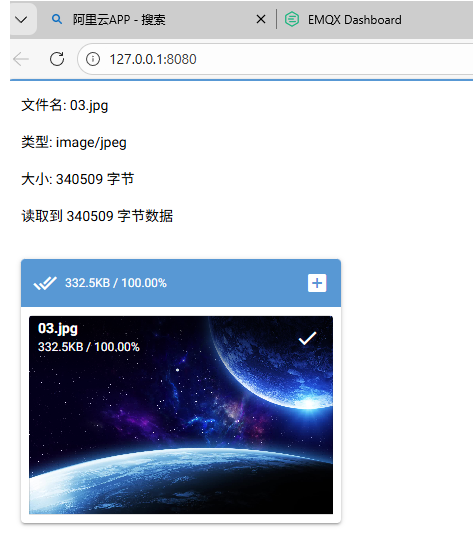
四、带记录表格和路径的上传
python
import os
import sqlite3
from pathlib import Path
from datetime import datetime
from nicegui import ui, app
import asyncio
import pandas as pd
class FileUploadApp:
def __init__(self):
self.uploaded_files = []
# 设置基础路径
BASE_DIR = Path(__file__).parent # 脚本所在目录
# 创建shujiku目录用于保存数据库
shujiku_dir = BASE_DIR / 'shujiku'
shujiku_dir.mkdir(exist_ok=True)
self.db_path = shujiku_dir / 'file_uploads.db'
# 创建wenjian目录用于保存上传文件
self.wenjian_dir = BASE_DIR / 'wenjian'
self.wenjian_dir.mkdir(exist_ok=True)
self.init_database()
self.setup_ui()
def init_database(self):
"""初始化数据库"""
conn = sqlite3.connect(self.db_path)
cursor = conn.cursor()
# 创建文件上传记录表
cursor.execute('''
CREATE TABLE IF NOT EXISTS file_uploads (
id INTEGER PRIMARY KEY AUTOINCREMENT,
version TEXT NOT NULL,
filename TEXT NOT NULL,
file_size INTEGER NOT NULL,
upload_time TIMESTAMP NOT NULL,
file_path TEXT NOT NULL,
created_at TIMESTAMP DEFAULT CURRENT_TIMESTAMP
)
''')
# 创建索引以提高查询性能
cursor.execute('CREATE INDEX IF NOT EXISTS idx_upload_time ON file_uploads(upload_time)')
cursor.execute('CREATE INDEX IF NOT EXISTS idx_version ON file_uploads(version)')
conn.commit()
conn.close()
def setup_ui(self):
"""设置UI界面"""
# 应用标题
ui.label('文件上传系统').classes('text-h4 text-weight-bold text-primary')
ui.label('支持所有格式的文件上传').classes('text-subtitle1')
with ui.row().classes('w-full'):
# 左侧:上传区域
with ui.column().classes('w-2/3'):
self.setup_upload_section()
# 右侧:信息和状态区域
with ui.column().classes('w-1/3'):
self.setup_info_section()
# 已上传文件列表
self.setup_file_list()
# 文件记录表格
self.setup_file_records()
def setup_upload_section(self):
"""设置上传区域"""
ui.label('选择文件').classes('text-h6')
# 版本号输入框
with ui.row().classes('w-full items-center mb-4'):
ui.label('版本号:').classes('font-bold min-w-[60px]')
self.version_input = ui.input(
placeholder='请输入文件版本号 (如: v1.0.0)',
validation={'请输入版本号': lambda value: value.strip() != ''}
).classes('flex-grow')
# 使用正确的上传组件配置
self.upload = ui.upload(
label='点击或拖拽文件到此区域',
multiple=True,
max_file_size=100 * 1024 * 1024,
on_upload=self.handle_upload,
auto_upload=True # 启用自动上传,确保文件正确添加到列表
).classes('w-full')
# 设置样式 - 使用单行字符串
self.upload.props('style="border: 2px dashed #1976d2; border-radius: 8px; padding: 40px; text-align: center; cursor: pointer; background-color: #f5f5f5;"')
self.upload.props('accept="*/*"')
# 进度条
self.progress = ui.linear_progress(0).classes('w-full mt-4')
self.progress_label = ui.label('等待文件...').classes('text-caption mt-1')
# 按钮区域
with ui.row().classes('w-full mt-4 gap-2'):
self.submit_button = ui.button(
'提交上传',
on_click=self.submit_files,
icon='cloud_upload',
color='positive'
).classes('flex-grow')
ui.button(
'清空列表',
on_click=self.clear_files,
icon='delete',
color='negative'
).classes('flex-grow')
def setup_info_section(self):
"""设置信息区域"""
with ui.card().classes('w-full'):
ui.label('📋 使用说明').classes('text-h6')
ui.separator()
with ui.column().classes('w-full gap-2'):
with ui.row().classes('items-center'):
ui.icon('check_circle').classes('text-green')
ui.label('支持所有文件格式').classes('ml-2')
with ui.row().classes('items-center'):
ui.icon('check_circle').classes('text-green')
ui.label('文件保存在uploads目录').classes('ml-2')
with ui.row().classes('items-center'):
ui.icon('check_circle').classes('text-green')
ui.label('支持批量上传').classes('ml-2')
with ui.row().classes('items-center'):
ui.icon('check_circle').classes('text-green')
ui.label('版本号存储在数据库中').classes('ml-2')
ui.separator()
# 数据库信息
self.db_info = ui.column().classes('w-full')
self.update_db_info()
def setup_file_list(self):
"""设置已上传文件列表"""
ui.label('📁 已选择文件').classes('text-h6 mt-8')
self.file_list_container = ui.column().classes('w-full')
def setup_file_records(self):
"""设置文件记录表格"""
ui.label('📊 文件上传记录').classes('text-h6 mt-8')
# 刷新按钮
with ui.row().classes('w-full justify-between items-center mb-2'):
ui.label('存储在SQLite数据库中的文件记录').classes('text-caption text-grey-6')
ui.button('刷新记录', on_click=self.refresh_records, icon='refresh',
color='primary').props('flat')
# 创建表格容器
self.records_table_container = ui.column().classes('w-full')
self.refresh_records()
def refresh_records(self):
"""刷新文件记录表格"""
self.records_table_container.clear()
with self.records_table_container:
try:
# 从数据库获取记录
records = self.get_file_records()
if not records:
ui.label('暂无文件上传记录').classes('text-center text-gray-500 py-8')
return
# 创建表格
with ui.table(
columns=[
{'name': 'id', 'label': 'ID', 'field': 'id', 'sortable': True, 'align': 'left'},
{'name': 'version', 'label': '版本号', 'field': 'version', 'sortable': True, 'align': 'left'},
{'name': 'filename', 'label': '文件名', 'field': 'filename', 'sortable': True, 'align': 'left'},
{'name': 'file_size', 'label': '文件大小', 'field': 'file_size', 'sortable': True, 'align': 'right'},
{'name': 'upload_time', 'label': '上传时间', 'field': 'upload_time', 'sortable': True, 'align': 'left'},
{'name': 'actions', 'label': '操作', 'field': 'actions', 'align': 'center'},
],
rows=records,
row_key='id',
title='文件上传记录',
pagination=10,
selection='multiple',
on_select=lambda e: ui.notify(f'选择了 {len(e.selection)} 行')
).classes('w-full') as table:
# 添加操作列
table.add_slot('body-cell-actions', '''
<q-td :props="props">
<q-btn icon="delete" size="sm" flat dense @click="() => $parent.$emit('delete', props.row)" color="red" />
</q-td>
''')
table.on('delete', lambda e: self.delete_record(e.args))
# 添加顶部工具栏
with table.add_slot('top'):
with ui.row().classes('w-full justify-between items-center'):
ui.label(f'共 {len(records)} 条记录').classes('text-caption')
with ui.row().classes('gap-2'):
ui.button(
'导出CSV',
on_click=self.export_to_csv,
icon='download',
color='secondary'
).props('flat')
ui.button(
'删除选中',
on_click=lambda: self.delete_selected(table),
icon='delete_sweep',
color='negative'
).props('flat')
except Exception as e:
ui.label(f'加载记录失败: {str(e)}').classes('text-red text-center py-4')
def get_file_records(self):
"""从数据库获取文件记录"""
try:
conn = sqlite3.connect(self.db_path)
cursor = conn.cursor()
cursor.execute('''
SELECT id, version, filename, file_size,
strftime('%Y-%m-%d %H:%M:%S', upload_time) as upload_time
FROM file_uploads
ORDER BY upload_time DESC
''')
records = []
for row in cursor.fetchall():
record = {
'id': row[0],
'version': row[1],
'filename': row[2],
'file_size': self.format_file_size(row[3]),
'upload_time': row[4],
'actions': ''
}
records.append(record)
conn.close()
return records
except Exception as e:
print(f"获取记录失败: {e}")
return []
def delete_record(self, record):
"""删除记录"""
try:
conn = sqlite3.connect(self.db_path)
cursor = conn.cursor()
# 先获取文件路径
cursor.execute('SELECT file_path FROM file_uploads WHERE id = ?', (record['id'],))
result = cursor.fetchone()
if result:
file_path = Path(result[0])
# 删除文件
if file_path.exists():
file_path.unlink()
# 删除数据库记录
cursor.execute('DELETE FROM file_uploads WHERE id = ?', (record['id'],))
conn.commit()
conn.close()
ui.notify(f'已删除记录: {record["filename"]}', type='info')
self.refresh_records()
self.update_db_info()
except Exception as e:
ui.notify(f'删除记录失败: {str(e)}', type='negative')
def delete_selected(self, table):
"""删除选中的记录"""
selected_rows = table.selected
if not selected_rows:
ui.notify('请先选择要删除的记录', type='warning')
return
# 确认对话框
with ui.dialog() as dialog, ui.card():
ui.label('确认删除?').classes('text-h6 text-red')
ui.label(f'这将删除 {len(selected_rows)} 条记录').classes('mt-2')
with ui.row().classes('mt-4 justify-end gap-2'):
ui.button('取消', on_click=dialog.close).props('outline')
ui.button('确认删除', on_click=lambda: self.confirm_delete_selected(selected_rows, dialog),
color='red')
dialog.open()
def confirm_delete_selected(self, selected_rows, dialog):
"""确认删除选中的记录"""
try:
conn = sqlite3.connect(self.db_path)
cursor = conn.cursor()
deleted_count = 0
for record in selected_rows:
# 先获取文件路径
cursor.execute('SELECT file_path FROM file_uploads WHERE id = ?', (record['id'],))
result = cursor.fetchone()
if result:
file_path = Path(result[0])
# 删除文件
if file_path.exists():
file_path.unlink()
# 删除数据库记录
cursor.execute('DELETE FROM file_uploads WHERE id = ?', (record['id'],))
deleted_count += 1
conn.commit()
conn.close()
ui.notify(f'成功删除 {deleted_count} 条记录', type='positive')
dialog.close()
self.refresh_records()
self.update_db_info()
except Exception as e:
ui.notify(f'删除记录失败: {str(e)}', type='negative')
def export_to_csv(self):
"""导出记录到CSV"""
try:
conn = sqlite3.connect(self.db_path)
# 使用pandas读取数据
df = pd.read_sql_query('''
SELECT
id as "ID",
version as "版本号",
filename as "文件名",
file_size as "文件大小(字节)",
upload_time as "上传时间"
FROM file_uploads
ORDER BY upload_time DESC
''', conn)
conn.close()
# 生成文件名
timestamp = datetime.now().strftime('%Y%m%d_%H%M%S')
csv_filename = f'file_uploads_{timestamp}.csv'
csv_path = Path(csv_filename)
# 保存为CSV
df.to_csv(csv_path, index=False, encoding='utf-8-sig')
ui.notify(f'已导出到 {csv_filename}', type='positive')
except Exception as e:
ui.notify(f'导出失败: {str(e)}', type='negative')
async def handle_upload(self, e):
"""处理文件上传事件 - 针对SmallFileUpload对象的正确处理方法"""
try:
# 获取文件名 - 从e.file.name获取
file_name = e.file.name if hasattr(e, 'file') and hasattr(e.file, 'name') else 'unknown'
# 获取文件内容 - SmallFileUpload对象有特殊处理方法
file_content = None
# 方法1: 尝试使用read()方法 - 这是一个协程,需要await
if hasattr(e.file, 'read'):
try:
# 注意:read()是异步方法,需要await
file_content = await e.file.read()
except Exception as read_error:
print(f"读取错误: {read_error}")
if file_content is None:
ui.notify(f'无法读取文件 {file_name} 的内容,请检查文件格式', type='warning')
return
# 确保file_content是bytes类型
if isinstance(file_content, str):
file_content = file_content.encode('utf-8')
elif not isinstance(file_content, bytes):
# 尝试转换为bytes
try:
file_content = bytes(file_content)
except:
ui.notify(f'文件 {file_name} 内容格式不支持: {type(file_content)}', type='warning')
return
# 添加到上传文件列表
self.uploaded_files.append({
'name': file_name,
'type': self.get_file_type(file_name),
'size': len(file_content),
'content': file_content,
'upload_time': datetime.now().strftime('%Y-%m-%d %H:%M:%S')
})
# 更新文件列表显示
self.update_file_list()
ui.notify(f'已添加文件: {file_name}', type='positive')
# 不立即清空上传组件,让用户可以看到已选择的文件
# 在提交上传后再清空
except Exception as ex:
ui.notify(f'处理文件时出错: {str(ex)}', type='negative')
def get_file_type(self, filename: str) -> str:
"""获取文件类型"""
ext = Path(filename).suffix.lower()
type_map = {
# 图片
'.jpg': '图片', '.jpeg': '图片', '.png': '图片', '.gif': '图片',
'.bmp': '图片', '.svg': '图片', '.webp': '图片', '.ico': '图标',
# 文档
'.pdf': 'PDF文档', '.doc': 'Word文档', '.docx': 'Word文档',
'.txt': '文本文件', '.rtf': '富文本', '.md': 'Markdown',
# 表格
'.xls': 'Excel文件', '.xlsx': 'Excel文件', '.csv': 'CSV文件',
# 压缩文件
'.zip': '压缩文件', '.rar': '压缩文件', '.7z': '压缩文件',
'.tar': '压缩文件', '.gz': '压缩文件',
# 音频
'.mp3': '音频文件', '.wav': '音频文件', '.flac': '音频文件',
# 视频
'.mp4': '视频文件', '.avi': '视频文件', '.mov': '视频文件',
# 代码
'.py': 'Python代码', '.js': 'JavaScript代码', '.html': 'HTML文件',
# RBL文件
'.rbl': 'RBL文件',
}
return type_map.get(ext, f'{ext[1:].upper()}文件' if ext else '未知文件')
def update_file_list(self):
"""更新文件列表显示"""
self.file_list_container.clear()
if not self.uploaded_files:
with self.file_list_container:
ui.label('暂无文件').classes('text-center text-gray-500 py-8')
return
with self.file_list_container:
for file_info in self.uploaded_files:
with ui.card().classes('w-full mb-2'):
with ui.row().classes('items-center w-full'):
# 文件图标
ui.icon(self.get_file_icon(file_info['name'])).classes('text-2xl text-blue-500')
# 文件信息
with ui.column().classes('ml-3 flex-grow'):
ui.label(file_info['name']).classes('font-bold truncate max-w-xs')
with ui.row().classes('text-xs text-gray-600'):
ui.label(file_info['type'])
ui.label('•').classes('mx-1')
ui.label(self.format_file_size(file_info['size']))
ui.label('•').classes('mx-1')
ui.label(file_info['upload_time'])
# 删除按钮
ui.button(
icon='delete',
on_click=lambda f=file_info: self.remove_file(f),
color='red'
).props('flat dense').classes('text-xs')
def get_file_icon(self, filename: str) -> str:
"""获取文件图标"""
ext = Path(filename).suffix.lower()
icon_map = {
'.jpg': 'image', '.jpeg': 'image', '.png': 'image',
'.gif': 'image', '.bmp': 'image', '.svg': 'image',
'.pdf': 'picture_as_pdf', '.doc': 'description', '.docx': 'description',
'.txt': 'article', '.zip': 'folder_zip', '.rar': 'folder',
'.mp3': 'music_note', '.mp4': 'movie', '.py': 'code',
'.js': 'javascript', '.html': 'html', '.rbl': 'description',
}
return icon_map.get(ext, 'insert_drive_file')
def format_file_size(self, size: int) -> str:
"""格式化文件大小"""
for unit in ['B', 'KB', 'MB', 'GB']:
if size < 1024.0:
return f"{size:.1f} {unit}"
size /= 1024.0
return f"{size:.1f} TB"
def remove_file(self, file_info: dict):
"""删除文件"""
if file_info in self.uploaded_files:
self.uploaded_files.remove(file_info)
self.update_file_list()
ui.notify(f'已移除: {file_info["name"]}', type='info')
async def submit_files(self):
"""提交文件"""
if not self.uploaded_files:
ui.notify('请先选择要上传的文件', type='warning')
return
# 检查版本号
version = self.version_input.value.strip()
if not version:
ui.notify('请输入版本号', type='warning')
return
try:
# 显示进度
self.submit_button.disable()
self.progress_label.set_text('正在保存文件...')
self.progress.value = 0.1
# 确保上传目录存在
upload_dir = self.wenjian_dir
upload_dir.mkdir(exist_ok=True)
saved_count = 0
total = len(self.uploaded_files)
for i, file_info in enumerate(self.uploaded_files):
# 更新进度
progress = 0.1 + (i + 1) / total * 0.8
self.progress.value = progress
self.progress_label.set_text(f'保存中 {i+1}/{total}: {file_info["name"]}')
try:
# 生成安全的文件名
safe_name = self.make_safe_name(file_info['name'])
file_path = upload_dir / safe_name
# 处理重名文件
counter = 1
original_stem = file_path.stem
extension = file_path.suffix
while file_path.exists():
safe_name = f"{original_stem}_{counter}{extension}"
file_path = upload_dir / safe_name
counter += 1
# 保存文件
with open(file_path, 'wb') as f:
f.write(file_info['content'])
# 获取当前时间
upload_time = datetime.now()
# 保存到数据库
conn = sqlite3.connect(self.db_path)
cursor = conn.cursor()
cursor.execute('''
INSERT INTO file_uploads (version, filename, file_size, upload_time, file_path)
VALUES (?, ?, ?, ?, ?)
''', (
version,
file_info['name'],
file_info['size'],
upload_time.strftime('%Y-%m-%d %H:%M:%S'),
str(file_path.absolute())
))
conn.commit()
conn.close()
saved_count += 1
# 小延迟
await asyncio.sleep(0.1)
except Exception as e:
ui.notify(f'保存 {file_info["name"]} 失败: {str(e)}', type='warning')
# 完成
self.progress.value = 1.0
self.progress_label.set_text(f'完成! 已保存 {saved_count} 个文件')
# 清空列表和版本号
self.uploaded_files.clear()
self.version_input.value = ''
self.version_input.validation = None # 重置验证状态
self.upload.reset() # 清空上传组件
self.update_file_list()
self.update_db_info()
self.refresh_records()
# 显示结果
if saved_count > 0:
success_msg = f'成功保存 {saved_count} 个文件到数据库'
ui.notify(success_msg, type='positive')
except Exception as e:
ui.notify(f'保存文件时出错: {str(e)}', type='negative')
finally:
# 恢复状态
self.submit_button.enable()
# 3秒后重置进度条
await asyncio.sleep(3)
self.progress.value = 0
self.progress_label.set_text('等待文件...')
def make_safe_name(self, filename: str) -> str:
"""生成安全的文件名"""
# 只保留安全字符
import re
name = Path(filename).name
safe_name = re.sub(r'[^\w\s.-]', '', name)
safe_name = safe_name.strip()
if not safe_name:
safe_name = f'file_{datetime.now().strftime("%Y%m%d_%H%M%S")}'
return safe_name
def clear_files(self):
"""清空文件列表"""
if not self.uploaded_files:
ui.notify('文件列表已为空', type='info')
return
# 确认对话框
with ui.dialog() as dialog, ui.card():
ui.label('确认清空?').classes('text-h6 text-red')
ui.label(f'这将清空 {len(self.uploaded_files)} 个已选择的文件').classes('mt-2')
with ui.row().classes('mt-4'):
ui.button('取消', on_click=dialog.close).props('outline')
ui.button('确认清空', on_click=lambda: self.confirm_clear(dialog), color='red')
dialog.open()
def confirm_clear(self, dialog):
"""确认清空"""
self.uploaded_files.clear()
self.update_file_list()
ui.notify('已清空文件列表', type='info')
dialog.close()
def update_db_info(self):
"""更新数据库信息"""
self.db_info.clear()
with self.db_info:
try:
conn = sqlite3.connect(self.db_path)
cursor = conn.cursor()
# 获取统计信息
cursor.execute('SELECT COUNT(*) FROM file_uploads')
total_records = cursor.fetchone()[0]
cursor.execute('SELECT SUM(file_size) FROM file_uploads')
total_size = cursor.fetchone()[0] or 0
cursor.execute('''
SELECT strftime('%Y-%m-%d %H:%M:%S', MAX(upload_time))
FROM file_uploads
''')
latest_upload = cursor.fetchone()[0]
conn.close()
ui.label('📊 数据库统计').classes('font-bold mb-2')
with ui.column().classes('gap-1'):
ui.label(f'• 总记录数: {total_records}').classes('text-caption')
ui.label(f'• 总文件大小: {self.format_file_size(total_size)}').classes('text-caption')
if latest_upload:
ui.label(f'• 最后上传: {latest_upload}').classes('text-caption text-grey-6')
else:
ui.label('• 最后上传: 暂无').classes('text-caption text-grey-6')
ui.label(f'• 数据库路径: {self.db_path.absolute()}').classes('text-caption text-grey-6')
except Exception as e:
ui.label(f'📊 数据库统计: 读取失败 ({str(e)})').classes('text-caption text-red')
def main():
"""主函数"""
# 设置基础路径
BASE_DIR = Path(__file__).parent # 脚本所在目录
# 创建shujiku目录用于保存数据库
shujiku_dir = BASE_DIR / 'shujiku'
shujiku_dir.mkdir(exist_ok=True)
# 创建wenjian目录用于保存上传文件
wenjian_dir = BASE_DIR / 'wenjian'
wenjian_dir.mkdir(exist_ok=True)
# 创建应用
FileUploadApp()
# 运行应用
ui.run(
title='文件上传系统',
favicon='📁',
dark=False,
reload=False,
port=8080,
show=True
)
if __name__ == '__main__':
main()