1. 本节目标
• 熟练使用SQL语句对数据库进行CRUD操作
• 掌握聚合函数的使用
• 掌握分组查询以及对分组结果进行过滤
• 了解内置函数
2. CRUD简介
CURD是对数据库中的记录进行基本的增删改查操作
• Create (创建)
• Retrieve (读取)
• Update (更新)
• Delete (删除)
3. Create 新增
3.1 语法
java
INSERT [INTO] table_name
 [(column [, column] ...)]
VALUES
 (value_list) [, (value_list)] ...
value_list: value, [, value] ...
3.2 示例
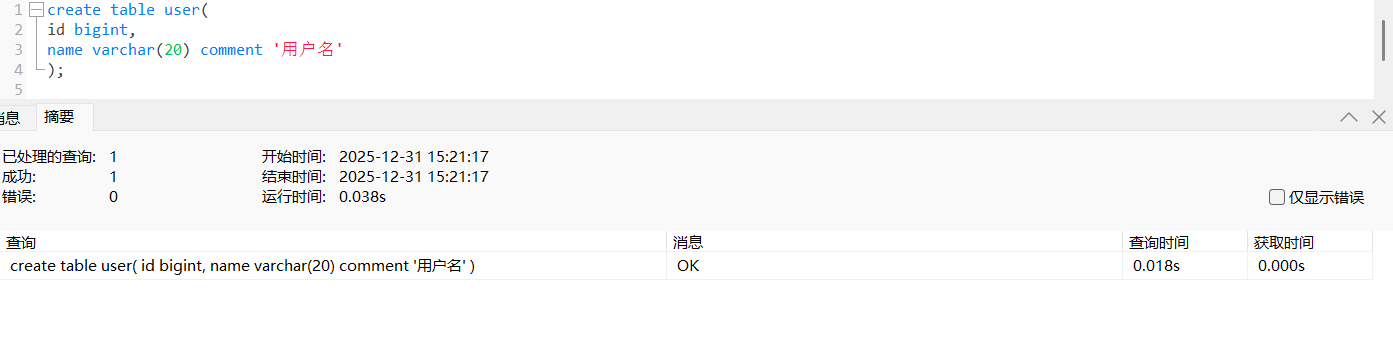
3.2.1 单行数据指定列插入
value_list 中值的数量必须和指定列数量及顺序一致
java
insert into user(id,name) values(3,'王五');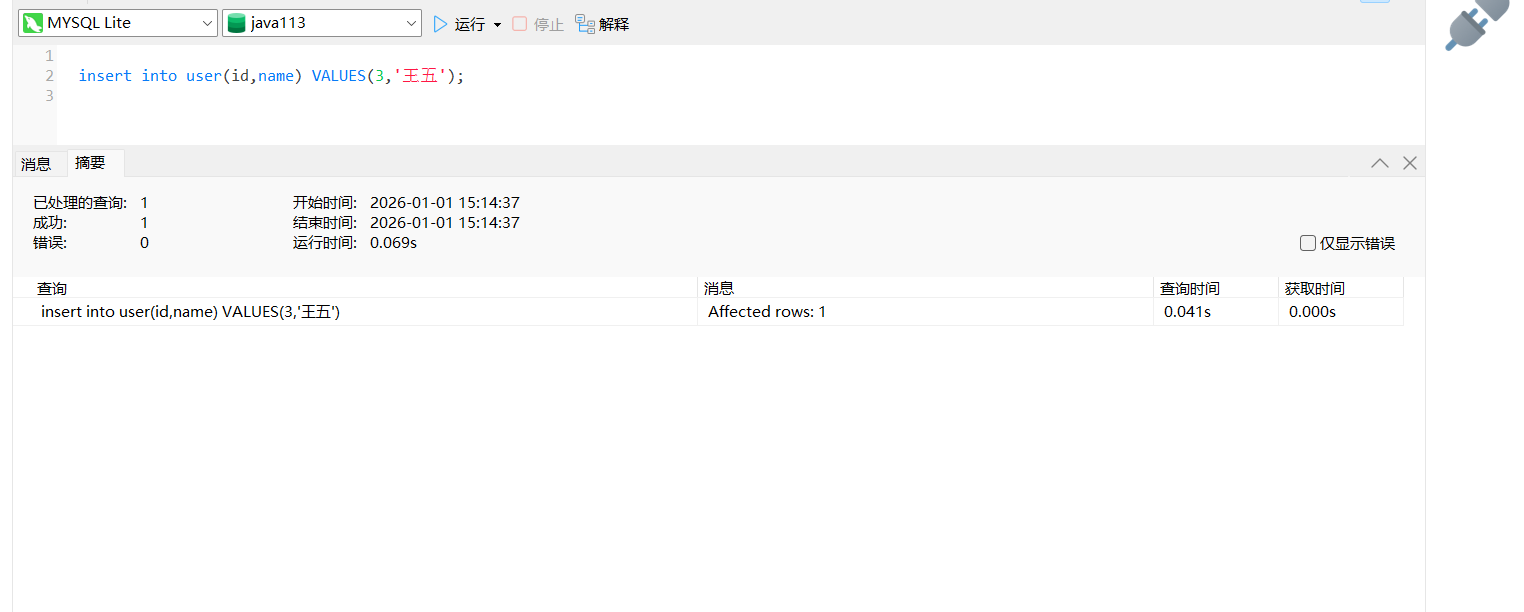
3.2.1 单行数据全列插入
value_list 中值的数量必须和定义表的列的数量及顺序一致
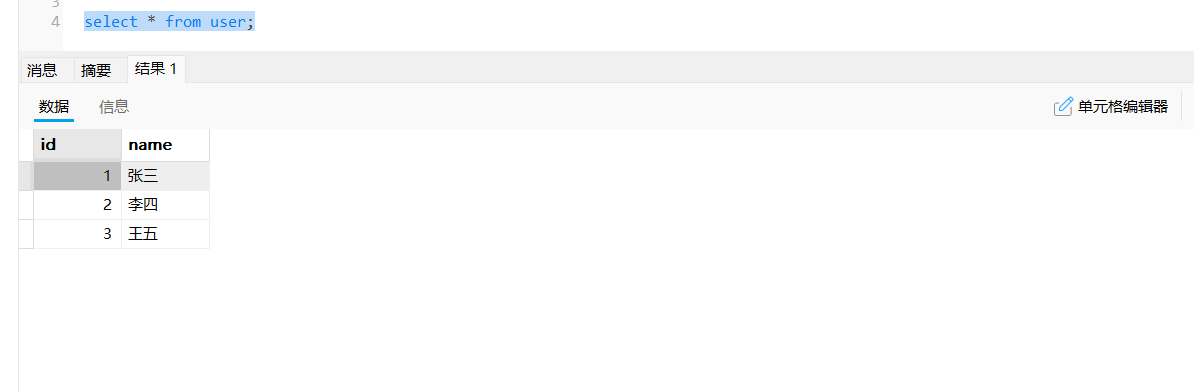
3.2.3 多行数据指定列插入
两种都可以
java
insert into user(id,name) values(4,'钱七'),(5,'孙八');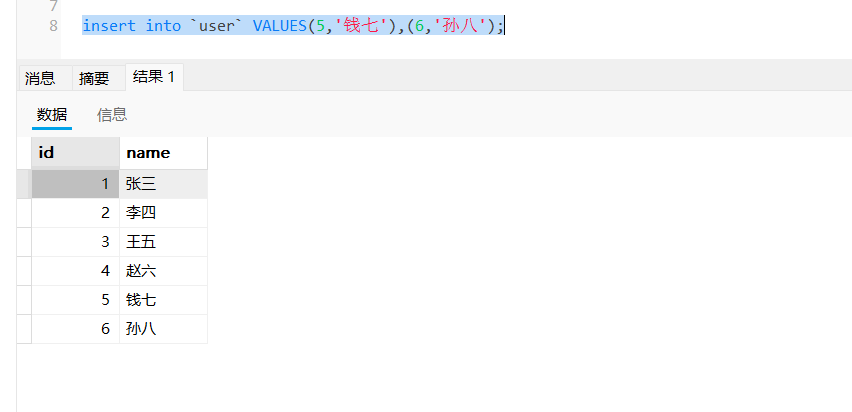
4. Retrieve 检索
4.1 语法
java
SELECT
 [DISTINCT]
 select_expr [, select_expr] ...
 [FROM table_references]
 [WHERE where_condition]
 [GROUP BY {col_name | expr}, ...]
 [HAVING where_condition]
 [ORDER BY {col_name | expr } [ASC | DESC], ... ]
 [LIMIT {[offset,] row_count | row_count OFFSET offset}]
4.2 示例
4.2.1 构造数据
java
CREATE TABLE exam (
 id BIGINT,
 name VARCHAR(20) COMMENT '同学姓名',
 chinese float COMMENT '语文成绩',
 math float COMMENT '数学成绩',
 english float COMMENT '英语成绩'
);

INSERT INTO exam (name, chinese, math, english) VALUES
(1, '唐三藏', 67, 98, 56),
(2, '孙悟空', 87, 78, 77),
(3, '猪悟能', 88, 98, 90),
(4, '曹孟德', 82, 84, 67),
(5, '刘玄德', 55, 85, 45),
(6, '孙权', 70, 73, 78),
(7, '宋公明', 75, 65, 30);
4.3 Select
4.3.1 全列查询
java
# 使用 * 可以查询表中所有列的值
mysql> select * from exam;
+----+--------+---------+------+---------+
| id | name | chinese | math | english |
+----+--------+---------+------+---------+
| 1 | 唐三藏 | 67 | 98 | 56 |
| 2 | 孙悟空 | 87 | 78 | 77 |
| 3 | 猪悟能 | 88 | 98 | 90 |
| 4 | 曹孟德 | 82 | 84 | 67 |
| 5 | 刘玄德 | 55 | 85 | 45 |
| 6 | 孙权 | 70 | 73 | 78 |
| 7 | 宋公明 | 75 | 65 | 30 |
+----+--------+---------+------+---------+
7 rows in set (0.00 sec)
4.3.2 指定列查询
查询所有人的编号、姓名和语文成绩
java
mysql> select id, name, chinese from exam;
+----+--------+---------+
| id | name | chinese |
+----+--------+---------+
| 1 | 唐三藏 | 67 |
| 2 | 孙悟空 | 87 |
| 3 | 猪悟能 | 88 |
| 4 | 曹孟德 | 82 |
| 5 | 刘玄德 | 55 |
| 6 | 孙权 | 70 |
| 7 | 宋公明 | 75 |
+----+--------+---------+
7 rows in set (0.00 sec)
在select后面的查询列表中指定希望查询的列,可以是一个也可以是多个,中间用逗号隔开 指定列的顺序与表结构中的列的顺序无关
4.3.3 查询字段为表达式
常量表达式
java
# 表达式本身就是一个常
mysql> select id, name, 10 from exam;
+----+--------+----+
| id | name | 10 |
+----+--------+----+
| 1 | 唐三藏 | 10 |
| 2 | 孙悟空 | 10 |
| 3 | 猪悟能 | 10 |
| 4 | 曹孟德 | 10 |
| 5 | 刘玄德 | 10 |
| 6 | 孙权 | 10 |
| 7 | 宋公明 | 10 |
+----+--------+----+
7 rows in set (0.00 sec)
# 也可以是常量的运算
mysql> select id, name, 10 + 1 from exam;
+----+--------+--------+
| id | name | 10 + 1 |
+----+--------+--------+
| 1 | 唐三藏 | 11 |
| 2 | 孙悟空 | 11 |
| 3 | 猪悟能 | 11 |
| 4 | 曹孟德 | 11 |
# 表达式本身就是一个常
mysql> select id, name, 10 from exam;
+----+--------+----+
| id | name | 10 |
+----+--------+----+
| 1 | 唐三藏 | 10 |
| 2 | 孙悟空 | 10 |
| 3 | 猪悟能 | 10 |
| 4 | 曹孟德 | 10 |
| 5 | 刘玄德 | 10 |
| 6 | 孙权 | 10 |
| 7 | 宋公明 | 10 |
+----+--------+----+
7 rows in set (0.00 sec)
# 也可以是常量的运算
mysql> select id, name, 10 + 1 from exam;
+----+--------+--------+
| id | name | 10 + 1 |
+----+--------+--------+
| 1 | 唐三藏 | 11 |
| 2 | 孙悟空 | 11 |
| 3 | 猪悟能 | 11 |
| 4 | 曹孟德 | 11 |
# 表达式本身就是一个常
mysql> select id, name, 10 from exam;
+----+--------+----+
| id | name | 10 |
+----+--------+----+
| 1 | 唐三藏 | 10 |
| 2 | 孙悟空 | 10 |
| 3 | 猪悟能 | 10 |
| 4 | 曹孟德 | 10 |
| 5 | 刘玄德 | 10 |
| 6 | 孙权 | 10 |
| 7 | 宋公明 | 10 |
+----+--------+----+
7 rows in set (0.00 sec)
# 也可以是常量的运算
mysql> select id, name, 10 + 1 from exam;
+----+--------+--------+
| id | name | 10 + 1 |
+----+--------+--------+
| 1 | 唐三藏 | 11 |
| 2 | 孙悟空 | 11 |
| 3 | 猪悟能 | 11 |
| 4 | 曹孟德 | 11 |
| 5 | 刘玄德 | 11 |
| 6 | 孙权 | 11 |
| 7 | 宋公明 | 11 |
+----+--------+--------+
7 rows in set (0.01 sec)
把所有学生的语文成绩加10分
java
# 表达式中包含一个字段
mysql> select id, name, chinese + 10 from exam;
+----+--------+--------------+
| id | name | chinese + 10 |
+----+--------+--------------+
| 1 | 唐三藏 | 77 |
| 2 | 孙悟空 | 97 |
| 3 | 猪悟能 | 98 |
| 4 | 曹孟德 | 92 |
| 5 | 刘玄德 | 65 |
| 6 | 孙权 | 80 |
| 7 | 宋公明 | 85 |
+----+--------+--------------+
7 rows in set (0.00 sec)
计算所有学生语文、数学和英语成绩的总分
java
# 表达式包含多个字段
mysql> select id, name, chinese + math + english from exam;
+----+--------+--------------------------+
| id | name | chinese + math + english |
+----+--------+--------------------------+
| 1 | 唐三藏 | 221 |
| 2 | 孙悟空 | 242 |
| 3 | 猪悟能 | 276 |
| 4 | 曹孟德 | 233 |
| 5 | 刘玄德 | 185 |
| 6 | 孙权 | 221 |
| 7 | 宋公明 | 170 |
+----+--------+--------------------------+
7 rows in set (0.00 sec)
4.3.4 为查询结果指定别名
4.3.4.1 语法
java
SELECT column [AS] alias_name [, ...] FROM table_name;AS可以省略,别名如果包含空格必须用单引号包裹
4.3.4.2 示例
为总分这一列指定别名
java
mysql> select id, name, chinese + math + english as 总分 from exam;
+----+--------+------+
| id | name | 总分 | # 表头以别名显示
+----+--------+------+
| 1 | 唐三藏 | 221 |
| 2 | 孙悟空 | 242 |
| 3 | 猪悟能 | 276 |
| 4 | 曹孟德 | 233 |
| 5 | 刘玄德 | 185 |
| 6 | 孙权 | 221 |
| 7 | 宋公明 | 170 |
+----+--------+------+
7 rows in set (0.00 sec)
4.3.5 结果去重查询
- 查询当前所的数学成绩
java
# 通过观察有两条98的记录
mysql> select math from exam;
+------+
| math |
+------+
| 98 | # 第一条
| 78 |
| 98 | # 第二条
| 84 |
| 85 |
| 73 |
| 65 |
+------+
7 rows in set (0.00 sec)- 在结果集中去除重复记录,可以使用DISTINCT
java
# 去重查询
mysql> select distinct math from exam;
+------+
| math |
+------+
| 98 |
| 78 |
| 84 |
| 85 |
| 73 |
| 65 |
+------+
6 rows in set (0.00 sec)
使用DISCTINCT去重时,只有查询列表中所有列的值都相同才会判定为重复
注意:
• 查询时不加限制条件会返回表中所有结果,如果表中的数据量过大,会把服务器的资源消耗殆尽
• 在生产环境不要使不加限制条件的查询
4.4 Where 条件查询
4.4.1 语法
java
SELECT
 select_expr [, select_expr] ... [FROM table_references]
 WHERE where_condit
4.4.2 示例
4.4.4.1 基本查询
查询英语不及格的同学及英语成绩 < 60
java
mysql> select name, english from exam where english < 60;
+--------+---------+
| name | english |
+--------+---------+
| 唐三藏 | 56 |
| 刘玄德 | 45 |
| 宋公明 | 30 |
+--------+---------+
3 rows in set (0.00 sec)
查询语文成绩高于英语成绩的同学
java
mysql> select name, chinese, english from exam where chinese > english;
+--------+---------+---------+
| name | chinese | english |
+--------+---------+---------+
| 唐三藏 | 67 | 56 |
| 孙悟空 | 87 | 77 |
| 曹孟德 | 82 | 67 |
| 刘玄德 | 55 | 45 |
| 宋公明 | 75 | 30 |
+--------+---------+---------+
5 rows in set (0.00 sec)
总分在 200 分以下的同学
java
mysql> select name, chinese + math + english as 总分 from exam where chinese +
math + english < 200;
+--------+------+
| name | 总分 |
+--------+------+
| 刘玄德 | 185 |
| 宋公明 | 170 |
+--------+------+
2 rows in set (0.00 sec)
4.4.4.2 AND和OR
查询语文成绩大于80分且英语成绩大于80分的同学
java
mysql> select * from exam where chinese > 80 and english > 80;
+----+--------+---------+------+---------+
| id | name | chinese | math | english |
+----+--------+---------+------+---------+
| 3 | 猪悟能 | 88 | 98 | 90 |
+----+--------+---------+------+---------+
1 row in set (0.00 sec)
查询语文成绩大于80分或英语成绩大于80分的同学
java
mysql> select * from exam where chinese > 80 OR english > 80;
+----+--------+---------+------+---------+
| id | name | chinese | math | english |
+----+--------+---------+------+---------+
| 2 | 孙悟空 | 87 | 78 | 77 |
| 3 | 猪悟能 | 88 | 98 | 90 |
| 4 | 曹孟德 | 82 | 84 | 67 |
+----+--------+---------+------+---------+
3 rows in set (0.00 sec)
观察AND和OR的优先级
java
mysql> select * from exam where chinese > 80 or math > 70 and english > 70;
mysql> select * from exam where (chinese > 80 or math > 70) and english > 70;
()>and>or优先级
4.4.4.3 范围查询
语文成绩在 80, 90 分的同学及语文成绩
java
# 使用BETWEEN AND 实现
mysql> select name, chinese from exam where chinese between 80 and 90;
# 使用 AND 实现
mysql> select name, chinese from exam where chinese >= 80 and chinese <= 90;
+--------+---------+
| name | chinese |
+--------+---------+
| 孙悟空 | 87 |
| 猪悟能 | 88 |
| 曹孟德 | 82 |
+--------+---------+
3 rows in set (0.00 sec)
数学成绩是 78 或者 79 或者 98 或者 99 分的同学及数学成绩
java
# 使用IN实现
mysql> select name, math from exam where math in (78, 79, 98, 99);
# 使用OR实现
mysql> select name, math from exam where math = 78 or math = 79 or math = 98 or
 math = 99;
+--------+------+
| name | math |
+--------+------+
| 唐三藏 | 98 |
| 孙悟空 | 78 |
| 猪悟能 | 98 |
+--------+------+
3 rows in set (0.00 sec)
4.4.4.4 模糊查询
查询所有姓孙的同学
java
mysql> select * from exam where name like '孙%';
+----+--------+---------+------+---------+
| id | name | chinese | math | english |
+----+--------+---------+------+---------+
| 2 | 孙悟空 | 87 | 78 | 77 |
| 6 | 孙权 | 70 | 73 | 78 |
+----+--------+---------+------+---------+
2 rows in set (0.00 sec)
查询姓孙且姓名共有两个字同学
java
mysql> select * from exam where name like '孙_';
+----+------+---------+------+---------+
| id | name | chinese | math | english |
+----+------+---------+------+---------+
| 6 | 孙权 | 70 | 73 | 78 |
+----+------+---------+------+---------+
1 row in set (0.00 sec)
4.4.4.5 NULL的查询
构造数据
java
# 写入一条数据,英语成绩为NULL
insert into exam values (8, '张飞', 27, 0, NULL);
查询英语成绩为NULL的记录
java
# 使用is null
mysql> select * from exam where english is null;
+----+------+---------+------+---------+
| id | name | chinese | math | english |
+----+------+---------+------+---------+
| 8 | 张飞 | 27 | 0 | NULL |
+----+------+---------+------+---------+
1 row in set (0.00 sec)
查询英语成绩不为NULL的记录
java
# 使用is not null
mysql> select * from exam where english is not null;
+----+--------+---------+------+---------+
| id | name | chinese | math | english |
+----+--------+---------+------+---------+
| 1 | 唐三藏 | 67 | 98 | 56 |
| 2 | 孙悟空 | 87 | 78 | 77 |
| 3 | 猪悟能 | 88 | 98 | 90 |
| 4 | 曹孟德 | 82 | 84 | 67 |
| 5 | 刘玄德 | 55 | 85 | 45 |
| 6 | 孙权 | 70 | 73 | 78 |
| 7 | 宋公明 | 75 | 65 | 30 |
+----+--------+---------+------+---------+
7 rows in set (0.00 sec)
NULL与其他值进行运算结果为NULL
java
# 观察结果中的总分
mysql> select name, chinese + math + english as 总分 from exam;
+--------+------+
| name | 总分 |
+--------+------+
| 唐三藏 | 221 |
| 孙悟空 | 242 |
| 猪悟能 | 276 |
| 曹孟德 | 233 |
| 刘玄德 | 185 |
| 孙权 | 221 |
| 宋公明 | 170 |
| 张飞 | NULL |
+--------+------+
8 rows in set (0.00 sec)
注意
• WHERE条件中可以使用表达式,但不能使用别名
• AND的优先级高于OR,在同时使用时,建议使用小括号()包裹优先执行的部分
• 过滤NULL时不要使用等于号(=)与不等于号(!= , <>)
• NULL与任何值运算结果都为NULL
4.5 Order by 排序
4.5.1 语法
java
-- ASC 为升序(从小到大)
-- DESC 为降序(从大到小)
-- 默认为 ASC
SELECT ... FROM table_name [WHERE ...] ORDER BY {col_name | expr } [ASC |
DESC], ... ;
4.5.2 示例
按数学成绩从低到高排序(升序)
java
mysql> select name, math from exam order by math asc;
+--------+------+
| name | math |
+--------+------+
| 张飞 | 0 |
| 宋公明 | 65 |
| 孙权 | 73 |
| 孙悟空 | 78 |
| 曹孟德 | 84 |
| 刘玄德 | 85 |
| 唐三藏 | 98 |
| 猪悟能 | 98 |
+--------+------+
8 rows in set (0.00 sec)
按语文成绩从高到低排序(降序)
java
mysql> select name, chinese from exam order by chinese desc;
+--------+---------+
| name | chinese |
+--------+---------+
| 猪悟能 | 88 |
| 孙悟空 | 87 |
| 曹孟德 | 82 |
| 宋公明 | 75 |
| 孙权 | 70 |
| 唐三藏 | 67 |
| 刘玄德 | 55 |
| 张飞 | 27 |
+--------+---------+
8 rows in set (0.00 sec)
按英语成绩从高到低排序
java
mysql> select name, english from exam order by english desc;
+--------+---------+
| name | english |
+--------+---------+
| 猪悟能 | 90 |
| 孙权 | 78 |
| 孙悟空 | 77 |
| 曹孟德 | 67 |
| 唐三藏 | 56 |
| 刘玄德 | 45 |
| 宋公明 | 30 |
| 张飞 | NULL | # NULL被看做比任何值都小
+--------+---------+
8 rows in set (0.00 sec)
查询同学各门成绩,依次按数学降序,英语升序,语文升序的方式显示
java
mysql> select name, math, english, chinese from exam order by math desc,
english asc, chinese asc;
+--------+------+---------+---------+
| name | math | english | chinese |
+--------+------+---------+---------+
| 唐三藏 | 98 | 56 | 67 |
| 猪悟能 | 98 | 90 | 88 |
| 刘玄德 | 85 | 45 | 55 |
| 曹孟德 | 84 | 67 | 82 |
| 孙悟空 | 78 | 77 | 87 |
| 孙权 | 73 | 78 | 70 |
| 宋公明 | 65 | 30 | 75 |
| 张飞 | 0 | NULL | 27 |
+--------+------+---------+---------+
8 rows in set (0.00 sec)
查询同学及总分,由高到低排序
java
mysql> select name, chinese + math + english from exam order by chinese + math
+ english desc;
+--------+--------------------------+
| name | chinese + math + english |
+--------+--------------------------+
| 猪悟能 | 276 |
| 孙悟空 | 242 |
| 曹孟德 | 233 |
| 唐三藏 | 221 |
| 孙权 | 221 |
| 刘玄德 | 185 |
| 宋公明 | 170 |
| 张飞 | NULL |
+--------+--------------------------+
8 rows in set (0.00 sec)
可以使用列的别名进行排序
java
mysql> select name, chinese + math + english as 总分 from exam order by 总分
desc;
+--------+------+
| name | 总分 |
+--------+------+
| 猪悟能 | 276 |
| 孙悟空 | 242 |
| 曹孟德 | 233 |
| 唐三藏 | 221 |
| 孙权 | 221 |
| 刘玄德 | 185 |
| 宋公明 | 170 |
| 张飞 | NULL |
+--------+------+
8 rows in set (0.00 sec)
所有英语成绩不为NULL的同学,按语文成绩从高到低排序
java
mysql> select * from exam where english is not null order by chinese desc;
+----+--------+---------+------+---------+
| id | name | chinese | math | english |
+----+--------+---------+------+---------+
| 3 | 猪悟能 | 88 | 98 | 90 |
| 2 | 孙悟空 | 87 | 78 | 77 |
| 4 | 曹孟德 | 82 | 84 | 67 |
| 7 | 宋公明 | 75 | 65 | 30 |
| 6 | 孙权 | 70 | 73 | 78 |
| 1 | 唐三藏 | 67 | 98 | 56 |
| 5 | 刘玄德 | 55 | 85 | 45 |
+----+--------+---------+------+---------+
7 rows in set (0.00 sec)
注意
• 查询中没有ORDER BY 子句,返回的顺序是未定义的,永远不要依赖这个顺序
• ORDER BY 子句中可以使用列的别名进行排序
• NULL 进行排序时,视为比任何值都小,升序出现在最上面,降序出现在最下面
4.6 分页查询
4.6.1 语法
java
-- 起始下标为 0
-- 从 0 开始,筛选 num 条结果
SELECT ... FROM table_name [WHERE ...] [ORDER BY ...] LIMIT num;
-- 从 start 开始,筛选 num 条结果
SELECT ... FROM table_name [WHERE ...] [ORDER BY ...] LIMIT start, num;
-- 从 start 开始,筛选 num 条结果,比第二种用法更明确,建议使用
SELECT ... FROM table_name [WHERE ...] [ORDER BY ...] LIMIT num OFFSET start;
4.6.2 示例
java
# 查询第一页数据
mysql> select * from exam order by id asc limit 0, 3;
+----+--------+---------+------+---------+
| id | name | chinese | math | english |
+----+--------+---------+------+---------+
| 1 | 唐三藏 | 67 | 98 | 56 |
| 2 | 孙悟空 | 87 | 78 | 77 |
| 3 | 猪悟能 | 88 | 98 | 90 |
+----+--------+---------+------+---------+
3 rows in set (0.00 sec)
# 查询第二页数据
mysql> select * from exam order by id asc limit 3, 3;
+----+--------+---------+------+---------+
| id | name | chinese | math | english |
+----+--------+---------+------+---------+
| 4 | 曹孟德 | 82 | 84 | 67 |
| 5 | 刘玄德 | 55 | 85 | 45 |
| 6 | 孙权 | 70 | 73 | 78 |
+----+--------+---------+------+---------+
3 rows in set (0.00 sec)
# 查询第三页数据,没有达到limit的条数限制,也不会有任何影响,有多少条就显示多少条
mysql> select * from exam order by id asc limit 6, 3;
+----+--------+---------+------+---------+
| id | name | chinese | math | english |
+----+--------+---------+------+---------+
| 7 | 宋公明 | 75 | 65 | 30 |
| 8 | 张飞 | 27 | 0 | NULL |
+----+--------+---------+------+---------+
2 rows in set (0.00 sec)
5. Update 修改
5.1 语法
java
UPDATE [LOW_PRIORITY] [IGNORE] table_reference
 SET assignment [, assignment] ...
 [WHERE where_condition]
 [ORDER BY ...]
 [LIMIT row_count]
对符合条件的结果进行列值更新
5.2 示例
将孙悟空同学的数学成绩变更为 80 分
java
# 查看原始数据
mysql> select * from exam where name = '孙悟空';
+----+--------+---------+------+---------+
| id | name | chinese | math | english |
+----+--------+---------+------+---------+
| 2 | 孙悟空 | 87 | 78 | 77 |
+----+--------+---------+------+---------+
1 row in set (0.00 sec)
# 更新操作
mysql> update exam set math = 80 where name = '孙悟空';
Query OK, 1 row affected (0.01 sec)
Rows matched: 1 Changed: 1 Warnings: 0
# 查看结果,数学成绩更新成功
mysql> select * from exam where name = '孙悟空';
+----+--------+---------+------+---------+
| id | name | chinese | math | english |
+----+--------+---------+------+---------+
| 2 | 孙悟空 | 87 | 80 | 77 |
+----+--------+---------+------+---------+
1 row in set (0.00 sec)
将曹孟德同学的数学成绩变更为 60 分,语文成绩变更为 70 分
java
# 查看原始数据
mysql> select name, math, chinese from exam where name = '曹孟德';
+--------+------+---------+
| name | math | chinese |
+--------+------+---------+
| 曹孟德 | 84 | 82 |
+--------+------+---------+
1 row in set (0.00 sec)
# 更新操作
mysql> update exam set math = 60, chinese = 70 where name = '曹孟德';
Query OK, 1 row affected (0.01 sec)
Rows matched: 1 Changed: 1 Warnings: 0
# 查看结果
mysql> select name, math, chinese from exam where name = '曹孟德';
+--------+------+---------+
| name | math | chinese |
+--------+------+---------+
| 曹孟德 | 60 | 70 |
+--------+------+---------+
1 row in set (0.00 sec)
将所有同学的语文成绩更新为原来的 2 倍
java
# 查看原始数据
mysql> select * from exam;
+----+--------+---------+------+---------+
| id | name | chinese | math | english |
+----+--------+---------+------+---------+
| 1 | 唐三藏 | 67 | 98 | 56 |
| 2 | 孙悟空 | 87 | 80 | 77 |
| 3 | 猪悟能 | 88 | 98 | 90 |
| 4 | 曹孟德 | 70 | 90 | 67 |
| 5 | 刘玄德 | 55 | 115 | 45 |
| 6 | 孙权 | 70 | 73 | 78 |
| 7 | 宋公明 | 75 | 95 | 30 |
| 8 | 张飞 | 27 | 0 | NULL |
+----+--------+---------+------+---------+
8 rows in set (0.00 sec)
# 更新操作
mysql> update exam set chinese = chinese * 2;
Query OK, 8 rows affected (0.01 sec)
Rows matched: 8 Changed: 8 Warnings: 0
# 查看结果
mysql> select * from exam;
+----+--------+---------+------+---------+
| id | name | chinese | math | english |
+----+--------+---------+------+---------+
| 1 | 唐三藏 | 134 | 98 | 56 |
| 2 | 孙悟空 | 174 | 80 | 77 |
| 3 | 猪悟能 | 176 | 98 | 90 |
| 4 | 曹孟德 | 140 | 90 | 67 |
| 5 | 刘玄德 | 110 | 115 | 45 |
| 6 | 孙权 | 140 | 73 | 78 |
| 7 | 宋公明 | 150 | 95 | 30 |
| 8 | 张飞 | 54 | 0 | NULL |
+----+--------+---------+------+---------+
8 rows in set (0.00 sec)
5.3 Update 注意事项
• 以原值的基础上做变更时,不能使用math += 30这样的语法
• 不加where条件时,会导致全表数据被列新,谨慎操作
6. Delete 删除
6.1 语法
java
DELETE FROM tbl_name [WHERE where_condition] [ORDER BY ...] [LIMIT row_count]6.2 示例
删除孙悟空同学的考试成绩
java
# 查看原始数据
mysql> select * from exam where name = '孙悟空';
+----+--------+---------+------+---------+
| id | name | chinese | math | english |
+----+--------+---------+------+---------+
| 2 | 孙悟空 | 174 | 80 | 77 |
+----+--------+---------+------+---------+
1 row in set (0.00 sec)
# 删除操作
mysql> delete from exam where name = '孙悟空';
Query OK, 1 row affected (0.01 sec)
# 查看结果
mysql> select * from exam where name = '孙悟空';
Empty set (0.00 sec)
删除整张表数据
java
# 准备测试表
mysql> CREATE TABLE t_delete (
 id INT,
 name VARCHAR(20)
);
Query OK, 0 rows affected (0.16 sec)
# 插入测试数据
mysql> INSERT INTO t_delete (id, name) VALUES (1, 'A'), (2, 'B'), (3, 'C');
Query OK, 3 rows affected (0.00 sec)
Records: 3 Duplicates: 0 Warnings: 0
# 查看测试表
mysql> select * from t_delete;
+------+------+
| id | name |
+------+------+
| 1 | A |
| 2 | B |
| 3 | C |
+------+------+
3 rows in set (0.00 sec)
# 删除整张表中的数据
mysql> delete from t_delete;
Query OK, 3 rows affected (0.00 sec)
# 查看结果
mysql> select * from t_delete;
Empty set (0.00 sec)
6.3 Delete注意事项
执行Delete时不加条件会删除整张表的数据,谨慎操作
7. 截断表
7.1 语法
java
TRUNCATE [TABLE] tbl_name7.2 示例
java
# 准备测试表
mysql> CREATE TABLE t_truncate (
 id INT PRIMARY KEY AUTO_INCREMENT,
 name VARCHAR(20)
);
Query OK, 0 rows affected (0.16 sec)
# 插入测试数据
mysql> INSERT INTO t_truncate (name) VALUES ('A'), ('B'), ('C');
Query OK, 3 rows affected (1.05 sec)
Records: 3 Duplicates: 0 Warnings: 0
# 查看测试表
mysql> select * from t_truncate;
+----+------+
| id | name |
+----+------+
| 1 | A |
| 2 | B |
| 3 | C |
+----+------+
3 rows in set (0.00 sec)
# 查看建表结构,AUTO_INCREMENT=4
mysql> show create table t_truncate;
*************************** 1. row ***************************
 Table: t_truncate
Create Table: CREATE TABLE `t_truncate` (
 `id` int NOT NULL AUTO_INCREMENT,
 `name` varchar(20) CHARACTER SET utf8mb4 DEFAULT NULL,
 PRIMARY KEY (`id`)
) ENGINE=InnoDB AUTO_INCREMENT=4 DEFAULT CHARSET=utf8mb4
COLLATE=utf8mb4_0900_ai_ci |
1 row in set (0.00 sec)
# 截断表,注意受影响的行数是0
mysql> truncate table t_truncate;
Query OK, 0 rows affected (0.01 sec)
# 查看表中的数据
mysql> select * from t_truncate;
Empty set (0.00 sec)
# 查看表结构,AUTO_INCREMENT已被重置为0
mysql> show create table t_truncate\G
*************************** 1. row ***************************
 Table: t_truncate
Create Table: CREATE TABLE `t_truncate` (
 `id` int NOT NULL AUTO_INCREMENT,
 `name` varchar(20) CHARACTER SET utf8mb4 DEFAULT NULL,
 PRIMARY KEY (`id`)
) ENGINE=InnoDB DEFAULT CHARSET=utf8mb4 COLLATE=utf8mb4_0900_ai_ci
1 row in set (0.00 sec)
# 继续写入数据
mysql> INSERT INTO t_truncate (name) VALUES ('D');
Query OK, 1 row affected (0.01 sec)
# 自增主键从1开如计数
mysql> select * from t_truncate;
+----+------+
| id | name |
+----+------+
| 1 | D |
+----+------+
1 row in set (0.00 sec)
# 再次查看表结构,AUTO_INCREMENT=2
mysql> show create table t_truncate\G
*************************** 1. row ***************************
 Table: t_truncate
Create Table: CREATE TABLE `t_truncate` (
 `id` int NOT NULL AUTO_INCREMENT,
 `name` varchar(20) CHARACTER SET gbk DEFAULT NULL,
 PRIMARY KEY (`id`)
) ENGINE=InnoDB AUTO_INCREMENT=2 DEFAULT CHARSET=utf8mb4
COLLATE=utf8mb4_0900_ai_ci
1 row in set (0.00 sec)
7.3 Truncate注意事项
• 只能对整表操作,不能像 DELETE 一样针对部分数据
• 不对数据操作所以比DELETE更快,TRUNCATE在删除数据的时候,不经过真正的事物,所以无法 回滚
• 会重置 AUTO_INCREMENT 项
8. 插入查询结果
8.1 语法
java
INSERT INTO table_name [(column [, column ...])] SELECT ...8.2 示例
删除表中的重复记录,重复的数据只能有一份
java
# 创建测试表,并构造数据
mysql> CREATE TABLE t_recored (id int, name varchar(20));
# 插入测试数据
INSERT INTO t_recored VALUES
(100, 'aaa'),
(100, 'aaa'),
(200, 'bbb'),
(200, 'bbb'),
(200, 'bbb'),
(300, 'ccc');
# 查看结果
mysql> select * from t_recored;
+------+------+
| id | name |
+------+------+
| 100 | aaa |
| 100 | aaa |
| 200 | bbb |
| 200 | bbb |
| 200 | bbb |
| 300 | ccc |
+------+------+
6 rows in set (0.00 sec)
实现思路:原始表中的数据一般不会主动删除,但是真正查询时不需要重复的数据,如果每次查询 都使用DISTINCT进行去重操作,会严重效率。可以创建一张与 t_recored 表结构相同的表,把 去重的记录写入到新表中,以后查询都从新表中查,这样真实的数据不丢失,同时又能保证查询效 率
java
# 创建一张新表,表结构与t_recored相同
mysql> create table t_recored_new like t_recored;
Query OK, 0 rows affected (0.02 sec)
# 新表中没有记录
mysql> select * from t_recored_new;
Empty set (0.00 sec)
# 原表中的记录去重后写入到新表
mysql> insert into t_recored_new select distinct * from t_recored;
Query OK, 3 rows affected (0.00 sec)
Records: 3 Duplicates: 0 Warnings: 0
# 查询新表中的记录,实现去重
mysql> select * from t_recored_new;
+------+------+
| id | name |
+------+------+
| 100 | aaa |
| 200 | bbb |
| 300 | ccc |
+------+------+
3 rows in set (0.00 sec)
# 新表与原来重命名
mysql> rename table t_recored to t_recored_old, t_recored_new to t_recored;
Query OK, 0 rows affected (0.02 sec)
# 查询重命名后表中的记录,实现需求且原来中的记录不受影响
mysql> select * from t_recored;
+------+------+
| id | name |
+------+------+
| 100 | aaa |
| 200 | bbb |
| 300 | ccc |
+------+------+
3 rows in set (0.00 sec)
mysql> select * from t_recored_old;
+------+------+
| id | name |
+------+------+
| 100 | aaa |
| 100 | aaa |
| 200 | bbb |
| 200 | bbb |
| 200 | bbb |
| 300 | ccc |
+------+------+
6 rows in set (0.00 sec)
9. 聚合函数
9.1 常用函数
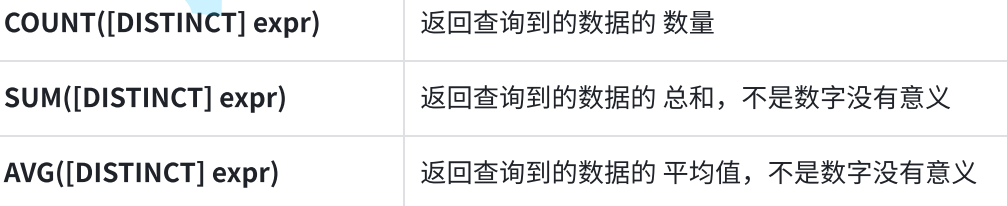

9.2 示例
9.2.1 COUTN
统计exam表中有多少记录
java
# 使用 * 做统计
mysql> select count(*) from exam;
+----------+
| count(*) |
+----------+
| 7 |
+----------+
1 row in set (0.00 sec)
# 使用常量做统计
mysql> select count(1) from exam;
+----------+
| count(1) |
+----------+
| 7 |
+----------+
1 row in set (0.00 sec)
统计有多少学生参加数学考试
java
# # 使用指定列做统计
mysql> select count(math) from exam;
+-------------+
| count(math) |
+-------------+
| 7 |
+-------------+
1 row in set (0.00 sec)
统计语文成绩小于50分的学生个数
java
# 加入where条件
mysql> select count(chinese) from exam where chinese < 50;
+----------------+
| count(chinese) |
+----------------+
| 0 |
+----------------+
1 row in set (0.00 sec)
9.2.2 SUM
统计所有学生数学成绩总分
java
mysql> select sum(math) from exam;
+-----------+
| sum(math) |
+-----------+
| 569 |
+-----------+
1 row in set (0.01 sec)
不能统计非数值的列
java
mysql> select sum(name) from exam;
+-----------+
| sum(name) |
+-----------+
| 0 |
+-----------+
1 row in set, 7 warnings (0.01 sec) # 警告信息,可以使用show warnings查看
9.2.3 AVG
统计英语成绩的平均分
java
# NULL值不参与统计
mysql> select avg(english) from exam;
+--------------+
| avg(english) |
+--------------+
| 61 |
+--------------+
1 row in set (0.00 sec)
统计平均总分
java
mysql> select avg(chinese + math + english) as 总分 from exam;
+-------+
| 总分 |
+-------+
| 297.5 |
+-------+
1 row in set (0.00 sec)
9.2.4 MAX
查询英语最高分
java
mysql> select max(english) from exam;
+--------------+
| max(english) |
+--------------+
| 90 |
+--------------+
1 row in set (0.00 sec)
9.2.5 MIN
查询 > 70 分以上的数学最低分
java
mysql> select min(math) from exam where math > 70;
+-----------+
| min(math) |
+-----------+
| 73 |
+-----------+
1 row in set (0.00 sec)
查询数据成绩的最高分与英语成绩的最低分
java
# 可以使用多个聚合函数
mysql> select max(math), min(english) from exam;
+-----------+--------------+
| max(math) | min(english) |
+-----------+--------------+
| 115 | 30 |
+-----------+--------------+
1 row in set (0.00 sec)
10. Group by 分组查询
GROUP BY 子句的作用是通过一定的规则将一个数据集划分成若干个小的分组,然后针对若干个
分组进行数据处理,比如使用聚合函数对分组进行统计。
10.1 语法
java
SELECT {col_name | expr} ,... ,aggregate_function (aggregate_expr)
 FROM table_references
 GROUP BY {col_name | expr}, ...
 [HAVING where_conditio
• col_name | expr:要查询的列或表达式,可以有多个,必须在 GROUP BY 子句中作为分组的依
据
• aggregate_function:聚合函数,比如COUNT(), SUM(), AVG(), MAX(), MIN()
• aggregate_expr:聚合函数传入的列或表达式,如果列或表达式不在 GOURP BY 子句中,必须
包含中聚合函数中
10.2 示例
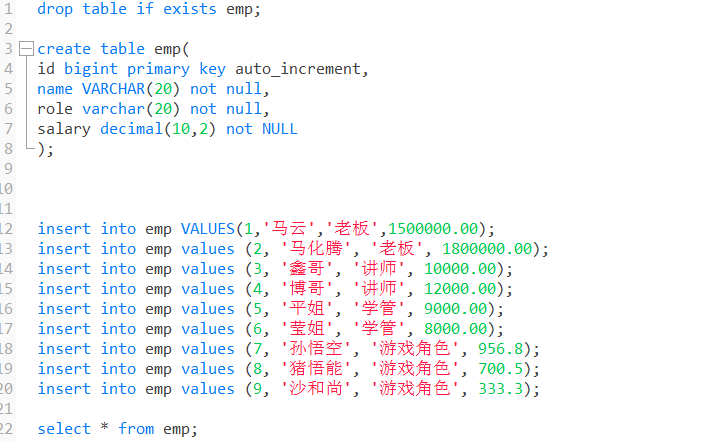
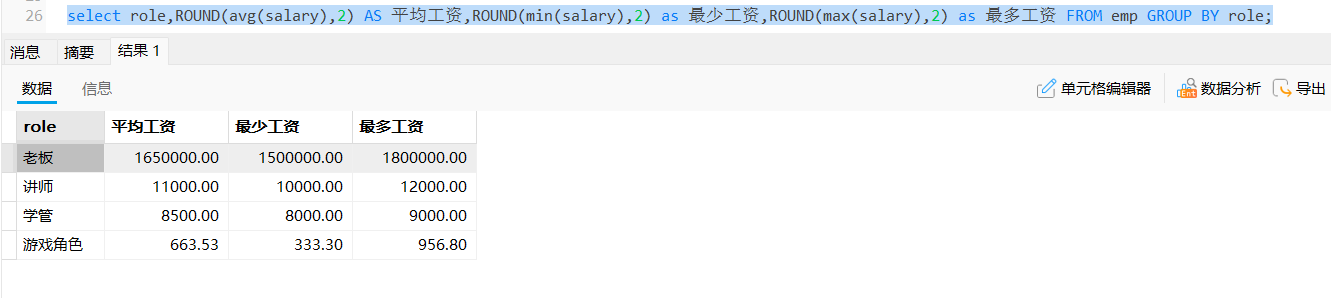
准备测试表及数据职员表emp,列分别为:id(编号),name(姓名),role(角色),salary(薪水)
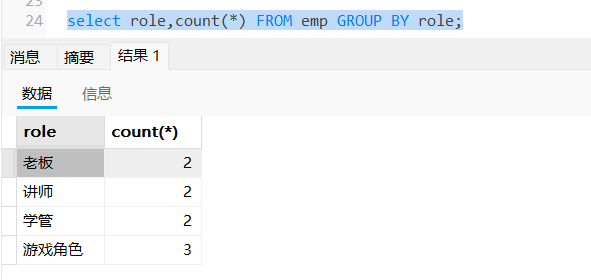
统计每个角色的人数
统计每个角色的平均工资,最高工资,最低工资
10.3 having子句
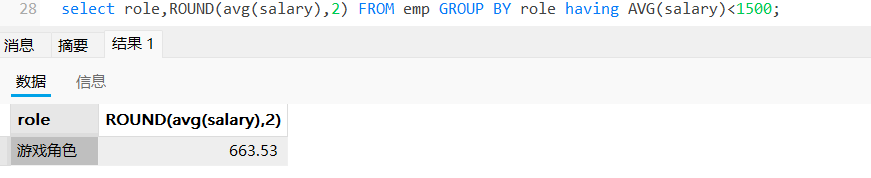
使用GROUP BY 对结果进行分组处理之后,对分组的结果进行过滤时,不能使用 WHERE 子句,而要使用 HAVING 子句
显示平均工资低于1500的角色和它的平均工资
10.4 Having 与Where 的区别
• Having 用于对分组结果的条件过滤
• Where 用于对表中真实数据的条件过滤
11. 内置函数
11.1 日期函数
11.1.1 示例
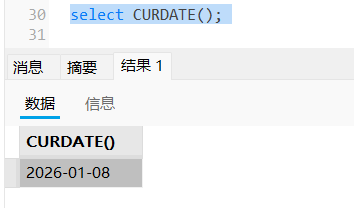
获取当前日期
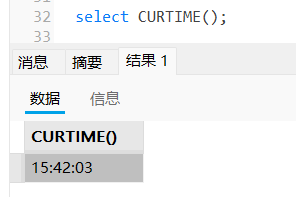
获取当前时间
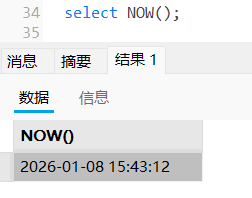
获取当前日期和时间
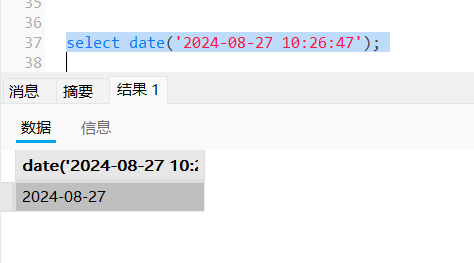
提取指定datatime的日期部分
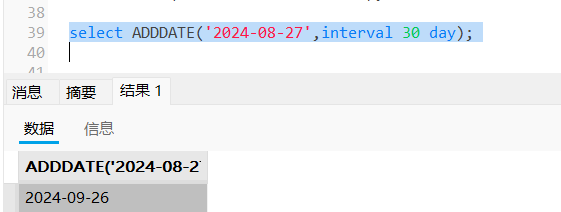
在给定日期的基础上加31天
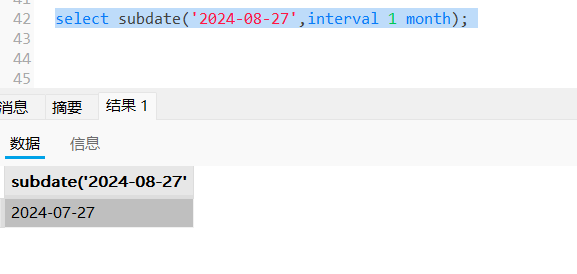
在给定日期的基础上减去1月
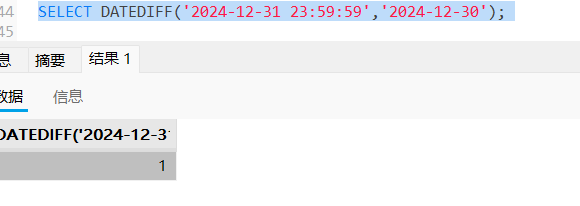
计算两个日期之间相差多少天
11.2 字符串处理函数
11.2.1 示例
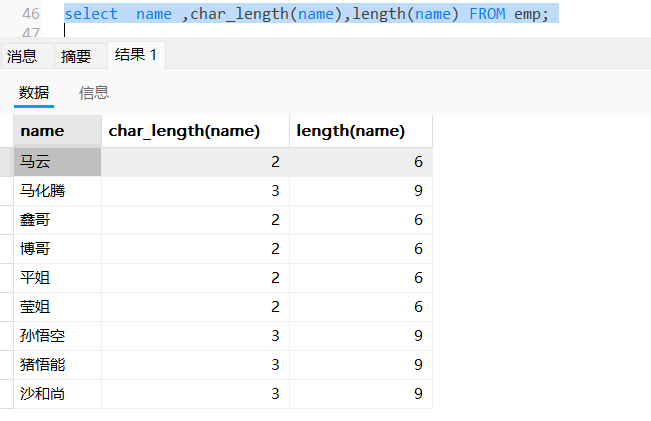
显示所有参加考试的学生姓名、姓名字符数和字节长度
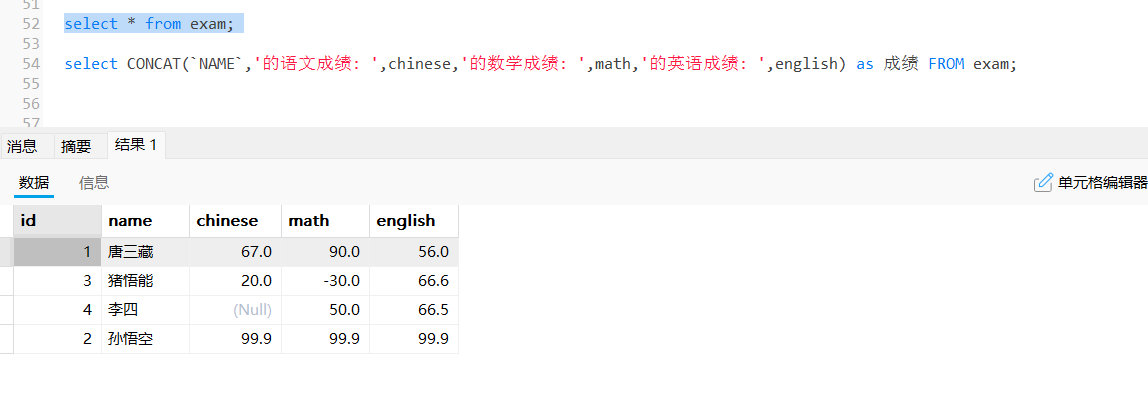
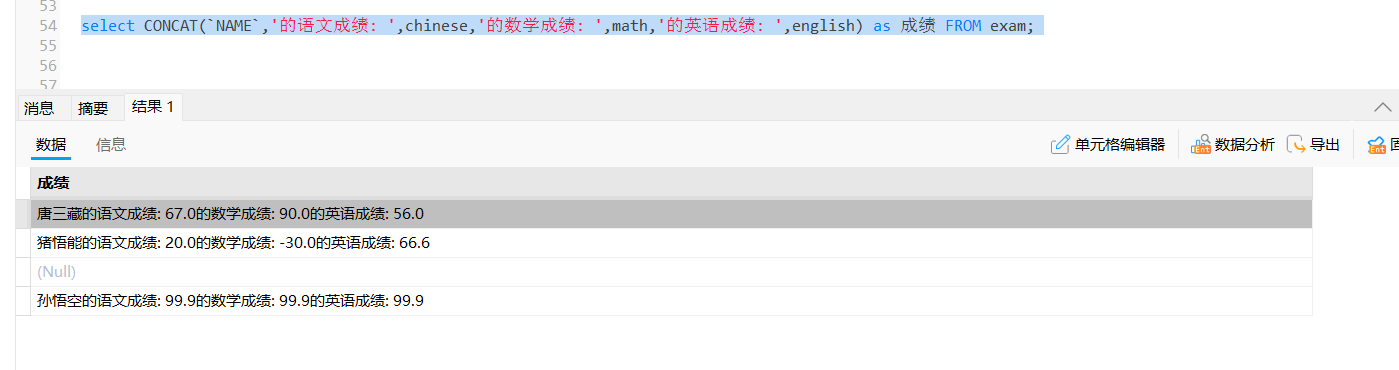
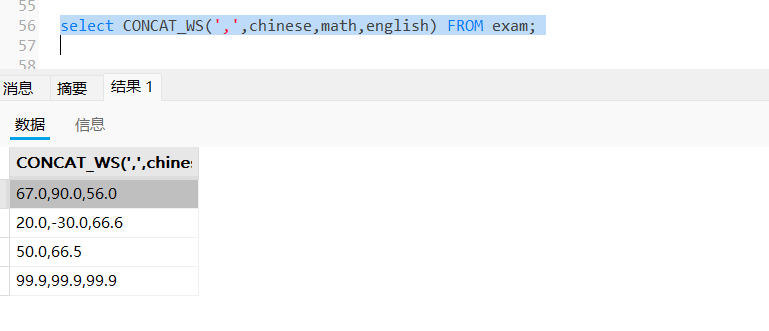
显示学生的考试成绩,格式为 "XXX的语文成绩:XXX分,数学成绩:XXX分,英语成绩:XXX分"
拼接后的字符串用逗号隔开
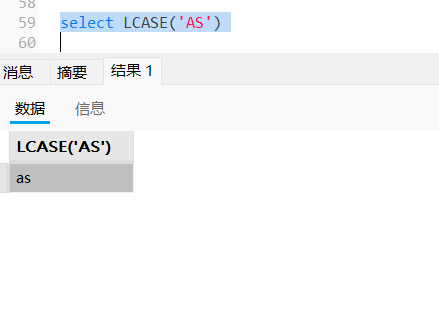
将给定字符串转换成小写
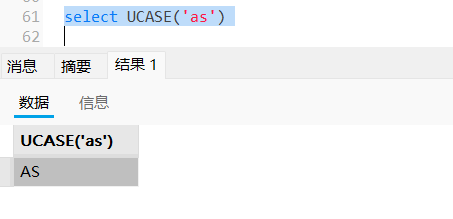
将给定字符串转换成大写
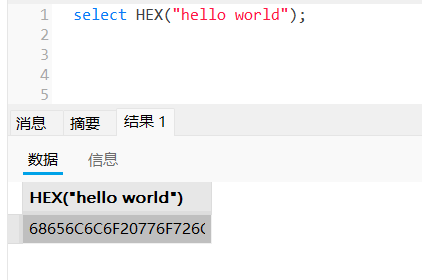
转换为十六进制
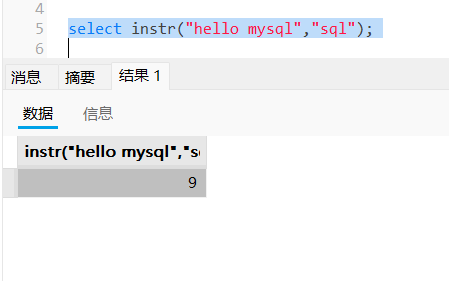
子字符串第一次出现的索引
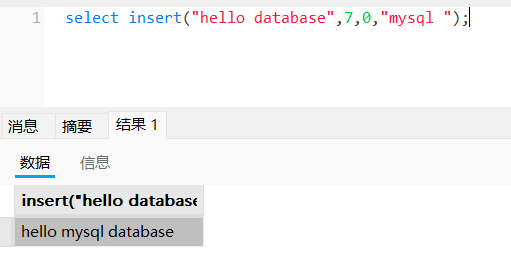
指定位置插入子字符串
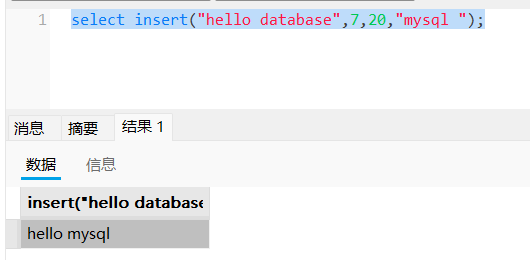
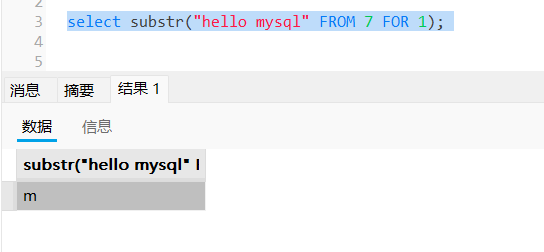
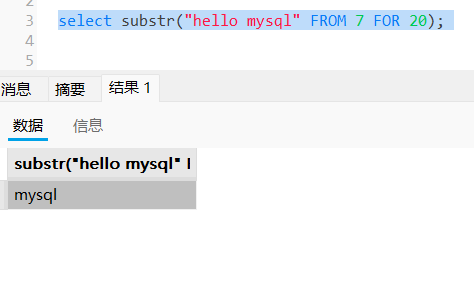
从第 7 位往后取 20 个字符用mysql替换
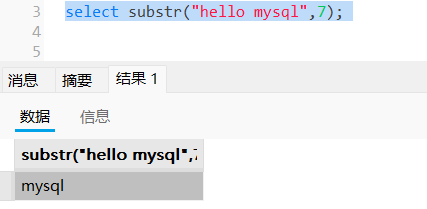
从hello mysql 的第7个字符开始截取
返回指定的子字符串
从第7个字符开始截取,截取一个字符
不总调整到整个字符串结尾
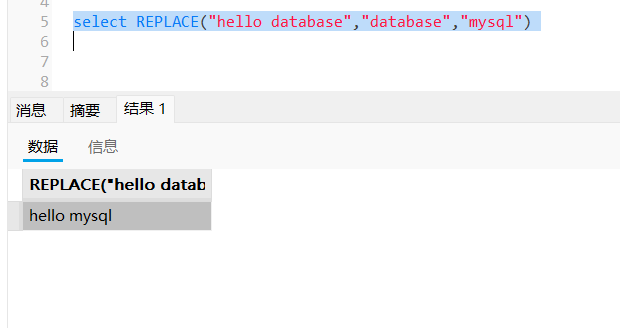
替换字符串
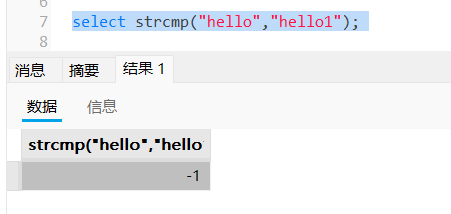
比较两个字符串
返回字符串str中最左/最右边的len个字符
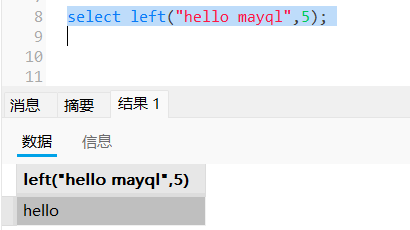
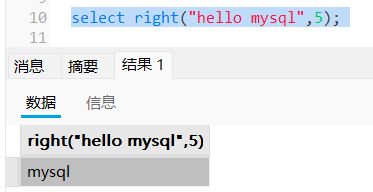
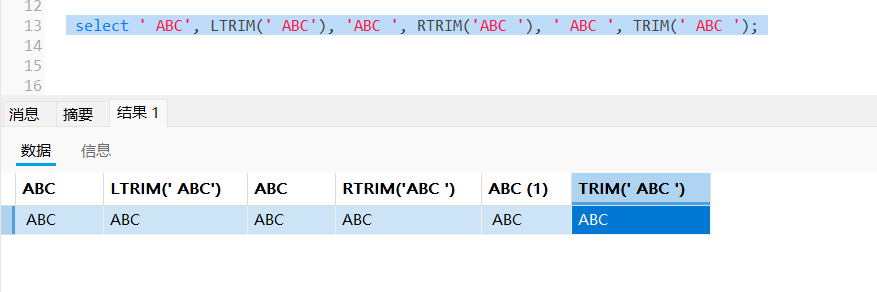
删除给定字符串的前导、末尾、前导和末尾的空格
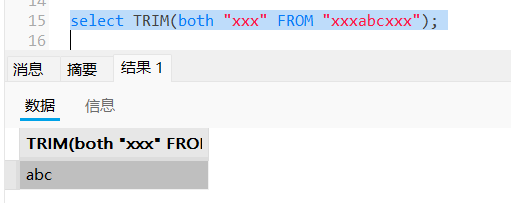
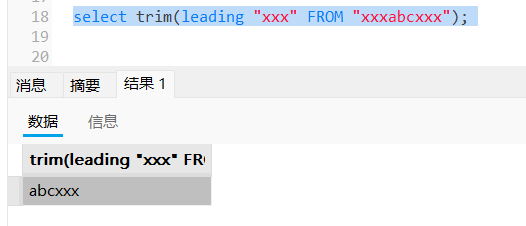
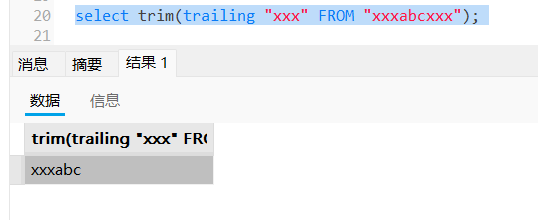
删除给定符串的前导、末尾或前导和末尾的指定字符串
删除前导的指定字符串
删除后导的指定字符串
11.3 数学函数
11.3.1 示例
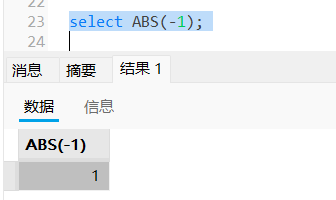
返回-1的绝对值
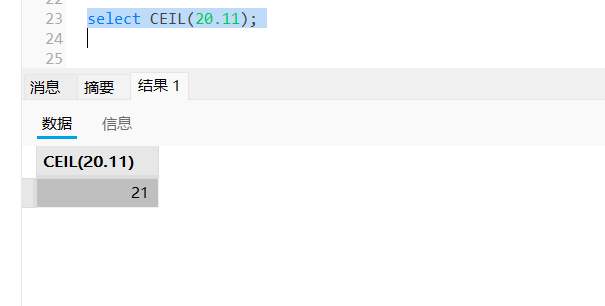
返回不小于20.11的最小整数值
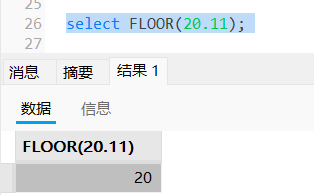
返回不大于20.11的最小整数值
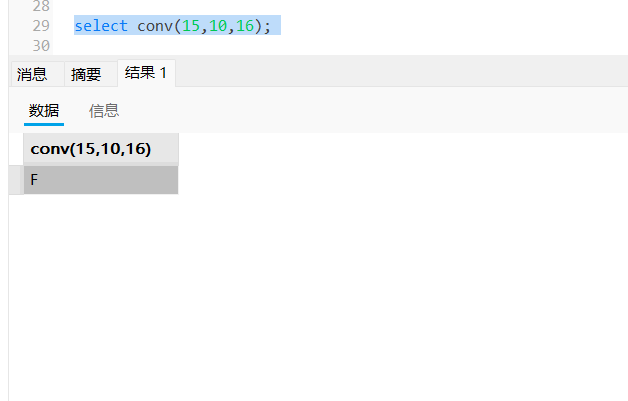
10进制转为16进制
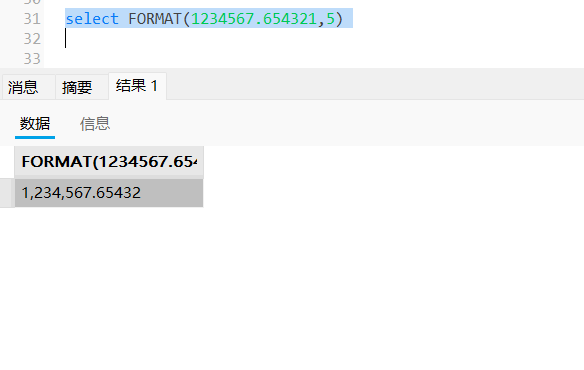
格式化1234567.654321
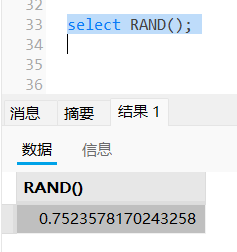
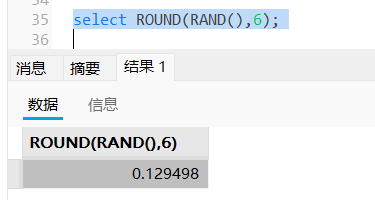
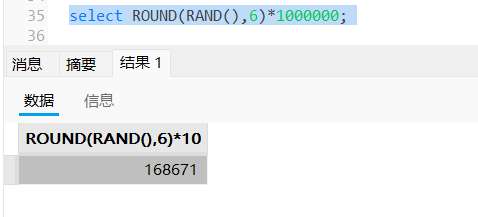
返回一个随机浮点值
舍弃到小数点后6位
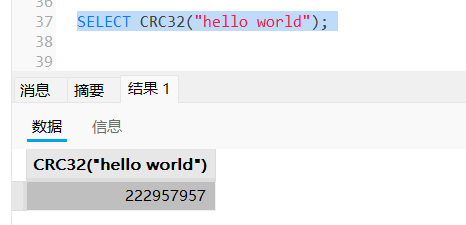
字符串的循环冗余校验
11.4 其他常用函数
11.4.1 示例
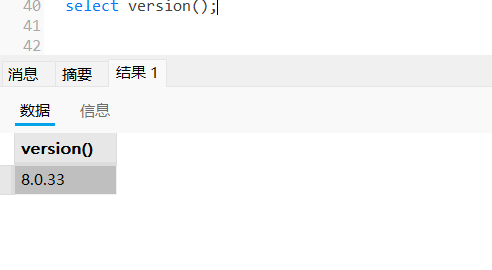
显示当前数据库版本
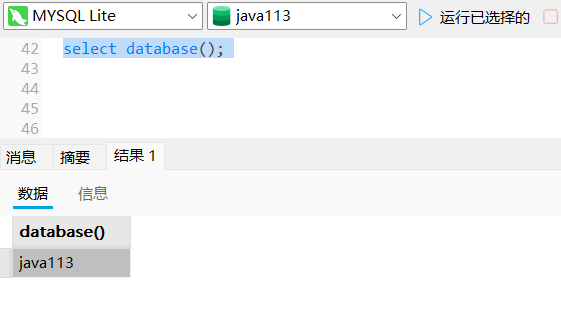
显示当前正在使用的数据库
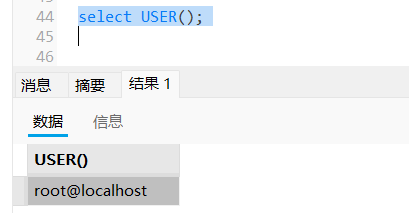
显示当前用户
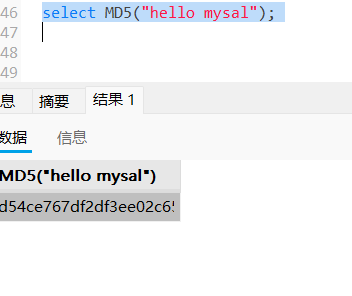
对一个字符串进行md5加密
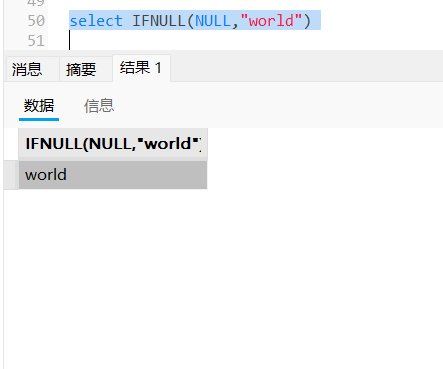
ifnull
第一个参数不为空返回第一个参数值
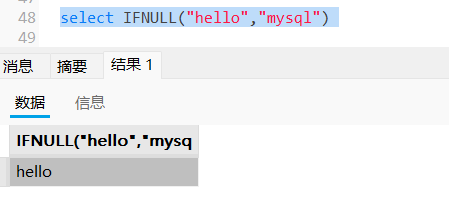
第一个参数为空返回第二个参数值