微信AI机器人-人工智能技术,为用户提供服务的自动化系统:具备自然语言处理技术、理解用户的文本输入,并给出响应的回复或执行特定的任务能力。
AI机器人能24小时提供实时服务,无论何时何地,用户都能获得及时的信息反馈和帮助。节省了用户搜索时间,提高了效率,并且还可以帮助管理社群,提高社群活跃度。
一、去千帆大模型官网申请API
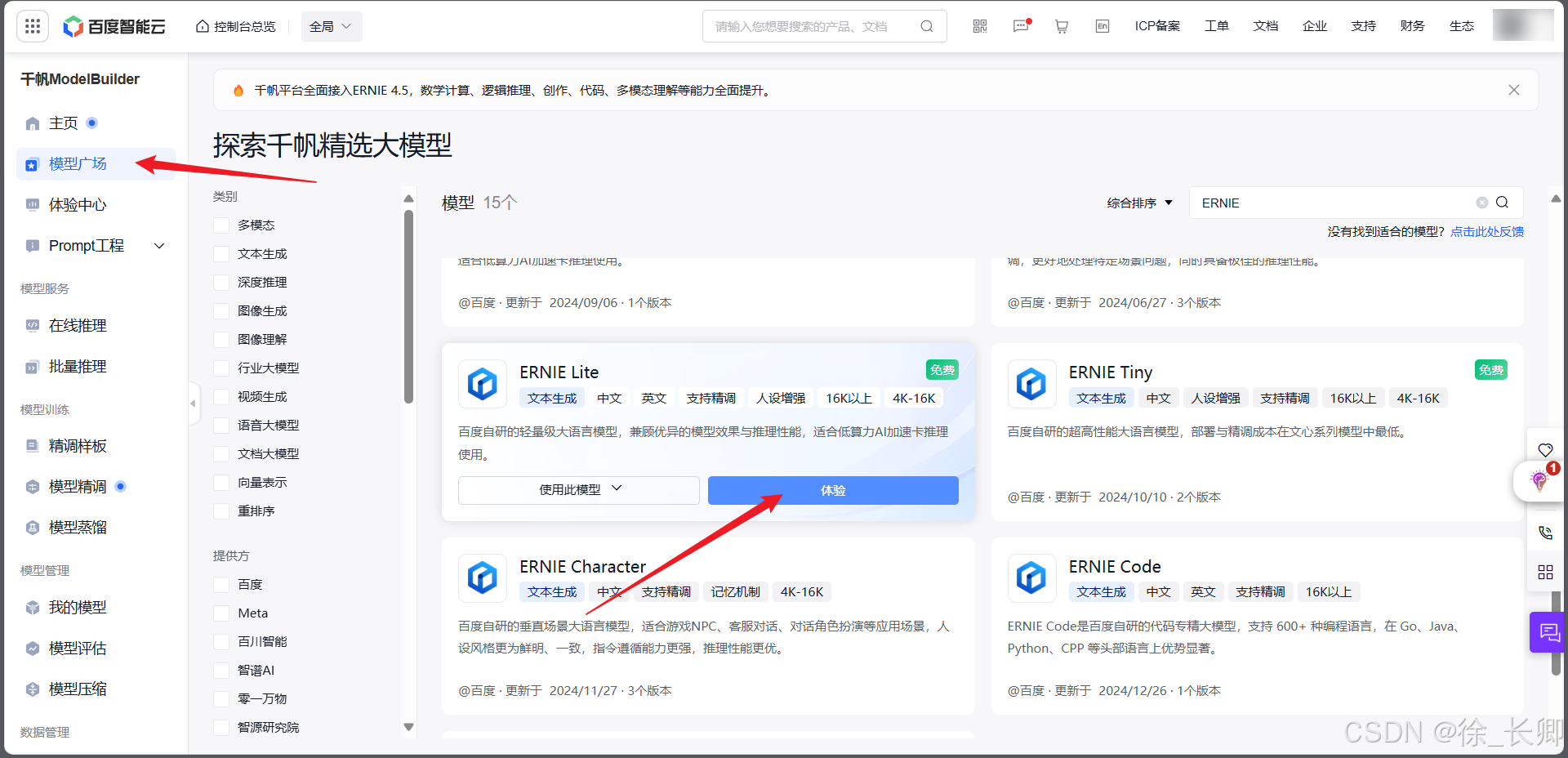
1、在模型广场搜索ERNIE-Lite(免费),点击体验
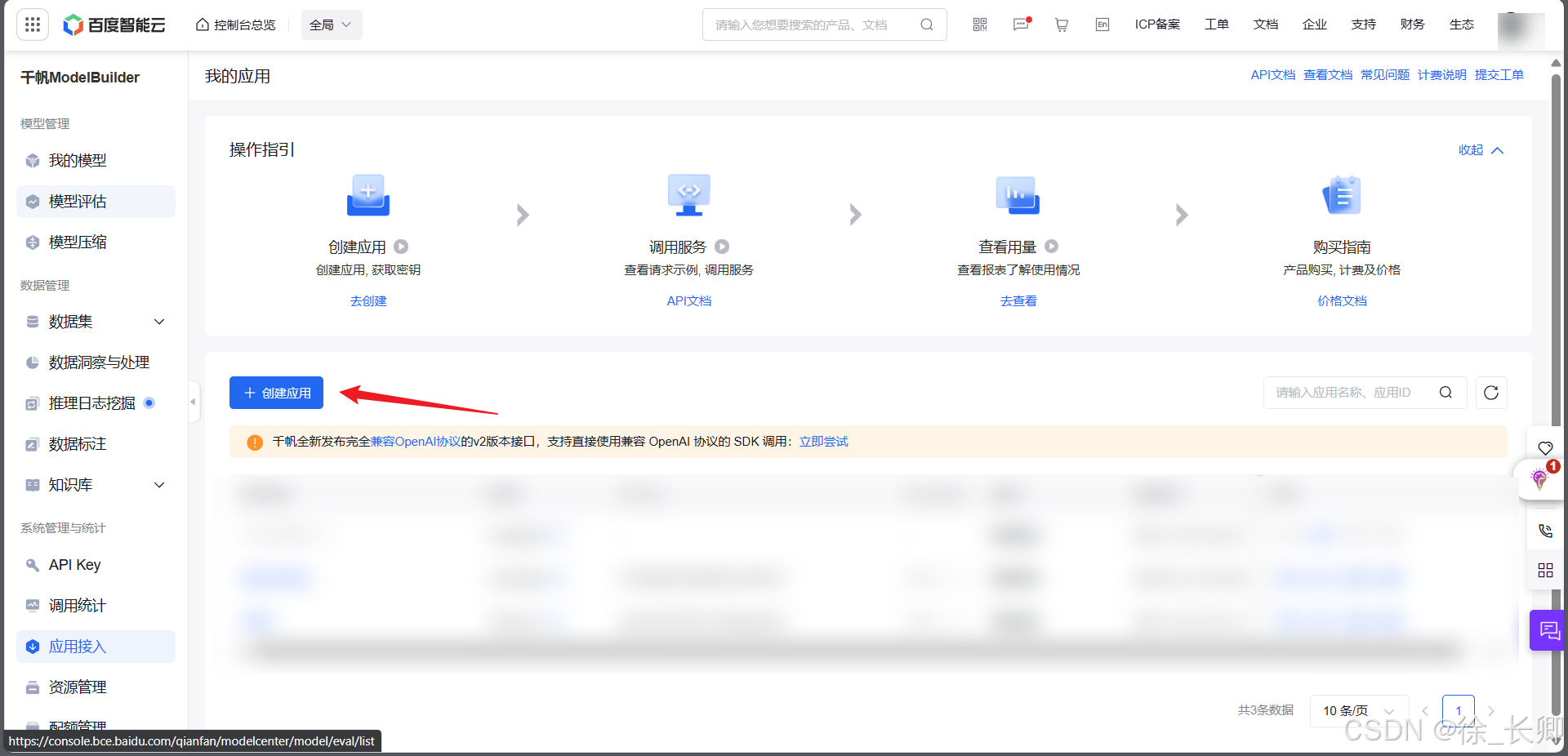
2、点击应用接入,填入必填项,点击创建(需要实名认证)
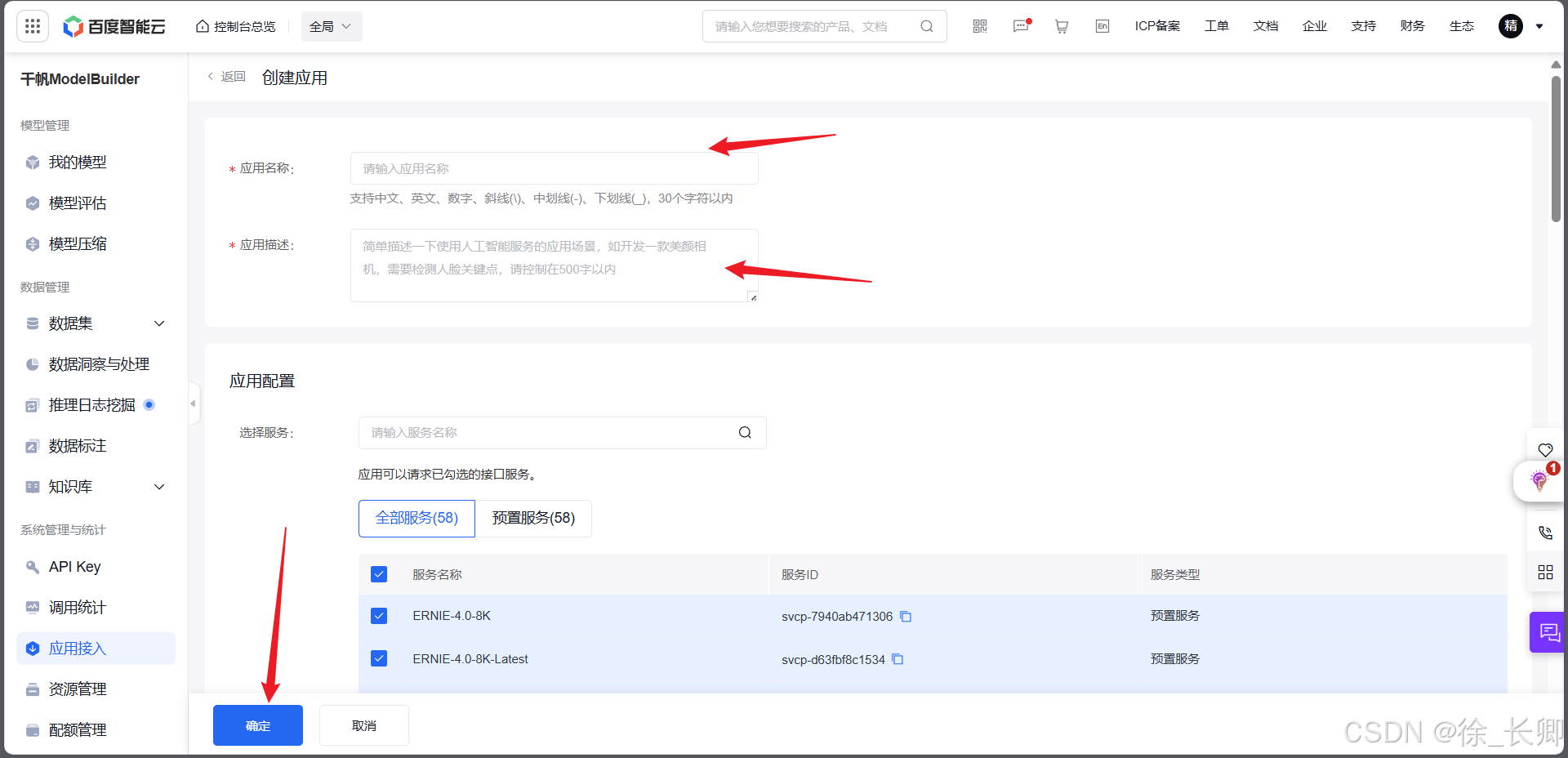
3、获取API KEYI和Secret Key
二、打开pycharm,运行以下程序
一、完整代码展示
注:运行代码前请登录PC端微信,否则会运行失败
python
import requests
import json
import csv
import os
import schedule
import time
from wxauto import WeChat


class WeChatBot:
    def __init__(self):
        self.wx = WeChat()
        self.list_name = [
                        '徐长卿',#机器人账号添加管理员的备注,徐长卿为管理员,ros为机器人,ros给管理员的备注就应为徐长卿,可进行修改
                        '嘻嘻嘻',#被监控群聊名称
                        'AAA刘哥百货超市',
                        '小超市'
        ]
        # 为每个群聊添加监听
        for group in self.list_name:
            self.wx.AddListenChat(who=group, savepic=True)

    def get_access_token(self):
        """使用 API Key,Secret Key 获取access_token"""
        url = "https://aip.baidubce.com/oauth/2.0/token?grant_type=client_credentials&client_id=[应用API Key]&client_secret=[应用Secret Key]"
        payload = json.dumps("")
        headers = {
            'Content-Type': 'application/json',
            'Accept': 'application/json'
        }
        response = requests.post(url, headers=headers, data=payload)
        if response.status_code == 200:
            return response.json().get("access_token")
        else:
            print("Failed to get access token:", response.text)
            return None

    def call_ai_model(self, content):
        """调用大模型接口并返回结果"""
        access_token = self.get_access_token()
        if access_token:  # 确保access_token不为空
            url = f"https://aip.baidubce.com/rpc/2.0/ai_custom/v1/wenxinworkshop/chat/ernie-lite-8k?access_token={access_token}"
            payload = json.dumps({
                "messages": [
                    {
                        "role": "user",
                        "content": content
                    }
                ]
            })
            headers = {
                'Content-Type': 'application/json'
            }
            response = requests.post(url, headers=headers, data=payload)
            if response.status_code == 200:
                return response.json().get('result')
            else:
                print("Failed to get response from chat API:", response.text)
                return None
        else:
            print("Access token is None, cannot proceed with chat API request.")
            return None

    def send_morning_wishes(self):
        """发送早安祝福消息"""
        good_morning_message = "老板生成一段祝福群友的早安祝福"
        ai_reply = self.call_ai_model(good_morning_message)
        if ai_reply:
            for group in self.list_name:
                self.wx.SendMsg(msg=ai_reply, who=group)

    def send_evening_greetings(self):
        """发送晚上好的消息"""
        evening_greetings = "老板生成一段祝福群友的晚上好祝福"
        for group in self.list_name:
            self.wx.SendMsg(msg=evening_greetings, who=group)

    def listen_messages(self):
        # 持续监听消息
        wait = 1  # 设置1秒查看一次是否有新消息
        while True:
            msgs = self.wx.GetListenMessage()
            for chat, messages in msgs.items():
                # 获取聊天窗口名(群名)
                who = chat.who
                # 检查是否是指定的群聊
                if who in self.list_name:
                    for msg in messages:
                        msg_type = msg.type  # 获取消息类型
                        content = msg.content  # 获取消息内容
                        print(f'【{who}】:{content}')
                        # 获取发送者信息
                        sender = msg.sender
                        # 根据群聊名称和消息内容回复不同的消息
                        if who != self.list_name[0]:
                            if content.startswith('购买'):
                                try:
                                    parts = content.split('购买')[1].strip()
                                    commodity_name, quantity = parts.split(' ', 1)
                                    if self.is_commodity_exists(commodity_name):
                                        reply = f"{sender},已为您将{commodity_name}{quantity}添加至订单中,感谢您的支持"
                                        self.save_to_csv_order(sender, commodity_name, quantity)
                                        self.wx.SendMsg(msg=reply, who=who)
                                    else:
                                        reply = f"{sender},该商品小店尚未出售"
                                        self.wx.SendMsg(msg=reply, who=who)
                                except ValueError:
                                    reply = f"{sender},输入格式错误,请按照'购买 商品名称 购买数量'的格式输入。"
                                    self.wx.SendMsg(msg=reply, who=who)
                            elif content.startswith('查询'):
                                parts = content.split('查询')[1].strip()
                                if parts:  # 确保有商品信息
                                    commodity_name = parts
                                    if self.is_commodity_exists(commodity_name):
                                        price_info = self.get_price_info(commodity_name)
                                        reply = f"{sender},{commodity_name} {price_info}"
                                    else:
                                        reply = f"{sender},该商品小店尚未出售"
                                    self.wx.SendMsg(msg=reply, who=who)
                            if content.startswith('老板'):
                                ai_reply = self.call_ai_model(content[2:])
                                if ai_reply:
                                    self.wx.SendMsg(msg=ai_reply, who=who)
                        elif who == self.list_name[0]:
                            if content.startswith('转发'):
                                # 转发消息到其他所有监控群聊,删除"转发"二字
                                new_content = content[2:].strip()
                                self.forward_message(new_content)
                            if content.startswith('增加'):
                                try:
                                    parts = content.split('增加')[1].strip()
                                    if parts:  # 确保有商品信息
                                        commodity_name, price_info = parts.split(' ', 1)
                                        if self.is_commodity_exists(commodity_name):
                                            reply = f"{sender},{commodity_name}已经存在。"
                                        else:
                                            reply = f"{sender},{commodity_name}增加成功。"
                                            self.save_to_csv(commodity_name, price_info)
                                        self.wx.SendMsg(msg=reply, who=who)
                                except ValueError:
                                    reply = f"{sender},输入格式错误,请按照'增加 商品名称 价格信息'的格式输入。"
                                    self.wx.SendMsg(msg=reply, who=who)
                            elif content.startswith('删除'):
                                commodity_name = content.split('删除')[1].strip()
                                if self.delete_commodity_from_csv(commodity_name):
                                    reply = f"{sender},{commodity_name}删除成功。"
                                else:
                                    reply = f"{sender},{commodity_name}不存在。"
                                self.wx.SendMsg(msg=reply, who=who)
            schedule.run_pending()
            time.sleep(wait)

    def forward_message(self, content):
        """将消息转发到所有监控的群聊"""
        for group in self.list_name:
            if group != self.list_name[0]:  # 排除发送"转发"命令的群聊
                self.wx.SendMsg(msg=content, who=group)

    def save_to_csv_order(self, username, commodity_name, quantity):
        # 将订单信息保存到order.csv中
        with open('order.csv', 'a', newline='', encoding='utf-8') as file:
            writer = csv.writer(file)
            # 写入用户名、商品名称和数量
            writer.writerow([username, commodity_name, quantity])
        print(f"订单 '{commodity_name}' 已添加到order.csv")

    def get_price_info(self, commodity_name):
        # 从commodity.csv中获取商品的价格信息
        with open('commodity.csv', 'r', newline='', encoding='utf-8') as file:
            reader = csv.reader(file)
            for row in reader:
                if row and row[0] == commodity_name:
                    return row[1]
        return "未知价格"

    def save_to_csv(self, commodity_name, price_info):
        # 将信息保存到commodity.csv中
        with open('commodity.csv', 'a', newline='', encoding='utf-8') as file:
            writer = csv.writer(file)
            # 写入商品名称和价格信息
            writer.writerow([commodity_name, price_info])
        print(f"商品 '{commodity_name}' 已添加到commodity.csv")

    def is_commodity_exists(self, commodity_name):
        # 检查商品是否存在
        if not os.path.exists('commodity.csv'):
            return False
        with open('commodity.csv', 'r', newline='', encoding='utf-8') as file:
            reader = csv.reader(file)
            for row in reader:
                if row and row[0] == commodity_name:
                    return True
        return False

    def delete_commodity_from_csv(self, commodity_name):
        # 删除CSV文件中的商品
        lines = []
        found = False
        with open('commodity.csv', 'r', newline='', encoding='utf-8') as file:
            reader = csv.reader(file)
            for row in reader:
                if row and row[0] != commodity_name:
                    lines.append(row)
                elif row:
                    found = True
        with open('commodity.csv', 'w', newline='', encoding='utf-8') as file:
            writer = csv.writer(file)
            writer.writerows(lines)
        return found

    def start(self):
        schedule.every().day.at("08:30").do(self.send_morning_wishes)
        schedule.every().day.at("19:30").do(self.send_evening_greetings)

        # 开始监听消息
        self.listen_messages()


if __name__ == "__main__":
    bot = WeChatBot()
    bot.start()
2、代码修改
__init__函数中第一个为管理员,其他的可以为群聊和个人用户get_access_token函数中修改url为自己的获取API KEYI和Secret Key,注意需要删除" "且不要有空格
3、程序解释
上述代码通过wxauto库对微信进行实时监控,可以实现管理员和需要管理的群聊互不干扰,代码可并行检查多个群聊,并不会因为同时多个群聊收到多个信息而出现遗漏,会根据先后顺序回答,同时可以自行设置时间发送早安、晚安祝福,wxauto库开源,并且可以进行云端部署,建议配合官方文档查看修改。
上述功能不会导致微信封号、放心使用。
本文部分代码参考以下链接