ESLint + Prettier 落地实施文档
项目概述
本文档详细说明了如何在现代前端项目(特别是基于Vue 3 + TypeScript + Vite的技术栈)中实施ESLint和Prettier代码质量工具,以保证代码风格的一致性和提高代码质量。
一、ESLint配置落地步骤
1. 安装核心依赖
bash
npm install -D eslint @eslint/js2. 安装Vue和TypeScript支持插件
bash
npm install -D eslint-plugin-vue @vue/eslint-config-typescript @typescript-eslint/eslint-plugin @typescript-eslint/parser3. 安装Prettier集成插件
bash
npm install -D eslint-config-prettier eslint-plugin-prettier4. 创建ESLint配置文件
创建 eslint.config.js 配置文件:
javascript
import js from '@eslint/js';
import prettierConfig from 'eslint-config-prettier';
import prettierPlugin from 'eslint-plugin-prettier';
import globals from 'globals';
import vue from 'eslint-plugin-vue';
import vueTsConfig from '@vue/eslint-config-typescript';
import tseslint from '@typescript-eslint/eslint-plugin';

export default [
  // 排除不需要检查的配置文件
  {
    ignores: ['node_modules/', 'dist/', 'vite.config.*', '.prettierrc.cjs', 'prettier.config.cjs'],
  },
  // 基础 JS 规则
  js.configs.recommended,
  // 禁用与 Prettier 冲突的 ESLint 规则(必须放在 vue/ts 规则前)
  prettierConfig,
  // Vue 3 核心规则(适配 Vue 3 语法、setup 语法糖等)
  ...vue.configs['flat/essential'],
  ...vue.configs['flat/strongly-recommended'],
  ...vue.configs['flat/recommended'],
  // Vue + TS 整合规则
  ...vueTsConfig(),
  {
    // 生效范围:匹配 Vue/TS/Vite 项目的所有代码文件
    files: ['**/*.{js,jsx,ts,tsx,vue}'],
    languageOptions: {
      // 全局变量:适配浏览器 + Node(Vite 运行在 Node 环境)
      globals: {
        ...globals.browser,
        ...globals.node,
        defineProps: 'readonly', // Vue 3 宏函数
        defineEmits: 'readonly',
        defineExpose: 'readonly',
        withDefaults: 'readonly',
      },
      ecmaVersion: 'latest',
      sourceType: 'module',
    },
    plugins: {
      prettier: prettierPlugin,
      '@typescript-eslint': tseslint,
    },
    rules: {
      // 核心:开启 Prettier 校验,错误级别为 error
      'prettier/prettier': 'error',

      // Vue 专属规则(适配 Vue 3 + TS)
      'vue/multi-word-component-names': 'off', // 关闭"组件名必须多单词"(新手可先关闭,团队规范时开启)
      'vue/no-unused-vars': 'error', // 检测未使用的变量
      'vue/no-v-html': 'warn', // 慎用 v-html(设为警告)

      // TS 专属规则
      '@typescript-eslint/no-unused-vars': ['error', { argsIgnorePattern: '^_' }], // 忽略下划线开头的未使用参数
      '@typescript-eslint/no-explicit-any': 'warn', // 禁止 any 类型(设为警告,逐步优化)
      '@typescript-eslint/ban-ts-comment': 'warn', // 禁止 @ts-ignore 等注释(设为警告)

      // 通用规则(适配 Vite 项目)
      'no-console': process.env.NODE_ENV === 'production' ? 'error' : 'warn', // 生产环境禁止 console
      'no-debugger': process.env.NODE_ENV === 'production' ? 'error' : 'off', // 生产环境禁止 debugger
      'no-undef': 'off', // TS 已做类型检查,关闭 ESLint 的未定义变量检查
    },
  },
];
5. 添加脚本命令
在 package.json 中添加:
json
{
  "scripts": {
    "lint": "eslint .",
    "lint:fix": "eslint . --fix"
  }
}
二、Prettier配置落地步骤
1. 安装Prettier
bash
npm install -D prettier2. 创建Prettier配置文件
创建 prettier.config.cjs 配置文件:
javascript
export default {
  printWidth: 120, // Vite 项目代码可适当放宽单行长度
  tabWidth: 2, // 缩进 2 个空格(Vue 官方推荐)
  useTabs: false,
  singleQuote: true, // 单引号(Vue 生态通用规范)
  semi: true, // 语句末尾加分号
  trailingComma: 'es5',
  bracketSpacing: true,
  arrowParens: 'avoid',
  endOfLine: 'lf', // Vite 项目统一 LF 换行符
  vueIndentScriptAndStyle: true, // Vue 文件中 script/style 标签内缩进
  singleAttributePerLine: false // Vue 标签属性不强制单行一个
};
3. 创建Prettier忽略文件
创建 .prettierignore 文件:
# 依赖目录
node_modules/
# Vite 打包产物
dist/
# 配置文件
.eslint.config.js
.prettierrc.js
vite.config.ts
# 其他
*.md
*.json
public/
4. 添加格式化脚本
在 package.json 中添加:
json
{
  "scripts": {
    "format": "prettier --write \"**/*.{vue,js,ts,jsx,tsx,css,less,md}\""
  }
}
三、集成与自动化
1. VSCode编辑器配置
在 .vscode/settings.json 中添加:
json
{
  "editor.defaultFormatter": "esbenp.prettier-vscode",
  "editor.formatOnSave": true,
  "editor.codeActionsOnSave": {
    "source.fixAll.eslint": "explicit"
  },
  "eslint.validate": [
    "javascript",
    "javascriptreact",
    "typescript",
    "typescriptreact",
    "vue"
  ]
}
四、常用命令
npm run lint:检查代码规范npm run lint:fix:自动修复代码规范问题npm run format:格式化所有代码文件
五、注意事项
-
配置文件后缀 :在ES模块项目中,配置文件需使用
.cjs后缀(如prettier.config.cjs),以兼容CommonJS模块系统。 -
规则优先级 :ESLint配置中,
eslint-config-prettier必须放在Vue和TS规则之前,以避免规则冲突。 -
Vue宏函数 :在配置中添加Vue 3宏函数(如
defineProps、defineEmits等)为只读全局变量,避免ESLint报错。 -
开发体验 :生产环境中对
console和debugger使用更严格的规则,开发环境中则相对宽松。 -
渐进式优化 :对于某些严格规则(如
no-explicit-any)设置为警告级别,允许团队逐步改进代码质量。
通过以上配置,项目可以实现一致的代码风格、高质量的代码标准,并提升团队协作效率。
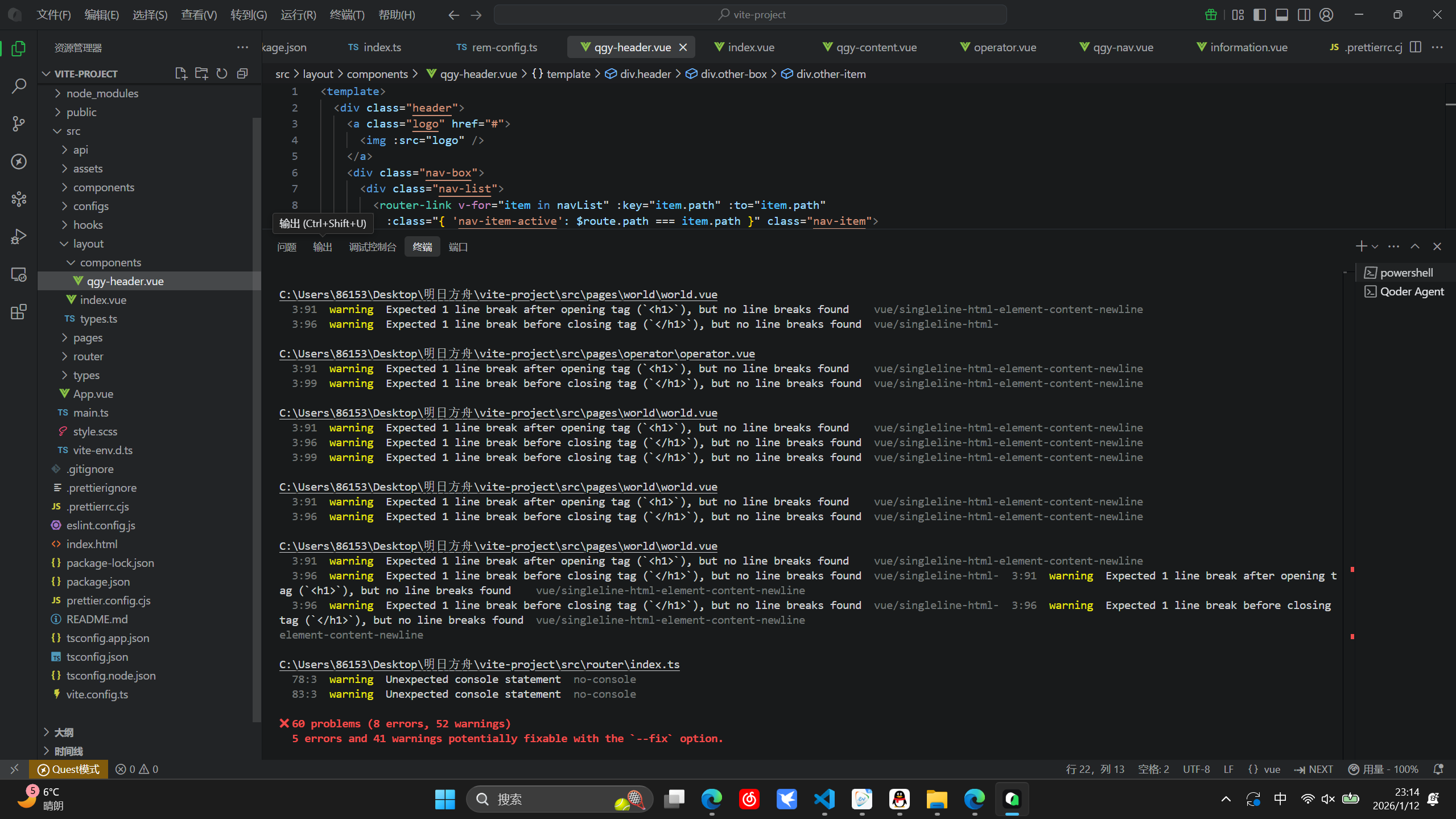
项目中效果展示