文章目录
概要
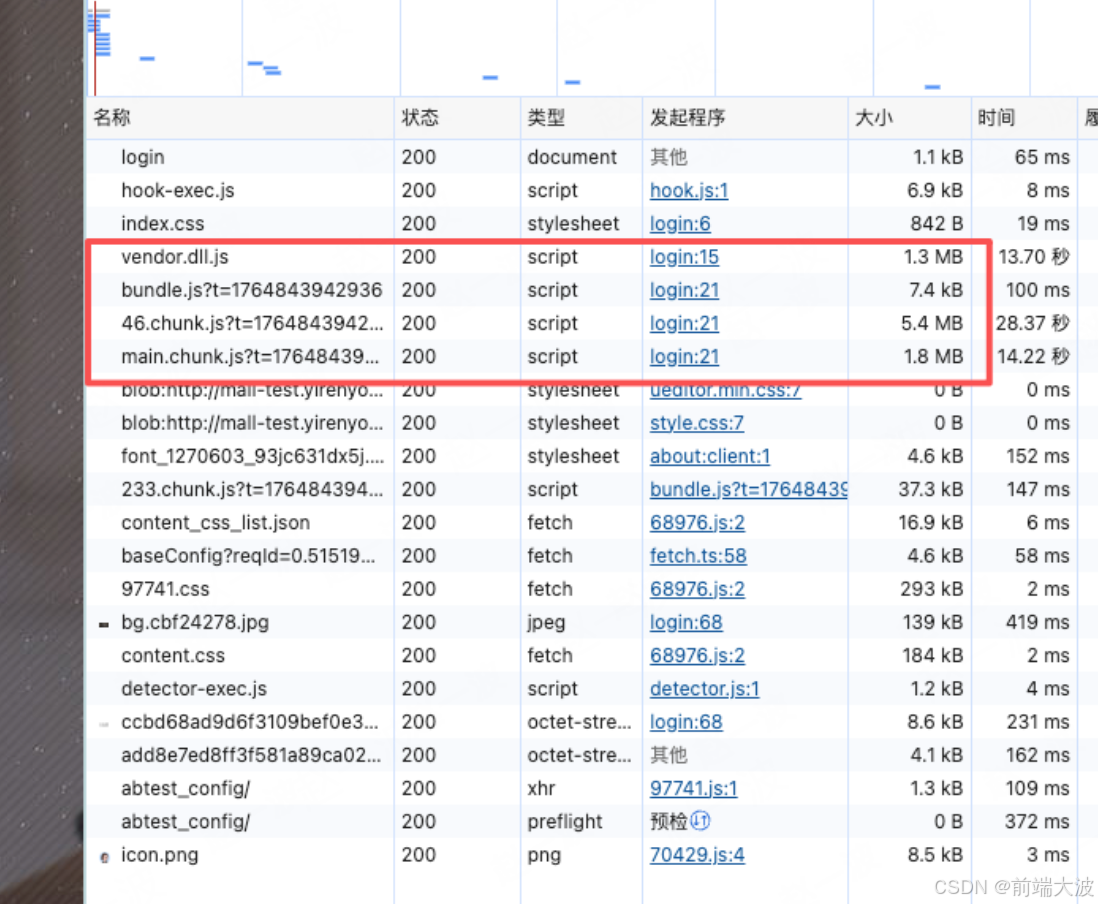
近期在维护一个老项目的时候,发现它跑起来太慢了,核心文件过大如下图,实在是受不了,准备对它下手。
整体架构
项目使用的是 react 16 +antd+webpack
优化方案
通过安装webpack-bundle-analyzer 来对打包后的产物进行分析,然后逐个击破。
过程
主要问题出现在以下几个包如图:
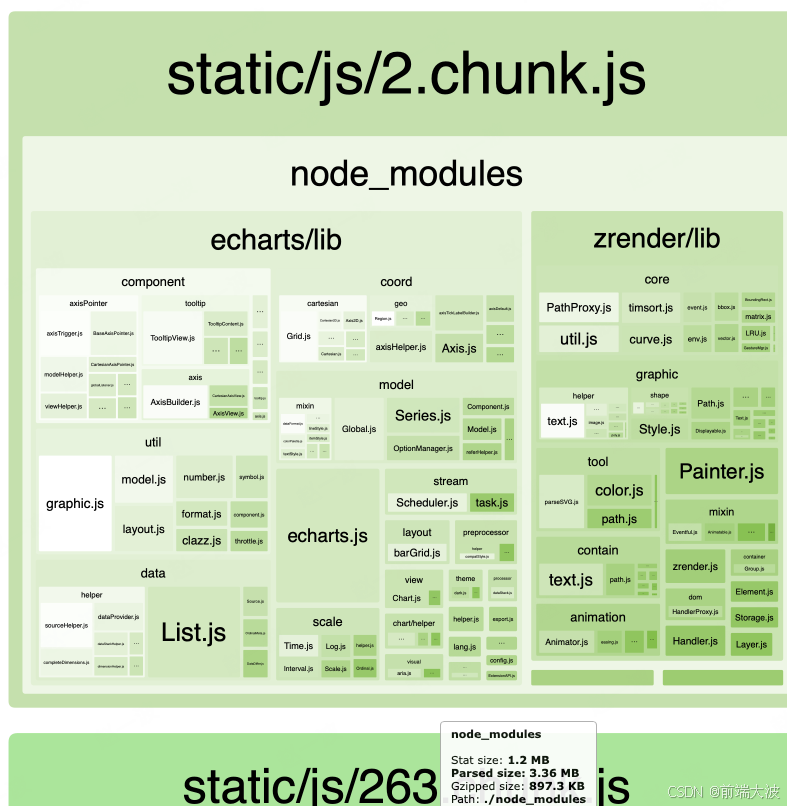
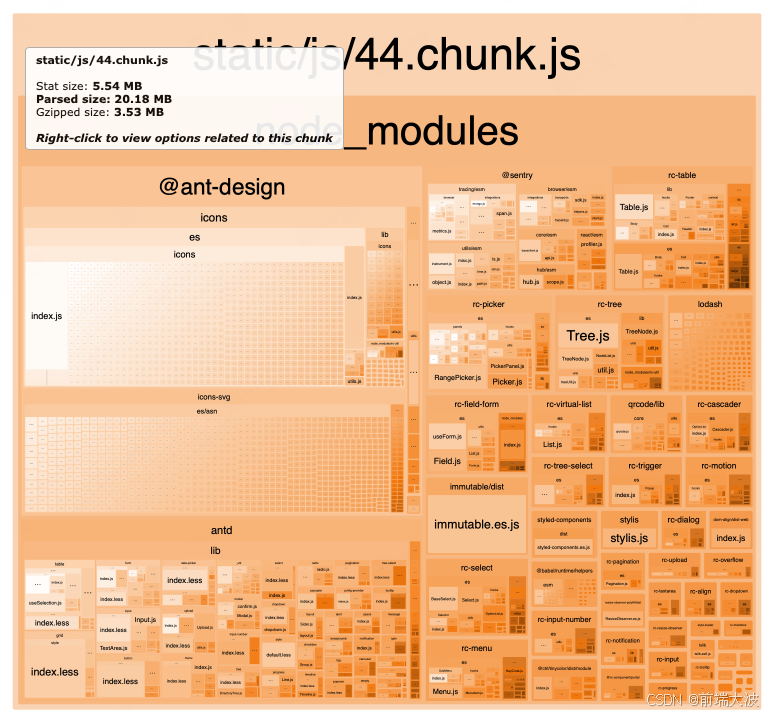
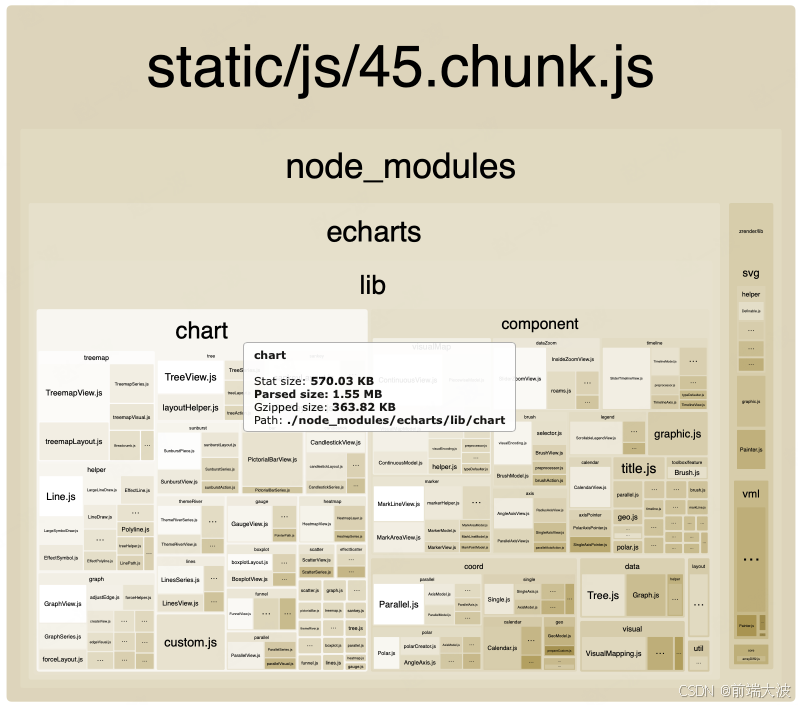
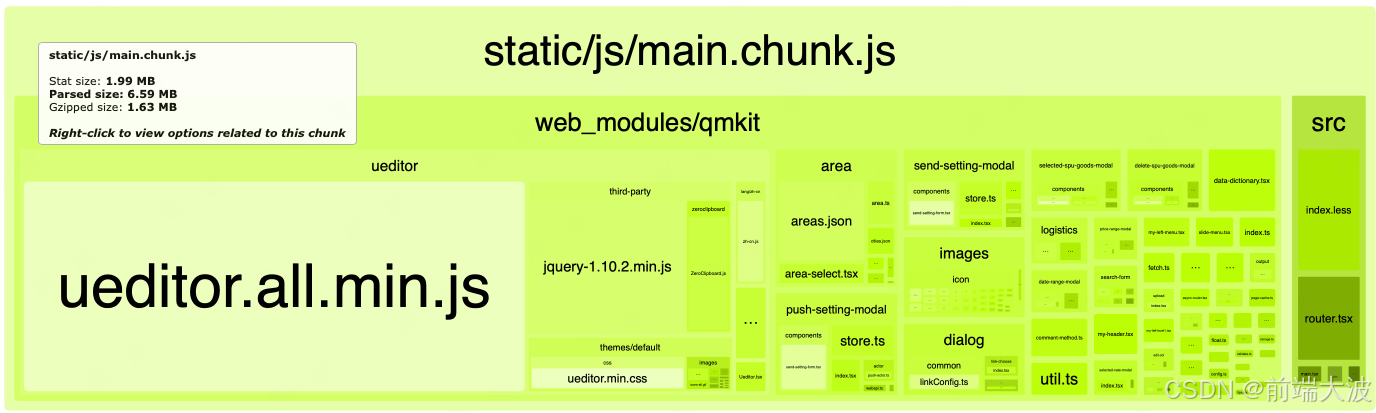
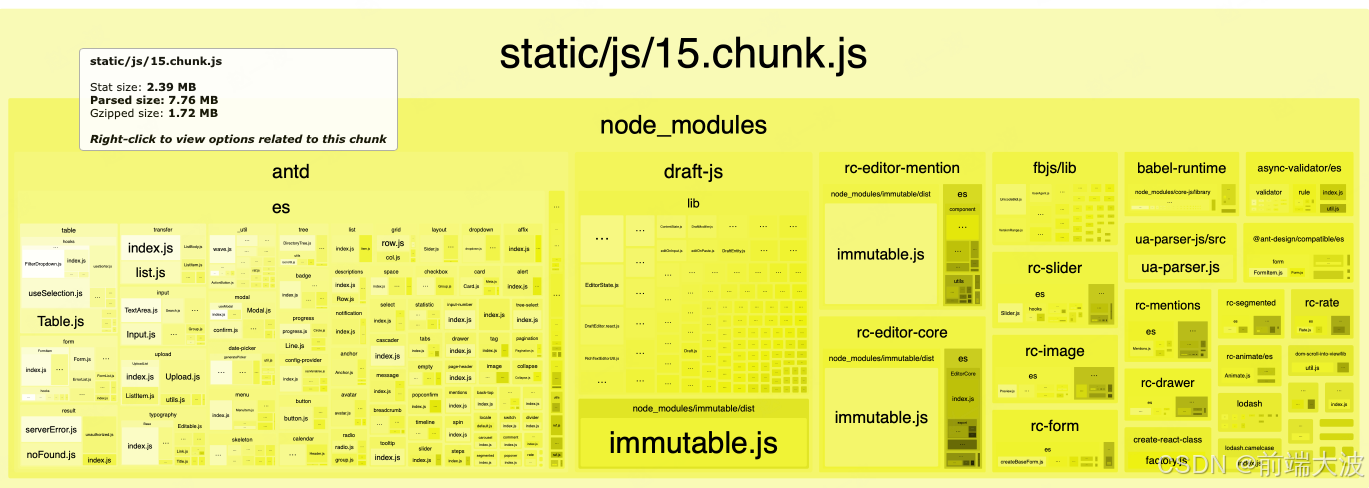
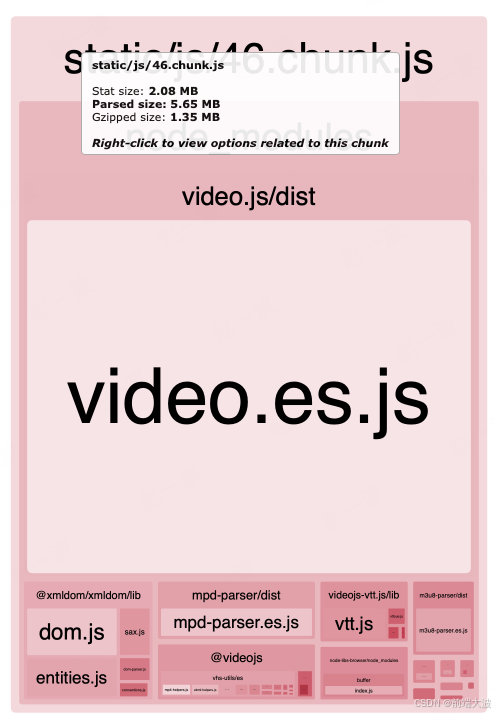
分析上图后得出以下方案
- 44.chunk.js (5.54 MB) - antd 和 @ant-design/icons
问题:@ant-design/icons 体积很大,且 antd 使用了 lib 目录而非 es。
javascript
// .babelrc - 修改 antd 按需加载配置
[
  "import",
  {
    "libraryName": "antd",
    "libraryDirectory": "es",  // 改为 es,体积更小
    "style": true
  }
],
// 添加 @ant-design/icons 按需加载
[
  "import",
  {
    "libraryName": "@ant-design/icons",
    "libraryDirectory": "es/icons",
    "camel2DashComponentName": false
  },
  "icons"
]
代码中按需导入图标:
javascript
// ❌ 不要这样
import { PlusOutlined, DeleteOutlined } from '@ant-design/icons';

// ✅ 改为这样
import PlusOutlined from '@ant-design/icons/es/icons/PlusOutlined';
import DeleteOutlined from '@ant-design/icons/es/icons/DeleteOutlined';- lodash 优化
问题:lodash 使用方式不一致,可能全量引入。
javascript
// .babelrc - lodash 插件已配置,确保使用正确
// 代码中统一使用按需导入
// ❌ 不要这样
import _ from 'lodash';
const result = _.debounce(fn, 300);

// ✅ 改为这样(已有部分代码这样做了)
import debounce from 'lodash/debounce';
const result = debounce(fn, 300);- immutable.js 去重
问题:immutable.js 在多个 chunk 中重复出现。
优化:在 webpack.config.js 中添加去重配置:
javascript
// config/webpack.config.js - 在 optimization.splitChunks 中启用
splitChunks: {
  chunks: 'all',
  name: false,
  cacheGroups: {
    // immutable.js 单独打包,避免重复
    immutable: {
      test: /[\\/]node_modules[\\/]immutable[\\/]/,
      name: 'immutable',
      priority: 20,
      reuseExistingChunk: true,
    },
    // antd 单独打包
    antd: {
      test: /[\\/]node_modules[\\/](antd|@ant-design)[\\/]/,
      name: 'antd',
      priority: 15,
      reuseExistingChunk: true,
    },
    // rc-* 组件单独打包(antd 的底层依赖)
    rcComponents: {
      test: /[\\/]node_modules[\\/]rc-[\\w-]+[\\/]/,
      name: 'rc-components',
      priority: 10,
      reuseExistingChunk: true,
    },
    // 其他第三方库
    vendors: {
      test: /[\\/]node_modules[\\/]/,
      name: 'vendors',
      priority: 5,
      reuseExistingChunk: true,
      minChunks: 2,
    },
  },
},- echarts 按需加载优化
问题:echarts 体积大,需要更细粒度的按需加载。
javascript
// 如果某个页面只需要特定图表类型,可以这样:
import echarts from 'echarts/lib/echarts';
import 'echarts/lib/chart/bar';  // 只引入需要的图表类型
import 'echarts/lib/component/tooltip';- video.js 动态导入
问题:video.js 体积大(2.08 MB),但可能不是所有页面都需要。
优化:改为动态导入:
javascript
// ❌ 当前方式
import videojs from 'video.js';

// ✅ 改为动态导入
const loadVideoJS = () => import('video.js').then(module => module.default);

// 使用时
componentDidMount() {
  loadVideoJS().then(videojs => {
    // 使用 videojs
  });
}- UEditor 动态导入
问题:UEditor 体积很大(包含 jquery),不是所有页面都需要。
javascript
// web_modules/qmkit/ueditor/Ueditor.tsx
// ✅ 改为动态导入
const UEditor = React.lazy(() => import('./Ueditor'));

// 使用时用 Suspense 包裹
<Suspense fallback={<div>加载中...</div>}>
  <UEditor />
</Suspense>- moment.js 优化
问题:moment.js 包含所有语言包,体积大。
优化:在 webpack.config.js 中移除未使用的语言包:
javascript
// config/webpack.config.js - 在 plugins 中添加
new webpack.IgnorePlugin({
  resourceRegExp: /^\.\/locale$/,
  contextRegExp: /moment$/,
}),

// 如果只需要中文,确保代码中只引入中文
import 'moment/locale/zh-cn'; - 启用更激进的代码分割
优化 webpack.config.js:
javascript
// config/webpack.config.js
optimization: {
  // ... 其他配置
  splitChunks: {
    chunks: 'all',
    name: false,
    minSize: 20000,  // 20KB,小于此大小的不单独打包
    maxSize: 500000, // 500KB,超过此大小尝试分割
    cacheGroups: {
      // React 核心
      react: {
        test: /[\\/]node_modules[\\/](react|react-dom|react-router)[\\/]/,
        name: 'react-core',
        priority: 30,
        reuseExistingChunk: true,
      },
      // immutable
      immutable: {
        test: /[\\/]node_modules[\\/]immutable[\\/]/,
        name: 'immutable',
        priority: 25,
        reuseExistingChunk: true,
      },
      // antd
      antd: {
        test: /[\\/]node_modules[\\/](antd|@ant-design)[\\/]/,
        name: 'antd',
        priority: 20,
        reuseExistingChunk: true,
      },
      // rc-* 组件
      rcComponents: {
        test: /[\\/]node_modules[\\/]rc-[\\w-]+[\\/]/,
        name: 'rc-components',
        priority: 15,
        reuseExistingChunk: true,
      },
      // echarts
      echarts: {
        test: /[\\/]node_modules[\\/](echarts|zrender)[\\/]/,
        name: 'echarts',
        priority: 15,
        reuseExistingChunk: true,
      },
      // 大型库单独打包
      largeLibs: {
        test: /[\\/]node_modules[\\/](video\.js|draft-js|ueditor)[\\/]/,
        name: 'large-libs',
        priority: 10,
        reuseExistingChunk: true,
      },
      // 其他第三方库
      vendors: {
        test: /[\\/]node_modules[\\/]/,
        name: 'vendors',
        priority: 5,
        reuseExistingChunk: true,
        minChunks: 2,
      },
    },
  },
  runtimeChunk: {
    name: 'runtime',
  },
},
预期效果
总体打包体积减少了20%-30%。
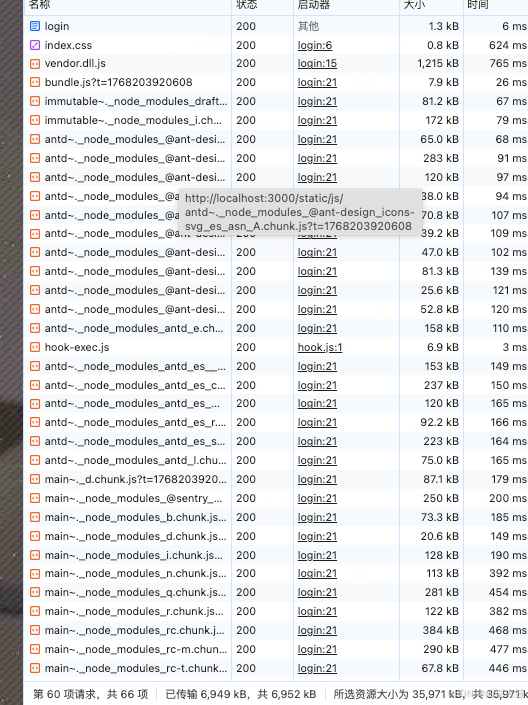
可见把几个臃肿的文件拆了开来,而且总体积减小了。
小结
后期可以持续优化,比如项目中使用了 ueditor,可以替换成更轻量的库,比如 wangEditor; moment.js可以替换成 dayjs