
文章同步发布于我的 个人博客
!TIP 如果想要获得性价比最高的Vibe Coding体验, 推荐购买 🔗 GLM Coding Lite 服务,Lite版本的按Prompt计费, 每5小时最多约120次prompts
Claude Code 核心功能
我们在使用 Claude Code 时, 可以通过以下功能来 配置或者扩展 Claude Code 的能力 , 这些能力都是 Claude Code 的核心功能
Plugin
Claude Code 插件 是一种将 Claude Code 的 核心功能(Commands / Agents / Hooks / Skills / MCP) 打包封装 的一种方式, 它实现了对于这些核心功能的 分离 和 共享 , 任何安装了插件的项目都可以使用插件内置的 Claude Code 核心功能
用途
- 将自己在工作中创建的通用 Commands / Agents / Hooks / Skills / MCP 封装成插件, 在创建新项目时可以直接通过安装插件的方式来使用这些能力
- 想要将自己创建的 Commands / Agents / Hooks / Skills / MCP 在团队内共享或直接开源, 让别人也可以使用这些能力
目录结构
一个插件的目录中包含了这些核心功能的文件, 目录结构与 .claude 中的路径结构相同, 结构如下:
bash
my-first-plugin/
├── .claude-plugin/
│   └── plugin.json          # 插件元数据
├── commands/                 # 自定义斜杠命令(可选)
│   └── hello.md
├── agents/                   # 自定义代理(可选)
│   └── helper.md
├── skills/                   # 代理技能(可选)
│   └── my-skill/
│       └── SKILL.md
└── hooks/                    # 事件处理程序(可选)
    └── hooks.json
创建一个插件
前置条件
bash
npm install -g @anthropic-ai/claude-code # 或使用 pnpm 安装- 购买
Claude Code服务(使用GLM Coding Plan服务)
!WARNING 在国内无法直接购买和使用
Claude系列模型 , 目前国内对于Claude Code支持度最好的是智谱的 🔗 GLM Coding Plan 服务, 性价比最高, 可以直接作为平替使用
购买 🔗 GLM Coding Lite 服务, 然后根据 官方文档 进行配置
插件市场
插件市场(Plugin Marketplace) 指的是包含一系列插件的用于共享和分发的项目, 本质上是一个包含描述文件(.claude-plugin/marketplace.json)的项目, 我们可以通过将其发布到 Github 或者私有仓库中进行共享
创建插件市场
- 创建一个空目录并进行初始化
bash
mkdir ryan-plugin-marketplace
cd ryan-plugin-marketplace && pnpm init && git init- 创建
.claude-plugin/marketplace.json文件, 并填写以下内容
json
{
  "name": "ryan-plugin-marketplace",
  "owner": {
    "name": "Ryan",
    "email": "ryan@example.com"
  },
  "plugins": [
    {
      "name": "dev",
      "source": "./plugins/dev",
      "description": "Functions used in daily development",
      "version": "1.0.0",
      "author": {
        "name": "Ryan"
      }
    }
  ]
}- 创建
plugins/dev/commands/hello.md
md
你好👋- 将项目发布到 github
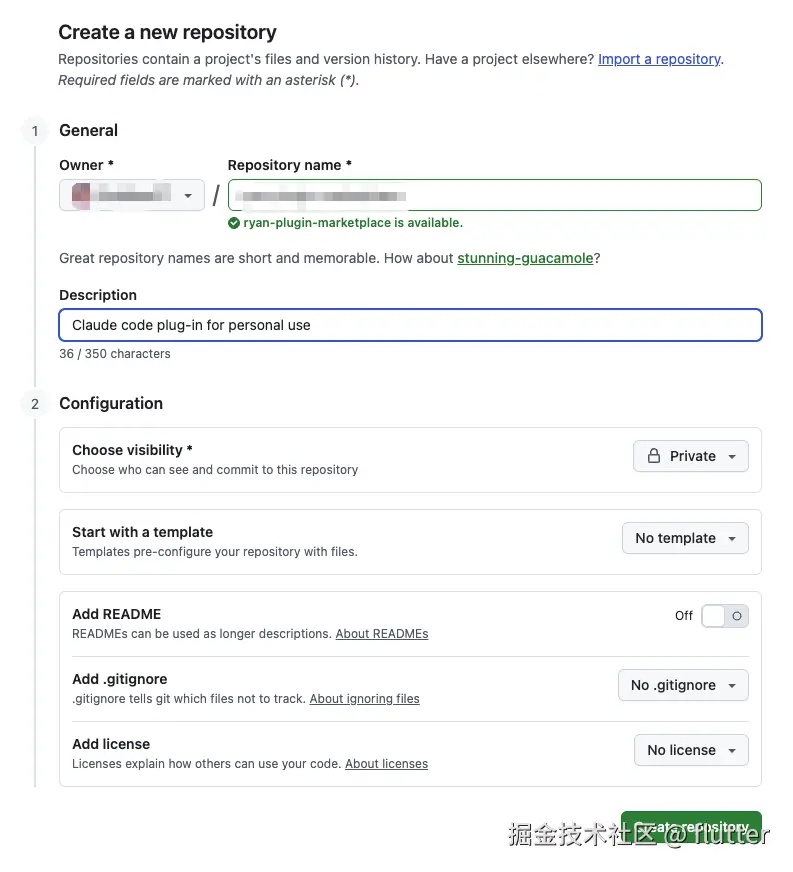
bash
git add -A && git commit -m 'init: Initialization project'
git remote add origin git@github.com:SublimeCT/ryan-plugin-marketplace.git
git push -u origin main
安装插件
插件市场的安装范围
- 对当前用户的所有项目都生效:
bash
claude

> /plugin marketplace add anthropics/claude-code- 对某个项目生效(修改
.claude/settings.json):
json
{
  "extraKnownMarketplaces": {
    "my-marketplace": {
      "source": {
        "source": "github",
        "repo": "owner/repo"
      }
    }
  }
}- 对某个项目生效, 但不提交到版本控制中(修改
.claude/settings.local.json):
json
{
  "extraKnownMarketplaces": {
    "my-marketplace": {
      "source": {
        "source": "github",
        "repo": "owner/repo"
      }
    }
  }
}
这里我们选择对当前用户的所有项目都生效的安装方式:
bash
claude

> /plugin marketplace add xxx/ryan-plugin-marketplace
  ⎿  Successfully added marketplace: ryan-plugin-marketplace
插件的安装范围
默认安装的插件会在所有项目中生效, 但有时我们想让插件只在某个项目中使用, Claude Code 提供了 --scope 参数指定插件的安装范围:
User scope(默认选项): 插件在当前用户下的所有项目都生效Project scope(在交互式命令行界面中默认使用 ): 插件只在当前项目下生效, 配置保存在.claude/settings.json, 会与团队共享Local scope: 仅对当前仓库生效, 且不会提交到版本控制
这里我们选择 User scope:
bash
claude plugin install dev@ryan-plugin-marketplace
✔ Successfully installed plugin: dev@ryan-plugin-marketplace
测试
测试插件是否安装成功:
bash
claude

 ▐▛███▜▌   Claude Code v2.0.37
▝▜█████▛▘  Sonnet 4.5 · API Usage Billing
  ▘▘ ▝▝    /Users/xxx/projects/openapi-codegen

────────────────────────────────────────────────────────────────────────────────────────────────────────────────────────────────────────────
> /dev
────────────────────────────────────────────────────────────────────────────────────────────────────────────────────────────────────────────
  /dev:base      base command (plugin:dev@ryan-plugin-marketplace)
  /dev:hello     你好👋 (plugin:dev@ryan-plugin-marketplace)
bash
> /dev:hello is running...

⏺ 你好!我可以帮助你处理这个项目的任务。

  我看到这是一个基于 OpenAPI/Swagger 的代码生成工具项目。有什么我可以帮你的吗?比如:

  - 修复 bug
  - 添加新功能
  - 代码重构
  - 运行测试
  - 代码生成相关的问题
  - 或者其他任何开发任务

  请告诉我你需要什么帮助!
管理插件
bash
claude

> /plugin
╭──────────────────────────────────────────────────────────────────────────────────────────────────────────────────────────────────────────╮
│ Plugins                                                                                                                                  │
│                                                                                                                                          │
│   1. Browse and install plugins                                                                                                          │
│ ❯ 2. Manage and uninstall plugins                                                                                                        │
│   3. Add marketplace                                                                                                                     │
│   4. Manage marketplaces                                                                                                                 │
╰──────────────────────────────────────────────────────────────────────────────────────────────────────────────────────────────────────────╯
   Press ↑↓ to navigate · Enter to select · Esc to exit
我们选择 Manage and uninstall plugins 后, 就可以 对插件进行 禁用 / 更新 / 卸载 了:
bash
> /plugin
╭──────────────────────────────────────────────────────────────────────────────────────────────────────────────────────────────────────────╮
│ dev @ ryan-plugin-marketplace                                                                                                            │
│                                                                                                                                          │
│ Version: 1.0.0                                                                                                                           │
│                                                                                                                                          │
│ Functions used in daily development                                                                                                      │
│                                                                                                                                          │
│ Author: Ryan                                                                                                                             │
│                                                                                                                                          │
│ Status: Enabled                                                                                                                          │
│                                                                                                                                          │
│ Installed components:                                                                                                                    │
│ • Commands: base, hello                                                                                                                  │
│                                                                                                                                          │
│                                                                                                                                          │
│ ❯ Disable plugin                                                                                                                         │
│   Mark for update                                                                                                                        │
│   Update now                                                                                                                             │
│   Uninstall                                                                                                                              │
│   Back to plugin list                                                                                                                    │
╰──────────────────────────────────────────────────────────────────────────────────────────────────────────────────────────────────────────╯

 Navigate: ↑↓ • Select: Enter • Back: Esc