1.先按照以下链接来基础配置(相信大家都到了这一步)
https://go48pg.yuque.com/go48pg/pa41sm/mz2k9z
2.到华为开发者中心注册应用(相信你也配置了)
3.一定要申请华为的"自分类权益"


看个人需求来申请,不申请这个离线是接收不到通知的。
- 此前我的APP 在线/切后台都已经正常。
nodejs 服务端控制器代码如下 : controllers/jpush/index.js
js
const { JPushAsync } = require("../../lib/JPush/index");
const AjaxResult = require("../../utils/response");
const config = require("../../config/index");

const { VENDOR_CONFIG_MAP } = require("./vendorConfig");

const client = JPushAsync.buildClient(
  config.jpush.appKey,
  config.jpush.masterSecret
);

/**
 * 极光推送控制器
 */
class JPushController {
  /**
   * 发送推送消息
   */
  static async sendMsg(req, res, next) {
    const {
      alias,
      tags,
      registrationId,
      title,
      content,
      extras,
      badge,
      category,
    } = req.body;
    try {
      if (!registrationId && !alias && !tags && !content) {
        throw new Error(
          "推送目标(registrationId/alias/tags)和内容(content)不能为空!"
        );
      }

      // 合并小红点到 extras
      const androidExtras = {
        ...extras,
        badge: badge !== undefined ? badge : 1,
      };

      // 1. 获取通知消息基础对象
      const androidNotification = JPushAsync.android(
        content,
        title || "通知",
        1,
        androidExtras
      );

      // 2. 处理各厂商通道专属逻辑
      const thirdPartyChannel = {};
      Object.keys(VENDOR_CONFIG_MAP).forEach((vendor) => {
        const config = VENDOR_CONFIG_MAP[vendor](
          null,
          category,
          androidNotification
        );
        if (config) {
          thirdPartyChannel[vendor] = config;
        }
      });

      let pushPayload = client
        .push()
        .setPlatform("android")
        .setNotification(androidNotification)
        .setMessage(content, title, "text", androidExtras)
        .setOptions(null, 86400 * 3, null, null, null, null, thirdPartyChannel);

      // 3. 全局消息分类设为服务通讯类 (1)
      pushPayload.payload.options.classification = 1;

      if (registrationId) {
        pushPayload.setAudience(JPushAsync.registration_id(registrationId));
      } else if (alias) {
        pushPayload.setAudience(JPushAsync.alias(alias));
      } else if (tags) {
        pushPayload.setAudience(JPushAsync.tag(tags));
      } else {
        pushPayload.setAudience(JPushAsync.ALL);
      }

      const result = await pushPayload.send();
      res.status(200).json(AjaxResult.success(result));
    } catch (error) {
      next(error);
    }
  }
}

module.exports = JPushController;
厂商配置:controllers/jpush/vendorConfig.js
js
/**
 * 华为消息分类映射
 */
const HUAWEI_CATEGORY_MAP = {
  IM: "IM",
  VOIP: "VOIP",
  EXPRESS: "EXPRESS",
  ACCOUNT: "ACCOUNT",
  WORK: "WORK",
  DEVICE_REMINDER: "DEVICE_REMINDER",
  SYSTEM_REMINDER: "SYSTEM_REMINDER",
  MAIL: "MAIL",
  MARKETING: "MARKETING",
};

/**
 * 各厂商专属配置逻辑
 */
const VENDOR_CONFIG_MAP = {
  // 华为通道配置
  huawei: (payload, category, androidNotification) => {
    const huaweiCategory =
      HUAWEI_CATEGORY_MAP[category] || HUAWEI_CATEGORY_MAP.SYSTEM_REMINDER;

    // 华为角标及分类必须设在 android 级别
    androidNotification.android.badge_add_num = 1;
    androidNotification.android.badge_class = "io.dcloud.PandoraEntry";
    androidNotification.android.category = huaweiCategory;

    // 华为 options 级别配置
    return {
      category: huaweiCategory,
      importance: huaweiCategory === "MARKETING" ? "LOW" : "NORMAL",
      target_user_type: 0,
    };
  },
  // 后续可扩展小米、OPPO、VIVO 等...
  // xiaomi: (payload, category, androidNotification) => { ... }
};

module.exports = {
  HUAWEI_CATEGORY_MAP,
  VENDOR_CONFIG_MAP,
};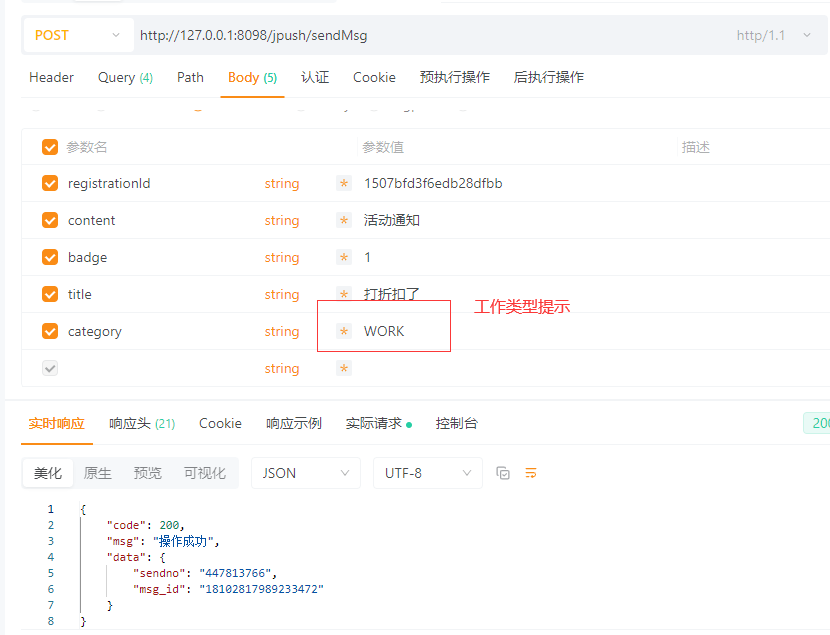
以上接口调用传递的消息类型为华为厂商:工作事项提醒,也就是申请的自分类权益*里面的内容。
- 我相信看到这里的兄弟基础配置+在线推送都是正常的,我这里提供的是离线接收不到的思路。