背景:
针对想要在native进程中如何访问systemserver中的display这个java服务 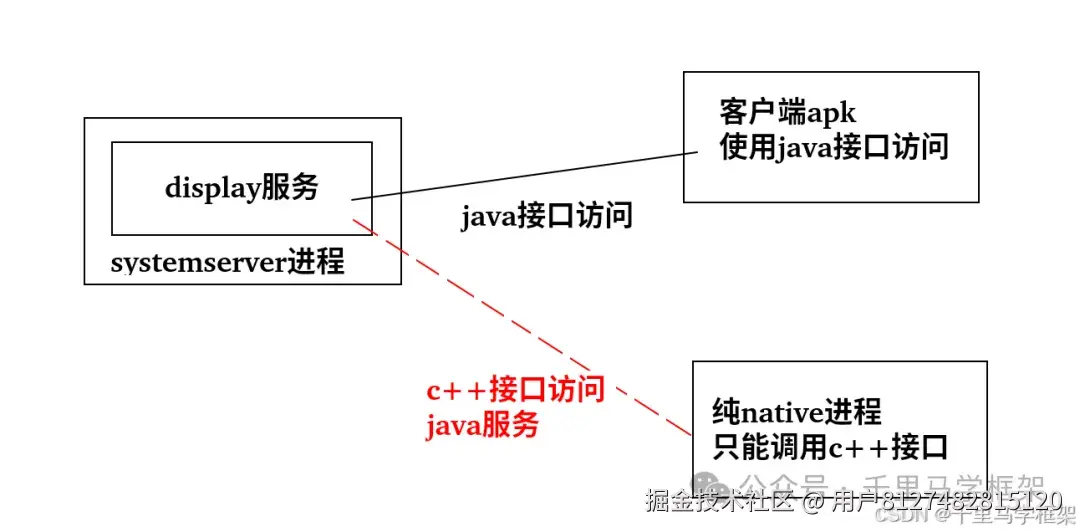
上一篇文章已经分享了相关的方案 binder跨进程高阶玩法-纯native客户端如何访问java服务端接口
这个方案优劣势如下: 优点:实现原理简单,可以只需要进行代码编写,组装好parcel然后调用transact方法既可以实现跨进程调用,完全不需要依赖其他aidl等模块
缺点:需要针对每个跨进程的接口进行详细的细分,特别是组装和拆装parcel对象,这个每个接口都不一样,而且也比较容易出错
那么基于上面的一个缺点导致的痛点问题,就有学员朋友提出了另一种使用aidl文件的方案来解决这个问题。
方案2实战实现
这里直接上相关的代码,大家可以就可以很容易看出他的方案核心
bash
get_display_ids$ tree
.
├── aidl
│   └── android
│       └── hardware
│           └── display
│               ├── DisplayInfo.aidl
│               └── IDisplayManager.aidl
├── Android.bp
└── src
    ├── DisplayBase.cpp
    ├── DisplayBase.h
    └── main1.cpp

5 directories, 6 files
明显可以看到这里多了两个aidl文件,最熟悉的其实就是 IDisplayManager.aidl,这里是不是看到这个aidl文件,大家大概就可以看出这里实际上就是在native层面使用aidl文件编译生成的c++相关接口,不过这种方式我们前面也聊过因为IDisplayManager.aidl可能依赖较多,aidl单独编译需要引入的aidl也可能会很多,这种引入就会比较麻烦。具体可以看看aidl文件详细情况。
IDisplayManager.aidl
cpp
package android.hardware.display;

import android.hardware.display.DisplayInfo;

/** @hide */
interface IDisplayManager {
    @UnsupportedAppUsage
    DisplayInfo getDisplayInfo(int displayId);
    int[] getDisplayIds(boolean includeDisabled);
}
DisplayInfo.aidl --这里可以看出的它主要是依赖"DisplayBase.h"这个头文件来声明相关的结构
cpp
package android.hardware.display;

parcelable DisplayInfo cpp_header "DisplayBase.h";
大家明显可以看到这里的IDisplayManager.aidl文件被缩减成了只有两个方法,其实这个IDisplayManager.aidl文件属于原生系统的阉割版本,但是因为我们的需求就是获取的getDisplayIds,DisplayInfo.aidl是因为第一个接口getDisplayInfo需要的一个依赖,所以这个阉割的aidl也是完全可以满足的。
详细源码: Android.bp
cpp
filegroup {
    name: "libdms_client_aidl",
    srcs: [
        "aidl/**/*.aidl"
    ],
    path: "aidl"
}

cc_library {
    name: "libdms_client",
    srcs: [
        "src/DisplayBase.cpp",
        ":libdms_client_aidl"
    ],
    aidl: {
        export_aidl_headers: true,
        local_include_dirs: ["aidl"],
    },
    export_include_dirs: [
        "src",
    ],
    shared_libs: [
        "libbinder",
        "liblog",
        "libutils",
    ],
}

cc_binary {
    name: "get_display_ids",
    srcs: [ "src/main1.cpp"],
    shared_libs: [
        "libbinder",
        "liblog",
        "libutils",
        "libdms_client",
    ],
}
这里注意一下编译会有两个目标,一个是libdms_client.so和get_display_ids这个可执行文件。
main1.cpp这个是主要的调用
cpp
#include <android/hardware/display/IDisplayManager.h>
#include <binder/IServiceManager.h>
#include <binder/Status.h>
#include <utils/String16.h>
#include <utils/Errors.h>
#include <binder/IInterface.h>
#include <stdio.h>
#include <vector>

using namespace android;

int main() {
    printf("get_display_ids\n");
    auto sm = defaultServiceManager();
    if (sm && sm->checkService(String16("display"))) {
        printf("display service is found\n");
        auto binder = sm->getService(String16("display"));
        auto display = interface_cast<android::hardware::display::IDisplayManager>(binder);
        std::vector<int32_t> ids;
        auto res = display->getDisplayIds(true, &ids);
        if (res.isOk()) {
            printf("ids.size=%d\n", (int)ids.size());
            for (int i =0;i <  (int)ids.size();i++) {
                printf("id[%d]=%d\n",i, ids[i]);
            }
        }
        for(int i = 0;i < ids.size();i++) {
              android::hardware::display::DisplayInfo displayInfo;
		res = display->getDisplayInfo(ids[i], &displayInfo);
		if (res.isOk()) {
		    printf("layerStack=%d\n", displayInfo.layerStack);
		    printf("flags=%d\n", displayInfo.flags);
		    printf("type=%d\n", displayInfo.type);
		    printf("displayId=%d\n", displayInfo.displayId);
		    printf("dispalyGroupId=%d\n", displayInfo.displayGroupId);
		    printf("physicalDisplayId=%d\n", (int)(displayInfo.physicalDisplayId & 0xFF));
		}
		printf("################################################################### \n");
        }

    }
    return 0;
}
DisplayBase.h
cpp
#include <binder/Parcelable.h>
#include <binder/Parcel.h>
#include <utils/String16.h>


namespace android {
namespace hardware {
namespace display {

struct DisplayInfo : public android::Parcelable {
    int layerStack;
    int flags;
    int type;
    int displayId;
    int displayGroupId;
    //DisplayAddress address;
    int64_t physicalDisplayId;
    //DeviceProductInfo deviceProductInfo;
    String16 deviceProductInfoName;
    String16 manufacturerPnpId;
    String16 productId;
    int32_t modelYear;
    int32_t week;
    int32_t year;
    String16 name;
    int width;
    int height;

    status_t writeToParcel(Parcel * parcel) const;
    status_t readFromParcel(const Parcel * source);
};

}
}
}
DisplayBase.cpp --主要是针对DisplayInfo对象进行parcel包相关的拆装工作
cpp
#include "DisplayBase.h"

namespace android {
namespace hardware {
namespace display {
status_t DisplayInfo::writeToParcel(Parcel * parcel) const {
    parcel->writeInt32(layerStack);
    return OK;
}

status_t DisplayInfo::readFromParcel(const Parcel * source) {
    //status_t res = OK;
    layerStack = source->readInt32();
    flags = source->readInt32();
    type = source->readInt32();
    displayId = source->readInt32();
    displayGroupId = source->readInt32();
    physicalDisplayId = source->readInt64();
    deviceProductInfoName = source->readString16();
    manufacturerPnpId = source->readString16();
    productId = source->readString16();
    modelYear = source->readInt32();
    week = source->readInt32();
    year = source->readInt32();
    name = source->readString16();
    width = source->readInt32();
    height = source->readInt32();
    return OK;
}

}// display
}// hardware
}// android
实战结果:
cpp
NX563J:/ # get_display_ids
get_display_ids
display service is found
ids.size=2
id[0]=0
id[1]=2
layerStack=0
flags=16515
type=1
displayId=0
dispalyGroupId=0
physicalDisplayId=36
###################################################################
layerStack=2
flags=136
type=4
displayId=2
dispalyGroupId=0
physicalDisplayId=255
###################################################################
可以看到这里的displayId也是正常获取了,一共2个display分别id如下: id0=0 id1=2
但是大家是否有发现,使用getDisplayInfo接口其实获取的数据是有问题的,明显就是physicalDisplayId=36是不对的,这里就就相当于留给大家的作业了,大家看看是啥问题,把他修改好后,找马哥确认一下修改方案是ok。