1、pip安装依赖
bash
pip install playwright
playwright install chromium
2、apt安装其他依赖
bash
sudo apt update && sudo apt install -y libgbm1 libgbm1 libasound2 libxkbcommon0 libcups2 libdrm2 libxdamage1 libpango-1.0-03、支持中文字体
bash
sudo apt install fonts-wqy-microhei fonts-wqy-zenhei fonts-noto-cjk注意:和html的字体并不是完全一样,可以进一步优化
4、完整代码
bash
from playwright.sync_api import sync_playwright

def html_to_image_sync(html_file_path, output_image_path):
    """同步版本的HTML转图片"""
    with sync_playwright() as p:
        browser = p.chromium.launch(headless=True)
        page = browser.new_page()

        # 设置更长的超时时间
        page.set_default_timeout(60000)  # 60秒超时

        page.set_viewport_size({"width": 375, "height": 600})

        with open(html_file_path, 'r', encoding='utf-8') as file:
            html_content = file.read()

        try:
            # 使用domcontentloaded而不是默认的load,加载更快
            page.set_content(html_content, wait_until="domcontentloaded", timeout=60000)

            # 可选:等待特定元素加载完成
            # page.wait_for_selector('.fund-card', timeout=2000)

            page.screenshot(path=output_image_path, full_page=True)
            print(f"截图成功: {output_image_path}")

        except Exception as e:
            print(f"截图失败: {e}")

        finally:
            browser.close()

# 使用同步版本
html_to_image_sync("0010-gemini3.html", "0010-gemini3.png")
建议:可以将图片宽度放大为375的倍数,不然看起来分辨率太小,不清晰
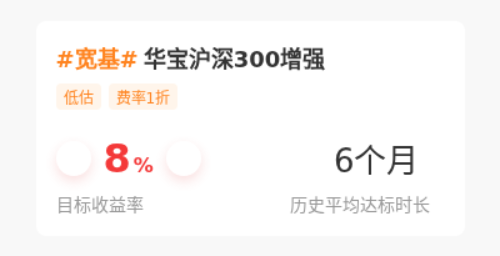
截图效果(+-图片没有加载出来):
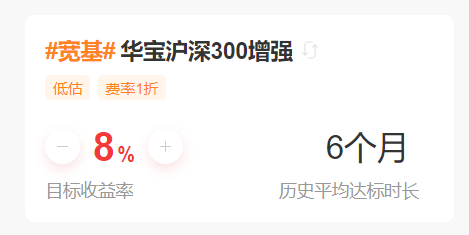
html效果:
5、优化代码(图标需要转base64)
bash
from playwright.sync_api import sync_playwright
import base64

def html_to_image_sync(html_file_path, output_image_path):
    """优化版本的HTML转图片"""
    with sync_playwright() as p:
        # 启动浏览器,添加网络优化参数
        browser = p.chromium.launch(
            headless=True,
            args=[
                '--disable-web-security',
                '--disable-features=VizDisplayCompositor',
                '--disable-background-timer-throttling',
                '--disable-renderer-backgrounding',
                '--aggressive-cache-discard',
                '--max_old_space_size=4096'
            ]
        )

        # 创建页面上下文,设置网络超时
        context = browser.new_context(
            viewport={"width": 375, "height": 600},
            ignore_https_errors=True
        )

        page = context.new_page()
        page.set_default_timeout(45000)  # 45秒超时
        page.set_default_navigation_timeout(45000)

        try:
            with open(html_file_path, 'r', encoding='utf-8') as file:
                html_content = file.read()

            print("读取HTML文件成功,开始处理外部资源...")

            # 方案1: 替换外部图片为base64内联图片
            html_content = replace_external_images_with_base64(html_content)

            # 方案2: 或者使用本地SVG图标替换
            # html_content = replace_with_svg_icons(html_content)

            print("设置页面内容...")
            # 使用commit而不是domcontentloaded,更快
            page.set_content(html_content, wait_until="commit", timeout=30000)

            # 等待字体和样式加载完成
            print("等待页面渲染...")
            page.wait_for_timeout(2000)  # 等待2秒确保CSS应用

            # 检查关键元素是否渲染
            try:
                page.wait_for_selector('.fund-card', timeout=5000)
                print("关键元素加载成功")
            except:
                print("关键元素加载超时,继续截图...")

            page.screenshot(path=output_image_path, full_page=True, timeout=15000)

        except Exception as e:
            print(f"主流程失败: {e}")

        finally:
            browser.close()

def replace_external_images_with_base64(html_content):
    """将外部图片替换为base64编码的内联图片"""
    # 简单的加号SVG(灰色)
    plus_svg = '''<svg width="24" height="24" xmlns="http://www.w3.org/2000/svg">
        <path d="M19 13h-6v6h-2v-6H5v-2h6V5h2v6h6v2z" fill="#cccccc"/>
    </svg>'''

    # 简单的减号SVG(灰色)
    minus_svg = '''<svg width="24" height="24" xmlns="http://www.w3.org/2000/svg">
        <path d="M19 13H5v-2h14v2z" fill="#cccccc"/>
    </svg>'''

    # 刷新图标SVG
    refresh_svg = '''<svg width="16" height="16" xmlns="http://www.w3.org/2000/svg">
        <path d="M12.8 5.2A6 6 0 0 0 8 2a6 6 0 1 0 4.8 9.6" stroke="#999" stroke-width="1.5" fill="none"/>
        <path d="M12 4l2.8-2.8v4" stroke="#999" stroke-width="1.5" fill="none" stroke-linecap="round"/>
    </svg>'''

    # 将SVG转换为base64
    def svg_to_base64(svg_content):
        return "data:image/svg+xml;base64," + base64.b64encode(svg_content.encode('utf-8')).decode('utf-8')

    # 替换图片URL
    replacements = {
        'https://img.icons8.com/material-rounded/24/cccccc/plus-math.png': svg_to_base64(plus_svg),
        'https://img.icons8.com/material-rounded/24/cccccc/minus-math.png': svg_to_base64(minus_svg),
        'https://img.icons8.com/ios/50/999999/refresh--v1.png': svg_to_base64(refresh_svg)
    }

    for old_url, new_data in replacements.items():
        html_content = html_content.replace(old_url, new_data)

    return html_content

def replace_with_svg_icons(html_content):
    """直接使用内联SVG替换img标签"""
    # 加号SVG
    plus_svg = '''<svg width="12" height="12" viewBox="0 0 24 24" fill="#cccccc">
        <path d="M19 13h-6v6h-2v-6H5v-2h6V5h2v6h6v2z"/>
    </svg>'''

    # 减号SVG
    minus_svg = '''<svg width="12" height="12" viewBox="0 0 24 24" fill="#cccccc">
        <path d="M19 13H5v-2h14v2z"/>
    </svg>'''

    # 刷新SVG
    refresh_svg = '''<svg width="16" height="16" viewBox="0 0 50 50" fill="#999999">
        <path d="M25 10c-8.3 0-15 6.7-15 15s6.7 15 15 15 15-6.7 15-15-6.7-15-15-15zm0 28c-7.2 0-13-5.8-13-13s5.8-13 13-13 13 5.8 13 13-5.8 13-13 13z"/>
        <path d="M25 16l-5 5 5 5 5-5-5-5z"/>
    </svg>'''

    # 直接替换整个img标签
    html_content = html_content.replace(
        '',
        refresh_svg
    )

    html_content = html_content.replace(
        '',
        plus_svg
    )

    html_content = html_content.replace(
        '',
        minus_svg
    )

    return html_content

# 使用优化版本
html_to_image_sync("0010-gemini3.html", "0010-gemini3.png")
截图效果:
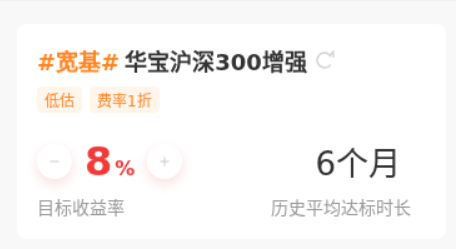
图标并不是完全一样。这里是自行生成的。需要解决