最终效果
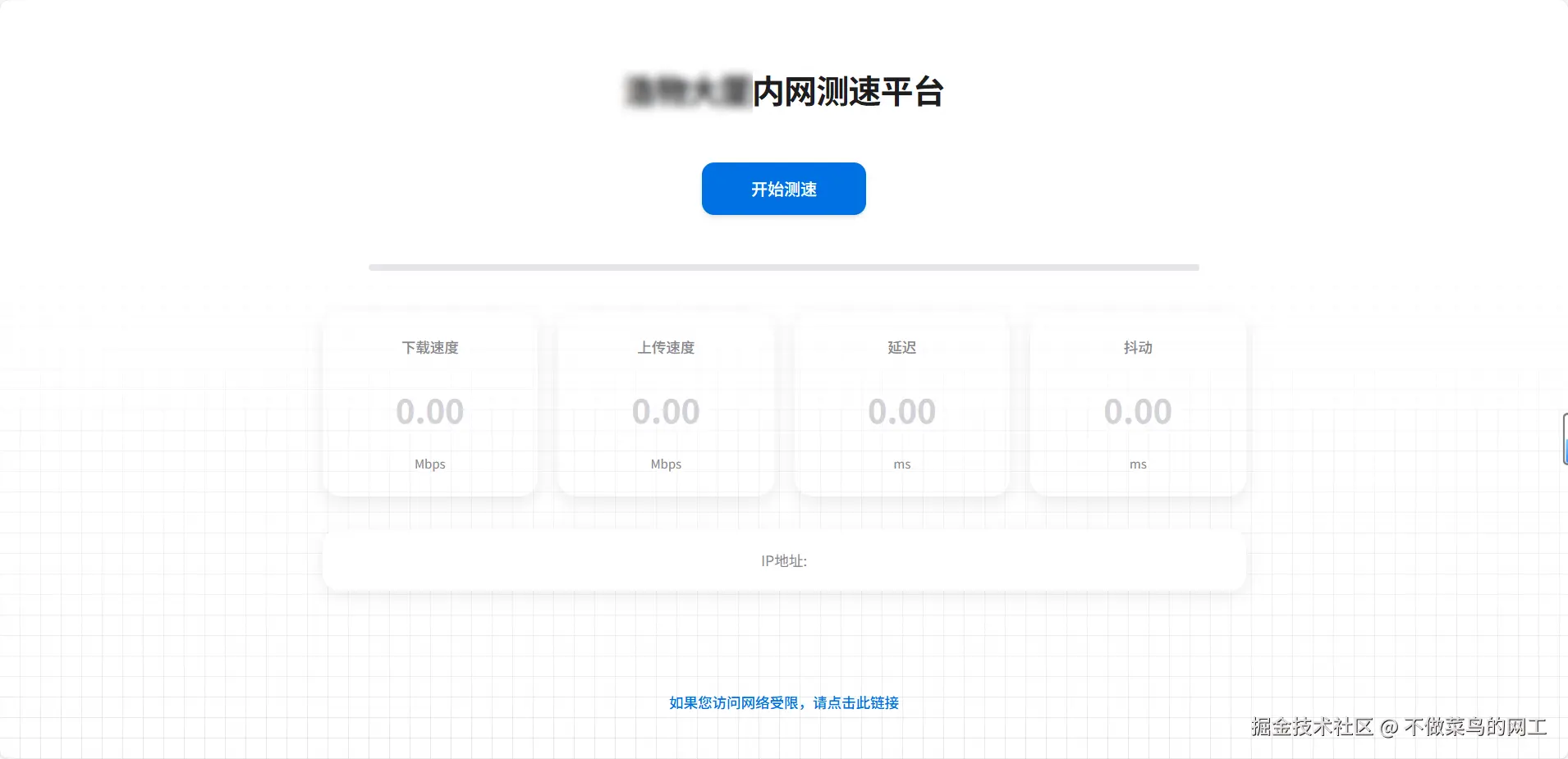
部署过程
- 准备服务器一台,并且接入公司网络
- 部署speedtestx docker镜像并启动
- 对speedtestx原有静态页面进行改造并上线
部署镜像
bash
# 拉取镜像
docker pull docker.io/badapple9/speedtest-x:2024-10-03
yaml
# 创建docker-compose
# 并且将静态文件挂载到宿主机

cat > docker-compose.yaml << 'EOF'
version: '3.9'
services:
    speedtest-x:
        image: speedtest-x:2024-10-03
        tty: true
        stdin_open: true
        ports:
            - '5000:80'
        restart: always
        volumes:
            - ./html:/var/www/html
            - ./backend:/var/www/backend
        container_name: speedtest-x
EOF
bash
# 后台运行配置
docker compose up -d
修改静态页面
html/index.html 以及 html/backend/getIP.php 两个文件
xml
<!DOCTYPE html>
<html>

<head>
	<meta charset="UTF-8" />
	<meta name="viewport" content="width=device-width, initial-scale=1, shrink-to-fit=no, user-scalable=no" />
	<title>XX测速</title>
	<link rel="shortcut icon" href="favicon.ico">
	<script type="text/javascript" src="speedtest.js"></script>
	<script type="text/javascript">

		//INITIALIZE SPEEDTEST
		var s = new Speedtest(); //create speedtest object
		var xhr = new XMLHttpRequest();
		var url_report = './backend/report.php';
		var milestone = 0;
		var key_prefix = Date.parse(new Date());
		s.onupdate = function (data) { //callback to update data in UI
			var clientIp = data.clientIp || "获取失败";
			// 解析IP地址和位置信息
			var ipIspArr = clientIp.split(' - ', 3);
			var ip = ipIspArr[0];
			var location = ipIspArr.slice(1).join(' - ');

			// 更新IP地址显示,添加样式
			if (location) {
				I("ip").innerHTML = '<span class="ip-address">' + ip + '</span> - <span class="ip-info">' + location + '</span>';
			} else {
				I("ip").innerHTML = '<span class="ip-address">' + ip + '</span>';
			}

			I("dlText").textContent = (data.testState == 1 && data.dlStatus == 0) ? "..." : data.dlStatus;
			I("ulText").textContent = (data.testState == 3 && data.ulStatus == 0) ? "..." : data.ulStatus;
			I("pingText").textContent = data.pingStatus;
			I("jitText").textContent = data.jitterStatus;
			var prog = (Number(data.dlProgress) * 2 + Number(data.ulProgress) * 2 + Number(data.pingProgress)) / 5;
			I("progress").style.width = (100 * prog) + "%";
			var isp = ipIspArr[1];
			var addr = ipIspArr[2] === undefined ? '' : ipIspArr[2];
			var progress = Math.floor(100 * prog);
			var key = key_prefix + "_" + ip;
			if (progress > 20 && (progress % 10 == 0) && progress != milestone) {
				console.log(progress);
				var params = 'key=' + key + '&ip=' + ip + '&isp=' + isp + '&addr=' + addr + '&dspeed=' + I("dlText").textContent + '&uspeed=' + I("ulText").textContent + '&ping=' + I("pingText").textContent
					+ '&jitter=' + I("jitText").textContent;
				xhr.timeout = 3000;
				xhr.ontimeout = function (e) {
					console.log('上报超时');
				};
				xhr.open('POST', url_report, true);
				xhr.setRequestHeader("Content-type", "application/x-www-form-urlencoded");
				xhr.send(params);
				milestone = progress;
			}
		}
		s.onend = function (aborted) { //callback for test ended/aborted
			I("startStopBtn").className = ""; //show start button again
			if (aborted) { //if the test was aborted, clear the UI and prepare for new test
				initUI();
			}
		}

		function startStop() { //start/stop button pressed
			if (s.getState() == 3) {
				//speedtest is running, abort
				s.abort();
			} else {
				//test is not running, begin
				s.start();
				I("startStopBtn").className = "running";
			}
		}

		//function to (re)initialize UI
		function initUI() {
			I("dlText").textContent = "";
			I("ulText").textContent = "";
			I("pingText").textContent = "";
			I("jitText").textContent = "";
			I("ip").textContent = "";
		}

		function I(id) { return document.getElementById(id); }
	</script>

	<style type="text/css">
		html,
		body {
			border: none;
			padding: 0;
			margin: 0;
			/* background: #F5F5F7; */
			color: #1D1D1F;
		}

		body {
			width: 100vw;
			height: 100vh;
			background:
				/* 从右上角到左下角的渐变遮罩 - 逐渐隐藏 */
				linear-gradient(180deg,
					rgba(255, 255, 255, 1) 0%,
					rgba(255, 255, 255, 0.95) 25%,
					rgba(255, 255, 255, 0.85) 50%,
					rgba(255, 255, 255, 0.7) 75%,
					rgba(255, 255, 255, 0.5) 100%),
				/* 网格线条 */
				linear-gradient(to left, rgba(0, 0, 0, 0.2) 1px, transparent 1px),
				linear-gradient(to top, rgba(0, 0, 0, 0.2) 1px, transparent 1px);
			background-size:
				cover,
				20px 20px,
				20px 20px;
			background-color: white;
			overflow: hidden;
			text-align: center;
			font-family: -apple-system, BlinkMacSystemFont, "SF Pro Text", "Helvetica Neue", sans-serif;
		}

		h1 {
			color: #1D1D1F;
			font-weight: 600;
			letter-spacing: -0.02em;
			margin-top: 2em;
			margin-bottom: 1.5em;
		}

		#startStopBtn {
			display: inline-block;
			margin: 0 auto;
			color: #FFFFFF;
			background-color: #0071E3;
			border: none;
			border-radius: 12px;
			transition: all 0.2s ease;
			box-sizing: border-box;
			width: 10em;
			height: 3.2em;
			line-height: 3.2em;
			cursor: pointer;
			font-weight: 500;
			font-size: 16px;
			box-shadow: 0 2px 4px rgba(0, 0, 0, 0.1);
		}

		#startStopBtn:hover {
			background-color: #0077ED;
			transform: translateY(-1px);
			box-shadow: 0 4px 8px rgba(0, 0, 0, 0.15);
		}

		#startStopBtn:active {
			background-color: #0066CC;
			transform: translateY(0);
			box-shadow: 0 2px 4px rgba(0, 0, 0, 0.1);
		}

		#startStopBtn.running {
			background-color: #FF3B30;
		}

		#startStopBtn.running:hover {
			background-color: #FF453A;
		}

		#startStopBtn.running:active {
			background-color: #FF3B30;
		}

		#startStopBtn:before {
			content: "开始测速";
		}

		#startStopBtn.running:before {
			content: "停止测试";
		}

		#test {
			margin-top: 3em;
			margin-bottom: 6em;
			max-width: 900px;
			margin-left: auto;
			margin-right: auto;
			padding: 0 20px;
		}

		.testContainer {
			display: flex;
			flex-wrap: wrap;
			justify-content: center;
			align-items: center;
			gap: 20px;
			margin-bottom: 2em;
		}

		div.testArea {
			flex: 1 1 200px;
			max-width: 220px;
			height: 180px;
			position: relative;
			box-sizing: border-box;
			background: rgb(255, 255, 255, 0);
			border-radius: 18px;
			padding: 24px;
			box-shadow: 0 6px 16px rgba(0, 0, 0, 0.08);
			transition: all 0.3s ease;
			display: flex;
			flex-direction: column;
			justify-content: space-between;
			align-items: center;
			text-align: center;
		}

		div.testArea:hover {
			transform: translateY(-2px);
			box-shadow: 0 8px 20px rgba(0, 0, 0, 0.12);
		}

		div.testName {
			font-size: 14px;
			font-weight: 500;
			color: #86868B;
			margin-bottom: 16px;
		}

		div.meterText {
			font-size: 32px;
			font-weight: 600;
			color: #1D1D1F;
			line-height: 1;
			margin: 8px 0;
		}

		#dlText {
			color: #0071E3;
		}

		#ulText {
			color: #34C759;
		}

		#pingText,
		#jitText {
			color: #FF9500;
		}

		div.meterText:empty:before {
			color: #D2D2D7 !important;
			content: "0.00";
		}

		div.unit {
			font-size: 12px;
			color: #86868B;
			margin-top: 8px;
		}


		@media all and (max-width:65em) {
			body {
				font-size: 1.5vw;
			}
		}

		@media all and (max-width:40em) {
			body {
				font-size: 0.9em;
			}

			h1 {
				font-size: 1.8em;
				margin-top: 1.5em;
				margin-bottom: 1.2em;
			}

			#startStopBtn {
				width: 12em;
				height: 3.5em;
				line-height: 3.5em;
				font-size: 14px;
			}

			#test {
				margin-top: 2em;
				margin-bottom: 4em;
				padding: 0 16px;
			}

			.testContainer {
				flex-direction: row;
				flex-wrap: wrap;
				justify-content: center;
				align-items: center;
				gap: 12px;
			}

			div.testArea {
				flex: 1 1 calc(50% - 6px);
				max-width: 180px;
				height: 150px;
				margin: 0;
				padding: 16px;
			}

			div.testName {
				font-size: 13px;
			}

			div.meterText {
				font-size: 24px;
			}

			div.unit {
				font-size: 11px;
			}

			#ipArea {
				font-size: 13px;
				padding: 0 16px;
				margin-top: 1.5em;
			}

			p a {
				font-size: 13px;
				padding: 0 16px;
				display: inline-block;
			}
		}

		@media all and (max-width:320px) {
			h1 {
				font-size: 1.6em;
			}

			div.testArea {
				flex: 1 1 calc(50% - 6px);
				max-width: 140px;
				height: 140px;
				padding: 14px;
			}

			div.testName {
				font-size: 12px;
			}

			div.meterText {
				font-size: 22px;
			}

			div.unit {
				font-size: 10px;
			}
		}

		#progressBar {
			width: 90%;
			height: 6px;
			background-color: #E5E5EA;
			position: relative;
			display: block;
			margin: 0 auto;
			margin-bottom: 2.5em;
			border-radius: 3px;
		}

		#progress {
			position: absolute;
			top: 0;
			left: 0;
			height: 100%;
			width: 0%;
			transition: width 0.3s ease;
			background-color: #0071E3;
			border-radius: 3px;
		}

		#ipArea {
			margin-top: 2em;
			font-size: 14px;
			color: #86868B;
			background: #FFFFFF;
			border-radius: 16px;
			padding: 20px;
			box-shadow: 0 4px 16px rgba(0, 0, 0, 0.08);
			/* max-width: 600px; */
			margin-left: auto;
			margin-right: auto;
			display: flex;
			align-items: center;
			justify-content: center;
			flex-wrap: wrap;
			gap: 8px;
		}


		#ip {
			word-break: break-all;
		}

		#ipArea .ip-label {
			color: #86868B;
			font-weight: 500;
		}

		#ipArea .ip-info {
			color: #0071E3;
			font-weight: 500;
		}

		#ipArea .ip-address {
			color: #1D1D1F;
			font-weight: 600;
			font-size: 14px;
		}

		p a {
			color: #0071E3;
			text-decoration: none;
			font-size: 14px;
			font-weight: 500;
			transition: color 0.2s ease;
		}

		p a:hover {
			color: #0066CC;
			text-decoration: underline;
		}

		@media (prefers-color-scheme: dark) {

			html,
			body {
				background: #1C1C1E;
				color: #F5F5F7;
			}

			h1 {
				color: #F5F5F7;
			}

			div.testArea {
				background: #2C2C2E;
				box-shadow: 0 4px 12px rgba(0, 0, 0, 0.3);
			}

			div.testArea:hover {
				box-shadow: 0 8px 20px rgba(0, 0, 0, 0.4);
			}

			div.testName {
				color: #86868B;
			}

			div.meterText {
				color: #F5F5F7;
			}

			div.unit {
				color: #86868B;
			}

			#progressBar {
				background-color: #3A3A3C;
			}

			#progress {
				background-color: #0071E3;
			}

			#ipArea {
				color: #86868B;
				background: #2C2C2E;
				box-shadow: 0 4px 12px rgba(0, 0, 0, 0.3);
				border-left: 4px solid #0071E3;
			}

			#ipArea .ip-label {
				color: #86868B;
			}

			#ipArea .ip-info {
				color: #34C759;
			}

			#ipArea .ip-address {
				color: #F5F5F7;
			}

			p a {
				color: #34C759;
			}

			p a:hover {
				color: #30B053;
			}


		}
	</style>
</head>

<body>
	<h1>XX大厦内网测速平台</h1>
	<div id="startStopBtn" onclick="startStop()"></div>
	<div id="test">
		<div id="progressBar">
			<div id="progress"></div>
		</div>
		<div class="testContainer">
			<div class="testArea">
				<div class="testName">下载速度</div>
				<div id="dlText" class="meterText"></div>
				<div class="unit">Mbps</div>
			</div>
			<div class="testArea">
				<div class="testName">上传速度</div>
				<div id="ulText" class="meterText"></div>
				<div class="unit">Mbps</div>
			</div>
			<div class="testArea">
				<div class="testName">延迟</div>
				<div id="pingText" class="meterText"></div>
				<div class="unit">ms</div>
			</div>
			<div class="testArea">
				<div class="testName">抖动</div>
				<div id="jitText" class="meterText"></div>
				<div class="unit">ms</div>
			</div>
		</div>
		<div id="ipArea">
			<span class="ip-label"></span>IP地址:</span>
			<span id="ip"></span>
		</div>
	</div>
	<p><a href="http://10.10.10.2:8000/portal/dingtalk/index.html" target="_blank">如果您访问网络受限,请点击此链接</a></p>
	<script type="text/javascript">
		initUI();
	</script>
</body>

</html>
kotlin
# 只修改部分

function getLocalOrPrivateIpInfo($ip)
{
    // ::1/128 is the only localhost ipv6 address. there are no others, no need to strpos this
    if ('::1' === $ip) {
        return '本地 IPv6 地址';
    }

    // simplified IPv6 link-local address (should match fe80::/10)
    if (stripos($ip, 'fe80:') === 0) {
        return '链路本地 IPv6 地址';
    }

    // anything within the 127/8 range is localhost ipv4, the ip must start with 127.0
    if (strpos($ip, '127.') === 0) {
        return '本地 IPv4 地址';
    }

    // 10/8 private IPv4
    if (strpos($ip, '10.') === 0) {
        return '私有 IPv4 地址';
    }

    // 172.16/12 private IPv4
    if (preg_match('/^172\.(1[6-9]|2\d|3[01])\./', $ip) === 1) {
        // 172.16.30.0/24 属于3/5楼用户地址
        if (preg_match('/^172\.16\.30\./', $ip) === 1) {
            return '3&5楼终端设备';
        }
        // 172.16.40.0/24 属于机房服务器地址
        if (preg_match('/^172\.16\.40\./', $ip) === 1) {
            return '机房服务器设备';
        }
        // 172.16.20.0/24 属于4楼用户地址
        if (preg_match('/^172\.16\.20\./', $ip) === 1) {
            return '4楼终端设备';
        }
        // 172.16.103.0-172.16.104.254 属于云桌面地址
        if (preg_match('/^172\.16\.(103|104)\./', $ip) === 1) {
            return '云桌面虚拟机设备';
        }
        // 172.16.80.0/23 属于1-2楼用户地址
        if (preg_match('/^172\.16\.(80|81)\./', $ip) === 1) {
            return '1&2楼终端设备';
        }
        return '私有 IPv4 地址';
    }

    // 192.168/16 private IPv4
    if (strpos($ip, '192.168.') === 0) {
        return '私有 IPv4 地址';
    }

    // IPv4 link-local
    if (strpos($ip, '169.254.') === 0) {
        return '链路本地 IPv4 地址';
    }

    return null;
}