1.创建flutter项目
// cmd 输入
// org fun.tacotues为组织名
// eclipse_mark为项目名
bash
flutter create --org fun.tacotues eclipse_mark2. 接入极光推送(极光通道和华为通道)
极光推送通过极光通道和厂商通道进行消息下发,区别如下:
| 通道 | 描述 | 支持类型 |
|---|---|---|
| 极光通道 | 极光通道是自建通道,需要依赖长连接才能收到推送,设备离线消息不会下发。 | 所有可以成功注册极光通道的机型 |
| 厂商通道 | 厂商通道是系统通道,设备离线也可以收到推送。 | Android:支持小米、华为、OPPO、vivo、魅族、荣耀、FCM通道 iOS:APNs通道 |
2.1 创建极光应用
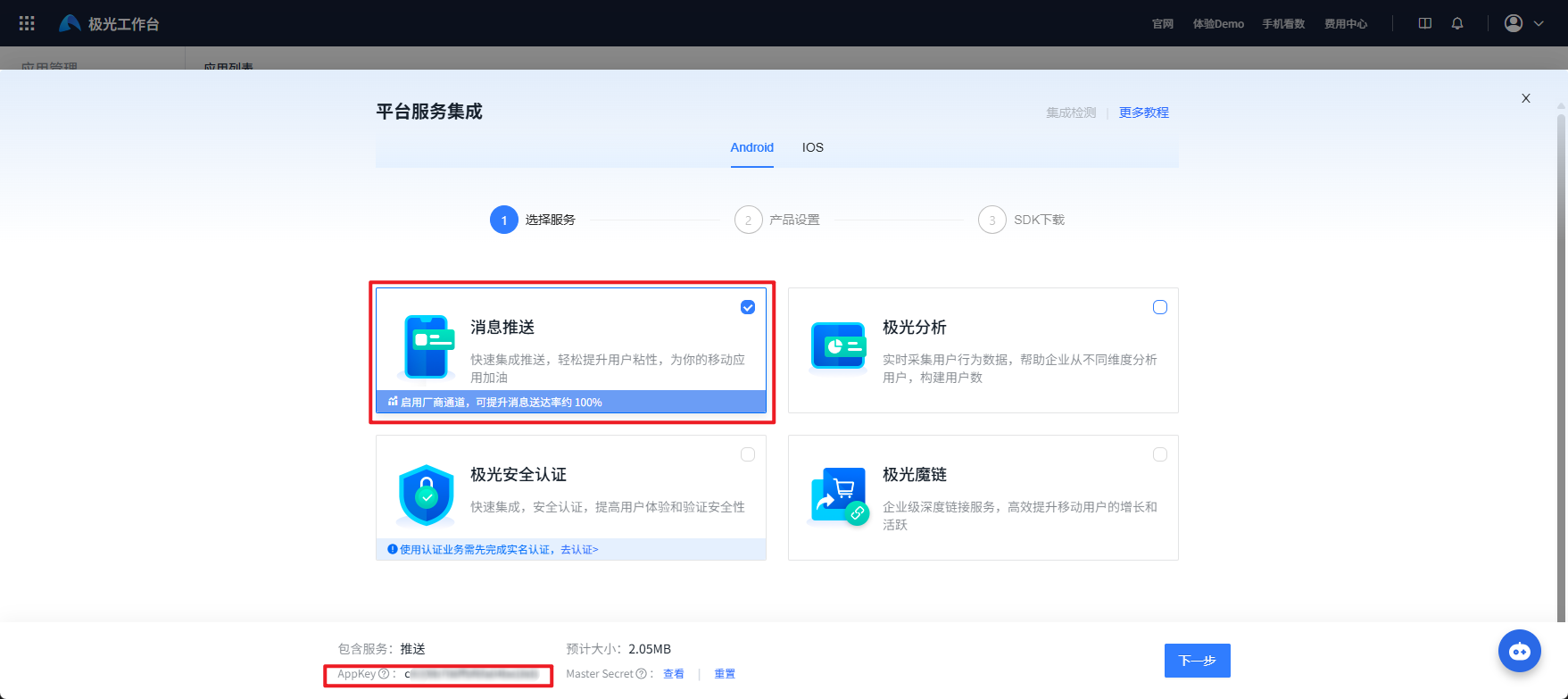
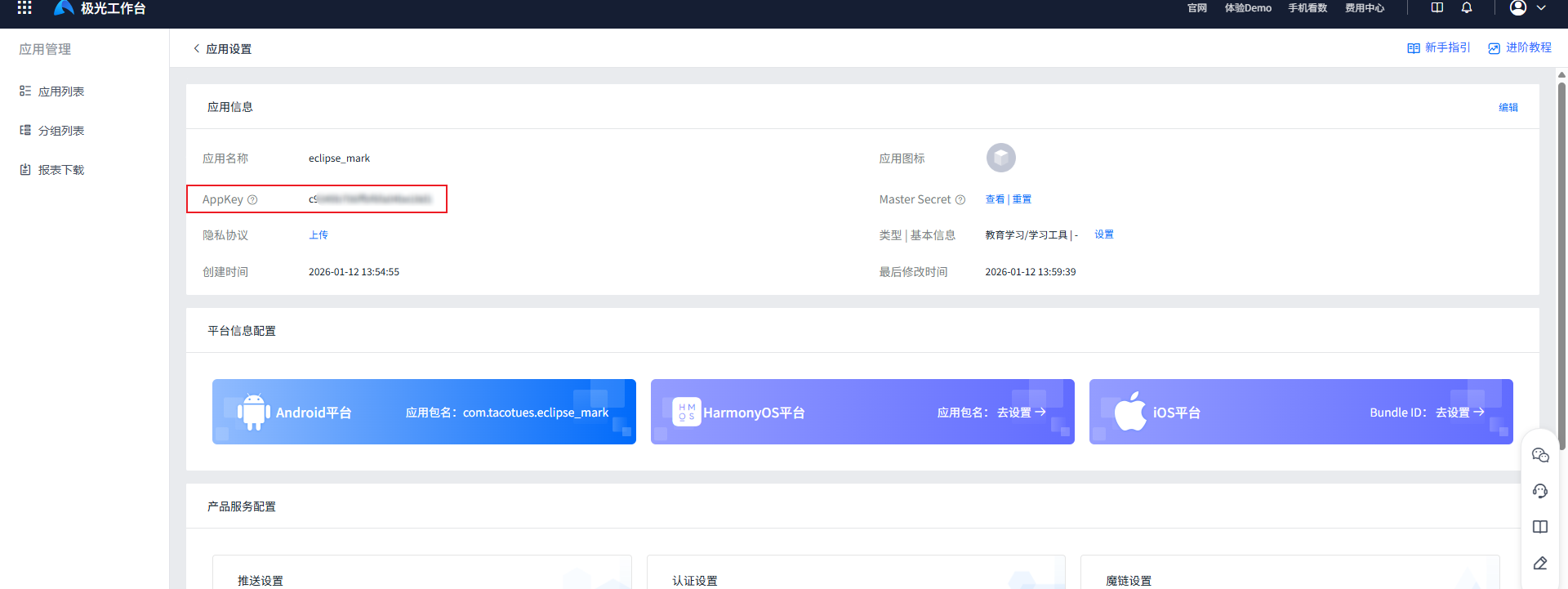
进入极光控制台创建应用
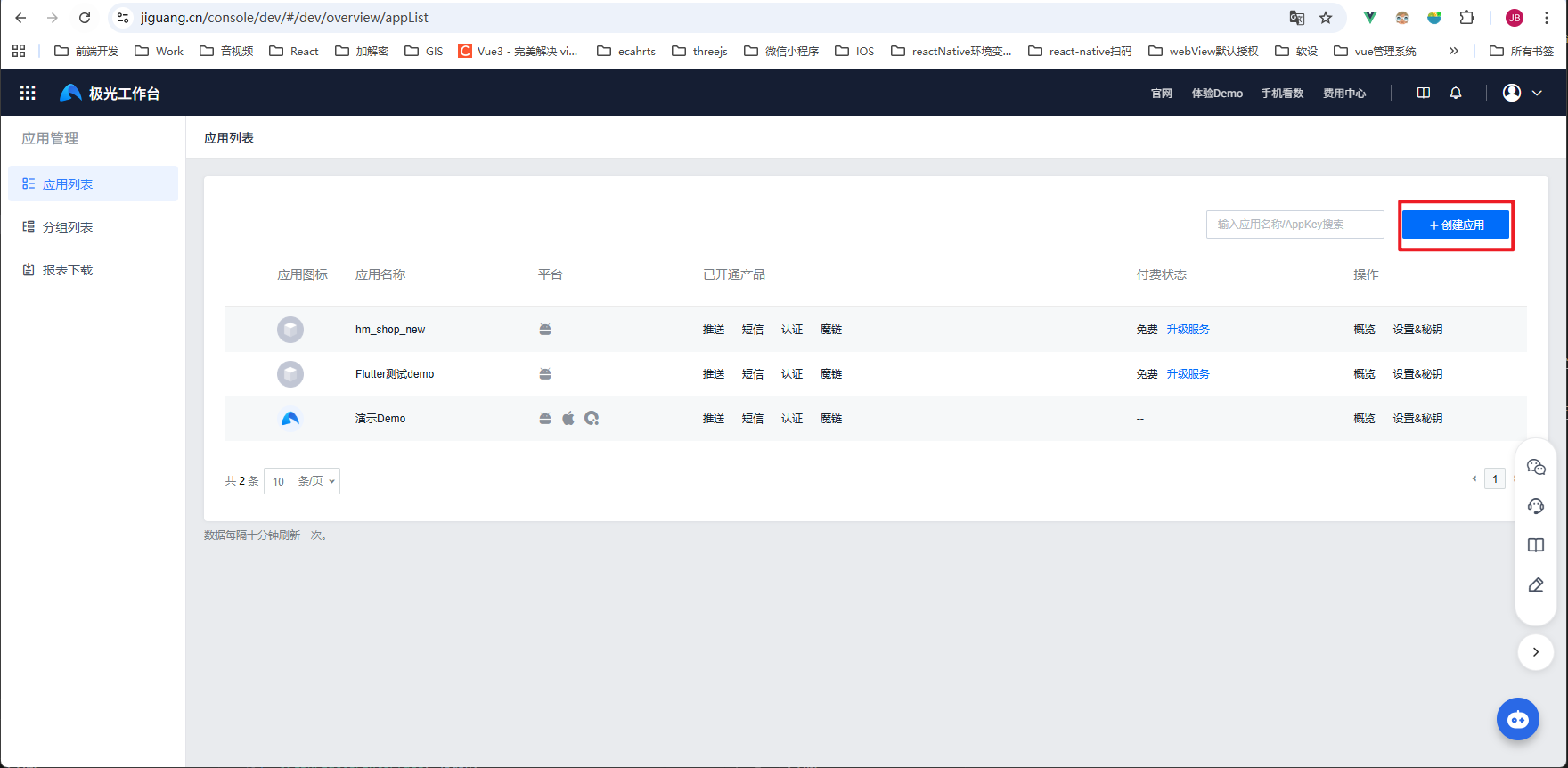
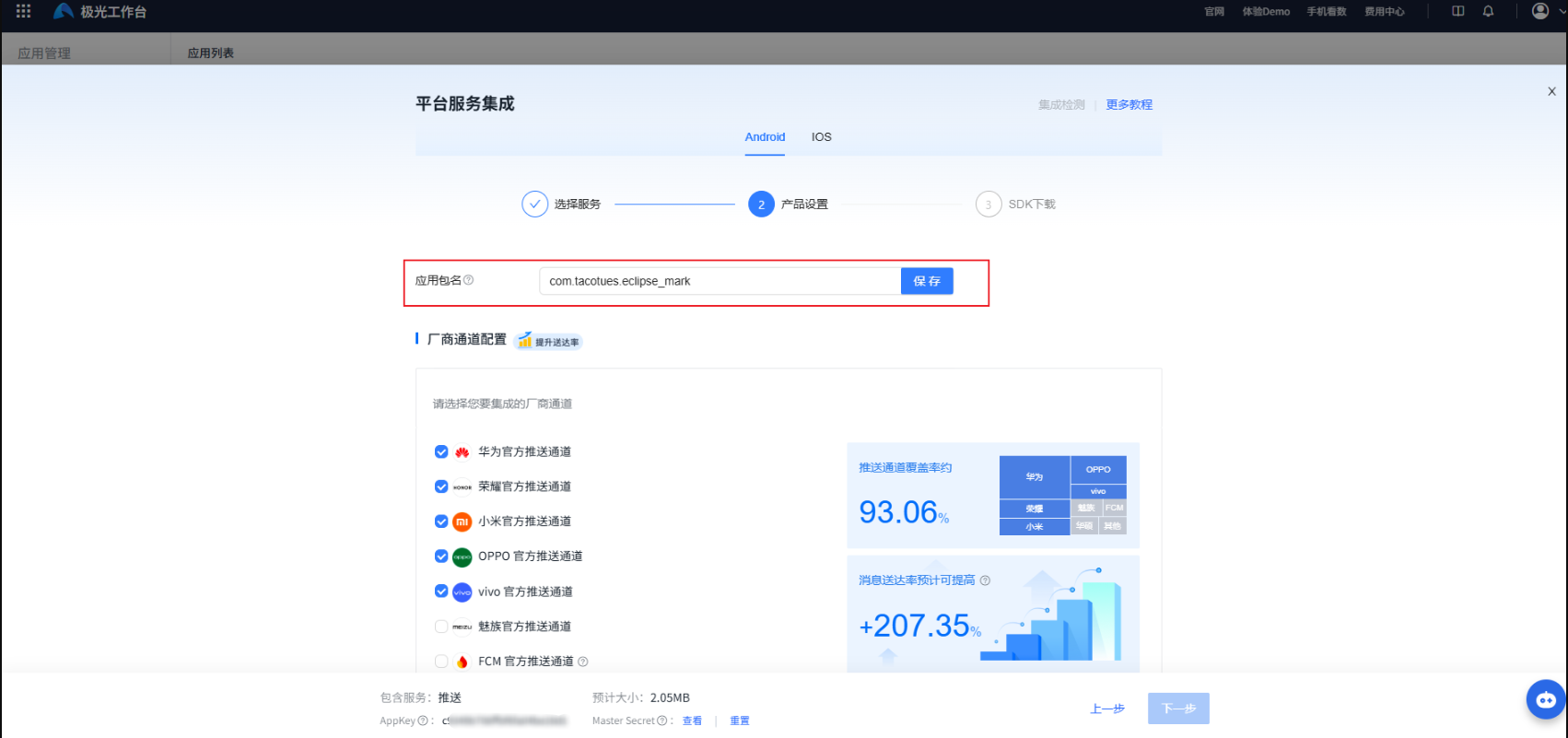
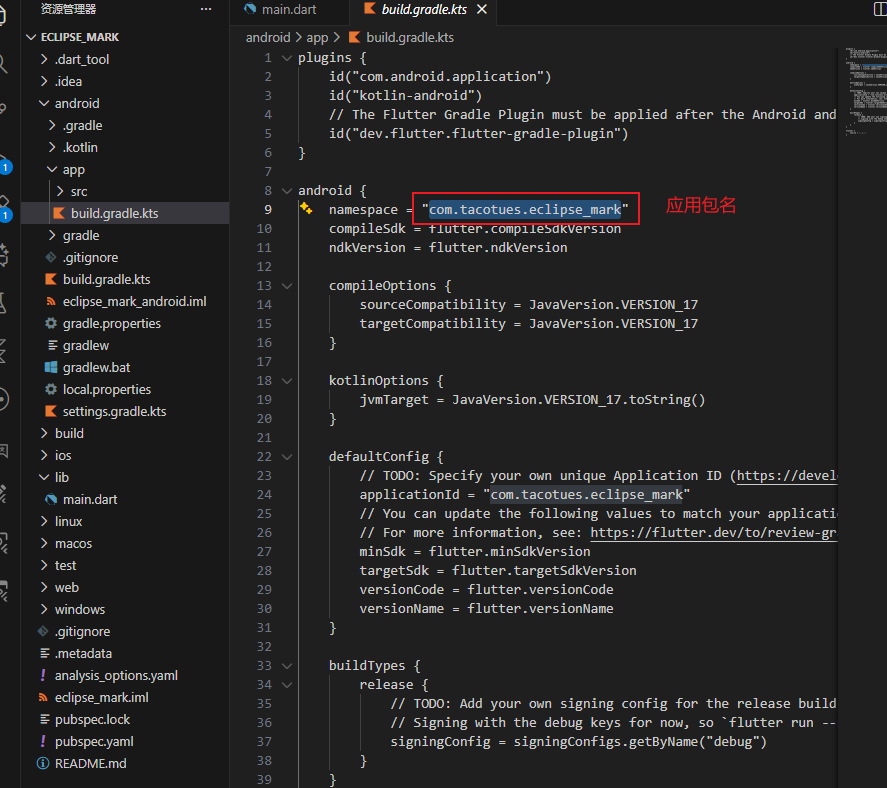
填写应用包名,然后保存验证包名能否使用(某些厂商的推送要求包名不能重复)
2.2接入极光通道
2.2.1 jpush_flutter插件安装和配置
安装Flutter极光推送插件
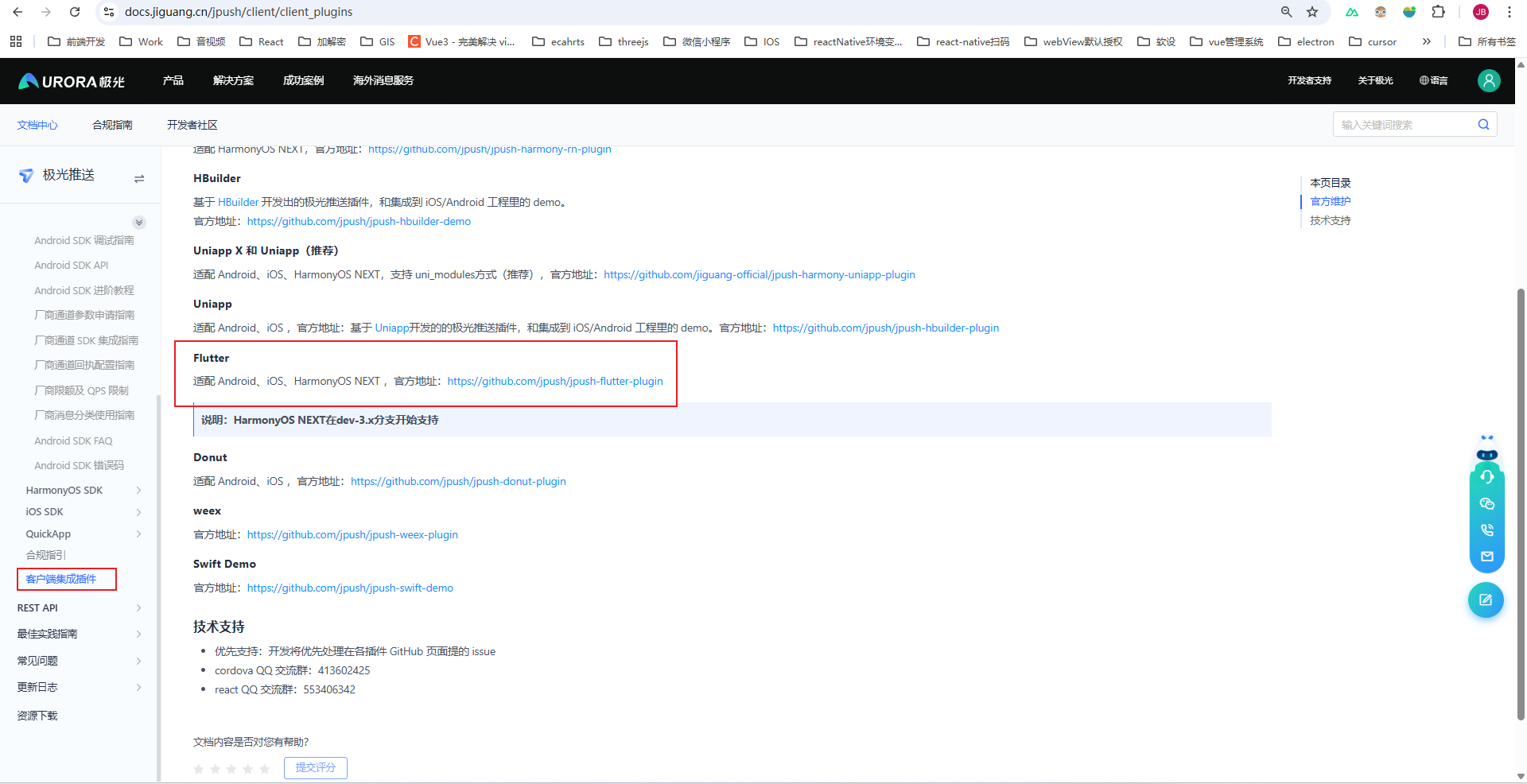
安装插件
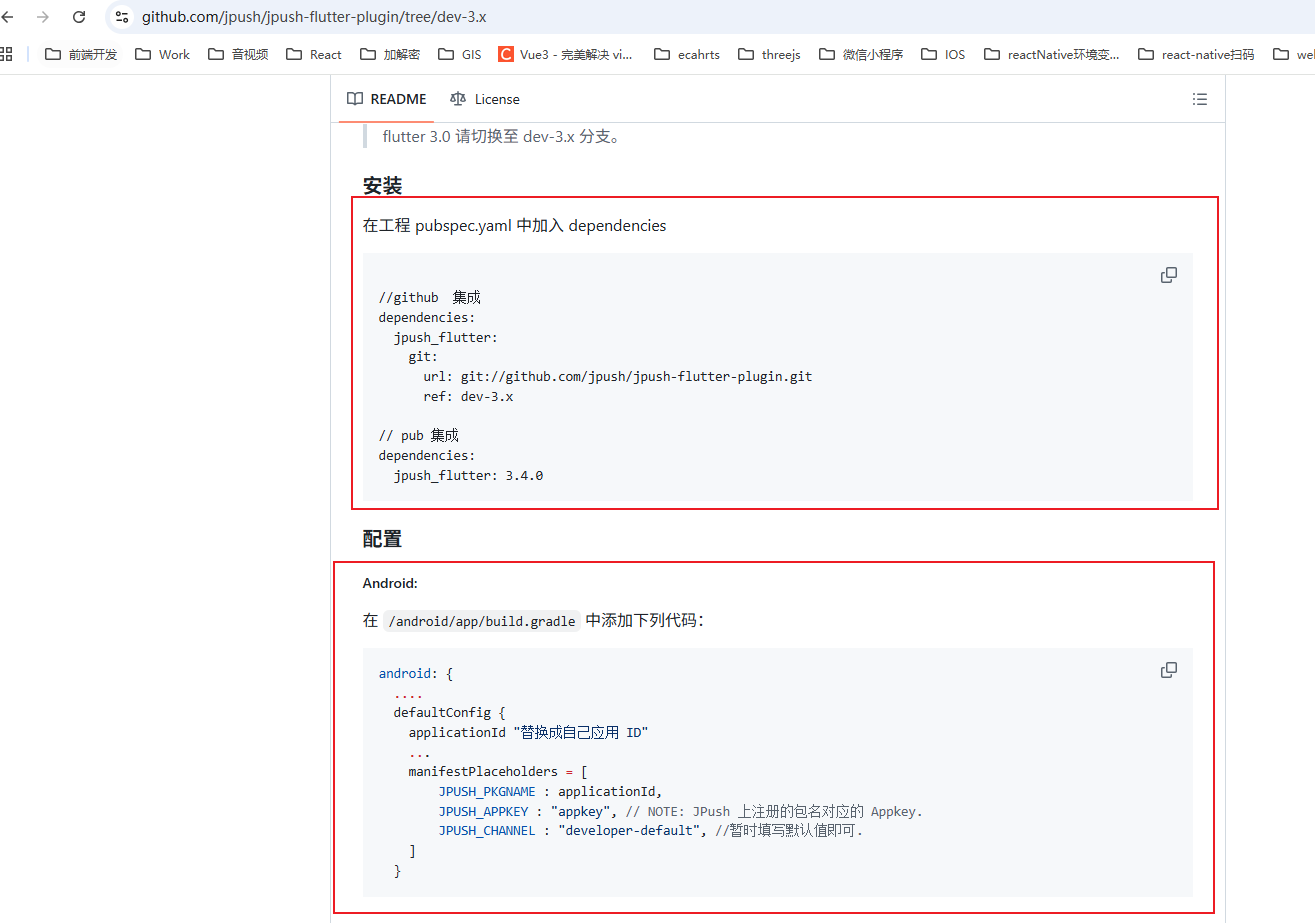
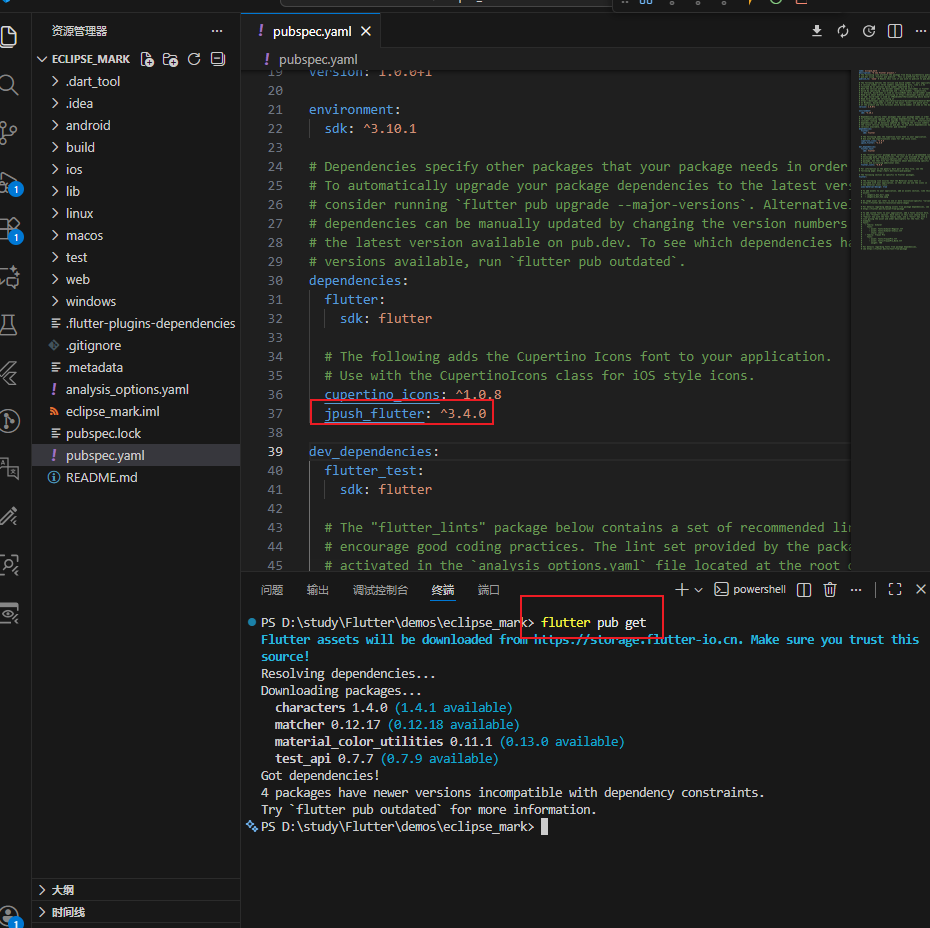
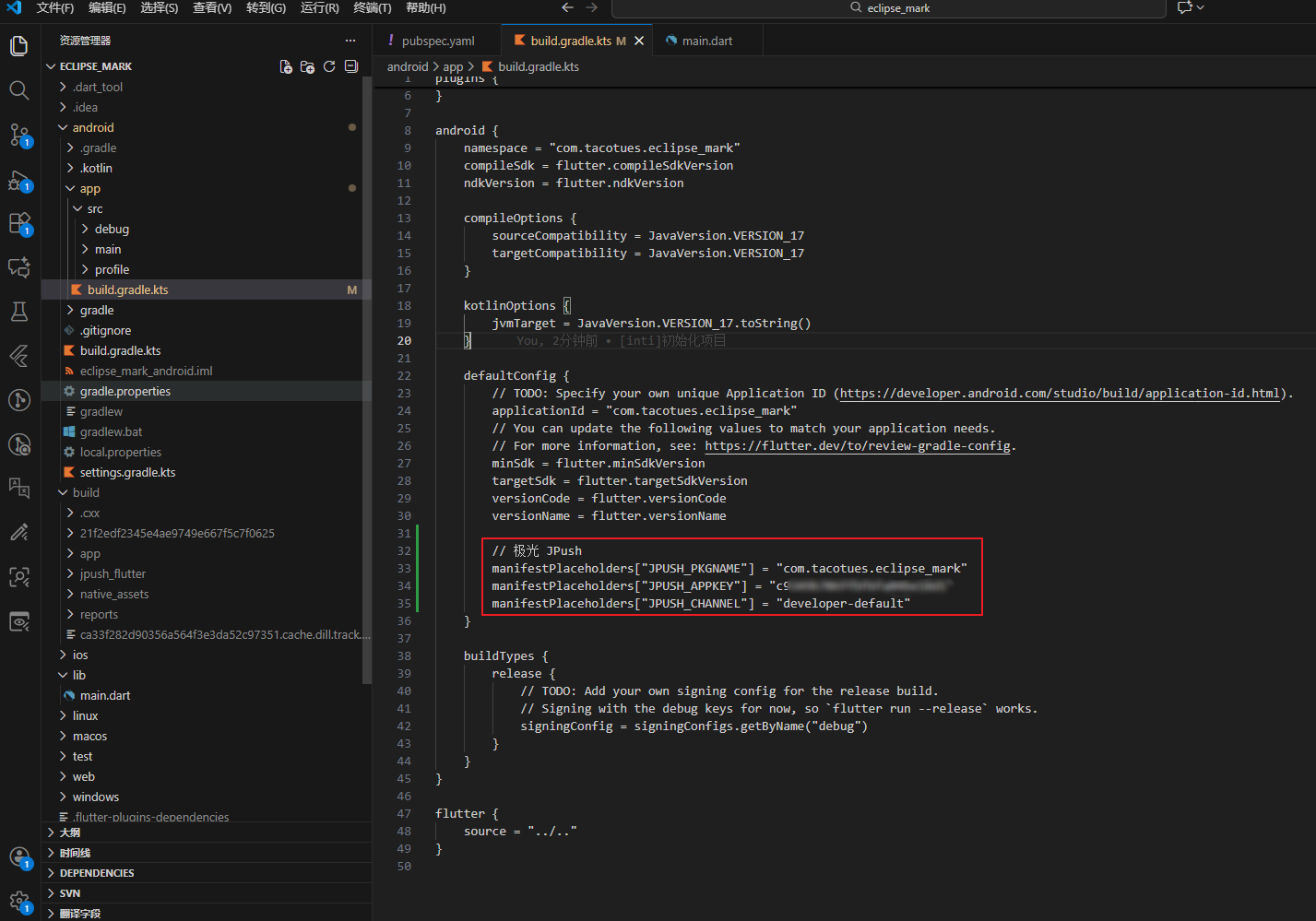
这里/android/app/build.gradle配置改为兼容.kts写法
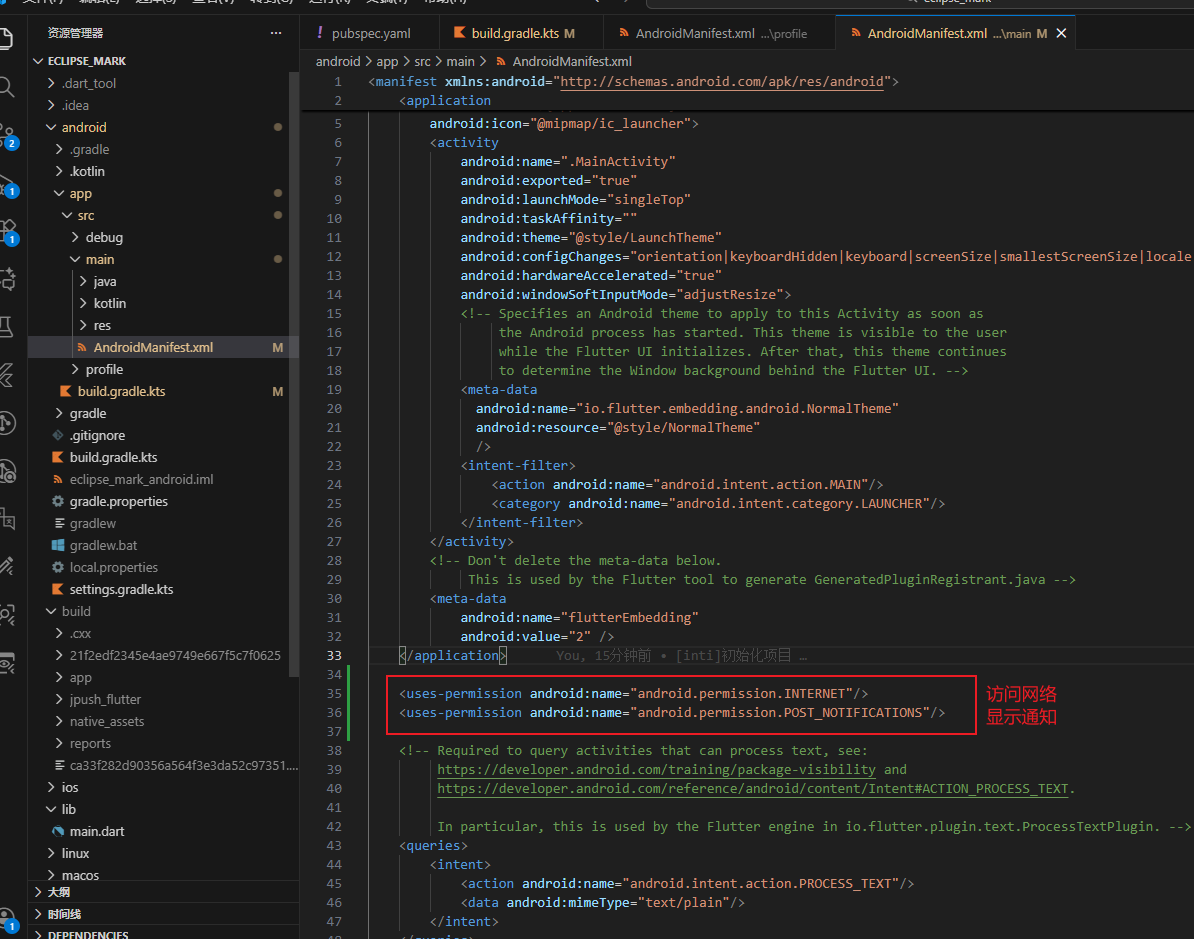
在 android/app/main/AndroidManifest.xml 增加访问网络和显示通知权限
2.2.2 初始化插件
main.dart中初始化插件
setup需要填入创建的极光应用的appKey
dart
// main.dart
import 'package:flutter/material.dart';
import 'package:flutter/foundation.dart'; // kIsWeb

// 极光(⚠️ 只能在 Android / iOS 使用)
import 'package:jpush_flutter/jpush_flutter.dart';
import 'package:jpush_flutter/jpush_interface.dart';

import 'package:eclipse_mark/pages/detail_page.dart';
import 'package:eclipse_mark/pages/home_page.dart';
import 'package:eclipse_mark/j_push/notification_payload.dart.dart';

// intent:#Intent;component=com.tacotues.eclipse_mark/com.tacotues.eclipse_mark.MainActivity;end
// RegistrationID

/// 全局 NavigatorKey(用于点击通知跳转)
final navigatorKey = GlobalKey<NavigatorState>();

/// JPush 实例(延迟初始化,避免 Web 报错)
JPushFlutterInterface? jpush;

void main() async {
  WidgetsFlutterBinding.ensureInitialized();

  /// 🚫 Web 平台不初始化极光
  if (!kIsWeb) {
    await initJPush();
  } else {
    debugPrint('🌐 当前是 Web 平台,已跳过极光推送初始化');
  }

  runApp(const MyAPP());
}

/// 初始化极光(仅 Android / iOS)
Future<void> initJPush() async {
  jpush = JPush.newJPush();

  // 注意addEventHandler 要在 setup 之前
  jpush!.addEventHandler(
    /// 前台收到通知
    onReceiveNotification: (notification) async {
      debugPrint("📩 onReceiveNotification: $notification");
    },

    /// 点击通知
    onOpenNotification: (notification) async {
      debugPrint("👉 onOpenNotification: $notification");
      _handleNotificationClick(notification);
    },

    /// 自定义消息
    onReceiveMessage: (message) async {
      debugPrint("✉️ onReceiveMessage: $message");
    },

    /// 连接状态
    onConnected: (message) async {
      debugPrint("🔌 onConnected: $message");
    },

    /// iOS DeviceToken
    onReceiveDeviceToken: (message) async {
      debugPrint("📱 onReceiveDeviceToken: $message");
    },
  );

  /// 设置 AppKey
  jpush!.setup(
    appKey: "替换成你自己的 appKey",
    channel: "developer-default",
    production: false,
    debug: true,
  );

  /// 获取 RegistrationID
  final rid = await jpush!.getRegistrationID() ?? '';
  debugPrint('🔥 JPush RegistrationID: $rid');
}


/// 统一处理点击通知跳转
void _handleNotificationClick(Map<String, dynamic> notification) {
  final extras = notification['extras'] as Map?;
  final rawData = extras?['cn.jpush.android.EXTRA'];

  if (rawData is! Map) return;

  final payload = NotificationPayload.fromRaw(rawData);

  navigatorKey.currentState?.pushNamed(
    '/detail',
    arguments: payload,
  );
}


class MyAPP extends StatelessWidget {
  const MyAPP({super.key});

  @override
  Widget build(BuildContext context) {
    return MaterialApp(
      debugShowCheckedModeBanner: false,
      navigatorKey: navigatorKey,
      home: const HomePage(),
      routes: {
        '/detail': (context) => const DetailPage(),
      },
    );
  }
}
dart
// notification_payload.dart.dart
class NotificationPayload {
  final Map<String, dynamic> data;

  NotificationPayload(this.data);

  factory NotificationPayload.fromRaw(Map raw) {
    return NotificationPayload(
      raw.map((k, v) => MapEntry(k.toString(), v)),
    );
  }

  /// 安全取值
  T? get<T>(String key) {
    final value = data[key];
    if (value is T) return value;
    return null;
  }

  /// 常用兜底方法
  String getString(String key, {String defaultValue = ''}) {
    final value = data[key];
    return value?.toString() ?? defaultValue;
  }

  int getInt(String key, {int defaultValue = 0}) {
    final value = data[key];
    if (value is int) return value;
    if (value is String) return int.tryParse(value) ?? defaultValue;
    return defaultValue;
  }

  bool contains(String key) => data.containsKey(key);

  @override
  String toString() => data.toString();
}
创建主页和详情页面
dart
// home_page.dart
import 'package:flutter/material.dart';

class HomePage extends StatelessWidget {
  const HomePage({super.key});

  @override
  Widget build(BuildContext context) {
    return Scaffold(
      appBar: AppBar(title: const Text('Home')),
      body: Padding(
        padding: const EdgeInsets.all(20.0),
        child: Center(
          child: Column(
            mainAxisAlignment: MainAxisAlignment.center,
            children: [
              ElevatedButton(
                onPressed: () {
                  Navigator.of(context).pushNamed('/detail');
                },
                child: const Text('跳转到detail页面'),
              ),
            ],
          ),
        ),
      ),
    );
  }
}
dart
// detail_page.dart
import 'package:flutter/material.dart';
import 'package:eclipse_mark/j_push/notification_payload.dart.dart';

class DetailPage extends StatelessWidget {
  const DetailPage({super.key});

  @override
  Widget build(BuildContext context) {
    final payload =
        ModalRoute.of(context)?.settings.arguments as NotificationPayload?;

    if (payload == null) {
      return Scaffold(
        appBar: AppBar(title: const Text('详情页面')),
        body: Center(child: Text('无通知数据')),
      );
    }

    final id = payload.getInt('id');
    final label = payload.getString('label');

    return Scaffold(
      appBar: AppBar(title: const Text('详情页面')),
      body: Column(
        mainAxisAlignment: MainAxisAlignment.center,
        children: [
          Text('ID: $id'),
          Text('Label: $label'),
          Text('Raw: ${payload.data}'),
        ],
      ),
    );
  }
}
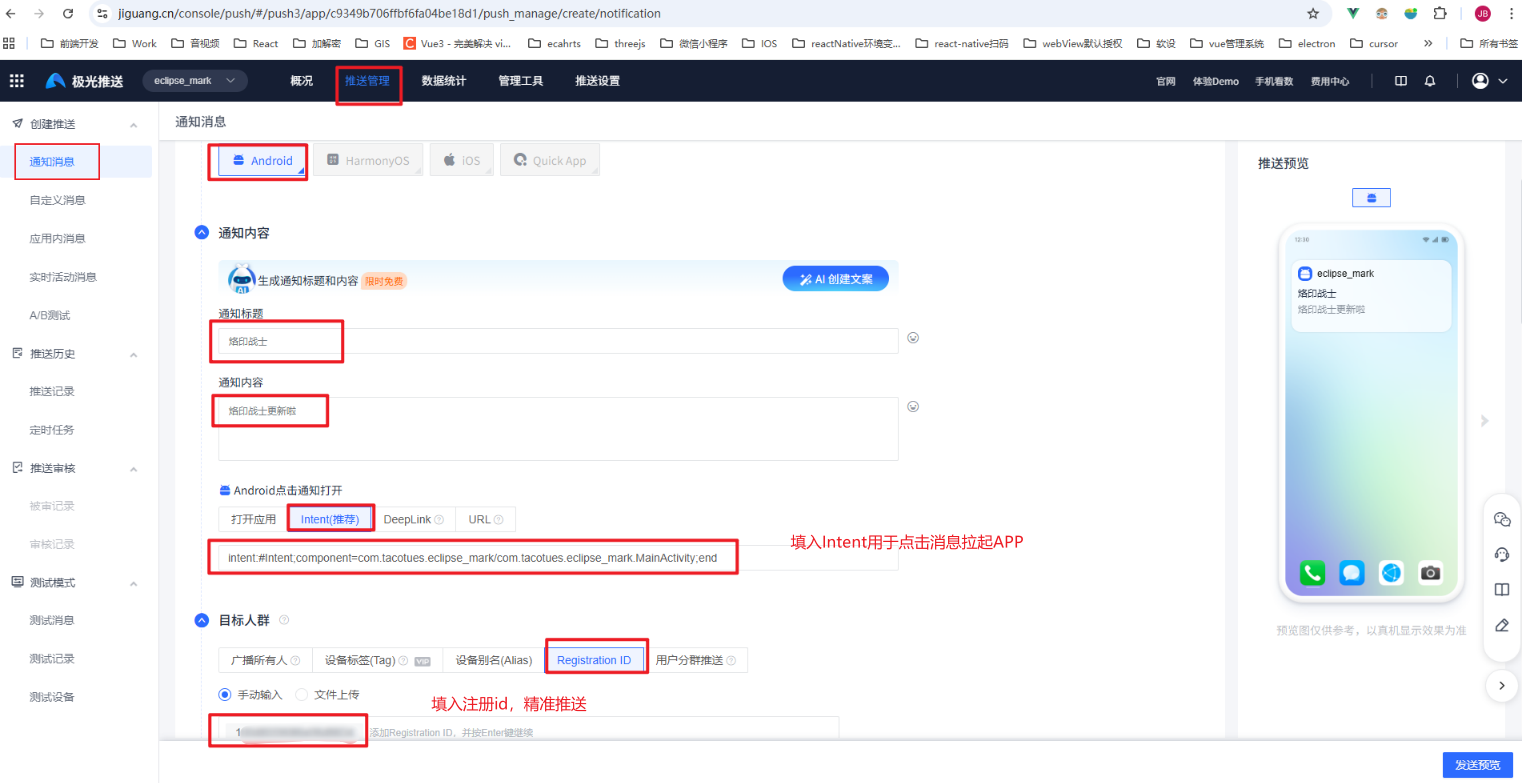
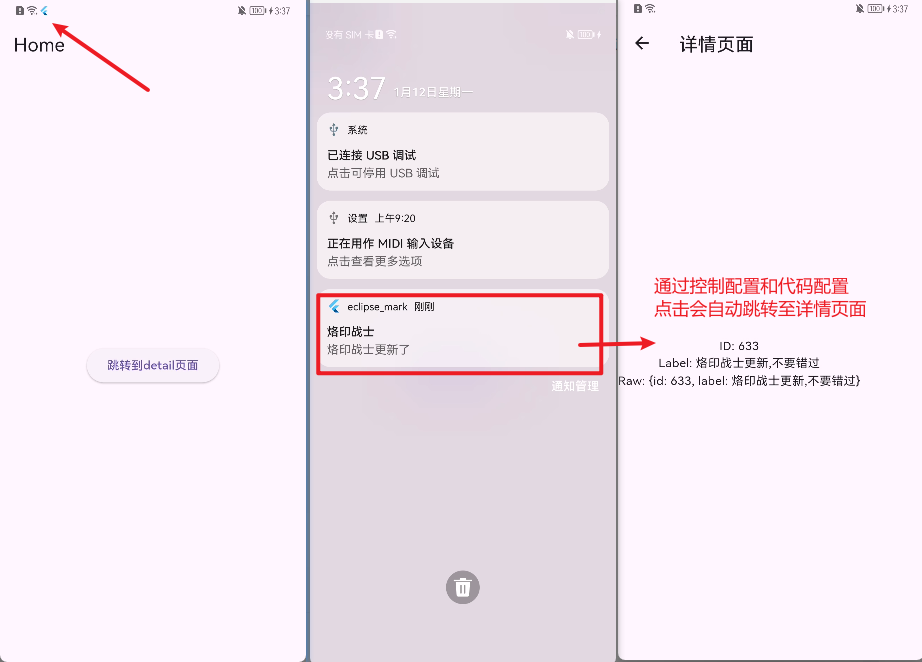
2.2.3 测试极光通道推送
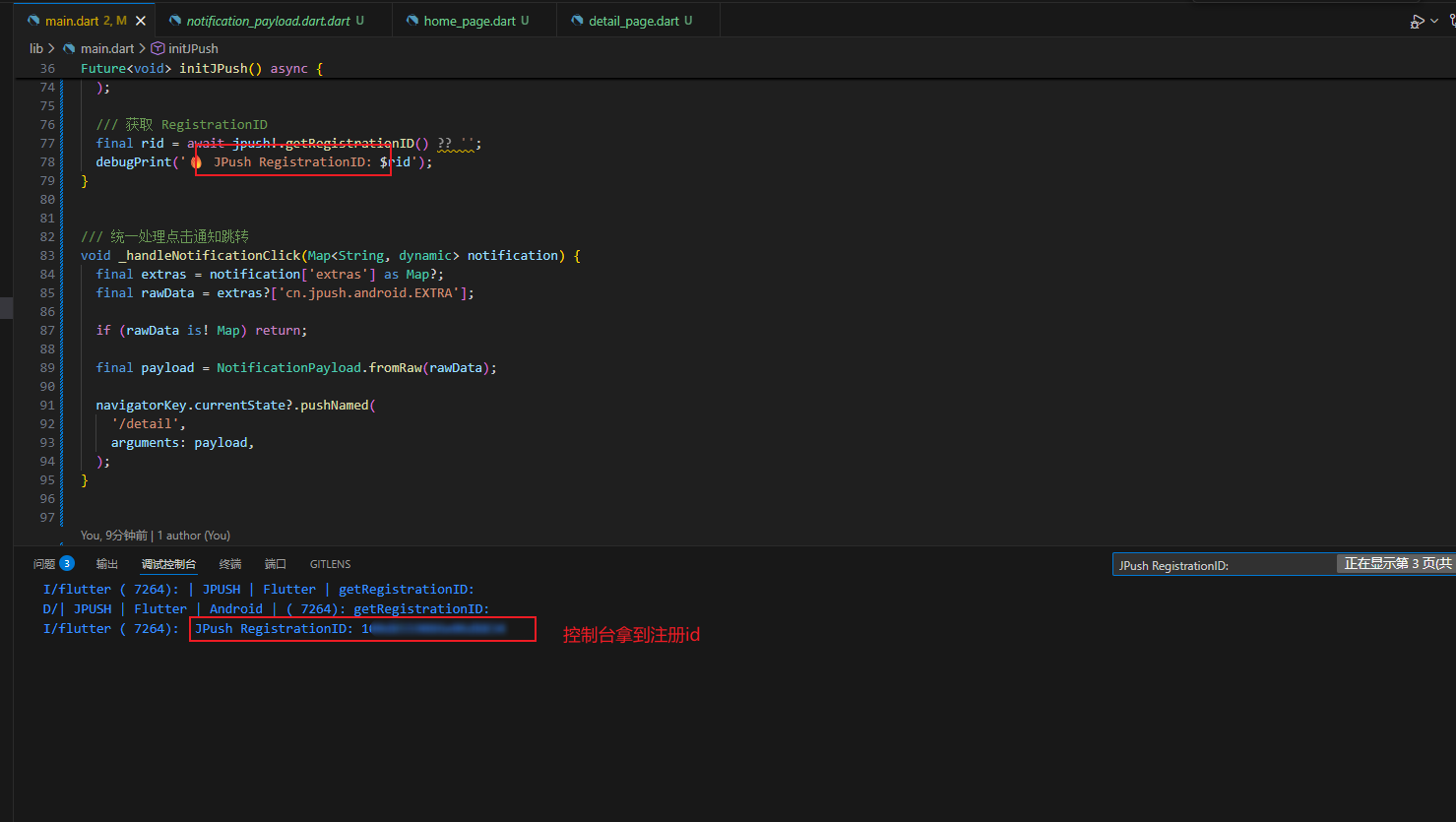
在控制台拿到注册id
2.3接入华为通道
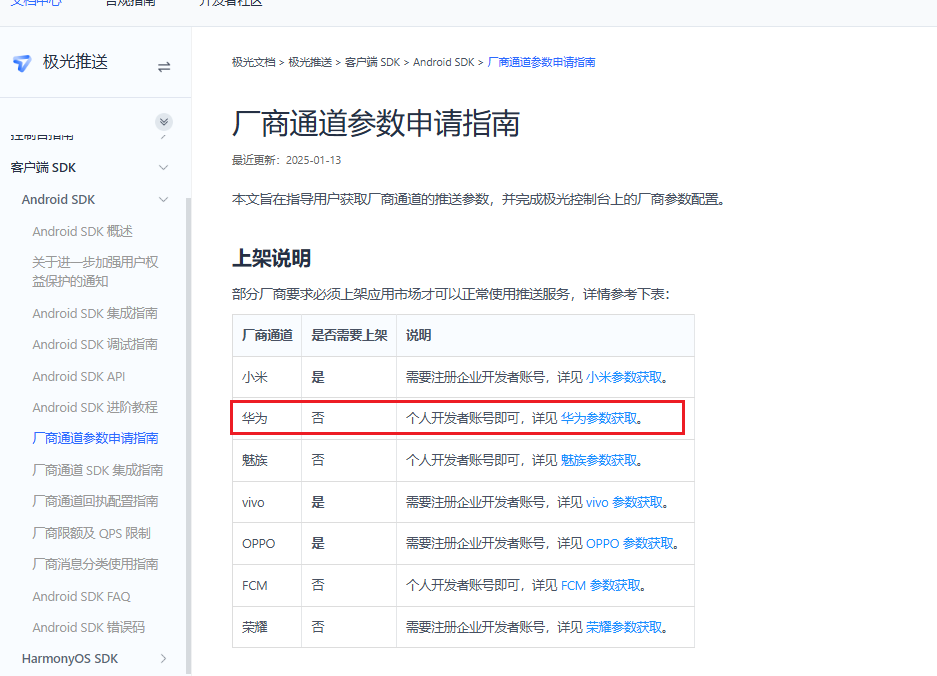
2.3.1 申请华为厂商通道参数
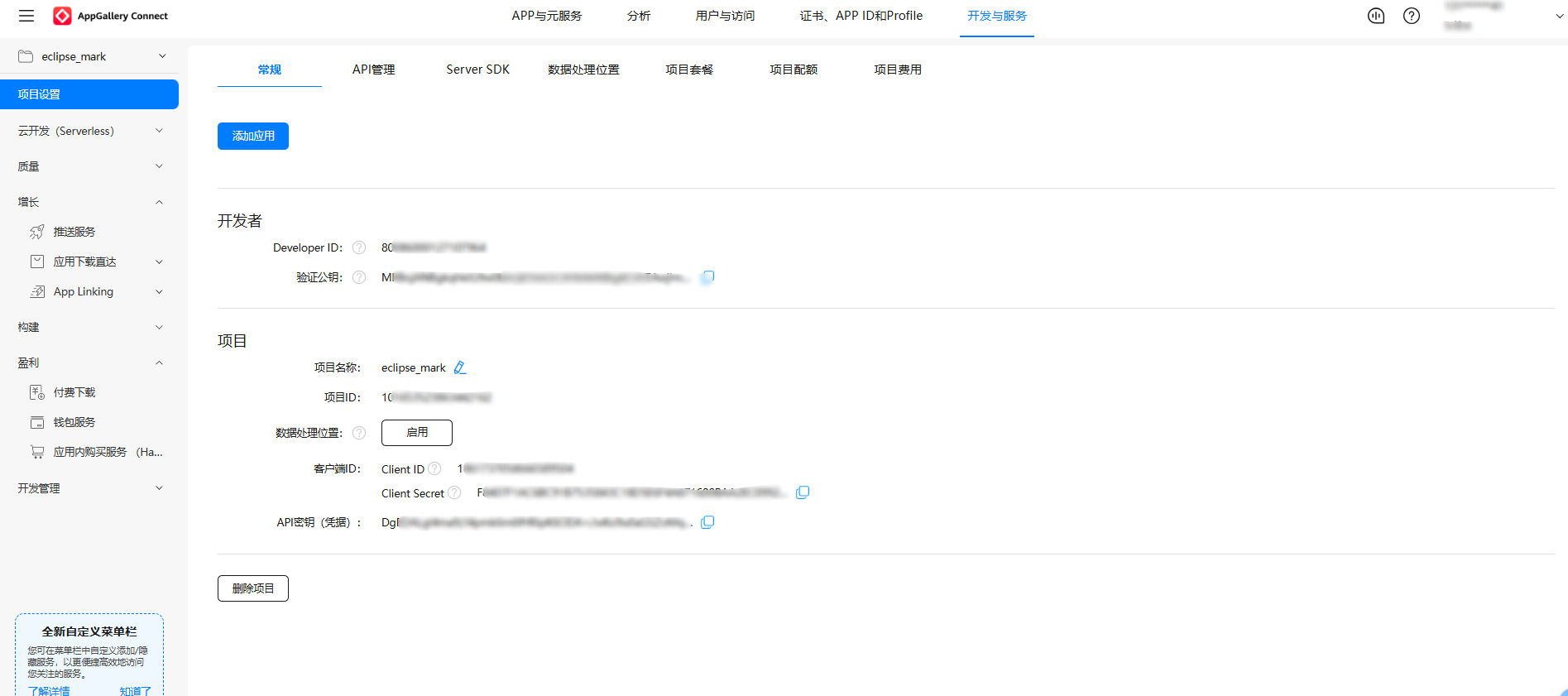
创建项目
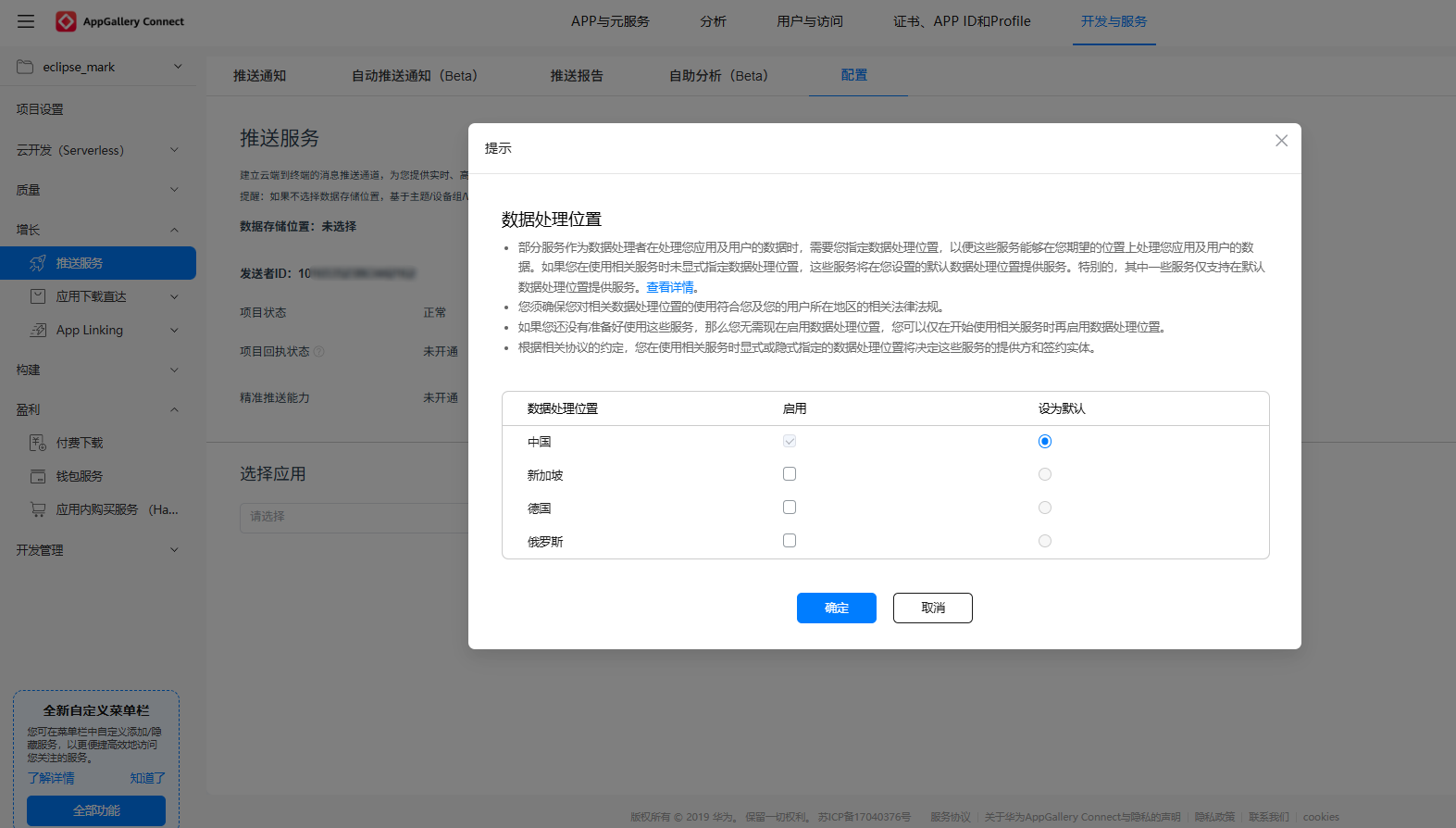
开通推送服务
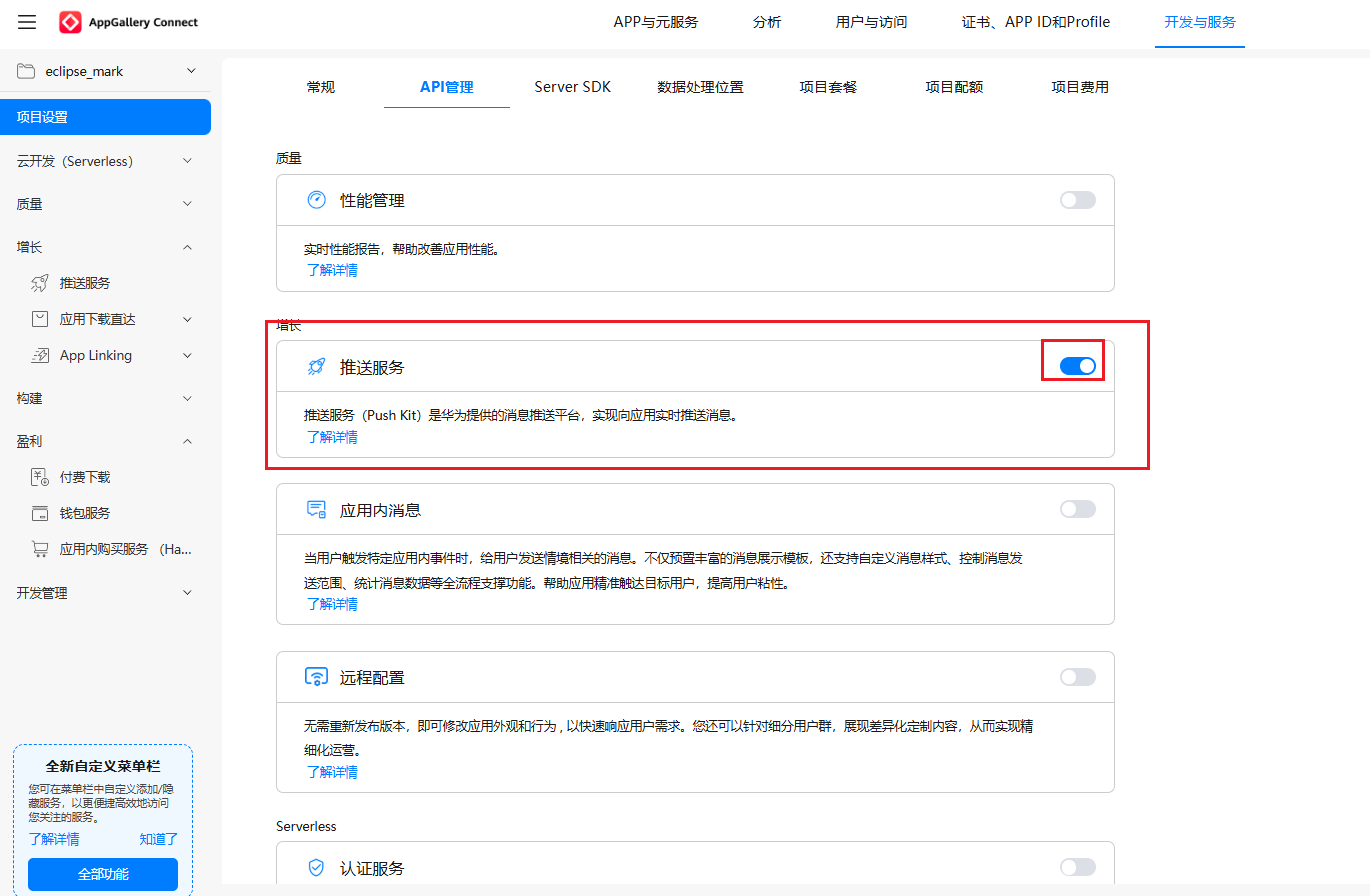
查看推送服务是否已经开启
添加应用
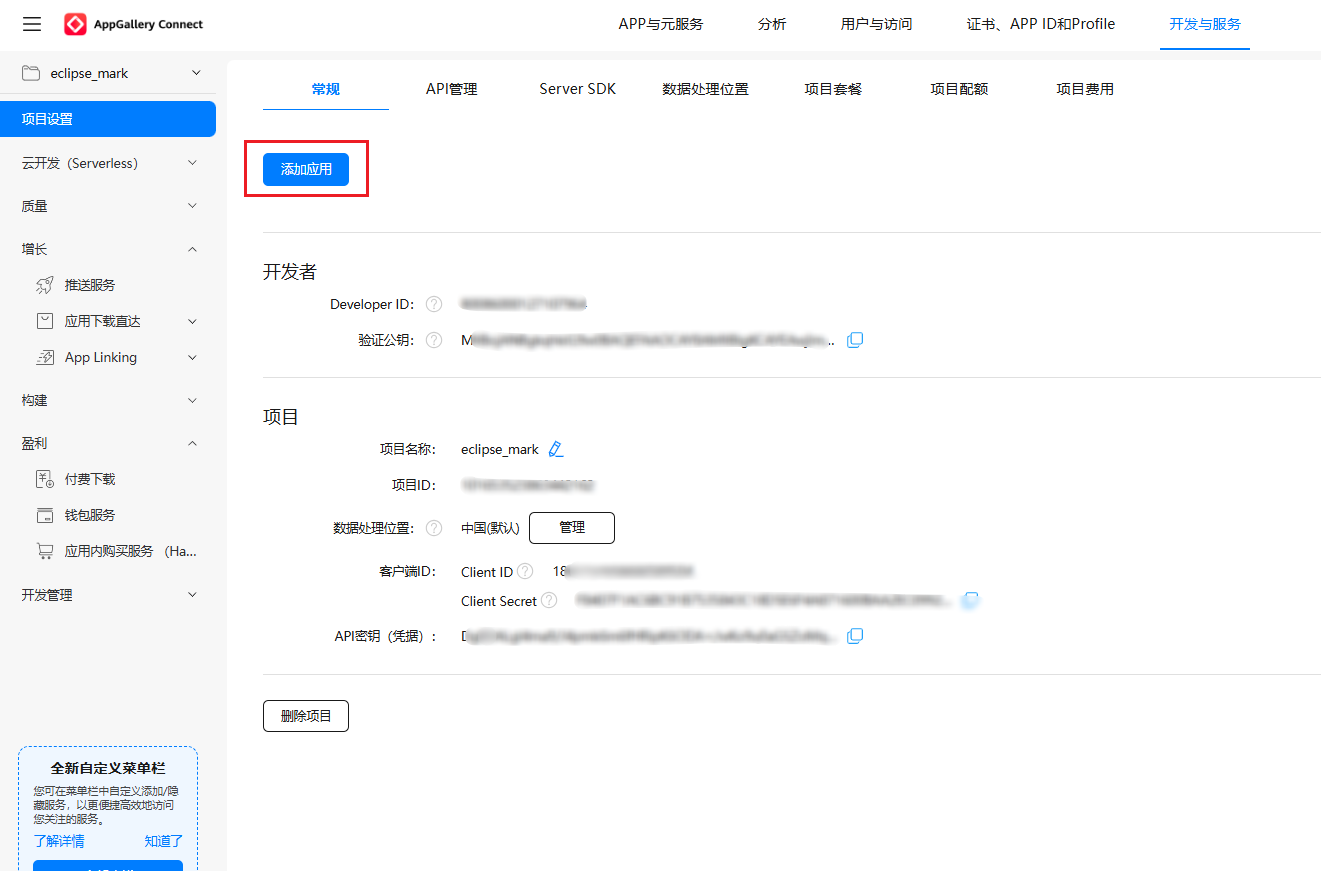
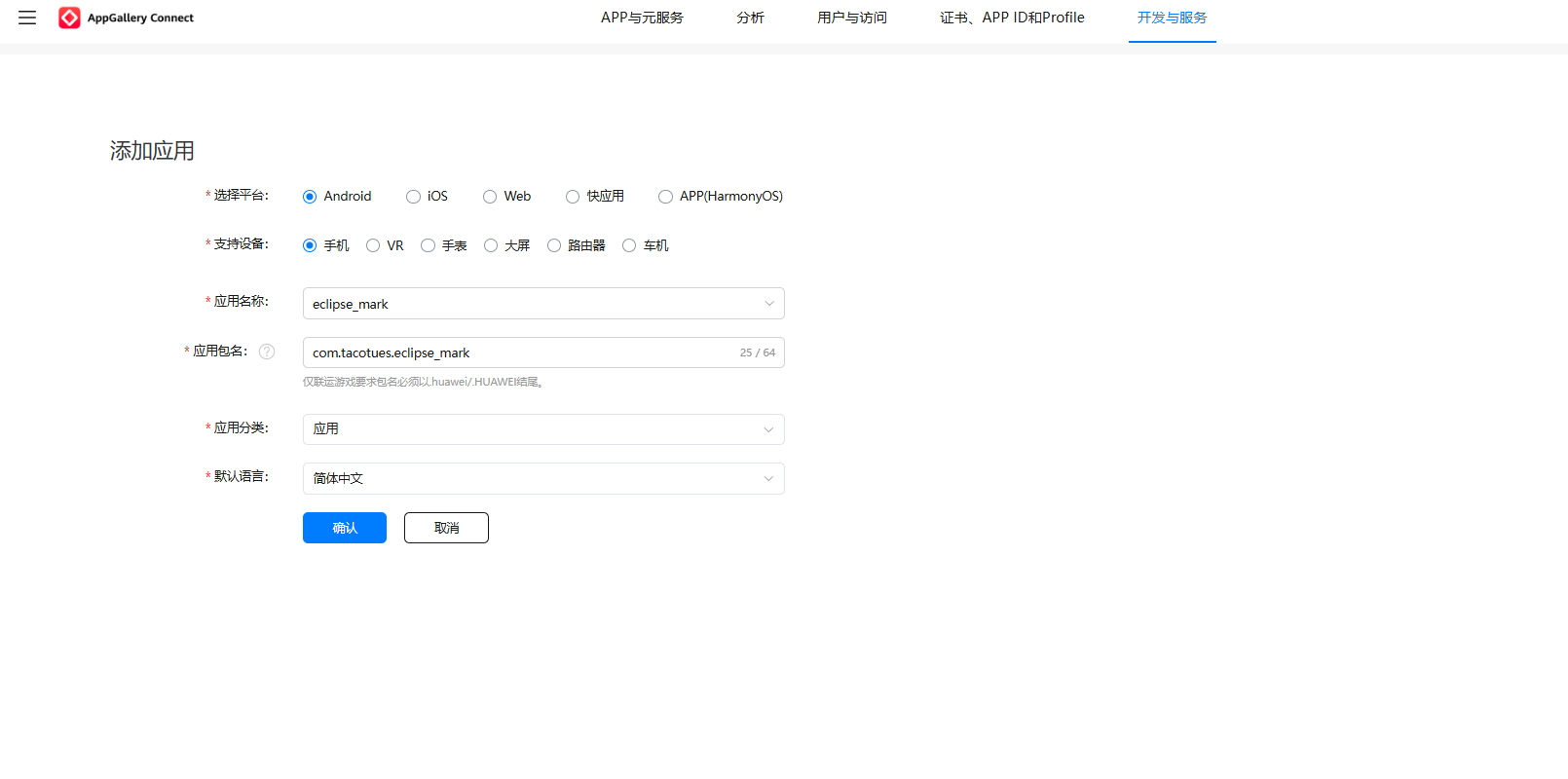
填写包名,添加应用
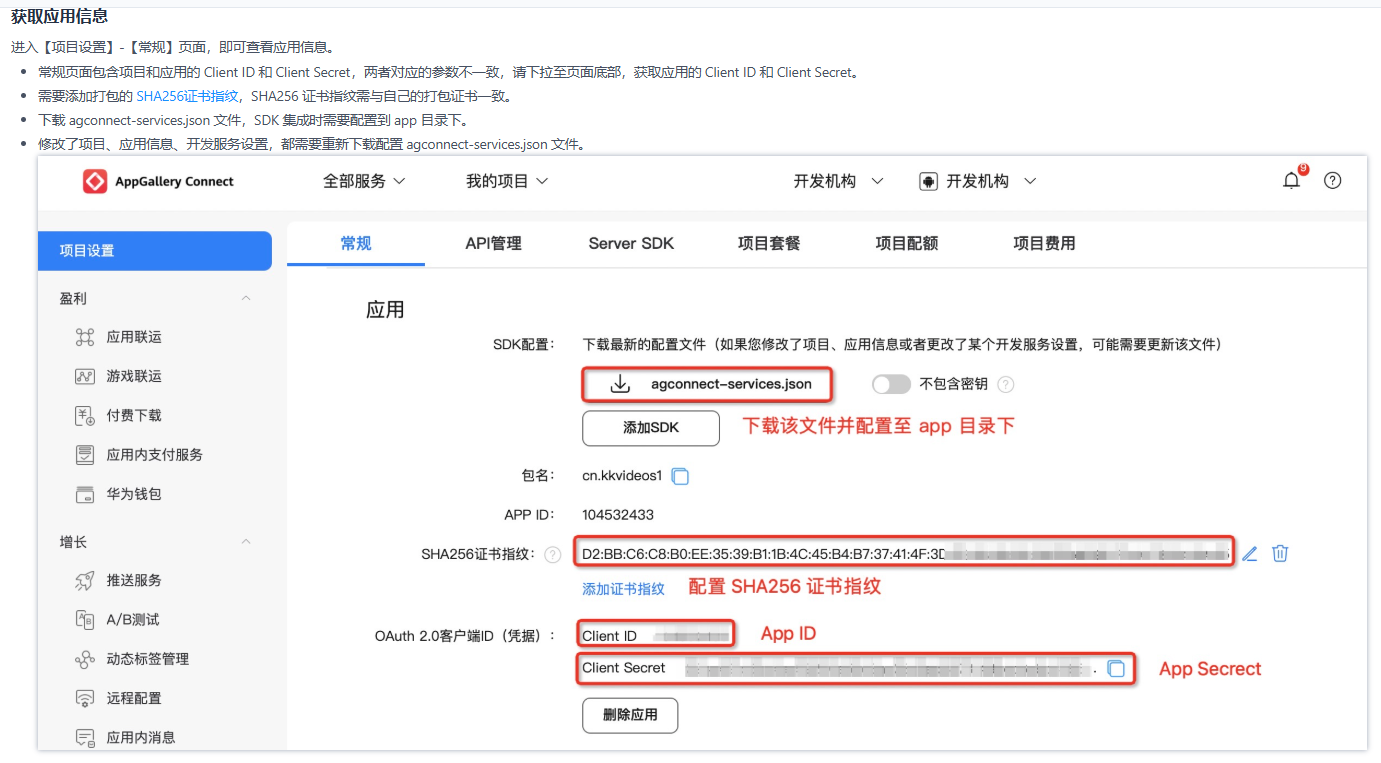
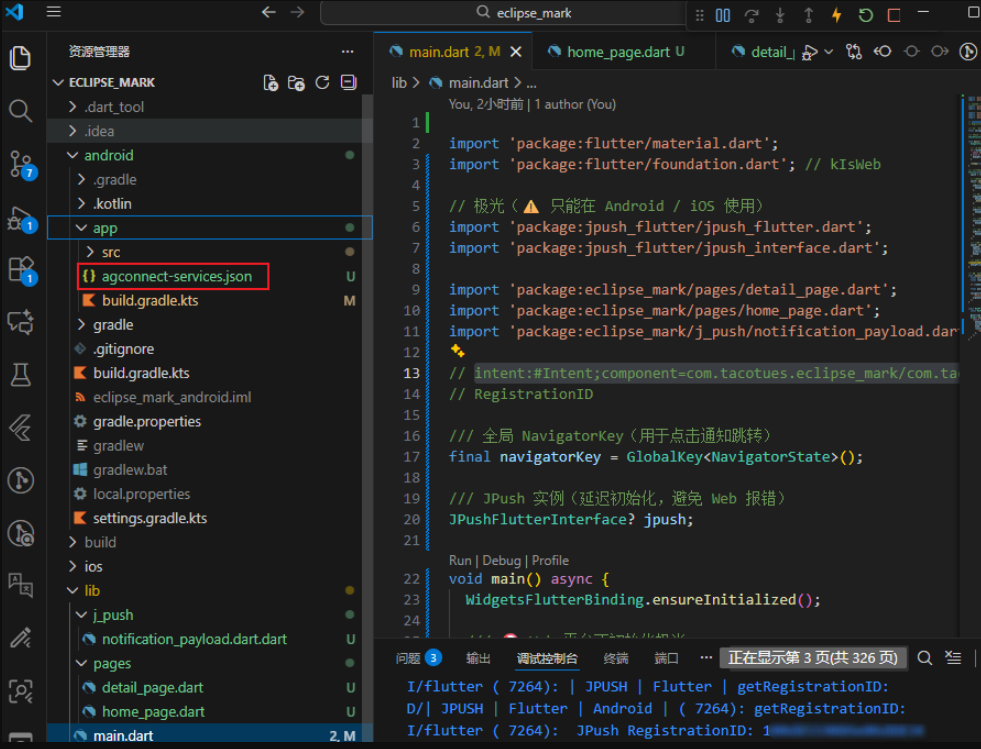
下载 agconnect-services.json 文件方案android/app目录下
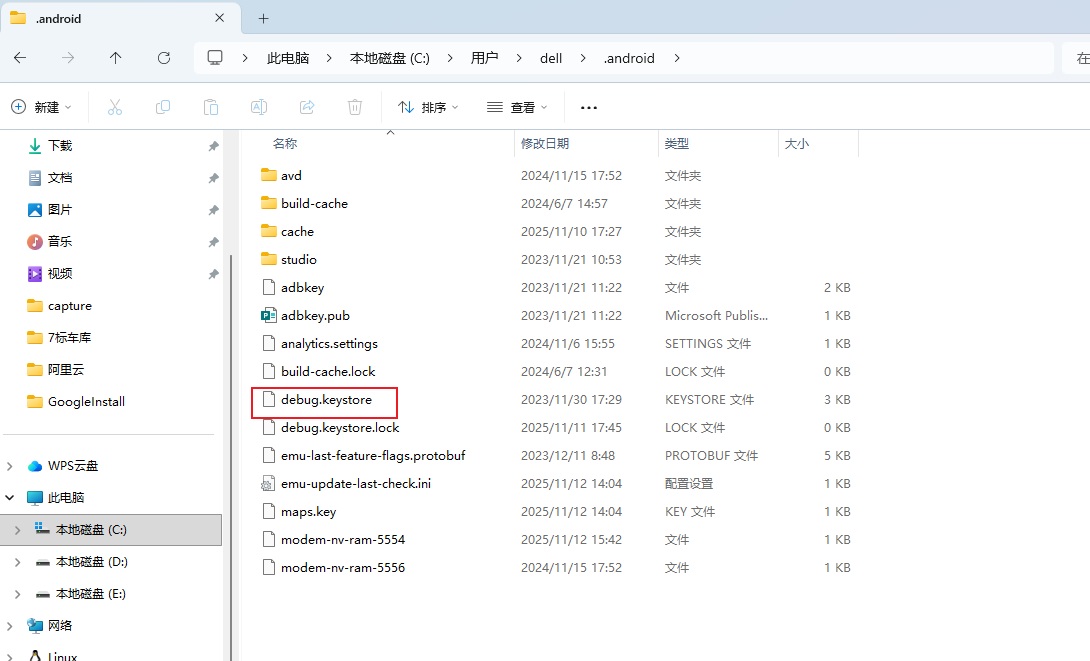
添加证书指纹,这里我使用debug.keystore (本地调试证书)
如何添加证书指纹
通过 keytool获取
debug.keystore(Flutter 默认)
Windows:
bash
keytool -list -v ^
-alias androiddebugkey ^
-keystore %USERPROFILE%\.android\debug.keystore ^
-storepass android ^
-keypass android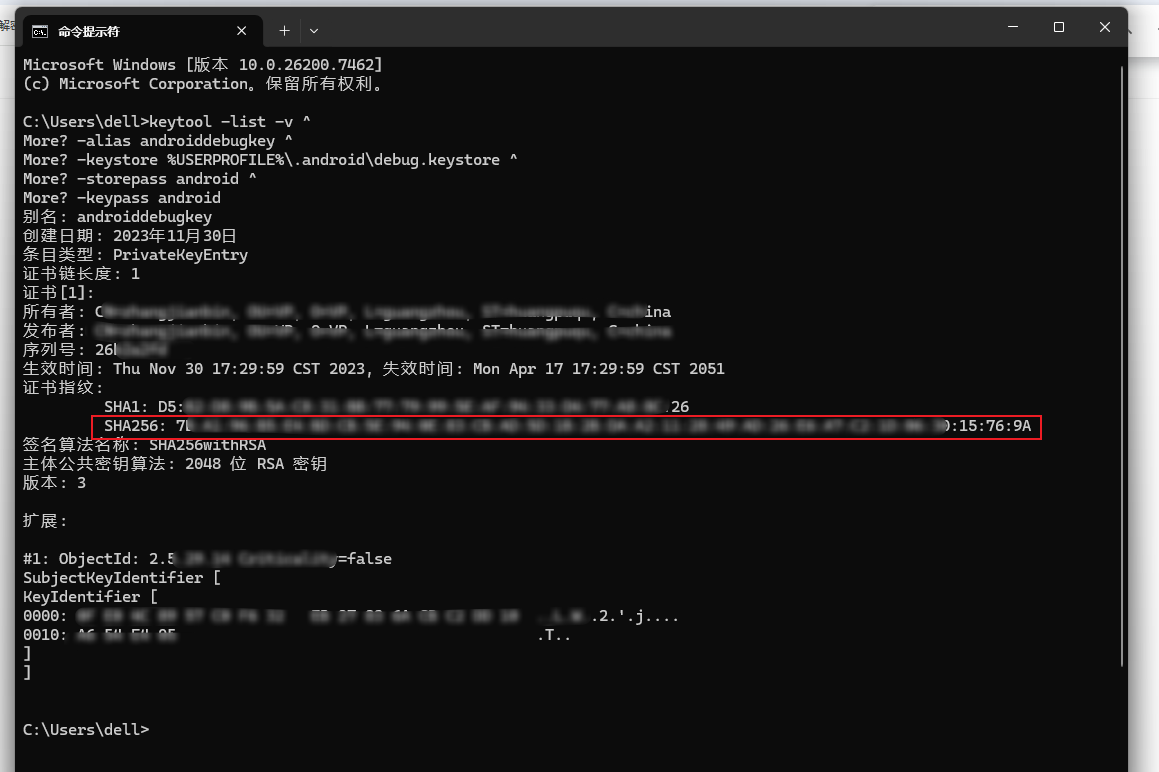
拿到 7B:A1:96:B5 这一串指纹复制到华为配置页面保存(不要复制 SHA256: 前缀)
2.3.2 华为通道参数配置
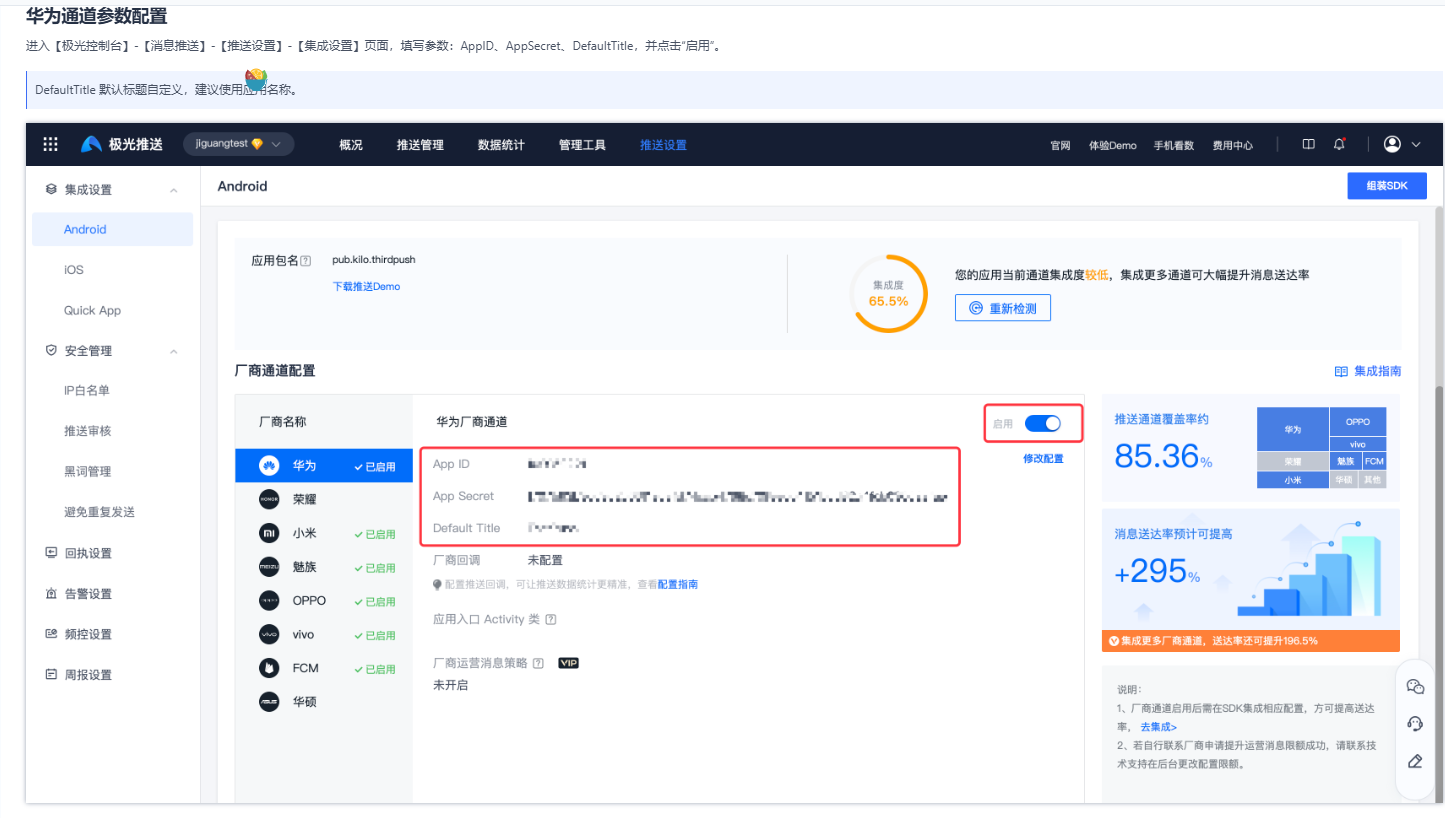
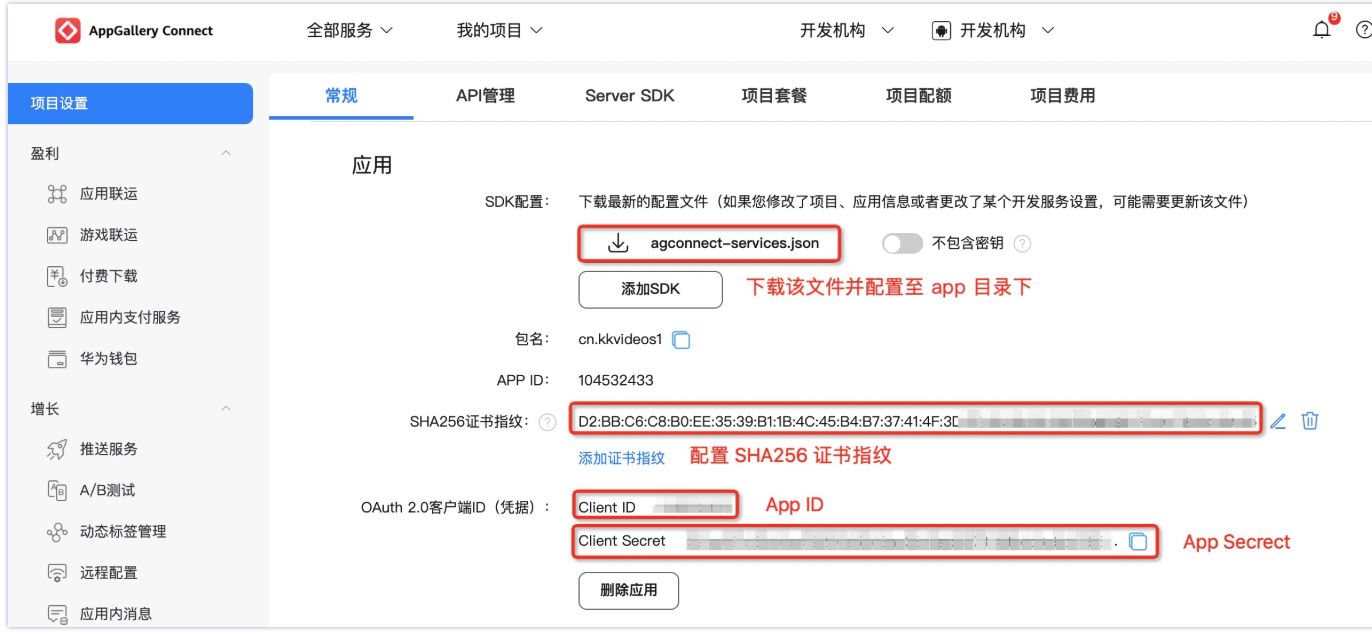
2.3.3 极光华为适配
将debug.keystore (本地调试证书)复制到android/app目录下
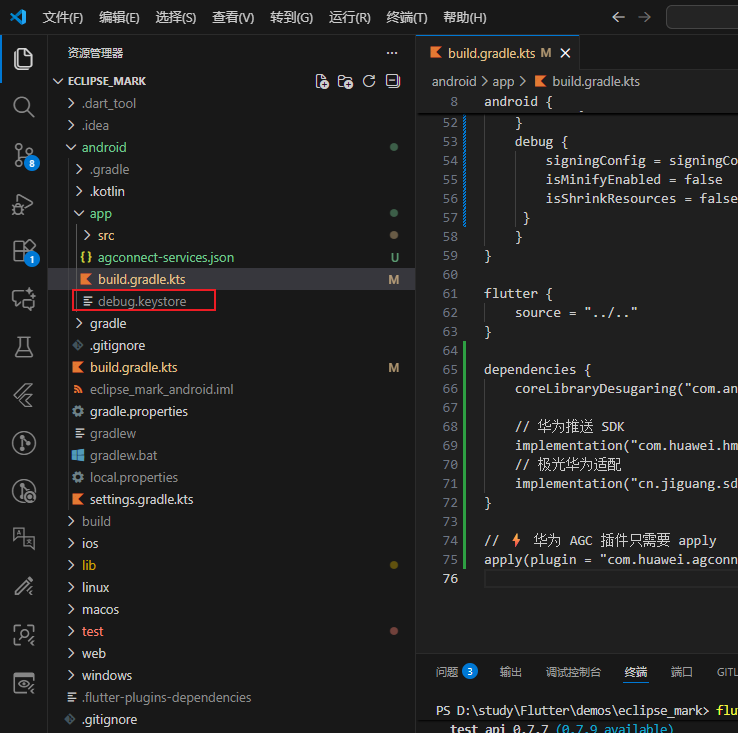
修改android/app/build.gradle.kts
kotlin
plugins {
    id("com.android.application")
    id("kotlin-android")
    // The Flutter Gradle Plugin must be applied after the Android and Kotlin Gradle plugins.
    id("dev.flutter.flutter-gradle-plugin")
}

android {
    namespace = "com.tacotues.eclipse_mark"
    compileSdk = flutter.compileSdkVersion
    ndkVersion = flutter.ndkVersion

    compileOptions {
        sourceCompatibility = JavaVersion.VERSION_17
        targetCompatibility = JavaVersion.VERSION_17
    }

    kotlinOptions {
        jvmTarget = JavaVersion.VERSION_17.toString()
    }

    defaultConfig {
        // TODO: Specify your own unique Application ID (https://developer.android.com/studio/build/application-id.html).
        applicationId = "com.tacotues.eclipse_mark"
        // You can update the following values to match your application needs.
        // For more information, see: https://flutter.dev/to/review-gradle-config.
        minSdk = flutter.minSdkVersion
        targetSdk = flutter.targetSdkVersion
        versionCode = flutter.versionCode
        versionName = flutter.versionName

        // 极光 JPush
        manifestPlaceholders["JPUSH_PKGNAME"] = "com.tacotues.eclipse_mark"
        manifestPlaceholders["JPUSH_APPKEY"] = "你的APPkey"
        manifestPlaceholders["JPUSH_CHANNEL"] = "developer-default"
    }

    signingConfigs {
        create("release") {
            storeFile = file("debug.keystore")
            storePassword = "android"
            keyAlias = "androiddebugkey"
            keyPassword = "android"
        }
    }

    buildTypes {
    release {
        signingConfig = signingConfigs.getByName("release")
        isMinifyEnabled = false     // 不开启混淆
        isShrinkResources = false   // ⚠ 关闭资源压缩
    }
    debug {
        signingConfig = signingConfigs.getByName("release")
        isMinifyEnabled = false
        isShrinkResources = false
     }
    }
}

flutter {
    source = "../.."
}

dependencies {
    coreLibraryDesugaring("com.android.tools:desugar_jdk_libs:2.1.4")

    // 华为推送 SDK
    implementation("com.huawei.hms:push:6.11.0.300")
    // 极光华为适配
    implementation("cn.jiguang.sdk.plugin:huawei:5.6.0")
}

// ⚡ 华为 AGC 插件只需要 apply
apply(plugin = "com.huawei.agconnect")
修改andorid/build.gradle.kts
kotlin
buildscript {
    repositories {
        google()
        mavenCentral()
        maven("https://developer.huawei.com/repo/") // 华为仓库
    }
    dependencies {
        classpath("com.android.tools.build:gradle:8.1.1") // ⚡ 对应 gradle 8.14
        classpath("com.huawei.agconnect:agcp:1.9.1.301")
    }
}

allprojects {
    repositories {
        google()
        mavenCentral()
        maven("https://developer.huawei.com/repo/") // 华为仓库
    }
}

val newBuildDir: Directory =
    rootProject.layout.buildDirectory
        .dir("../../build")
        .get()
rootProject.layout.buildDirectory.value(newBuildDir)

subprojects {
    val newSubprojectBuildDir: Directory = newBuildDir.dir(project.name)
    project.layout.buildDirectory.value(newSubprojectBuildDir)
}
subprojects {
    project.evaluationDependsOn(":app")
}

tasks.register<Delete>("clean") {
    delete(rootProject.layout.buildDirectory)
}
2.3.4 打包APP离线测试消息推送
bash
// usb连接手机
flutter clean
flutter build apk --release
flutter install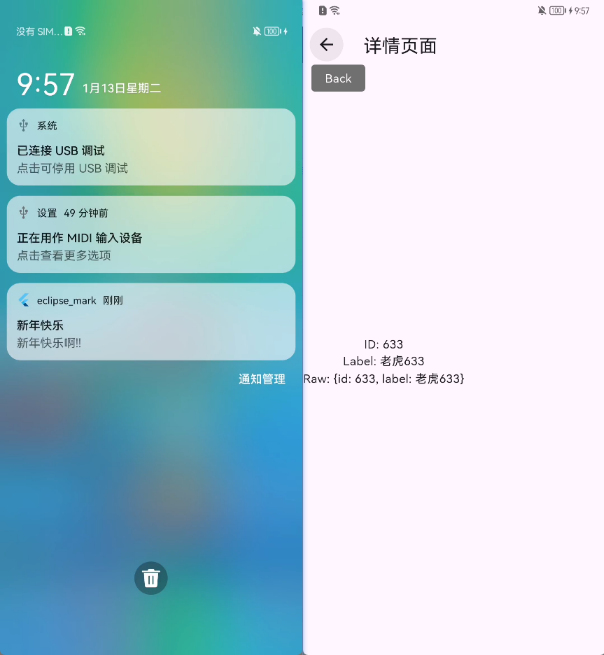
3.flutter本地通知
3.1 依赖安装
flutter pub get 安装几个依赖
bash
name: eclipse_mark
description: "A new Flutter project."

version: 1.0.0+1

environment:
  sdk: ^3.10.1

dependencies:
  flutter:
    sdk: flutter

  cupertino_icons: ^1.0.8
  jpush_flutter: ^3.4.0
  path_provider: ^2.1.5 // 路径插件
  flutter_local_notifications: ^19.5.0 // 本地消息推送
  timezone: ^0.10.1 // 时区插件
  permission_handler: ^12.0.1 // 权限处理

dev_dependencies:
  flutter_test:
    sdk: flutter

  flutter_lints: ^6.0.0

flutter:
  uses-material-design: true
  assets:
    - assets/images/ # 加载整个 images 文件夹下的图片
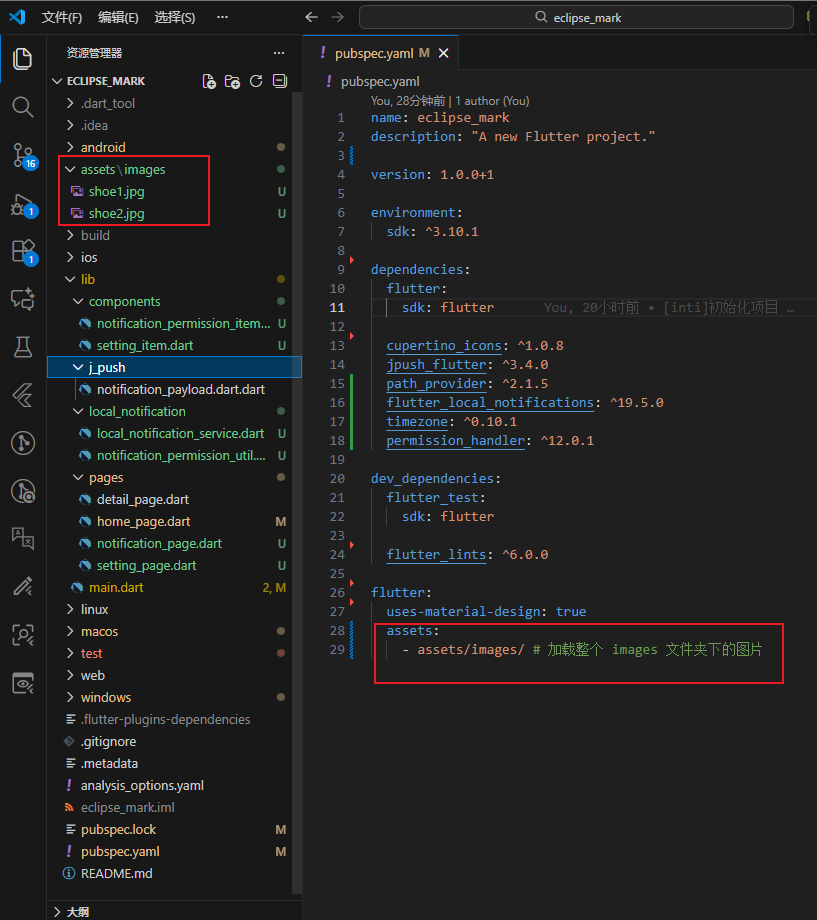
在项目里面放几张图片用于本地消息测试,(安卓的消息不支持在线图片, ios支持在线图片)
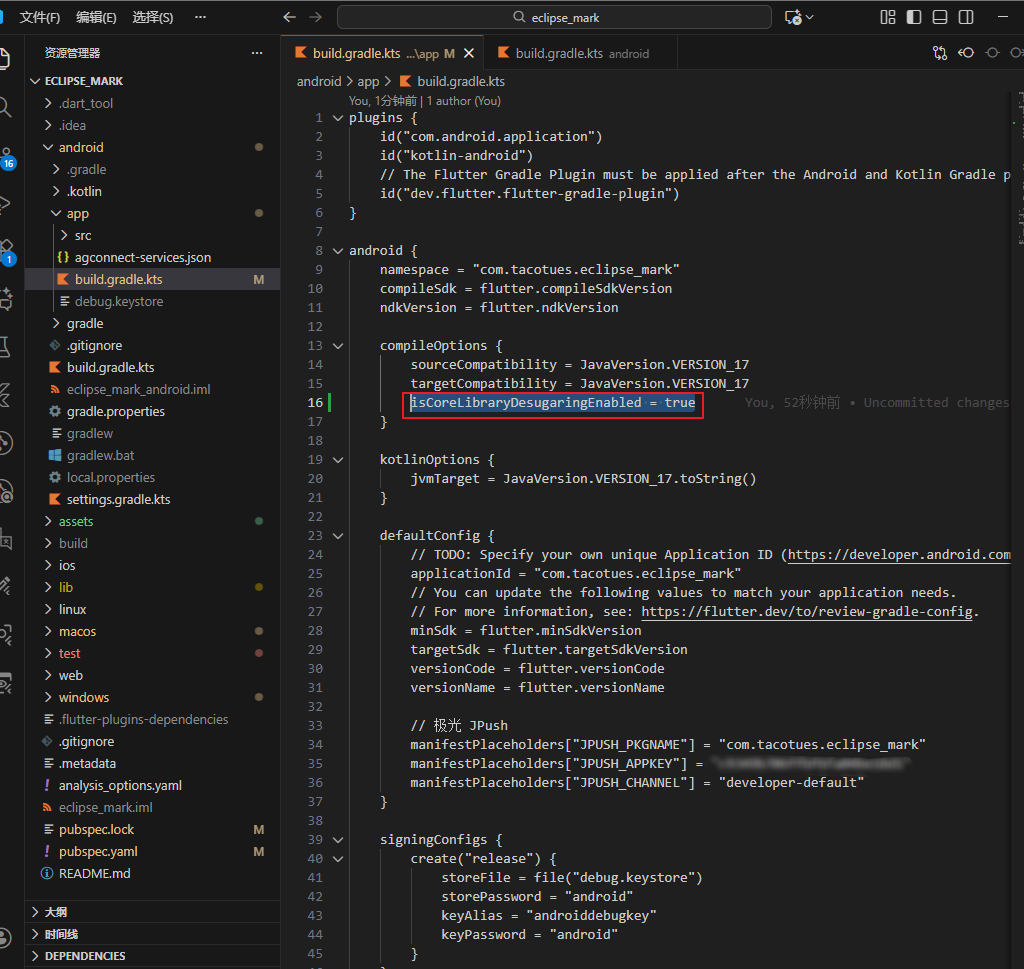
android/app/build.gradle.kts 开启 isCoreLibraryDesugaringEnabled
3.2 创建本地通知类和工具
local_notification_service.dart
dart
import 'dart:convert';
import 'dart:io';
import 'package:flutter/services.dart';
import 'package:flutter_local_notifications/flutter_local_notifications.dart';
import 'package:path_provider/path_provider.dart';
import '../main.dart';
import 'package:timezone/data/latest.dart' as tz;

class LocalNotificationService {
  LocalNotificationService._internal();
  static final LocalNotificationService _instance =
      LocalNotificationService._internal();
  factory LocalNotificationService() => _instance;

  final FlutterLocalNotificationsPlugin _plugin =
      FlutterLocalNotificationsPlugin();

  Future<void> init() async {
    tz.initializeTimeZones();

    const androidSettings = AndroidInitializationSettings(
      '@mipmap/ic_launcher',
    );
    const iosSettings = DarwinInitializationSettings(
      requestAlertPermission: true,
      requestBadgePermission: true,
      requestSoundPermission: true,
    );

    const settings = InitializationSettings(
      android: androidSettings,
      iOS: iosSettings,
    );

    await _plugin.initialize(
      settings,
      onDidReceiveNotificationResponse: _onNotificationClick,
    );
  }

  static void _onNotificationClick(NotificationResponse response) {
    final payload = response.payload;
    if (payload != null) {
      navigatorKey.currentState?.pushNamed(
        '/notification_screen',
        arguments: payload,
      );
    }
  }

  /// 把 assets 图片复制到本地缓存
  Future<String> copyAssetToFile(String assetPath, String fileName) async {
    final bytes = await rootBundle.load(assetPath);
    final dir = await getTemporaryDirectory();
    final file = File('${dir.path}/$fileName');
    await file.writeAsBytes(bytes.buffer.asUint8List());
    return file.path;
  }

  /// 1️⃣ 纯文字通知
  Future<void> showTextNotification({
    required int id,
    required String title,
    required String body,
    required String type,
  }) async {
    final androidDetails = AndroidNotificationDetails(
      'channel_id',
      '文字通知',
      importance: Importance.max,
      priority: Priority.high,
      styleInformation: BigTextStyleInformation(
        body, // 展开显示长文本
        contentTitle: title,
      ),
    );

    const iosDetails = DarwinNotificationDetails();

    final details = NotificationDetails(
      android: androidDetails,
      iOS: iosDetails,
    );

    final payloadData = {
      'id': id,
      'type': type,
      'title': title,
      'body': body,
    };

    await _plugin.show(
      id,
      title,
      body,
      details,
      payload: jsonEncode(payloadData),
    );
  }

  /// 2️⃣ 文字 + 小图通知
  Future<void> showTextWithSmallIcon({
    required int id,
    required String title,
    required String body,
    required String type,
    required String assetImagePath,
  }) async {
    final imagePath = await copyAssetToFile(assetImagePath, 'notification_icon.jpg');

    final androidDetails = AndroidNotificationDetails(
      'channel_id',
      '小图通知',
      importance: Importance.max,
      priority: Priority.high,
      largeIcon: FilePathAndroidBitmap(imagePath),
      styleInformation: BigTextStyleInformation(body, contentTitle: title),
    );

    const iosDetails = DarwinNotificationDetails();

    final details = NotificationDetails(
      android: androidDetails,
      iOS: iosDetails,
    );

    final payloadData = {
      'id': id,
      'type': type,
      'title': title,
      'body': body,
      'extra': {'imagePath': imagePath},
    };

    await _plugin.show(
      id,
      title,
      body,
      details,
      payload: jsonEncode(payloadData),
    );
  }

  /// 3️⃣ 文字 + 大图 + 小图通知
  Future<void> showTextWithBigAndSmallImage({
    required int id,
    required String title,
    required String body,
    required String type,
    required String assetImagePath,
  }) async {
    final imagePath = await copyAssetToFile(assetImagePath, 'notification_image.jpg');

    final bigPictureStyle = BigPictureStyleInformation(
      FilePathAndroidBitmap(imagePath), // 大图
      contentTitle: title,
      summaryText: body,
      largeIcon: FilePathAndroidBitmap(imagePath), // 左侧小图
    );

    final androidDetails = AndroidNotificationDetails(
      'channel_id',
      '大图通知',
      importance: Importance.max,
      priority: Priority.high,
      styleInformation: bigPictureStyle,
      ticker: 'ticker',
    );

    const iosDetails = DarwinNotificationDetails();

    final details = NotificationDetails(
      android: androidDetails,
      iOS: iosDetails,
    );

    final payloadData = {
      'id': id,
      'type': type,
      'title': title,
      'body': body,
      'extra': {'imagePath': imagePath},
    };

    await _plugin.show(
      id,
      title,
      body,
      details,
      payload: jsonEncode(payloadData),
    );
  }
}
notification_permission_util.dart
dart
import 'package:permission_handler/permission_handler.dart';

class NotificationPermissionUtil {
  /// 是否已开启通知权限
  static Future<bool> isGranted() async {
    final status = await Permission.notification.status;
    return status.isGranted;
  }

  /// 请求通知权限(首次)
  static Future<bool> request() async {
    final status = await Permission.notification.request();
    return status.isGranted;
  }

  /// 跳转系统设置
  static Future<void> openSettings() async {
    await openAppSettings();
  }
}
3.3 抽取权限设置页面组件
notification_permission_item.dart
dart
import 'package:eclipse_mark/components/setting_item.dart';
import 'package:eclipse_mark/local_notification/notification_permission_util.dart';
import 'package:flutter/material.dart';

class NotificationPermissionItem extends StatefulWidget {
  const NotificationPermissionItem({super.key});

  @override
  State<NotificationPermissionItem> createState() =>
      _NotificationPermissionItemState();
}

class _NotificationPermissionItemState extends State<NotificationPermissionItem>
    with WidgetsBindingObserver {
  bool _enabled = true;

  @override
  void initState() {
    super.initState();
    WidgetsBinding.instance.addObserver(this);
    _checkPermission();
  }

  @override
  void dispose() {
    WidgetsBinding.instance.removeObserver(this);
    super.dispose();
  }

  /// 从系统设置回来时刷新
  @override
  void didChangeAppLifecycleState(AppLifecycleState state) {
    if (state == AppLifecycleState.resumed) {
      _checkPermission();
    }
  }

  Future<void> _checkPermission() async {
    final granted = await NotificationPermissionUtil.isGranted();
    if (mounted) {
      setState(() => _enabled = granted);
    }
  }

  @override
  Widget build(BuildContext context) {
    return SettingItem(
      title: '系统通知权限',
      valueText: _enabled ? '已开启' : '未开启',
      enabled: !_enabled,
      onTap: _enabled
          ? null
          : () async {
              await NotificationPermissionUtil.openSettings();
            },
    );
  }
}
setting_item.dart
dart
import 'package:flutter/material.dart';

class SettingItem extends StatelessWidget {
  final String title;
  final String valueText;
  final VoidCallback? onTap;
  final bool enabled;

  const SettingItem({
    super.key,
    required this.title,
    required this.valueText,
    this.onTap,
    this.enabled = true,
  });

  @override
  Widget build(BuildContext context) {
    return InkWell(
      onTap: enabled ? onTap : null,
      child: Container(
        padding: const EdgeInsets.symmetric(horizontal: 16, vertical: 14),
        decoration: const BoxDecoration(
          border: Border(
            bottom: BorderSide(color: Color(0xFFE5E5E5)),
          ),
        ),
        child: Row(
          children: [
            Expanded(
              child: Text(
                title,
                style: const TextStyle(fontSize: 16),
              ),
            ),
            Text(
              valueText,
              style: TextStyle(
                color: enabled ? Colors.grey[600] : Colors.red,
                fontSize: 14,
              ),
            ),
            if (onTap != null) ...[
              const SizedBox(width: 6),
              const Icon(Icons.chevron_right, size: 20, color: Colors.grey),
            ],
          ],
        ),
      ),
    );
  }
}
3.4 本地消息详情和设置页面代码
notification_page.dart
dart
import 'dart:convert';
import 'dart:io';
import 'package:flutter/material.dart';

class NotificationPage extends StatelessWidget {
  const NotificationPage({super.key});

  @override
  Widget build(BuildContext context) {
    final payloadStr = ModalRoute.of(context)?.settings.arguments as String?;

    String title = '暂无标题';
    String body = '暂无内容';
    String? imagePath;

    if (payloadStr != null) {
      try {
        final data = jsonDecode(payloadStr);
        title = data['title'] ?? title;
        body = data['body'] ?? body;
        final extra = data['extra'] ?? {};
        imagePath = extra['imagePath'];
      } catch (e) {}
    }

    return Scaffold(
      appBar: AppBar(title: const Text('消息详情')),
      body: Padding(
        padding: const EdgeInsets.all(16),
        child: Column(
          crossAxisAlignment: CrossAxisAlignment.start,
          children: [
            Text('标题: $title', style: const TextStyle(fontSize: 18)),
            const SizedBox(height: 8),
            Text('内容: $body', style: const TextStyle(fontSize: 18)),
            const SizedBox(height: 8),
            if (imagePath != null) Image.file(File(imagePath)),
          ],
        ),
      ),
    );
  }
}
setting_page.dart
dart
import 'package:eclipse_mark/components/notification_permission_item.dart';
import 'package:flutter/material.dart';

class SettingPage extends StatelessWidget {
  const SettingPage({super.key});

  @override
  Widget build(BuildContext context) {
    return Scaffold(
      appBar: AppBar(title: const Text('设置')),
      body: ListView(
        children: const [
          NotificationPermissionItem(),
        ],
      ),
    );
  }
}
main.dart 里面初始化 LocalNotificationService
dart
import 'package:eclipse_mark/local_notification/local_notification_service.dart';
import 'package:eclipse_mark/pages/notification_page.dart';
import 'package:eclipse_mark/pages/setting_page.dart';
import 'package:flutter/material.dart';
import 'package:flutter/foundation.dart'; // kIsWeb

// 极光(⚠️ 只能在 Android / iOS 使用)
import 'package:jpush_flutter/jpush_flutter.dart';
import 'package:jpush_flutter/jpush_interface.dart';

import 'package:eclipse_mark/pages/detail_page.dart';
import 'package:eclipse_mark/pages/home_page.dart';
import 'package:eclipse_mark/j_push/notification_payload.dart.dart';

// intent:#Intent;component=com.tacotues.eclipse_mark/com.tacotues.eclipse_mark.MainActivity;end
// RegistrationID

/// 全局 NavigatorKey(用于点击通知跳转)
final navigatorKey = GlobalKey<NavigatorState>();

/// JPush 实例(延迟初始化,避免 Web 报错)
JPushFlutterInterface? jpush;

void main() async {
  WidgetsFlutterBinding.ensureInitialized();

  // 初始化本地通知
  await LocalNotificationService().init();

  /// 🚫 Web 平台不初始化极光
  if (!kIsWeb) {
    await initJPush();
  } else {
    debugPrint('🌐 当前是 Web 平台,已跳过极光推送初始化');
  }

  runApp(const MyAPP());
}

/// 初始化极光(仅 Android / iOS)
Future<void> initJPush() async {
  jpush = JPush.newJPush();

  // 注意addEventHandler 要在 setup 之前
  jpush!.addEventHandler(
    /// 前台收到通知
    onReceiveNotification: (notification) async {
      debugPrint("📩 onReceiveNotification: $notification");
    },

    /// 点击通知
    onOpenNotification: (notification) async {
      debugPrint("👉 onOpenNotification: $notification");
      _handleNotificationClick(notification);
    },

    /// 自定义消息
    onReceiveMessage: (message) async {
      debugPrint("✉️ onReceiveMessage: $message");
    },

    /// 连接状态
    onConnected: (message) async {
      debugPrint("🔌 onConnected: $message");
    },

    /// iOS DeviceToken
    onReceiveDeviceToken: (message) async {
      debugPrint("📱 onReceiveDeviceToken: $message");
    },
  );

  /// 设置 AppKey
  jpush!.setup(
    appKey: "你的appKey",
    channel: "developer-default",
    production: false,
    debug: true,
  );

  /// 获取 RegistrationID
  final rid = await jpush!.getRegistrationID() ?? '';
  debugPrint('🔥 JPush RegistrationID: $rid');
}

/// 统一处理点击通知跳转
void _handleNotificationClick(Map<String, dynamic> notification) {
  final extras = notification['extras'] as Map?;
  final rawData = extras?['cn.jpush.android.EXTRA'];

  if (rawData is! Map) return;

  final payload = NotificationPayload.fromRaw(rawData);

  navigatorKey.currentState?.pushNamed('/detail', arguments: payload);
}

class MyAPP extends StatelessWidget {
  const MyAPP({super.key});

  @override
  Widget build(BuildContext context) {
    return MaterialApp(
      debugShowCheckedModeBanner: false,
      navigatorKey: navigatorKey,
      home: const HomePage(),
      routes: {
        '/detail': (context) => const DetailPage(),
        '/notification_screen': (context) => const NotificationPage(),
        '/setting': (context) => const SettingPage(),
      },
    );
  }
}
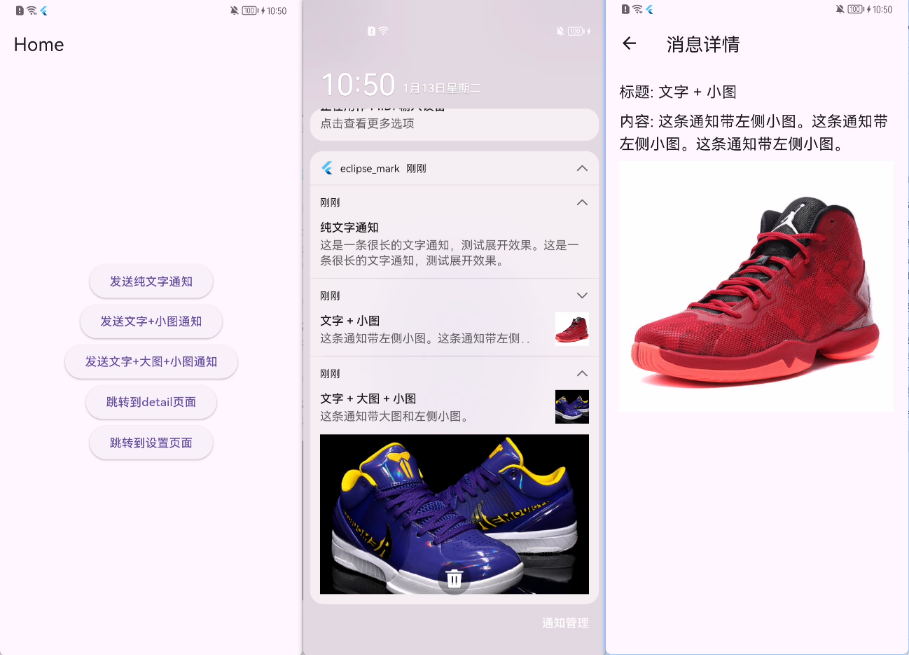
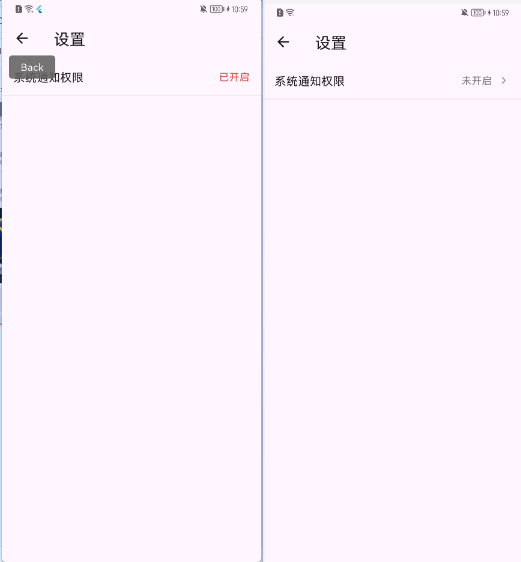
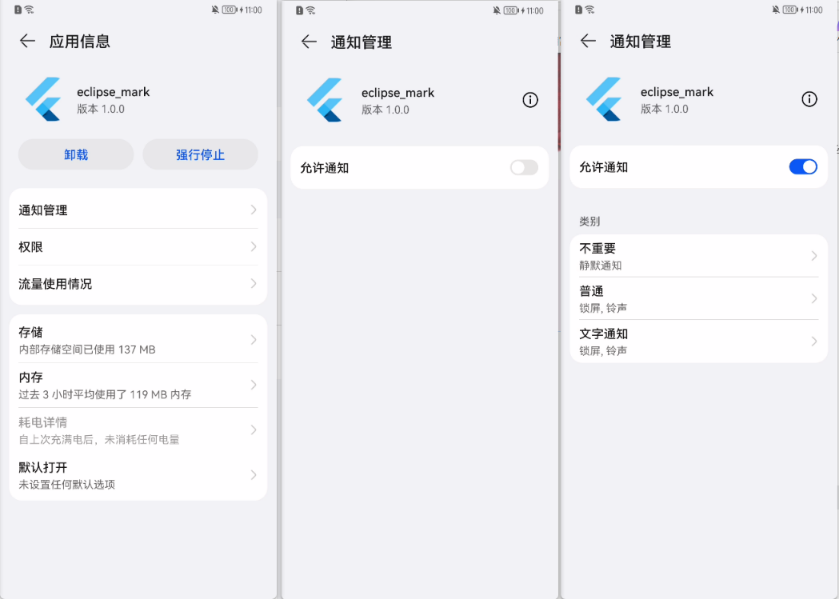
3.3 效果测试