文章目录
在现代网页中,弹幕(Barrage)是一种非常流行的用户互动方式,尤其在直播、短视频和互动课堂中广泛使用。下面讲解如何使用原生 HTML5 Canvas + JavaScript 实现一个高密度弹幕系统,支持 图标背景、动画效果、暂停/隐藏功能 。
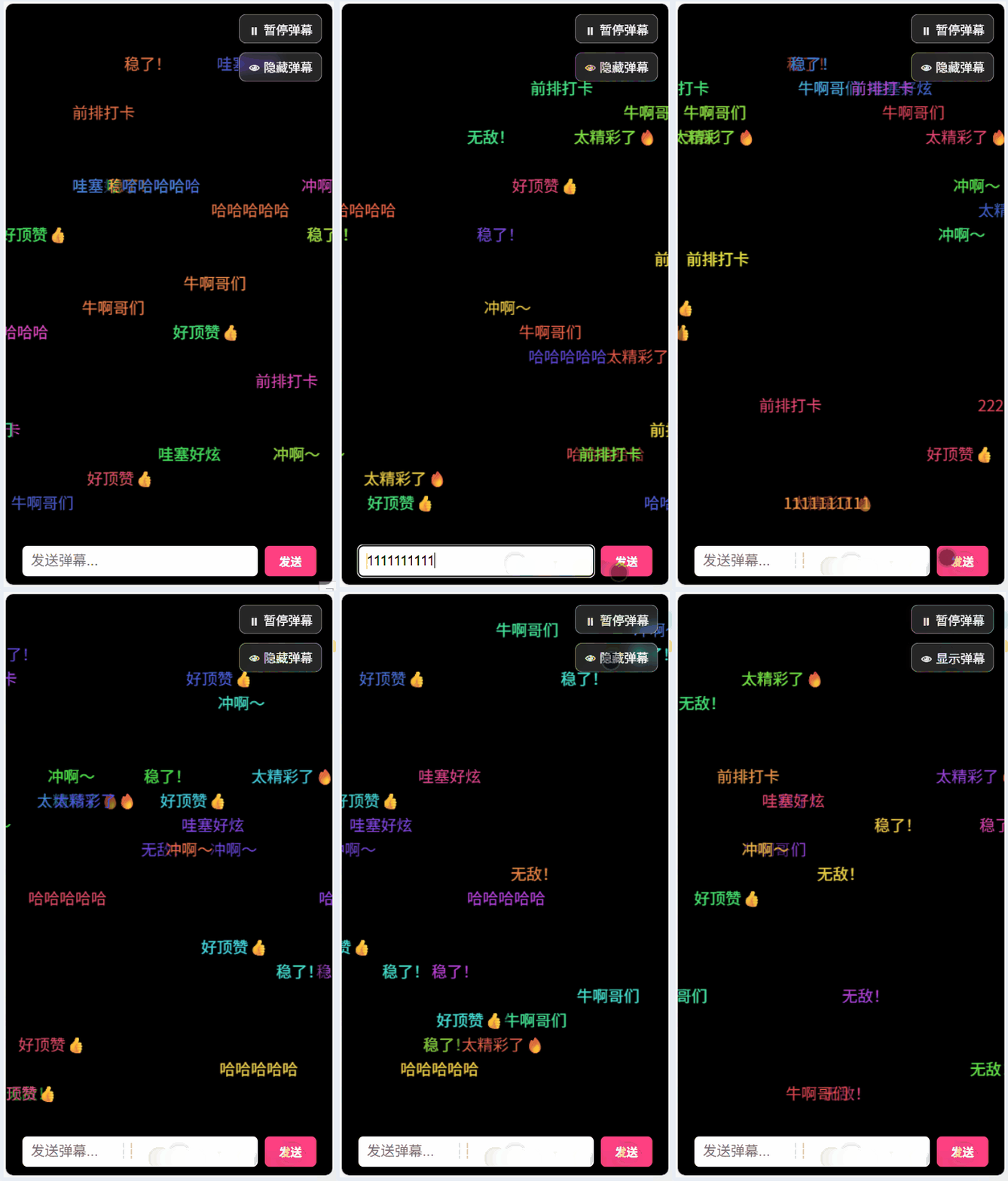
效果展示
- 弹幕自动随机出现,颜色随机
- 支持用户输入发送自定义弹幕
- 支持暂停/恢复和隐藏/显示弹幕
- 弹幕背景带圆角矩形,实现图标/文字区分
- 弹幕密集且不遮挡底部输入框
如图所示:
HTML 结构
HTML 部分主要包括三个区域:
- Canvas 渲染区:用于绘制弹幕。
- 控制按钮:暂停/恢复和隐藏/显示弹幕。
- 输入区域:用于发送自定义弹幕。
html
<canvas id="barrageCanvas"></canvas>

<div class="controls">
  <button id="togglePause" class="ctrl-btn">⏸ 暂停弹幕</button>
  <button id="toggleHide" class="ctrl-btn">👁 隐藏弹幕</button>
</div>

<div class="input-area">
  <input type="text" id="barrageInput" placeholder="发送弹幕..." />
  <button id="sendBtn">发送</button>
</div>-
canvas是绘制弹幕的核心区域。 -
controls包含两个按钮:- 暂停/恢复:暂停弹幕移动,但仍显示已存在弹幕。
- 隐藏/显示:隐藏或显示弹幕,但不影响位置更新。
-
input-area用于输入用户自定义弹幕。
样式设计
CSS 样式确保弹幕在全屏显示,且输入区域固定在底部,不被弹幕遮挡。
css
body {
  margin: 0;
  background: #000;
  overflow: hidden;
  height: 100vh;
  font-family: sans-serif;
}

canvas {
  position: absolute;
  top: 0;
  left: 0;
}

.input-area {
  position: fixed;
  bottom: 10px;
  left: 50%;
  transform: translateX(-50%);
  width: 90%;
  display: flex;
  gap: 8px;
  z-index: 10;
}

.controls {
  position: fixed;
  top: 12px;
  right: 12px;
  display: flex;
  flex-direction: column;
  gap: 10px;
  z-index: 20;
}canvas使用绝对定位,覆盖整个页面。input-area使用fixed固定在底部,并保证弹幕不会遮挡输入框。controls固定在右上角,并加入半透明和模糊效果,提高视觉层次。
Canvas 与弹幕逻辑
1. 初始化 Canvas
js
const canvas = document.getElementById("barrageCanvas");
const ctx = canvas.getContext("2d");

function resizeCanvas() {
  canvas.width = window.innerWidth;
  canvas.height = window.innerHeight;
  updateLineCount();
}
window.addEventListener("resize", resizeCanvas);
resizeCanvas();resizeCanvas保证弹幕在屏幕大小变化时自适应。- 使用
updateLineCount动态计算可用弹幕行数,避免弹幕覆盖输入框。
2. 弹幕行数计算
js
const inputHeight = 80;
const topMargin = 20;
const lineHeight = 28;
let lineCount;

function updateLineCount() {
  lineCount = Math.floor((canvas.height - inputHeight - topMargin) / lineHeight);
}lineHeight决定每条弹幕在纵向的间距。lineCount用于随机选择弹幕所在的行。
3. 弹幕类 Barrage
js
class Barrage {
  constructor(text, lineIndex) {
    this.text = text;
    this.color = `hsl(${Math.random() * 360},80%,60%)`;
    this.fontSize = 18;
    this.x = canvas.width;
    this.lineIndex = lineIndex;
    this.y = topMargin + lineHeight * (lineIndex + 1);
    this.speed = 1.5 + Math.random() * 2.5;
    this.padding = 8;
  }

  draw() {
    ctx.font = `${this.fontSize}px sans-serif`;
    const textWidth = ctx.measureText(this.text).width;

    // 绘制半透明圆角矩形背景
    ctx.fillStyle = "rgba(0,0,0,0.4)";
    ctx.beginPath();
    ctx.roundRect(this.x - this.padding / 2, this.y - this.fontSize, textWidth + this.padding, this.fontSize + 8, 8);
    ctx.fill();

    // 绘制文本
    ctx.fillStyle = this.color;
    ctx.fillText(this.text, this.x, this.y);
  }

  update() {
    this.x -= this.speed;
  }
}draw()负责渲染文字和背景矩形,背景矩形带圆角,实现图标/文字区分。update()负责弹幕移动。- 弹幕颜色随机,增加视觉丰富度。
- 弹幕的
speed随机,避免所有弹幕移动速度一致。
4. 弹幕管理
js
const barrages = [];
const preset = ["太精彩了🔥", "前排打卡", "哈哈哈哈哈", "好顶赞👍", "稳了!", "无敌!", "冲啊~", "哇塞好炫", "牛啊哥们"];
let isPaused = false;
let isHidden = false;barrages存储当前页面所有弹幕。preset是随机弹幕库。isPaused和isHidden控制暂停与隐藏状态。
5. 自动发射弹幕
js
setInterval(() => {
  if (isPaused) return;
  const count = Math.floor(Math.random() * 3) + 1;
  for (let i = 0; i < count; i++) {
    const text = preset[Math.floor(Math.random() * preset.length)];
    const lineIndex = Math.floor(Math.random() * lineCount);
    barrages.push(new Barrage(text, lineIndex));
  }
}, 300);- 每 300ms 自动生成 1~3 条弹幕。
- 随机选择文字和行号。
- 暂停时不会生成新弹幕。
6. 用户发送弹幕
js
sendBtn.onclick = () => {
  const text = input.value.trim();
  if (text) {
    const lineIndex = Math.floor(Math.random() * lineCount);
    barrages.push(new Barrage(text, lineIndex));
    input.value = "";
  }
};- 用户输入后随机选择行显示。
- 清空输入框,方便连续发送。
7. 控制按钮逻辑
js
togglePause.onclick = () => {
  isPaused = !isPaused;
  togglePause.textContent = isPaused ? "▶ 恢复弹幕" : "⏸ 暂停弹幕";
};

toggleHide.onclick = () => {
  isHidden = !isHidden;
  toggleHide.textContent = isHidden ? "🚫 隐藏弹幕" : "👁 显示弹幕";
};- 暂停弹幕时,已存在弹幕仍显示,但不移动。
- 隐藏弹幕时,仍在计算位置,但不渲染。
8. 渲染循环
js
function render() {
  ctx.clearRect(0, 0, canvas.width, canvas.height);
  for (let i = barrages.length - 1; i >= 0; i--) {
    const b = barrages[i];
    if (!isHidden) b.draw();
    if (!isPaused) b.update();
    if (b.x + ctx.measureText(b.text).width < 0) barrages.splice(i, 1);
  }
  requestAnimationFrame(render);
}
render();- 清空画布,重新绘制所有弹幕。
- 遍历弹幕数组,从后往前遍历,方便删除已移出屏幕的弹幕。
requestAnimationFrame保证动画平滑。
案例源码
html
<!DOCTYPE html>
<html lang="zh-CN">
  <head>
    <meta charset="UTF-8" />
    <meta name="viewport" content="width=device-width, initial-scale=1.0" />
    <title>高密度弹幕(图标+动画+暂停优化)</title>
    <style>
      body {
        margin: 0;
        background: #000;
        overflow: hidden;
        height: 100vh;
        font-family: sans-serif;
      }

      canvas {
        position: absolute;
        top: 0;
        left: 0;
      }

      .input-area {
        position: fixed;
        bottom: 10px;
        left: 50%;
        transform: translateX(-50%);
        width: 90%;
        display: flex;
        gap: 8px;
        z-index: 10;
      }

      .input-area input {
        flex: 1;
        padding: 8px 10px;
        font-size: 16px;
        border-radius: 6px;
        border: none;
      }

      .input-area button {
        padding: 8px 16px;
        border: none;
        border-radius: 6px;
        background: #ff4081;
        color: white;
        font-weight: bold;
      }

      .controls {
        position: fixed;
        top: 12px;
        right: 12px;
        display: flex;
        flex-direction: column;
        gap: 10px;
        z-index: 20;
      }

      .ctrl-btn {
        display: flex;
        align-items: center;
        gap: 6px;
        justify-content: center;
        background: rgba(255, 255, 255, 0.15);
        color: #fff;
        border: 1px solid rgba(255, 255, 255, 0.4);
        border-radius: 8px;
        padding: 6px 10px;
        font-size: 14px;
        backdrop-filter: blur(6px);
        cursor: pointer;
        transition: transform 0.1s;
      }

      .ctrl-btn:active {
        transform: scale(0.95);
      }
    </style>
  </head>
  <body>
    <canvas id="barrageCanvas"></canvas>

    <div class="controls">
      <button id="togglePause" class="ctrl-btn">⏸ 暂停弹幕</button>
      <button id="toggleHide" class="ctrl-btn">👁 隐藏弹幕</button>
    </div>

    <div class="input-area">
      <input type="text" id="barrageInput" placeholder="发送弹幕..." />
      <button id="sendBtn">发送</button>
    </div>

    <script>
      const canvas = document.getElementById("barrageCanvas");
      const ctx = canvas.getContext("2d");
      const input = document.getElementById("barrageInput");
      const sendBtn = document.getElementById("sendBtn");
      const togglePause = document.getElementById("togglePause");
      const toggleHide = document.getElementById("toggleHide");

      const inputHeight = 80;
      const topMargin = 20;
      const lineHeight = 28;
      let lineCount;

      function resizeCanvas() {
        canvas.width = window.innerWidth;
        canvas.height = window.innerHeight;
        updateLineCount();
      }
      function updateLineCount() {
        lineCount = Math.floor((canvas.height - inputHeight - topMargin) / lineHeight);
      }

      window.addEventListener("resize", resizeCanvas);
      resizeCanvas();

      class Barrage {
        constructor(text, lineIndex) {
          this.text = text;
          this.color = `hsl(${Math.random() * 360},80%,60%)`;
          this.fontSize = 18;
          this.x = canvas.width;
          this.lineIndex = lineIndex;
          this.y = topMargin + lineHeight * (lineIndex + 1);
          this.speed = 1.5 + Math.random() * 2.5;
          this.padding = 8;
        }
        draw() {
          ctx.font = `${this.fontSize}px sans-serif`;
          const textWidth = ctx.measureText(this.text).width;

          ctx.fillStyle = "rgba(0,0,0,0.4)";
          ctx.beginPath();
          ctx.roundRect(this.x - this.padding / 2, this.y - this.fontSize, textWidth + this.padding, this.fontSize + 8, 8);
          ctx.fill();

          ctx.fillStyle = this.color;
          ctx.fillText(this.text, this.x, this.y);
        }
        update() {
          this.x -= this.speed;
        }
      }

      const barrages = [];
      const preset = ["太精彩了🔥", "前排打卡", "哈哈哈哈哈", "好顶赞👍", "稳了!", "无敌!", "冲啊~", "哇塞好炫", "牛啊哥们"];

      let isPaused = false;
      let isHidden = false;

      // 发射弹幕
      setInterval(() => {
        if (isPaused) return;
        const count = Math.floor(Math.random() * 3) + 1;
        for (let i = 0; i < count; i++) {
          const text = preset[Math.floor(Math.random() * preset.length)];
          const lineIndex = Math.floor(Math.random() * lineCount);
          barrages.push(new Barrage(text, lineIndex));
        }
      }, 300);

      sendBtn.onclick = () => {
        const text = input.value.trim();
        if (text) {
          const lineIndex = Math.floor(Math.random() * lineCount);
          barrages.push(new Barrage(text, lineIndex));
          input.value = "";
        }
      };

      // 暂停/恢复
      togglePause.onclick = () => {
        isPaused = !isPaused;
        togglePause.textContent = isPaused ? "▶ 恢复弹幕" : "⏸ 暂停弹幕";
      };

      // 隐藏/显示
      toggleHide.onclick = () => {
        isHidden = !isHidden;
        toggleHide.textContent = isHidden ? "🚫 隐藏弹幕" : "👁 显示弹幕";
      };

      // 渲染循环
      function render() {
        ctx.clearRect(0, 0, canvas.width, canvas.height);
        for (let i = barrages.length - 1; i >= 0; i--) {
          const b = barrages[i];
          if (!isHidden) b.draw(); // 暂停仍显示
          if (!isPaused) b.update(); // 暂停不更新位置
          if (b.x + ctx.measureText(b.text).width < 0) barrages.splice(i, 1);
        }
        requestAnimationFrame(render);
      }
      render();
    </script>
  </body>
</html>
👉点击进入 我的网站